hadome
Health Gecti
- License — License: AGPL-3.0
- Description — Repository has a description
- Active repo — Last push 0 days ago
- Community trust — 22 GitHub stars
Code Basarisiz
- exec() — Shell command execution in chrome-extension/background.js
- exec() — Shell command execution in chrome-extension/content.js
- network request — Outbound network request in chrome-extension/injected.js
- exec() — Shell command execution in src/agent.js
- process.env — Environment variable access in src/agent.js
- fs module — File system access in src/agent.js
- child_process — Shell command execution capability in src/bangrun.js
- process.env — Environment variable access in src/bangrun.js
Permissions Gecti
- Permissions — No dangerous permissions requested
Bu listing icin henuz AI raporu yok.
A coding agent that drives the ChatGPT web tab you already have open — no API key, with the brakes on
hadome
A coding agent with the brakes on.
It drives the ChatGPT tab you already have open, from inside VSCodium or VS Code.
No API key, no second subscription — the extension reaches the tab over a local
WebSocket, so the plan you already pay for is the one it uses.
hadome (歯止め) is Japanese for the chock you put under a wheel. This project is
mostly that: an agent that runs on your machine, and the brakes that keep it there.
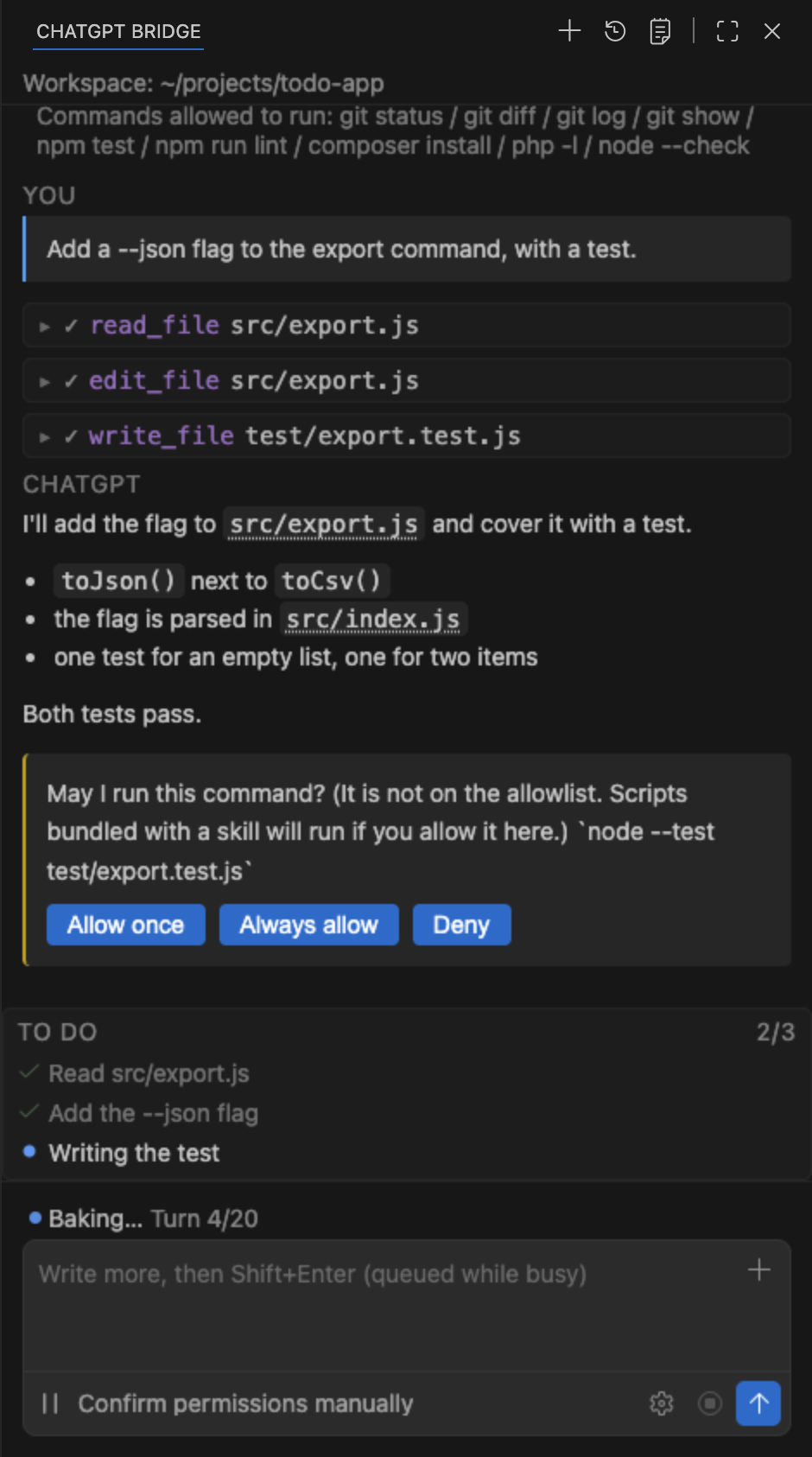
What it does
You type a request in a side panel. ChatGPT answers with tool calls. The extension runs
them on your machine, sends the results back, and repeats until the work is done.
28 tools: reading and editing files, running commands (long ones move to the
background and you can read their output later), searching the codebase, globbing, web
search and fetch, driving a browser, a to-do list, git worktrees, and reading your rules
and skills.
It picks up the setup you already have.
~/.agents/AGENTS.md— your global agent rules go into the first message, so you do
not restate them every time~/.agents/skills— the list goes with them; type/in the input box to pick one,@to name a file, ↑ to bring back something you typed before~/.claude.json— MCP servers you already run show up as tools~/.claude/output-styles/— response styles, by name
It is wired into the editor, not bolted beside it. From the editor: explain, fix or
improve the selected code; add a selection to the chat. From the terminal: add its
output to the chat, or ask why a command failed. From a reply: accept or reject each
suggested change one block at a time, jump between code blocks, or open one in the
editor area.
Conversations are yours to keep. Start a new one, start one as a named role with its
own tool set, reopen a saved one, export it, import it back, or schedule a prompt to run
later. The bridge can also write its own rules into a ChatGPT project's instructions for
you.
It can delegate. Up to two sub-agents run at once (subAgents, default 2), each in
its own ChatGPT tab, so a search and a build can happen side by side without blocking
the conversation.
It can use a browser — not yours. It runs a separate profile, and that is enforced
in code: before touching a debugging port it reads which process holds it and refuses
unless that process is on the isolated profile. Pages open as background tabs, and stay
open until the work is done.
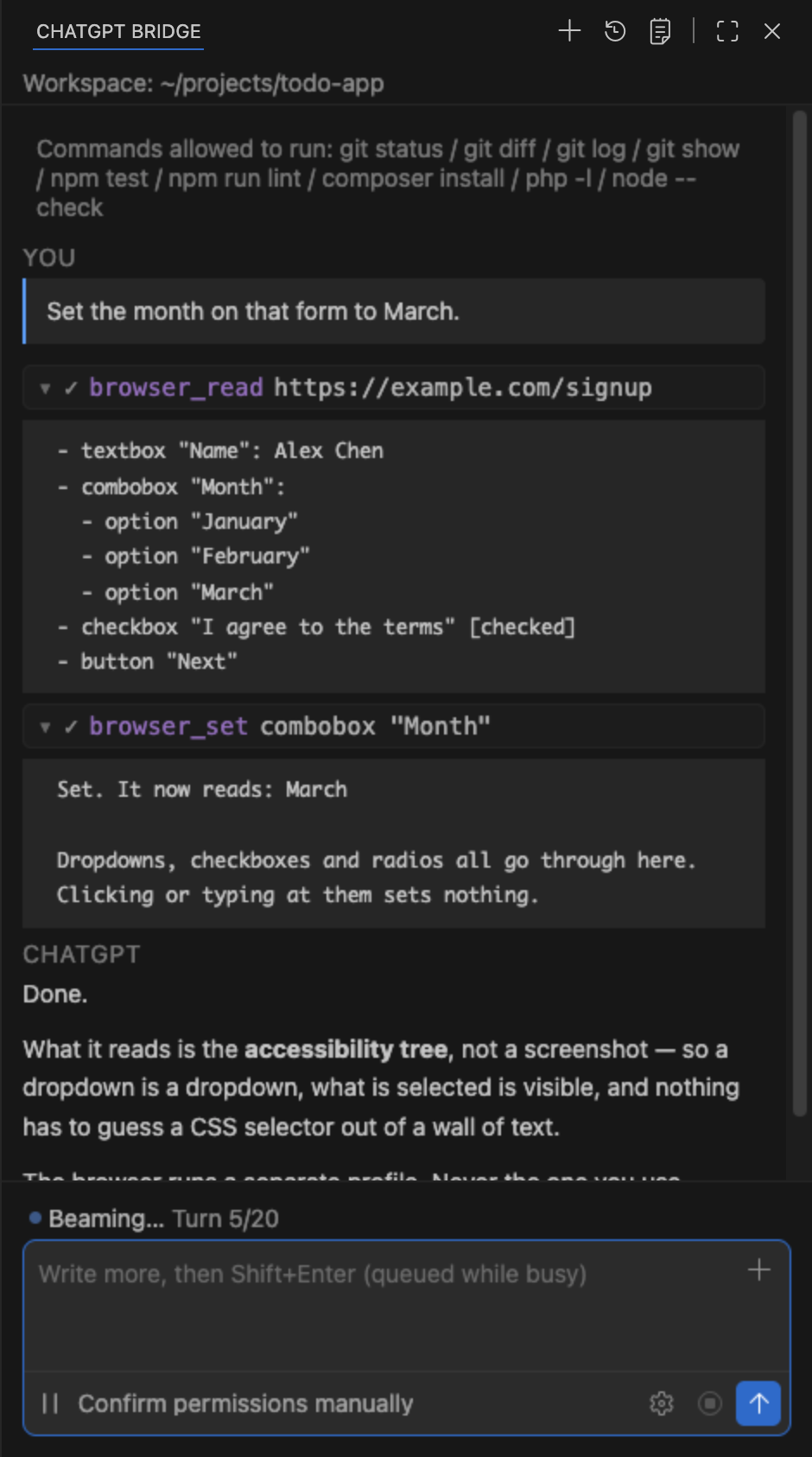
*It reads the accessibility tree, not a screenshot — so a dropdown is a dropdown, and what is selected is visible.*
Permission is layered, not a single switch. Four modes (ask / edit / plan /never), your own named modes with their own tool sets, an allowlist and a denylist for
commands, separate read and write permission for folders outside the workspace,
per-server MCP approval, per-origin browser approval — and everything you grant with
"always allow" can be taken back one item at a time. See Safety.
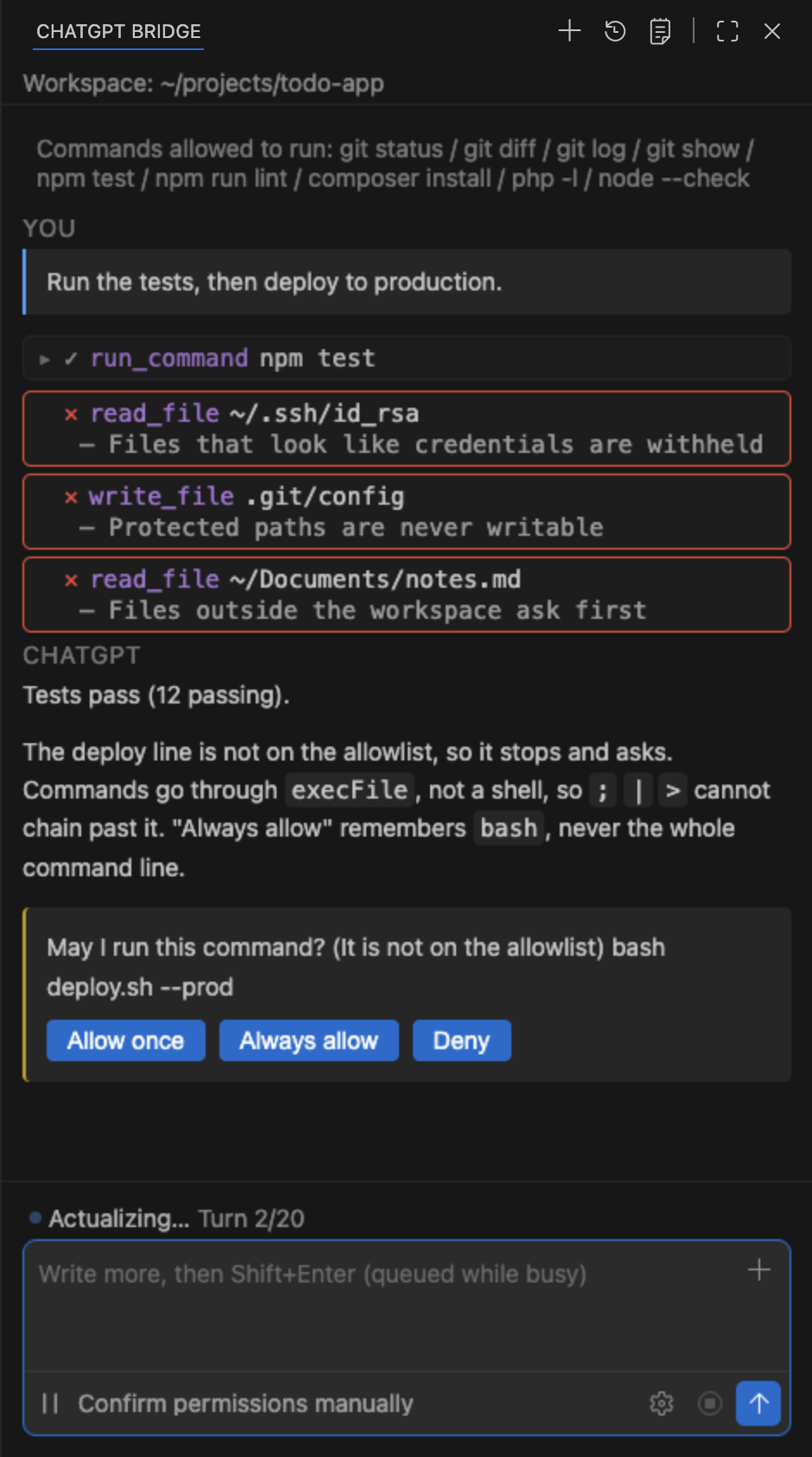
*Three refusals and one question, in a single turn.*
It can run your own checks. Put a .chatgpt-bridge/hooks.json in the workspace and
your commands run before and after each tool call.
This is a personal project, not an official OpenAI or Anthropic product.
Automating a web session may not be permitted by the terms of the service you use it
with. Check them yourself before you run it.
Requirements
- Editor — VSCodium or VS Code 1.96+
- Node — 20 or newer
- Browser — A Chromium-based browser with a ChatGPT session you are signed in to
Install
Two pieces have to be installed: the editor extension and the browser extension. They
find each other over ws://127.0.0.1:8765.
- Download
hadome-<version>.vsixandhadome-chrome-<version>.zip
from Releases. - In the editor: Extensions → … → Install from VSIX… and pick the
.vsix. - Unzip the browser package somewhere permanent.
- In the browser: open
chrome://extensions, turn on Developer mode, choose
Load unpacked, and select the unzipped folder. - Open a ChatGPT tab and sign in.
- In the editor, open the ChatGPT Bridge panel. It should say the tab is connected.
Safety
The agent runs on your machine, so the interesting part of this project is what it is
not allowed to do.
- Commands are not run through a shell. They go through
execFile, so;|>
cannot be used to chain past the allowlist. - Commands not on the allowlist stop and ask you. "Always allow" remembers the
program, never the whole command line. - Files outside the workspace stop and ask you, with reading and writing tracked
separately. - Protected paths are never writable —
.git/,.vscode/settings.json,~/.claude.jsonand similar — not by settings, not by an approval. - Secrets are not sent. Files that look like credentials are withheld, and they are
also hidden from search results, because their existence is itself a hint. - Web pages need provenance. The agent can only open a URL you pasted, or one it
reached from a page you already approved. - Browser tools touch an isolated profile only, never the browser you use, and they
refuse to open the site ChatGPT itself is running on. - MCP tools and MCP resources both stop and ask you, per server.
- Every "always allow" you grant can be taken back from the command palette.
Every rule above is enforced in src/tools.js, not by convention.
What is not in this repository
This repository carries what you need to build and run the extension. The test suite,
the measurement tools and the development notes are not published.
That means you cannot re-run the checks that hold the rules above in place. They
exist — each new guardrail is added together with a deliberate break, to prove the check
fails when the guardrail is removed — but they are not part of this distribution. What you can do instead is read src/tools.js: every gate above is in
there, and the code is the whole of it.
Source comments are removed when this tree is built, so the code here says what it does
but not why.
Building it yourself
npm install
npm run build            # bundle the panel (webview/src → webview/dist)
npm run package          # → hadome-<version>.vsix
npm run package:chrome   # → hadome-chrome-<version>.zip
npm run package runs vsce package with --allow-missing-repository,--skip-license and --no-rewrite-relative-links. It rebuilds the panel first, so a
stale bundle never ends up in the .vsix.
Configuration
Settings live under chatgptBridge.*.
| Setting | Default | |
|---|---|---|
thinking |
false |
Turn on ChatGPT thinking before sending. The toggle only appears when the open tab actually has that control and it responds |
mode |
ask |
How much it asks before acting: ask / edit / plan / never |
modes |
[] |
Extra modes of your own |
port |
8765 |
The local WebSocket port the two halves meet on |
allowlist |
9 entries | Commands that run without asking |
denylist |
[] |
Commands that are refused even if allowlisted |
commandTimeoutAllowlist |
[] |
Commands allowed to run past the default timeout |
disabledTools |
[] |
Tools to switch off entirely |
protectSecrets |
true |
Withhold files that look like credentials |
allowedOutside |
[] |
Folders outside the workspace it may read |
allowedOutsideWrite |
[] |
Folders outside the workspace it may write |
allowedSites |
[] |
Sites the browser tools may open without asking |
mcp |
false |
Borrow tools from MCP servers |
browserPath |
"" |
Which browser the browser_* tools drive (empty = the one you loaded the companion extension into) |
browserProfile |
"" |
The profile that browser runs on (empty = a dedicated one, kept apart from the browser you use) |
allowedMcpServers |
[] |
MCP servers whose tools run without asking |
requireRestorePoint |
false |
Refuse to edit unless the work is committed |
respectGitIgnore |
true |
Skip ignored files when searching |
autosave |
true |
Save a file after the agent edits it |
diagnosticsAfterEdit |
true |
Send new problems back after an edit |
preventDoneWithOpenTodos |
true |
Refuse to finish while todos are open |
maxTurns |
0 |
Stop after N turns (0 = no limit) |
contextWindow |
0 |
Override the assumed context size |
subAgents |
2 |
How many sub-agents may run at once |
subPortBase |
8810 |
First port used for sub-agent tabs |
restartGapSeconds |
20 |
Wait this long before re-opening a conversation |
loadGlobalRules |
true |
Read your global agent rules |
projectUrl |
"" |
The ChatGPT project to keep conversations inside |
projectRulesLanguage |
auto |
Language of the rules sent to ChatGPT |
outputStyle |
"" |
Extra instructions appended to every request |
language |
auto |
Interface language |
notify |
needsYou |
When to raise a notification |
revealOnStart |
false |
Open the panel when the editor starts |
focusView |
false |
Move focus to the panel when it opens |
codeActions |
true |
Offer quick fixes that hand the problem to the agent |
requireModifierToSend |
true |
Require a modifier key to send |
Every command it contributes is under ChatGPT Bridge in the command palette.
How it is built
editor ─ panel (webview/) ─ extension.js ─ src/agent.js ─ src/bridge.js
                                  │                          ║ WebSocket
                                  ├ src/protocol.js          ║
                                  ├ src/tools.js         chrome-extension/ ─ chatgpt.com
                                  ├ src/browser.js
                                  └ src/mcp.js
src/protocol.js— builds the first message and parses tool calls out of the replysrc/tools.js— the tools themselves, and every gate described abovesrc/browser.js— drives an isolated browser over the DevTools protocolsrc/mcp.js— an MCP client, so servers you already run show up as tools
Language
The interface speaks English, Japanese and Traditional Chinese, following the editor's
own language setting.
License
AGPL-3.0-or-later. If you run a modified version as a network service, you
have to offer its source to the people using it.
Yorumlar (0)
Yorum birakmak icin giris yap.
Yorum birakSonuc bulunamadi