lanternist
Health Gecti
- License — License: MIT
- Description — Repository has a description
- Active repo — Last push 0 days ago
- Community trust — 24 GitHub stars
Code Gecti
- Code scan — Scanned 12 files during light audit, no dangerous patterns found
Permissions Gecti
- Permissions — No dangerous permissions requested
Bu listing icin henuz AI raporu yok.
Faceless YouTube videos, made on your own PC with Claude Code. The open production engine of Nichebend Studio, by DamaizLabs.
Lanternist
Faceless YouTube videos, made on your own PC with Claude Code. Free and open source (MIT).
You bring a topic and your YouTube channel. Claude Code writes each script with you and turns it into a scene, and
Lanternist makes the video on your graphics card: the illustrations, the voice, the music and the 1080p render. What it
makes stays on your PC until you upload it (what goes out).
Lanternist is the open production engine of Nichebend Studio,
by DamaizLabs. Nichebend Studio adds a niche-bending engine, which proposes the niche
and the format of a channel. That engine is not open source.
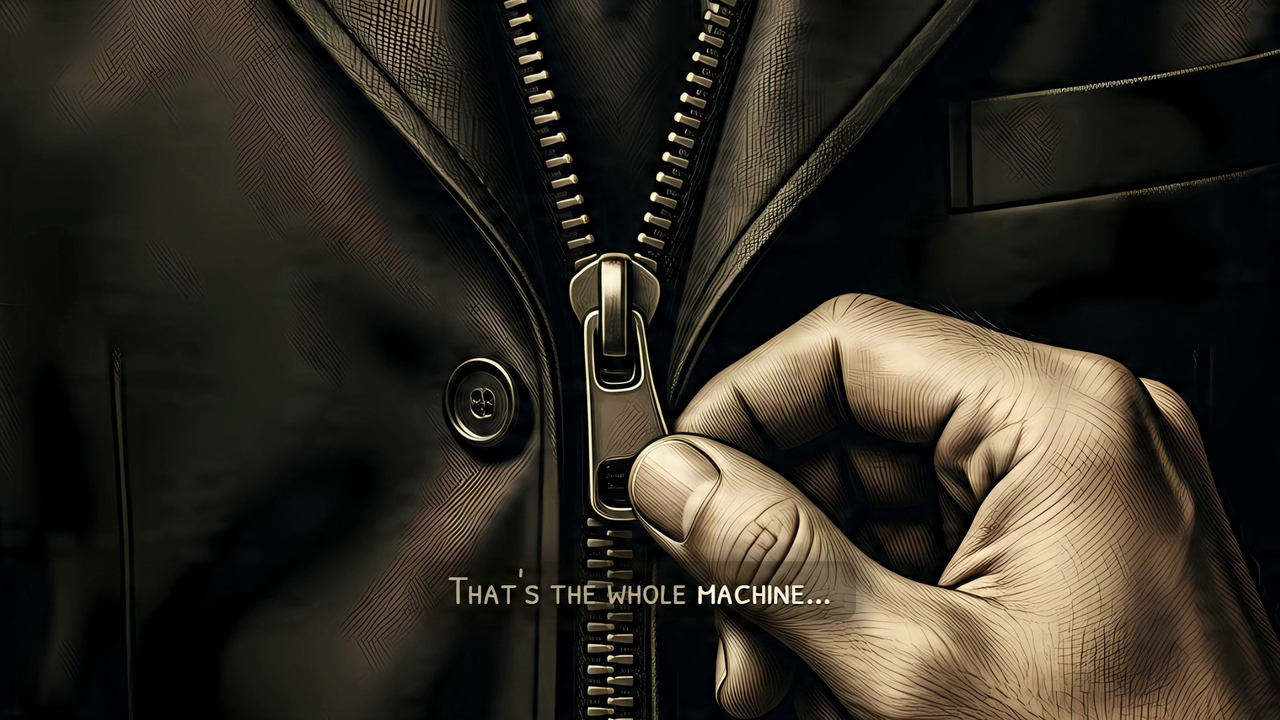
A frame of the example episode that ships with Lanternist: «How Does a Zip Work?», 54 seconds, in the «láminas»
format. The illustration, the camera move and the captions are the engine's. The frame carries Lanternist's AI marks.
What it does
- Images: Qwen-Image, running in ComfyUI on your PC.
- Voice: Kokoro makes the voice of your channel, and
Orpheus narrates every episode with it, on
llama.cpp. You can also use a recording of your own voice. - Music: ACE-Step.
- The video: a scene engine built on HyperFrames,
GSAP and WebGPU. Claude Code writes each episode's scene as a short Python file (escena.py), so
every video is written as code (how a scene is written). - Provenance: every run writes an
assets.jsonwith the source, the license and the URL of each piece it used. - Formats: one is ready today, «láminas» (one illustration per idea, with the camera travelling over it). Two more
are in preparation. They are all in the catalogue of formats.
Claude Code is part of the engine. Its skills, in .claude/skills/, do the work with you:
| Skill | What it does |
|---|---|
instala-lanternist |
installs Lanternist and proves it works by making the example episode |
propone-formato |
looks at a YouTube link you paste and tells you which format is closest |
crea-canal |
sets up your channel: name, language, format, voice and look |
produce-semana |
makes your videos of the week, from the topics to the files ready to upload |
script-to-slides |
turns a script into the slides you approve before any GPU time is spent |
pone-en-escena |
writes and fixes the scene of an episode |
You approve every step that matters
Lanternist proposes, and you decide. Three decisions are always yours, one by one:
- The format of your channel, when you create it.
- Each script, before any GPU time is spent on it.
- Each publication. Lanternist never publishes. By default it uploads nothing: it leaves the video ready for you
to upload by hand.
Inside each episode there are two more stops, after the images and before the render, so you can look at the frames
before the long work starts.
What goes out of your PC
The images, the voice, the music and the video are made on your PC and stay there. Four things go out:
- what you write with Claude Code, which goes to Anthropic like any Claude Code session;
- the source lookups that check a script's facts: Wikipedia and Wikidata, Crossref, OpenAlex, GBIF, Open Library,
archive.org and the pages that a script cites as its sources; - the title, channel and thumbnail of a YouTube link you paste, which
propone-formatoreads from YouTube's
public embed service (oEmbed); - the upload to YouTube, only if you switch it on.
Installing downloads the models and tools from their original sources.
Requirements
These are minimums, measured on the only PC where Lanternist has been tested. Lanternist does not check your
hardware for you: the installer checks the NVIDIA driver and the programs it needs, but not your VRAM, your RAM or
your free disk. Lanternist has not been tested below these figures: expect it to fail, possibly after a long
download.
| Minimum | |
|---|---|
| System | Windows 11, 64-bit. A Mac does not work: everything needs CUDA. Linux has not been tested |
| Graphics card | An NVIDIA card with CUDA and 8 GB of VRAM or more, with an up-to-date driver. Tested on an RTX 3060 Ti with 8 GB |
| Memory | 32 GB of RAM |
| Disk | About 95 GB free on an SSD: 77 GB of models, and the rest for the Python environments. Then room for your videos: a 19-minute episode leaves a final.mp4 of about 3 GB |
| Programs | Python 3.12 (winget install -e --id Python.Python.3.12), Git, Node.js and ffmpeg. If Git, Node.js or ffmpeg is missing, the installer tells you the winget command that installs it |
| Claude Code | A high-usage Claude plan. One episode, with its review, took 385 Claude replies. An entry plan will not produce a week of videos |
How long the graphics card works: the 54-second example episode takes about 11 minutes; a 19-minute episode in the
«láminas» format took about 2 hours 20 minutes.
Install
- Clone this repository into a short folder, such as
C:\lanternist. Windows cannot load a DLL whose path is
longer than 260 characters, and ComfyUI has very long paths inside. - Open Claude Code in that folder and ask it to install Lanternist. The
instala-lanternistskill checks the
requirements with you, runs the installer one step at a time and tells you what each step downloads before it
starts. It ends by making the example episode from start to finish: if that video comes out marked, Lanternist
works on your PC. It never asks for keys in the chat.
You can also run the installer yourself:
py -3.12 instala.py --comprueba   # what is missing; downloads nothing
py -3.12 instala.py               # installs what is missing, in order
Running it again is safe: every step checks first whether it is done, and an interrupted download resumes. The models
and tools on the installer's fixed list (datos/descargas.json) are checked against their SHA-256 when they arrive, and
a file that does not match is deleted. Python and npm packages come at fixed versions, from PyPI and npm.
If you already have ComfyUI or llama.cpp, tell Claude before installing, or read
the FAQ: the order of the steps matters.
Uploading to YouTube
By default Lanternist uploads nothing. Each run ends with a folder, subir-al-canal/, that holds the video, the
thumbnail, the subtitles and a page, LEEME.html, with the title, the full description (chapters, sources and the AI
disclosure) and the steps to upload it by hand in YouTube Studio.
If you want Lanternist to upload for you, set YOUTUBE_SUBIDA_API=1 and create your own Google Cloud project,
following docs/youtube-upload.md. Lanternist ships no Google credentials. What the API upload
promises:
- the video arrives as a private draft, with YouTube's synthetic-content flag set and the AI disclosure in the
description. Lanternist never publishes it: you do, in Studio; - it was tested with a new Google project that Google has not audited, and its uploads behaved as normal drafts.
Google's own documentation is not settled on what happens to uploads from such projects. If YouTube locks your draft
as private, uploadfinal.mp4by hand: everything you need is insubir-al-canal/; - the Google setup guide has not yet been followed from scratch by a new user.
AI marking
Every video and thumbnail that Lanternist makes carries two machine-readable marks that say it was made with AI:
signed metadata (C2PA) and an invisible watermark in the picture and in the sound. They are always on, and the upload
refuses a file without them. The EU AI Act asks for this (Article 50(2)), also from open-source tools. Files made from
26 October 2026 and before version 0.1.0 also carry a TrustMark watermark with the number 59: ignore it, it
is not Lanternist's (why).
- To check a file, double-click
detector.cmdand drag the file onto the page that opens. It runs on your PC and
uploads nothing. From a terminal:.venv\Scripts\python scripts\detecta_marca.py <file>. - Expect YouTube's AI label on your videos. An API upload tells YouTube that the video contains synthetic media.
By hand,LEEME.htmltells you to answer yes to Studio's question about altered or synthetic content. YouTube
can also show its label when it reads C2PA metadata.
What is marked, how the detector decides and what survives re-encoding: docs/ai-marking.md.
Acceptable use
By using Lanternist you agree to these rules. The MIT license lets you change the code; these rules are about what
you make with it.
- Clone only your own voice. Your channel's voice comes from Kokoro's catalogue or from a recording of yourself.
A cloned voice of someone else is a deep fake. - Do not remove or tamper with the AI marks, and do not publish Lanternist's videos without them. The exceptions
are legitimate ones, such as security audits and research. - Do not present the videos as made by a person. The Llama 3.2 Acceptable Use Policy, which applies to the voice
model, forbids it. - Do not download videos from YouTube to imitate them. YouTube's terms forbid it.
propone-formatoreads only what
YouTube publishes for embedding a video (its title, channel and thumbnail), and the screenshots or video files you
give it yourself.
Licenses
- Lanternist is MIT-licensed: see LICENSE. Its production skeleton comes from
faceless-youtube-agents, also MIT. - Built with Llama. The voice model, Orpheus TTS 3B, is a derivative of Llama 3.2. Llama 3.2 is licensed under the
Llama 3.2 Community License, Copyright © Meta Platforms, Inc. All Rights Reserved. Using the voice means accepting
that license and the
Llama 3.2 Acceptable Use Policy. - GSAP is installed from npm under the GSAP Standard "No Charge" License
(gsap.com/standard-license). It is not an open source license, so GSAP is not
part of Lanternist's MIT code and never travels in this repository. It allows free use «in commercial or
non-commercial apps, web sites, games, components, and other software as long as end users are not charged a fee of
any kind to use your product», and it forbids tools «that allow users to build visual animations without code» that
compete with Webflow's. Lanternist is free, and its videos are written as code. If you build a paid product on top
of Lanternist, read that license first. - Everything else (ComfyUI, the models, the fonts, the tools the installer downloads) is listed with its license
in THIRD_PARTY_NOTICES.md. Nothing that cannot be redistributed travels in this
repository: the installer downloads it from its original source.
Language
This documentation is in English. The console messages, the skills and the manual that Claude Code reads
(CLAUDE.md) are in Spanish for now, and so is LEEME.html.
Help and contributing
- Installing and how-to questions: GitHub Discussions, category Installation, and the FAQ.
- Bugs: open an issue with the bug form. It asks for your Lanternist commit, your graphics card and the error.
- A new format: open an issue with the format form, or paste a video link to Claude and let
propone-formatosay
what the engine would need. - Code: read CONTRIBUTING.md.
Yorumlar (0)
Yorum birakmak icin giris yap.
Yorum birakSonuc bulunamadi