salesforce-mcp-lib
Health Uyari
- License — License: MIT
- Description — Repository has a description
- Active repo — Last push 0 days ago
- Low visibility — Only 9 GitHub stars
Code Gecti
- Code scan — Scanned 12 files during light audit, no dangerous patterns found
Permissions Gecti
- Permissions — No dangerous permissions requested
Bu listing icin henuz AI raporu yok.
Salesforce MCP Library is a local stdio bridge for Salesforce MCP endpoints using OAuth client credentials, featuring a reusable Apex MCP library and JSON-RPC 2.0 core.
Salesforce MCP Library


Open-source bridge connecting AI agents to Salesforce via Model Context Protocol.
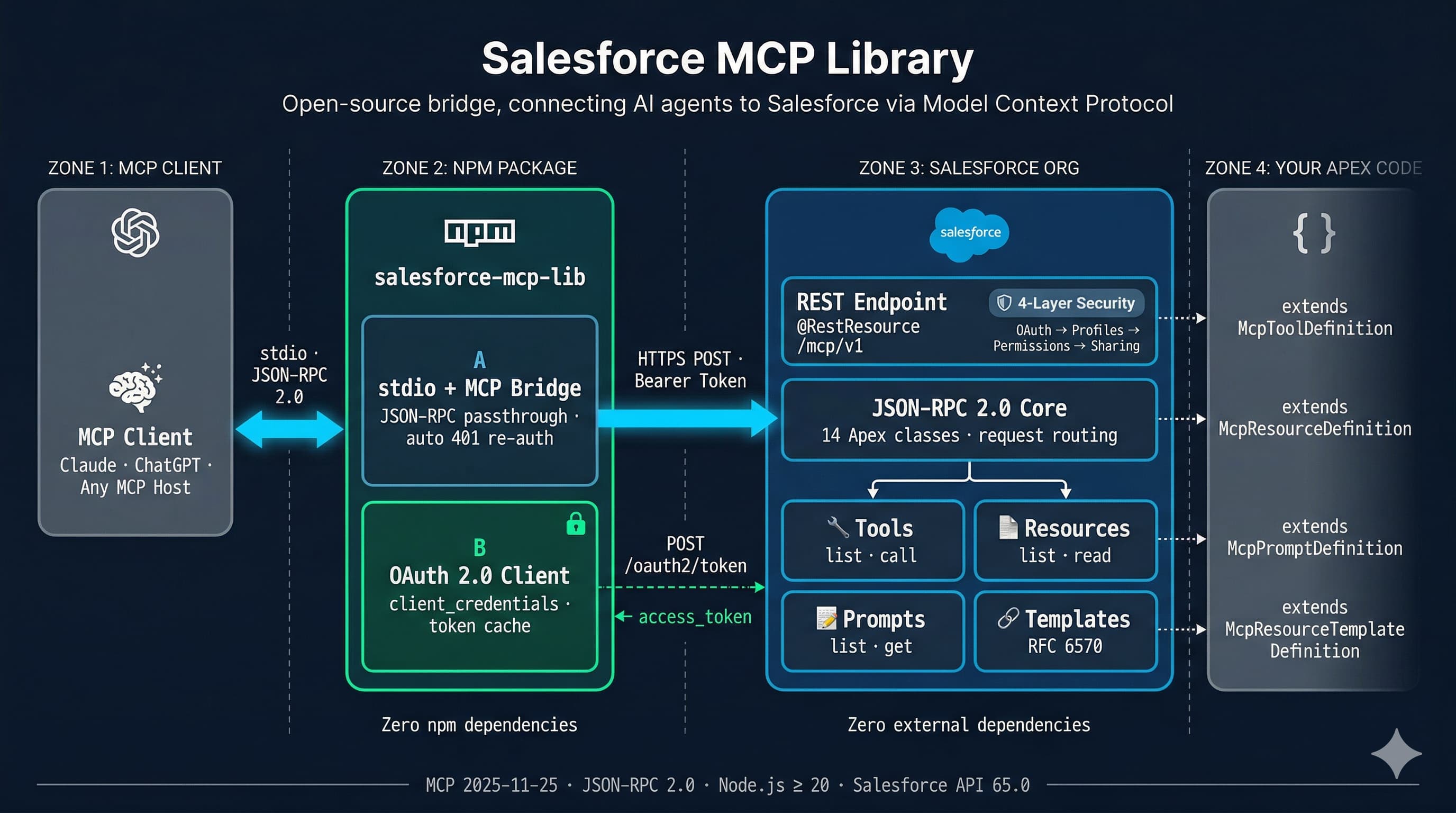
Two packages, zero external dependencies:
| Package | What it does | Install |
|---|---|---|
| Apex framework (2GP unlocked) | JSON-RPC 2.0 core + MCP server running natively in your Salesforce org | sf package install |
| npm stdio proxy | Bridges any MCP client to the Apex endpoint via OAuth 2.0 | npx salesforce-mcp-lib |
How it works
- MCP Client (Claude, ChatGPT, any MCP host) sends JSON-RPC 2.0 messages over stdio
- npm proxy authenticates via OAuth 2.0
client_credentials, forwards requests over HTTPS, and handles token refresh automatically - Apex MCP Server dispatches requests to your registered tools, resources, and prompts — all running inside Salesforce with full platform security
The Apex server is stateless — it rebuilds its handler chain on every request. No session cleanup, no state bugs, no cross-request data leakage.
Security — 4 layers, 3 of them automatic
| Layer | Enforced by |
|---|---|
| OAuth 2.0 scopes | Connected App configuration |
| Profile permissions | Salesforce platform |
| Permission Sets | Salesforce platform |
| Sharing rules | Salesforce platform |
Quick start
1. Install the Apex framework
sf package install --package 04tdL000000So9xQAC --target-org YOUR_ORG --wait 10
2. Create your MCP endpoint (2 Apex classes)
Endpoint — a @RestResource that wires up your capabilities. In this unlocked package, the framework API stays public; the endpoint itself is global because Apex REST entry points require it:
@RestResource(urlMapping='/mcp/minimal')
global inherited sharing class MinimalMcpEndpoint {
    @HttpPost
    global static void handlePost() {
        McpServer server = new McpServer();
        server.registerTool(new MinimalTool());
        server.handleRequest(RestContext.request, RestContext.response);
    }
}
Tool — extend the package's public McpToolDefinition base class and implement inputSchema(), validate(), execute():
public inherited sharing class MinimalTool extends McpToolDefinition {
    public MinimalTool() {
        this.name = 'echo';
        this.description = 'Echoes the provided message back to the caller';
    }
    public override Map<String, Object> inputSchema() {
        return new Map<String, Object>{
            'type' => 'object',
            'properties' => new Map<String, Object>{
                'message' => new Map<String, Object>{
                    'type' => 'string',
                    'description' => 'The message to echo'
                }
            },
            'required' => new List<String>{ 'message' }
        };
    }
    public override void validate(Map<String, Object> arguments) {
        if (!arguments.containsKey('message')) {
            throw new McpInvalidParamsException('message is required');
        }
    }
    public override McpToolResult execute(Map<String, Object> arguments) {
        String msg = (String) arguments.get('message');
        McpToolResult result = new McpToolResult();
        result.content = new List<McpTextContent>{ new McpTextContent(msg) };
        return result;
    }
}
3. Configure a Connected App
Create a Connected App with OAuth 2.0 Client Credentials flow enabled. Note the client_id and client_secret.
4. Connect an AI agent
Add to your MCP client config (e.g. claude_desktop_config.json):
{
  "mcpServers": {
    "salesforce": {
      "command": "npx",
      "args": [
        "-y", "salesforce-mcp-lib",
        "--instance-url", "https://your-org.my.salesforce.com",
        "--client-id", "YOUR_CLIENT_ID",
        "--client-secret", "YOUR_CLIENT_SECRET",
        "--endpoint", "/services/apexrest/mcp/minimal"
      ]
    }
  }
}
That's it. The agent can now discover and invoke your Salesforce tools.
inherited sharing and with sharing help enforce record-level access defaults, but they don't enforce CRUD/FLS by themselves. Use explicit security checks when your tool reads or writes protected fields or objects.
All three MCP capabilities
Register tools, resources, and prompts in a single endpoint:
@RestResource(urlMapping='/mcp/e2e')
global inherited sharing class E2eHttpEndpoint {
    @HttpPost
    global static void handlePost() {
        McpServer server = new McpServer();
        server.registerTool(new ExampleQueryTool());
        server.registerResource(new ExampleOrgResource());
        server.registerPrompt(new ExampleSummarizePrompt());
        server.handleRequest(RestContext.request, RestContext.response);
    }
}
| Capability | Extend | Override |
|---|---|---|
| Tool | McpToolDefinition |
inputSchema(), validate(), execute() |
| Resource | McpResourceDefinition |
read() |
| Resource Template | McpResourceTemplateDefinition |
read(arguments) |
| Prompt | McpPromptDefinition |
get(arguments) |
See examples/ for complete working code.
CLI reference
salesforce-mcp-lib [options]
| Option | Env variable | Required | Description |
|---|---|---|---|
--instance-url |
SF_INSTANCE_URL |
Yes | Salesforce org URL |
--client-id |
SF_CLIENT_ID |
Yes | Connected App client ID |
--client-secret |
SF_CLIENT_SECRET |
Yes | Connected App client secret |
--endpoint |
SF_ENDPOINT |
Yes | Apex REST endpoint path |
--log-level |
SF_LOG_LEVEL |
No | debug / info / warn / error (default: info) |
Tech stack
- Apex: Salesforce API 65.0 — 54 classes, zero external dependencies
- TypeScript: ES2022, Node.js >= 20 — 6 modules, zero npm production dependencies
- Protocol: MCP
2025-11-25, JSON-RPC 2.0 — all 11 MCP methods implemented - Packaging: Salesforce 2GP unlocked package (no namespace)
Project structure
force-app/main/
  json-rpc/classes/    # JSON-RPC 2.0 core (14 classes)
  mcp/classes/         # MCP server framework (40 classes)
packages/salesforce-mcp-lib/
  src/                 # TypeScript stdio proxy (6 modules)
  tests/               # Unit tests
examples/
  minimal/             # Single-tool echo example
  e2e-http-endpoint/   # Tools + resources + prompts
scripts/               # Build, deploy, and release scripts
Contributing
Contributions are welcome. Validate Apex changes in a fresh scratch org before submitting:
./scripts/org-create.sh your-alias
./scripts/org-test.sh
org-create.sh provisions a new scratch org, sets it as default, and deploys force-app. org-test.sh then runs the Apex test suite in that org. Run the existing TypeScript test suite as well before submitting:
cd packages/salesforce-mcp-lib && npm test && npm run lint
License
Yorumlar (0)
Yorum birakmak icin giris yap.
Yorum birakSonuc bulunamadi