agent-terminal
Health Uyari
- License — License: MIT
- Description — Repository has a description
- Active repo — Last push 0 days ago
- Low visibility — Only 5 GitHub stars
Code Gecti
- Code scan — Scanned 12 files during light audit, no dangerous patterns found
Permissions Gecti
- Permissions — No dangerous permissions requested
This is a native macOS terminal application designed to manage multiple AI coding agents simultaneously. It organizes project workspaces and surfaces live runtime metrics—such as memory usage, active git branches, and listening ports—directly in the UI.
Security Assessment
Overall Risk: Medium. This tool inherently executes shell commands and manages local processes via a Rust backend (Tauri) and xterm.js. It actively reads terminal output to detect running AI agents and extract system metadata. While the automated code scan of 12 files found no dangerous patterns, hardcoded secrets, or requests for dangerous system permissions, the tool reads local context like git states and process IDs. Because it interacts heavily with your local system and actively monitors your active shell sessions, standard caution is advised.
Quality Assessment
The project is under heavy active development (last push was today) and uses standard, well-regarded technologies like Rust and Tauri. It is properly licensed under the permissive MIT license. However, community trust and visibility are currently very low; the repository has only 5 GitHub stars, indicating it is an early-stage project without significant public review or adoption.
Verdict
Use with caution—the underlying code appears clean, but the tool's extensive system access and very early stage of development warrant careful consideration before deploying in sensitive environments.
A terminal that understands AI agents. Project workspaces, live process metrics, and native Claude Code + Codex support.
Agent Terminal
A mouse-first, project-scoped terminal workspace built for running AI coding agents effectively.
⚠️ Early stage — under heavy active development. APIs and UI will change.
What is Agent Terminal?
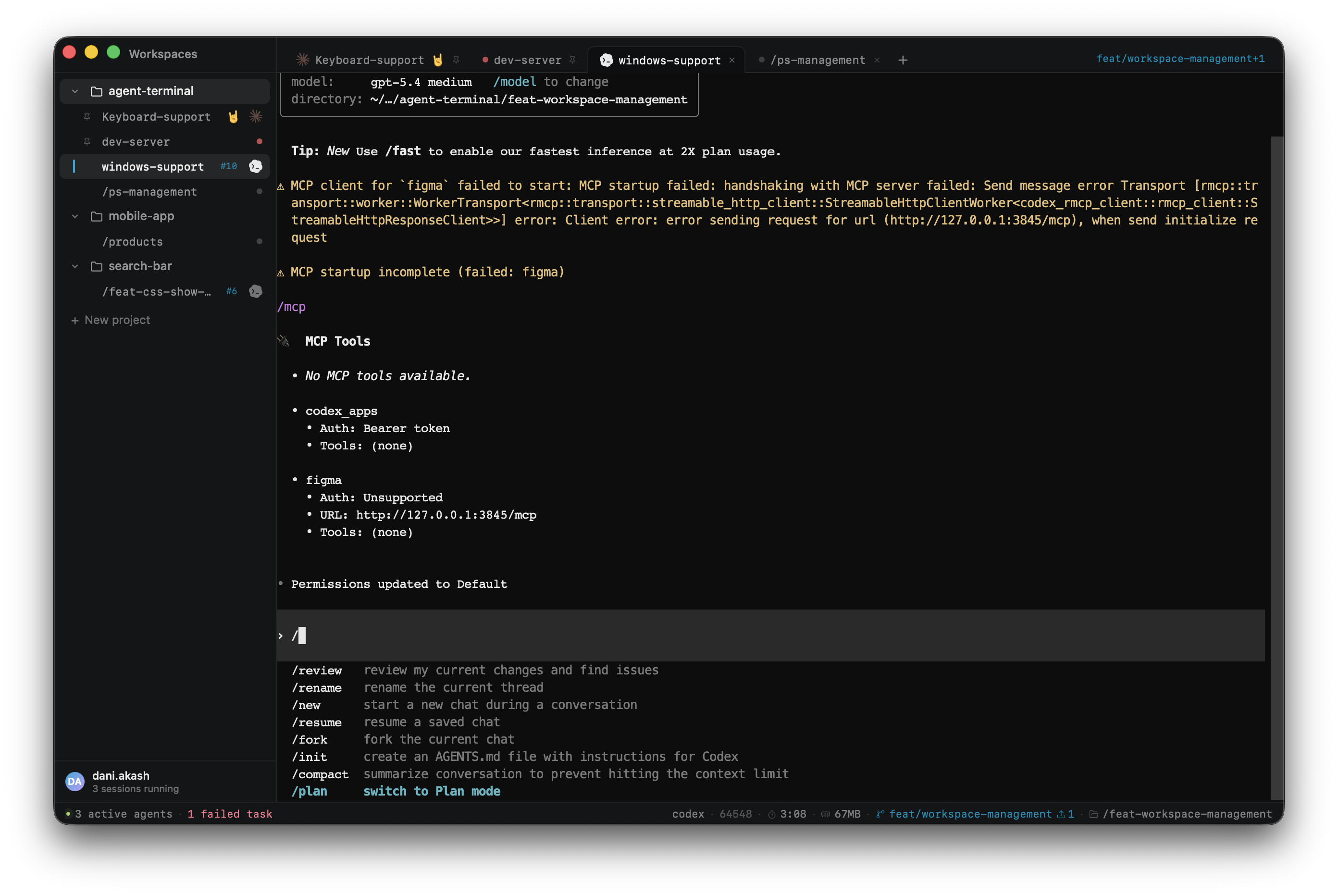
Agent Terminal is a native macOS terminal app designed around the way developers actually work with AI coding agents today: multiple projects, multiple agents, multiple sessions — all running simultaneously and all needing context at a glance.
Most terminals treat every tab equally. Agent Terminal gives each project its own workspace, tracks your AI agent sessions as first-class citizens, and surfaces live runtime metadata — memory usage, listening ports, model in use, git state — directly in the status bar without you having to switch windows or run commands.
It is built on Tauri (Rust backend, WebView frontend) and uses xterm.js for terminal rendering. There are no config files to edit and no tmux dependency — just open it and use it.
Features
Project-scoped workspaces
Tabs are organized under named projects. Switch between projects without losing your place. Each tab remembers its working directory and restores it on the next launch.
AI agent integration
Agent Terminal detects when an AI coding agent is running inside a tab and surfaces agent-specific context automatically — no manual setup required.
Supported agents:
| Agent | Status |
|---|---|
| Claude Code | ✅ Supported |
| Codex CLI | ✅ Supported |
| Gemini CLI | 🔜 Planned |
| Cursor | 🔜 Planned |
| Open Code | 🔜 Planned |
Want support for another agent? Request it on X →
Live status bar
The status bar shows real-time context for the active tab, updated every 2 seconds.
Left side — workspace overview (global across all projects):
- Active agents running · Active shell tasks · Failed tasks
Right side — active tab context:
- Process name · PID · ⏱ elapsed · 🧮 memory (RSS)
- 🔌 Listening TCP ports (so you know when your dev server is up)
- ✨
--modelflag when an agent is running with a specific model - ⎇ Git branch · dirty indicator · commits ahead/behind remote
- 📂 Current working directory (hover to see full path)
Agent glyph system
Each agent tab shows a brand mark (Anthropic sunburst for Claude, OpenAI hex for Codex) in the tab bar and sidebar that reflects the session state. When an agent is running with full permissions (--dangerously-skip-permissions for Claude Code, --yolo for Codex), a danger badge appears next to the tab.
MOD system
The intelligence layer is built on a Rust-native MOD system. Each MOD subscribes to PTY output and shell hook events, extracts structured data, and emits it to the frontend — without blocking the terminal or adding visible latency.
| MOD | What it does |
|---|---|
DirTrackerMod |
Tracks CWD via OSC 7 shell hooks |
ProcessTrackerMod |
Tracks process state (running / done / error) via OSC 133 |
ClaudeCodeMod |
Detects Claude Code sessions, extracts --model and permission flags |
CodexMod |
Detects Codex sessions, extracts permission flags |
ProcessInspectorMod |
Polls live process metrics: PID, RSS memory, elapsed time, TCP ports |
GitMonitorMod |
Tracks git branch, dirty state, and remote sync status |
No tmux dependency
Sessions use raw PTYs managed directly by Rust. No tmux, no daemon, no invisible infrastructure. The tradeoff: long-running processes need to be restarted when you reopen the app. In exchange, the app is simpler, faster to start, and has zero external dependencies.
Getting Started
Prerequisites
- macOS 13 or later
- Rust stable toolchain
- Bun —
curl -fsSL https://bun.sh/install | bash - Xcode Command Line Tools —
xcode-select --install
Run in development
git clone https://github.com/DaniAkash/agent-terminal.git
cd agent-terminal

bun install
bun run tauri:dev
The first run compiles the Rust backend — expect a few minutes. Subsequent runs are much faster thanks to incremental compilation.
Build for production
bun run tauri:build
Outputs a .dmg and .app in src-tauri/target/release/bundle/.
Tech Stack
| Layer | Technology |
|---|---|
| App framework | Tauri v2 |
| Terminal rendering | xterm.js (WebGL renderer) |
| PTY backend | portable-pty (Rust) |
| Frontend | React · TypeScript · Vite |
| Styling | Tailwind CSS |
| UI components | shadcn/ui (base-ui primitives) |
| State management | nanostores |
| Package manager | Bun |
| Linter / formatter | Biome (JS) · Clippy (Rust) |
Roadmap
Agent Terminal is early stage and under heavy active development.
- Project-scoped workspaces with persistent tabs
- xterm.js terminal with WebGL rendering
- CWD tracking and tab label from working directory
- OSC 133 shell integration (process state tracking)
- MOD system (Rust-native plugin architecture)
- Claude Code + Codex detection and agent glyphs
- Live status bar (process metrics, git, CWD, icons)
- Keyboard shortcuts (Cmd+T, Cmd+W, Cmd+1–9, and more)
- Theming support (light / dark / custom color schemes)
- Gemini CLI, Cursor, Open Code agent support
- Agent turn detection (know when an agent is actively working vs idle)
- Universal binary (Apple Silicon + Intel in one download)
- macOS App Store distribution
- Windows support
Contributing
Contributions are welcome — see CONTRIBUTING.md for setup instructions, code conventions, and how to add support for new agents via the MOD system.
License
MIT — see LICENSE.
Copyright © 2026 Dani Akash. If you use or build on this project, the copyright notice must be retained as required by the MIT License.
Yorumlar (0)
Yorum birakmak icin giris yap.
Yorum birakSonuc bulunamadi