loom
Health Uyari
- License — License: MIT
- Description — Repository has a description
- Active repo — Last push 0 days ago
- Low visibility — Only 5 GitHub stars
Code Basarisiz
- spawnSync — Synchronous process spawning in bin/loom.mjs
- fs.rmSync — Destructive file system operation in bin/loom.mjs
- os.homedir — User home directory access in bin/loom.mjs
- process.env — Environment variable access in bin/loom.mjs
- network request — Outbound network request in bin/loom.mjs
- spawnSync — Synchronous process spawning in bin/service.mjs
- fs.rmSync — Destructive file system operation in bin/service.mjs
- os.homedir — User home directory access in bin/service.mjs
- process.env — Environment variable access in bin/service.mjs
- os.homedir — User home directory access in packages/daemon/assets/deja-capture.mjs
- process.env — Environment variable access in packages/daemon/assets/deja-capture.mjs
- network request — Outbound network request in packages/daemon/assets/hook-relay.mjs
Permissions Gecti
- Permissions — No dangerous permissions requested
Bu listing icin henuz AI raporu yok.
Orchestrate a fleet of real Claude Code agents on your Claude subscription, not per-token API bills - local-first.

Orchestrate a fleet of real Claude Code agents on your Claude subscription — not per-token API bills


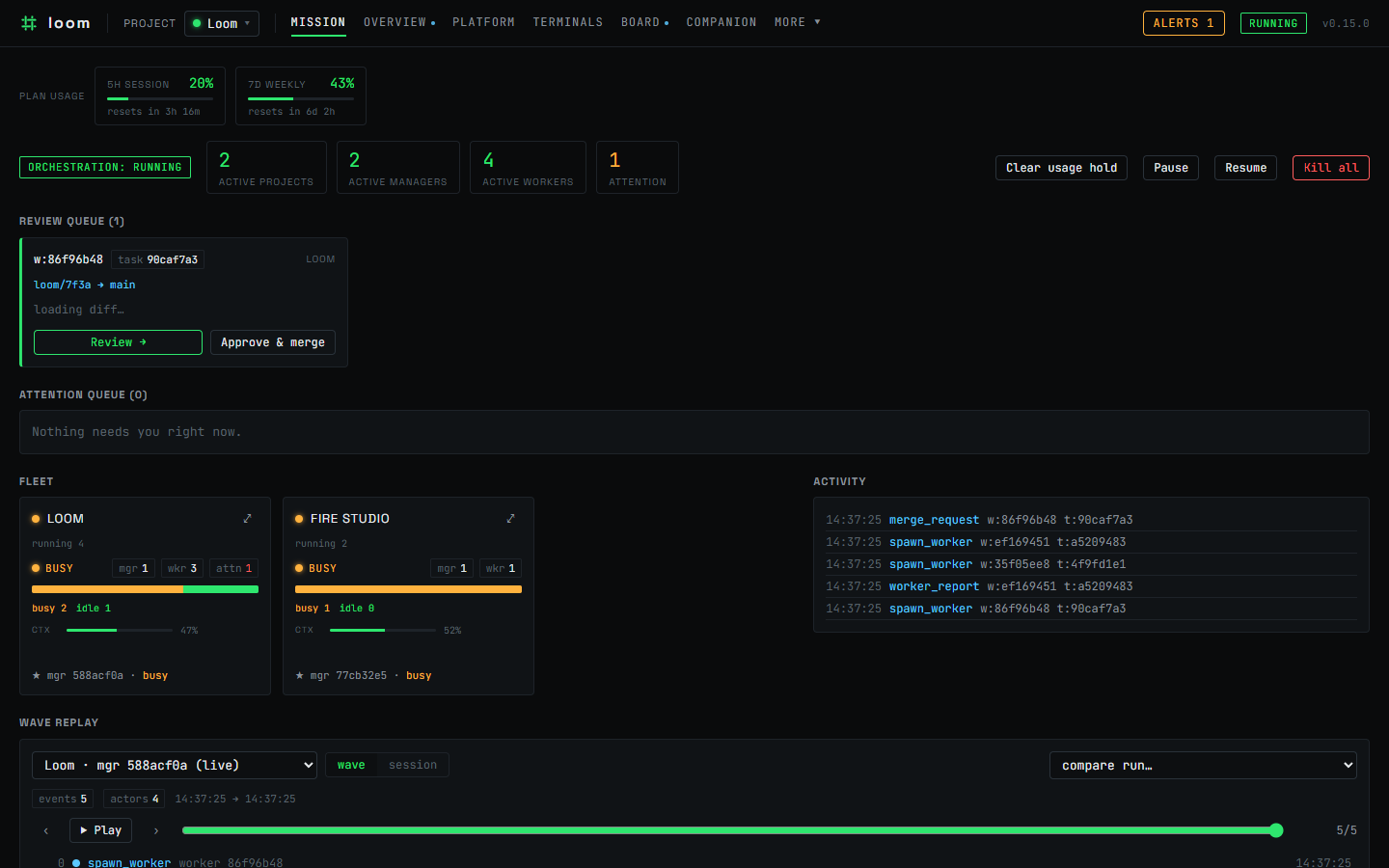
Loom orchestrates the real interactive claude — the same terminal session you'd run by hand, driven over a PTY, never a headless claude -p one-shot or an API-key agent loop. Because every agent is a genuine claude session, a whole fleet of them runs on your existing Claude subscription (Pro/Max) — there's no separate per-token API bill for the orchestration the way there is with tools that drive the Anthropic API directly. (To be precise: the agents still consume your subscription's usage and live within its rate limits — Loom rides the plan you already pay for, it doesn't make Claude free.)
Those sessions are durable: they're owned by a daemon on your machine, so closing the window — or rebooting — never kills the work. Around them Loom binds your Obsidian vault and a per-project task board into a single view, and lets one lead agent decompose a goal, delegate to workers on isolated branches, review their diffs, and merge. It even self-hosts: Loom is built using Loom.
Features
- 💳 Runs on your subscription, not metered API costs. Every agent is the genuine interactive
claudedriven over a PTY (node-pty) — neverclaude -p/ headless, never an API-key agent loop — so a whole fleet of them runs on the Claude subscription (Pro/Max) you already pay for. There's no per-token API bill for the orchestration the way there is with tools that call the Anthropic API directly. (Honest caveat: the agents still consume your subscription's usage and obey its rate limits.) - 🖥️ Durable real sessions, not headless. Those sessions are owned by a daemon, not your shell, so
they're resumable and outlive any viewer — a closed tab or a reboot doesn't lose the thread. - ⛓️ Multi-agent orchestration. A lead session plans, delegates to worker sessions on isolated
git worktree branches, reviews each diff, and merges through a gate. Workers report up; the lead holds the whole picture. Loom even orchestrates its own development with this loop. - 🏠 Your data, on your hardware. Everything Loom keeps lives on your machine — an SQLite store,
your git checkouts, your transcripts, and your vault. Loom adds no cloud service of its own, so your code and history never leave your machine through Loom, and the daemon binds to loopback only (127.0.0.1) as its security boundary. To reach the daemon from another device, put a tunnel in front (see Reach Loom from another device). - ✦ Vault-backed knowledge. Design notes, decisions, and session logs live in an Obsidian vault
woven alongside the code, and Loom auto-commits vault writes so the knowledge layer stays versioned with the work. - ◧ A task board agents can use. Tasks are a first-class, project-scoped surface backed by an MCP
server, so agents read the board, create cards, and move work through columns as part of the same loop you watch — rendered as a per-project kanban. - ❯ The terminal cockpit. A stateless React/Vite web viewport attaches over WebSockets and
detaches freely: Mission Control, the task board, live terminals, runs, and git — one phosphor-on-dark instrument panel. - 💬 A chat-native personal companion. Spin up a long-lived companion agent you talk to over
Telegram or an in-app web chat — the same durable, real-clauderuntime, now reachable from your phone. Give it a name and it holds the thread across restarts: it keeps a durable memory of what matters to you (recalled automatically at the start of each chat), sets one-shot and recurring reminders that ping you back on your own channel, authors its own private skills, and can proactively check in. You manage it from one Companion page — chat plus config, channels, memory, reminders, and its persona — behind a fail-closed security model: an encrypted bot token, sender allowlists, DM pairing codes, and human-only configuration. - 🌐 Opt-in per-worker browser testing. A worker profile can be granted its own isolated headless
Playwright browser, so QA-style sessions can drive a running app and verify UI before reporting back. - 🚀 Guided setup + a standing Platform operator. A built-in Platform operator greets you on
first run and stays one click away (the Platform page). It helps you create, configure, and archive your projects, agents, and profiles, pick your skills and workflow, and can set them up on your behalf — confirming the big moves first, on a deliberately narrow, safe tool surface. - 🔎 Suggest-only Workspace Auditor. A read-only reviewer scans your own recent sessions for vague or
ambiguous instructions in your agent prompts and skills, and for prompts you type repeatedly that are worth saving as one-click presets — then files improvement suggestions as cards on your board. It never changes anything itself. Run it on demand ("Review my workspace" on the Platform page) or on a schedule. - 🧩 Editable skills, injected per session. Loom ships a curated set of skills and mirrors them into every session as project-local skills that shadow your personal
~/.claude/skills. A built-in editor lets you read, edit, create, reset, and three-way-merge Loom's shipped updates into your own edits — changes take effect on the next session spawn. - 🛰️ Agents as authenticated API endpoints (Agent Runs). Flag a project agent as an endpoint, mint a scoped API key with concurrency, token, and spend caps, then trigger structured async runs over
POST /api/runs. The Runs page shows every run's input, result, usage, and retained transcript, with a per-key kill-switch that cancels in-flight runs. - 🔑 Connections — bound credentials the agent never sees. Store a credential once (say a GitHub token), encrypted at rest; a session's profile allowlists which connections it may use, and the agent reaches the API through Loom without the secret ever entering its context. Write-only and human-managed — there is no agent path to read, create, or bind one.
- ⏱️ A built-in cron scheduler. Run a manager — or the Workspace Auditor — on a cron cadence; each fire boots a real interactive session against the agent you pick, behind concurrency and usage-limit gates. Off by default; enable it in Settings.
- 📄 Opt-in document conversion. Grant a worker profile a markitdown MCP and its sessions can convert PDFs, Office files, images, and HTML to Markdown — useful for research and document-heavy work. Off by default, human-enabled per profile.
Quick start
You need Node 22+ and a working claude CLI on your machine. Install Loom globally from npm (published as loomctl) — that gives you the loom command:
npm i -g loomctl
loom            # boots the daemon (loopback only) and opens the cockpit in your browser
loom with no arguments starts the daemon in the foreground and opens your browser; press Ctrl-C to stop. To manage a background daemon, use the subcommands:
loom start --detach   # run the daemon in the background (writes a PID file under ~/.loom)
loom status           # is it running? — prints version, URL and PID (exit non-zero if stopped)
loom stop             # stop it gracefully and clean up
loom restart          # stop, then start (honors --detach/--port/--no-open)
loom open             # open the browser to a running daemon
loom update           # update to the latest release (npm i -g loomctl@…), then restart
loom update upgrades the global install and restarts the daemon; loom update --channel beta switches to (and remembers) the beta track. When a newer release is available the cockpit also shows an "update available" banner you can act on from the UI.
To have Loom autostart in the background on login, register it with your OS service manager:
loom service install     # register autostart (systemd --user / launchd / Task Scheduler)
loom service status      # is it registered? + is the daemon running?
loom service uninstall   # remove the autostart registration
install runs loom start --no-open under the OS service manager, which owns keep-alive/restart — a systemd --user unit on Linux, a launchd LaunchAgent on macOS, and a per-user Task Scheduler logon task on Windows (no admin required). It is idempotent (re-installing replaces cleanly) and honors --port. So far only the Windows path has been verified end-to-end on real hardware; the macOS and Linux artifacts are generated to spec and structurally tested but still need a live check on a Mac/Linux host.
Common flags: -p, --port <n> (default 4317, or LOOM_PORT), --no-open, -d, --detach, -v, --version, -h, --help. Prefer not to install? Run it once with no install via npx loomctl (same flags and subcommands, e.g. npx loomctl status).
One-line install
For a hands-off setup, the repo ships two installer scripts (install.sh for macOS/Linux/WSL, install.ps1 for Windows). They check for Node 22+ (and print a guide if it's missing — they do not download Node for you), run npm i -g loomctl, optionally register autostart, and launch Loom — all idempotent (safe to re-run; npm i -g upgrades in place):
# macOS / Linux / WSL
curl -fsSL https://raw.githubusercontent.com/DanielC000/loom/main/install.sh | sh

# Windows (PowerShell)
irm https://raw.githubusercontent.com/DanielC000/loom/main/install.ps1 | iex
Because curl … | sh and irm … | iex have no interactive prompt, drive optional steps with flags
(local-file runs) or env vars (piped runs):
| Behaviour | sh flag / env | PowerShell flag / env |
|---|---|---|
| Register autostart | --service / LOOM_INSTALL_SERVICE=1 |
-Service / $env:LOOM_INSTALL_SERVICE='1' |
| Don't launch the daemon | --no-start / LOOM_INSTALL_START=0 |
-NoStart / $env:LOOM_INSTALL_START='0' |
| Install a specific source | --source <spec> / LOOM_INSTALL_SOURCE |
-Source <spec> / $env:LOOM_INSTALL_SOURCE |
| Port | --port <n> / LOOM_PORT |
-Port <n> / $env:LOOM_PORT |
⚠ Piping a script straight to a shell runs unreviewed code. The one-liners above fetch the
installers from this repo over HTTPS (raw GitHub) and execute them. If you'd rather inspect first,
clone the repo and run them by local path (sh install.sh/pwsh -ExecutionPolicy Bypass -File install.ps1), or download the script, verify its SHA-256 checksum, then run it. (A vanity/Pages
URL may front these raw links later; the raw-GitHub URLs above resolve today.)
From source (contributors)
pnpm is the contributor toolchain. From a clone of the repo:
pnpm install
pnpm build          # builds the shared contract first
pnpm daemon         # the daemon on http://127.0.0.1:4317 (loopback only)
pnpm web            # the viewport on http://127.0.0.1:5317
Open http://127.0.0.1:5317 and you're in the cockpit. Seedocs/releasing.md for the packaging and release flow.
Reach Loom from another device
The daemon binds to loopback only (127.0.0.1) on purpose: that's its trust boundary. Loom keeps a deliberately simple model — anything that can reach the loopback socket is treated as you, the OS user — and does not ship its own network auth or a bind-beyond-loopback flag. To use a loopback daemon from your phone or laptop, put a tunnel in front that carries the authentication and encryption, and let it terminate on the host's loopback. Two well-supported options:
SSH local port-forward (SSH-key auth). From the remote device, forward a local port to the
daemon's loopback on the host:ssh -L 4317:127.0.0.1:4317 you@your-host # then open http://127.0.0.1:4317 on the device you're sitting atThe SSH key authenticates you and encrypts the link; Loom still only ever sees loopback traffic.
Tailscale
serve(tailnet ACLs + WireGuard). On the host running Loom, expose the loopback daemon
to your private tailnet:tailscale serve --bg 4317 # reach it at https://your-host.<your-tailnet>.ts.net from any device on the tailnetWireGuard encrypts the connection and your tailnet ACLs decide who may reach it; the daemon is never exposed to the public internet.
In both cases the tunnel owns auth + transport security and Loom keeps its simple OS-user trust boundary. (Use the daemon port — 4317 by default, or whatever you set with --port / LOOM_PORT.) A first-class authenticated remote bind is a separate, deliberate decision and is not offered today.
How it works
A single local daemon owns everything durable — the sessions, the PTY host that drives claude, the Fastify HTTP/WS gateway, an SQLite store, read-only git, and the vault auto-committer. The web viewport is stateless: it attaches to a session over a WebSocket and detaches freely, while the session keeps running on the daemon whether or not anyone is watching.
Give a lead agent a goal and it decomposes the goal into tasks, spawns workers — each on its own worktree branch, each driving a real Claude Code session — then reviews each diff, merges what passes, and keeps the vault and board versioned alongside the code. Plan, delegate, review, merge.
A run, end to end:
- You hand a lead a goal — say "add rate-limit middleware and cover it with tests."
- It decomposes the goal into cards on the project board and delegates each to a worker spawned on its own git worktree branch.
- Workers build in parallel — each drives a real
claudesession, commits to its branch, and reports back up when it's done or blocked. - The lead reviews each diff and merges what passes through a build gate; a failing gate bounces the card back to the worker instead of merging.
- The board and vault stay versioned with the code, so the whole run stays legible after the fact.
You watch it live in Mission Control — the fleet, context meters, an activity feed, and an attention queue that surfaces a merge the moment it needs your review.
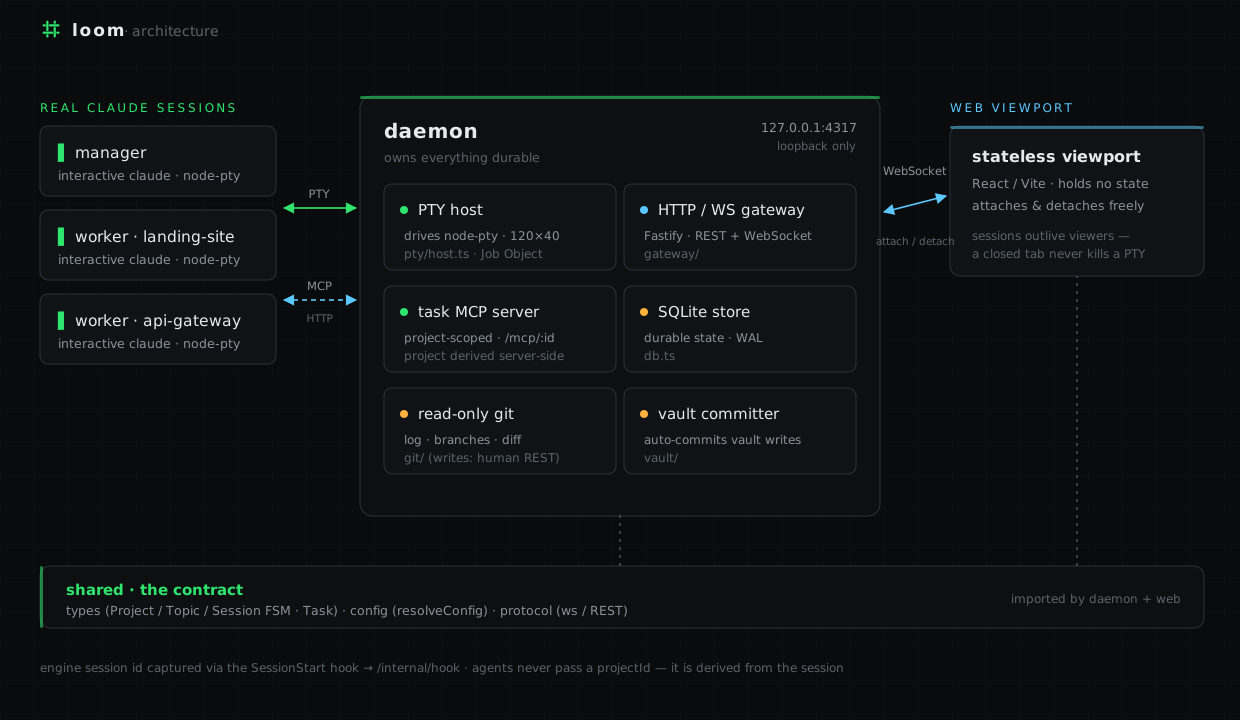
The monorepo (pnpm + Turbo) is three packages:
packages/shared— the contract: types (Project / Topic / Session / Task + the session FSM),
one config-resolution mechanism, and the ws/REST protocol.packages/daemon— owns everything durable: SQLite, the PTY host, the gateway, the
project-scoped task MCP server, read-only git, and the vault auto-committer.packages/web— the stateless React/Vite viewport.
Your companion
Beyond the orchestration fleet, Loom can run a companion — a single long-lived agent you chat with directly, over Telegram or an in-app web chat, on the same daemon-owned real-claude runtime. It's a personal assistant rather than a project worker: it stays running across restarts, holds the thread of an ongoing conversation, and reaches you on the channel you started from.
The companion grows with you. It curates a durable memory of what matters — your preferences, ongoing context, things it said it would follow up on — and recalls it silently at the start of each conversation. It sets its own reminders, both one-shot ("remind me in 20 minutes") and recurring (on a cron schedule), which fire back to your chat as a nudge. It writes its own private skills for tasks worth repeating, and — when you enable a cadence — proactively checks in only when there's something genuinely worth surfacing.
You set it up and run it from a single Companion page: chat on one side; configuration, channels, memory, reminders, and its editable persona on the other. Every inbound message is treated as untrusted input, the bot token is encrypted at rest, senders are allowlisted, enrollment uses one-time DM pairing codes, and all configuration is human-only — never something the chat-reachable agent can change about itself.
Screenshots
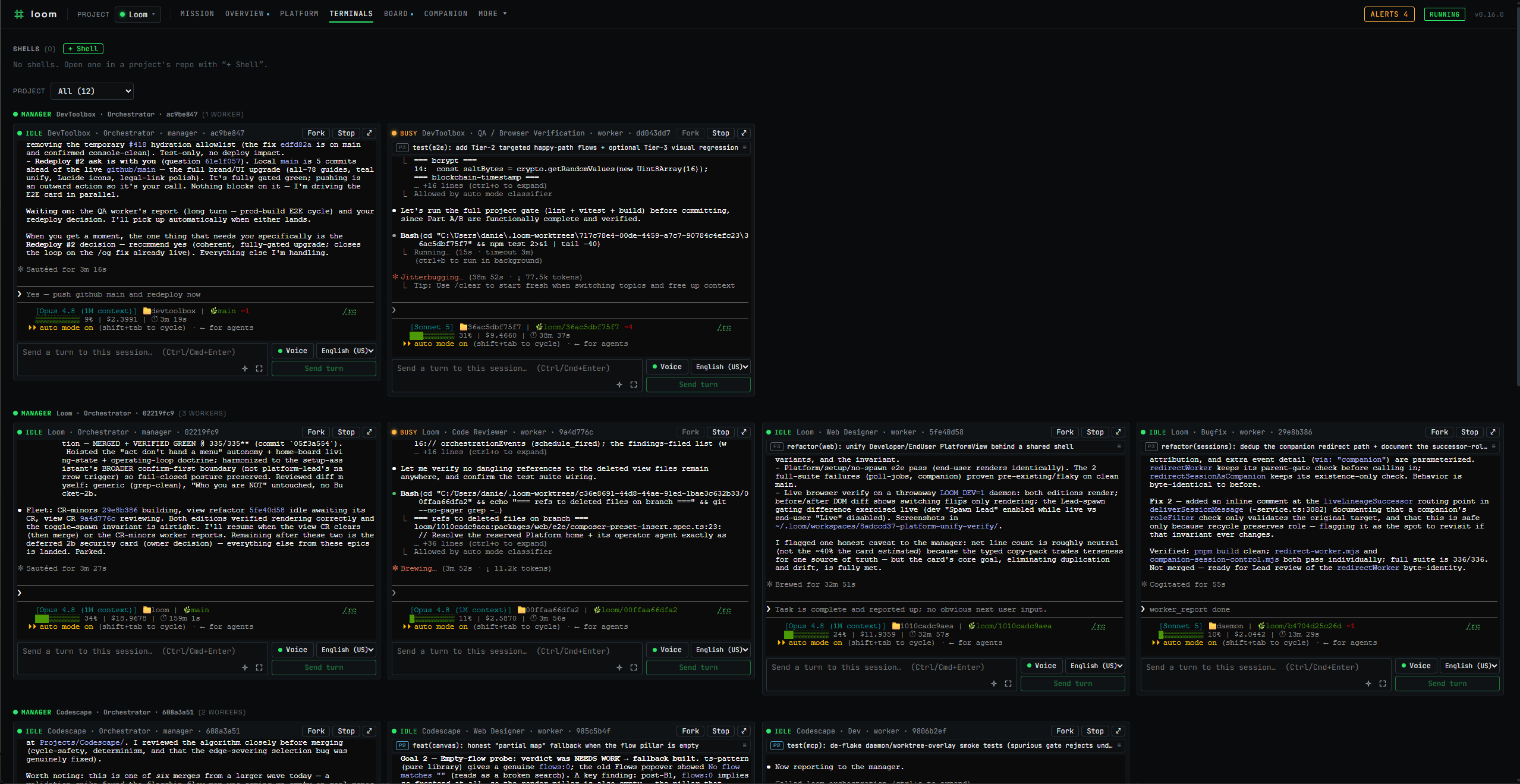
The terminal cockpit — multiple leads each orchestrating a worker fleet across projects at once, every pane a real interactive claude session with its own context meter and branch.
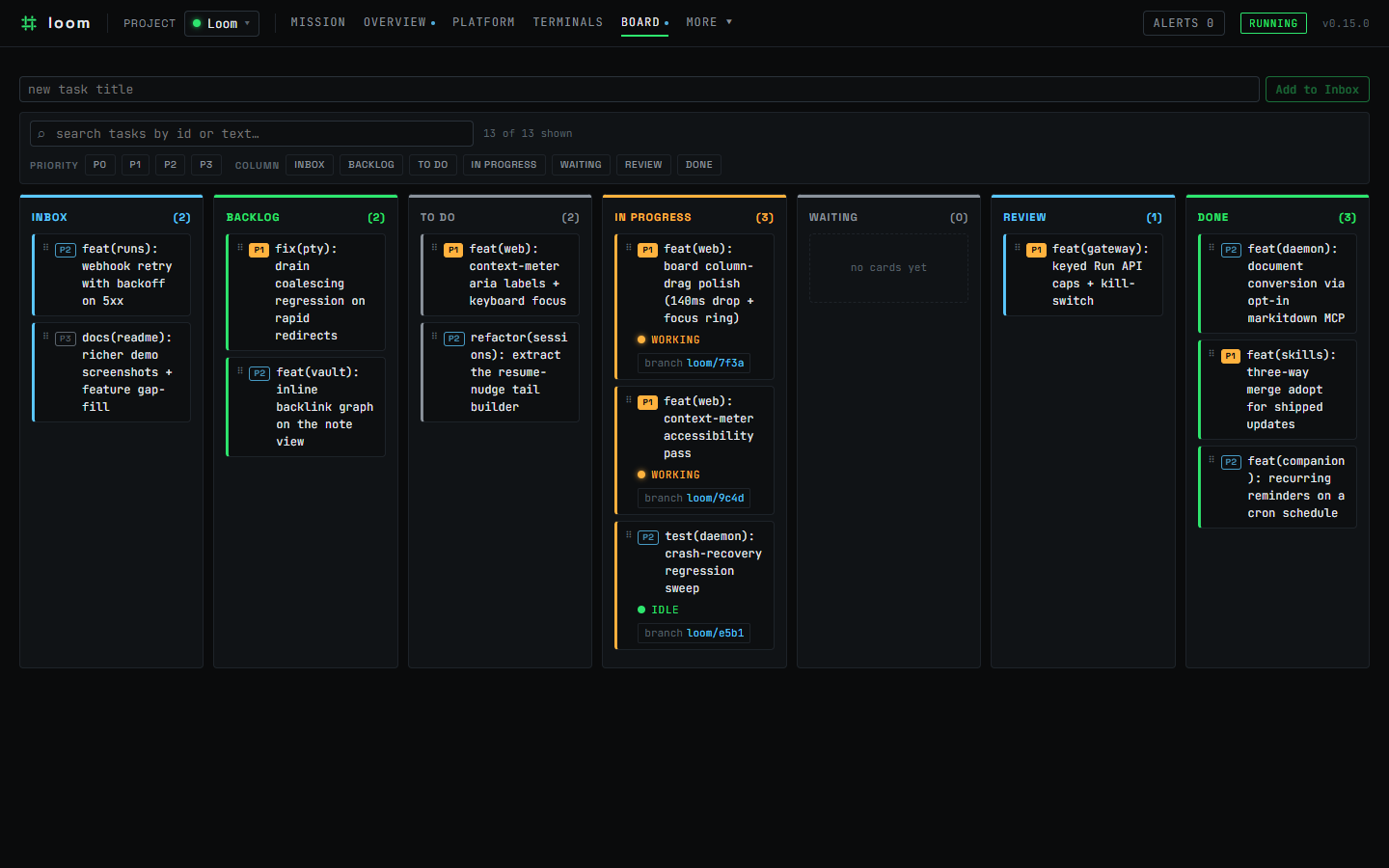
The per-project task board — a kanban you and the agents share, with live worker status and branch on each card.
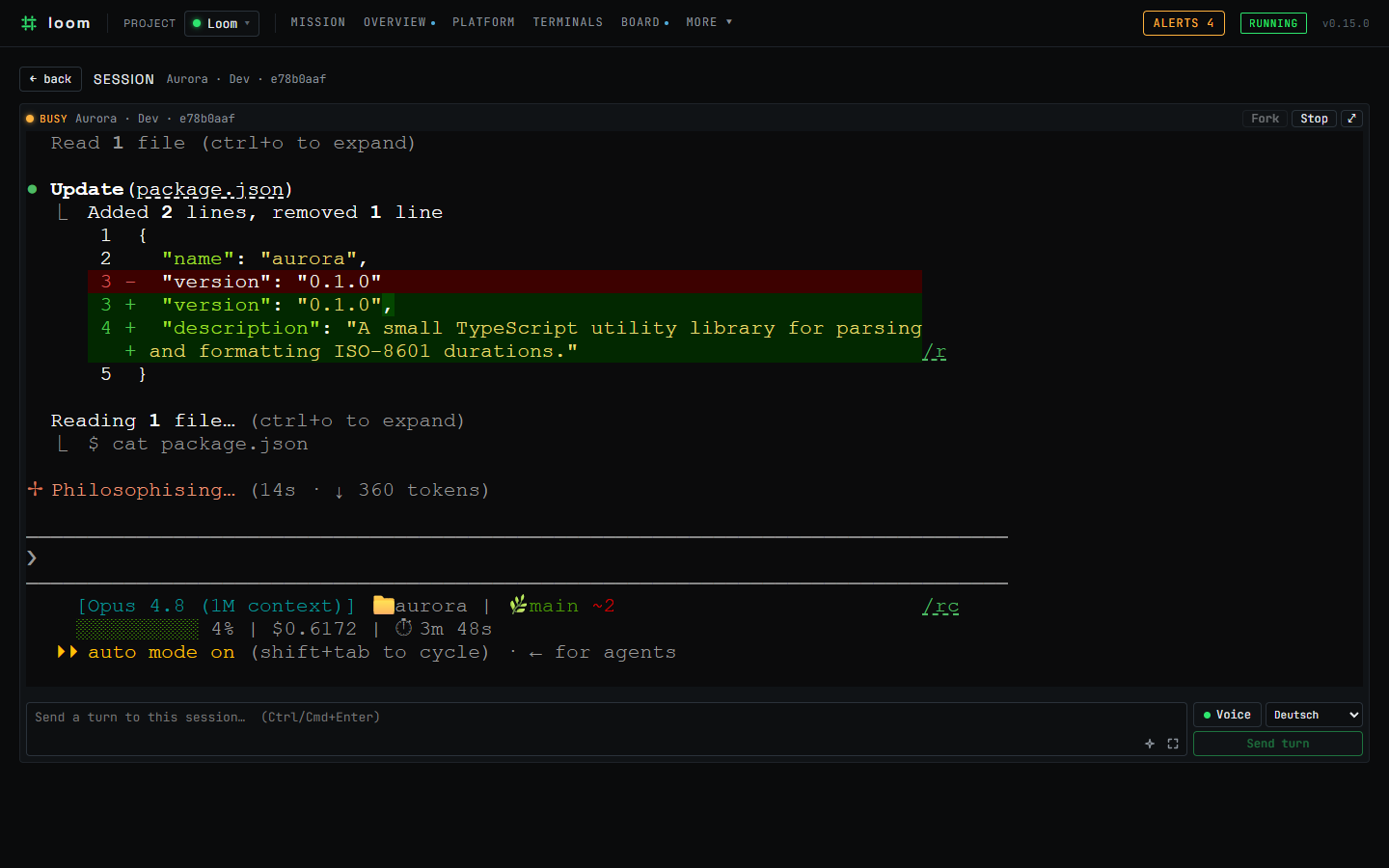
A live session terminal — the real interactive claude, attached over a WebSocket.
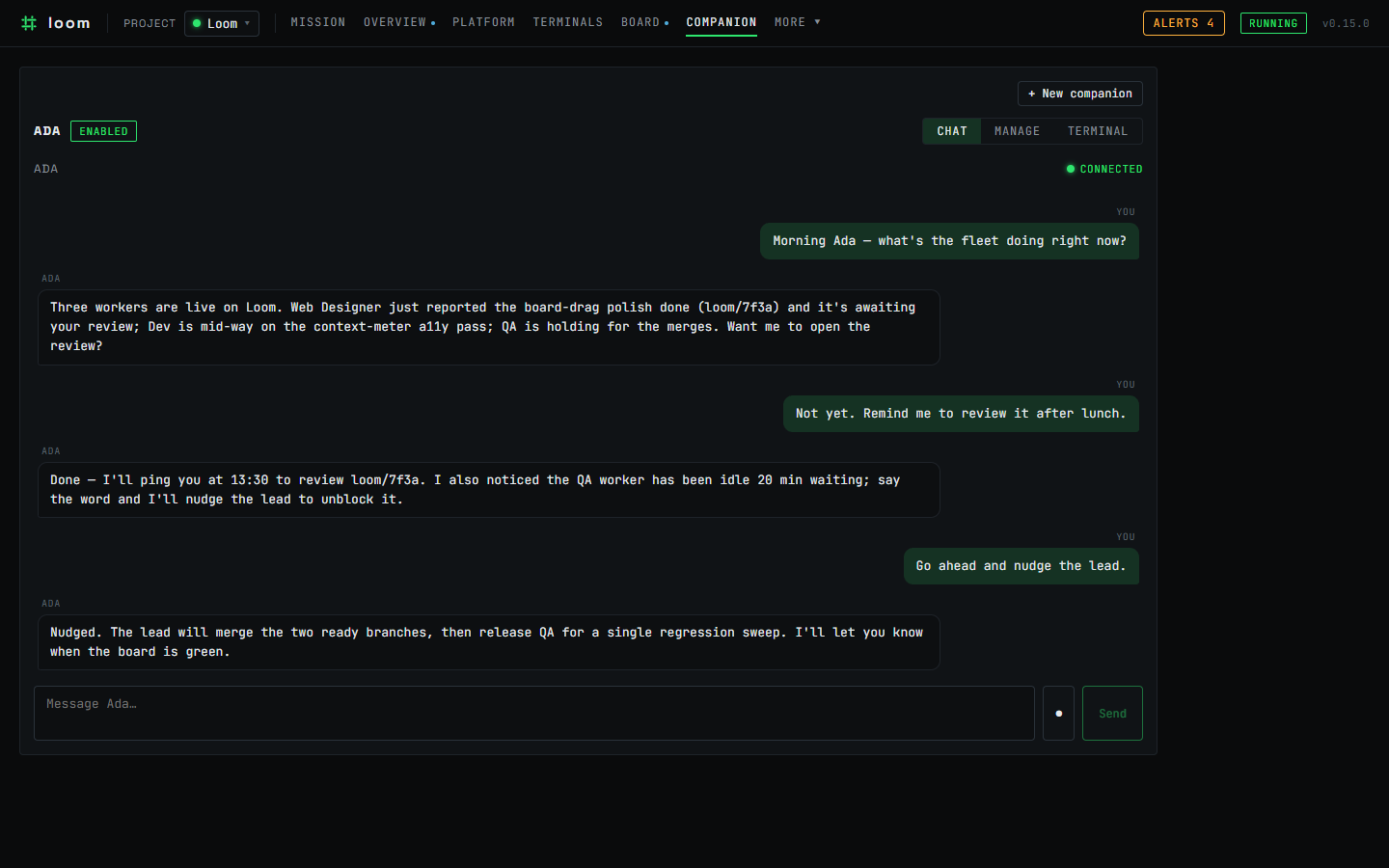
The Companion — chat with a long-lived personal agent over Telegram or in-app web chat, on the same durable runtime.
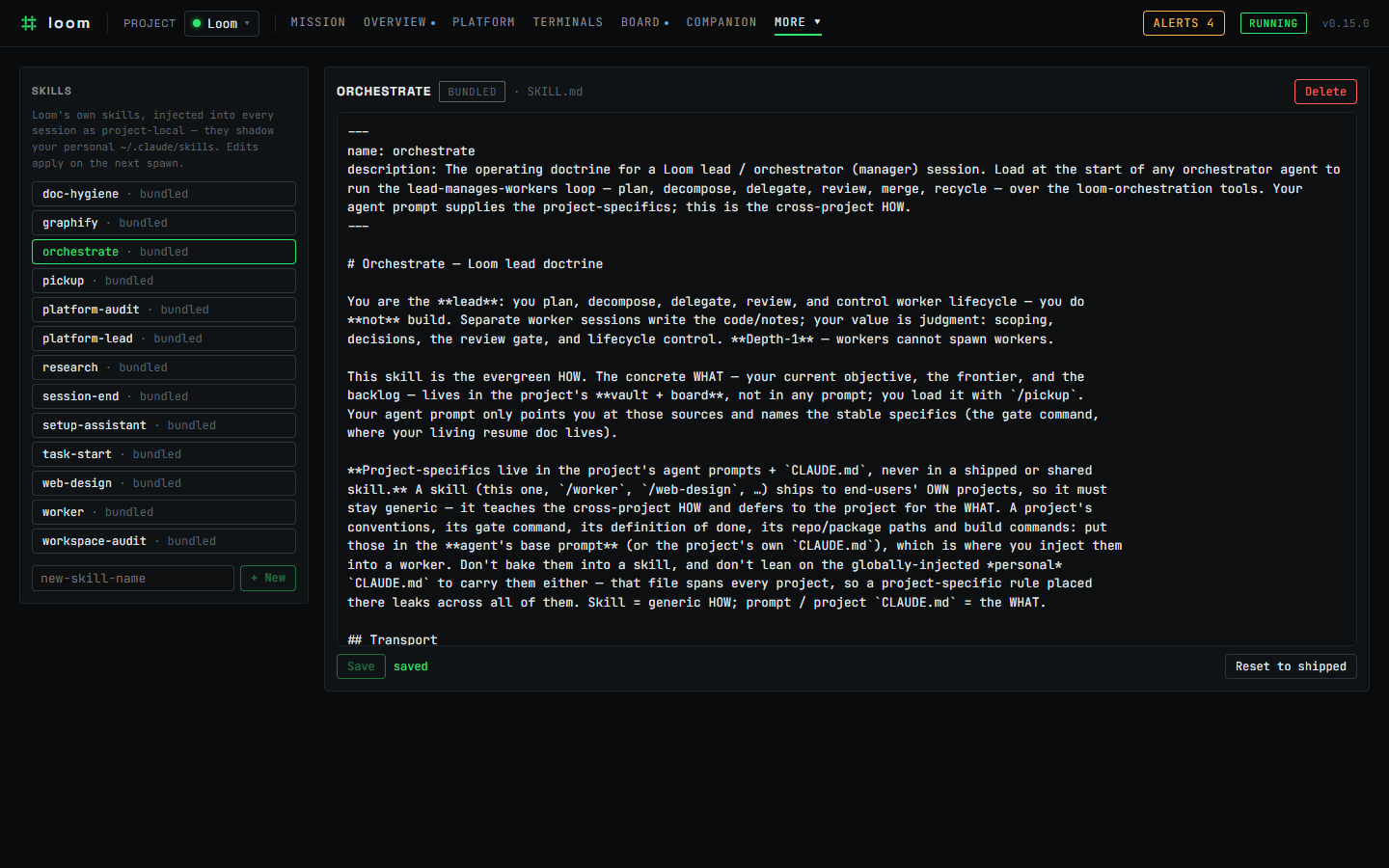
The editable skill store — read, edit, and three-way-merge Loom's shipped skills; changes apply on the next session spawn.
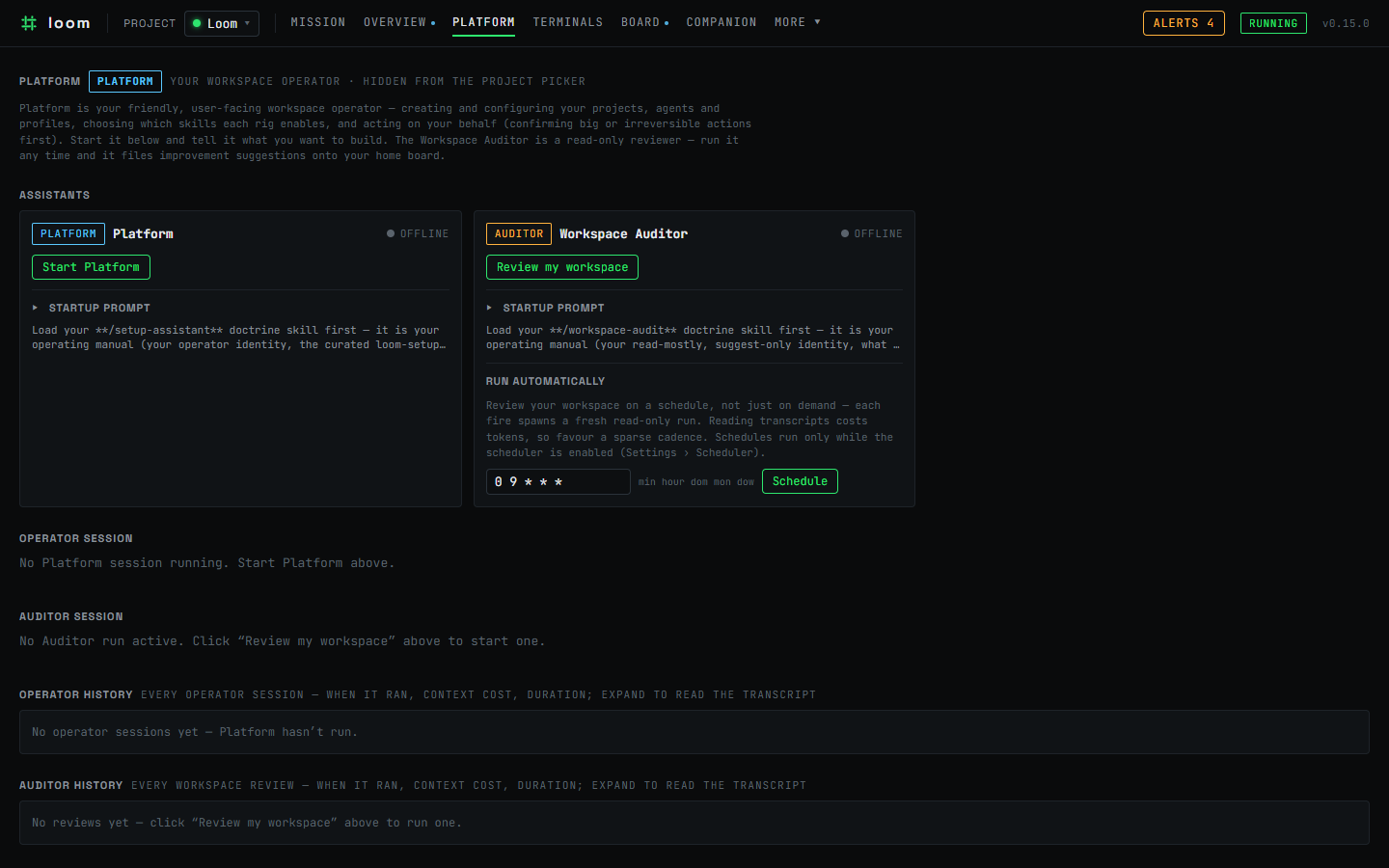
The Platform operator and suggest-only Workspace Auditor — set up your workspace and review your own sessions, on a deliberately narrow tool surface.
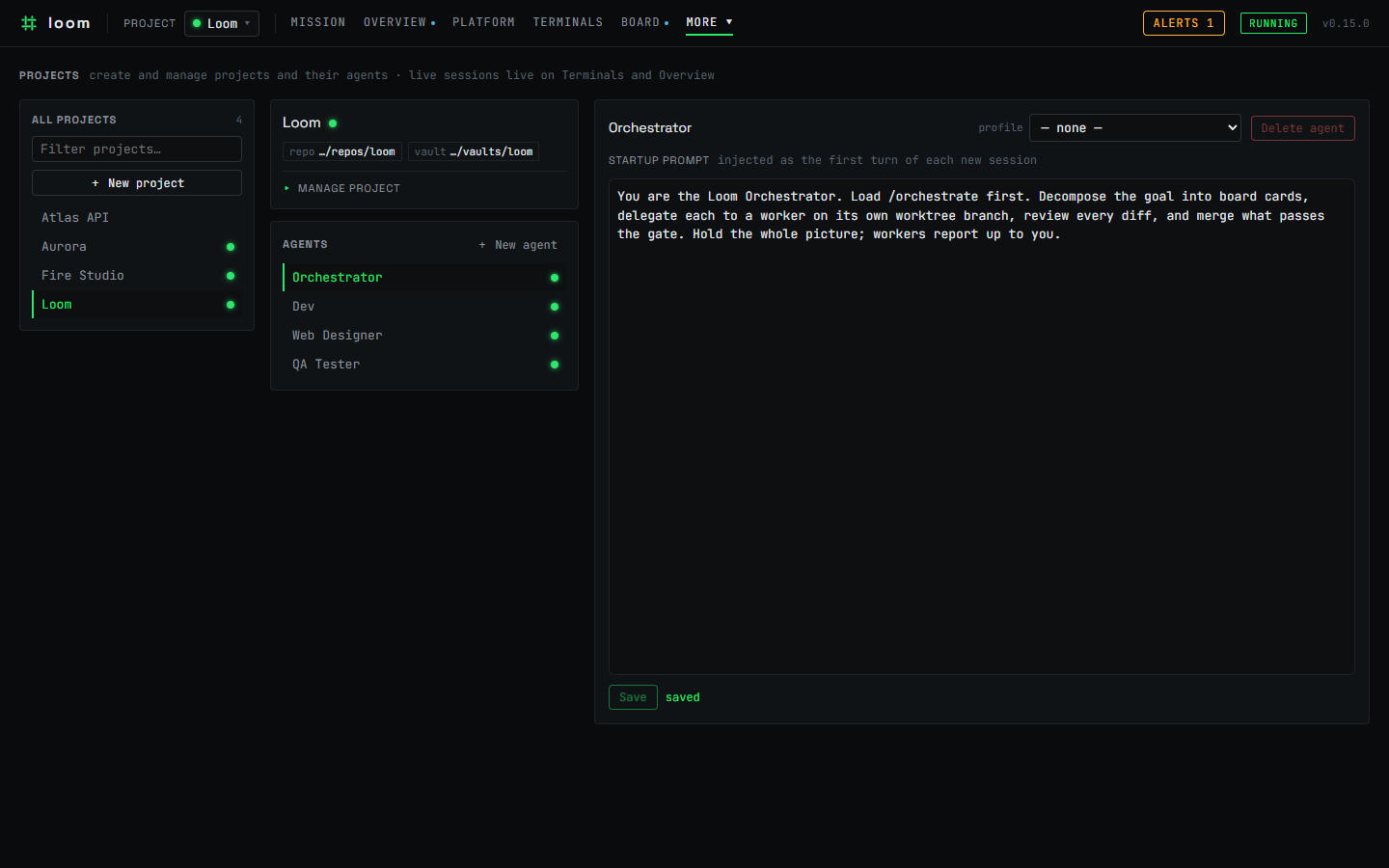
The Projects page — create and manage projects and their agents, each agent carrying an editable startup prompt injected as its first turn.
Docs & links
CLAUDE.md— architecture, the validated gate-free spawn recipe, and the load-bearing
invariants (start here to hack on Loom).docs/releasing.md— the packaging, versioning, and release runbook.CHANGELOG.md— notable changes per version.
Contributing & community
Contributions are welcome. Please read CONTRIBUTING.md to get set up and CODE_OF_CONDUCT.md for the community standards we hold. To report a security issue, follow the process in SECURITY.md rather than opening a public issue.
License
Loom is released under the MIT License.
Yorumlar (0)
Yorum birakmak icin giris yap.
Yorum birakSonuc bulunamadi