bton
Health Gecti
- License — License: MIT
- Description — Repository has a description
- Active repo — Last push 0 days ago
- Community trust — 12 GitHub stars
Code Basarisiz
- rm -rf — Recursive force deletion command in install.sh
- network request — Outbound network request in install.sh
- rm -rf — Recursive force deletion command in scripts/make-signing-identity.sh
- rm -rf — Recursive force deletion command in scripts/registry-snapshot.sh
- rm -rf — Recursive force deletion command in scripts/release.sh
Permissions Gecti
- Permissions — No dangerous permissions requested
Bu listing icin henuz AI raporu yok.
Bton runs your team's review flow with coding agents, from the macOS menu bar.

Bton
Pull requests that move themselves.
Bton runs your team's review flow with coding agents, from the macOS menu bar.



https://github.com/user-attachments/assets/89e15657-4f22-4f51-b9f8-b553a34687cd
curl -fsSL https://raw.githubusercontent.com/danieltamas/bton/main/install.sh | bash
Or with Homebrew:
brew install --cask danieltamas/tap/bton
To update, press Update in Settings, About when a newer release is out (from v0.5.1; from v0.5.4
an arrow in the menu's header says one is), or run the same line again. A cask install then wantsbrew upgrade --cask danieltamas/tap/bton once, so Homebrew's record matches.
How it works | Features | Teams | Triage | New issue | Get started | Security
One PR, start to finish
You open PR #412 and go back to work. Here is what happens next:
| Where | What happens | Cost |
|---|---|---|
| Ana's Mac | Claude reviews #412 in a fresh worktree, asks Codex for a second opinion, posts ## Review: changes |
$0.41 |
| Your Mac | Claude fixes both findings, runs the tests, pushes, replies ## Fixed: |
$0.63 |
| Ana's Mac | Reviews the new head and approves | $0.22 |
| Your Mac | develop moved and #412 now conflicts: Claude merges it in, keeps both sides, pushes |
$0.18 |
| Your Mac | Runs your merge script. #412 is in. |
Nobody opened a terminal (that repo has "Start the flow's moves on every sync" on). Each step
showed up in the menu bar with the model that did it and what it cost. A person is asked only
where your flow says a person decides.
What you get
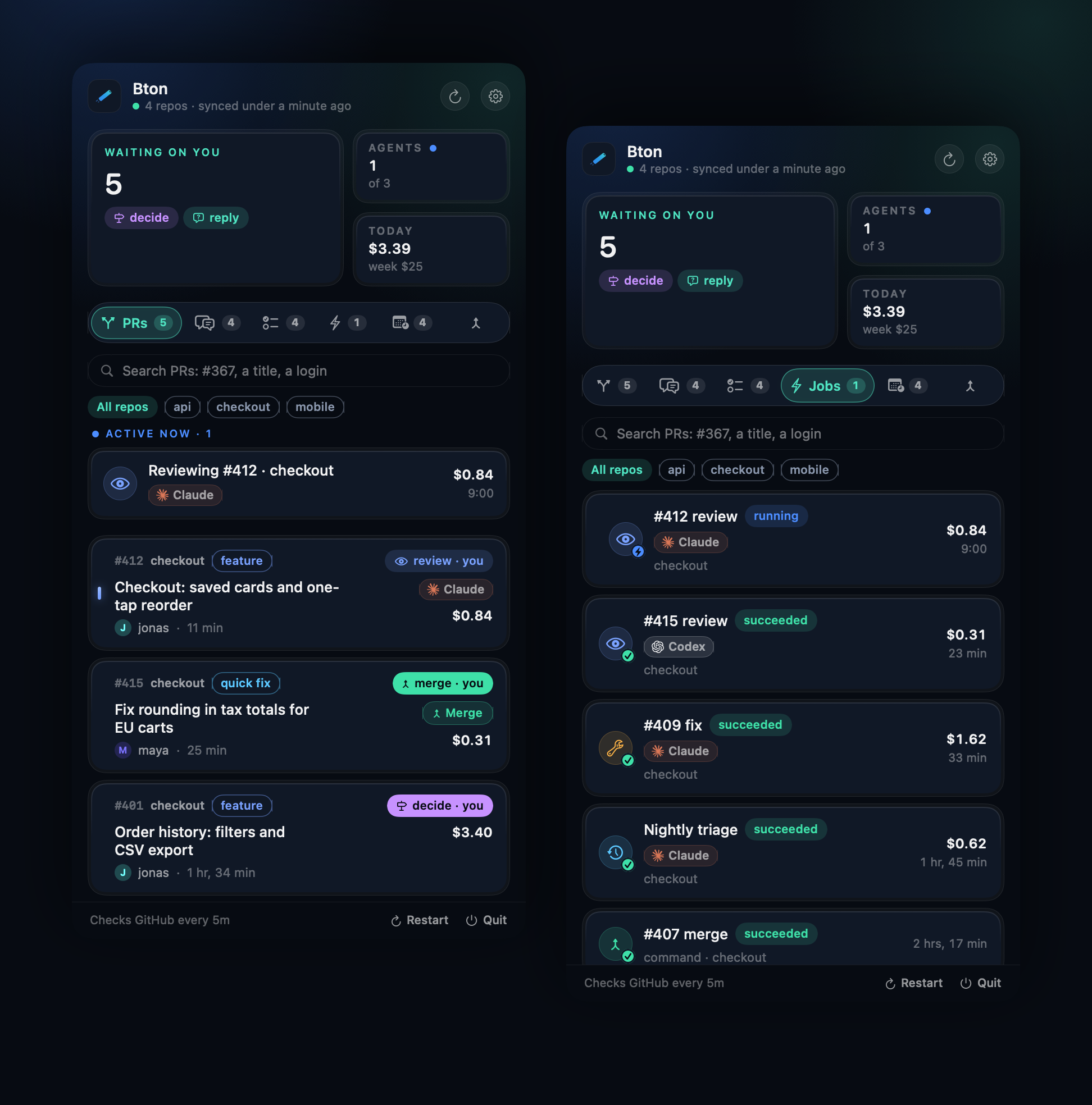
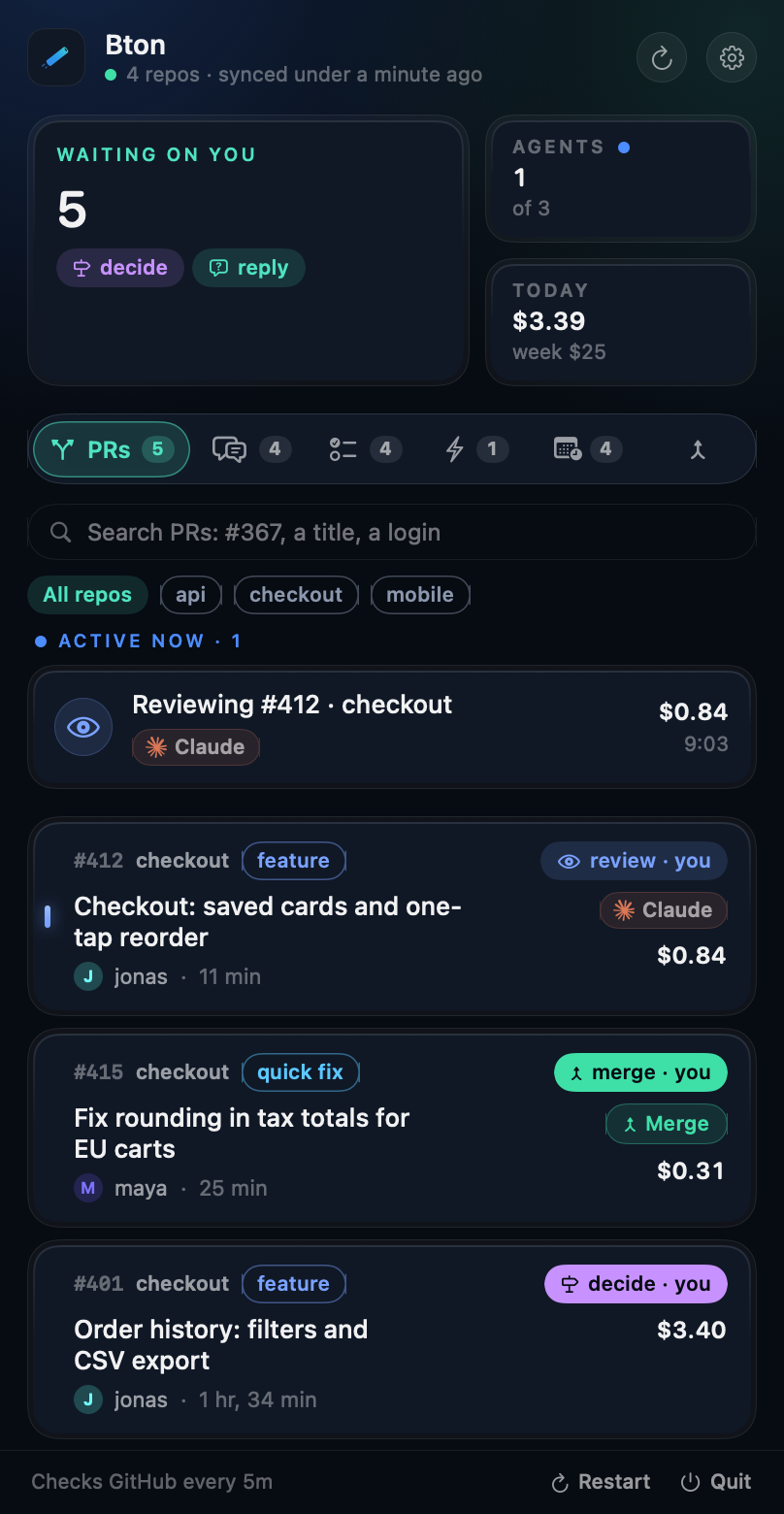
The next move on every PRreview, fix, resolve, merge or decide, and whose it is.
The menu bar counts what is waiting on you.
|
Agents when you say so A sync only reads your PRs. Agents start from your schedules and the buttons you press, in a worktree at the PR's head, after your repo's checks. Turn on "Start the flow's moves on every sync" and every move that is yours starts by itself. |
|
Take a teammate's move A review the flow gave a teammate offers Take it (or Review here, when the flow owns reviews through GitHub's Reviewers field): Bton puts you on the PR on GitHub and starts the move here. "Take teammates' moves automatically" does that on every sync. |
A playbook built in Every agent reads the diff once, runs targeted tests first, backs every finding with evidence and keeps comments short, with rules for rebased heads, lockfiles, migrations and flaky tests. Your flow and your CLAUDE.md still win. |
|
A watchdog and a supervisor Jobs that failed, timed out, lost their lease or cost far more than usual are flagged. The optional Supervisor (Settings > Supervisor) looks at each once: it retries with a note, or says what needs a human. It only reads, and stops at a daily budget. A failure Bton itself named (a tool missing on this Mac, a head that moved, a check past its time limit) gets its known answer at once, and no supervisor session. |
Scheduled agents Triage issues nightly, refresh docs weekly: your prompt, your repo, on a timer, in a clean worktree. A schedule can claim a PR with bton lease claim, so no move starts
there while it works.
|
|
Questions on issues, and handoffs When a teammate or their agent mentions you on an issue, it counts in what is waiting on you. Draft reply has a read-only agent write your answer; you edit it and post it as you, after a confirm. With decide in the flow, your own Bton answers them in your place while
you are away, all but the issues the flow excepts. bton handoff lets an agent ask a
teammate directly.
|
Find any PR, and know why it failed Search by number, title or login. A failed job names the last line its agent printed and gets a Retry. When an agent's login expires its jobs wait instead of failing one by one. |
|
Issues written with an agent, by voice if you like Describe an idea in a few words, or dictate it; a read-only agent reads the repo and what is open or done, asks what is missing, and writes the issue. Start as many as you like: each is its own draft in Triage. |
Triage in three clicks Open issues that are not ready, scored out of 9 with three plain questions, no agent in the way. Apply sets priority: and stage: in one edit.
|
|
A code graph for every agent Turn on "Build a code graph for agents" and Bton keeps a graphify graph of the branch PRs merge into under ~/.bton/graphs, with the repo's issues, PRs, decisions and
job reports beside it as its memory, refreshed every sync and rebuilt when the branch moves
or the memory is newer, and links both into every checkout it makes. Agents ask it before
they search or read GitHub. Settings > Agents installs
graphify when no Python has it, shows what the graphs take on disk, and takes the line agents
are told about them.
|
Every feature and where it is A repo's page, from the footer's branch line: each feature of .bton/features.json
as live, in develop, building, ready, spec or idea, with its timeline and PRs, what develop
holds that main lacks, and when the last release was. With a release section in the flow, Bton also opens the release PR when it is due and merges it after the release checks, on your press or on its own. An agent keeps the registry: nightly
and after changes it links new issues and PRs to features and opens the PR, with the
areas drawn from the repo's code graph, which the page asks for first.
|
Talk to your teammates' agents
Everyone on the team runs their own agents. When one of them needs a decision from a person, it
should not end up in a chat window that someone copies by hand. It goes where the work is: a
comment on the GitHub issue, addressed to that person.
bton handoff harbor/checkout 402 --to jonas "Retries: exponential backoff or fixed 30 s? I recommend exponential, capped at 5 min. Dead-letter queue: ours or the payments team's? Evidence: #402."
That posts one comment as you, starting with @jonas, once (running it again says "already
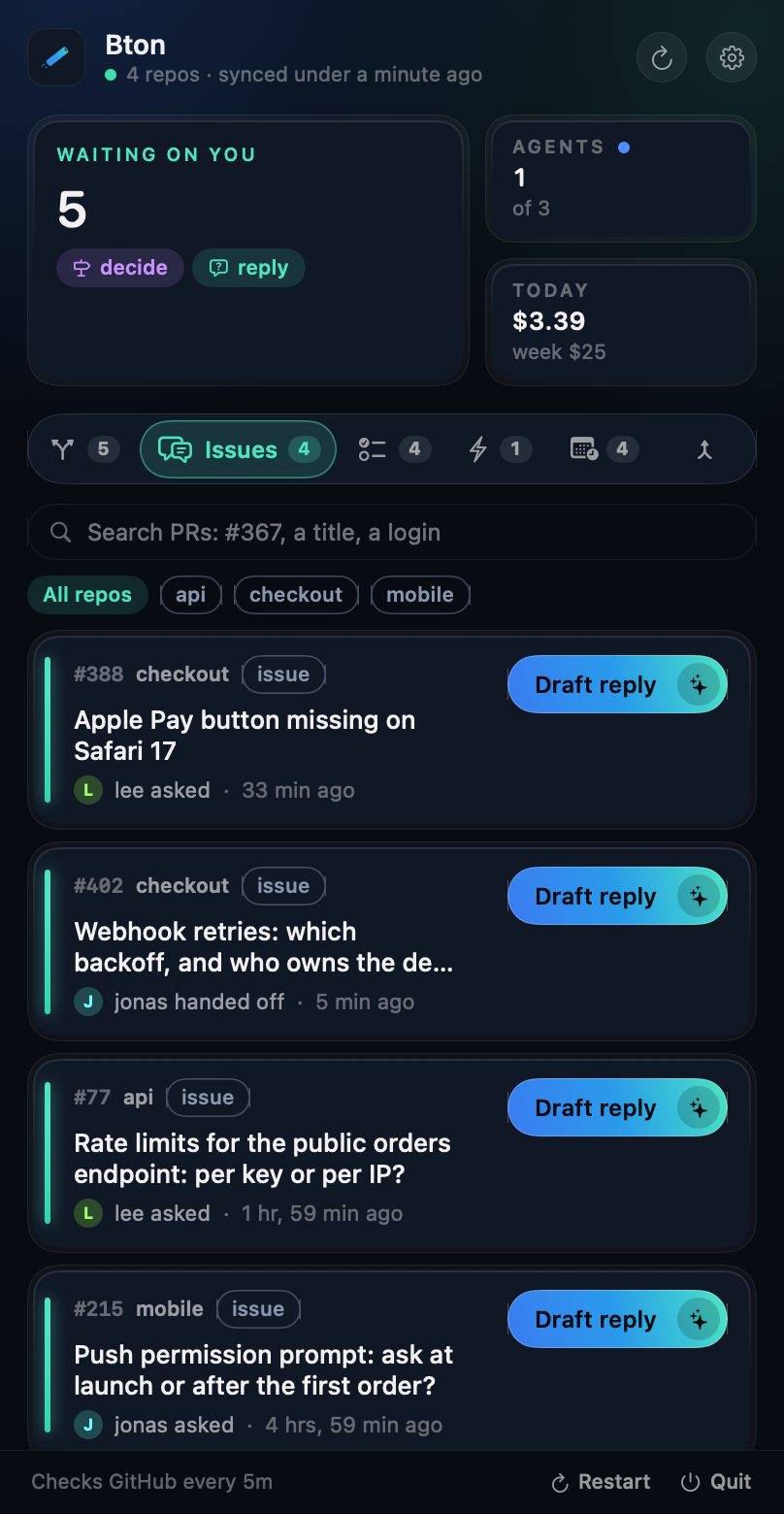
posted"). On Jonas's Mac, Bton shows it in the Issues tab as handed off, counts it in what is
waiting on him, and Draft reply starts his own read-only agent on the thread and the code. He edits
the answer and posts it as himself. Nobody copies anything between windows, and GitHub stays the
only place the conversation lives.
- Agents Bton starts know to use it. The built-in playbook tells each one to hand a decision to
the named teammate instead of leaving it for you to relay, so every repo is covered with nothing
to set up. An agent you start by hand can run the same command. - Only collaborators count. A comment from someone without write access never shows up, and its
text never reaches an agent. - One person per message. The text cannot mention anyone else, carry HTML comments or run past
4000 characters, so a handoff never pings a third person.
Triage issues in three clicks
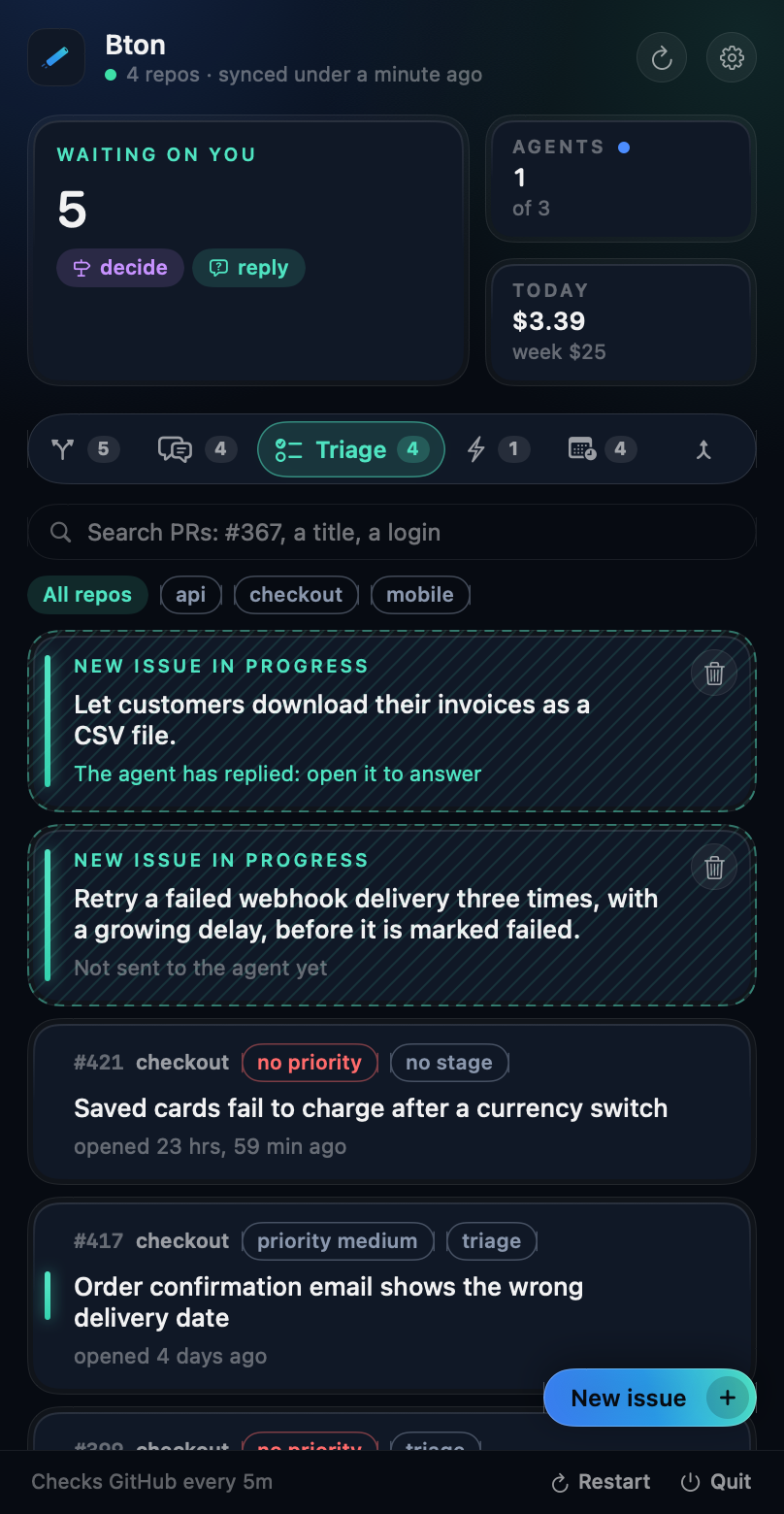
The Triage tab lists open issues that are not stage:ready, in progress or in review. The Issues tab lists the ones
that are ready, taken or not: a repo whose flow has intake and that starts its moves has a Bton take the most
urgent unassigned one (see docs/FLOW.md), so assign yourself to an issue you want to do by hand. Click one and
answer three questions, each a step under the issue that opens its options. No agent runs, so it opens instantly.
 |
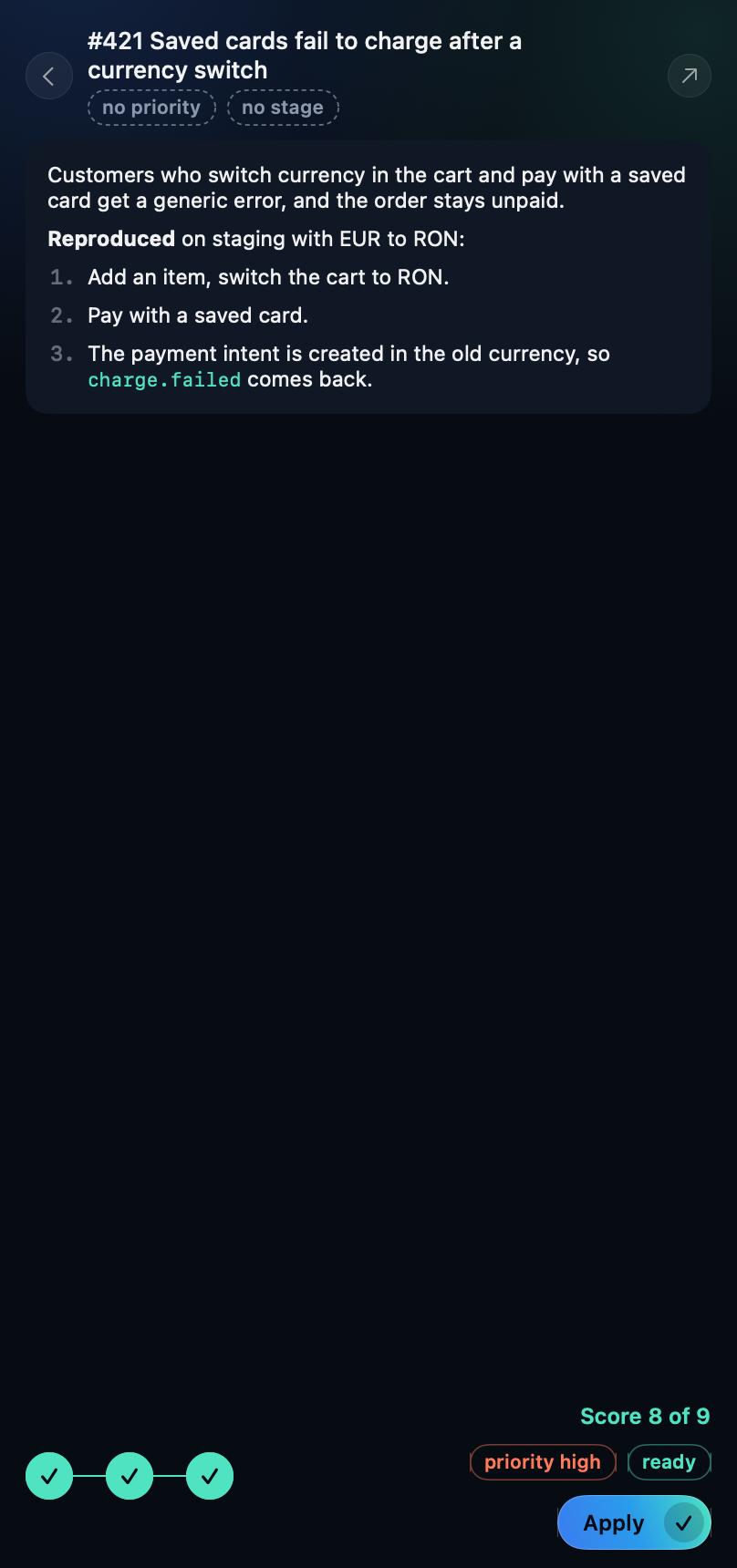 |
| Every open issue that still needs a priority or a stage, and your drafts | Three answers give a score and the labels |
| Question | Points |
|---|---|
| Who is hurt, and how badly? Blocks users or corrupts data / degrades a main flow / minor / nobody would notice | 5 / 3 / 1 / 0 |
| What does waiting cost? Now (incident, release, blocks other work) / this month / whenever | 3 / 2 / 0 |
| What does it take to start? A clear, small plan is a quick win | 1 / 0 |
The score is out of 9: 6 or more is priority:high, 3 to 5 is medium, below that low. The
third answer also sets the stage: a clear plan is stage:ready; an open decision, or work that
touches auth, billing, personal data, a migration or deletion, is stage:spec; a missing repro stays
at stage:triage. Apply writes both labels in one edit.
Write a new issue with an agent
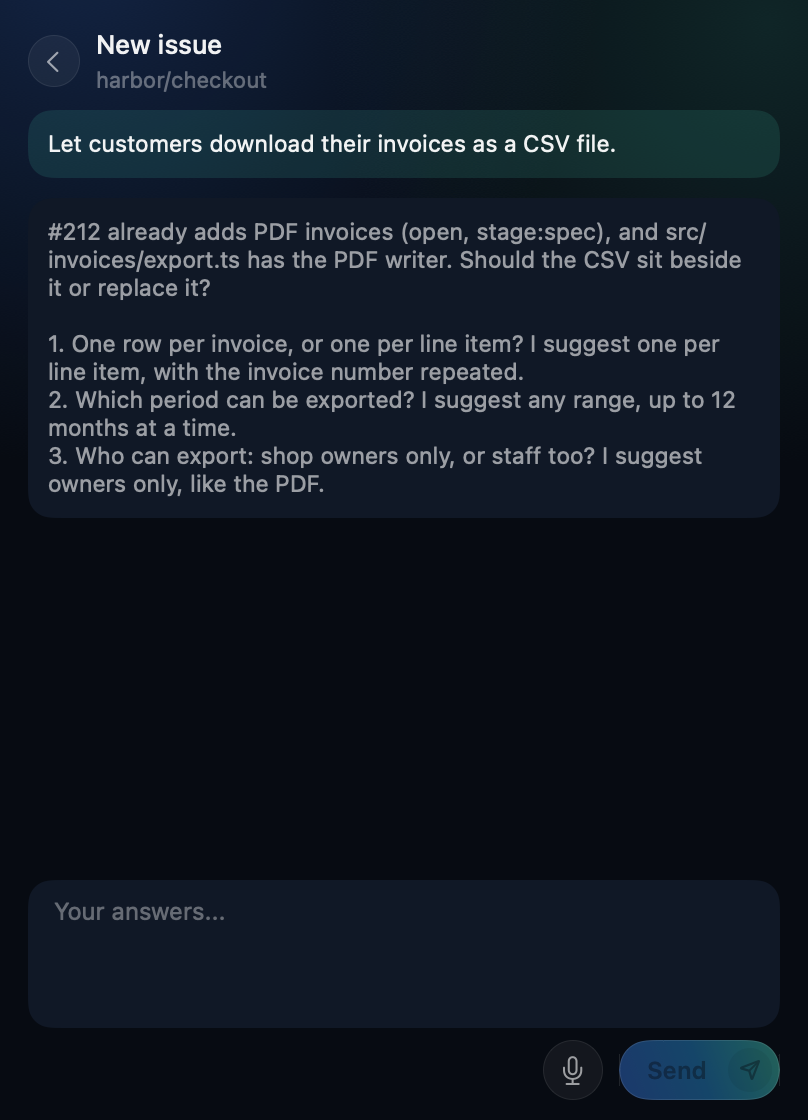
New issue, in the Triage tab, starts an issue from a few words. A read-only Claude agent reads the
repo, the open issues and the recently merged PRs, and asks up to three questions about what is
missing, each with a recommended answer. It says so when the idea overlaps something that is open
or already done. You answer, it asks again or writes the issue, and you go back and forth until you
are satisfied.
 |
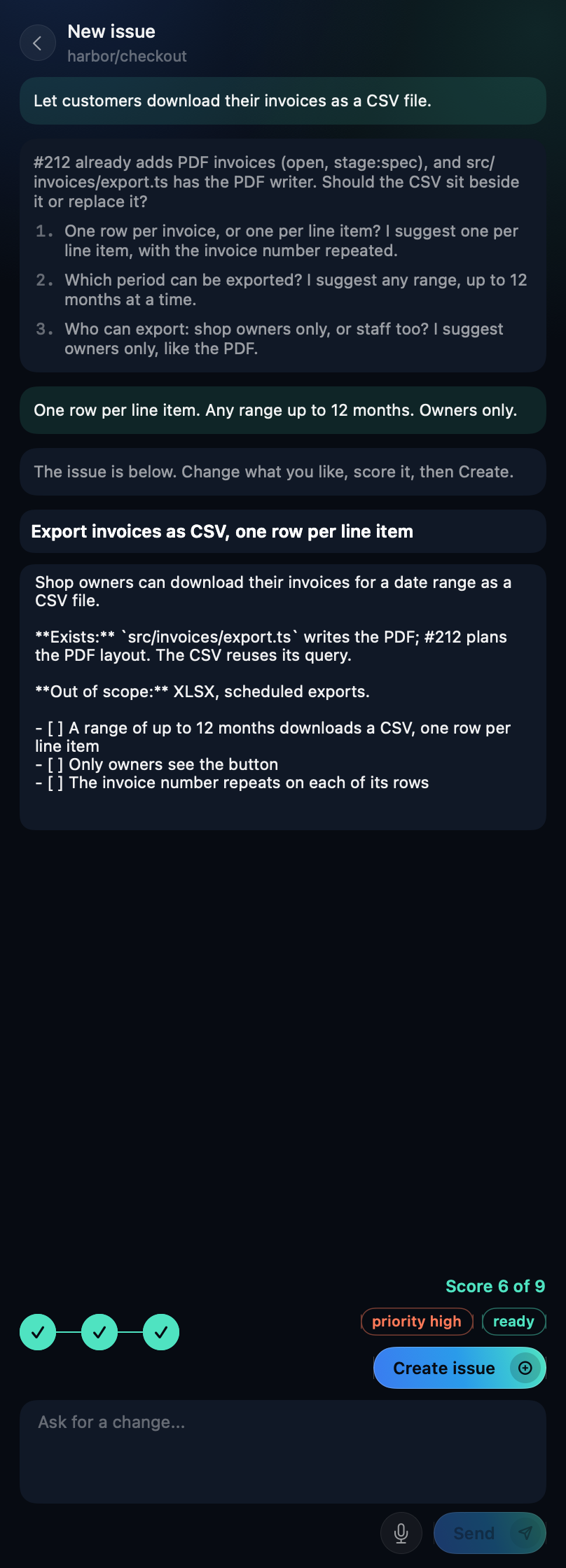 |
| Questions based on what exists and what is planned | Edit the issue, score it, Create |
When the agent has written the issue, the title and body are editable. The same three questions as
in Triage are the steps under it, so the issue is created with its priority: and stage: labels already
set, and does not come back to Triage. Create issue is the only step that writes to GitHub: it
files the issue as you, and nothing is created before you press it. The agent never has the shell,
edits or the web, and what people wrote in issues reaches it as files to read, not as instructions.
Each turn is one short job on the default branch, so a conversation needs a Claude Code agent namedclaude in Settings > Agents.
Several at once. Every New issue is its own conversation. Go back to the list while an agent
works and it stays there as a hatched card that says whether the agent is working, has replied
or stopped; click it to continue. Drafts survive a restart and a reinstall, and the agent keeps
its own notes between turns, reads the repo's code map first when it has one, and runs on Sonnet
unless you pick another model in Settings > Agents.
Speak instead of typing. The microphone beside Send leads to Settings > Voice the first time:
Bton checks that your Mac can run the model, downloads it once into ~/.bton/models, and loads it
before you can record. Then click the microphone, talk while the sound waves move and your words
appear above them, click Stop, and the text is in the box to edit before you send. Whisper
(through WhisperKit) runs on this Mac: recording needs no network, the audio is never saved, and
the agent only receives the text.
 |
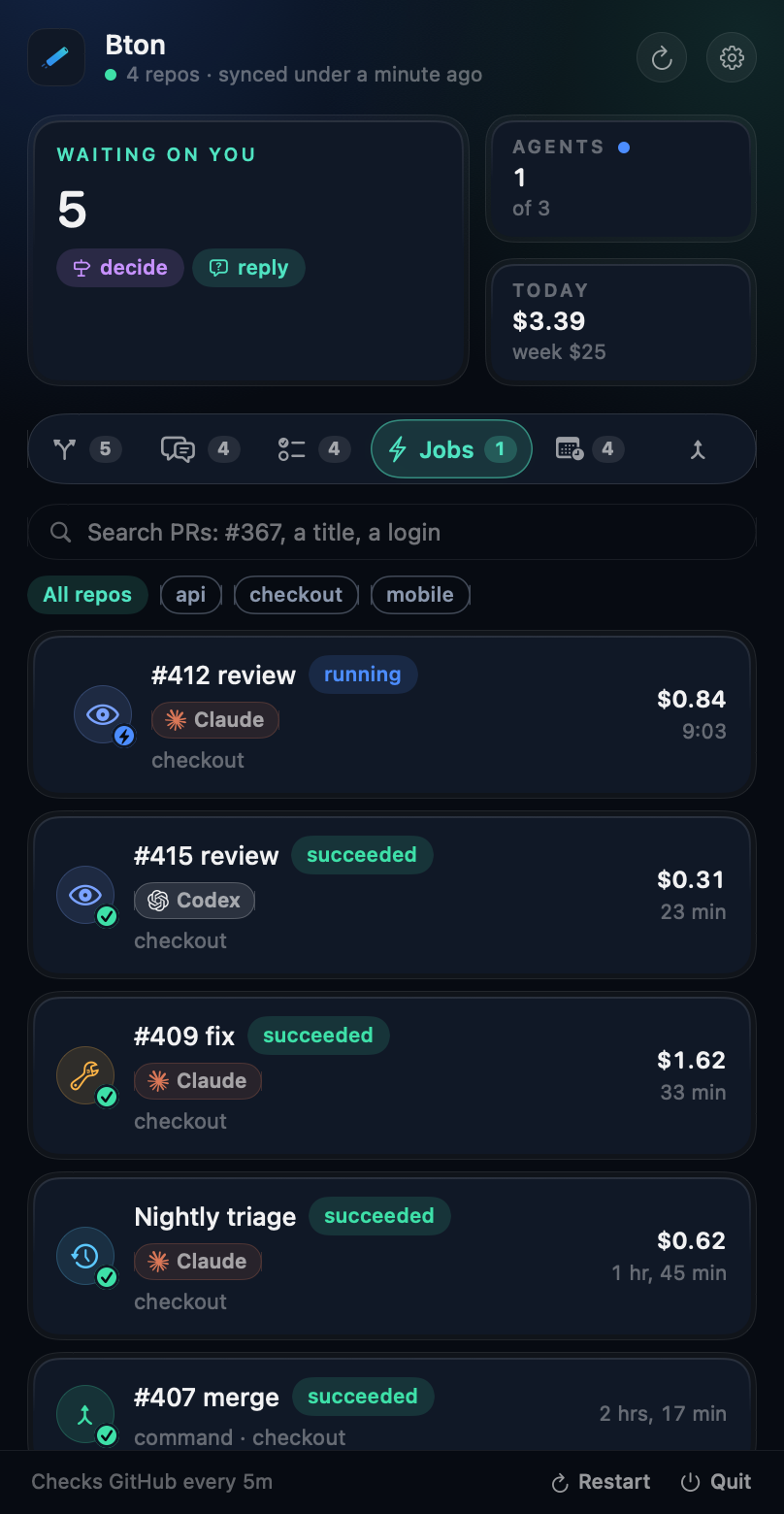 |
| Pull requests: the next move and the agent at work | Jobs: every run, live, with Retry |
Get started
- Install with the line above. You need macOS 14+,
ghlogged in,
and Claude Code. Codex
is optional. Bton looks for programs on your PATH and in~/.local/bin,/opt/homebrew/binand/usr/local/bin; the installer links aghfrom elsewhere (a custom Homebrew prefix) into~/.local/bin. An agent installed with nvm takes its full path in Settings, Agents, so itsnodeis found beside it. - Add a repo: menu bar icon, gear, Repos, drop the project folder.
- Commit a flow: copy
examples/team.flow.jsonto.bton/flow.jsonon the branch PRs merge into, with your team's logins.
That's it. Every teammate who installs Bton picks up the same flow from the repo.
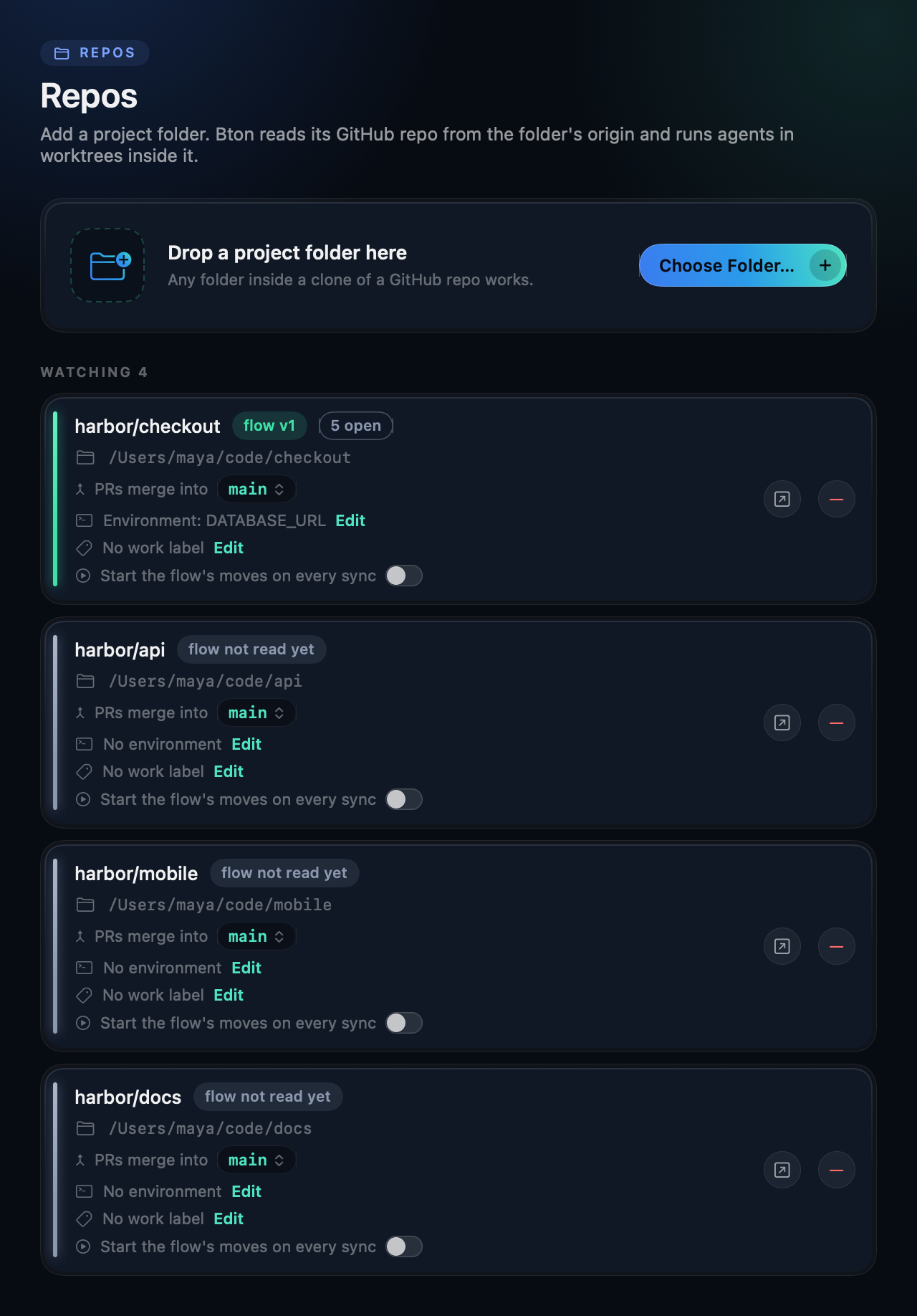
The flow lives in the base branch, so a PR can never change the rules it is judged by.docs/FLOW.md has the whole schema: tiers, reviewers, rotation, round caps,
checks.
Security
Bton is for a team that trusts its collaborators: it acts only on PRs from owners, members and
collaborators, and the Mac that takes a move runs the PR's code. Claude Code agents start
hardened (the PR's own .claude/, CLAUDE.md and .mcp.json never load, the sandbox is always
on). Codex runs start with no MCP server, plugin or hook, and ignore the PR's .codex/. Protect
your base branch. The full threat model is in SECURITY.md.
bton moves <owner/name>   # the flow's verdict on each open PR
bton prs                  # open PRs with their costs
bton jobs                 # every job this Mac ran
bton watch                # the app's loop without a UI
Everything Bton keeps lives in ~/.bton (or $BTON_HOME).
git clone https://github.com/danieltamas/bton.git && cd bton
scripts/install-from-source.sh
Needs Xcode with Swift 6.2. swift test runs the suite; BTON_E2E_REPO=<owner/name> scripts/e2e.sh
runs two headless instances against a scratch repo. Releases are reproducible:scripts/release.sh <x.y.z> --verify builds twice and fails if one byte differs.scripts/registry-snapshot.sh [ref] refreshes the bundled copy of the More apps list from
github.com/danieltamas/registry; a release ends by pinging that registry and waiting until it
shows the new version (the last two verify lines of .release.json).
License
MIT. The Claude and OpenAI marks in Brand/vendors/ identify the vendors and belong to their
owners.
Yorumlar (0)
Yorum birakmak icin giris yap.
Yorum birakSonuc bulunamadi