draw-your-font
Health Pass
- License — License: MIT
- Description — Repository has a description
- Active repo — Last push 0 days ago
- Community trust — 20 GitHub stars
Code Fail
- exec() — Shell command execution in site/demo.src.js
- child_process — Shell command execution capability in skills/draw-your-font/scripts/resolve-cli.js
- execSync — Synchronous shell command execution in skills/draw-your-font/scripts/resolve-cli.js
- fs module — File system access in skills/draw-your-font/scripts/resolve-cli.js
- fs module — File system access in src/cli.js
Permissions Pass
- Permissions — No dangerous permissions requested
No AI report is available for this listing yet.
Turn a photo of your handwriting into a real font (TTF/WOFF/WOFF2) - free, open source, no uploads. Node CLI + Claude Code skill.
draw-your-font
Turn a photo of your handwriting into a real font (TTF/WOFF/WOFF2) - free, open source, no uploads, no credits.
Draw your alphabet on paper. Take a photo. Get your font.
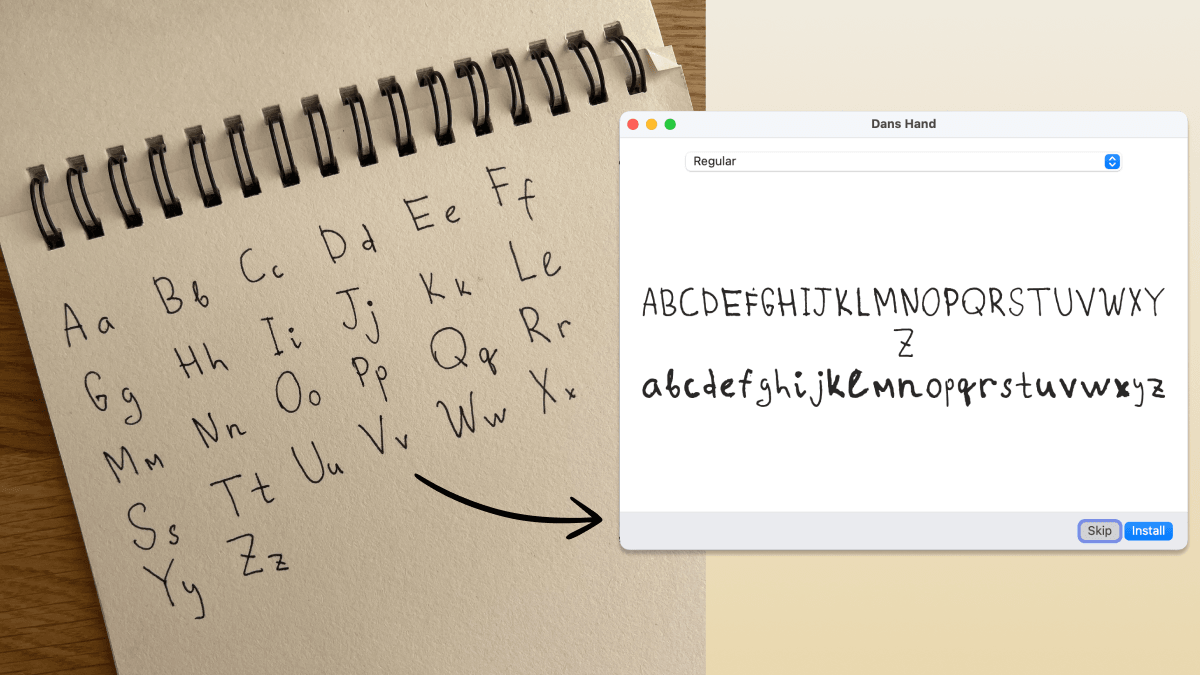
This is a real one-shot result: dim light, spiral binding, page shadow. One photo in, installable font out.
Use it as a Claude Code skill (the fun way)
npx skills add danilo-znamerovszkij/draw-your-font
Then in Claude Code, invoke the skill and hand it your photo:
/draw-your-font "here's a photo of my handwriting - make my font" (drag the photo into the terminal)
Claude finds your letters in the photo, labels them with vision, builds the
font, shows you a preview, and critiques its own work. Iterate by talking:
- "make it rounder" / "a bit bolder"
- "the g looks bad" - it shows you the crop and fixes or asks for a re-shoot
- "give me woff2 + css for my website"
- "how readable is it?" - a legibility score and the two worst letter pairs
No photo yet? Say "give me a font template" and you get a printable PDF grid:
write your alphabet with a dark pen, photograph the pages, and hand them back.
Messy freeform photos work too. Napkins, notebooks, spiral binding, bad
lighting: that's what the vision step is for.
Everything runs locally on your machine. Your handwriting never leaves it.
Use it as a CLI (no AI at all)
The skill is a thin layer over a deterministic npm CLI. It works on its own
when you can tell it what you wrote:
# freeform photo, you know the order you wrote in:
npx draw-your-font make photo.jpg --chars "ABCabc" --name "My Hand"
# → MyHand.ttf - double-click, install, done.

# best quality: print a template, fill it, photograph:
npx draw-your-font template -o template.pdf --charset minimal   # or: spanish
npx draw-your-font make page1.jpg page2.jpg --charset minimal --name "My Hand"
Pure npm, zero system dependencies: no FontForge, no ImageMagick, no potrace
binary. Works on macOS / Linux / Windows wherever Node ≥ 18 runs.
CLI reference
| Command | What it does |
|---|---|
template |
printable A4 PDF grid (--charset minimal|spanish) |
segment <photos…> |
find letters → crops + numbered contact sheet + blobs.json |
build |
labeled crops → font (--labels / --chars / --charset) |
make <photos…> |
segment + build in one shot |
preview |
render any text with the built font |
Refinement flags: --smooth 0..2 (rounder curves), --weight=-2..2
(thinner/bolder), --formats ttf,woff,woff2,css (web-ready + @font-face
snippet). Run draw-your-font --help for everything.
How it works
photo ──► adaptive threshold ──► blob detection ──► label (Claude / you / template order)
      ──► potrace vectorize ──► shared em-square metrics ──► TTF/WOFF/WOFF2 + preview
The craft is in the metrics step: every character has a vertical band in a
shared 1000-unit em square (cap height, x-height, descender depth), so yourg hangs below the line and your o stays small. That's what makes it feel
like a font instead of a ransom note. Vectorization is potrace, the same
engine inside FontForge and Inkscape. AI never draws your letters; it only
finds, labels, and judges them.
FAQ
Who owns the font? You. 100%, commercial use included. It's your
handwriting.
Why is this free when Calligraphr charges $8/month? Their cost is
servers and a browser editor. Here your machine does the work and the agent
is the editor.
Kerning, ligatures, letter randomization? v2. The pipeline (fonttoolscalt) is planned; the current output is a clean single-variant font.
License
MIT. Draw something.
Reviews (0)
Sign in to leave a review.
Leave a reviewNo results found