Synabun
Health Gecti
- License — License: Apache-2.0
- Description — Repository has a description
- Active repo — Last push 0 days ago
- Community trust — 10 GitHub stars
Code Basarisiz
- exec() — Shell command execution in hooks/claude-code/post-plan.mjs
- process.env — Environment variable access in hooks/claude-code/post-plan.mjs
- network request — Outbound network request in hooks/claude-code/post-plan.mjs
- process.env — Environment variable access in hooks/claude-code/pre-websearch.mjs
- network request — Outbound network request in hooks/claude-code/pre-websearch.mjs
- process.env — Environment variable access in hooks/claude-code/prompt-submit.mjs
- network request — Outbound network request in hooks/claude-code/prompt-submit.mjs
- execSync — Synchronous shell command execution in hooks/claude-code/session-start.mjs
- process.env — Environment variable access in hooks/claude-code/session-start.mjs
- network request — Outbound network request in hooks/claude-code/session-start.mjs
- process.env — Environment variable access in hooks/claude-code/stop.mjs
- process.env — Environment variable access in lib/paths.js
- process.env — Environment variable access in mcp-server/dist/config.js
Permissions Gecti
- Permissions — No dangerous permissions requested
Bu listing icin henuz AI raporu yok.
Hi, this is Synabun. A little bit of this and a little bit of that. Have fun with it, hope it helps someone is some way.

SynaBun
Persistent vector memory for AI assistants — powered by SQLite and local embeddings.





Any Claude Code instance (or MCP-compatible AI tool) can connect to SynaBun and retain knowledge across sessions through semantic vector search. Memories are stored in a local SQLite database with built-in vector search — no external services, no API keys, no Docker.
Screenshots
Neural Interface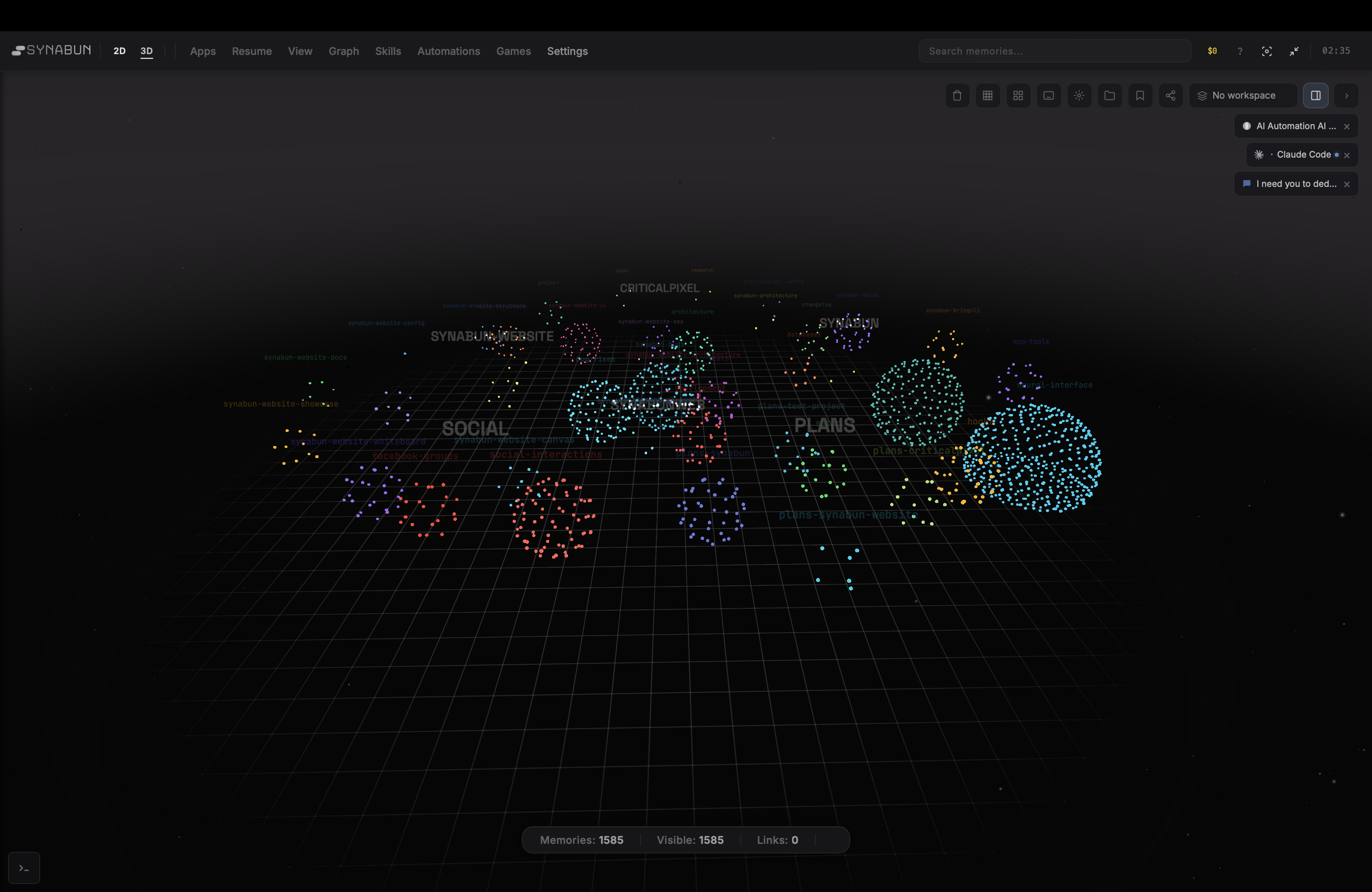
Interactive 3D force-directed graph — memories as nodes, relationships as edges |
Claude Code Skin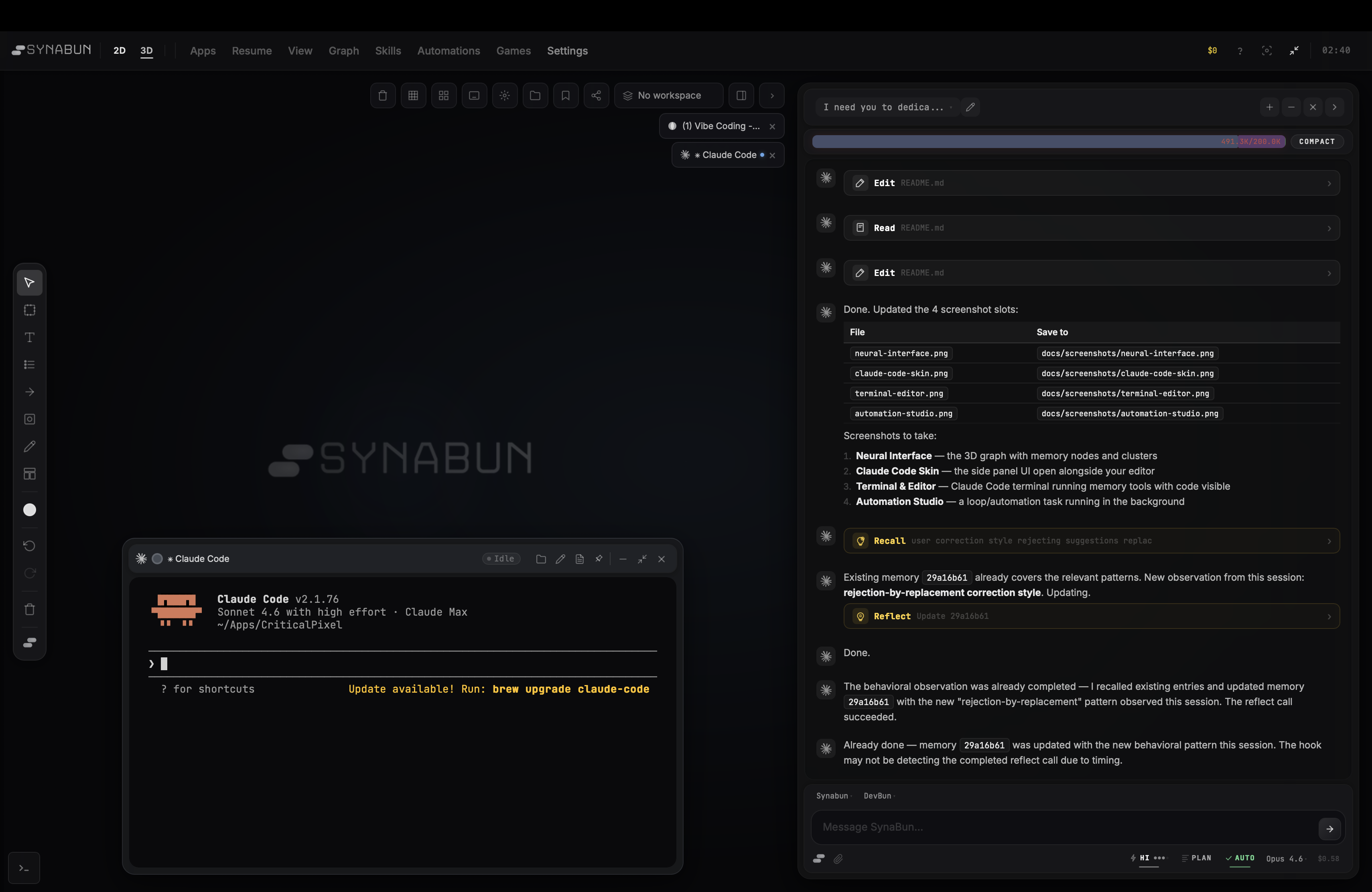
Side panel UI for browsing and managing memories alongside your editor |
Terminal & Editor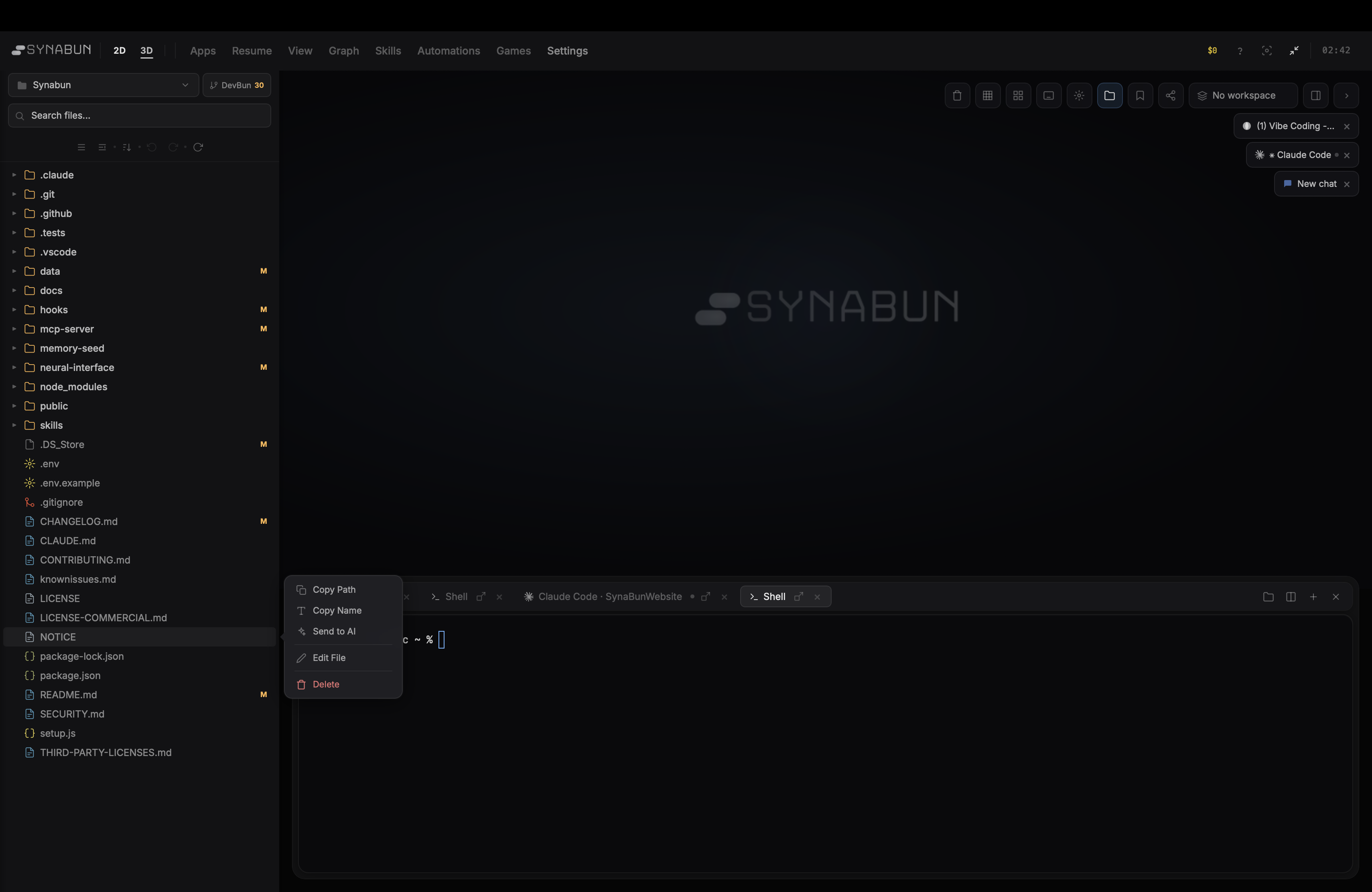
Memory tools running directly in your terminal alongside code |
Automation Studio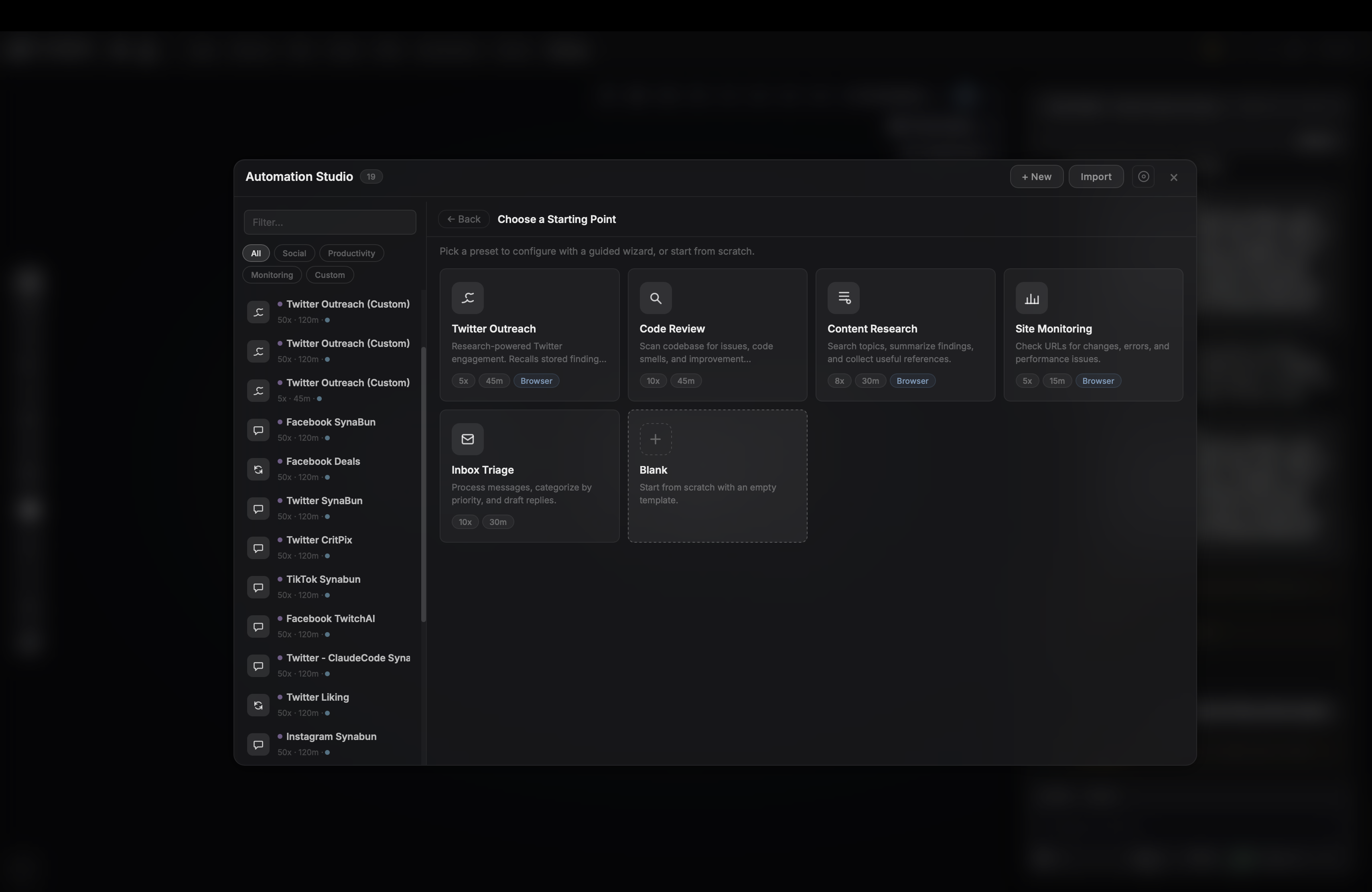
Autonomous background loops — set a task and let it run |
Features
- Semantic Search — find memories by meaning, not keywords, using cosine similarity
- Multi-Project — single collection serves all projects with automatic project detection and cross-project recall
- Smart Relevance — time decay (90-day half-life), project boost (1.2x), and access frequency scoring
- User-Defined Categories — hierarchical categories with prescriptive routing descriptions; dynamic schema refresh without server restart
- Neural Interface — interactive 3D force-directed graph visualization at
localhost:3344 - Local Embeddings — built-in Transformers.js (
all-MiniLM-L6-v2, 384 dims) — no API key or internet needed after first run - Onboarding Wizard — guided setup through the Neural Interface UI
- Trash & Restore — soft-delete with full restore capability; trash management via Neural Interface
- Memory Sync — SHA-256 file hash tracking detects when related source files change, flagging stale memories
- OpenClaw Bridge — read-only integration overlays OpenClaw workspace memories as ephemeral nodes in the 3D graph
- Category Logos — upload custom logos for parent categories, rendered on sun nodes in the 3D visualization
- Backup & Restore — export and import SQLite database snapshots via the Neural Interface
- Claude Code Hooks — 7 lifecycle hooks automate memory recall, storage, and session indexing
- User Learning — autonomous observation of user communication patterns, preferences, and behavioral singularity across sessions
- Claude Code
/synabunCommand — single slash command hub with interactive menu for brainstorming, auditing, health checks, and memory search - Leonardo AI Integration — 4 browser-based MCP tools for AI image and video generation via Leonardo.ai — no API key needed, full UI automation via Playwright with the
/leonardoskill for guided creation
Table of Contents
- Screenshots
- Quick Start
- Architecture
- MCP Tools
- Neural Interface
- Usage
- Memory Categories
- Importance Scale
- How It Works
- Configuration
- Claude Code Hooks
- Claude Code Skills
- CLAUDE.md Integration
- Multi-Project Support
- Known Limitations
- Troubleshooting
- Cost
- File Structure
- License
Documentation
| Document | Description |
|---|---|
| Website Docs | Full documentation on synabun.ai |
| README | Quick start, architecture, configuration |
| Usage Guide | Detailed usage patterns, tool quirks, best practices |
| API Reference | Neural Interface REST API (55+ endpoints) |
| Hooks Guide | Claude Code hooks: 7 lifecycle hooks for memory automation |
| Contributing | Bug reports, feature requests, and forking guide |
| Security | Security model and vulnerability reporting |
| Changelog | Version history |
Contributions: We welcome bug reports and feature requests. Pull requests are not accepted. See CONTRIBUTING.md for details.
Quick Start
Prerequisites
- Node.js 22.5+ (for built-in
node:sqlite)
No Docker, no API keys, no external services required.
Optional: Build tools for terminal featuresThe Neural Interface includes an embedded terminal powered by node-pty (native addon). If build tools are missing, npm install will warn but continue — everything else works fine.
| Platform | Install |
|---|---|
| macOS | xcode-select --install |
| Linux | sudo apt install build-essential python3 |
| Windows | VS Build Tools 2022 with "Desktop development with C++" |
Install via npm
npm install -g synabun
synabun
Or clone from GitHub
git clone https://github.com/danilokhury/Synabun.git
cd Synabun
npm start
Either method will:
- Check prerequisites (Node.js 22.5+)
- Install all dependencies
- Build the MCP server
- Create the SQLite database (
data/memory.db) - Download the embedding model (~23MB, cached permanently)
- Launch the Neural Interface
- Open the onboarding wizard in your browser
1. Build the MCP server
cd mcp-server
npm install
npm run build
Note: Always use
npm run build(notnpx tsc) — npx can install an unrelatedtscpackage instead of using the local TypeScript compiler.
2. Register with your AI tool
Add to your project's .mcp.json:
{
  "mcpServers": {
    "SynaBun": {
      "command": "node",
      "args": ["/path/to/Synabun/mcp-server/run.mjs"]
    }
  }
}
Or register globally for all projects:
claude mcp add SynaBun -s user \
  -- node "/path/to/Synabun/mcp-server/run.mjs"
No environment variables needed — SQLite and local embeddings work out of the box.
3. Verify
Restart Claude Code, then run /mcp. You should see the SynaBun server with 72 tools listed.
The .mcp.json path must match the platform where Claude Code is running:
| Platform | Path format | Example |
|---|---|---|
| Windows | Forward slashes | D:/Apps/Synabun/mcp-server/run.mjs |
| WSL | Linux mount paths | /mnt/d/Apps/Synabun/mcp-server/run.mjs |
| Linux/macOS | Native paths | /home/user/Apps/Synabun/mcp-server/run.mjs |
Common pitfall: If Claude Code runs on Windows but you use a WSL-style path like /mnt/j/..., Node.js will resolve it to J:\mnt\j\... (prepending the drive letter), which doesn't exist. Always use Windows-native paths when Claude Code runs on Windows.
Architecture
AI Assistant (any project)
    │
    │  MCP Protocol (stdio or HTTP)
    │
┌───┴──────────────────────────┐
│   SynaBun MCP Server         │  Node.js 22.5+ / TypeScript
│                              │
│  72 tools across 9 groups:   │
│  Memory (8), Browser (39),   │
│  Whiteboard (5), Cards (5),  │
│  Discord (8), Leonardo (4),  │
│  Git (1), Loop (1),          │
│  TicTacToe (1)               │
│                              │
│  Transformers.js             │  Local embeddings
│  all-MiniLM-L6-v2            │  (384 dims, ~23MB model)
│                              │
│  node:sqlite                 │  Built-in SQLite
│  data/memory.db              │  (vectors as Float32 BLOBs)
│                              │
│  Playwright                  │  Browser automation
│  (Chromium)                  │  (persistent sessions)
└──────────────────────────────┘
Everything runs in a single Node.js process — no external services, no Docker, no API keys.
MCP Tools (72)
SynaBun exposes 72 tools via the Model Context Protocol, organized into 9 groups:
Memory (8 tools)
| Tool | Purpose | Key Parameters |
|---|---|---|
remember |
Store a new memory | content, category, project, tags, importance, subcategory |
recall |
Semantic search across memories | query, category, project, tags, limit, min_importance |
reflect |
Update an existing memory | memory_id (full UUID), content, importance, tags, category |
forget |
Soft-delete a memory (moves to trash) | memory_id |
restore |
Restore a trashed memory | memory_id |
memories |
List recent memories or get stats | action (recent, stats, by-category, by-project) |
sync |
Detect stale memories via file hash comparison | project (optional filter) |
category |
Create, update, delete, or list categories | action (create, update, delete, list), name, description, parent |
Browser (39 tools)
18 general browser automation tools + 21 social media extraction tools, all powered by Playwright with persistent Chromium sessions.
General automation:browser_navigate, browser_click, browser_fill, browser_type, browser_hover, browser_select, browser_press, browser_evaluate, browser_snapshot, browser_content, browser_screenshot, browser_session, browser_go_back, browser_go_forward, browser_reload, browser_wait, browser_scroll, browser_upload
Social media extraction:browser_extract_tweets, browser_extract_fb_posts, browser_extract_tiktok_videos, browser_extract_tiktok_search, browser_extract_tiktok_studio, browser_extract_tiktok_profile, browser_extract_wa_chats, browser_extract_wa_messages, browser_extract_ig_feed, browser_extract_ig_profile, browser_extract_ig_post, browser_extract_ig_reels, browser_extract_ig_search, browser_extract_li_feed, browser_extract_li_profile, browser_extract_li_post, browser_extract_li_notifications, browser_extract_li_messages, browser_extract_li_search_people, browser_extract_li_network, browser_extract_li_jobs
Whiteboard (5 tools)
| Tool | Purpose |
|---|---|
whiteboard_read |
View whiteboard contents |
whiteboard_add |
Place new items on the whiteboard |
whiteboard_update |
Modify items on the whiteboard |
whiteboard_remove |
Delete items from the whiteboard |
whiteboard_screenshot |
Capture the whiteboard as an image |
Cards (5 tools)
| Tool | Purpose |
|---|---|
card_list |
See all open memory cards |
card_open |
Open a memory card on screen |
card_close |
Dismiss open memory cards |
card_update |
Move, resize, pin, or compact cards |
card_screenshot |
Capture open cards as an image |
Discord (8 tools)
| Tool | Purpose |
|---|---|
discord_guild |
Server info, channels, members, roles, audit log |
discord_channel |
Create, edit, delete channels and set permissions |
discord_role |
Create, edit, delete roles, assign/remove from members |
discord_message |
Send, edit, delete, pin, react, bulk delete, list messages |
discord_member |
Member info, kick, ban, unban, timeout, nickname |
discord_onboarding |
Welcome screen, rules, verification, onboarding prompts |
discord_webhook |
Create, edit, delete, list, execute webhooks |
discord_thread |
Create, archive, unarchive, lock, delete threads |
Automation (1 tool)
| Tool | Purpose |
|---|---|
loop |
Run, stop, or check autonomous background tasks |
Leonardo AI (4 tools)
Browser-based AI image and video generation via Leonardo.ai. No API key needed — all tools automate the Leonardo.ai web UI directly via Playwright.
| Tool | Purpose |
|---|---|
leonardo_browser_navigate |
Navigate to specific Leonardo.ai pages (home, library, image editor, video, upscaler, blueprints, realtime canvas, models) |
leonardo_browser_generate |
Fill the prompt and click Generate — configure UI settings (model, style, dimensions, motion controls) beforehand using generic browser tools |
leonardo_browser_library |
View or search the Leonardo.ai generation library |
leonardo_browser_download |
Capture the current Leonardo.ai page as a screenshot to see generation results |
Tip: Use the
/leonardoskill in Claude Code for an expert-guided creation experience with a 7-phase video prompter, 6-phase image prompter, model advisor with decision matrices for 30+ models, curated prompt library, and style guide with motion controls and camera combos.
Neural Interface
SynaBun includes a 3D visualization UI for browsing and managing memories.
Start it:
cd neural-interface
npm start
Then open http://localhost:3344
What you get:
- Interactive force-directed graph — memories as nodes, relationships as edges
- Click nodes to inspect, edit, or delete memories
- Semantic search bar (press
/to focus) - Category sidebar with filtering, hierarchy editing, and custom logos
- Drag nodes to pin them in 3D space
- Trash management — view, restore, or permanently purge deleted memories
- Memory Sync — detect stale memories whose source files have changed (SHA-256 hash comparison)
- Backup & Restore — export and import database snapshots
- OpenClaw Bridge — overlay OpenClaw workspace memories as read-only ephemeral nodes
- Graphics quality presets (Low, Medium, High, Ultra)
- Onboarding wizard for first-time setup
- Category export — download all memories in a category as Markdown
The Neural Interface also serves as the admin panel for category management, hook installation, skill management, and MCP registration — all from a single web UI.
Usage
Storing memories
Format content in Markdown for readability:
remember({
  content: `## Redis Price Cache Configuration

**TTL:** 1 hour (3600 seconds)
**Location:** \`orchestratorSingleton.ts\`

**Note:** Increasing TTL improves performance but delays price updates.`,
  category: "project",
  importance: 7,
  tags: ["redis", "cache", "pricing"],
  subcategory: "architecture"
})
Searching memories
recall({
  query: "how does the price caching work",
  limit: 5
})
Results include similarity score, importance, age, and full content. Filter by category, project, tags, or minimum importance.
Browsing and stats
memories({ action: "stats" })                              // Counts by category and project
memories({ action: "recent", limit: 10 })                  // Most recent
memories({ action: "by-category", category: "learning" })  // Filter by category
memories({ action: "by-project", project: "myapp" })       // Filter by project
Updating memories
reflect({
  memory_id: "8f7cab3b-644e-4cea-8662-de0ca695bdf2",  // Full UUID required
  importance: 9,
  add_tags: ["critical"]
})
Deleting and restoring memories
// Soft-delete (moves to trash)
forget({ memory_id: "8f7cab3b-644e-4cea-8662-de0ca695bdf2" })

// Undo — restore from trash
restore({ memory_id: "8f7cab3b-644e-4cea-8662-de0ca695bdf2" })
Detecting stale memories
// Check which memories have outdated file references
sync({ project: "my-project" })
// Returns: list of memories whose related_files have changed since last update
The sync tool compares SHA-256 hashes of files referenced in related_files against stored checksums. Use it to find memories that may need updating after code changes.
For detailed usage patterns and best practices, see the Usage Guide.
Memory Categories
Categories are fully user-defined, stored per-connection in mcp-server/data/custom-categories-{connId}.json. There are no hardcoded defaults. Manage them via MCP tools or the Neural Interface.
How Claude Decides Where to Store Memories
Category descriptions are routing instructions that Claude reads every time it calls remember. Claude reads ALL category descriptions from the tool schema and picks the best match.
You create categories with descriptions
        ↓
buildCategoryDescription() assembles them into a hierarchical guide
        ↓
The guide is embedded in the MCP tool schema (Zod .describe())
        ↓
Claude reads the guide when calling remember/recall/reflect
        ↓
Claude picks the category whose description best matches the memory
Descriptions refresh dynamically — when you change a description via MCP tools (category_update), the tool schemas rebuild and Claude sees the update immediately via notifications/tools/list_changed. No server restart needed.
Writing Effective Descriptions
Descriptions should be prescriptive rules, not vague labels:
| Quality | Example |
|---|---|
| Bad | "Pricing and stores" |
| Good | "ONLY for deal/pricing memories: store imports, price comparisons, Gamivo/YuPlay/Steam pricing. Never put project bugs here." |
| Bad | "Bug fixes" |
| Good | "Bug fixes, root cause analysis, error resolutions. Must be about actual code bugs — not feature requests or ideas." |
Tips:
- Be explicit about boundaries — say what does NOT belong as much as what does
- Reference other categories by name — "use deals for pricing, use bug-fixes for bugs"
- List concrete examples — "Gamivo, YuPlay, Steam pricing data"
- Keep it under ~200 chars — Claude reads all descriptions at once, brevity helps
Parent Categories
Parent categories group related children into visual clusters. They affect how Claude sees the hierarchy:
[criticalpixel] (parent) — All CriticalPixel memories go here
  bug-fixes = Bug fixes, root cause analysis, error resolutions for CP code
  databases = Database schemas, queries, migrations, Supabase config
deals = ONLY deal/pricing memories: store imports, price comparisons...
memory-system = MCP server architecture, SQLite config, embedding pipeline...
Create parents via MCP tools:
category_create({ name: "my-project", description: "All memories for my-project" })
category_update({ name: "bug-fixes", parent: "my-project" })
Or via the Neural Interface sidebar — click the Parent button, then drag categories onto it.
Dynamic Schema Refresh
category_create / category_update / category_delete
  → refreshCategorySchemas()
    → invalidateCategoryCache()
    → tool.update({ paramsSchema: ... })
    → SDK sends notifications/tools/list_changed
      → Claude re-fetches tool list → sees updated descriptions
Importance Scale
| Score | Meaning | When to use |
|---|---|---|
| 1-2 | Trivial | Temporary workarounds, minor preferences |
| 3-4 | Low | Common patterns, routine configs |
| 5 | Normal | Standard decisions (default) |
| 6-7 | Significant | Important patterns, non-obvious fixes |
| 8-9 | Critical | Hard-won bug fixes, key architecture decisions |
| 10 | Foundational | Core architecture, security rules, owner preferences |
Memories with importance 8+ are immune to time-based relevance decay.
How It Works
Embedding and storage
When remember is called, the content text is embedded locally via Transformers.js (all-MiniLM-L6-v2) which returns a 384-dimensional normalized vector. This vector (stored as a Float32Array BLOB), along with the payload (content, category, tags, timestamps, etc.), is inserted into the SQLite memories table.
Semantic search
When recall is called, the query is embedded the same way, then cosine similarity is computed in JavaScript against all stored vectors. Results are re-ranked with:
- Time decay — 90-day half-life (older memories score lower, unless importance >= 8)
- Project boost — memories from the current project get a 1.2x score multiplier
- Access boost — frequently recalled memories get a small relevance increase
SQLite schema
The database stores memories, session chunks, and trash in a single memory.db file. Columns are indexed on category, project, importance, and created_at for fast filtered queries.
Access tracking
Every time a memory is returned by recall, its accessed_at timestamp and access_count are updated (fire-and-forget, non-blocking).
Configuration
Environment variables
SynaBun works with zero configuration by default. All settings are optional:
# Optional overrides
SQLITE_DB_PATH=/custom/path/to/memory.db   # Default: data/memory.db
MEMORY_DATA_DIR=/custom/data/dir           # Default: mcp-server/data/
NEURAL_PORT=3344                           # Neural Interface port (default: 3344)
SETUP_COMPLETE=true

# API keys (optional — only needed for specific integrations)
DISCORD_BOT_TOKEN=your-token-here          # Discord server management
| Variable | Description |
|---|---|
SQLITE_DB_PATH |
Path to SQLite database file (default: data/memory.db) |
MEMORY_DATA_DIR |
Data directory for runtime files (default: mcp-server/data/) |
NEURAL_PORT |
Neural Interface server port (default: 3344) |
DISCORD_BOT_TOKEN |
Discord bot token for server management tools |
Set these in the .env file at the project root, or let SynaBun use the defaults.
Embeddings
SynaBun uses local embeddings via Transformers.js — no API key or internet connection needed (after the initial ~23MB model download).
| Property | Value |
|---|---|
| Model | Xenova/all-MiniLM-L6-v2 |
| Dimensions | 384 |
| Runtime | ONNX (via @huggingface/transformers) |
| Cache | ~/.cache/huggingface/ (permanent, auto-downloaded on first use) |
| Cost | Free |
The model runs entirely in-process — no external service calls, no API keys, no network dependency after first download.
Claude Code Hooks
SynaBun ships with 7 Claude Code hooks that automate memory usage across the entire coding session lifecycle.
| Hook | Event | Purpose |
|---|---|---|
session-start.mjs |
SessionStart |
Greeting, boot sequence, compaction recovery, loop detection, session registration |
prompt-submit.mjs |
UserPromptSubmit |
Tiered recall nudges, loop iteration injection, category tree on first threshold |
pre-compact.mjs |
PreCompact |
Captures session transcript before context compaction for conversation indexing |
stop.mjs |
Stop |
Combined obligations: compaction, loops, task memory, user learning, conversation turns, auto-store, unstored plans |
post-remember.mjs |
PostToolUse |
Tracks edit count and clears enforcement flags when memories are stored. User learning flag management |
pre-websearch.mjs |
PreToolUse |
Blocks WebSearch/WebFetch during active browser sessions to prevent interference |
post-plan.mjs |
PostToolUse |
Auto-stores plans as memories when exiting plan mode |
Install via Neural Interface: Settings > Integrations > Enable (global or per-project).
For detailed hook documentation, customization options, and custom hook templates, see the Hooks Guide.
Claude Code Skills
SynaBun ships Claude Code skills — slash commands that provide expert-guided workflows.
/synabun — Memory Command Hub
The entry point for all memory-powered capabilities. Type /synabun in Claude Code and an interactive menu appears:
| Option | What it does |
|---|---|
| Brainstorm Ideas | Cross-pollinate memories to spark creative ideas. Uses multi-round recall with 5 query strategies (direct, adjacent, problem-space, solution-space, cross-domain) and synthesizes ideas traced back to specific memories. |
| Audit Memories | Validate stored memories against the current codebase. Runs 6 phases: landscape survey, checksum pre-scan, bulk retrieval, parallel semantic verification, interactive classification (STALE/INVALID/VALID/UNVERIFIABLE), and audit report. |
| Memory Health | Quick stats overview and staleness check — total count, category distribution, stale file references. |
| Search Memories | Find something specific across your entire memory bank using semantic search. |
/leonardo — Master Media Prompter
Expert-guided AI image and video creation via Leonardo.ai. Supports quick mode for power users and interactive questionnaires for guided creation.
| Mode | Usage |
|---|---|
| Interactive menu | /leonardo — choose between Create Video, Create Image, Quick Generate, or Account Info |
| Direct routing | /leonardo video sunset over ocean or /leonardo image cyberpunk portrait |
| Quick mode | /leonardo quick a cinematic drone shot of a volcano — skip the questionnaire, use smart defaults |
The skill includes 5 expert modules: video prompter (7-phase cinematic questionnaire with motion controls and style stacking), image prompter (6-phase composition questionnaire with style presets), model advisor (decision matrices for 30+ models), prompt library (curated templates), and style guide (style stacking, motion controls, camera combos).
Install: Copy the skills to your global skills directory:
# Skills live at:
~/.claude/skills/synabun/SKILL.md
~/.claude/skills/leonardo/SKILL.md
CLAUDE.md Integration
Add this to any project's CLAUDE.md to instruct Claude to use memory automatically:
## Persistent Memory

You have persistent vector memory via the `SynaBun` MCP server (72 tools).
Core memory tools: remember, recall, forget, restore, reflect, memories, sync, category.
Also available: browser automation (39 tools), whiteboard (5), cards (5), discord (8), leonardo AI (4), git, loop, tictactoe.

### Auto-Recall (do this automatically)
- At session start: recall context about the current project
- When user mentions a specific topic: recall what you know
- Before architecture decisions: recall past decisions
- When debugging: recall past similar bugs

### Auto-Remember (do this automatically)
- After fixing a hard bug: remember the solution (importance 7+)
- After architecture decisions: remember the decision and why (importance 8+)
- When user says "remember this": importance 8+
- API quirks or gotchas discovered: remember as learning
- Session-ending context: remember ongoing work as conversation

### Memory Tool Quirks
- `remember` accepts `tags` and `importance` directly and returns the full UUID.
- `forget` is a soft delete — use `restore` to undo.
- The `reflect` tool's ID parameter is `memory_id` (not `id`). It requires the FULL UUID format.
- Make memory MCP calls sequentially, not in parallel — one failure cascades to all sibling calls in the batch.
Multi-Project Support
The project field is auto-detected from the working directory name. Memories from different projects are stored in the same collection but can be filtered independently.
When recall is called without a project filter, it searches all projects but gives a 1.2x boost to results matching the current project. Cross-project knowledge (like general patterns or tool usage) is still surfaced when relevant.
Database
SynaBun stores all data in a single SQLite file (data/memory.db). No external database service needed.
# Database location
ls mcp-server/data/memory.db

# Backup (just copy the file)
cp mcp-server/data/memory.db ~/backups/memory-$(date +%Y%m%d).db
Rebuilding after code changes
cd mcp-server
npm run build
No need to restart Claude Code — the MCP server is spawned fresh on each session.
Migrating from Qdrant
If you have an existing Qdrant-based installation, use the migration script:
cd mcp-server
npm run migrate
This reads all memories from your Qdrant instance, re-embeds them with the local model, and inserts them into the new SQLite database.
Known Limitations
1. reflect requires full UUID
remember returns the full UUID in its output. Use it directly with reflect:
reflect({ memory_id: "8f7cab3b" })                                    // Bad Request
reflect({ memory_id: "8f7cab3b-644e-4cea-8662-de0ca695bdf2" })        // Works
For existing memories, use recall to get the full UUID.
2. Parallel tool call failures
When making parallel MCP tool calls, if one fails, all sibling calls in that batch may fail. Make memory calls sequentially.
Troubleshooting
Common issues and fixes| Symptom | Cause | Fix |
|---|---|---|
Cannot find module '.../dist/index.js' |
TypeScript not compiled | npm run build inside mcp-server/ |
npx tsc installs wrong package |
npm's tsc package shadows TypeScript |
Use npm run build instead |
Node resolves path to J:\mnt\j\... |
WSL path used with Windows Claude Code | Use Windows paths (J:/...) |
node:sqlite not found |
Node.js version too old | Upgrade to Node.js 22.5+ |
remember fails with type errors |
Rare — older MCP SDK serialization | Update MCP SDK, or use reflect as fallback |
reflect returns "Bad Request" |
Using shortened ID | Use full UUID from remember output or recall |
| "Sibling tool call errored" | Parallel MCP call batch failure | Make memory calls sequentially |
Slow first remember/recall |
Embedding model loading on first use | Normal — model loads once per session (~2-3s) |
Cost
Free. SynaBun uses local embeddings (Transformers.js) and a local SQLite database. No API calls, no cloud services, no usage-based billing.
File Structure
Synabun/
├── LICENSE                         # Apache 2.0 License
├── LICENSE-COMMERCIAL.md           # Commercial licensing (Open Core model)
├── CONTRIBUTING.md                 # Bug reports, feature requests, and forking guide
├── CHANGELOG.md                    # Version history
├── SECURITY.md                     # Security policy
├── .env.example                    # Example environment configuration
├── .env                            # API key config (generated by setup wizard, gitignored)
├── setup.js                        # One-command setup & launch script
├── README.md                       # This file
├── CLAUDE.md                       # Claude Code project instructions (gitignored)
├── public/
│   ├── synabun.png                 # Logo
│   └── openclaw-logo-text.png      # OpenClaw bridge logo
├── data/                           # Runtime data directory
│   ├── memory.db                   # SQLite database (all memories + vectors)
│   ├── claude-code-projects.json   # Tracked project paths with hook status
│   ├── hook-features.json          # Hook feature flags (conversationMemory, greeting, userLearning)
│   ├── mcp-api-key.json            # API key for HTTP MCP transport
│   ├── pending-compact/            # PreCompact enforcement flags (per session)
│   ├── pending-remember/           # Edit tracking flags (per session)
│   └── precompact/                 # Session transcript cache (pre-compaction)
├── docs/
│   ├── usage-guide.md              # Detailed usage patterns & best practices
│   ├── api-reference.md            # Neural Interface REST API reference
│   └── hooks.md                    # Claude Code hook system documentation
├── skills/
│   ├── synabun/
│   │   ├── SKILL.md                # /synabun command hub (entry point)
│   │   └── modules/
│   │       ├── idea.md             # Brainstorm Ideas module
│   │       └── audit.md            # Audit Memories module
│   └── leonardo/
│       ├── SKILL.md                # /leonardo master media prompter
│       └── modules/
│           ├── video-prompter.md   # 5-phase video creation questionnaire
│           ├── image-prompter.md   # 5-phase image creation questionnaire
│           ├── model-advisor.md    # Decision matrices for 30+ models
│           ├── prompt-library.md   # Curated prompt templates
│           └── style-guide.md      # Style stacking & motion controls
├── hooks/
│   └── claude-code/
│       ├── session-start.mjs       # SessionStart — greeting, boot sequence, compaction recovery, session registration
│       ├── prompt-submit.mjs       # UserPromptSubmit — tiered recall nudges, loop iteration injection
│       ├── pre-compact.mjs         # PreCompact — transcript capture before compaction
│       ├── stop.mjs                # Stop — combined obligations: compaction, loops, task memory, plans
│       ├── post-remember.mjs       # PostToolUse — edit tracking, flag clearing, user learning
│       ├── pre-websearch.mjs       # PreToolUse — blocks WebSearch during active browser sessions
│       └── post-plan.mjs           # PostToolUse — auto-stores plans as memories
├── memory-seed/                    # Bootstrap seed data for new installations
│   ├── README.md
│   ├── architecture/               # 5 architecture overview memories
│   ├── mcp-tools/                  # 7 tool documentation memories
│   ├── neural-interface/           # 5 UI/API documentation memories
│   ├── hooks/                      # 4 hook documentation memories
│   ├── setup/                      # 3 setup/onboarding memories
│   └── development/                # 4 development guide memories
├── .tests/                         # Vitest test suite
│   ├── vitest.config.ts
│   ├── unit/                       # Tool-level unit tests (6 files)
│   ├── scenarios/                  # Usage pattern + cost benchmark tests (5 files)
│   ├── mocks/                      # SQLite/embedding mocks
│   └── utils/                      # Test utilities
├── neural-interface/               # 3D visualization UI (http://localhost:3344)
│   ├── server.js                   # Express API — 55+ endpoints
│   ├── package.json
│   └── public/
│       ├── index.html              # Three.js force-directed 3D graph
│       ├── index2d.html            # 2D canvas visualization variant
│       ├── onboarding.html         # Setup wizard
│       └── shared/                 # Shared CSS/JS assets
└── mcp-server/                     # MCP server (Node.js + TypeScript)
    ├── package.json
    ├── tsconfig.json
    ├── run.mjs                     # Entry wrapper (sets cwd, imports dist/)
    ├── data/
    │   ├── custom-categories-*.json # Per-connection category definitions
    │   └── display-settings.json    # MCP response display config
    ├── dist/                        # Compiled JS (generated by npm run build)
    └── src/
        ├── index.ts                 # Tool registration + schema refresh (72 tools)
        ├── config.ts                # Namespaced env config, project detection
        ├── types.ts                 # MemoryPayload interface (incl. file_checksums)
        ├── http.ts                  # HTTP MCP transport
        ├── tui.ts                   # Terminal UI for interactive management
        ├── services/
        │   ├── sqlite.ts            # SQLite storage layer (vectors as Float32 BLOBs)
        │   ├── local-embeddings.ts  # Local embedding generation (Transformers.js)
        │   ├── categories.ts        # Category CRUD, hierarchy, descriptions
        │   └── file-checksums.ts    # SHA-256 hashing for sync tool
        └── tools/
            ├── remember.ts          # Store a memory
            ├── recall.ts            # Semantic search with time decay
            ├── forget.ts            # Soft-delete (moves to trash)
            ├── restore.ts           # Restore from trash
            ├── reflect.ts           # Update a memory
            ├── memories.ts          # List and stats
            ├── sync.ts              # Stale memory detection via file hashes
            ├── category-create.ts   # Create category (triggers schema refresh)
            ├── category-update.ts   # Edit category (triggers schema refresh)
            ├── category-delete.ts   # Delete category (triggers schema refresh)
            ├── category-list.ts     # List categories with hierarchy
            ├── leonardo.ts          # Leonardo.ai tool registration barrel (4 browser-based tools)
            └── leonardo-browser-tools.ts # Browser-based generation, library, navigation, download
License
Licensed under the Apache License, Version 2.0.
You are free to use, modify, and distribute SynaBun under Apache 2.0. Premium features and enterprise extensions may be offered under a separate commercial license. See LICENSE-COMMERCIAL.md for details.
Trademark Notice
"SynaBun" is a trademark of its authors. The license does not grant permission to use the SynaBun name, trademarks, service marks, or branding. If you fork this project, you must use a different name for your derivative work.
Yorumlar (0)
Yorum birakmak icin giris yap.
Yorum birakSonuc bulunamadi