herdr-mods
Health Warn
- No license — Repository has no license file
- Description — Repository has a description
- Active repo — Last push 0 days ago
- Low visibility — Only 5 GitHub stars
Code Fail
- exec() — Shell command execution in mods/agent-list/footer.js
- exec() — Shell command execution in mods/agent-list/handoff.js
- exec() — Shell command execution in mods/folders/main.js
Permissions Pass
- Permissions — No dangerous permissions requested
No AI report is available for this listing yet.
Herdr desktop app mods: a spaces list with folders and an agents list that shows Claude Code background work, plus the my-t3 layout
herdr-mods
Three mods and a layout for the Herdr desktop app (herdr-app): a spaces list with folders, and an agents list that shows what a Claude Code agent still runs in the background and holds its finish alert until it really finished.
Listed in the Herdr gallery under Community.
Short instructions for your AI agent
Read https://github.com/Danipulok/herdr-mods and install it into my Herdr app, with the requirements its README lists
What is in it
mods/foldersreplaces the spaces list with folders.mods/agent-listreplaces the agents list with one sorted by what needs you, and rings a finished agent only once it stayed done.mods/toast-filteris Herdr's toast mod, holding back Herdr's own finish toast foragent-listand writing every notification to a log file.layouts/my-t3.jsonis theherdr-t3layout with its spaces block pointed atfoldersand its agents block atagent-list, and its notifications drawn bytoast-filter.keys.jsonholds the keys of thelayout:my-t3section.settings.jsonpoints Herdr's done sound at a silent file, sinceagent-listplays it.
RECIPE.md describes the same features in the form an agent rebuilds them from: sizes, colors and the commands each mod runs.
Features
Folders: name, color, rules that collect spaces, a start folder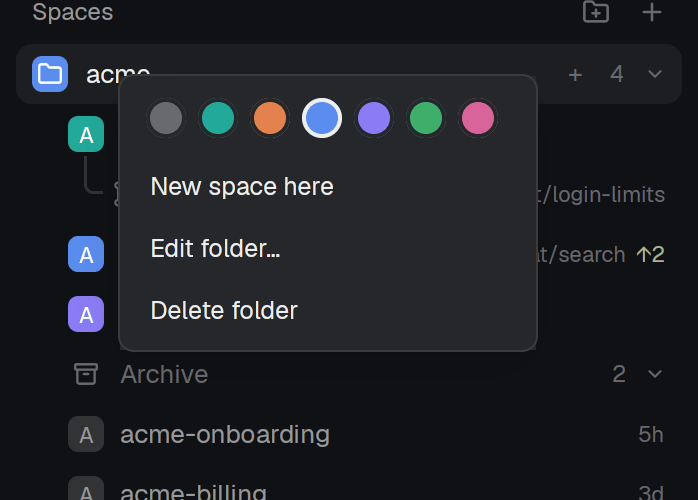
- New folder from the
folder-plusbutton at the top of the list. - A folder head shows a colored tile, the name, a
+for a new space in it, the count of its spaces and a fold arrow. Click the head to fold it. - Folded, the head still shows the most urgent agent state of its spaces (a spinner or a dot).
- Drag a head to reorder folders.
- Right-click a head: color swatches, New space here, Edit folder…, Delete folder.
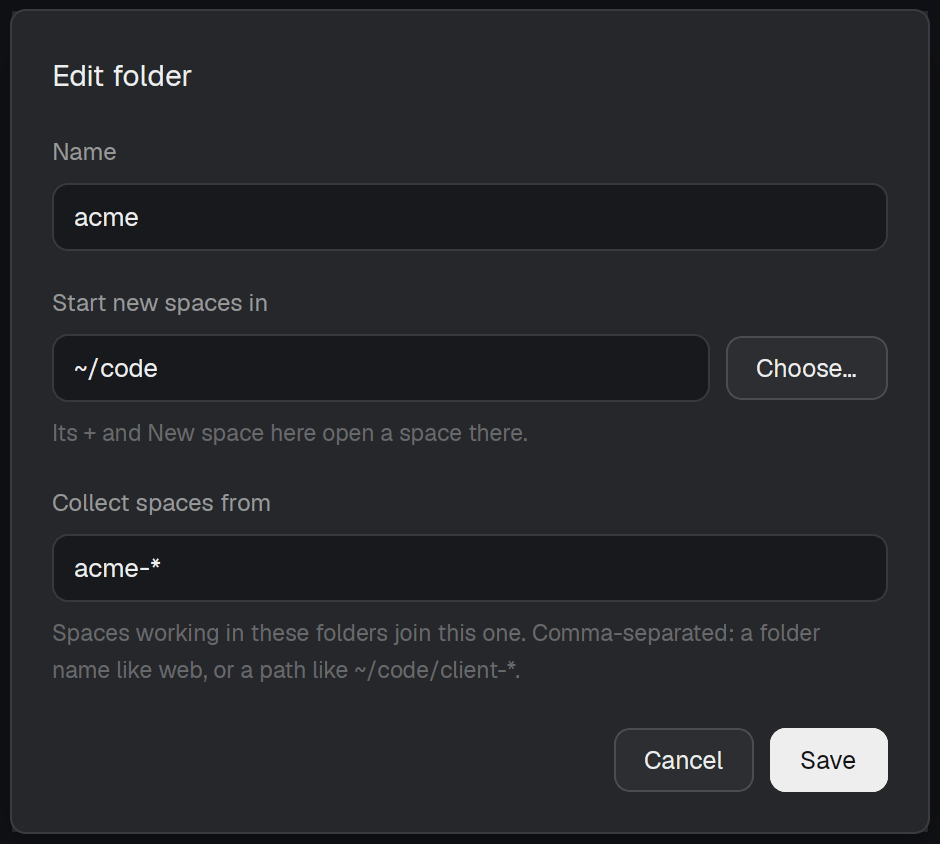
- Edit folder:
- Name.
- Start new spaces in: the directory its
+and New space here open a space in, with Choose… and path completion. A path that is not a directory shows an error. - Collect spaces from: comma-separated rules.
~is any home,*is one directory name, a bare name (web) matches at any depth, the deepest match wins. It follows the start folder until you edit it. - Tab and Shift+Tab move between fields; Up, Down and Tab pick a completion.
- Delete a folder and its spaces go where the other folders' rules put them.
- The folders live in
~/.config/herdr-space-folders.json, the file herdr-space-folders uses, so folders made with that mod show up here. A newer file on disk wins, and the file is re-read every 15 seconds and on change.
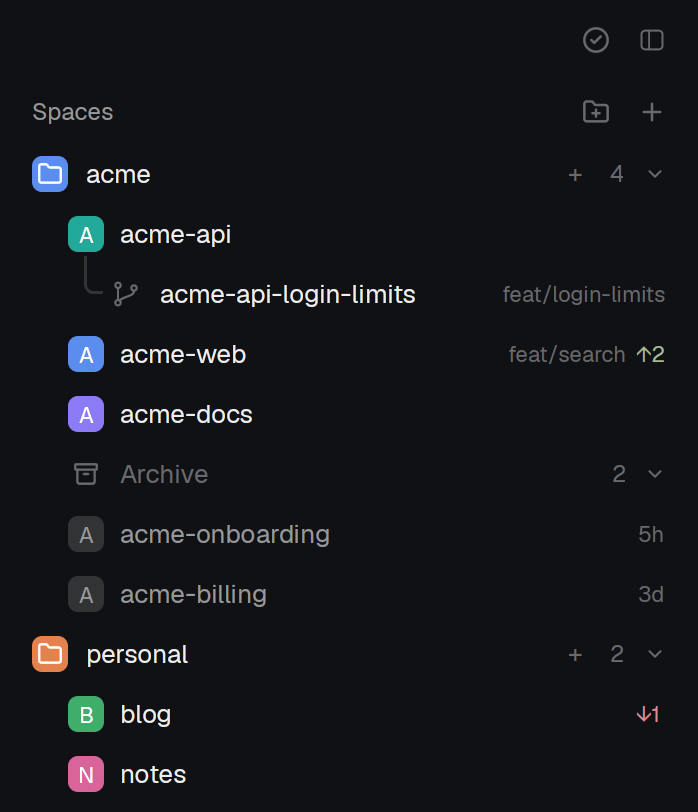
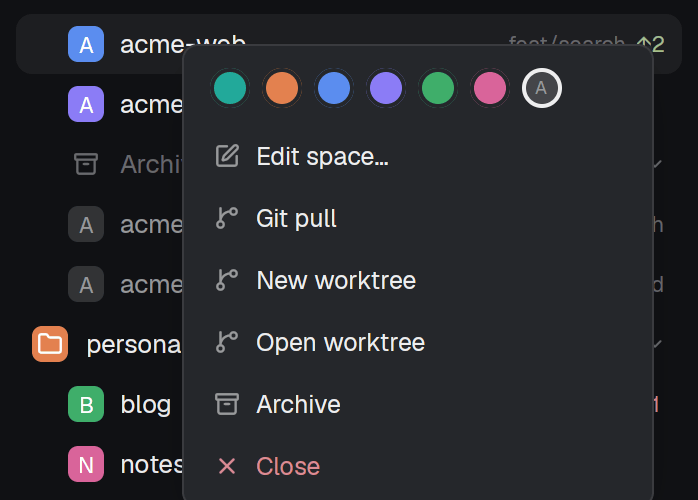
- Each space shows a colored avatar with its initial and, only when unusual, its git info:
repo · branch,↑2in green,↓1in red.mainandmasterare left out. - Click a red
↓Nto pull. - A linked worktree sits under its checkout with tree lines; the checkout's avatar becomes a fold arrow for its worktrees.
- Drag a space onto another to move it there and into that folder. While dragging, a "Drop here to take it out of its folder" zone shows.
- A space dropped into a folder by hand stays there, whatever the rules say.
- Right-click a space: color swatches with an automatic one, Edit space… (name and a pinned folder; empty means follow its terminals), Git pull, New worktree, Open worktree, Remove worktree (linked ones), Archive, Close.
- A space made from the front one (keys, palette) lands right under it in the same folder; one made from a folder's
+joins that folder. Closing the front space selects the one above it. - Spaces of another machine get their own header, or sit inside the first folder whose rules match.
- Narrower than 160px, the list draws a compact rail of avatars.
- Archive a space from its right-click menu, the hover button, or
ctrl-shift-w/cmd-shift-w. Each tab's name, directory and Claude Code session are recorded, then the space closes. - A folder ends with an
Archive Nrow. Open, it lists the archived spaces newest first with their age (5h,3d); see the Spaces screenshot. Archiving or restoring a space folds it. - Hover an archived row for its restore button, Shift-click it to restore the other way; right-click it for both restores and Delete.
- Restore checks each directory still exists, opens the space and its tabs, and where a session was recorded runs
claude --resume <session>, or a newclaudein the folder the tab was in. Which one: right-click theArchiverow for this folder's choice and the one for every folder (resume by default). Sessions come from ccgram, see Requirements.
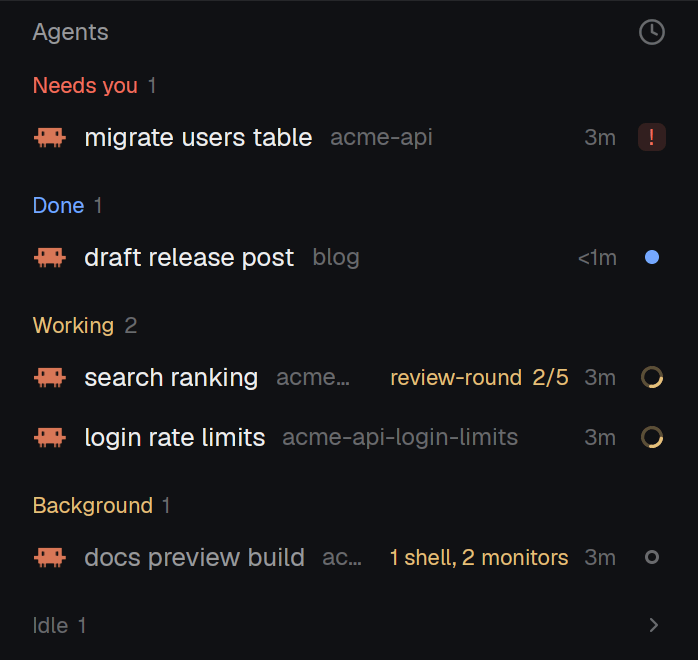
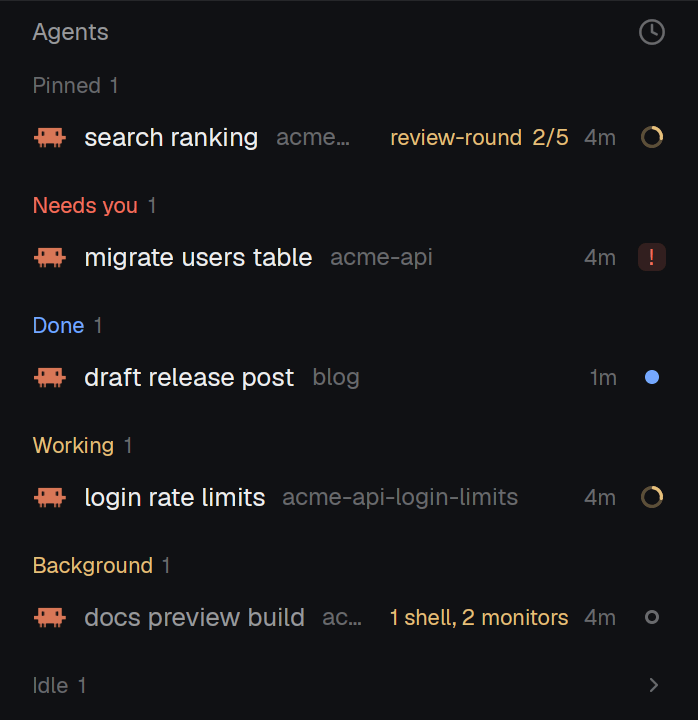
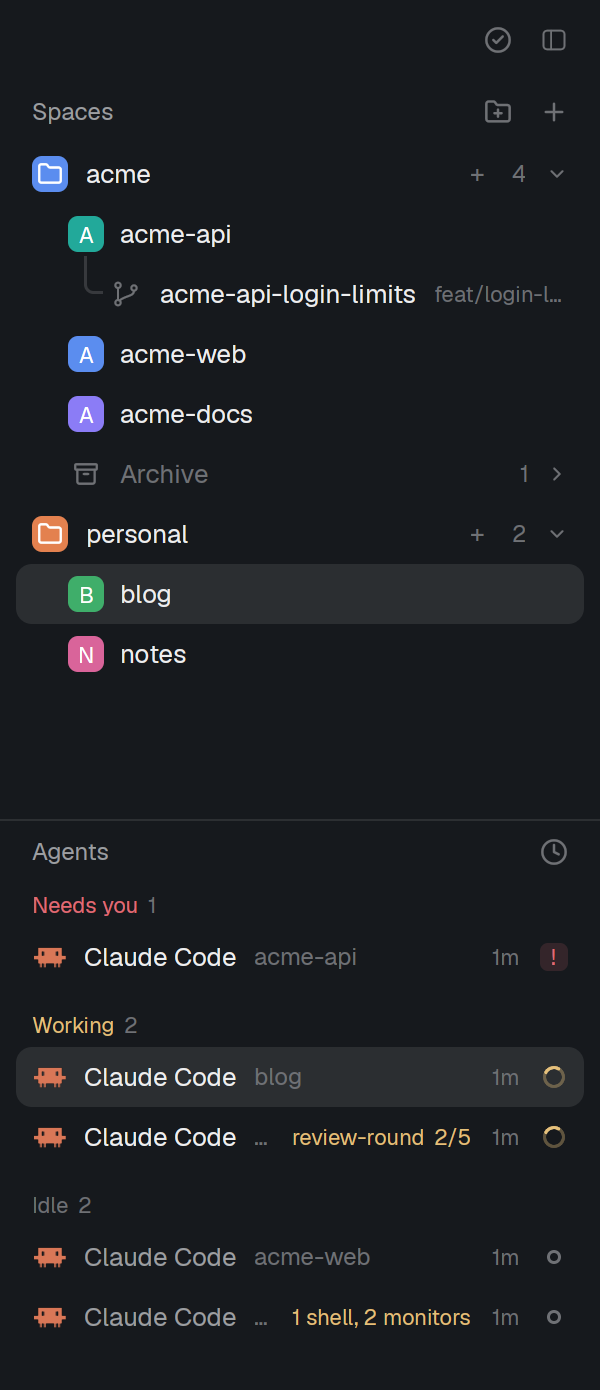
- Sections by priority: Needs you, Done, Working, Background, Idle, each with its count. Idle starts folded.
- Background holds idle and done agents that still run a shell, a monitor or a workflow, so a finished turn with work left behind it goes straight there.
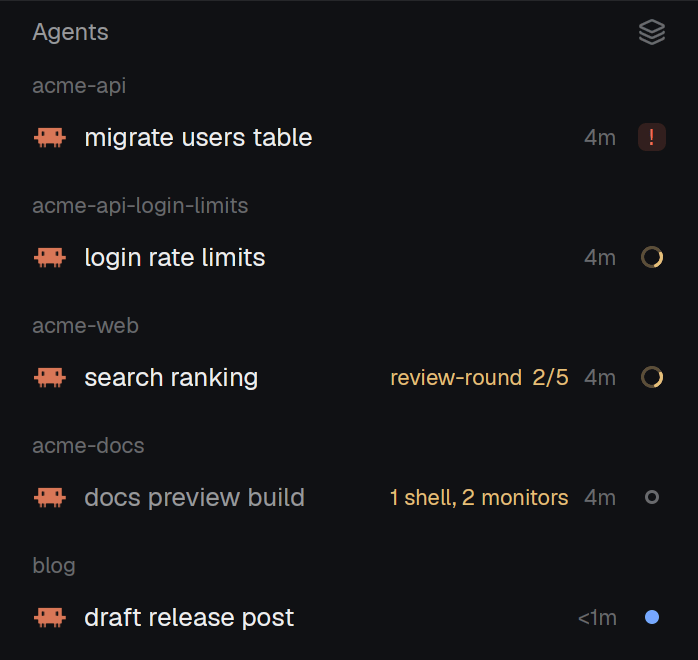
- The sort button switches to grouping by space.
- Each row: what the agent is on (its tab name, a telling title, else the program), its space when the section does not say it, the machine for a remote agent, the time in its state, and a state mark: a spinner, a
!badge, a dot or a ring. - For a Claude Code agent the list reads its footer every 5 seconds and shows what still runs behind it (
1 shell, 2 monitors) and each running workflow with its steps done (review-round 2/5). - Sub-agents sit under their parent with tree lines; the parent's fold arrow hides them and shows their count. A parent reads blocked if any sub-agent is.
- A done agent you look at stays in Done until you leave it.
- Hover a row to pin it. Pinned agents go into a Pinned group on top, the same pins herdr-t3's inbox uses.
- Click a row to focus the agent.
- A finish alert (toast and sound) waits 3 seconds and is dropped if by then the agent works again, you looked at it, or its footer shows a shell, a monitor or a workflow still running: Claude Code often finishes a turn and starts the next at once. Needs the Herdr version under Requirements.
- Every notification, gone in a few seconds on screen, stays in
~/.local/state/herdr-mods/notifications.jsonl(under$XDG_STATE_HOMEwhen set), one JSON line each, while the layout draws them withtoast-filter(my-t3does). Each held finish alert adds a line saying whether it rang, and if not, why.
| Keys | Does |
|---|---|
alt-down, ctrl-shift-pagedown, ctrl-space shift-n |
Next space in list order, skipping folded folders |
alt-up, ctrl-shift-pageup, ctrl-space shift-p |
Previous space |
cmd-shift-w, ctrl-shift-w |
Archive the front space |
alt-shift-s |
New space in the front space's folder, started in its start folder, as the folder's + |
cmd-shift-b |
Show or hide the sidebar (herdr-t3) |
cmd-shift-a |
Switch between the tab and the agent view (herdr-t3) |
cmd-shift-s |
Settle an agent in the inbox (herdr-t3) |
ctrl-v |
Paste into the terminal |
ctrl-shift-t |
New tab |
Requirements
- The Herdr desktop app with its
herdr-appCLI. Tested withherdr-app 0.1.14; held finish alerts needherdr-app 0.1.16, whose layouts name their toast mod; on older versions alerts stay immediate. - The
t3-*mods of herdr-t3, installed as its README says: the layout uses itst3-chrome,t3-tabsandt3-inboxmods. justandjq.
Optional: with ccgram installed, an archived Claude Code tab is resumed in its session on Restore. Without it, Restore opens a plain terminal in the same folder.
Install
git clone https://github.com/Danipulok/herdr-mods
cd herdr-mods
just deploy
herdr-app do layout.switch --name my-t3
just deploy loads each mod once with herdr-app check, copies the mods and the layout into ~/.config/herdr-app (or $XDG_CONFIG_HOME/herdr-app) and merges keys.json into the app's keys.json and, on the Herdr version held finish alerts need and unless you set your own done sound, settings.json into the app's settings.json. A running app picks up a deployed mod at once, with no restart. Run just deploy again after a git pull to update.
Undo
- Switch back to the default layout:
herdr-app do layout.switch --name main - Delete what
just deploycopied:rm -r ~/.config/herdr-app/mods/folders ~/.config/herdr-app/mods/agent-list ~/.config/herdr-app/mods/toast-filter ~/.config/herdr-app/layouts/my-t3.json - Drop the layout's keys:
. Give Herdr its done sound back:
jq 'del(.sounds.done)' ~/.config/herdr-app/settings.json > settings.tmp && mv settings.tmp ~/.config/herdr-app/settings.json
Your folders stay in ~/.config/herdr-space-folders.json. Delete that file too if no other mod uses it.
Where the code comes from
| Part | Source | Commit |
|---|---|---|
mods/folders base |
jankeesvw/herdr-space-folders mods/space-folders |
d630695db04d852ec89d86dd284f603d133dbba5 |
T3 changes in mods/folders |
JinJieBeWater/herdr-t3 mods/t3-spaces |
8b8506341a3aa285041f32e757bd48ef67c916bb |
mods/agent-list base |
JinJieBeWater/herdr-t3 mods/t3-agents |
8b8506341a3aa285041f32e757bd48ef67c916bb |
layouts/my-t3.json |
JinJieBeWater/herdr-t3 layouts/herdr-t3.json |
8b8506341a3aa285041f32e757bd48ef67c916bb |
| Both of the above | herdrdev/herdr-app defaults/mods/spaces and defaults/layouts/main.json |
tag v0.1.10 |
mods/toast-filter and mods/agent-list/done.mp3 |
herdrdev/herdr-app defaults/mods/toast and assets/sounds/done.mp3 |
tag v0.1.16 (034f8b85f7e6bb71f8ff55cb4a80c548b2578c0f) |
Herdr's code and herdr-t3 are under the Apache License 2.0 (licenses/Apache-2.0). The folders code of herdr-space-folders is MIT (licenses/space-folders-MIT).
To bring in an upstream change, diff the upstream file from the commit in the table to its new head and apply the hunks, then update the table.
Reviews (0)
Sign in to leave a review.
Leave a reviewNo results found