debasher
Health Warn
- License — License: LGPL-3.0
- Description — Repository has a description
- Active repo — Last push 0 days ago
- Low visibility — Only 6 GitHub stars
Code Pass
- Code scan — Scanned 12 files during light audit, no dangerous patterns found
Permissions Pass
- Permissions — No dangerous permissions requested
No AI report is available for this listing yet.
Flow-based programming workflow system for Unix programs, with streaming, cycles, interactivity, a visual editor, and integration with AI agents

DeBasher
DeBasher generalizes the shell pipeline: from a line of programs joined
by | to a graph of programs, in any language, joined by named options
that carry a value, a file or a pipe. The graph runs on one machine or
on a cluster, and its programs may be long-lived, with state that
survives a crash.
DeBasher is a workflow system whose processes are Unix programs, written
in Bash, Python, R, Perl or Groovy. The way the options of the processes
connect defines the dependency graph that DeBasher schedules and runs.
Programs are built in a visual editor, with the help of an AI assistant,
written by hand as Bash modules, or described in Python with the SDK. An
AI agent, such as Claude Code, works on the same program as a person,
with the operations of the editor, while the person follows each of its
changes on the canvas.
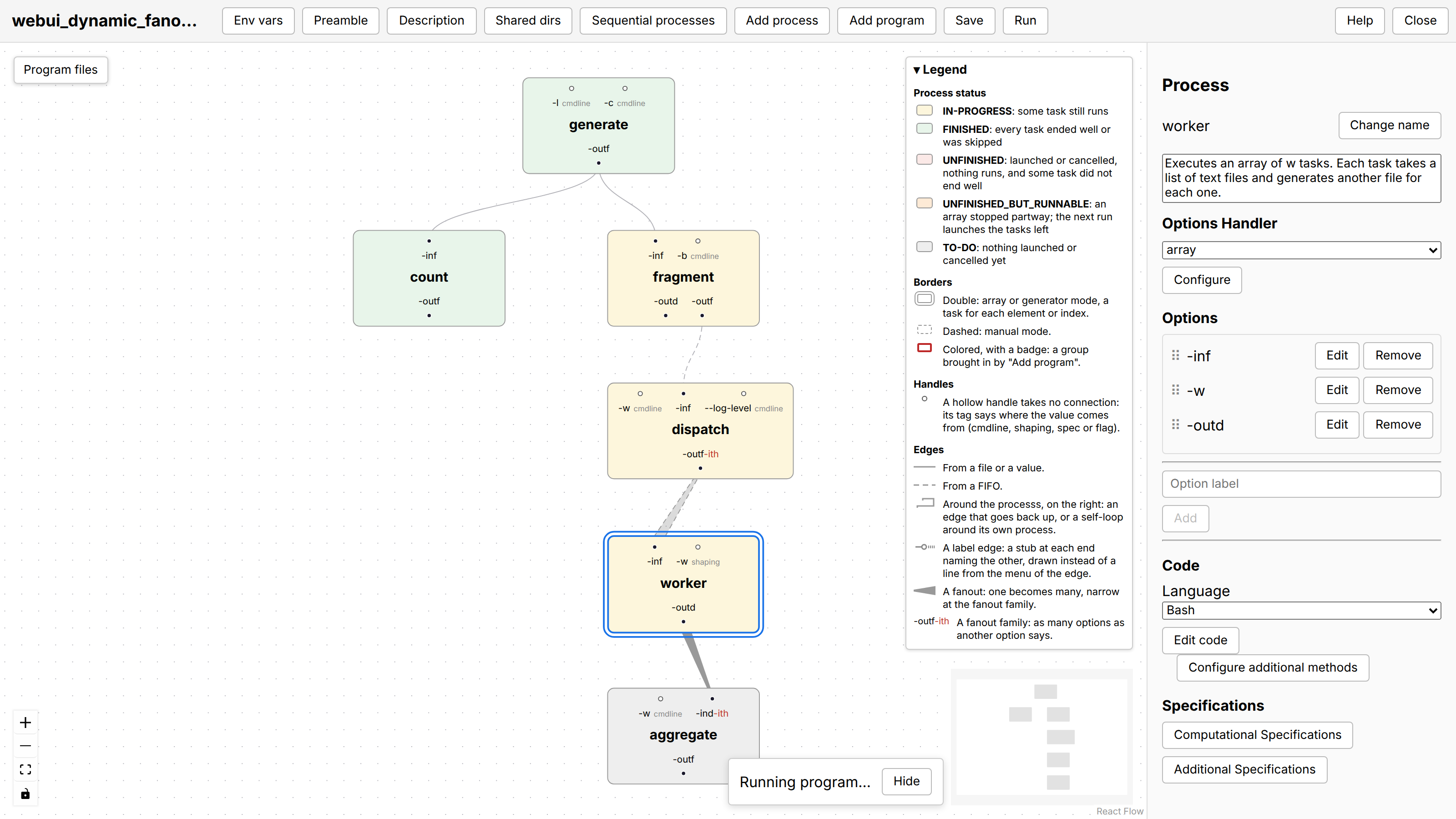
A program running in the web interface: a file is cut into fragments that a dispatcher streams through FIFOs to a pool of workers.
DeBasher runs two kinds of program. A general program processes a batch of
inputs and ends. A resident program processes a stream: long-lived,
stateful processes exchange messages through FIFOs, in cycles when needed,
survive crashes, and can launch a general program for each request they
receive. Both kinds define their processes the same way.
DeBasher follows flow-based programming and keeps what the shell does
best: a process is a black box with a command-line interface, so any
program that takes its inputs and leaves its outputs through options,
files or FIFOs can be one.
Among its features:
- cycles between processes, and interactive workflows;
- stateful processes, with crash recovery, snapshots, and orderly stop and
resume; - a built-in scheduler, and Slurm for clusters;
- Conda environments and Docker containers for reproducibility;
- a visual editor to build, run and observe programs from a browser;
- integration with AI agents: an MCP server offers an agent the
operations of the editor (build a program, run it, follow its run,
test its processes), each checked by DeBasher as it is made; a Claude
Code plugin brings skills to design a program, implement and test its
processes and review their code, in a terminal beside the canvas; and
the code editor of each process composes a prompt for any AI tool; - programs saved as a readable
program.yamland one file per process,
which the editor, the Python SDK, an AI agent or a text editor all
write, and git versions.
A program in Python
A program can also be described in Python with the SDK. This one has two
processes: write writes a greeting into a file, and shout, which
reads that file, writes it in capitals. Connecting the input of shout
to the output of write is all it takes for shout to run after it:
from debasher import Process, Program, connect, in_outdir, opt

write = Process("write", code="write.sh", description="Writes a greeting.",
                options=[opt("-name", "string", "who to greet"),
                         opt("-outf", "file", "the greeting")])
write.interface(cmdline={"-name": "mandatory"})
write.task_options(values={"-outf": in_outdir("greeting.txt")})

shout = Process("shout", code="shout.py", description="Turns it into capitals.",
                options=[opt("-inf", "file", "the greeting"),
                         opt("-outf", "file", "the result")])
shout.task_options(values={"-inf": connect(write["-outf"]),
                           "-outf": in_outdir("shout.txt")})

prg = Program("greet")
prg.add(write, cpus=1, mem=32, time="00:01:00")
prg.add(shout, cpus=1, mem=32, time="00:01:00")
Each process keeps its code in a file of its own language, and gets its
options on its command line. write.sh is a Bash function:
write()
{
    local name=$(read_opt_value_from_func_args "-name" "$@")
    local outf=$(read_opt_value_from_func_args "-outf" "$@")
    echo "Hello, ${name}!" > "${outf}"
}
and shout.py an ordinary Python script:
import argparse

parser = argparse.ArgumentParser()
parser.add_argument("-inf")
parser.add_argument("-outf")
args = parser.parse_args()
with open(args.inf) as inf, open(args.outf, "w") as outf:
    outf.write(inf.read().upper())
debasher_build writes the program beside the Python description, as the
editor saves it, and debasher_exec runs it:
debasher_build greet.py
debasher_exec --pfile greet.sh --outdir out -name World --wait
cat out/shout/shout.txt      # HELLO, WORLD!
The directory now holds program.yaml, which the web interface opens
with "Load program", and greet.sh, the module that debasher_exec
runs. The same program could have been drawn in the editor, or written by
hand as a Bash module; see the
documentation.
Try it
The quickest way to see DeBasher is its Docker demo image, which packs the
engine and the web interface into one container, with the example programs
inside:
git clone https://github.com/daormar/debasher.git
cd debasher
chmod 777 demo-data
docker compose up --build -d            # build and start, on port 8000
docker compose exec debasher webui-url  # print its address

# To stop it, freeing port 8000:
docker compose down
The webui-url command prints the address of the web interface, which
carries its token; open it in a browser. The image is for trying DeBasher
out, not for real work: inside it, processes cannot have Conda environments
or Docker containers of their own, and there is no Slurm.
DOCKER.md has the details, and how to run Claude Code inside the
container.
Installation
To install DeBasher itself:
git clone https://github.com/daormar/debasher.git
cd debasher
./reconf
./configure --prefix=<installation-directory>
make
make install
DeBasher runs on Linux, macOS and on Windows under WSL2; see the
installation instructions
for its requirements and for each system.
Project information
License and citation
DeBasher is released under the GNU Lesser General Public License, version 3.
If you use it in your research, please cite: Ortiz-Martínez, D. DeBasher: a
flow-based programming bash extension for the implementation of complex and
interactive workflows with stateful processes. BMC Bioinformatics 26, 106
(2025). https://doi.org/10.1186/s12859-025-06108-1
Reviews (0)
Sign in to leave a review.
Leave a reviewNo results found