aime-chat
Health Gecti
- License — License: MIT
- Description — Repository has a description
- Active repo — Last push 0 days ago
- Community trust — 26 GitHub stars
Code Basarisiz
- process.env — Environment variable access in .erb/configs/webpack.config.main.dev.ts
- process.env — Environment variable access in .erb/configs/webpack.config.main.prod.ts
- process.env — Environment variable access in .erb/configs/webpack.config.preload.dev.ts
- execSync — Synchronous shell command execution in .erb/configs/webpack.config.renderer.dev.ts
- process.env — Environment variable access in .erb/configs/webpack.config.renderer.dev.ts
- process.env — Environment variable access in .erb/configs/webpack.config.renderer.prod.ts
- execSync — Synchronous shell command execution in .erb/scripts/check-native-dep.js
Permissions Gecti
- Permissions — No dangerous permissions requested
This is a cross-platform desktop application that serves as a comprehensive AI chat and cowork space. It integrates with over 10 LLM providers, supports Retrieval-Augmented Generation (RAG), and enables local tool execution via the Model Context Protocol (MCP).
Security Assessment
Overall Risk: Medium. The tool is designed to process data locally first, which is good for privacy, but a few code characteristics require attention. Static analysis found synchronous shell command execution (`execSync`) within the Webpack build configuration and a native dependency check script. While these executions appear restricted to development and build bundling rather than production chat features, the use of `execSync` always warrants caution. Furthermore, the application frequently accesses `process.env` across multiple build scripts to read environment variables. Developers should ensure no hardcoded secrets are passed into these variables and be aware that the application routes chat inputs and file operations through external AI provider APIs.
Quality Assessment
The project is actively maintained, with its most recent push occurring today. It operates under the permissive and standard MIT license. Community trust is currently in its early stages, reflected by a modest 26 GitHub stars. The repository is well-documented and clearly outlines its dependencies and architecture.
Verdict
Use with caution—while actively maintained and licensed under MIT, the presence of synchronous shell execution in the build scripts necessitates a quick code review before adopting it for sensitive workflows.
A cross-platform AI desktop chat cowork app supporting 10+ LLM providers, RAG knowledge base, and MCP tools. Built with Electron + React + Mastra.



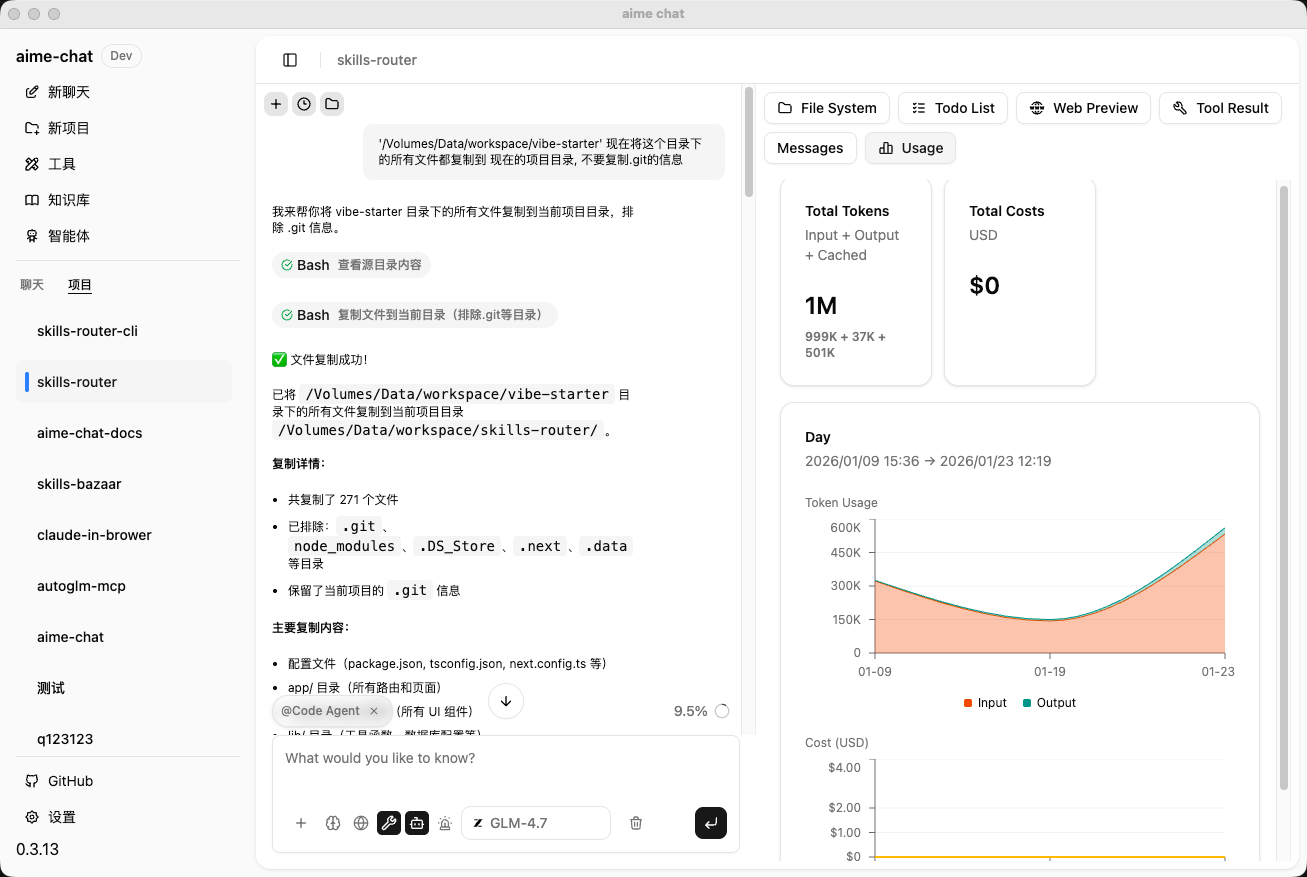
✨ Features
- 🤖 Multiple AI Provider Support - Integrated with mainstream AI providers including OpenAI, DeepSeek, Google, Zhipu AI, MiniMax, Ollama, LMStudio, ModelScope, and more
- 💬 Intelligent Conversations - Powerful AI Agent system based on Mastra framework, supporting streaming responses and tool calling
- 🤝 Open CoWork Capability - AI is not just for chatting, it can perform actual operations like file editing, code execution, web searching, and more
- 📚 Knowledge Base Management - Built-in vector database with support for document retrieval and knowledge Q&A
- 🛠️ Tool Integration - Support for MCP (Model Context Protocol) client with extensible tool capabilities
- 🎙️ Audio Processing - Built-in Speech-to-Text (STT) and Text-to-Speech (TTS) powered by Qwen3-TTS models
- 🔍 Skill System - Search, import, and manage AI skills from Git repositories or the online skill marketplace
- 🎨 Modern UI - Built with shadcn/ui component library, supports light/dark theme switching
- 🌍 Internationalization - Built-in Chinese and English interfaces
- 🔒 Local First - Data stored locally for privacy protection
- ⚡ High Performance - Built on Electron for cross-platform native experience
🚀 Quick Start
Prerequisites
- Node.js >= 22.x
- npm >= 10.x
- pnpm >= 10.x
Install Dependencies
pnpm install
Development Mode
Start the development server:
- Click on "Electron Main" in VSCode's debug panel to start debugging
The application will start in development mode with hot reload support.
Build Application
Package desktop application:
pnpm package
Packaged applications will be generated in the release/build directory.
macOS Installation Notes
Due to the app not being signed with an Apple Developer certificate, macOS Gatekeeper may prevent the app from running. If you see "App is damaged" or "Cannot be opened" error, please run the following command in Terminal:
# After mounting the DMG and copying to Applications
xattr -cr /Applications/aime-chat.app
Or right-click the app → hold Option key → click "Open".
📦 Project Structure
aime-chat/
├── assets/              # Static assets
│   ├── icon.png        # Application icon
│   ├── models.json     # AI model configurations
│   └── model-logos/    # Provider logos
├── src/
│   ├── main/           # Electron main process
│   │   ├── providers/  # AI provider implementations
│   │   ├── mastra/     # Mastra Agent and tools
│   │   ├── knowledge-base/ # Knowledge base management
│   │   ├── tools/      # Tool system
│   │   └── db/         # Database
│   ├── renderer/       # React renderer process
│   │   ├── components/ # UI components
│   │   ├── pages/      # Page components
│   │   ├── hooks/      # React Hooks
│   │   └── styles/     # Style files
│   ├── types/          # TypeScript type definitions
│   ├── entities/       # Data entities
│   └── i18n/           # Internationalization config
└── release/            # Build artifacts
🎯 Core Features
AI Provider Configuration
Support for configuring multiple AI providers, each with independent settings:
- API Key
- API Endpoint
- Available model list
- Enable/Disable status
Supported providers include:
| Provider | Type | Description |
|---|---|---|
| OpenAI | Cloud | GPT series models |
| DeepSeek | Cloud | DeepSeek series models |
| Cloud | Gemini series models | |
| Zhipu AI | Cloud | GLM series models |
| MiniMax | Cloud | MiniMax series models |
| Ollama | Local | Run open-source models locally |
| LMStudio | Local | Local model management tool |
| ModelScope | Cloud | ModelScope community models |
| SerpAPI | Cloud | Google Search API service |
Knowledge Base Features
- 📄 Document upload and parsing
- 🔍 Vector storage and retrieval
- 💡 Intelligent Q&A based on knowledge base
- 📊 Knowledge base management interface
Tool System
Rich built-in tools that AI Agents can call autonomously:
| Category | Tools | Description |
|---|---|---|
| File System | Bash, Read, Write, Edit, Grep, Glob | File read/write, search, edit operations |
| Code Execution | CodeExecution | Execute Python and Node.js code |
| Web Tools | Web Fetch, Web Search | Web scraping and search (with AI content summarization) |
| Image Processing | GenerateImage, EditImage, RMBG | Image generation, editing, and background removal |
| Vision Analysis | Vision | LLM-powered image recognition and analysis (with OCR integration) |
| OCR Recognition | PaddleOCR | Document and image text recognition (supports PDF/images) |
| Audio Processing | SpeechToText, TextToSpeech | Speech-to-text and text-to-speech (powered by Qwen3-TTS) |
| Database | LibSQL | Database query and management |
| Translation | Translation | Multi-language text translation |
| Task Management | TaskCreate, TaskGet, TaskList, TaskUpdate | Structured task creation, query, and status management |
| Information Extraction | Extract | Extract structured information from documents |
- 🔌 MCP Protocol Support - Extensible third-party tools
- ⚙️ Tool Configuration UI - Visual tool management and configuration
- 🔍 Skill Marketplace - Search and import skills from Git repositories or online marketplace (skills.sh)
🛠️ Tech Stack
Frontend
- Framework: React 19 + TypeScript
- UI Library: shadcn/ui (based on Radix UI)
- Styling: Tailwind CSS
- Routing: React Router
- State Management: React Context + Hooks
- Internationalization: i18next
- Markdown: react-markdown + remark-gfm
- Code Highlighting: shiki
Backend (Main Process)
- Runtime: Electron
- AI Framework: Mastra
- Database: TypeORM + better-sqlite3
- Vector Storage: @mastra/fastembed
- AI SDK: Vercel AI SDK
Build Tools
- Bundler: Webpack 5
- Compiler: TypeScript + ts-loader
- Hot Reload: webpack-dev-server
- App Packaging: electron-builder
Project Initialization
git clone https://github.com/DarkNoah/aime-chat.git
cd ./aime-chat
pnpm install

# Since pnpm disables postinstall scripts by default, if you encounter missing binary packages or similar issues, run:
pnpm approve-builds
⚙️ Configuration
Optional Runtime Libraries
AIME Chat supports optional runtime libraries that can be installed from the Settings page:
| Runtime | Description |
|---|---|
| PaddleOCR | OCR recognition engine based on PaddlePaddle, supports document structure analysis and text extraction from PDF/images |
| Qwen Audio | Audio processing engine based on Qwen3-TTS, supports speech recognition (ASR) and text-to-speech (TTS) |
These runtimes are managed via the built-in uv package manager and will be installed in the application data directory.
Data Storage
Application data is stored by default in the system user directory:
- macOS:
~/Library/Application Support/aime-chat - Windows:
%APPDATA%/aime-chat - Linux:
~/.config/aime-chat
🤝 Contributing
Issues and Pull Requests are welcome!
- Fork this repository
- Create a feature branch (
git checkout -b feature/AmazingFeature) - Commit your changes (
git commit -m 'Add some AmazingFeature') - Push to the branch (
git push origin feature/AmazingFeature) - Open a Pull Request
Code Standards
- Use ESLint and Prettier to maintain consistent code style
- Follow TypeScript type specifications
📄 License
This project is licensed under the MIT License.
👨💻 Author
Noah
- Email: [email protected]
🙏 Acknowledgments
🔗 Related Links
Yorumlar (0)
Yorum birakmak icin giris yap.
Yorum birakSonuc bulunamadi