cad2data-Revit-IFC-DWG
Health Gecti
- License — License: NOASSERTION
- Description — Repository has a description
- Active repo — Last push 0 days ago
- Community trust — 520 GitHub stars
Code Basarisiz
- rm -rf — Recursive force deletion command in DDC_LINUX_Converters/build-all.sh
Permissions Gecti
- Permissions — No dangerous permissions requested
This tool is an automation workflow and agent designed to extract and convert CAD and BIM files (such as Revit, IFC, DWG, and DGN) into accessible data formats. It processes these files locally on a Windows machine using command-line converters without requiring proprietary software licenses.
Security Assessment
The overall security risk is Medium. The primary function of this tool is to execute local shell commands and PowerShell scripts to run headless CAD converters. This shell execution is an expected behavior for its use case, but users should still inspect the scripts they run to prevent accidental file manipulation. Specifically, the automated audit flagged a `rm -rf` (recursive force deletion) command inside the `DDC_LINUX_Converters/build-all.sh` script. While this might simply be standard cleanup code for a Linux build environment, you should verify its exact target path before executing the script to ensure it does not accidentally delete critical system or project files. The repository does not request dangerous account permissions, and no hardcoded secrets were detected.
Quality Assessment
The project appears to be highly maintained and reliable. It utilizes the permissive MIT license, making it safe for commercial and private use. The repository is very active, with the most recent code push occurring today. Additionally, it has earned over 300 GitHub stars, indicating a strong level of community trust and adoption. The README is thoroughly documented and helpfully translated into multiple languages.
Verdict
Use with caution: the project is active and trusted by the community, but you should manually review the shell scripts—specifically checking the `rm -rf` deletion targets—before executing them locally.
DDC converters with first-party readers: RVT/RFA to GLB, IFC4 and JSONL; IFC to Excel; DWG to Excel, DXF and SVG. Offline CLI and desktop apps, n8n workflows and AI-agent instructions.
English • Deutsch • Español • Français • Русский • 中文 • العربية
cad2data — DDC converters for RVT, IFC and DWG files
Turn CAD/BIM files into open, structured data — locally, offline, without CAD licences.
.rvt / .rfa → GLB · glTF · OBJ · IFC4 · JSONL/CSV | .ifc → Excel · JSONL · SQLite | .dwg → Excel · CSV · JSONL · DXF · SVG





What changed in October 2026
The converters in this repository were rebuilt on DataDrivenConstruction's own file readers.
They no longer depend on any third-party CAD SDK:
| Format | Reader | Implementation |
|---|---|---|
.rvt / .rfa |
DDC RVT reader | Rust, first-party code |
.ifc / .ifczip |
DDC IFC reader | Python, first-party code (no IfcOpenShell at runtime) |
.dwg |
DDC DWG reader | Python, first-party code |
What this means for you:
- New binaries, new command lines. The old
RvtExporter.exe,IfcExporter.exe,DwgExporter.exe,DgnExporter.exeandRVT2IFCconverter.exe(generation 18.x) are retired and are no longer in the
repository tree. The new converters are published as packages on the
Releases page. - DGN is discontinued for now — there is no first-party DGN reader yet.
- All new converters are previews. Every run writes a machine-readable report with what was read,
what was skipped and why. Please check it before relying on the output (see Limitations). - Older releases and the git history stay available for reference.
Contents
- Converters
- Screenshots
- Quick start
- Command line
- Batch processing and automation
- DDC Data Viewer
- n8n workflows, notebooks and AI agents
- Limitations
- Repository layout
- Licensing
- Trademarks
Converters
| Package | Version | Reads | Writes | Interface |
|---|---|---|---|---|
| DDC RVT Converter | 0.6.8 | .rvt, .rfa saved by Autodesk® Revit® 2019–2027 |
GLB (default), glTF, OBJ, IFC4 (experimental), saved properties as JSONL; the desktop app also writes CSV tables and SQLite | Desktop app + RVTconverter.exe CLI |
| DDC RVT to IFC | 0.6.8 | .rvt, .rfa |
IFC4 with property sets, quantities, classification, materials; profiles full, coordination, geometry |
Desktop app (same CLI engine) |
| DDC IFC to Excel | 0.3.1 preview | IFC2x3 / IFC4 STEP files, .ifczip |
drawing.xlsx (objects, properties, quantities), data.jsonl, data.sqlite, result.json |
Desktop app + Python CLI (bundled runtime) |
| DDC DWG to Excel | 0.4.1 | .dwg drawings, R13–2018 format versions |
.xlsx (Entities, Summary, Layers, Blocks), .csv, .jsonl, .dxf, .svg, report.json |
Desktop app + dwg2excel.exe CLI |
| DDC Data Viewer | 0.1.1 | .xlsx, .csv, .jsonl, .parquet tables + .glb / .dae geometry |
filtered views to XLSX / CSV | Desktop app (free) |
Every geometry node written by the RVT Converter keeps the native element id, so tables and 3D can be
joined by ElementId. All packages run fully offline on Windows 10/11 x64 and need no Autodesk
software, no Excel and no Python installation. Linux / macOS builds — coming soon.
Screenshots
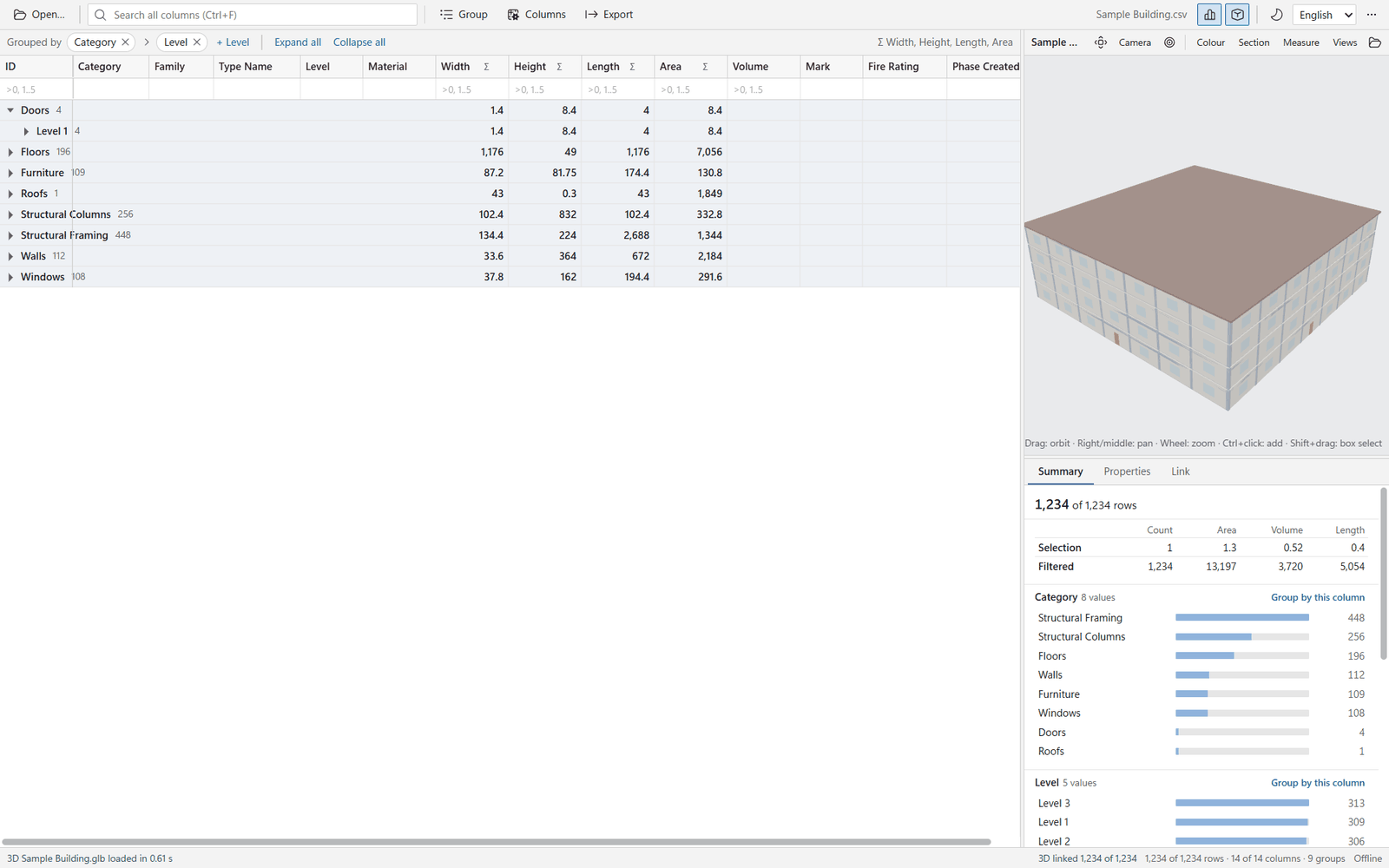
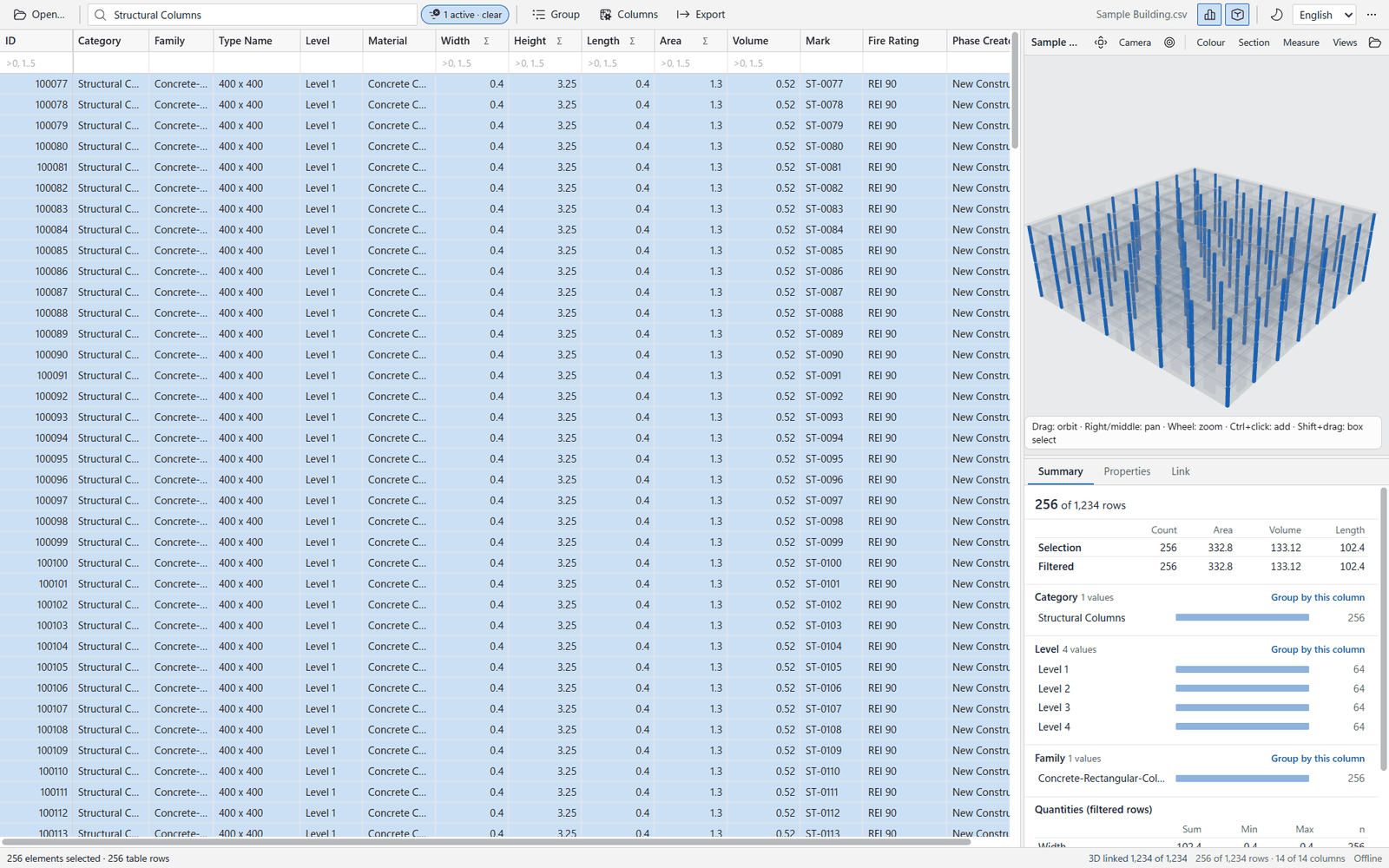
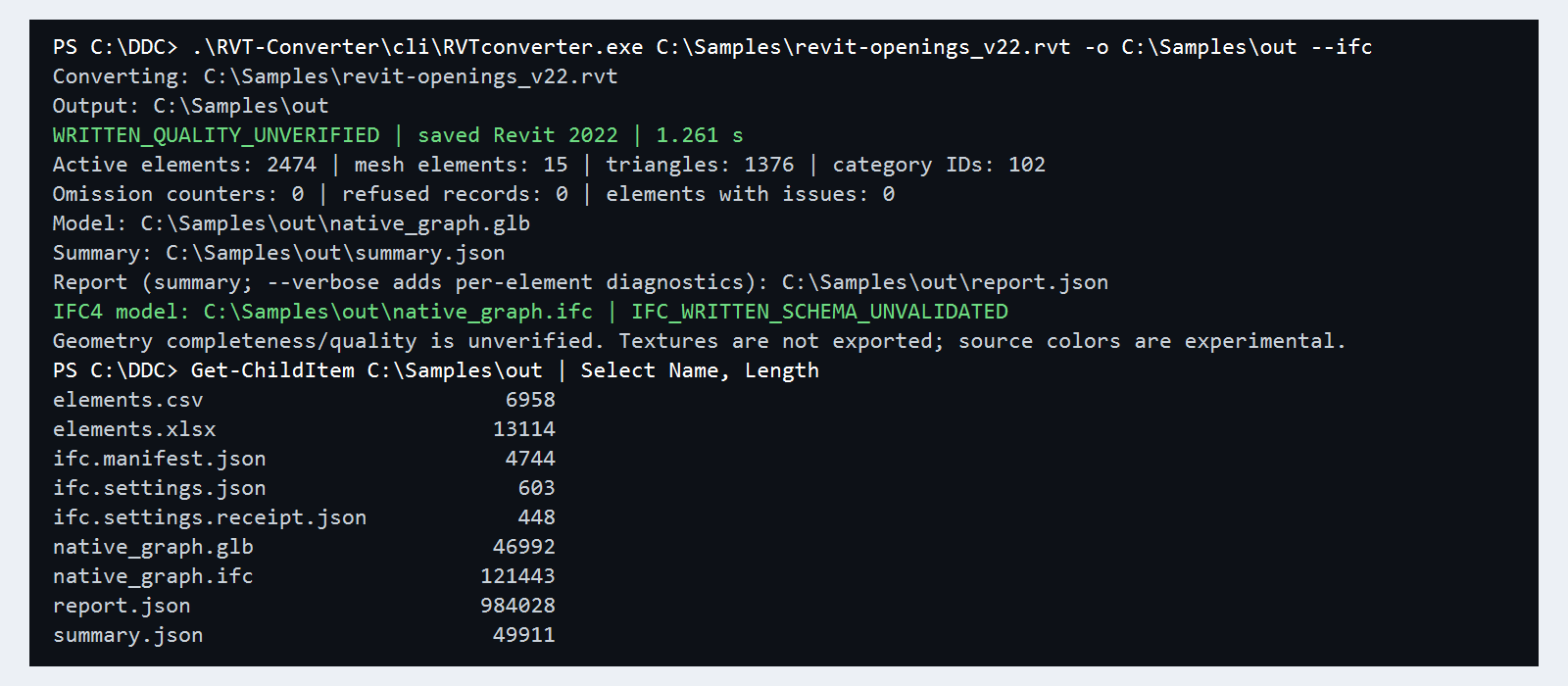
All screenshots below come from real runs of the packages in the current release. They use the
viewer's synthetic sample building and the open IFC sample in Sample_Projects/.
 |
 |
| DDC Data Viewer — a filter on Structural Columns highlights the linked elements in 3D; the summary panel sums area, volume and length. | DDC IFC to Excel — drawing.xlsx of the open Duplex IFC sample, grouped by IFC class (333 objects, 23 classes). |
 |
 |
Command line — RVTconverter.exe writes GLB + IFC4 with a status line and report; IFC to Excel prints a JSON status (output abridged). |
Dark theme and localisation — the viewer ships in English, German and Russian. |
Quick start
- Open the latest release
and download the package you need — a*-Setup.exe(per-user installer) or a*-portable.zip. - Verify the download against
SHA256SUMS.txtfrom the same release:Get-FileHash .\DDC-RVT-Converter-0.6.8-portable.zip -Algorithm SHA256 - Unzip the portable package to a folder of your choice, for example
C:\DDC\RVT-Converter\,C:\DDC\IFC-to-Excel\,C:\DDC\DWG-to-Excel\. Keep the folder structure as it is. - Start the desktop app (
RVT Converter.exe,IFC to Excel.exe,DWG to Excel.exe), drop files or
folders into the window and press Convert — or use the command line below. - Open the result in Excel, Python/pandas or the DDC Data Viewer.
The packages are not code-signed yet, so Windows SmartScreen may ask for confirmation on first start.
Command line
The examples below were run with the binaries of the current release. Paths assume the portable
packages were unpacked to C:\DDC\.
DDC RVT Converter — RVTconverter.exe
# GLB + reports into "Project.converted" next to the input (existing folders are never overwritten)
C:\DDC\RVT-Converter\cli\RVTconverter.exe "C:\Models\Project.rvt"

# choose the output folder, add saved properties (JSONL) and an IFC4 file
C:\DDC\RVT-Converter\cli\RVTconverter.exe "C:\Models\Project.rvt" -o "C:\Out\Project" --properties --ifc

# IFC for coordination: millimetres, survey point origin, only doors and windows
C:\DDC\RVT-Converter\cli\RVTconverter.exe "C:\Models\Project.rvt" --ifc --ifc-profile coordination `
    --ifc-units mm --ifc-origin survey-point --ifc-categories Doors,Windows

# additional geometry formats
C:\DDC\RVT-Converter\cli\RVTconverter.exe "C:\Models\Family.rfa" --gltf --obj
| Output | When | Content |
|---|---|---|
native_graph.glb |
always | 3D meshes, one node per element, named by ElementId |
summary.json, report.json |
always | status, counts, omissions and per-element diagnostics |
properties.jsonl, property_scopes.jsonl (+ manifests) |
--properties |
saved parameters per element (one JSON object per line) |
native_graph.ifc, ifc.manifest.json, ifc.settings.json |
--ifc |
IFC4 (tessellated geometry, property and quantity sets) |
native_graph.gltf + .bin, native_graph.obj + .mtl |
--gltf, --obj |
same geometry as GLB; OBJ in metres, Y-up |
Exit codes: 0 written without reported gaps, 2 written with reported gaps (or invalid arguments),1 conversion or I/O failure. Run RVTconverter.exe --help for all IFC options
(--ifc-config, --ifc-phase, --ifc-design-options, --ifc-exclude-categories, …).
DDC IFC to Excel
The portable package bundles its own Python runtime; the CLI is the converter module:
C:\DDC\IFC-to-Excel\runtime\python.exe C:\DDC\IFC-to-Excel\sources\ifc-excel\converter.py `
    "C:\Models\Building.ifc" --output "C:\Out\Building"
The command prints one JSON line ("status": "CONVERTED", "CONVERTED_WITH_LIMITS" or "FAILED")
and creates a new sub-folder with drawing.xlsx, data.jsonl, data.sqlite and result.json..ifczip files are accepted directly.
DDC DWG to Excel — dwg2excel.exe
# one or more drawings; a new sub-folder per drawing
C:\DDC\DWG-to-Excel\cli\dwg2excel.exe "C:\Drawings\Plan.dwg" -o "C:\Out"

# a whole folder: tables only, one JSON line per file for scripts
$dwg = (Get-ChildItem C:\Drawings -Filter *.dwg).FullName
C:\DDC\DWG-to-Excel\cli\dwg2excel.exe @dwg -o C:\Out --no-dxf --no-svg --json
Each drawing folder contains <name>.xlsx, <name>.csv, <name>.jsonl, <name>.dxf, <name>.svg,report.json and REPORT.txt. The console line reports how many records were decoded, refused or are
of a type the reader does not support yet. Other options: --timeout, --memory-limit-mb,--language en|ru, --version.
Batch processing and automation
PowerShell — every RVT file in a folder tree:
$exe = "C:\DDC\RVT-Converter\cli\RVTconverter.exe"
Get-ChildItem "C:\Projects" -Recurse -Include *.rvt | ForEach-Object {
    & $exe $_.FullName -o (Join-Path "C:\Out" $_.BaseName) --properties --ifc
    "{0}: exit {1}" -f $_.Name, $LASTEXITCODE
}
Python — load RVT properties and IFC tables with pandas:
import json, subprocess, pandas as pd

subprocess.run([r"C:\DDC\RVT-Converter\cli\RVTconverter.exe", r"C:\Models\Project.rvt",
                "-o", r"C:\Out\Project", "--properties"], check=False)
rows = [json.loads(line) for line in open(r"C:\Out\Project\properties.jsonl", encoding="utf-8")]
print(len(rows), "property records")

objects = pd.read_excel(r"C:\Out\Building\Building-<id>\drawing.xlsx", sheet_name="Objects")
print(objects.groupby("Category").size().sort_values(ascending=False))
DWG in CI or bots: dwg2excel.exe --json prints one JSON line per drawing; parse it to collect
status, output folder and decode statistics.
DDC Data Viewer
A free desktop viewer for the converter output: virtualised grid for 100k+ rows, search, filters,
grouping with sums, column chooser, export of the current view to XLSX/CSV and a 3D panel that links
rows and elements both ways (GLB or DAE). English, German and Russian; light and dark theme.
Download DDC-Data-Viewer-0.1.1-Setup.exe or the portable zip from the release.
n8n workflows, notebooks and AI agents
DDC_n8n_Workflows&Pipelines/— nine n8n workflows (conversion,
batch validation, AI classification, cost and CO2 estimation, QTO reports).DDC_in_additon/DDC_python_pipelines/— Jupyter notebooks for
conversion, batch processing and analytics.
Status: these workflows and notebooks were written for the retired 18.x command line
(RvtExporter.exeproducing XLSX + DAE). They are being ported to the new converters. Until then,
point the converter path settings to the new executables and adapt the parsing step:
RVT properties now come asproperties.jsonl(or CSV from the desktop app) and geometry as GLB;
IFC and DWG tables are still Excel workbooks.
AI_AGENTS_INSTRUCTIONS/— ready context for coding agents
(Claude Code, OpenCode, Antigravity and others) with the new command lines. Open the repository in your
agent and ask, for example, "convert every .rvt in C:\Projects to IFC and summarise the reports".- DDC Skills for AI agents
— ready-made automations for construction data.
Limitations
The converters are honest previews. Specifically:
- RVT: geometry completeness is not certified; textures are not exported; source colours are
experimental; storage variants the reader does not understand are reported, not guessed. IFC export is
tessellated IFC4 and is not schema-validated by the tool itself. - IFC: IFCXML is not supported; computed properties and full source fidelity are not qualified;
original records always remain indata.jsonl/data.sqlite. - DWG: decoding coverage depends on the drawing: some object types (for example certain tables,
multileaders, 3D solids, images) are reported as unsupported or refused instead of being exported
incorrectly. Checkreport.jsonfor every drawing. - DGN: not supported in the current generation.
- Platforms: Windows 10/11 x64. Linux / macOS — coming soon.
Bug reports with a small example file are very welcome — please use
GitHub Issues and do not attach
confidential models.
Repository layout
| Path | Content |
|---|---|
docs/ |
release notes, screenshots |
DDC_n8n_Workflows&Pipelines/ |
n8n workflow JSON files |
DDC_in_additon/ |
notebooks, presentations, images |
AI_AGENTS_INSTRUCTIONS/ |
instructions for AI coding agents |
DDC_WINDOWS_Converters/ |
licence texts for the Windows converters and the Excel → Revit add-in documentation; binaries are on the Releases page |
DDC_LINUX_Converters/ |
CWICR data packages, Qdrant packaging and telemetry dashboard |
Sample_Projects/ |
open IFC sample files |
Licensing
- Workflows, notebooks, scripts, AI instructions and documentation — MIT License.
- Converter packages (Releases) — one free edition (no paid tier), free of charge for private and commercial use under the
DataDrivenConstruction EULA shipped in each package (EULA.txt); see also
LICENSE-PROPRIETARY and NOTICE. Third-party open-source components
and their licences are listed inlicenses/inside each package. - Commercial redistribution, OEM or SaaS integration: [email protected].
Security reports: see SECURITY.md. Patents, trademarks and export control:
PATENTS.md, TRADEMARK.md, EXPORT-COMPLIANCE.md.
Consulting and training
DataDrivenConstruction helps construction, engineering and technology companies automate CAD/BIM data
processing and build open ETL pipelines — workshops, consulting and prototypes on your real data.
Contact [email protected] or visit
datadrivenconstruction.io.


If these tools are useful to you, please star the repository to get notified about new releases.
Trademarks
Autodesk®, Revit®, AutoCAD®, and Navisworks® are registered trademarks or trademarks of Autodesk, Inc.,
and/or its subsidiaries and/or affiliates in the USA and/or other countries. MicroStation® is a registered
trademark of Bentley Systems, Incorporated. IFC and buildingSMART® are trademarks of buildingSMART
International Ltd. All other trademarks belong to their respective owners. File-format names (RVT, RFA,
DWG, DXF, DGN) are used only to identify file formats.
DataDrivenConstruction is not affiliated with, endorsed by, sponsored by, or certified by Autodesk, Inc.
or Bentley Systems, Incorporated. DDC products are independent software developed for interoperability.
They do not contain or use Autodesk software, SDKs (including the Revit API or RealDWG), or Autodesk
source code.
Yorumlar (0)
Yorum birakmak icin giris yap.
Yorum birakSonuc bulunamadi