OpenConstructionDesign
Health Uyari
- License — License: AGPL-3.0
- Description — Repository has a description
- Active repo — Last push 0 days ago
- Low visibility — Only 5 GitHub stars
Code Gecti
- Code scan — Scanned 12 files during light audit, no dangerous patterns found
Permissions Gecti
- Permissions — No dangerous permissions requested
Bu listing icin henuz AI raporu yok.
Free, open-source CAD-BIM editor in Rust that your AI can drive: drafts with Apply, IFC in/out, MCP, Lua, ERP link.

OpenConstructionDesign
A free, open-source CAD-BIM editor that your AI can drive.















Download · Install · ERP link · Quickstart · Gallery · Editor · AI and MCP · MEP · Export · Lua · Build
Download

v1.0.0 · 62 MB · Windows 10/11 x64 · 8 GB RAM · works offline · no account
| Platform | Get it | Notes |
|---|---|---|
| Windows 10/11 x64 | Download the zip | Full editor. Unzip and run ddc-app.exe. |
| Browser | Online demo | Coming soon. |
| Linux x64 | Download the tar.gz (71 MB) | Editor ddc-app and ddc CLI. Ubuntu 22.04+, Debian 12+ (glibc 2.35), X11 or Wayland. |
| macOS | Build from source | No release build; untested. |
All releases · Website · User guide
OpenConstructionDesign is a CAD-BIM editor written in Rust, with its own geometry kernel and file
readers. You describe a building in the built-in chat, over MCP or as a JSON brief; the editor
produces real walls, rooms, doors, stairs and building services as a highlighted preview, and
nothing changes in your model until you press Apply. Bring a cloud model with your own key,
or run a local model through Ollama. The model and its full change history live in one SQLite
file on your machine, and IFC goes in and out.
[!NOTE]
The latest release is v1.0.0. The project file format, the APIs and the interface
can still change between releases. Keep the original of every model you open and keep an IFC
export for long-term storage. See Current limits.
Install in 60 seconds
- Download the Windows zip (
…-windows-x64.zip) (62 MB). - Unzip anywhere and run
ddc-app.exe. Nothing is installed in the system and no account is
needed. The build is not code-signed yet, so Windows SmartScreen may warn once: choose
More info → Run anyway, and check the SHA-256 on the release page if you want to be sure.
If the window does not open or rendering is broken, startddc-app.exe --safe-graphics. - Make something. Open Ask AI in the ribbon and describe a change, open an IFC file, or
generate a whole building from the sample briefbrief.de-residential.json
(see Quickstart).
Needs Git, the MSVC build tools and Rust 1.89+ via rustup; details in
Build from source and docs/BUILDING.md.
git clone https://github.com/datadrivenconstruction/OpenConstructionDesign.git
cd OpenConstructionDesign
cargo build --release -p ddc-app -p ddc-cli
cargo run --release -p ddc-app
ddc gen is compiled in with the link feature (cargo build --release -p ddc-cli --features link).
ddc gen --brief crates/io/contract/examples/brief.de-residential.json --out housing.ddc
ddc info housing.ddc
ddc open housing.ddc --export ifc4 housing.ifc
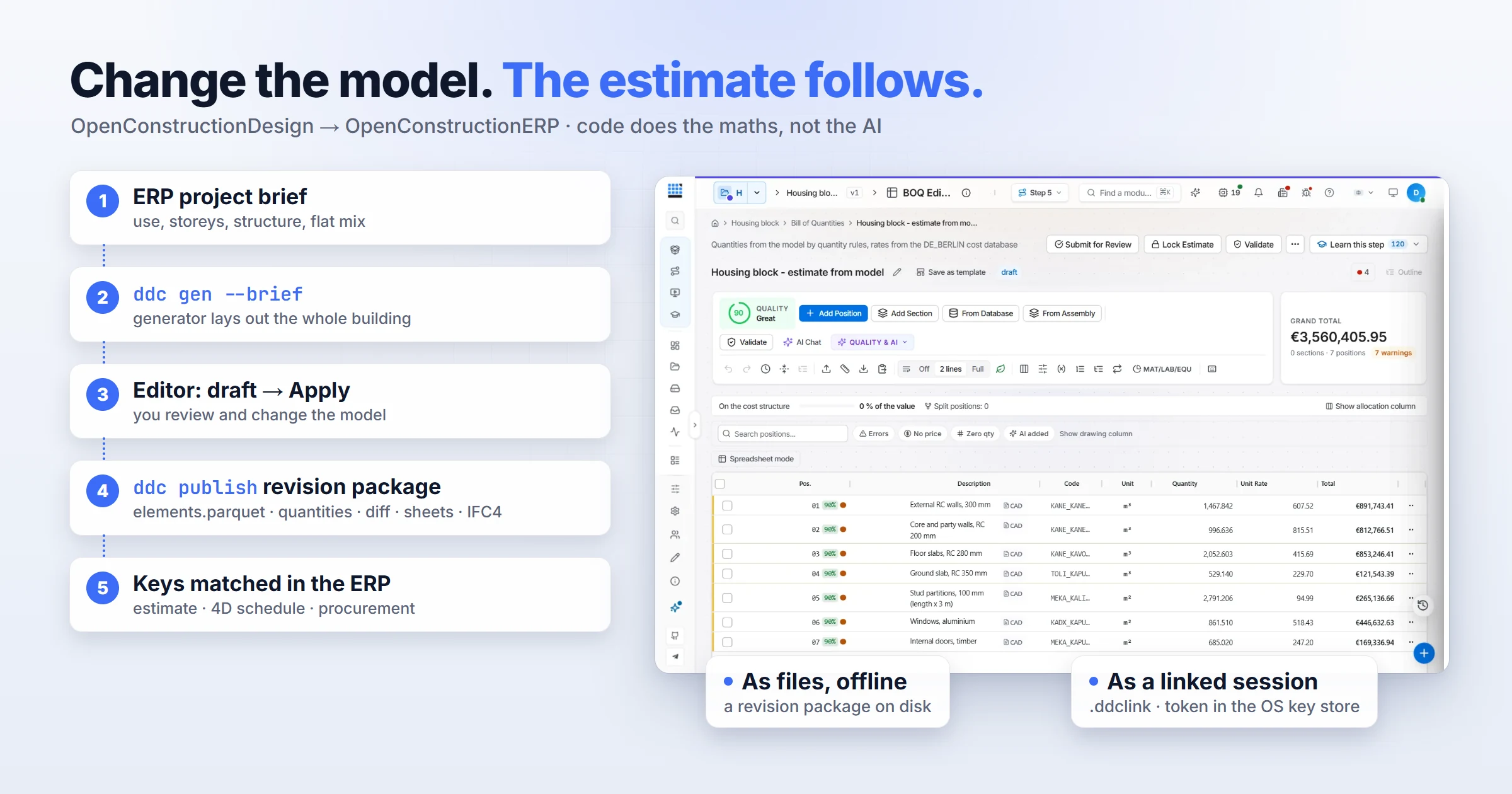
ERP link: change the model, the estimate follows
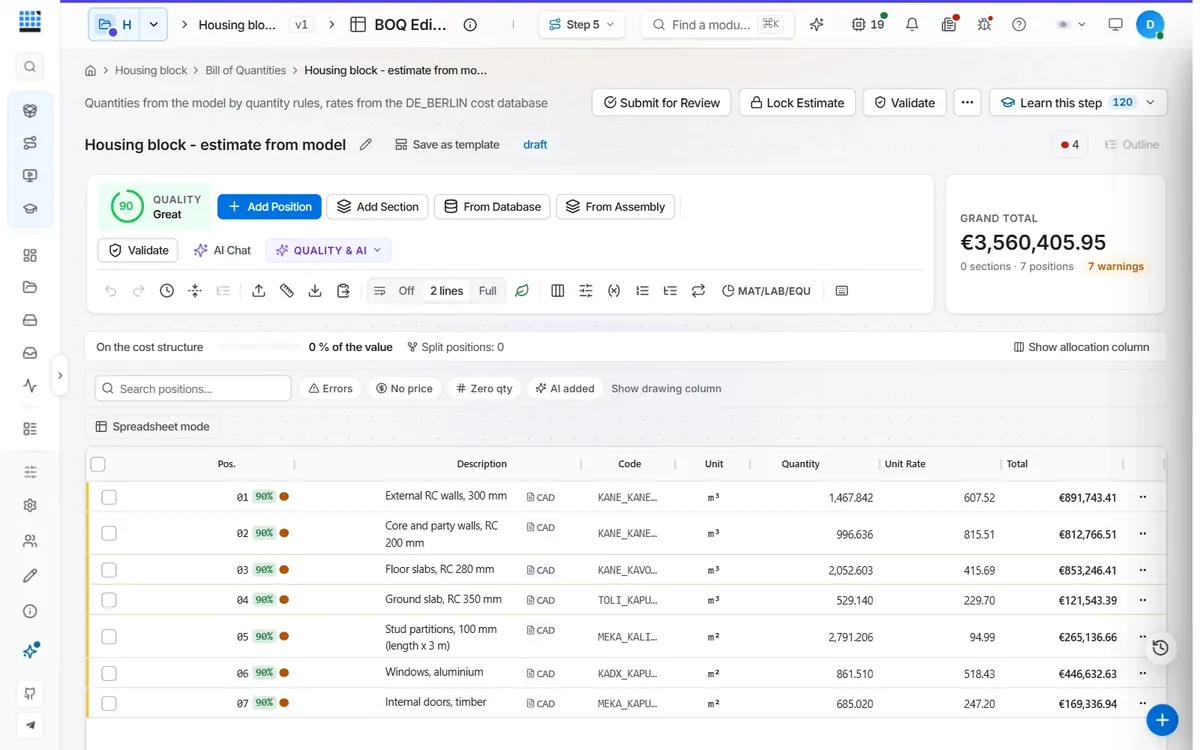 |
€3,560,405.95Estimate of the 6-storey housing block, priced straight from the model.7 positions · 6,730 elements · 7 levels · quantities from the model, rates from the DE_BERLIN cost database. Move a wall, add a floor or change a type in the editor, publish, and the quantities, the estimate, the 4D schedule and procurement in OpenConstructionERP update with it. |
OpenConstructionERP is the open
construction ERP from the same team. The editor hands it every element with a stable key, its
quantities and its level.
- Brief in, model out. An ERP project brief goes through
ddc gen --brief; you review the
preview in the editor and press Apply. - One revision package.
ddc publishwriteselements.parquet, quantities, the diff to the
last revision, sheets and IFC4; the ERP matches keys and updates the estimate, 4D schedule and
procurement. - Files or a live session. Exchange packages as files (offline) or link a session through a
.ddclinkfile with the token in the OS key store. Code does the maths, not the AI. An ERP
edition with the editor built in is in preparation.
OpenConstructionERP on GitHub ·
openconstructionerp.com ·
ERP link on the website ·
Details below
Quickstart
- Start
ddc-app.exe. - Open Ask AI in the ribbon and pick a model: Ollama on your own computer (no key), or paste
a key for a cloud provider. The key stays in the Windows credential store. - Describe a change in plain words, for example
"Add a 2-storey extension on the east side, 12 × 8 m, joined to the corridor on both levels." - Review the highlighted preview in plan and 3D, untick items or change values, then press
Apply. The whole plan is one undo step. Then keep editing by hand.
A whole building from a brief
For a new building, write a short JSON brief (use, storeys, structure, flat mix) and let the
generator lay it out. The schema is crates/io/contract/schemas/brief.schema.json;
a full example is brief.de-residential.json.
ddc gen --brief brief.json --out housing.ddc
ddc info housing.ddc
ddc open housing.ddc --export ifc4 housing.ifc
brief.de-residential.json)
{
  "schema": "ddc-brief/1",
  "name": "Wohnhaus Beispielstraße",
  "norm_pack": "de",
  "use": { "category": "residential_multi", "detail": "Mehrfamilienhaus, ein Treppenhaus" },
  "massing": {
    "floors_above": 5, "floors_below": 1, "floor_height_m": 3.0,
    "footprint": { "width_m": 34.0, "depth_m": 12.0 }, "lift": true
  },
  "programme": {
    "units": [
      { "name": "2-Zimmer", "count": 10, "area_m2": 52,
        "rooms": [{ "kind": "living" }, { "kind": "bedroom" }, { "kind": "kitchen" }, { "kind": "bath" }, { "kind": "hall" }] },
      { "name": "3-Zimmer", "count": 10, "area_m2": 74,
        "rooms": [{ "kind": "living" }, { "kind": "bedroom", "count": 2 }, { "kind": "kitchen" }, { "kind": "bath" },
                  { "kind": "hall" }, { "kind": "storage" }] }
    ],
    "spaces": [{ "kind": "technical", "name": "Technik", "floors": [-1], "area_m2": 40 }]
  },
  "structure": { "system": "masonry", "foundation": "raft" },
  "envelope": { "roof": "flat" }
}
[!NOTE]
ddc genandddc publishbelong to the ERP link and are compiled in with thelinkfeature:cargo build --release -p ddc-cli --features link.
What you can build
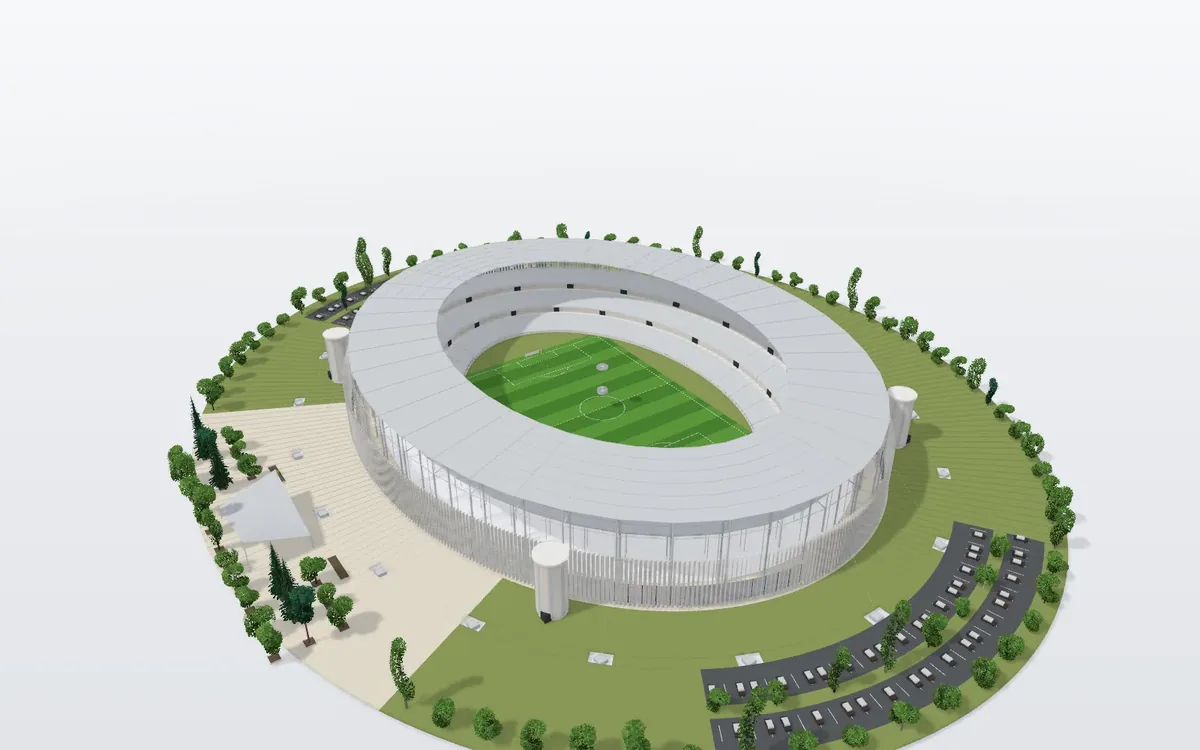
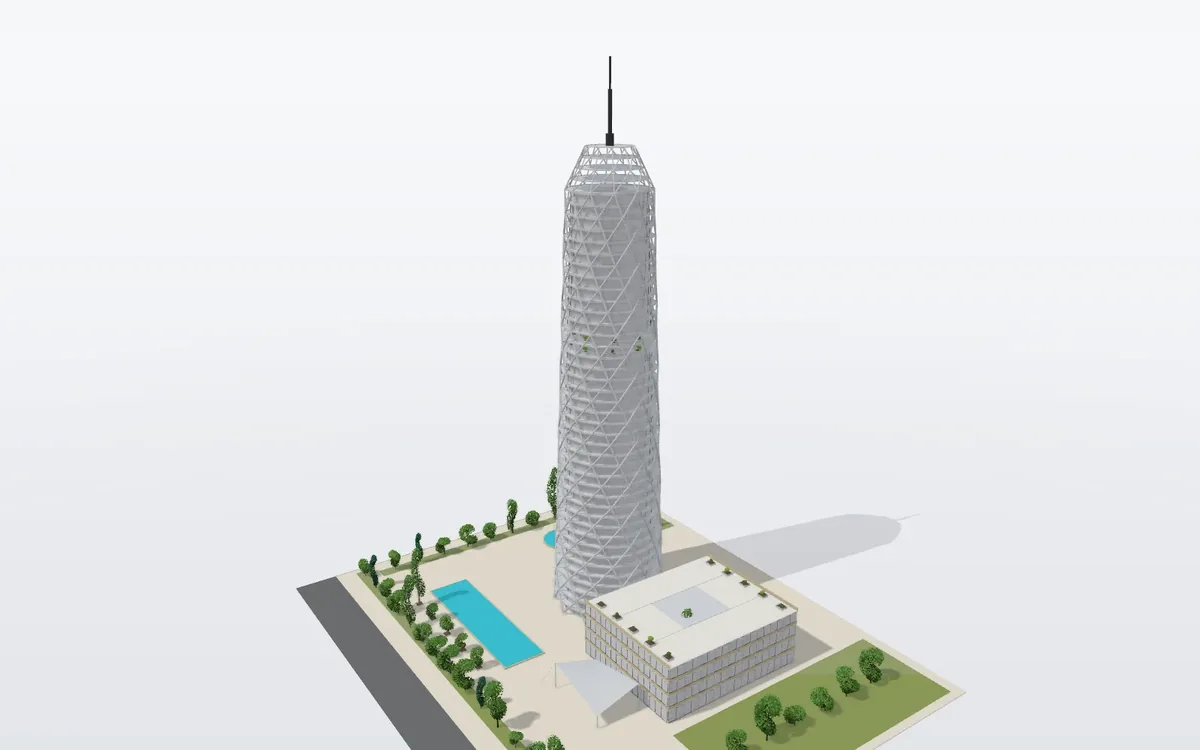
Each model is regenerated from its source in one command: a brief for the housing block, a Lua
script for the stadium and the tower. Times are wall-clock generation on one laptop with release
0.10; figures come from each run's own summary.
 |
 |
 |
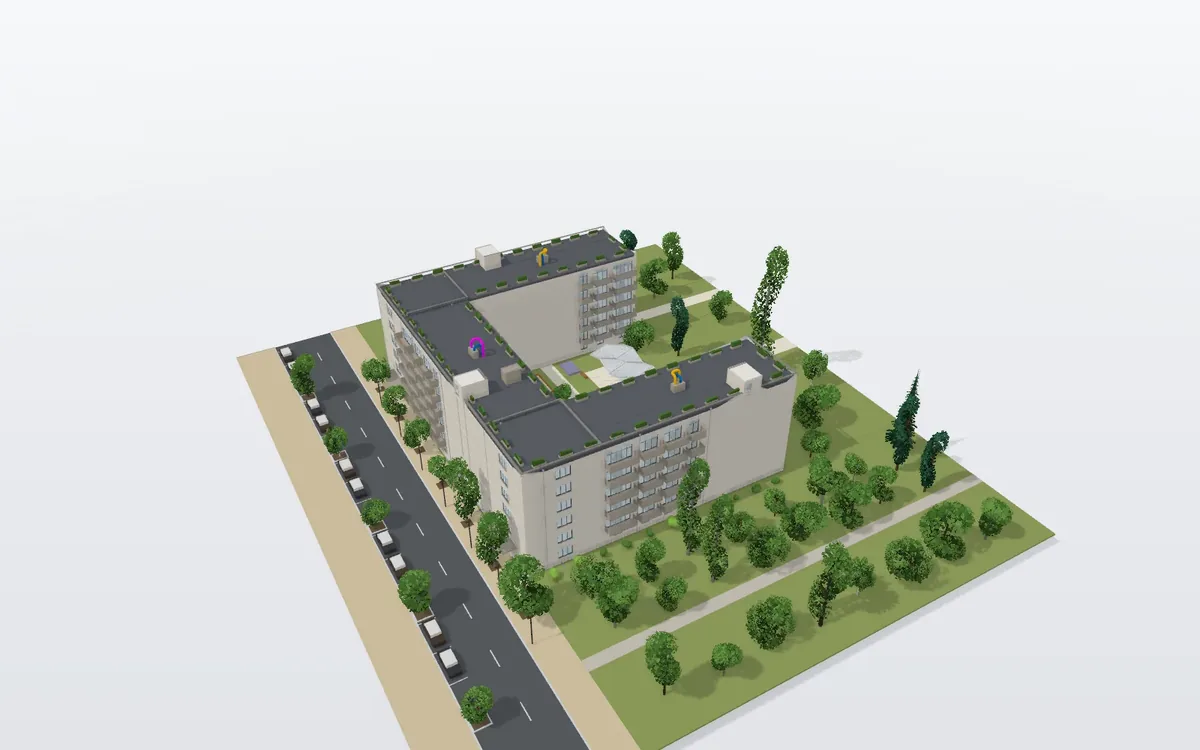
6-storey housing block (brief → ddc gen)U-shaped block around a garden court with HVAC, water, drainage and electrical. 10,274 elements · 504 walls · 354 rooms · 4,521 MEP runs · 412 circuits · 0 audit errors · 7 min |
Football stadium (Lua) A bowl under a ring roof, with site, parking and planting. Structure and envelope only. 6,441 elements · 12 min |
Diagrid tower (Lua) A steel diagrid tower on a podium, with a mast and a landscaped site. Structure and envelope only. 6,203 elements · 13 min |
Known gap in the housing block: 30 kitchen taps are not yet connected to the water network.
Lua recipes that ship with the editor
The recipes live in crates/script/data/recipes (24 files). Six of
them, rendered as they run with their default parameters:
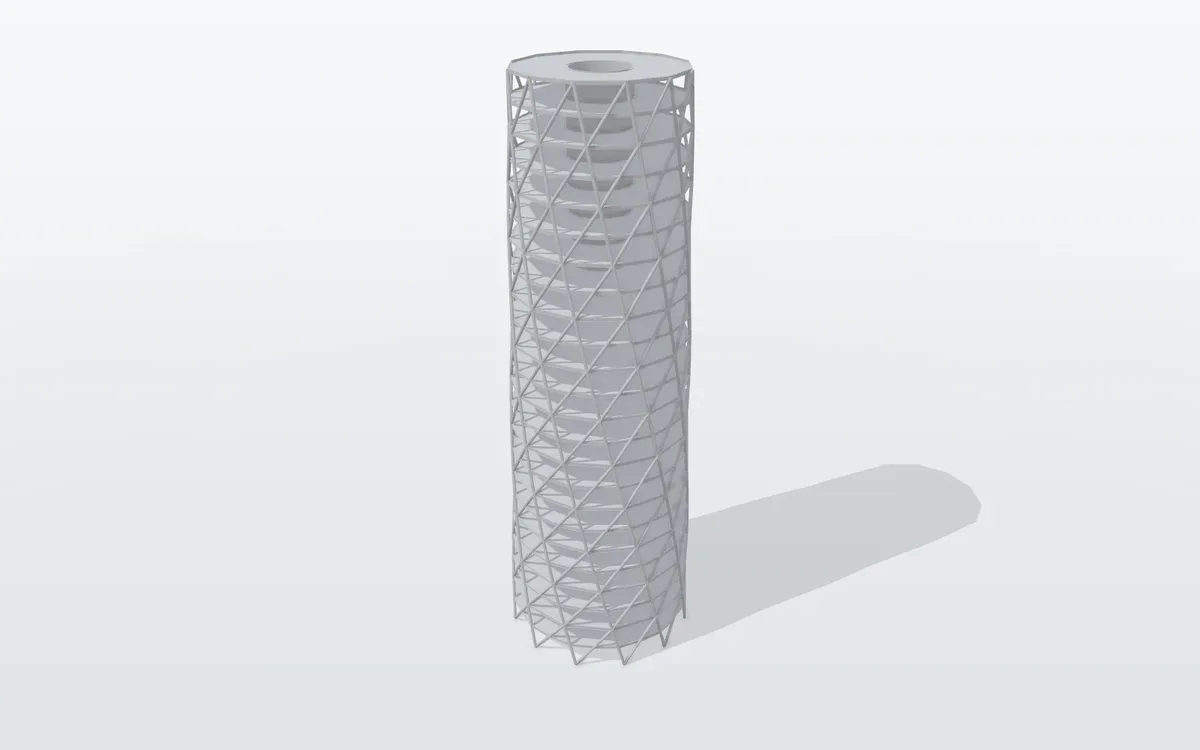 twisted_diagrid_tower.lua24 floors, 90° twist · 768 elements |
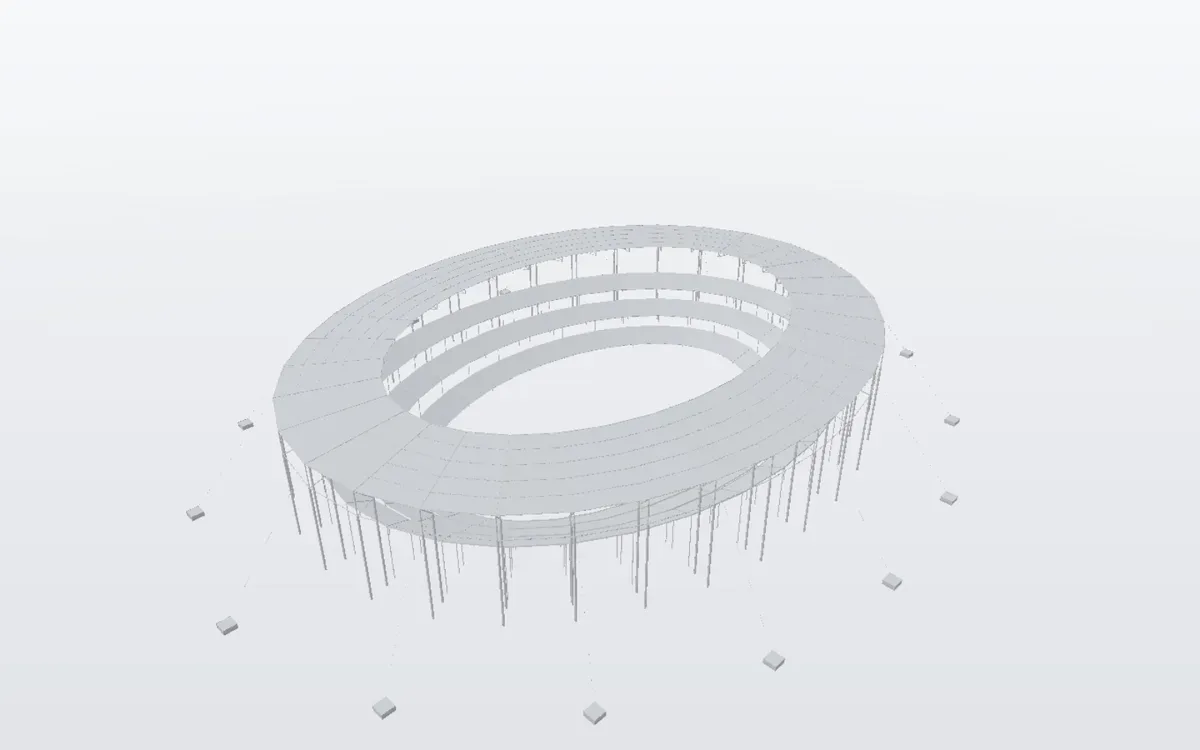 stadium_roof.lua32 cantilever trusses round a 60 × 42 m ellipse · 1,536 elements |
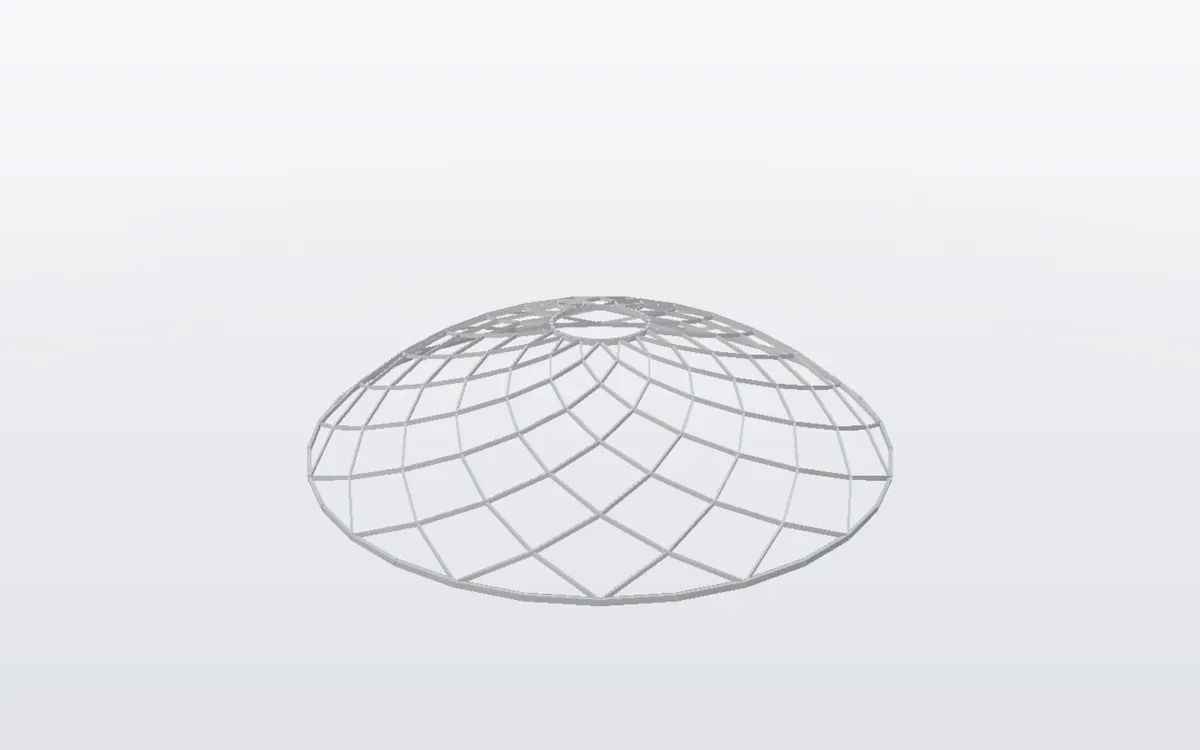 timber_gridshell.lua18 m radius, 7 m rise, glulam diagrid · 320 elements |
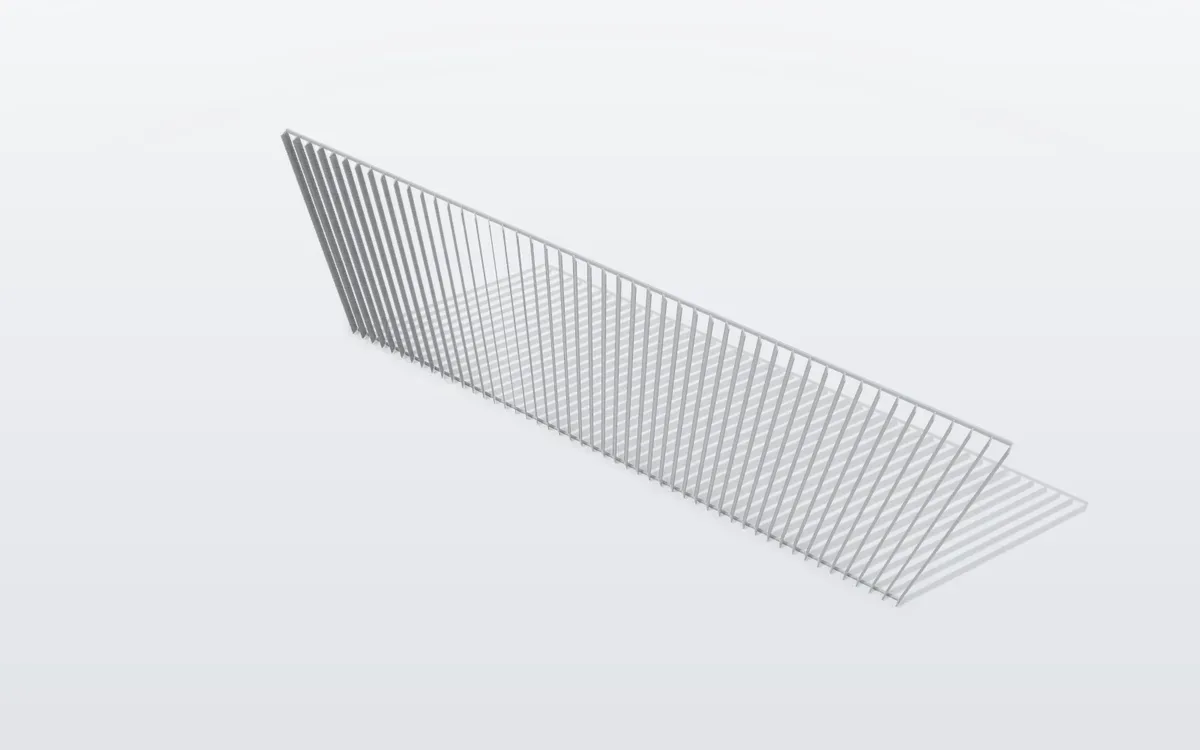 fin_facade.lua36 × 16 m, fins turned to an attractor · 149 elements |
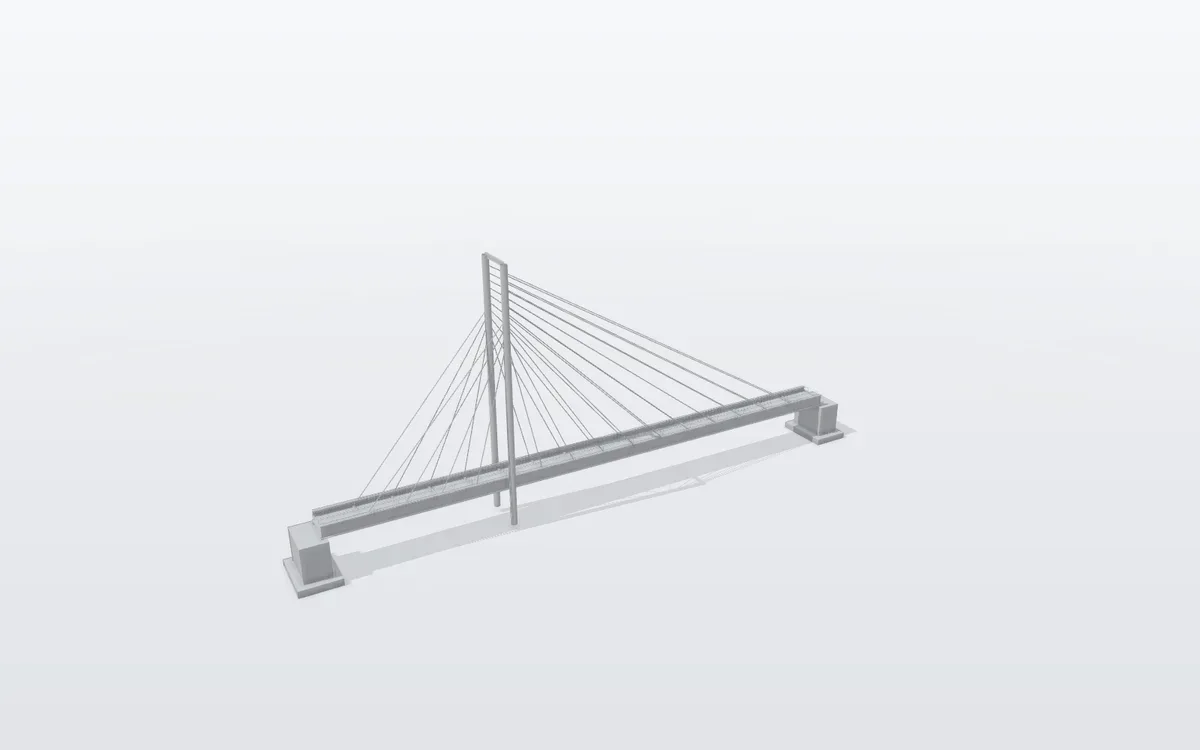 cable_stayed_footbridge.lua80 m span, 4 m deck, one pylon · 602 elements |
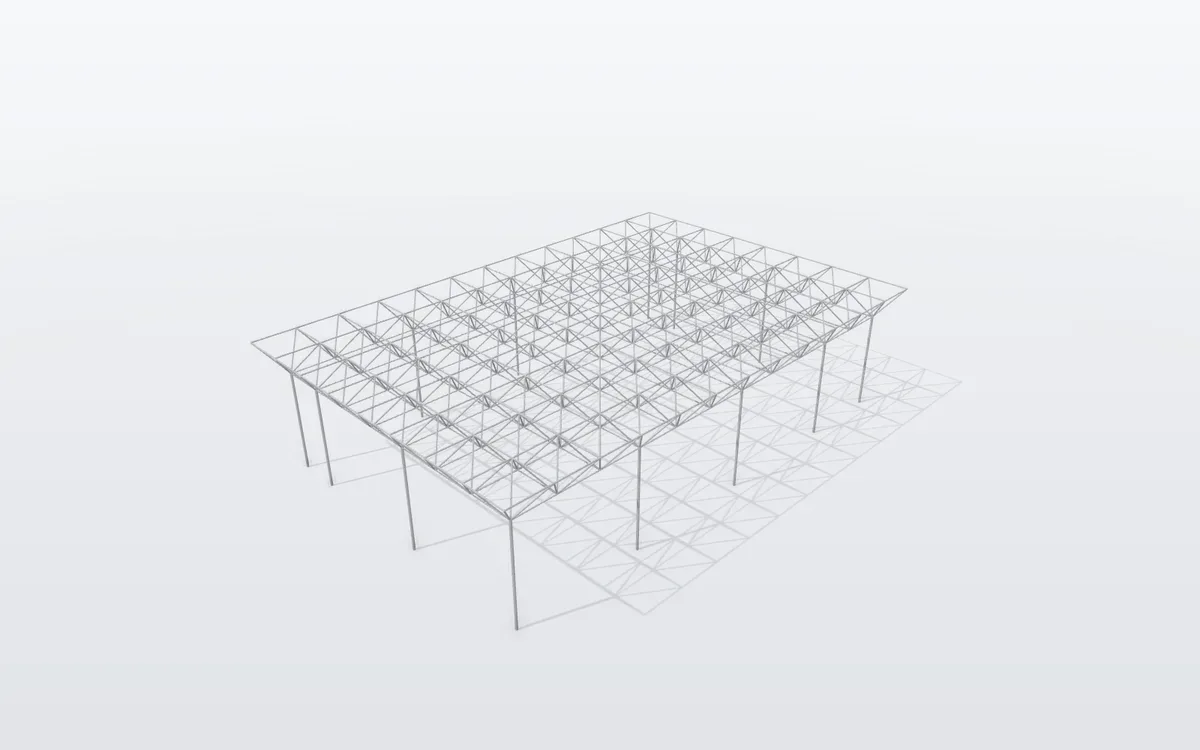 space_frame_hall.lua12 × 8 modules of 3 m · 782 elements |
All six pass audit{strict = true}. Nothing in the renders was edited by hand.
The editor
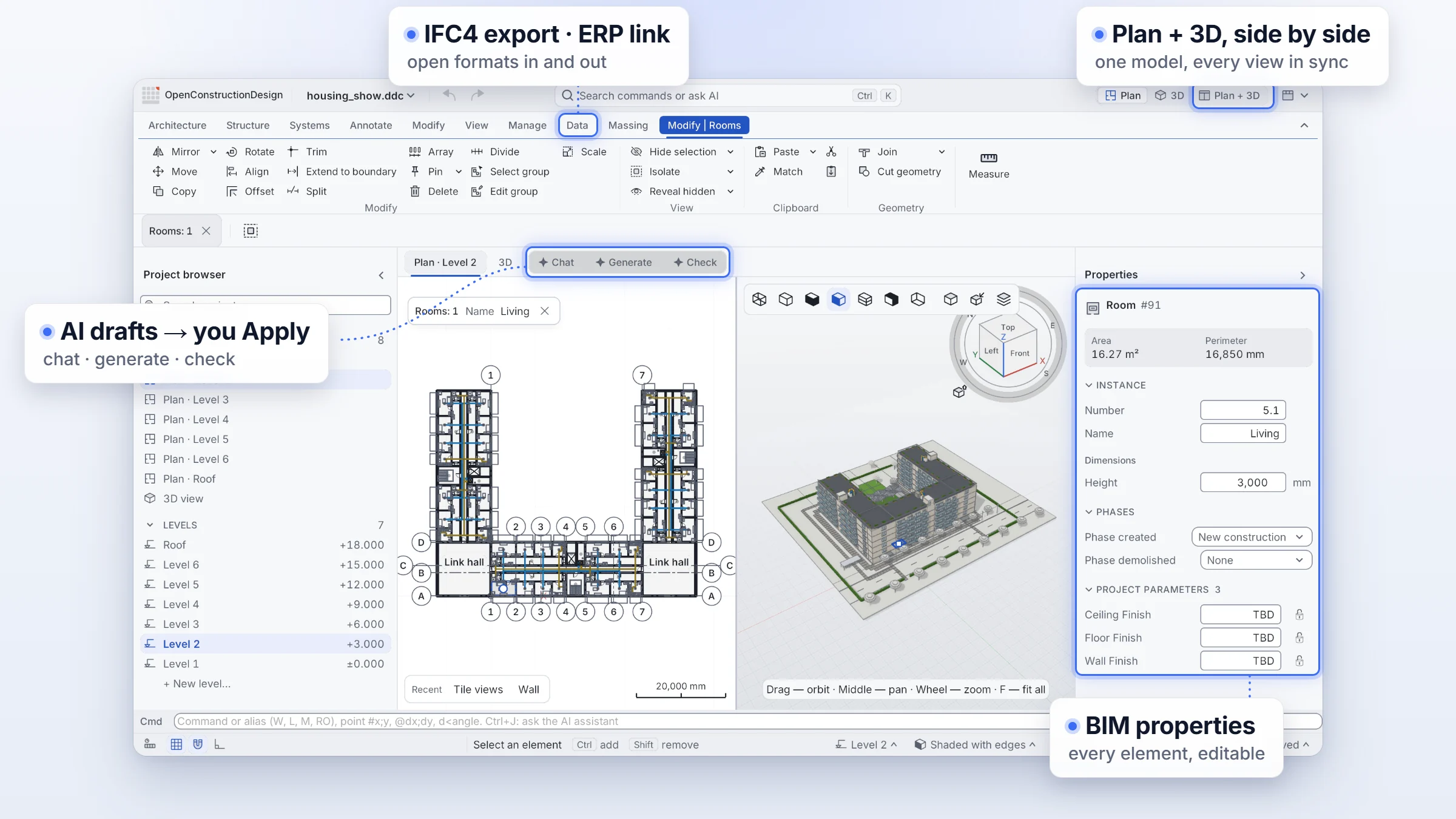
Plan and 3D in one window. Whatever the AI proposes, you can open, edit and finish by hand.
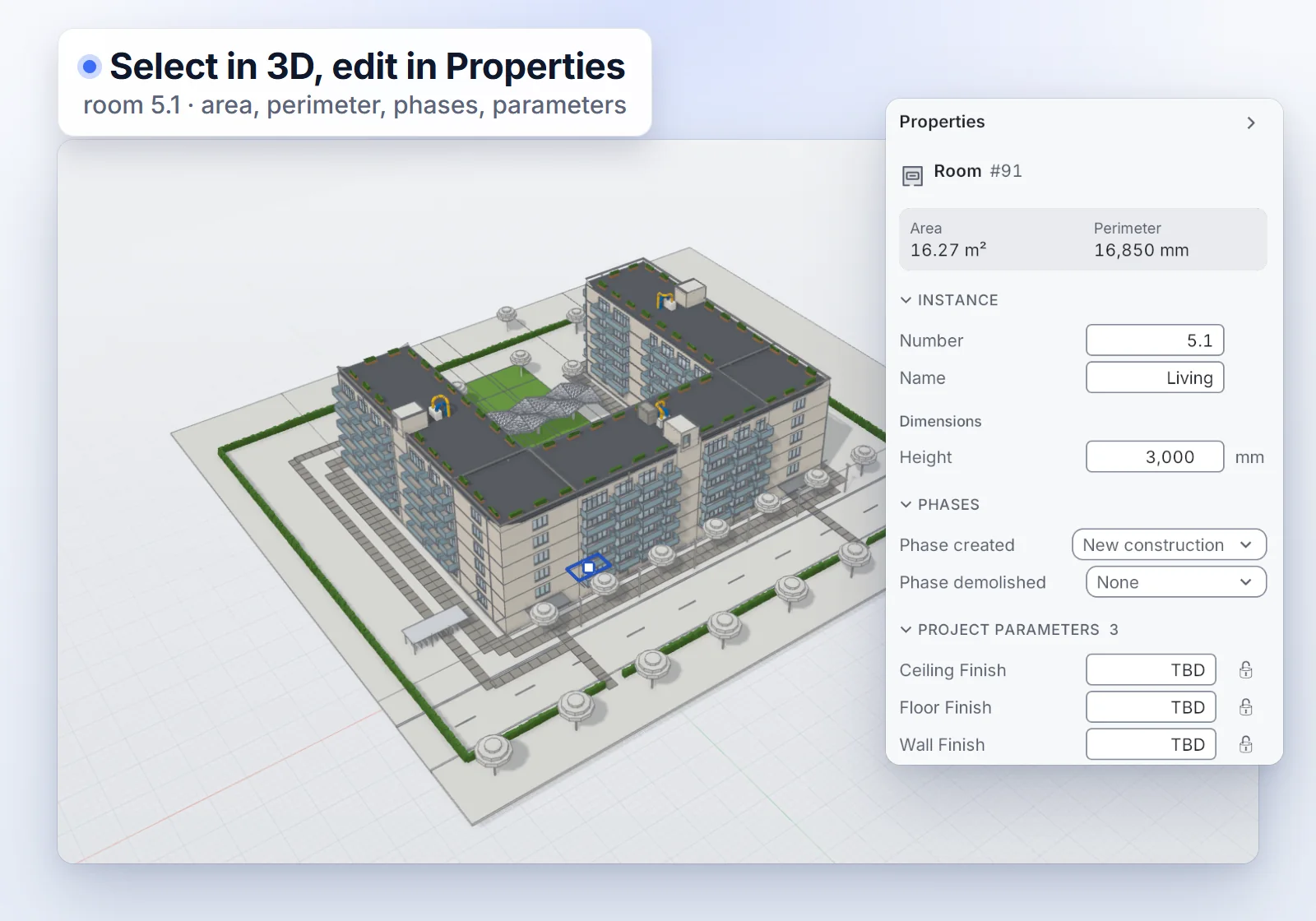
The six-storey housing block in the editor. Select anything in 3D or on the plan; the Properties panel shows the real values and edits them in place.
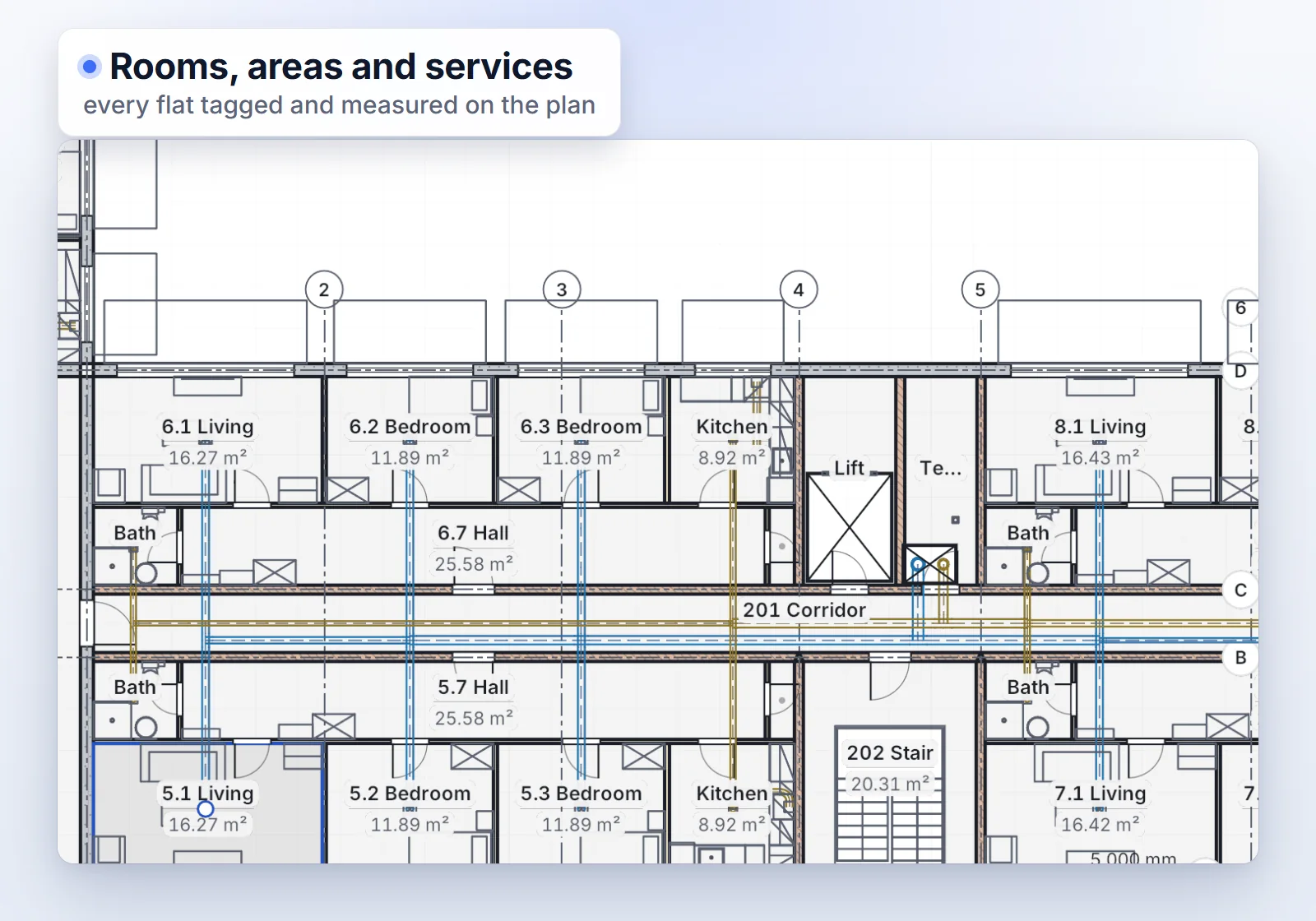 Plans. Rooms are named, numbered and measured, and follow every edit. |
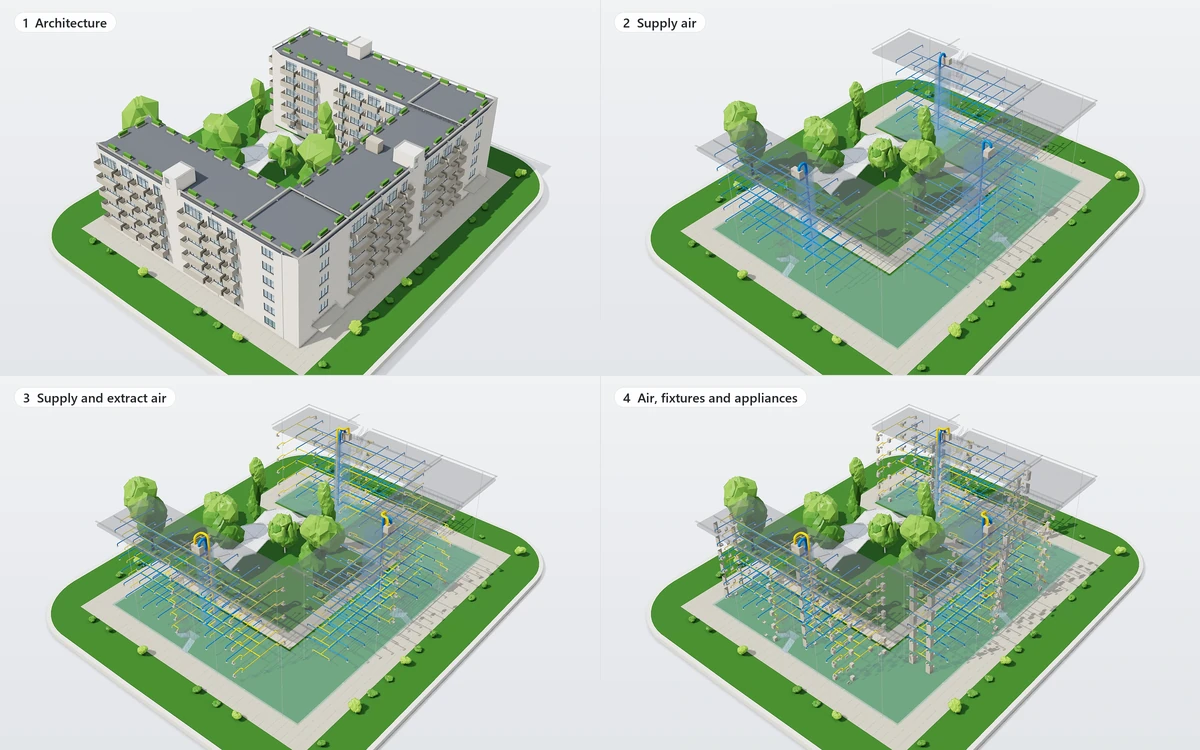 MEP services. Ducts, pipes and fixtures run through the same model, layer by layer. |
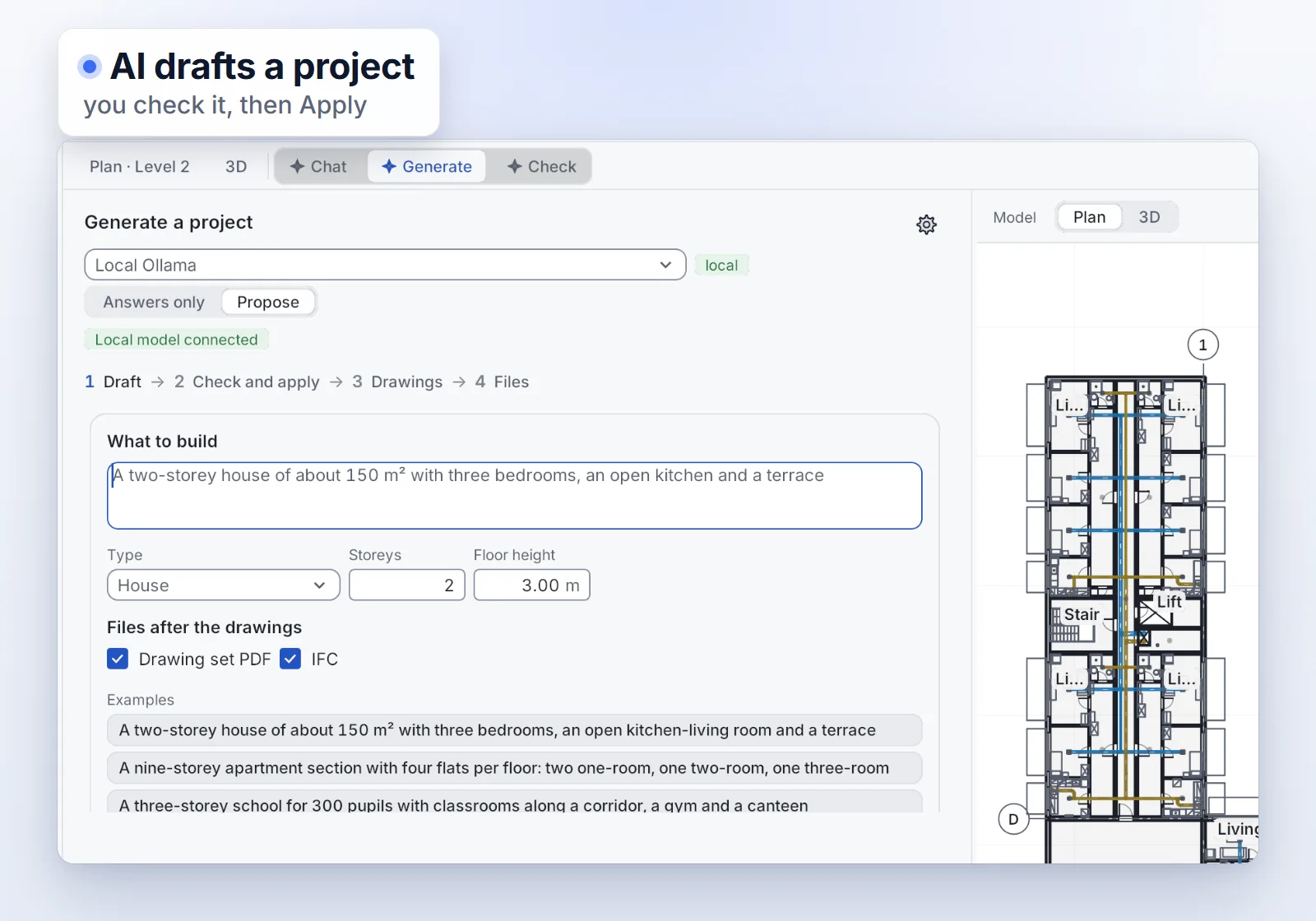 AI generate and review. The AI builds a preview from a brief. Nothing changes until you press Apply. |
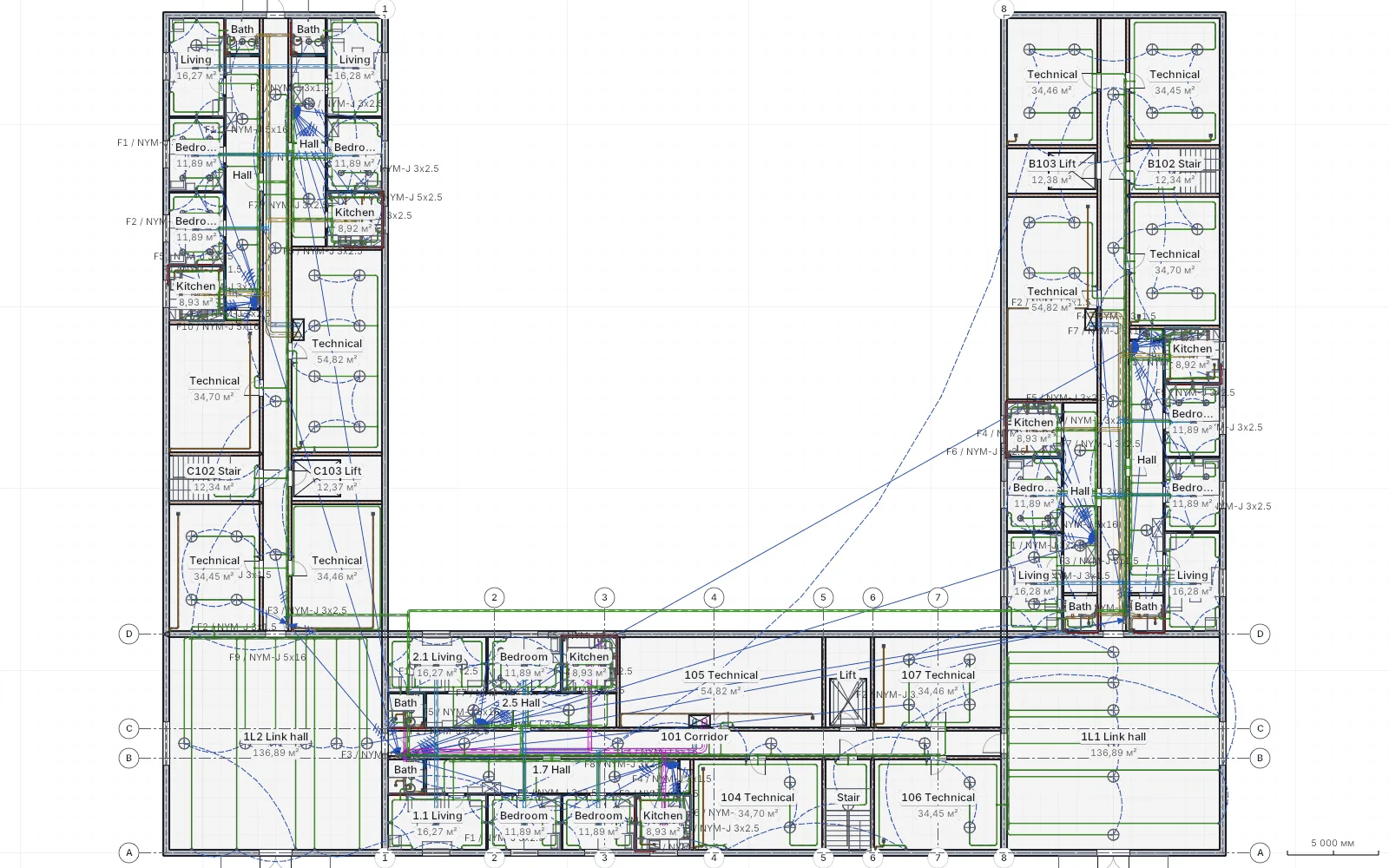 Drawings. Plans, sections and sheets come out of the model and stay in sync. |
Scripted shapes
|
|
|
|
Lua recipes that ship with the editor, rendered with default parameters. More on the site.
Full feature listModelling
- Levels, grids, reference planes, walls (layered types, automatic joins), floors, ceilings,
roofs, stairs, railings, ramps, curtain walls, openings, doors, windows, rooms and zones. - Own geometry kernel: exact predicates, B-rep solids, CSG, sweeps, NURBS, sketch constraints.
- Parametric families: components with types and parameters defined inside the model.
- Every edit is a journaled step with undo, redo, per-change history with its author, and
version comparison.
Documentation and drawings
- Plans, sections, elevations, 3D views, schedules, dimensions, tags, text, legends.
- Sheets with title blocks and views placed at scale; vector PDF and SVG export.
Structure
- Beams, columns, braces, structural walls and floors, footings, foundation slabs,
reinforcement that follows its host; steel connections with plates and bolts.
Formats
- Import IFC2X3, IFC4, IFC4X1 to IFC4X3 and
.ifczip; export IFC2X3, IFC4 and IFC4.3. - Read
.dwgand.dxfwith independent decoders. The original file is never modified. - Export glTF, STEP, STL, OBJ, 3MF; issues as BCF 2.1/3.0.
.rvtthrough an optional, separately distributed bridge module that speaks the published
bridge protocol; it is not part of this repository.- Clash detection, rule checks and model integrity checks.
Spreadsheets
- Round-trip element parameters through XLSX; an import is one undo step with a per-cell report.
- Query elements and open them as an editable table.
Automation
- JSON edit scripts with preview, and recording of actions into a script.
- Sandboxed Lua geometry scripts; the headless
ddcCLI (open,info,batch,run;genandpublishwith the ERP link).
AI and MCP
The editor runs no AI service of its own and is not tied to a vendor. It speaks OpenAI-style chat
completions and Anthropic-style messages, plus MCP for external clients. You pay your provider
directly, or nothing with a local model.
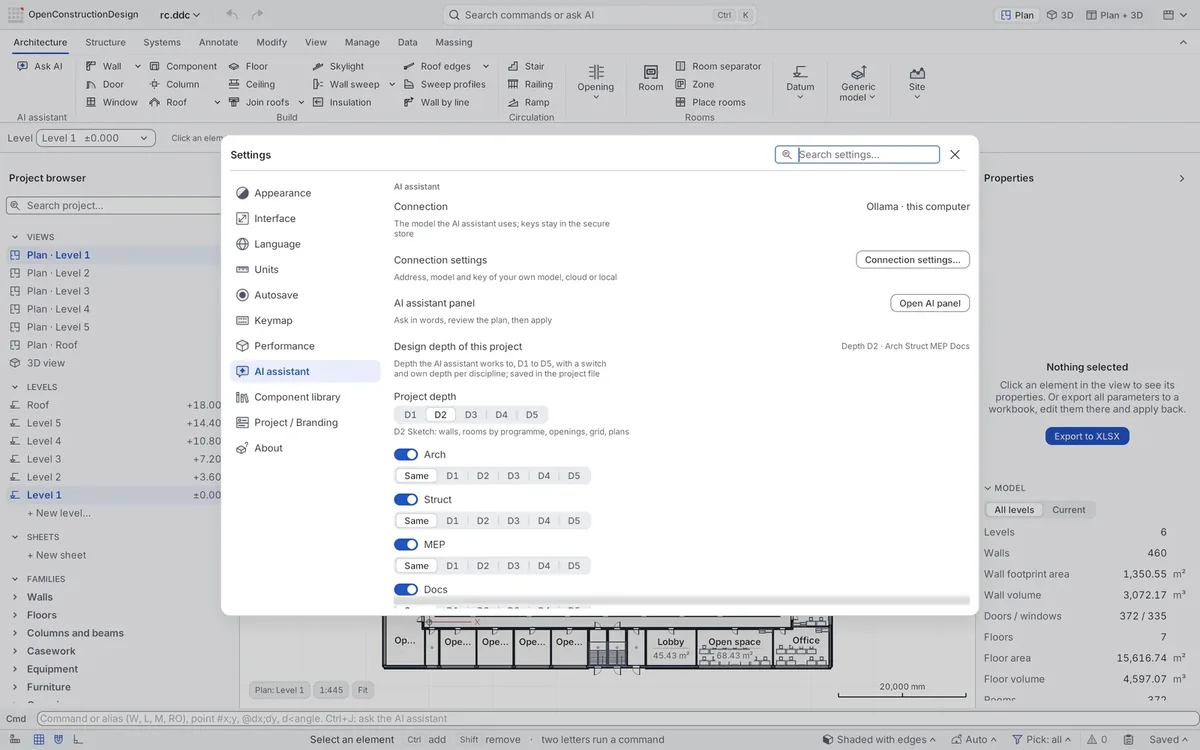 |
Design depth (D1 to D5) is set per discipline: architecture, structure, MEP, documents. |
[!IMPORTANT]
Preview, then Apply. The AI plans on a scratch copy, runs the model checks on its result and
shows it highlighted under a Preview, model unchanged banner, with the quantities it
adds. Nothing reaches your model until you press Apply; an applied plan is one undo step.
MCP server
Turn on MCP server in the editor. It listens on 127.0.0.1:47621 only and copies a client
config with a fresh token; revoke the token with one click.
| Tool | Purpose |
|---|---|
get_context |
Project, levels and the current selection |
query_elements |
Find walls, rooms, doors by any parameter |
create_elements |
Add elements into the preview |
run_checks |
Run the audit on the preview |
request_apply |
Ask the user to press Apply |
HTTP clients (for example .cursor/mcp.json):
{ "mcpServers": { "ddc-editor": {
    "type": "http", "url": "http://127.0.0.1:47621/mcp",
    "headers": { "Authorization": "Bearer <token>" } } } }
Command-line clients:
claude mcp add --transport http ddc-editor http://127.0.0.1:47621/mcp \
  --header "Authorization: Bearer <token>"
Clients that need a stdio bridge (for example claude_desktop_config.json):
{ "mcpServers": { "ddc-editor": {
    "command": "npx",
    "args": ["mcp-remote", "http://127.0.0.1:47621/mcp", "--header", "Authorization:${DDC_AUTH}"],
    "env": { "DDC_AUTH": "Bearer <token>" } } } }
More: docs/user/ai-assistant.md.
Building services (MEP)
The generator lays out services together with the building: ducts sized for the air each room
needs, pipes with their fittings, cooling and power for a data centre. They export as real IFC
classes (IfcDuctSegment, IfcPipeSegment, IfcCableCarrierSegment), not as boxes. Each grid
steps from the architecture through a ghosted shell to the service systems.
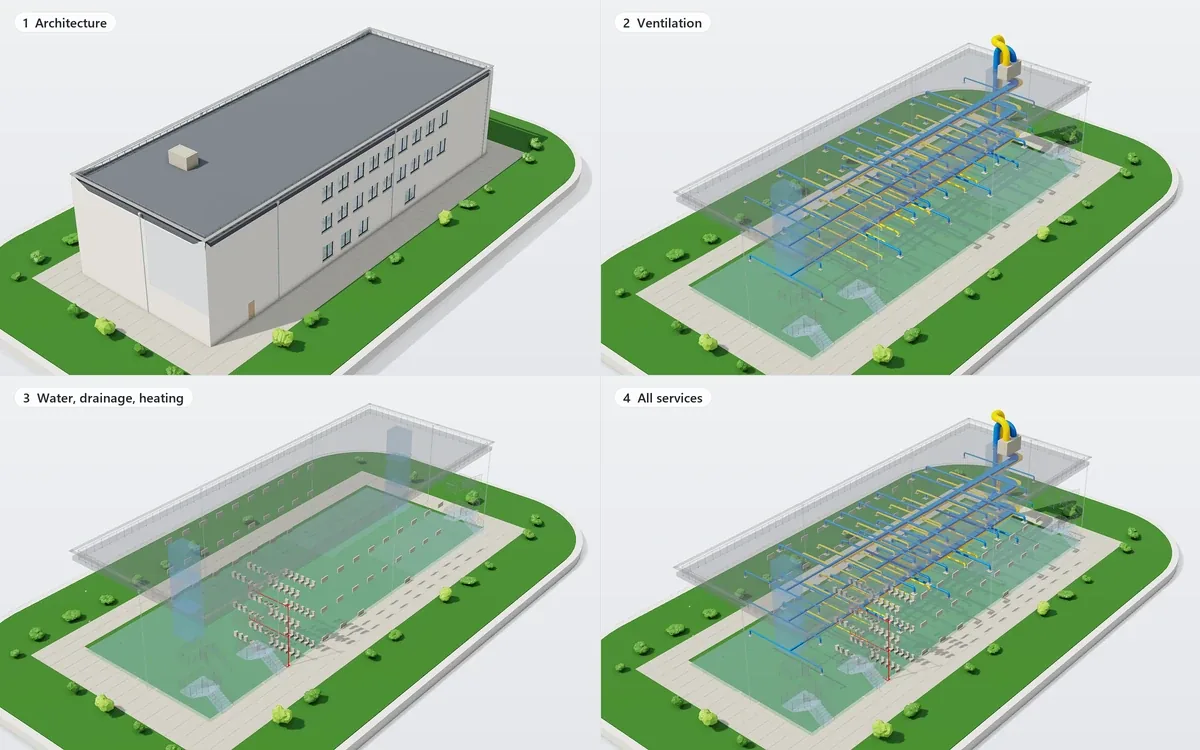 3-storey school: ventilation, then water, drainage and heating. 276 service runs. |
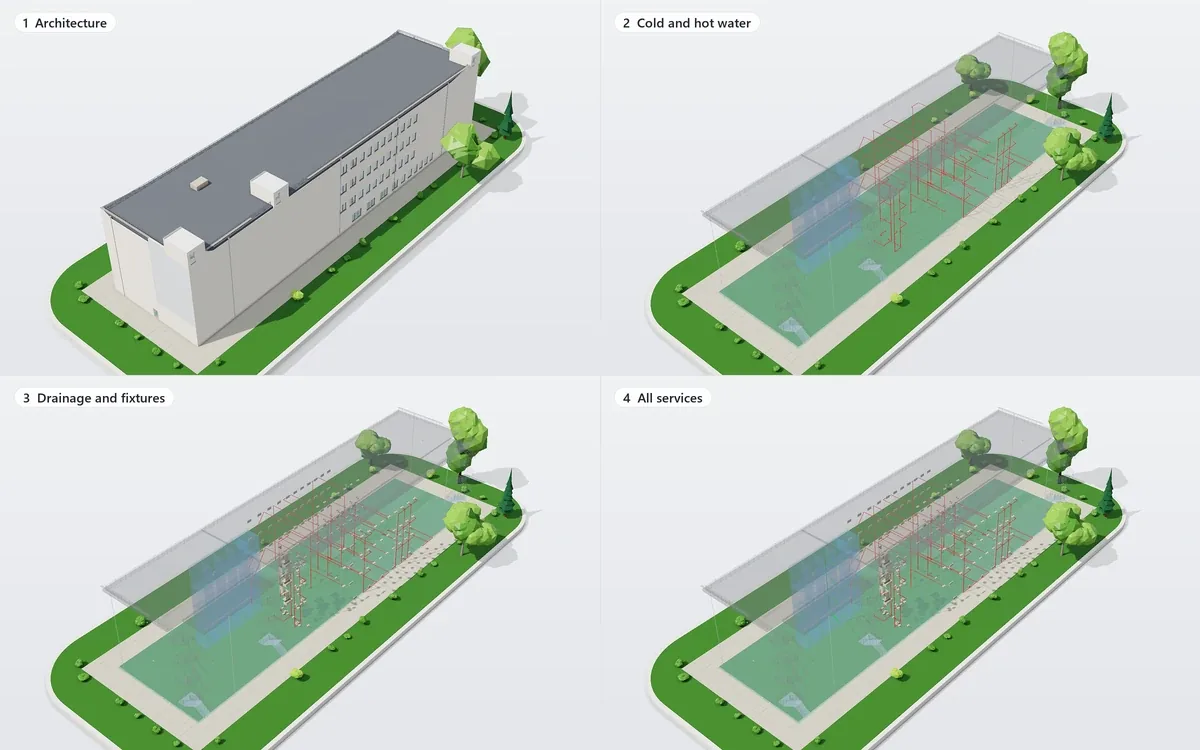 4-storey clinic: cold and hot water, drainage and fixtures. 983 service runs. No ventilation yet. |
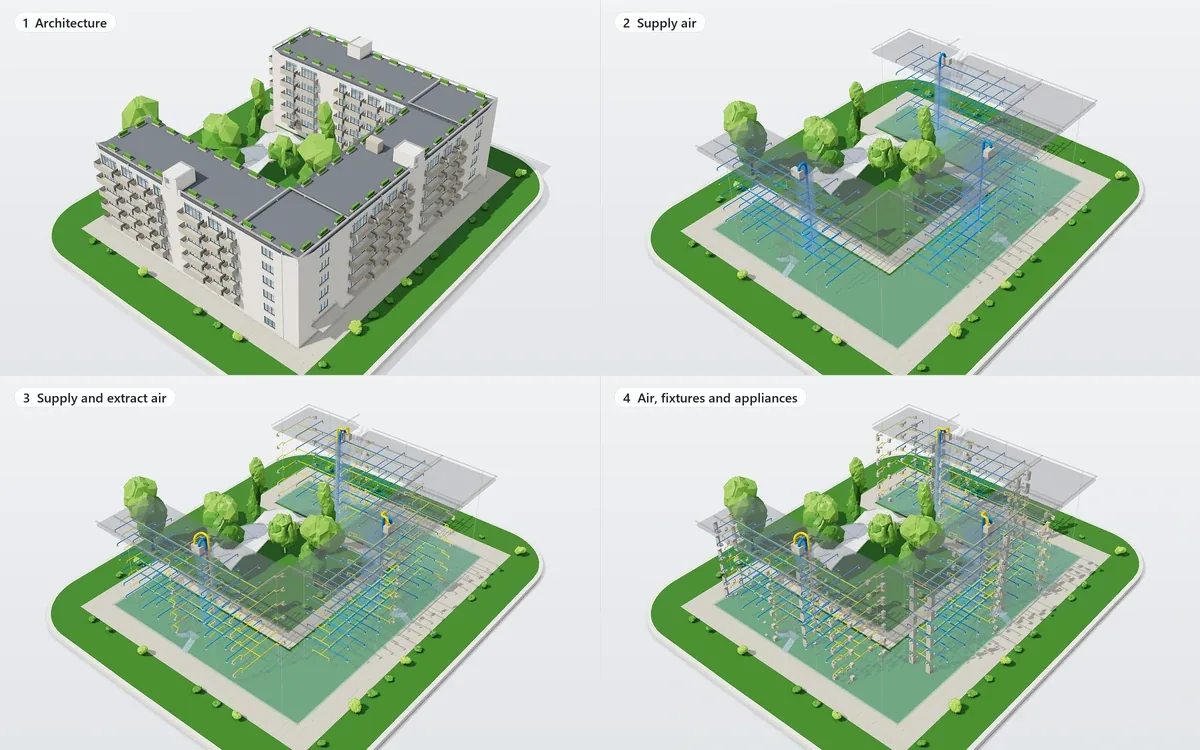 6-storey housing: supply and extract air, fixtures and appliances. 702 service runs. |
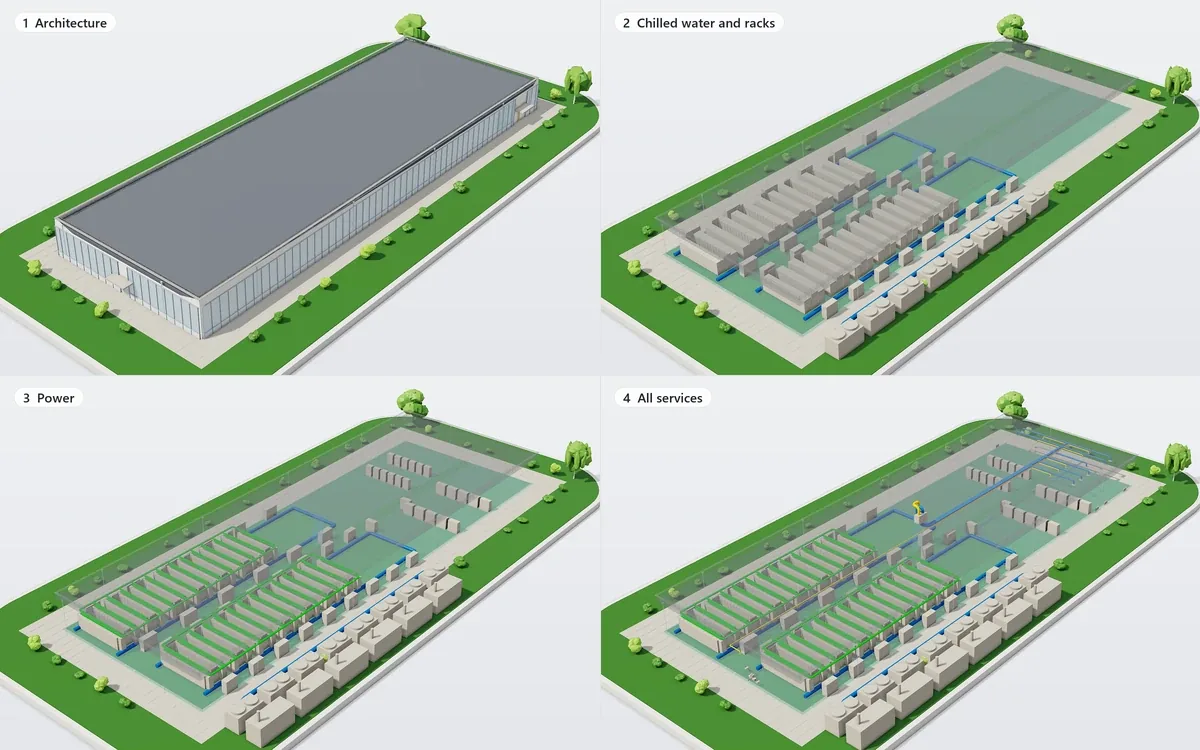 Data centre: chilled water (×2) with the rack rows, then power (×2). 330 service runs. |
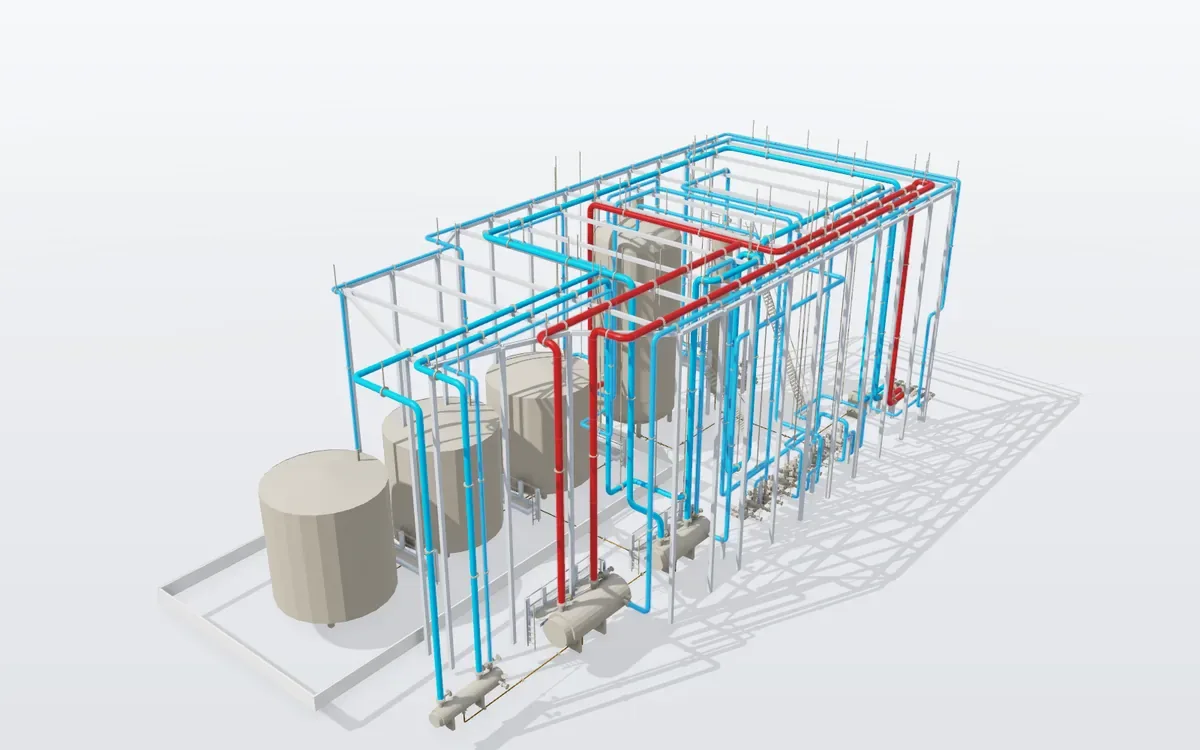
Process plant, 90 m³/h, from one brief: 29 units, 285 pipe runs, 978 m of pipe, 245 supports.
46 of 69 nozzles are connected so far; the plant check lists every open line.
[!NOTE]
Room-level electrical (boards, circuits, luminaires) is still being completed in the generator,
and the clinic has no ventilation yet. Both appear in the generator's own report.
Export: IFC4 and the ERP link
IFC read and write covers IFC2X3 to IFC4.3. The model is data first: every element carries a
stable key, its parameters and quantities, so an estimating or ERP system can price it. The
editor never invents a cost.
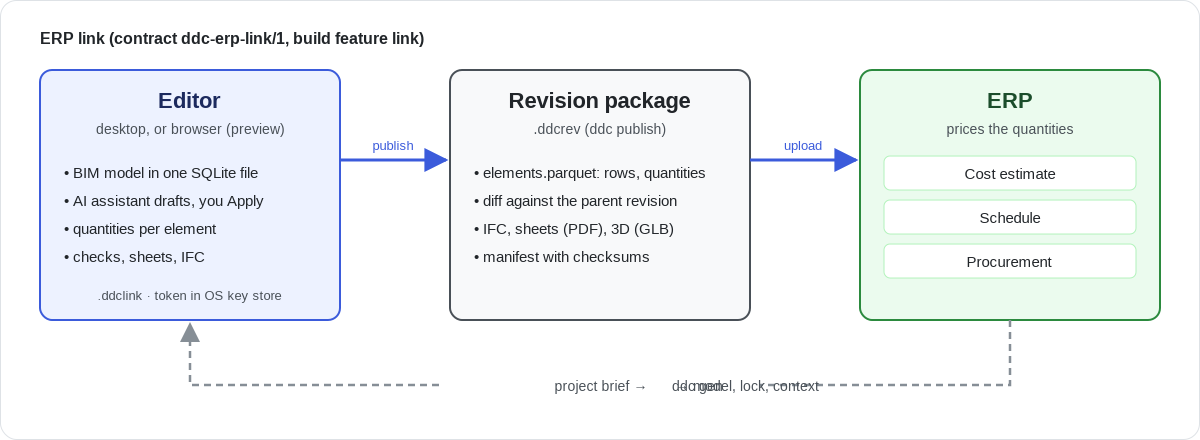
ddc gen --briefturns a project brief from the ERP into a model;ddc publishsends a model
back as a revision package: element rows (elements.parquet), quantities, a diff against the
parent revision, sheets, IFC and 3D geometry.- As files, this works offline and through any file share. A
.ddclinkfile opens a linked
session straight from the ERP; the project token lives only in the OS key store.
The housing block above, exported to IFC4 and opened in OpenConstructionERP 18.8.2:
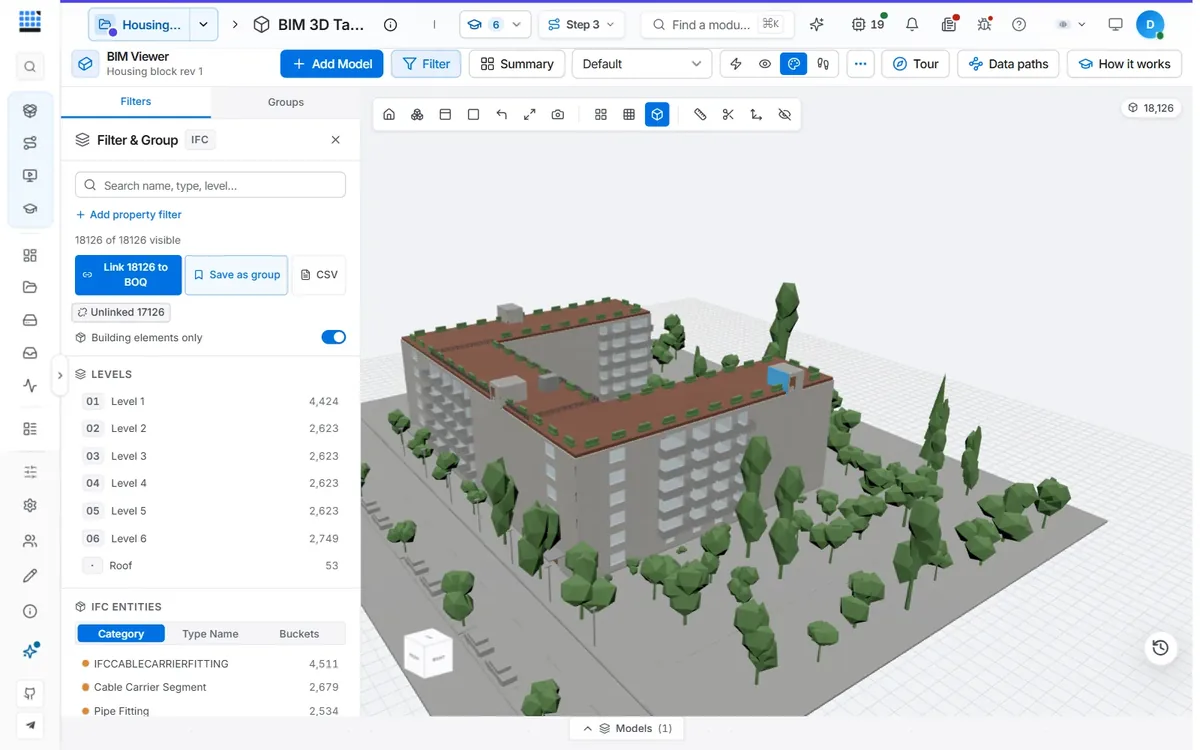 Imported model: 6,730 elements on 7 levels, counted by category and storey. The ERP draws imported geometry as simplified boxes. |
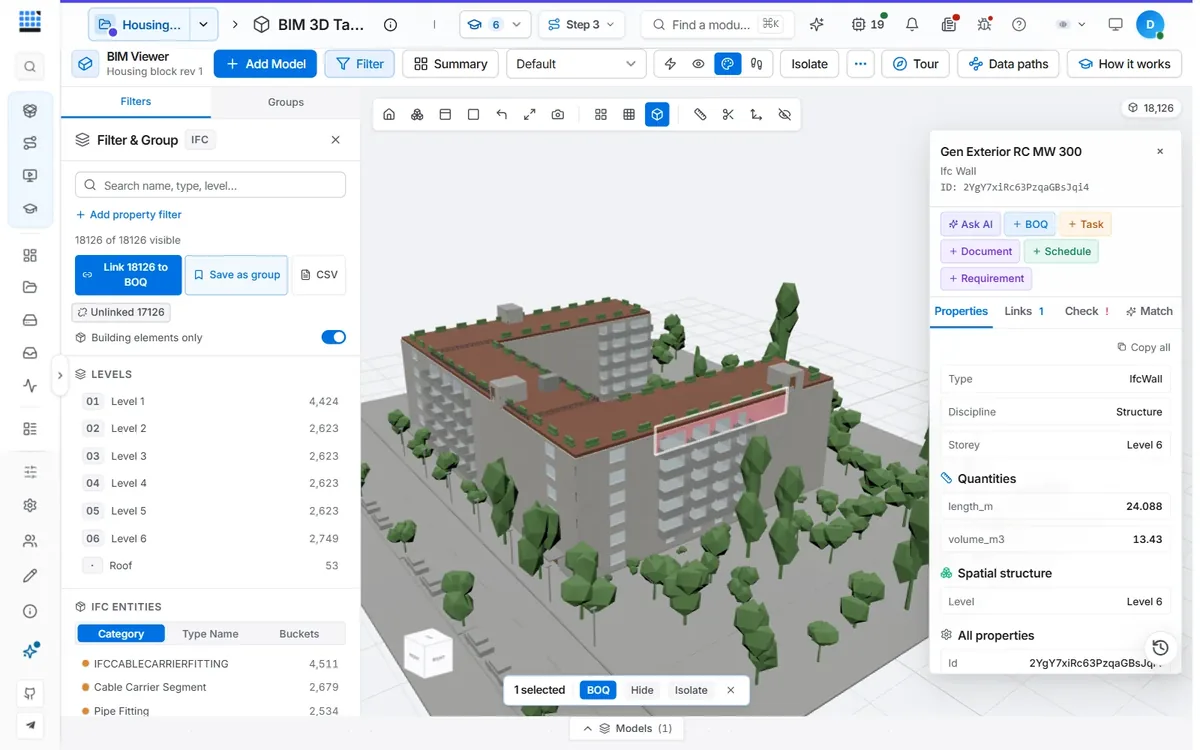 Quantities per element: Wall 105 on Level 1, 12 m long, 3 m high, 9.837 m³ net volume. |
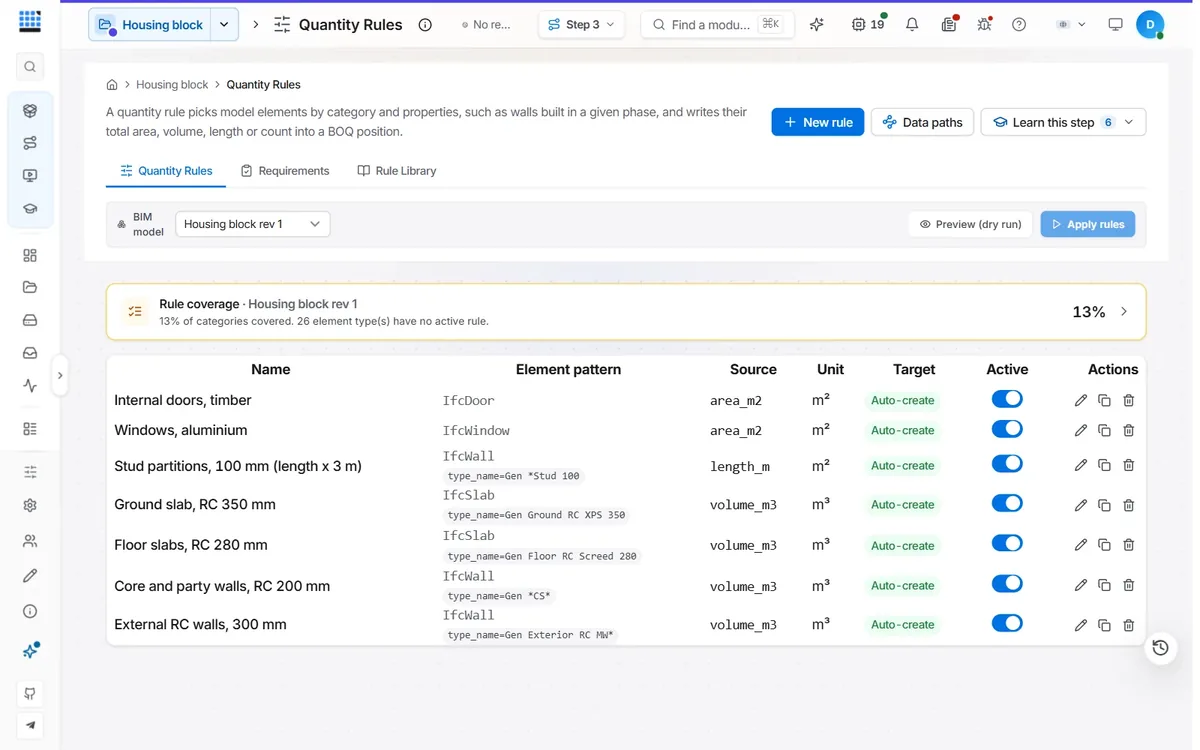 A dry run of 7 quantity rules matches 2,060 elements and shows the 7 bill positions it would create. |
The estimate: seven positions with quantities from the model. Total EUR 3,560,405.95; unit rates are typed in as an example. |
The ERP edition with the editor built in is in preparation. Without the ERP the editor works on
its own.
Lua scripting
Some shapes are a rule. A recipe declares its parameters with param, calls a builder and
ends with an audit; change a number and the whole shape rebuilds. Scripts run sandboxed: no
files, network, clock or randomness.
-- Twisted diagrid tower: steel diagonals in staggered rows, ring beams on every floor, slabs round a concrete core.
local floors = param("floors", 24, {min = 4, max = 80})
local radius = param("radius", "16 m", {min = "8 m", max = "40 m"})
local twist = param("twist", "90 deg", {min = "-180 deg", max = "180 deg"})
local taper = param("taper", 0.8, {min = 0.5, max = 1.2})
tower{floors = floors, floor_h = "4 m", radius = radius, sides = 12, twist = twist,
      taper = taper, system = "diagrid", module = 2, diagonal = "CHS 508x25",
      beam = "I 500x200", name = "tower"}
audit{strict = true}
Run it headless and override a parameter:
ddc run project.ddc crates/script/data/recipes/twisted_diagrid_tower.lua --out tower.ddc --param floors=32
Repository layout
| Crate | Role |
|---|---|
app |
The desktop editor (ddc-app) |
cli |
Headless CLI (ddc) |
ui |
Application shell on egui: tokens, icons, commands, ribbon, localisation |
render |
wgpu viewport renderer: scene chunks, instancing, camera, picking |
model |
Building model stored in SQLite with an edit journal |
ops |
Serialisable edit language shared by tools, imports, scripts and external clients |
geom |
Geometry kernel |
solver |
Geometric constraint solver for plan points |
gen |
Seed-deterministic building generators and family templates |
script |
Sandboxed Lua geometry scripts that emit one ops envelope |
ai |
AI assistant core: providers, wire protocols, conversation loop, tool catalogue |
io |
Import and export: IFC, DXF, XLSX, PDF, glTF; closed formats via an out-of-process bridge |
bridge-proto |
Neutral interchange frames for out-of-process import bridges |
link |
ERP link client: link file, token, context, lock, revisions |
calc |
Structural analysis job: analytical model and loads to solver input |
fem |
Linear static 3D frame finite elements |
Architecture: docs/ARCHITECTURE.md.
Build from source
Windows 10/11 x64 is the primary platform. You need Git, the MSVC build tools ("Desktop
development with C++"; a C compiler is needed for the bundled SQLite and Lua) and Rust via
rustup (stable, MSVC target, 1.89 or newer; CI uses 1.95.0).
rustup component add rustfmt clippy
git clone https://github.com/datadrivenconstruction/OpenConstructionDesign.git
cd OpenConstructionDesign
cargo build --release -p ddc-app -p ddc-cli
cargo run --release -p ddc-app             # the editor
cargo run --release -p ddc-cli -- --help   # the CLI (binary name: ddc)
Tests
cargo test -q -p ddc-model         # one crate
cargo test -q --workspace          # everything (slow)
cargo fmt --all --check
cargo clippy --workspace -- -D warnings
Details and other platforms: docs/BUILDING.md.
| Platform | Status |
|---|---|
| Windows 10/11, x64 | Supported; primary development platform |
| Linux | Editor and CLI in every release, built on Ubuntu 22.04; library crates tested in CI |
| macOS | Code paths exist; not regularly built or tested |
| Browser (wasm32) | Online demo coming soon; the browser build is not part of this repository yet |
Current limits
- The
.dwgand.dxfdecoders are independent implementations covering common building
elements and geometry, not every feature. Compare imports with the source. - The AI assistant can make mistakes; always read the preview and diff. Small local models
handle only simple requests. - The structural solver is a library and is not yet exposed in the editor.
- The project file format is not frozen; keep an IFC export for long-term storage.
- Very large models can be slow.
Documentation
| Document | Contents |
|---|---|
| Getting started | First model, files, saving |
| AI assistant | Providers, preview, Apply |
| Formats | Supported formats and IFC round trip |
| Families | Parametric families |
| User guide | Core workflows and shortcuts |
| Architecture | Crates, data flow, journal, AI contract |
| Building | Building and testing |
| Changelog | What shipped |
Contributing
Contributions are welcome; read CONTRIBUTING.md. Every contributor signs the
Contributor License Agreement before the first merge and signs off each commit
(git commit -s). Follow the Code of Conduct. Report vulnerabilities
privately as described in SECURITY.md, not in public issues.
OpenConstructionDesign belongs to one family with OpenConstructionERP
(estimates, schedules, procurement) and OpenConstructionAcademy
(courses on data-driven construction).
Licence
GNU Affero General Public License, version 3 only (AGPL-3.0-only). If you run a
modified version as a network service, you must offer its source to that service's users.
Third-party components keep their own licences; see THIRD_PARTY_LICENSES.txt
and NOTICE. A commercial licence is available where the AGPL does not fit; see
COMMERCIAL.md.
Yorumlar (0)
Yorum birakmak icin giris yap.
Yorum birakSonuc bulunamadi