RIFT-coding-agent
Health Uyari
- No license — Repository has no license file
- Description — Repository has a description
- Active repo — Last push 0 days ago
- Low visibility — Only 9 GitHub stars
Code Uyari
- process.env — Environment variable access in .claude/skills/remotion-best-practices/remotion-maps/techniques/cesium/assets/CesiumFlythrough.tsx
Permissions Gecti
- Permissions — No dangerous permissions requested
Bu listing icin henuz AI raporu yok.
Open-source AI coding agent for your terminal. Runs your tests, typecheck and lint after every change and checks its own summary against the git diff. MIT-licensed fork of OpenCode.
The open-source AI coding agent that runs your tests instead of telling you they passed.




Installation · What RIFT adds · Sharing · Configuration · FAQ · Credits
RIFT — an open-source AI coding agent for your terminal
RIFT is a free, MIT-licensed AI coding agent that lives in your terminal. It reads your
codebase, plans a change, edits files, and then — the part most coding agents skip — runs your
project's own tests, typechecker and linter, and shows you the real output.
Most AI code assistants finish a task by telling you it worked. RIFT finishes by proving it, or
by saying plainly that it could not. It also compares what it said it did against the actualgit diff and flags any claim the diff does not support.
It works with Claude, GPT, Gemini, Llama and dozens of other models through one CLI, and runs on
macOS, Linux and Windows.
RIFT is a fork of OpenCode, and most of the code
here is theirs. See Credits.
Installation

macOS, Linux, WSL, Git Bash
curl -fsSL https://raw.githubusercontent.com/Datum-Collective/RIFT-coding-agent/main/opencode/install | bash
Windows (PowerShell)
irm https://raw.githubusercontent.com/Datum-Collective/RIFT-coding-agent/main/opencode/install.ps1 | iex
rift works straight away when a directory such as ~/.local/bin or /opt/homebrew/bin is already
on your PATH, because the installer links it there. Otherwise it adds itself to your shell config and
tells you the one command to run (source ~/.zshrc) or to open a new terminal. Then point it at a
project:
cd your-project
rift
No Node, no Python, no build step — the installer drops a single self-contained binary (a 44–61 MB
download, depending on your platform) from Releases. opencode starts it
too, so either command works.
# a specific release
curl -fsSL https://raw.githubusercontent.com/Datum-Collective/RIFT-coding-agent/main/opencode/install | bash -s -- --version 0.1.0

# somewhere other than ~/.rift/bin
RIFT_INSTALL_DIR=/usr/local/bin curl -fsSL .../install | bash

# leave shell config files alone
curl -fsSL .../install | bash -s -- --no-modify-path
# irm | iex takes no arguments, so pin a version like this
& ([scriptblock]::Create((irm https://raw.githubusercontent.com/Datum-Collective/RIFT-coding-agent/main/opencode/install.ps1))) -Version 0.1.0
Update with rift upgrade, remove with rift uninstall.
macOS: a binary downloaded through a browser is quarantined by Gatekeeper, because these
builds are not notarized. Clear it with xattr -dr com.apple.quarantine ~/.rift/bin/rift. Thecurl command above avoids this entirely.
What RIFT adds
Everything below is what RIFT builds on top of OpenCode.
It verifies its own work
When the agent finishes editing, RIFT runs the checks your project already has — test,typecheck, lint, go test, cargo check, pytest — and puts the real results in front of
you:
VERIFICATION ─────────────────────────────────────────
  ✓ bun run typecheck                              1.2s
  ✗ bun test                                     failed
  ○ bun run lint                      permission denied
  ⚠ summary does not match the diff (1)
A check that could not run says so. It is never counted as a pass.
It checks its own summary against the diff
A second model compares what the agent claimed against the actual changes:
⚠ Summary does not match the diff (1):
- Claimed: added exponential backoff
  Actually: the diff only adds a fixed 200ms delay
It can open the page and look
For UI work, RIFT drives a real browser — navigate, click, type, screenshot — and reports the
console errors a screenshot would never show. A page that renders perfectly while throwing
on every render gets caught.
The task is the interface, not the chat log
The screen shows the state of the work rather than an endless transcript:
TASK ─────────────────────────────────────────────────
  Add retry logic to the API client
  ● executing · opus-5 → haiku-4.5 · 4 files +82 −11

PLAN ─────────────────────────────────────────────────
  ✓ 1. Add the retry helper                 src/retry.ts
  ● 2. Wire it into the client             src/client.ts
  ○ 3. Cover it with tests            test/retry.test.ts

EXECUTION ────────────────────────────────────────────
  ✓ Analyzing code                                 2.1s
  ✓ Editing 4 files                                8.4s
  ● Running tests
Dozens of tool calls collapse into the few states worth reading; the full transcript is one
keystroke away.
The sidebar keeps an engineering graph of what is being built, drawn as a tree, with the checks
RIFT ran under each piece:
Engineering graph
└── ● Product · build
    ├── ● Authentication · build
    │   ├── ✓ Database · build
    │   ├── ○ API · build
    │   │   waiting on: Frontend
    │   └── ○ Frontend · build
    └── ● Tools · build
It remembers the task after compaction
Long sessions get compacted, and a model-written summary can drop the goal, a decision, or which
files were touched. RIFT does not rely on it. It keeps the engineering context of each session in.rift/tasks/<session>/, refreshed after every turn:
.rift/tasks/<session>/
├── state.json            goal, plan, decisions, touched files, git, verification
├── plan.md
├── decisions.md
├── touched-files.json
├── verification.json
└── checkpoints/          the handoff written at each compaction
When a session compacts, RIFT writes a checkpoint first, then appends that handoff to the summary.
It is built from what RIFT recorded (your requests, the plan, the engineering graph, git status,
the last check results), not written by a model, so the agent picks up with the same goal, plan
and decisions it had before. The folder is git-ignored. Set "task_state": false to turn it off.
Vibe Mode
A strong model plans and reviews each step while a cheaper one does the work, so you get good
decisions without paying frontier prices for every edit.
Remotion
Type /remotion and a sentence, in any project (/video still works):
/remotion 30-second vertical launch video for this project, for developers
RIFT makes videos with Remotion, using Remotion's official Agent
Skills for the Remotion know-how. It writes a storyboard first, builds the composition, checks a
still from every scene before rendering, and confirms the MP4's resolution, length and frame rate
before calling it done.
rift remotion setupinstalls the skills (npx skills add remotion-dev/skills) in the project,
or for your user with-g. RIFT also loads skills from Claude Code plugins you have installed,
soclaude plugin install remotion@remotionworks for RIFT too.rift remotion new <name>creates a Remotion project;rift remotion studioopens Remotion
Studio for hand-tuning.
Rendering needs Node 20+; no paid services.
Share a session
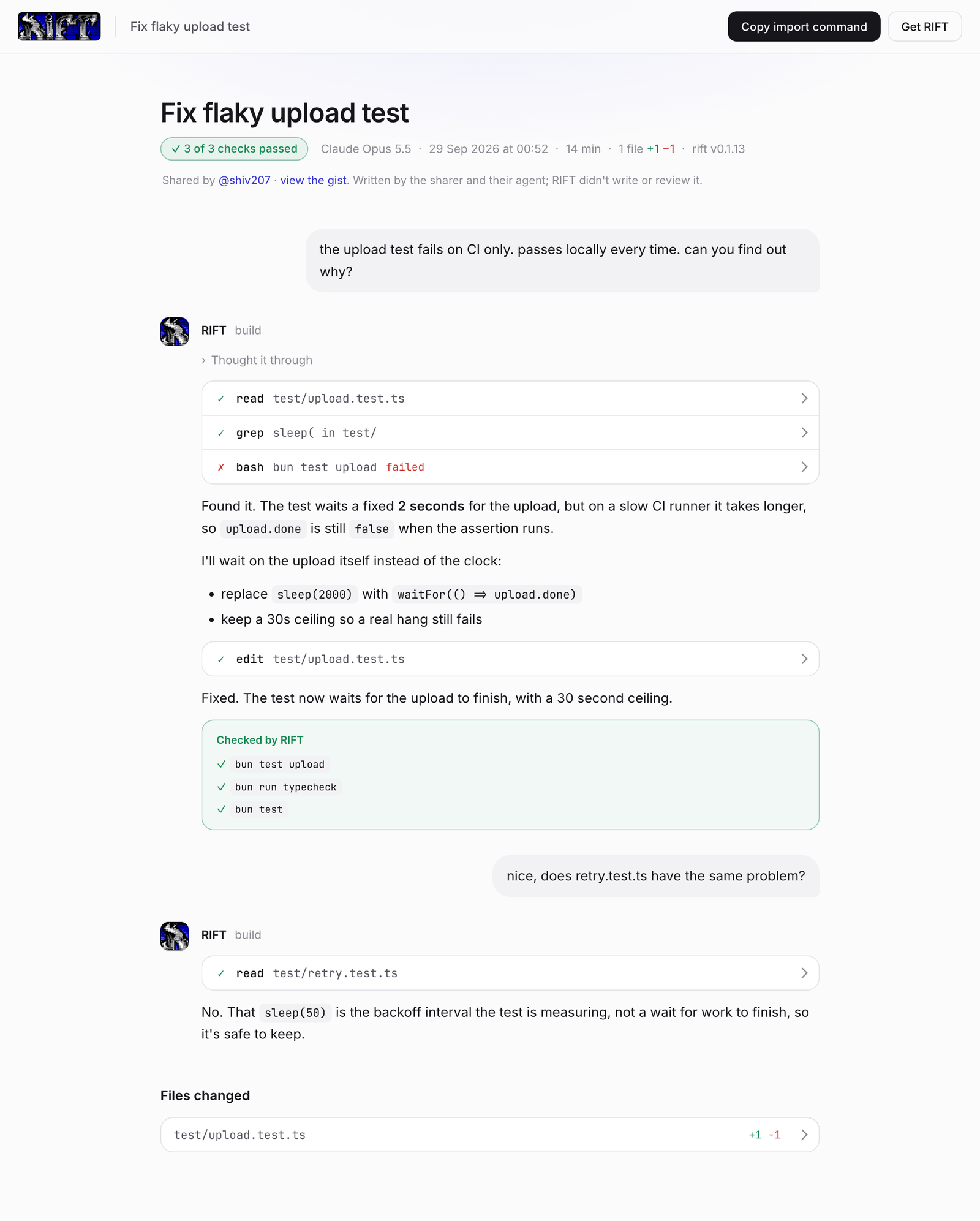
Type /share and a link is on your clipboard in about two seconds. It opens the session in the
RIFT viewer: your prompts, RIFT's steps, the diffs, and the checks RIFT ran, with a pass or fail
count up front.
- It is yours. The session is saved as a secret Gist on your own GitHub account, through
gh auth loginorGITHUB_TOKEN./unsharedeletes it. - Only the link opens it. The Gist id sits after the
#in the link, which browsers never send
to a server, and secret Gists are unlisted. The viewer is kept out of search engines. - Secrets stay on your machine. Before upload RIFT removes the API keys, tokens, private keys,
passwords, home folder path and screenshots it recognises. Read what you share all the same. - It works both ways.
rift import <link>brings a shared session into your own RIFT, andrift pr 42opens a pull request together with the session linked in its description.
Mission Control
Every session on one board, ordered so whatever needs you is on top.
Usage
rift                              # start in the current directory
rift /path/to/project             # start somewhere else
rift run "fix the failing test"   # non-interactive, for scripts and CI
rift --continue                   # resume the last session
rift import <share-link>          # bring a shared session into this project
rift remotion setup               # install Remotion's skills for /remotion
In a session, /share copies a link to it, /unshare takes it down, and /remotion makes a video.
| Key | Action |
|---|---|
<leader>v |
Switch between the task view and the full log |
<leader>o |
Open Mission Control |
<leader>d |
Review the diff |
<leader>b |
Show or hide the sidebar |
b |
Close the sidebar, when you're not typing |
ctrl+p |
Command palette |
tab |
Switch agent |
The leader key is ctrl+x.
Agents
RIFT inherits OpenCode's agents, switchable with Tab:
- build — full-access agent for development work
- plan — read-only agent for analysis and exploration
- vibe — planner and executor models working together, with a review gate between steps
A general subagent handles complex searches and multistep tasks; invoke it with @general.
Configuration
Config lives in rift.json in your project, or ~/.config/rift/rift.json globally.
{
  "$schema": "https://opencode.ai/config.json",
  "model": "anthropic/claude-sonnet-5",
  "verify": true,
  "verify_browser_url": "http://localhost:3000",
  "plannerModel": "anthropic/claude-opus-5",
  "executorModel": "anthropic/claude-haiku-4-5-20251001"
}
Set "share": "disabled" to turn sharing off for a project, or RIFT_DISABLE_SHARE=1 to turn it
off everywhere.
Coming from OpenCode? Your existing opencode.json, auth and sessions keep working — RIFT reads
both names and leaves your old directory where it is.
Full reference: the config schema in opencode/packages/core/src/v1/config/config.ts.
FAQ
Is RIFT free and open source?
Yes — MIT licensed, with prebuilt binaries on GitHub Releases. Bring your own model API key, or
use one of the free models included.
How is this different from Claude Code, Cursor or Copilot?
Those are excellent at generating code. RIFT's focus is the step after: proving the change works
by running your project's own checks and showing the raw output. It is terminal-first and open
source, so you can read exactly what it runs on your machine.
Which AI models does RIFT support?
Anthropic Claude, OpenAI GPT, Google Gemini, Meta Llama, Mistral, DeepSeek, local models via
Ollama, and many more — configured per project or per agent.
Does it work on Windows?
Yes, natively via the PowerShell installer, and through WSL or Git Bash.
Does my code get sent anywhere?
Only to the model provider you configure, the same as any other AI coding tool. RIFT has no
server of its own. Shell commands, edits and network access go through a permission system you
control.
A session leaves your machine only when you /share it, and then it goes to a secret Gist on your
own GitHub account, with recognisable secrets and screenshots removed first.
Who can see a shared session?
Anyone you give the link to, and no one else: the link is the only way in. It is not listed or
indexed anywhere, and rift github run never posts one into a PR comment unless you setSHARE=true. /unshare deletes the Gist, and the link stops working.
Credits
RIFT is a fork of OpenCode by
Anomaly, and the overwhelming majority of this codebase is their
work. The agent loop, provider layer, tool system, LSP and MCP integration, permissions, config
system and the TUI foundation are all OpenCode's. RIFT rebuilds the interface around tasks and
adds the verification layer, sharing and video described above.
OpenCode is MIT licensed, and so is RIFT. If you like what is here, a great deal of the credit
belongs upstream — give them a star.
RIFT is not affiliated with, endorsed by, or supported by the OpenCode team. Please direct
issues with RIFT to this repository, not
to them.
Building from source
You do not need this to use RIFT — the installer downloads a prebuilt binary.
git clone https://github.com/Datum-Collective/RIFT-coding-agent.git
cd RIFT-coding-agent/opencode
bun install          # requires bun 1.3.14
bun run dev
Cut a release by pushing a tag — git tag v0.1.0 && git push origin v0.1.0 — and the
release workflow builds all twelve platform targets.
License
MIT — see LICENSE. Copyright for the inherited code remains with the
OpenCode authors.
Yorumlar (0)
Yorum birakmak icin giris yap.
Yorum birakSonuc bulunamadi