twining-mcp
Health Uyari
- License — License: MIT
- Description — Repository has a description
- Active repo — Last push 0 days ago
- Low visibility — Only 6 GitHub stars
Code Basarisiz
- rm -rf — Recursive force deletion command in .claude/settings.json
Permissions Gecti
- Permissions — No dangerous permissions requested
This server provides persistent project memory and agent coordination for AI clients. It tracks architectural decisions, shares context between sessions, and prevents conflicting choices when using multiple AI agents.
Security Assessment
The tool handles local project context, decisions, and file paths, but does not appear to process highly sensitive credentials or personal data. Network requests are restricted to standard package installations, and no hardcoded secrets were found. However, the static scan flagged a recursive force deletion command (`rm -rf`) inside a configuration file (`.claude/settings.json`). While this might just be a local development cleanup script, it is a potential safety risk if triggered unintentionally. Overall risk is rated as Medium.
Quality Assessment
The project is licensed under the permissive MIT license and was actively updated very recently (pushed to 0 days ago). On the downside, it suffers from low community visibility, having only 6 GitHub stars. Because of this low adoption, it lacks widespread community testing and validation. The documentation is clear and professional, and it includes a Continuous Integration (CI) pipeline, which speaks well of the developer's practices.
Verdict
Use with caution — the codebase is active and well-documented, but the presence of a recursive deletion command and very low community adoption warrant a manual review of the configuration files before integrating it into your workflow.
Agent coordination MCP server — shared blackboard, decision tracking, and context assembly

Your AI agents forget everything. Twining remembers.
Persistent project memory for Claude Code and other MCP clients.


The Problem
You spend two hours with Claude Code making architectural decisions. You choose PostgreSQL over MongoDB. You settle on JWT for auth. You flag a race condition in the payment module. Then the session ends.
Tomorrow you start a new session. Claude has no idea what happened. The decisions are gone. The warnings are gone. The rationale is gone. You re-explain everything — or worse, Claude silently contradicts yesterday's choices.
This gets worse with multiple agents. Agent A decides on REST. Agent B picks gRPC for the same service. Neither knows the other exists. You find out when the code doesn't compile.
Context windows are ephemeral. Your project's decisions shouldn't be.
How Twining Fixes It
Twining is an MCP server that gives your AI agents persistent project memory. Decisions survive context resets. New sessions start informed. Multi-agent work stays coordinated.
# Install in 10 seconds
/plugin marketplace add daveangulo/twining-mcp
/plugin install twining@twining-marketplace
Record what you did — in natural language:
twining_record({
  summary: "Added Redis caching to UserService",
  decisions: ["Chose Redis over Memcached — need persistence across restarts"],
  assumptions: ["Read-heavy workload (10:1 ratio)"],
  scope: "src/services/"
})
Twining parses your decisions into structured records — extracting rationale, rejected alternatives, and domain automatically. One tool call, no forms.
Start a new session. Get caught up instantly:
twining_assemble({ task: "optimize the caching layer", scope: "src/services/" })
Twining scores every decision, warning, and finding by relevance to your task, then fills a token budget in priority order. You get exactly the context you need — no firehose, no re-explaining.
Ask why things are the way they are:
twining_why({ scope: "src/auth/middleware.ts" })
Returns the full decision chain for any file: what was decided, when, why, what alternatives were rejected, and which commit implemented it.
Why Not Just Use CLAUDE.md?
CLAUDE.md is static. You write it once and update it manually. It doesn't capture decisions as they happen, doesn't track rationale or alternatives, doesn't detect conflicts between agents, and can't selectively assemble context within a token budget.
Twining is dynamic. Every twining_decide call records a structured decision. Every twining_post shares a finding or warning. Every twining_assemble scores relevance and delivers precisely what the current task needs. The .twining/ directory is your project's living institutional memory.
Why Not an Orchestrator?
Orchestrators (like agent swarms and hierarchical coordinators) route work by assigning tasks. Twining coordinates by sharing state. The difference matters:
- Orchestrators hold coordination context in their own context window — a single point of failure that degrades as the window fills
- Twining's blackboard persists coordination state outside any agent's window, surviving context resets without information loss
Agents self-select into work by reading the blackboard. No central bottleneck. No relay that drops context. Every agent sees every other agent's decisions and warnings, directly.
Install
Plugin Install (Recommended)
# Add the marketplace (one-time)
/plugin marketplace add daveangulo/twining-mcp

# Install the plugin
/plugin install twining@twining-marketplace
Includes the MCP server, skills, lifecycle hooks, and pre-commit enforcement. Two gates: twining_assemble before working, twining_record before committing — hooks enforce both automatically.
Team Auto-Install
Commit this to your repo's .claude/settings.json so every team member gets Twining on clone:
{
  "extraKnownMarketplaces": {
    "twining-marketplace": {
      "source": {
        "source": "github",
        "repo": "daveangulo/twining-mcp"
      }
    }
  },
  "enabledPlugins": {
    "twining@twining-marketplace": true
  }
}
When team members trust the repository folder, Claude Code automatically installs the marketplace and plugin.
MCP-Only Install
For non-Claude-Code clients (Cursor, Windsurf, etc.):
claude mcp add twining -- npx -y twining-mcp --project .
Or add to .mcp.json:
{
  "mcpServers": {
    "twining": {
      "command": "npx",
      "args": ["-y", "twining-mcp", "--project", "."]
    }
  }
}
MCP server instructions are included automatically in the initialize response.
Upgrading from Manual Install
If you previously configured Twining manually, switch to the plugin:
- Remove manual MCP server:
claude mcp remove twining - Install plugin:
/plugin marketplace add daveangulo/twining-mcpthen/plugin install twining@twining-marketplace - Clean up: remove Twining hooks from
.claude/settings.json, remove.claude/agents/twining-aware.mdif present, remove Twining sections fromCLAUDE.md(skills handle this now) - Keep:
.twining/directory (all state preserved) - Verify:
/twining:status
Get the Most Out of It
The plugin handles agent instructions automatically via skills. For the MCP-only install path, add Twining instructions to your project's CLAUDE.md so agents use it automatically — see docs/CLAUDE_TEMPLATE.md for a ready-to-copy template.
Dashboard
A web dashboard starts automatically at http://localhost:24282 — browse decisions, blackboard entries, knowledge graph, and agent state. Configurable via TWINING_DASHBOARD_PORT.
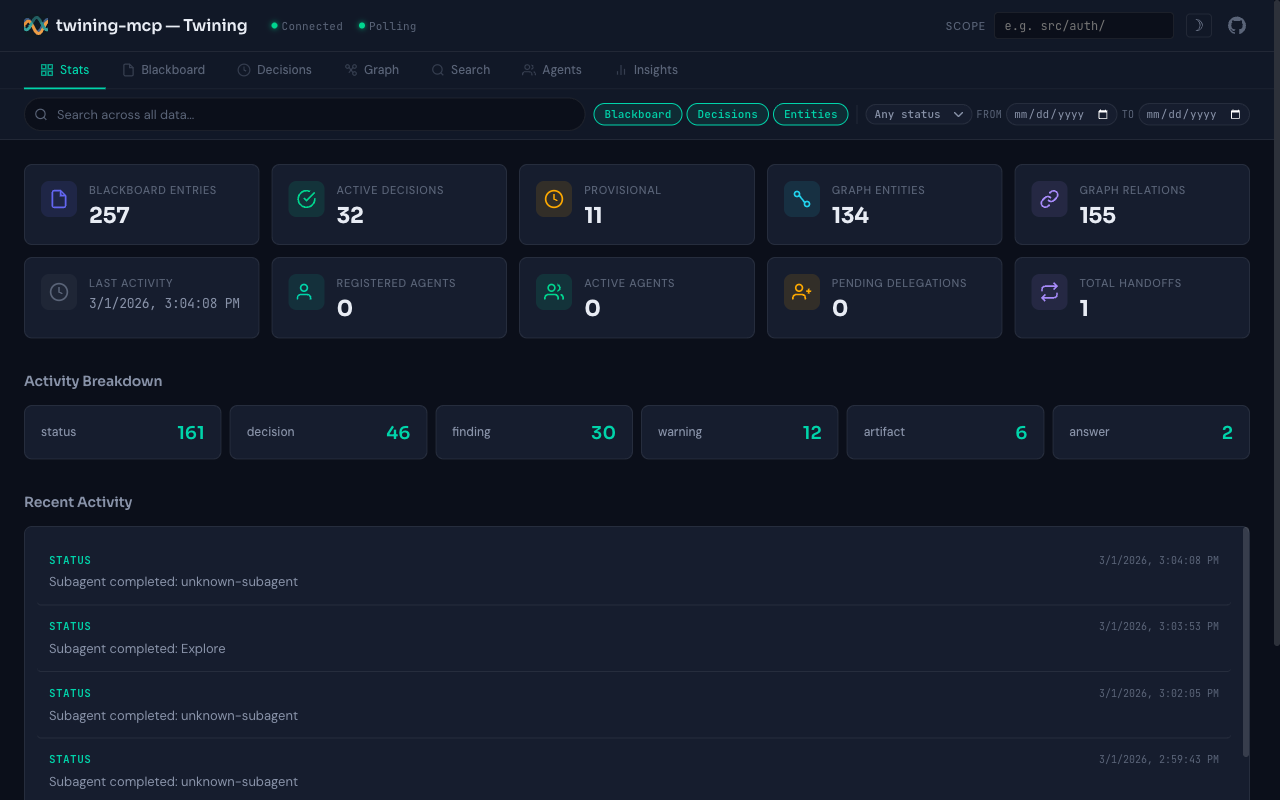
Stats overview: blackboard entries, decisions, graph entities, and activity breakdown
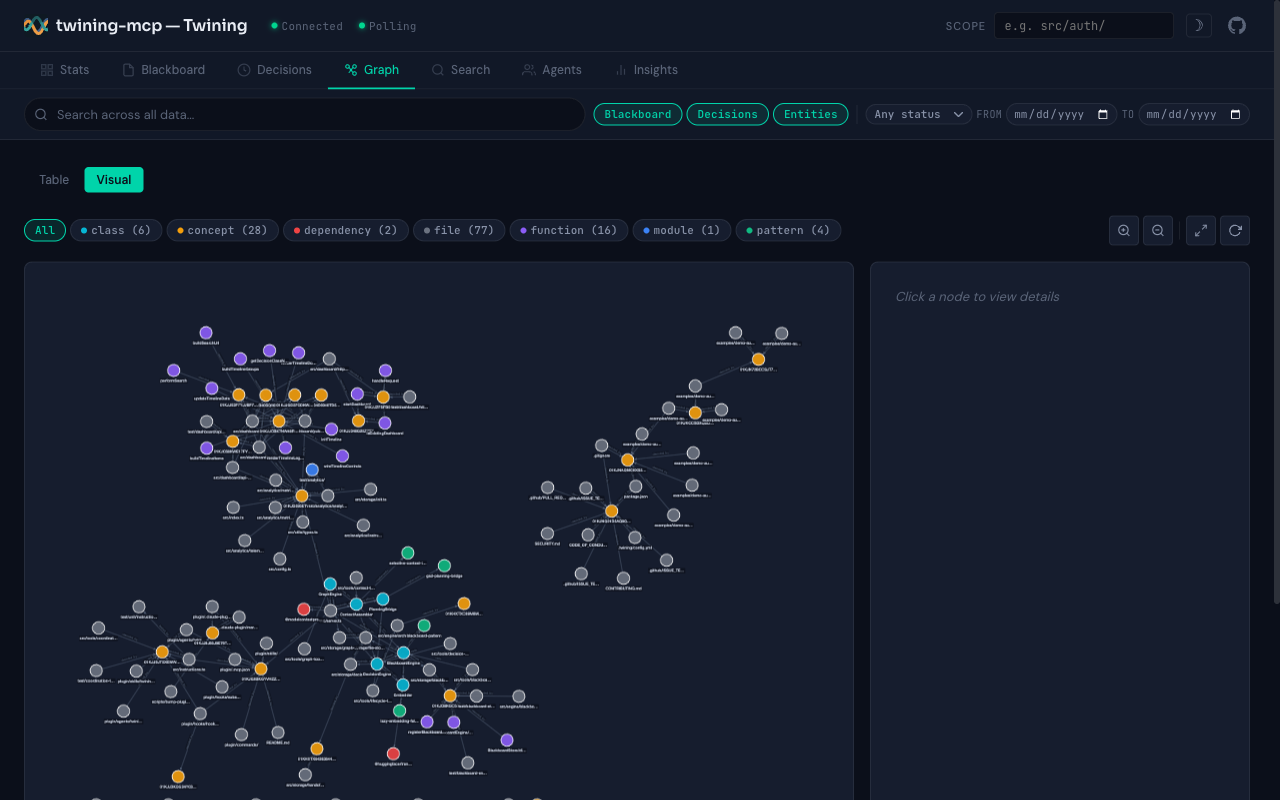
Interactive knowledge graph: files, decisions, classes, and their relationships
What's Inside
Core Tools (always available)
These are the tools agents use in every session:
| Tool | What It Does |
|---|---|
twining_assemble |
Gate 1: Build tailored context for a task — decisions, warnings, handoffs, within a token budget |
twining_record |
Gate 2: Record what you did and any choices made — natural language in, structured decisions out |
twining_post |
Share findings, warnings, needs, or status during work |
twining_why |
Check what decisions constrain a file before modifying it |
twining_housekeeping |
Periodic maintenance — archive, deduplicate, surface stale decisions (dry-run by default) |
twining_record accepts natural language decisions like "Chose Redis over Memcached — need persistence" and automatically parses them into structured records with rationale, rejected alternatives, and inferred domain. It also accepts assumptions, constraints, affected files, and dependency chains — everything the decision store needs for high-fidelity context assembly.
Extended Tools (available with full_surface: true)
For advanced workflows — deep decision management, graph exploration, multi-agent coordination:
| Category | Tools |
|---|---|
| Decisions | twining_decide, twining_search_decisions, twining_reconsider, twining_link_commit, twining_trace, twining_override, twining_promote, twining_commits |
| Blackboard | twining_read, twining_query, twining_recent, twining_dismiss |
| Context | twining_summarize, twining_what_changed |
| Graph | twining_add_entity, twining_add_relation, twining_neighbors, twining_graph_query, twining_prune_graph |
| Coordination | twining_register, twining_agents, twining_discover, twining_delegate, twining_handoff, twining_acknowledge |
| Lifecycle | twining_verify, twining_status, twining_archive, twining_export |
Enable with .twining/config.yml:
tools:
  full_surface: true
How It Works
All state lives in .twining/ as plain files — JSONL for the blackboard, JSON for decisions, graph, agents, and handoffs. Everything is jq-queryable, grep-able, and git-diffable. No database. No cloud. No accounts.
Architecture layers:
- Storage — File-backed stores with locking for concurrent access
- Engine — Decision tracking, blackboard, graph traversal, context assembly with token budgeting, agent coordination
- Embeddings — Local all-MiniLM-L6-v2 via
@huggingface/transformers, lazy-loaded, with keyword fallback. The server never fails to start because of embedding issues. - Dashboard — Read-only web UI with cytoscape.js graph visualization and vis-timeline
- Tools — MCP tool definitions validated with Zod, mapping 1:1 to the tool surface
See TWINING-DESIGN-SPEC.md for the full specification.
FAQ
Does Twining slow down Claude Code?
No. It's a local MCP server — tool calls are local file reads/writes. Semantic search loads lazily on first use.
Can I use it with Cursor, Windsurf, or other MCP clients?
Yes. Twining is a standard MCP server. Any MCP host can connect to it.
Where does my data go?
All coordination state is local in .twining/. Tool call metrics are stored locally in .twining/metrics.jsonl (gitignored). Optional anonymous telemetry can be enabled — see Analytics below.
Is Twining an agent orchestrator?
No. It's a coordination state layer. It captures what agents decided and why, and makes that knowledge available to future agents. Use it alongside orchestrators, agent teams, or standalone sessions.
Analytics
Twining includes a three-layer analytics system to help you understand the value it provides.
Insights Dashboard Tab
The web dashboard includes an Insights tab showing:
- Value Metrics — Blind decision prevention rate, warning acknowledgment, test coverage via
tested_bygraph relations, commit traceability, decision lifecycle, knowledge graph stats, and agent coordination metrics - Tool Usage — Call counts, error rates, average/P95 latency per tool
- Error Breakdown — Errors grouped by tool and error code
All value metrics are computed from existing .twining/ data — no new data collection needed.
Tool Call Metrics
Every MCP tool call is automatically instrumented with timing and success/error tracking. Metrics are stored locally in .twining/metrics.jsonl (gitignored — operational data, not architectural).
To disable local metrics collection, set in .twining/config.yml:
analytics:
  metrics:
    enabled: false
Opt-in Telemetry
Anonymous aggregate usage data can optionally be sent to PostHog to help improve Twining. Disabled by default. To enable, add to .twining/config.yml:
analytics:
  telemetry:
    enabled: true
That's it — the PostHog project key is built into the source code. If you run your own PostHog instance, you can override with posthog_api_key and posthog_host.
What is sent: tool names, call durations, success/failure booleans, server version, OS, architecture.
What is never sent: file paths, decision content, agent names, error messages, tool arguments, environment variables.
Privacy safeguards:
DO_NOT_TRACK=1environment variable always overrides configCI=trueauto-disables telemetry- Identity is a SHA-256 hash of hostname + project root (never raw paths)
- Network failures are silent — no retries
posthog-nodeis an optional dependency — graceful no-op if not installed
Development
npm install       # Install dependencies
npm run build     # Build
npm test          # Run tests (800+ tests)
npm run test:watch
Requires Node.js >= 18.
CI/CD
Two GitHub Actions workflows automate build verification and publishing:
CI (.github/workflows/ci.yml) — runs on every PR and push to main:
- Builds and tests across Node 18, 20, and 22
- Cancels in-progress runs when a new push arrives on the same branch
Publish (.github/workflows/publish.yml) — runs on v* tag push:
- Builds with
POSTHOG_API_KEYbaked in for published packages - Runs the full test suite as defense-in-depth
- Publishes to npm with
--provenancefor supply chain attestation - Creates a GitHub Release with auto-generated release notes
- Supports manual trigger via
workflow_dispatchwith a dry-run option
To publish a new version:
npm version patch   # or minor, major
git push && git push --tags
Required secrets (configured in GitHub repo Settings > Secrets):
| Secret | Purpose |
|---|---|
NPM_TOKEN |
npm access token (granular, scoped to twining-mcp) |
POSTHOG_API_KEY |
PostHog ingest key for published packages |
License
Yorumlar (0)
Yorum birakmak icin giris yap.
Yorum birakSonuc bulunamadi