motion-promo-reels
Health Uyari
- License — License: MIT
- Description — Repository has a description
- Active repo — Last push 0 days ago
- Low visibility — Only 6 GitHub stars
Code Basarisiz
- rm -rf — Recursive force deletion command in .github/workflows/package-skill.yml
- rm -rf — Recursive force deletion command in install.sh
- child_process — Shell command execution capability in templates/catalogo-9x16/comprobar.js
- spawnSync — Synchronous process spawning in templates/catalogo-9x16/comprobar.js
- process.env — Environment variable access in templates/catalogo-9x16/comprobar.js
- fs module — File system access in templates/catalogo-9x16/comprobar.js
- network request — Outbound network request in templates/catalogo-9x16/comprobar.js
- fs module — File system access in templates/catalogo-9x16/extraer.js
- network request — Outbound network request in templates/catalogo-9x16/extraer.js
Permissions Gecti
- Permissions — No dangerous permissions requested
Bu listing icin henuz AI raporu yok.
Claude skill: promotional videos with motion graphics and audio, 100% generated by code (canvas + ffmpeg). For a person, a product or a whole store catalog. Install: npx skills add david-d2c2/motion-promo-reels
motion-promo-reels
English · Español
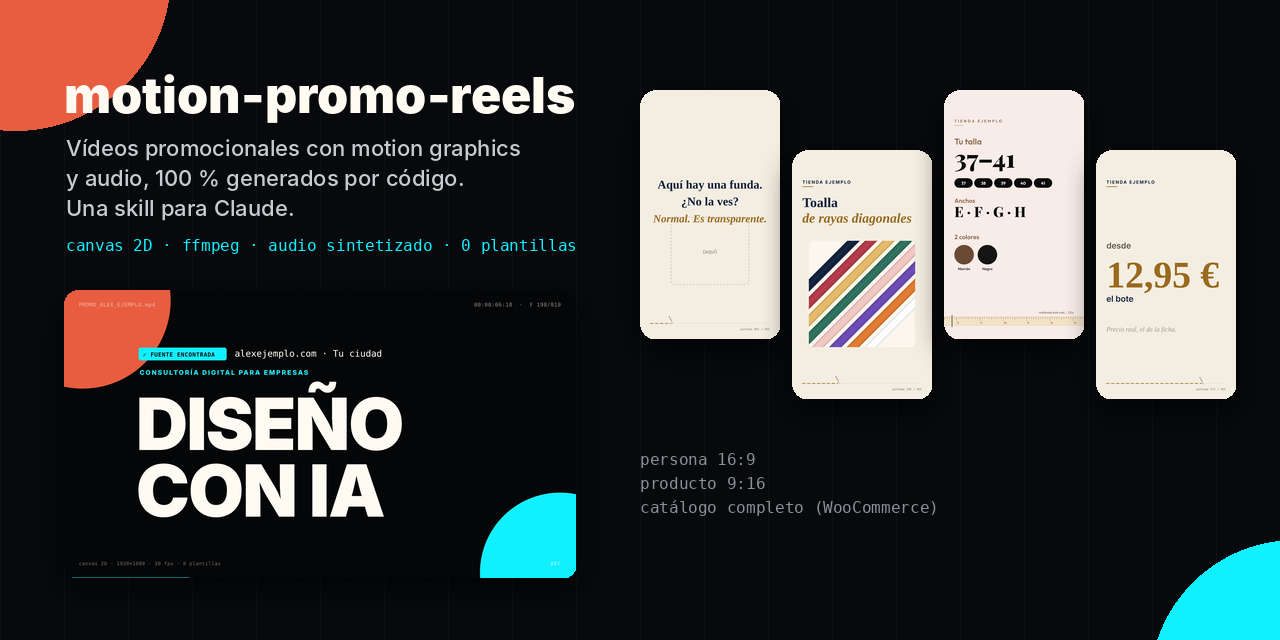
A Claude skill that generates promotional videos with motion graphics and audio, 100% by code: 2D canvas → frames → ffmpeg, plus music and sound effects synthesized with numpy. No video templates, no After Effects, no third-party music.
It covers three cases:
- a person or personal brand: a 27 s video in 16:9, now with A/B/C versions on demand;
- a handful of products: 15.5 s reels in 9:16, one hand-written gag per product and, since v2, a different construction per reel;
- since v3, music styles, sound-effect packs and an optional voice-over in all three;
- a whole catalog (WooCommerce): one reel per product, a gag per category, data read straight from the store — and, since v2, a different construction for every reel.
Battle-tested in production on real projects: a personal brand, a small online shop and a catalog of 100+ products. All sample data in this repository is fictional.
What makes it different
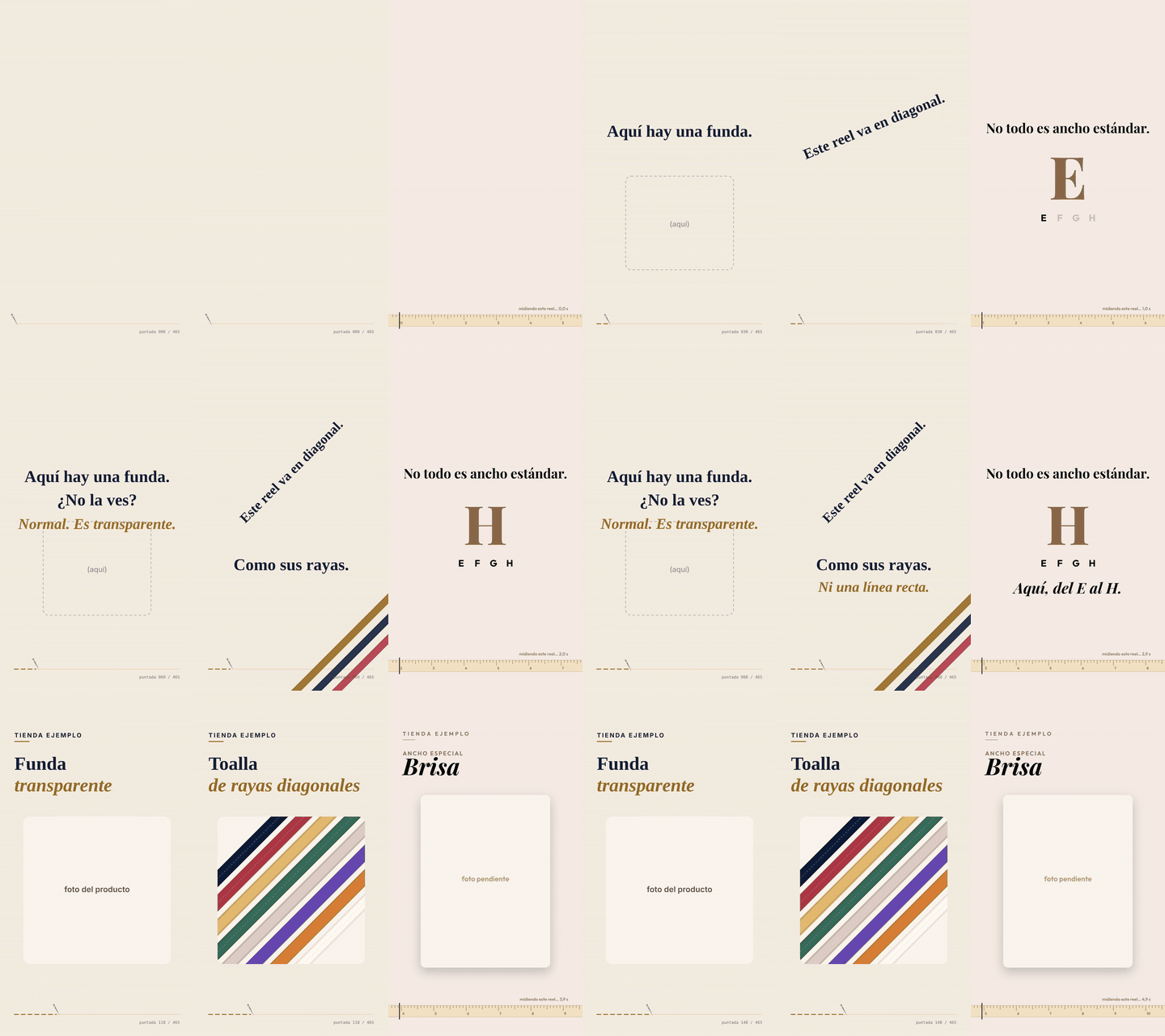
- Nothing made up. Prices, colors, sizes and features come from the website or the store's API. Anything that can't be confirmed gets flagged as pending.
- The gag is what the video does, not a joke on top. A transparent product → "There's a case here. Can't see it?" A diagonal-striped one → the reel tilts 45°. A 50-metre roll → "This reel lasts 15 s. You won't have time to use it up."
- A self-referential element runs through the whole video: a HUD with frame counter, a stitch line counting stitches, or a tape measure that "measures" the reel.
- Built-in quality control:
- frame-by-frame review;
- Instagram safe zones;
- −14 LUFS loudness;
- an AI label (EU AI Act, art. 50) when photos show AI-generated people;
- a calm tone for sensitive categories.
v3: they don't sound alike either, and they can talk
v2 varied the picture; the music was still one loop with a different tempo or timbre. v3 replaces it:
- Ten music styles with their own instruments, drums, groove and harmony — not presets of the same loop. A seed composes each video's melody and picks its drum pattern, fills, harmonic rhythm and arpeggio, so two videos in the same style don't sound the same either.
- The arrangement follows the scenes: a sparse intro under the gag, the full band with the product, a lighter bed while facts are read, a drum fill before each cut and a final chord.
- Five sound-effect packs (
digital,organico,cinematico,minimo,juguete), with chimes tuned to the music's key. - Optional voice-over with a free local voice (Piper, Spanish or English, installed only if you say yes:
node voz.js --instalar piper es), ElevenLabs, Voicebox or any TTS command. It only says what is on screen, caches every sentence (re-renders are free), stops at a character budget, ducks the music about 10 dB and writes an.srt. - Choose the look in plain words (v3.1):
node variar.js --opcionesshows the menu;node variar.js --preferencias musica=tranquila colores=clarosteers every video without fixing it. If a request says nothing about tone, the skill asks one question. - Built to be run by any model:
node comprobar.jschecks the environment and the data and says where each problem is and how to fix it;SKILL.mdopens with a step-by-step quick path;install.sh --agentsinstalls into~/.agents/skillsfor agents such as pi.
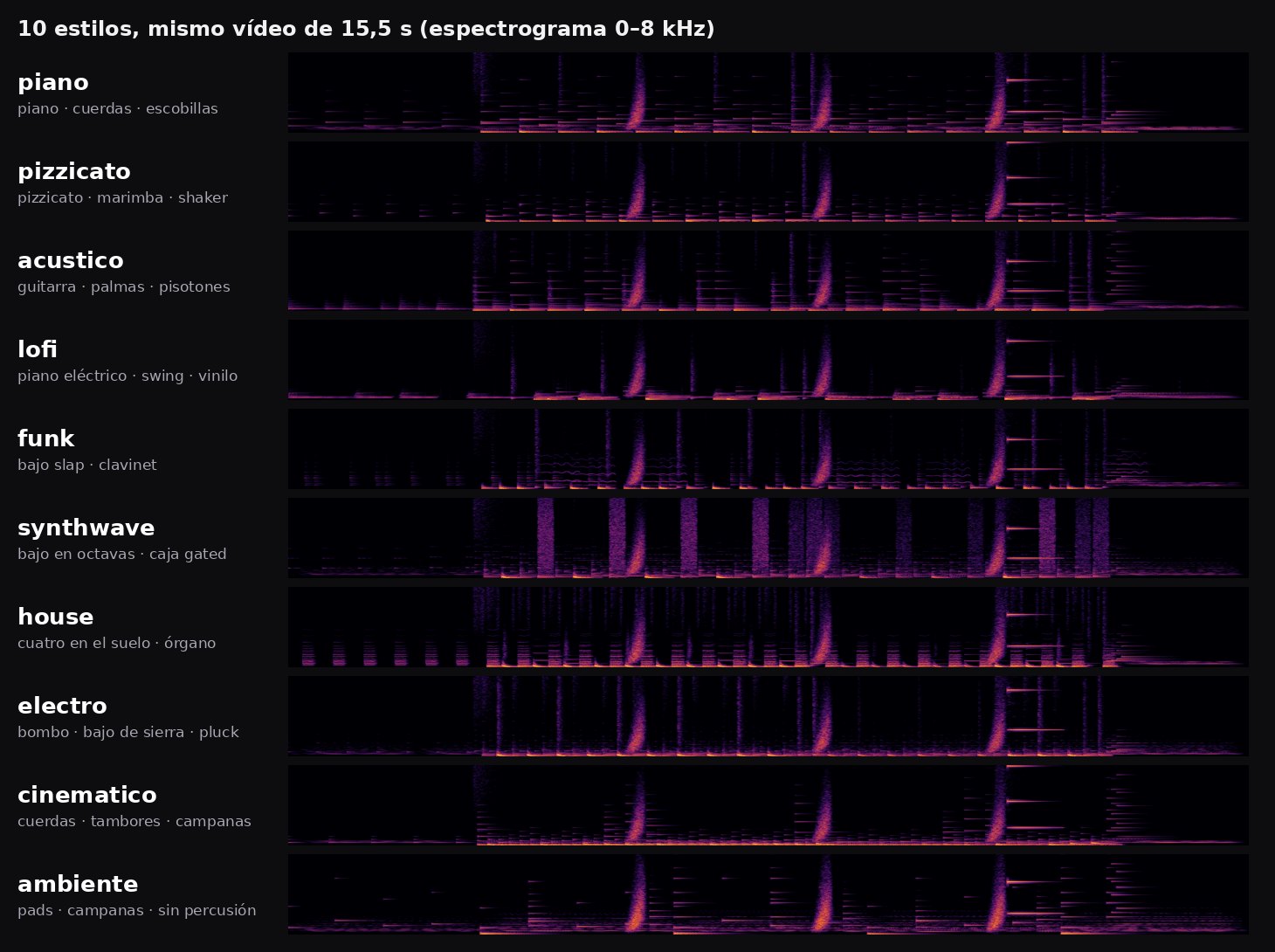
Nothing new is mandatory: no new dependencies, and without locucion.json there is no voice.
v2: fifty reels that don't look like one
In v1 every reel of a template shared the same timeline, layout, transition, colors, music and — within a catalog category — the same hook text. Fifty products gave you fifty copies of one film with different numbers.
v2 gives every video a plan, chosen by a seeded planner that compares it with the videos published right before it. All three templates share one variation core (variacion.js), so they behave the same way. For catalogs:
| Axis | Options |
|---|---|
| Scene order | 6 orders of range, facts and price after the product reveal |
| Product scene | card · blurred backdrop + full photo · arch frame |
| Range scene | pills · ruler + color stripes · tile grid |
| Facts scene | checklist · numbered 01–03 · stacked cards |
| Price scene | big · round stamp · hanging tag |
| Transition | flash · push · iris · diagonal · blinds · zoom (crossfade for sensitive categories) |
| Color theme | light · dark · accent — derived from the brand palette, only when WCAG contrast passes |
| Hook | text entrance (rise · mask · letters) and phrase variants that rotate within each category |
| Music | progression · key · tempo · timbre · arpeggio pattern (audio reads the same plan, so sound and picture stay in sync) |
The brand signature stays fixed on purpose: the self-referential tape measure and the closing card.
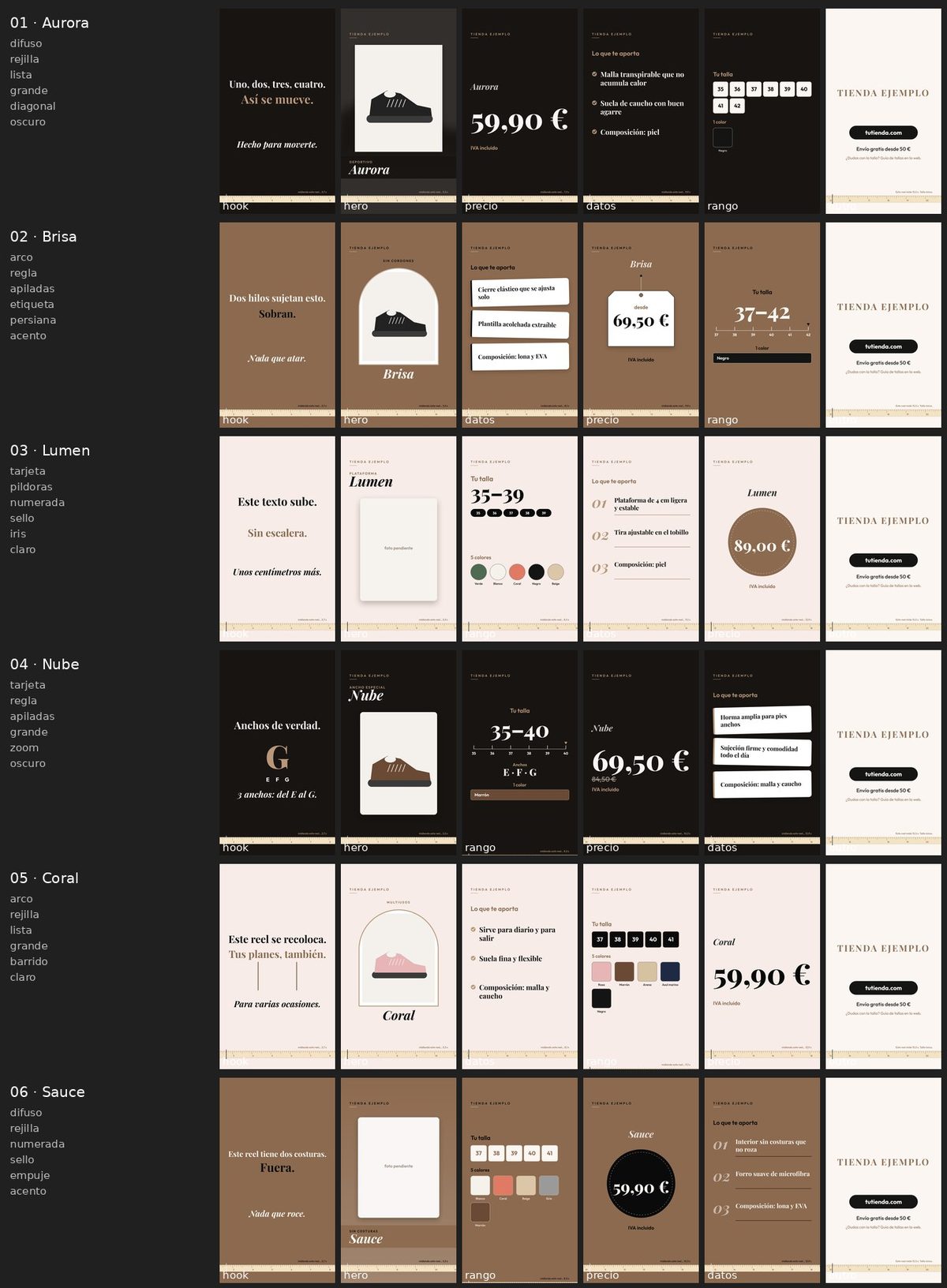
A few products get the same axes with layouts of their own (a Polaroid that drops in, a color fan deck, facts on sewn labels, a hanging price tag), while keeping each product's hand-written gag.
A personal video is a story, so its order never changes (the namesake gag depends on it). Instead you get versions — for different channels or to post again — that change the palette, the headline entrance, the stats, method and stack layouts, the background and the music:
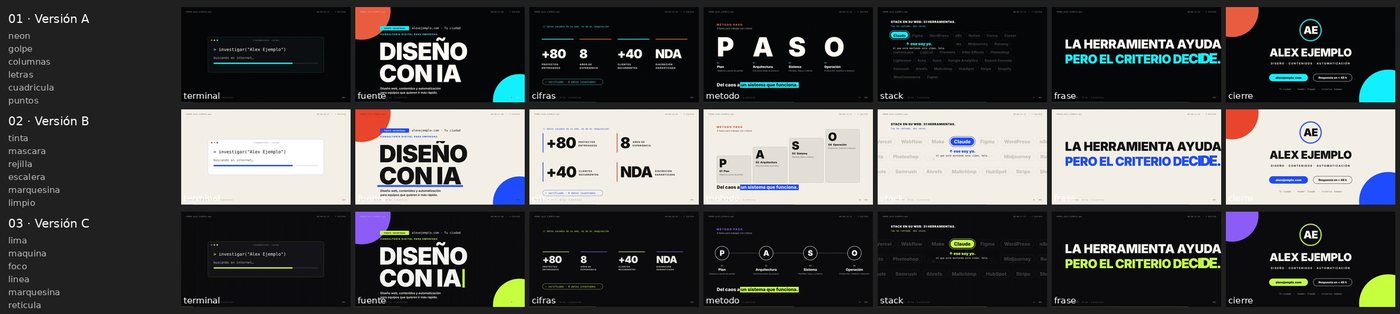
# catalog and products
node variar.js                       # plan new products, keep existing plans → VARIACION.md (batch report)
node variar.js --temporada 2027-01   # a fresh look for every reel, to publish again
node render.js all --hoja            # contact sheets: one row per reel, one frame per scene

# person
node variar.js 3                     # versions A, B and C, as different as possible → versiones.json
node render.js video promo_B.mp4 --version B
node render.js hoja                  # contact sheet of all versions
Plans are reproducible and hand-editable ("manual": true protects a product's plan). Without a plan, every template renders exactly like v1, minus the v1 bugs fixed along the way. See CHANGELOG.md.
Structure
motion-promo-reels/
├── SKILL.md                    instructions for Claude (the full method)
├── install.sh / install.ps1    one-line installers (curl / PowerShell)
├── assets/                     images for this README
└── templates/
    ├── README.md               what to change first in each template
    ├── persona-16x9/           personal brand (CFG block at the top of anim.html + versiones.json)
    ├── producto-9x16/          a few products (productos.json + variar.js)
    └── catalogo-9x16/          WooCommerce catalog (config.json + extraer.js + variar.js)
The skill is language-agnostic: Claude replies in your language and writes the on-screen copy in your audience's language. The sample data and code comments are in Spanish. All on-screen text can be changed without touching code:
- Product and brand copy lives in
CFG(persona),productos.json(product) orconfig.json(catalog). - Interface strings ("from", "colors", "NOT HIM", "measuring this reel…"…) live in a
textosblock. Spanish defaults are built in; override only the keys you need. See templates/README.md.
Installation
Claude Code: pick whichever method you prefer. All of them leave the skill in ~/.claude/skills/motion-promo-reels unless you choose another folder.
# npx (Node 18+), using the open skills CLI
npx skills add david-d2c2/motion-promo-reels -g -a claude-code   # all your projects
npx skills add david-d2c2/motion-promo-reels -a claude-code      # current project only

# curl (macOS / Linux)
curl -fsSL https://raw.githubusercontent.com/david-d2c2/motion-promo-reels/main/install.sh | bash
curl -fsSL https://raw.githubusercontent.com/david-d2c2/motion-promo-reels/main/install.sh | bash -s -- --dir /path/to/skills
curl -fsSL https://raw.githubusercontent.com/david-d2c2/motion-promo-reels/main/install.sh | bash -s -- --project
# Windows (PowerShell)
irm https://raw.githubusercontent.com/david-d2c2/motion-promo-reels/main/install.ps1 | iex
& ([scriptblock]::Create((irm https://raw.githubusercontent.com/david-d2c2/motion-promo-reels/main/install.ps1))) -Dir "D:\skills"
The install.sh / install.ps1 options:
| Option | Effect |
|---|---|
--dir PATH / -Dir PATH |
Installs into PATH/motion-promo-reels |
--project / -Project |
Installs into ./.claude/skills/ of the current folder |
--agents / -Agents |
Installs into ~/.agents/skills/, for agents that read that folder (such as pi) |
--force / -Force |
Replaces an existing installation (updating) |
--version TAG / -Version TAG |
Installs a specific release instead of the latest |
Both scripts download the same zip as the release below. Read them before piping them into a shell: they are short.
Or with git:
git clone https://github.com/david-d2c2/motion-promo-reels ~/.claude/skills/motion-promo-reels
claude.ai: download motion-promo-reels.zip from the latest release and upload it under Customize → Skills, then turn it on.
Don't use GitHub's green Code → Download ZIP button for this: it names the folder
motion-promo-reels-main, and claude.ai requires the folder to match the skill name (motion-promo-reels). The release zip is built with the right layout.
Then just ask: "make a promo reel for this product", "research [name] and create a promotional video with motion graphics", "generate one reel for every product in my store".
Rendering requirements
Rendering runs real tools, so it works best where they're installed: Claude Code, Cowork or any coding agent on your own machine. In a cloud sandbox, the agent installs what's missing when it can.
- Node 18+ and
npm install(installspuppeteer-core) inside the template you use - Chrome or Edge (or
CHROME_PATH) - ffmpeg on your PATH
- Python 3 with
numpyandscipy(plusPillowfor the batch contact sheets)
cd templates/producto-9x16
npm install
node comprobar.js                                        # environment + data check, with fix-it messages
node render.js all --stills 1.6,3.4,7.4,10.4,12.4,14.4   # review frames
node render.js all                                       # final videos in out/
Licenses
- Code: MIT.
- Bundled fonts (Inter, Gelasio, Playfair Display, Outfit): SIL Open Font License 1.1. Each
fonts/folder includes its license text. - The videos you generate are yours. Music and sound effects are synthesized in
sonido.py: no samples or third-party tracks. A voice-over is subject to the terms of the provider you choose (ElevenLabs, Voicebox's engines…), and a cloned voice needs its owner's consent.
Yorumlar (0)
Yorum birakmak icin giris yap.
Yorum birakSonuc bulunamadi