graph-of-skills
Health Gecti
- License — License: MIT
- Description — Repository has a description
- Active repo — Last push 0 days ago
- Community trust — 134 GitHub stars
Code Gecti
- Code scan — Scanned 12 files during light audit, no dangerous patterns found
Permissions Gecti
- Permissions — No dangerous permissions requested
This tool builds an offline skill graph from a library of documents and retrieves the most relevant skills during task execution. It is designed to help AI agents efficiently find and rank capabilities without flooding their context window.
Security Assessment
The overall risk is Low. The automated code scan checked 12 files and found no dangerous patterns, hardcoded secrets, or requests for dangerous permissions. While the retrieval process requires network requests to perform embedding similarity searches and potentially fetch datasets from HuggingFace, it does not inherently access sensitive local data or execute arbitrary shell commands.
Quality Assessment
The project appears highly maintained and trustworthy. It is backed by an active academic paper published on arXiv and associated with identifiable researchers. The codebase received its last update very recently and has attracted 134 GitHub stars, indicating strong early community adoption and validation. Furthermore, it uses the highly permissive MIT license, making it fully open source and safe for integration into commercial or personal projects.
Verdict
Safe to use.
Dependency-Aware Structural Retrieval for Massive Agent Skills
Graph of Skills (GoS)
Dependency-Aware Structural Retrieval for Massive Agent Skills
Dawei Liu* · Zongxia Li* · Hongyang Du · Xiyang Wu · Shihang Gui · Yongbei Kuang · Lichao Sun





🔥 Updates
- [2026-04-15] Released a Claude Code MCP plugin for graph of skills retrieval — drop-in integration for Claude Code agents.
- [2026-04-07] Paper released on arXiv:2604.05333 and HuggingFace Papers.
- [2026-04-06] Code open-sourced on GitHub.
- [2026-04-04] Skill libraries, prebuilt workspaces, and benchmark data released on HuggingFace.
Overview
Graph of Skills builds a skill graph offline from a library of SKILL.md documents, then retrieves a small, ranked set of relevant skills at task time. Instead of flooding the agent context with an entire skill library, GoS surfaces only the skills most likely to help -- along with their prerequisites and related capabilities.
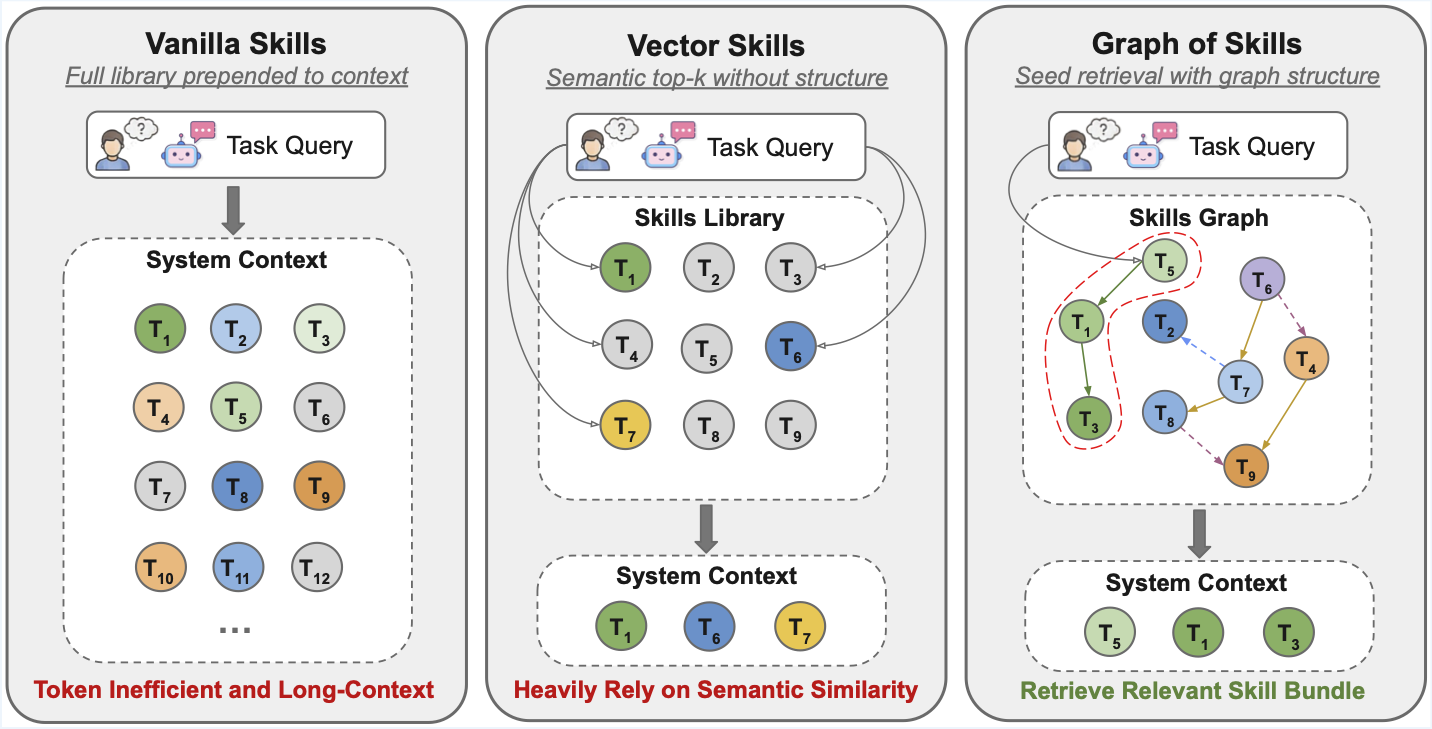
How It Works
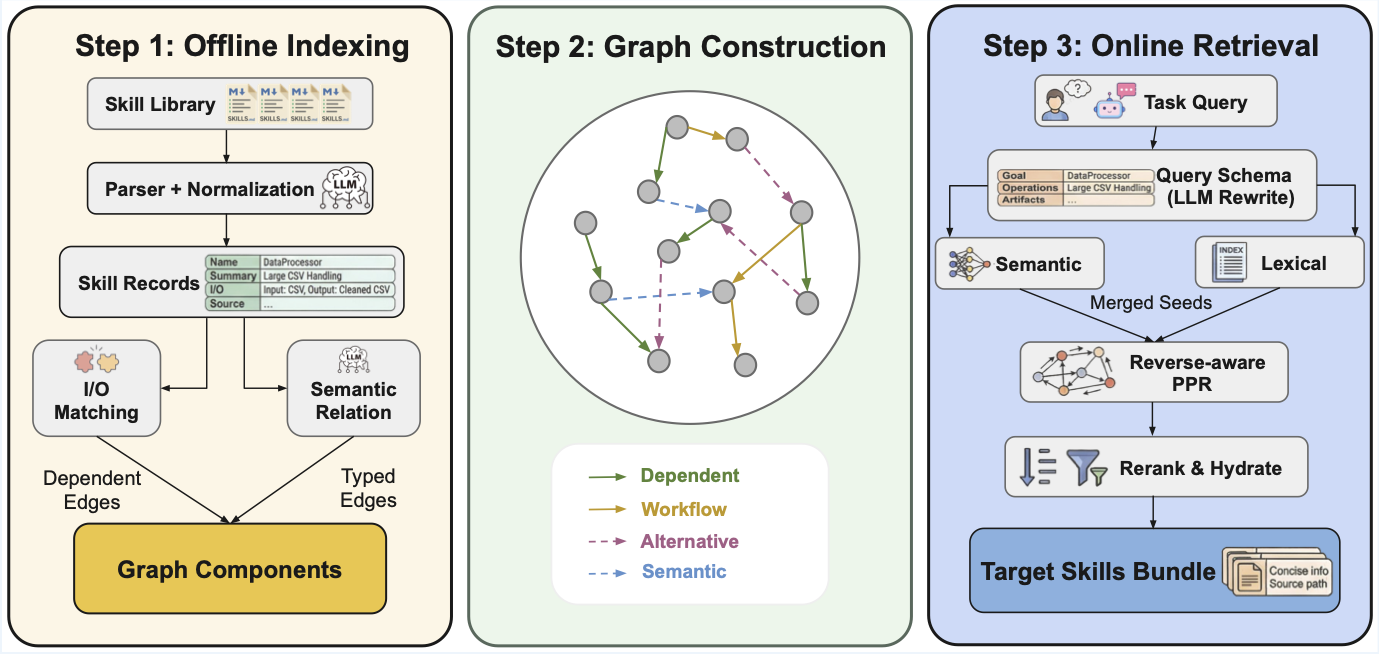
Retrieval pipeline:
- Seed -- retrieve semantic candidates (embedding similarity) and lexical candidates (exact-match tokens)
- Merge -- combine both candidate pools
- Rerank -- rerank using the skill-graph structure (dependencies, co-occurrence)
- Return -- emit a capped, agent-readable skill bundle
Results
GoS is evaluated on SkillsBench (87 dockerized coding tasks) and ALFWorld (134 household games) across three model families. R = average reward (%), T = input tokens, S = runtime (s). ↑ higher is better, ↓ lower is better.
| Model | Method | SB R↑ | SB T↓ | SB S↓ | AW R↑ | AW T↓ | AW S↓ |
|---|---|---|---|---|---|---|---|
| Claude Sonnet 4.5 | Vanilla Skills | 25.0 | 967,791 | 465.8 | 89.3 | 1,524,401 | 53.2 |
| Vector Skills | 19.3 | 894,640 | 357.3 | 93.6 | 28,407 | 37.8 | |
| + GoS | 31.0 | 860,315 | 364.9 | 97.9 | 27,215 | 49.2 | |
| MiniMax M2.7 | Vanilla Skills | 17.2 | 942,113 | 580.7 | 47.1 | 2,184,823 | 88.6 |
| Vector Skills | 10.4 | 852,881 | 552.9 | 50.7 | 66,109 | 73.4 | |
| + GoS | 18.7 | 867,452 | 502.5 | 54.3 | 65,227 | 68.8 | |
| GPT-5.2 Codex | Vanilla Skills | 27.4 | 3,187,749 | 686.8 | 89.3 | 1,435,614 | 83.3 |
| Vector Skills | 21.5 | 1,243,648 | 773.0 | 92.9 | 34,436 | 57.0 | |
| + GoS | 34.4 | 1,379,773 | 715.6 | 93.6 | 46,462 | 64.7 |
GoS achieves the highest reward on every model on both benchmarks while cutting input tokens by up to 56× (ALFWorld, Claude Sonnet 4.5) vs. Vanilla Skills. For scalability and ablation analysis, see the paper.
Installation
Requirements
- Python 3.10 -- 3.12
uv(recommended) orpip- An embedding API key (OpenAI, Gemini, or any OpenAI-compatible provider)
Setup
git clone https://github.com/graph-of-skills/graph-of-skills.git
cd graph-of-skills
uv sync
cp .env.example .env   # then fill in your API keys
OPENAI_API_KEY=sk-...
# Use the ``openai/...`` prefix so LiteLLM targets the OpenAI API (omit OPENAI_BASE_URL).
GOS_EMBEDDING_MODEL=openai/text-embedding-3-large
GOS_EMBEDDING_DIM=3072
OPENROUTER_API_KEY=<openrouter-key>
OPENAI_BASE_URL=https://openrouter.ai/api/v1
GOS_EMBEDDING_MODEL=openrouter/openai/text-embedding-3-large
GOS_EMBEDDING_DIM=3072
OPENAI_API_KEY=<azure-api-key>
OPENAI_BASE_URL=https://YOUR-RESOURCE.services.ai.azure.com/openai/v1
# Must match your **deployment name** in Azure (not necessarily ``text-embedding-3-large``).
GOS_EMBEDDING_MODEL=openai/<your-deployment-name>
GOS_EMBEDDING_DIM=<vector-dimension-for-that-model>
GEMINI_API_KEY=<your-key>
GOS_EMBEDDING_MODEL=gemini/gemini-embedding-001
GOS_EMBEDDING_DIM=3072
Quick Start
Goal: install the package, pull the published skill libraries, build (or download) a graph workspace, then run retrieval from the shell.
Read next: DATA.md for every download flag and asset size; .env.example for embedding providers. After GoS works locally, use evaluation/README.md for benchmark runners and evaluation/skillsbench/README.md for Harbor-based SkillsBench.
Step 0: Install (once per machine)
Complete Installation above: clone, uv sync, cp .env.example .env, and set embedding (and optional LLM) keys. Indexing and retrieval load .env from the repo root when you use uv run gos ….
Step 1: Download skill libraries
The collections skills_200, skills_500, skills_1000, skills_2000 are directories of SKILL.md files on HuggingFace, not in git. They unpack to:
data/skillsets/skills_200/…data/skillsets/skills_2000/
./scripts/download_data.sh --skillsets
This tries each archive, skips directories that already have files, and logs [skip] if an archive is not yet on the Hub. Gated datasets: HF_TOKEN=hf_... ./scripts/download_data.sh --skillsets. Full reference (tasks, workspaces, selective flags): DATA.md.
Tiny smoke test without HuggingFace: index the built-in folder skills/ (only a few skills) with any --workspace path you like.
Step 2: Workspace directory layout (recommended for benchmarks)
--workspace is where GoS stores the indexed graph (vectors + graph storage). Use the same path for gos retrieve, gos status, and gos add.
For ALFWorld and SkillsBench defaults, keep this mapping (see evaluation/README.md and evaluation/skillsbench/graphskills_benchmark.py):
| Skill tree you index | Recommended --workspace |
|---|---|
data/skillsets/skills_200 |
data/gos_workspace/skills_200_v1 |
data/skillsets/skills_500 |
data/gos_workspace/skills_500_v1 |
data/skillsets/skills_1000 |
data/gos_workspace/skills_1000_v1 |
data/skillsets/skills_2000 |
data/gos_workspace/skills_2000_v1 |
Step 3: Get a workspace (choose one path)
A. Build locally (needs embedding API; duration grows with library size):
mkdir -p data/gos_workspace
uv run gos index data/skillsets/skills_200 \
  --workspace data/gos_workspace/skills_200_v1 --clear
Use the matching pair for other sets (e.g. skills_1000 → data/gos_workspace/skills_1000_v1). Embedding model and dimension in .env must stay the same for later retrieval (see Configuration).
B. Download a prebuilt workspace (no gos index; must match the embedding used to build that archive):
./scripts/download_data.sh --workspace
See DATA.md for which gos_workspace_skills_*_v1.tar.gz files exist on the Hub and how they map to data/gos_workspace/.
Step 4: Retrieve
uv run gos retrieve "parse binary STL file, calculate volume and mass" \
  --workspace data/gos_workspace/skills_200_v1 --max-skills 5
Step 5: Inspect or extend
uv run gos status --workspace data/gos_workspace/skills_200_v1
uv run gos add path/to/NEW_SKILL.md --workspace data/gos_workspace/skills_200_v1
Step 6: What to run next
- End-to-end sanity check (retrieval + one Docker task): see the Minimal Verification collapsible in the Evaluation section.
- Paper benchmarks (ALFWorld, SkillsBench): evaluation/README.md (overview) and evaluation/skillsbench/README.md (Harbor / task generation).
Agent Integration
Claude Code (MCP Plugin)
GoS ships with a built-in MCP server that gives Claude Code direct access to the skill graph. When you open this project, Claude Code auto-discovers the server via .mcp.json — no manual setup.
Quick start:
uv sync                              # install deps (once)
cp .env.example .env                 # fill in API keys
./scripts/download_data.sh --workspace   # download prebuilt workspaces
Then open the project in Claude Code. The graph-of-skills MCP server is ready. Ask naturally:
"Find skills for processing 3D mesh files with GoS, then follow the skill instructions to complete the task."
Claude Code will call the GoS tools, retrieve relevant skills, and follow their instructions autonomously.
Manual registration (if auto-discovery is not available)claude mcp add graph-of-skills -- uv run --directory /path/to/graph-of-skills gos-claude
# Or with an explicit workspace
claude mcp add graph-of-skills -- uv run --directory /path/to/graph-of-skills gos-claude \
--workspace data/gos_workspace/skills_200_v1
Available tools:
| Tool | Purpose |
|---|---|
search_skills |
Quick ranked summary of relevant skills for a task |
retrieve_skill_bundle |
Full agent-ready skill content (SKILL.md bodies, scripts, graph evidence) |
hydrate_skills |
Load specific skills by exact name |
list_skills |
Browse all indexed skills with descriptions |
get_skill_detail |
Full metadata, I/O schema, and graph neighbors for one skill |
get_skill_neighbors |
Dependency / workflow / semantic edges for a skill |
get_status |
Workspace stats (skill count, edge count, retrieval config) |
index_skills |
Build the skill graph from a directory of SKILL.md files |
add_skill |
Incrementally add new skills to an existing graph |
See CLAUDE.md for the full integration guide, example workflows, and configuration.
Docker / Container (SkillsBench)
Inside a Docker container, an agent calls graphskills-query with a natural-language task description and receives a bounded skill bundle:
graphskills-query "parse binary STL file and calculate mass"
Each returned skill includes a Source: path the agent can open directly:
Source: /opt/graphskills/skills/mesh-analysis/SKILL.md
Set GOS_SKILLS_DIR to control path rewriting, so the same workspace can be indexed on a host and queried inside a container.
CLI Reference
| Command | Description |
|---|---|
gos index <dir> |
Build a graph workspace from a skill directory |
gos add <file> |
Add a single skill to an existing workspace |
gos retrieve <query> |
Retrieve a ranked skill bundle for a query |
gos query <query> |
Compact retrieval output (for debugging) |
gos status |
Show workspace statistics |
gos experiment |
Run built-in experiment presets |
graphskills-query |
Agent-facing retrieval (rewrites Source: paths for containers) |
gos-server |
Start the MCP server for tool-based retrieval |
gos-claude |
Start the MCP server for Claude Code (auto-discovered via .mcp.json) |
Configuration
All runtime settings are driven by environment variables. See .env.example for the full template. Download paths and workspace layout on disk are documented in DATA.md.
| Variable | Default | Description |
|---|---|---|
GOS_EMBEDDING_MODEL |
openai/text-embedding-3-large |
Embedding model for indexing and retrieval (use openai/<deployment> on Azure) |
GOS_EMBEDDING_DIM |
3072 |
Embedding dimension (must match the model output) |
GOS_PREBUILT_WORKING_DIR |
-- | Path to a prebuilt workspace for retrieval |
GOS_RETRIEVAL_TOP_N |
8 |
Maximum number of skills returned |
GOS_SEED_TOP_K |
5 |
Initial seed count before graph expansion |
GOS_MAX_CONTEXT_CHARS |
12000 |
Hard cap on total returned bundle size (chars) |
GOS_SKILLS_DIR |
-- | Container-side skill root (for Source: path rewriting) |
Note: The embedding model at retrieval time must match the model used when the workspace was indexed.
Evaluation
Docs: Start with evaluation/README.md (all tracks, modes, env vars). For SkillsBench + Harbor only, use evaluation/skillsbench/README.md. Dataset files and scripts are described in DATA.md.
We evaluate GoS on two benchmarks:
| Benchmark | Type | Tasks |
|---|---|---|
| ALFWorld | Interactive household tasks | 134 games |
| SkillsBench | Dockerized coding tasks | 87 tasks |
For running these evaluations, we recommend routing the agent's chat / completion API through OpenRouter: use an OpenAI-compatible BASE_URL (for example https://openrouter.ai/api/v1) and the API key your runner documents. The GoS project's own evaluation testing is done mainly this way. Embeddings for indexing and retrieval are separate; configure them in .env as in .env.example (OpenRouter, direct OpenAI, Gemini, or Azure).
Benchmark data is hosted externally and not included in this repository:
./scripts/download_data.sh # download all assets (~780 MB); options in DATA.md
Selective downloads and workspace rebuild steps: DATA.md.
Minimal Verification (end-to-end smoke test)Scope: GoS retrieval against a real workspace, then one SkillsBench task in Docker via Harbor. This is a smoke test, not a full benchmark sweep. For all tracks, see evaluation/README.md.
Prerequisites:
uv syncand a filled.env(embedding provider for the workspace you use, plusGEMINI_API_KEYfor the Harbor agent when usinggemini-cli).- Docker running (Harbor drives the task container).
- Harbor on your
PATH, e.g.uv tool install harbor(see evaluation/skillsbench/README.md). - Skill library
data/skillsets/skills_200/(from./scripts/download_data.sh --skillsetsor the full download script). - A workspace at
data/gos_workspace/skills_200_v1: either build withgos indexor download with./scripts/download_data.sh --workspace(Quick Start, Step 3; full detail in DATA.md).
The embedding model in .env must match how that workspace was built (same GOS_EMBEDDING_MODEL / GOS_EMBEDDING_DIM as at index time).
1. Retrieval smoke test
uv run gos retrieve "unit tests with pytest" \
  --workspace data/gos_workspace/skills_200_v1 --max-skills 3
You should see SKILL_HIT and at least one skill block. If you get errors about embedding dimension or missing keys, fix .env before continuing.
2. Generate a single graph-skills task pack
From the repository root, materialize one task (dialogue-parser is a small, standard example; it must exist under evaluation/skillsbench/tasks/):
uv run python evaluation/skillsbench/graphskills_benchmark.py \
  --skillset-name skills_200 \
  --task dialogue-parser \
  --skip-allskills --skip-vectorskills \
  --output-root evaluation/skillsbench/generated_verify
This writes evaluation/skillsbench/generated_verify/tasks_graph_skills/dialogue-parser/ with the graph-retrieval sidecar and mounts your workspace into the task image.
3. Run that task with Harbor
Still from the repo, load keys then run Harbor from evaluation/skillsbench/ so paths resolve like the rest of the eval docs:
cd evaluation/skillsbench
set -a && source ../../.env && set +a
harbor run --agent gemini-cli \
  --model gemini/gemini-3-flash-preview \
  --force-build \
  -p generated_verify/tasks_graph_skills/dialogue-parser \
  -o jobs/verify-sample
Use a --model string your Harbor agent accepts (often the same family as in .env). First run may spend time on image build.
4. What "success" looks like
- Harbor finishes with
Errors: 0in the summary table. - A
result.jsonappears underevaluation/skillsbench/jobs/verify-sample/<timestamp>/. - Reward may be
0.0, partial (e.g.0.5), or1.0depending on the task and agent; that is normal. The goal of this minimal path is to confirm retrieval, task packaging, Docker, and the agent all run, not to maximize score.
For more agents, configs, and batch YAML, see evaluation/skillsbench/README.md.
Repository Layout
graph-of-skills/
├── gos/                          # Core GoS package
│   ├── core/                     #   Engine, retrieval, parsing, schema
│   ├── interfaces/               #   CLI, MCP server, Claude Code plugin
│   └── utils/                    #   Configuration (pydantic-settings)
├── data/                         # Downloaded data (gitignored; see DATA.md)
│   ├── skillsets/                #   Skill libraries (skills_200, 500, 1000, 2000)
│   └── gos_workspace/            #   Indexed or prebuilt graph workspaces
├── evaluation/                   # See evaluation/README.md
│   ├── alfworld_run.py           #   ALFWorld benchmark runner
│   ├── skill.py                  #   SkillModule adapter for GoS
│   └── skillsbench/              #   SkillsBench — evaluation/skillsbench/README.md
├── skills/                       # Agent bootstrap skills for retrieval
├── scripts/                      # Utility scripts (data download, etc.)
├── tests/                        # Test suite
├── pyproject.toml                # Package definition & CLI entry points
├── .env.example                  # Environment variable template
├── DATA.md                       # Data & downloads
└── CLAUDE.md                     # Claude Code / MCP integration guide
Documentation
| Document | What it covers |
|---|---|
| CLAUDE.md | Claude Code integration: MCP plugin setup, available tools, example workflows, configuration |
| DATA.md | Downloading skill sets, SkillsBench tasks, and prebuilt workspaces (scripts/download_data.sh); rebuilding a workspace from source; packaging uploads for HuggingFace |
| evaluation/README.md | Evaluation overview: ALFWorld, SkillsBench runners, retrieval modes (gos / vector / all_full / none), environment setup for benchmark tracks |
| evaluation/skillsbench/README.md | SkillsBench detail: Harbor, Docker, generating task variants (graphskills_benchmark.py), batch configs, agents |
.env.example |
All GOS_* and provider variables for indexing, retrieval, and CLI |
| CONTRIBUTING.md | Dev setup, tests, project layout for contributors |
Citation
If you find this work useful, please cite:
@misc{li2026graphskillsdependencyawarestructural,
      title={Graph of Skills: Dependency-Aware Structural Retrieval for Massive Agent Skills},
      author={Dawei Liu and Zongxia Li and Hongyang Du and Xiyang Wu and Shihang Gui and Yongbei Kuang and Lichao Sun},
      year={2026},
      eprint={2604.05333},
      archivePrefix={arXiv},
      primaryClass={cs.AI},
      url={https://arxiv.org/abs/2604.05333},
}
License
This project is licensed under the MIT License.
Yorumlar (0)
Yorum birakmak icin giris yap.
Yorum birakSonuc bulunamadi