tachi
Health Uyari
- License — License: Apache-2.0
- Description — Repository has a description
- Active repo — Last push 0 days ago
- Low visibility — Only 6 GitHub stars
Code Gecti
- Code scan — Scanned 12 files during light audit, no dangerous patterns found
Permissions Gecti
- Permissions — No dangerous permissions requested
Bu listing icin henuz AI raporu yok.
Automated threat modeling toolkit — STRIDE + AI-specific threats in one command
tachi
Automated threat modeling sidecar for your projects.



Get started: Quick Start | Developer Guide (full walkthrough with worked examples)
What is tachi?
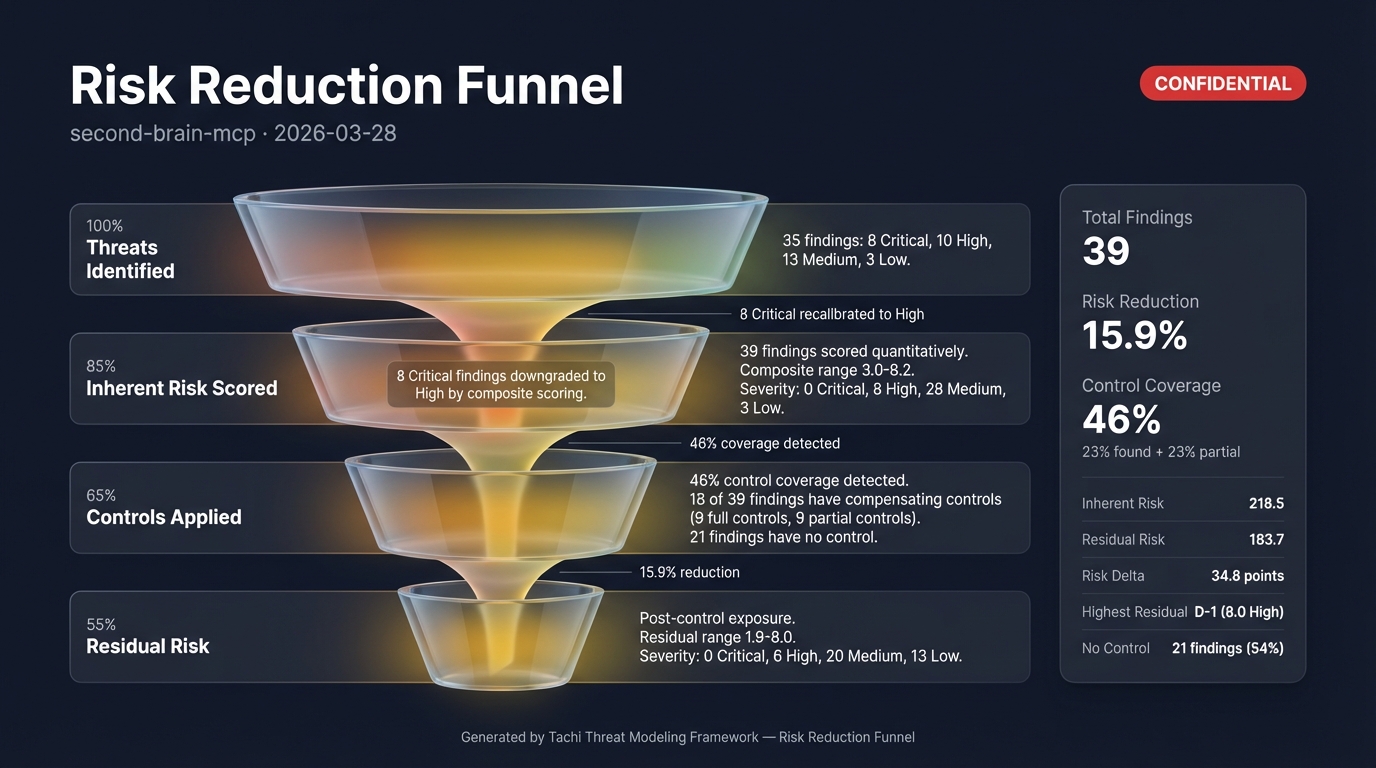
tachi is a threat modeling sidecar that you add to any project. It dispatches 14 specialized AI agents against your architecture description and produces a complete threat model in one command. Then three post-pipeline commands enrich your results: /risk-score for quantitative scoring, /compensating-controls for codebase control analysis, and /infographic for visual risk diagrams.
- 11 threat categories: 6 STRIDE + 3 LLM-specific + 2 Agentic
- 5 input formats: Mermaid, free-text, ASCII, PlantUML, C4
- 12+ output artifacts: structured findings, SARIF, narrative report, attack trees, quantitative risk scores, compensating controls analysis, visual infographics
- Works with any stack: tachi analyzes architecture, not code
tachi is built with the Agentic Oriented Development Kit (AOD Kit), a governance framework for AI agent-assisted development.
Quick Start
1. Clone tachi (one-time)
git clone https://github.com/davidmatousek/tachi.git ~/Projects/tachi
2. Add tachi to your project
From your project root:
# Agents (threat analysis engine)
cp -r ~/Projects/tachi/.claude/agents/tachi/ .claude/agents/tachi/

# Commands (5 slash commands)
mkdir -p .claude/commands
for cmd in threat-model risk-score compensating-controls infographic security-report; do
  cp ~/Projects/tachi/.claude/commands/$cmd.md .claude/commands/
done

# Schemas, templates, references, and brand assets
cp -r ~/Projects/tachi/schemas/ schemas/
cp -r ~/Projects/tachi/templates/ templates/
mkdir -p adapters/claude-code/agents
cp -r ~/Projects/tachi/adapters/claude-code/agents/references/ adapters/claude-code/agents/references/
cp -r ~/Projects/tachi/brand/ brand/
See INSTALL_MANIFEST.md for the full list of distributable files.
3. Restart Claude Code
After copying the files, restart Claude Code (close and reopen the VS Code window, or start a new CLI session) so it picks up the new agents and commands.
If you want infographic images (.jpg), set the GEMINI_API_KEY environment variable with a key from Google AI Studio. This is optional — all text-based outputs work without it.
4. Create your architecture file (or let Claude Code do it)
Create docs/security/architecture.md describing your system. You can write it yourself or ask Claude Code:
Investigate this repository's architecture -- source code, config files, infrastructure
definitions, READMEs -- and create docs/security/architecture.md as a Mermaid flowchart
with all major components, data flows, protocols, and trust boundaries.
tachi auto-detects the format. Mermaid, free-text, ASCII, PlantUML, and C4 are all supported.
5. Run your first threat model
/threat-model
That's it. One command. tachi validates the setup, reads your architecture, dispatches 14 threat agents, and writes everything to a timestamped folder under docs/security/.
6. Review your results
| File | Source | What It Contains |
|---|---|---|
threats.md |
/threat-model |
Primary threat model -- findings, coverage matrix, risk summary, mitigations |
threats.sarif |
/threat-model |
SARIF 2.1.0 for GitHub Code Scanning and CI/CD integration |
threat-report.md |
/threat-model |
Narrative report with executive summary and remediation roadmap |
attack-trees/ |
/threat-model |
One Mermaid attack tree per Critical/High finding |
risk-scores.md |
/risk-score |
Quantitative risk scores with CVSS, exploitability, scalability, reachability |
risk-scores.sarif |
/risk-score |
SARIF 2.1.0 with composite scores as security-severity per finding |
compensating-controls.md |
/compensating-controls |
Detected codebase controls, residual risk, missing control recommendations |
compensating-controls.sarif |
/compensating-controls |
SARIF 2.1.0 with residual risk as security-severity per finding |
threat-baseball-card-spec.md |
/infographic |
Baseball Card risk dashboard specification |
threat-baseball-card.jpg |
/infographic |
Baseball Card infographic (requires GEMINI_API_KEY) |
threat-system-architecture-spec.md |
/infographic |
Annotated architecture diagram specification |
threat-system-architecture.jpg |
/infographic |
Architecture infographic with finding legend (requires GEMINI_API_KEY) |
Start with threats.md Section 7 -- Recommended Actions. Then run /risk-score for quantitative prioritization, /compensating-controls to detect existing defenses, and /infographic for visual risk diagrams. Work through Critical findings first, then High.
Full Walkthrough: The Developer Guide covers the complete 5-step risk lifecycle with worked examples, advanced options, and CI/CD integration.
Command Options
/threat-model
Runs the 5-phase threat modeling pipeline: scope, determine threats, determine countermeasures, assess, and report. Produces threats.md, threats.sarif, threat-report.md, and attack-trees/.
# Default -- uses docs/security/architecture.md
/threat-model

# Specify architecture file
/threat-model path/to/my-architecture.md

# Custom output directory
/threat-model docs/security/architecture.md --output-dir reports/security/

# Version-tagged output for a release
/threat-model docs/security/architecture.md --version v1.0.0
/risk-score
Enriches threat model output with four-dimensional quantitative risk scores (CVSS 3.1, exploitability, scalability, reachability) and governance fields (owner, SLA, disposition, review date). Produces risk-scores.md and risk-scores.sarif.
# Score threats in the default location
/risk-score

# Score threats in a specific directory
/risk-score docs/security/2026-03-27/

# Custom output directory
/risk-score docs/security/2026-03-27/ --output-dir reports/risk/
/compensating-controls
Scans a target codebase against scored threats to detect existing security controls, calculate residual risk, and recommend missing controls. Requires /risk-score output as input. Produces compensating-controls.md and compensating-controls.sarif.
# Scan current project against risk scores in the default location
/compensating-controls

# Scan against risk scores in a specific directory
/compensating-controls docs/security/2026-03-27/

# Scan a different codebase
/compensating-controls docs/security/2026-03-27/ --target ~/Projects/my-app/

# Custom output directory
/compensating-controls docs/security/2026-03-27/ --output-dir reports/controls/
/infographic
Generates visual threat infographic specifications and presentation-ready images. Auto-detects the richest data source in the output directory (prefers risk-scores.md over threats.md). Produces spec markdown and .jpg images (images require GEMINI_API_KEY).
# Generate all infographic templates from the default location
/infographic

# Generate from a specific directory
/infographic docs/security/2026-03-27/

# Generate only the baseball card template
/infographic docs/security/2026-03-27/ --template baseball-card

# Generate only the system architecture template
/infographic docs/security/2026-03-27/ --template system-architecture

# Custom output directory
/infographic docs/security/2026-03-27/ --output-dir reports/visuals/
How It Works
tachi uses a multi-agent orchestration pattern. The orchestrator parses your architecture, identifies components and data flows, then dispatches the right combination of threat agents per component:
| Component Type | STRIDE Agents | AI Agents |
|---|---|---|
| External Entity (users, APIs) | S, R | -- |
| Process (servers, agents) | S, T, R, I, D, E | LLM + AG if AI keywords detected |
| Data Store (databases, caches) | T, I, D | -- |
| Data Flow (API calls, messages) | T, I, D | -- |
AI agents activate when component names or descriptions contain keywords like "LLM", "agent", "orchestrator", "MCP", "tool server", "embedding", "RAG", etc.
After all agents report, the orchestrator deduplicates findings, runs cross-agent correlation, computes risk ratings, and generates the output suite.
Threat Categories
STRIDE (6 categories)
| Category | Threat | Example |
|---|---|---|
| Spoofing | Identity impersonation | Stolen API key used to make authenticated requests |
| Tampering | Unauthorized data modification | SQL injection modifying database records |
| Repudiation | Missing accountability | User denies triggering an expensive operation, no logs exist |
| Information Disclosure | Data exposure | Error messages leaking internal architecture details |
| Denial of Service | Availability attacks | Request flooding exhausting connection pools |
| Elevation of Privilege | Unauthorized access | Regular user accessing admin endpoints |
AI-Specific (5 categories)
| Category | Threat | Example |
|---|---|---|
| Prompt Injection (LLM) | Adversarial inputs hijacking LLM behavior | Hidden instructions in a document causing the LLM to leak its system prompt |
| Data Poisoning (LLM) | Corrupted training/RAG data | Attacker modifying knowledge base documents to spread misinformation |
| Model Theft (LLM) | Model extraction | Competitor reverse-engineering your fine-tuned model via API queries |
| Agent Autonomy (AG) | Insufficient oversight | AI agent sending 500 emails without human approval |
| Tool Abuse (AG) | Tool misuse or manipulation | Malicious plugin exfiltrating source code when invoked |
Examples
The examples/ directory contains complete threat models you can reference:
| Example | Architecture | Threat Categories |
|---|---|---|
| Web App | Traditional web application | STRIDE |
| Agentic App | LLM orchestrator + MCP tools | STRIDE + AI |
| Microservices | Cross-service architecture | STRIDE |
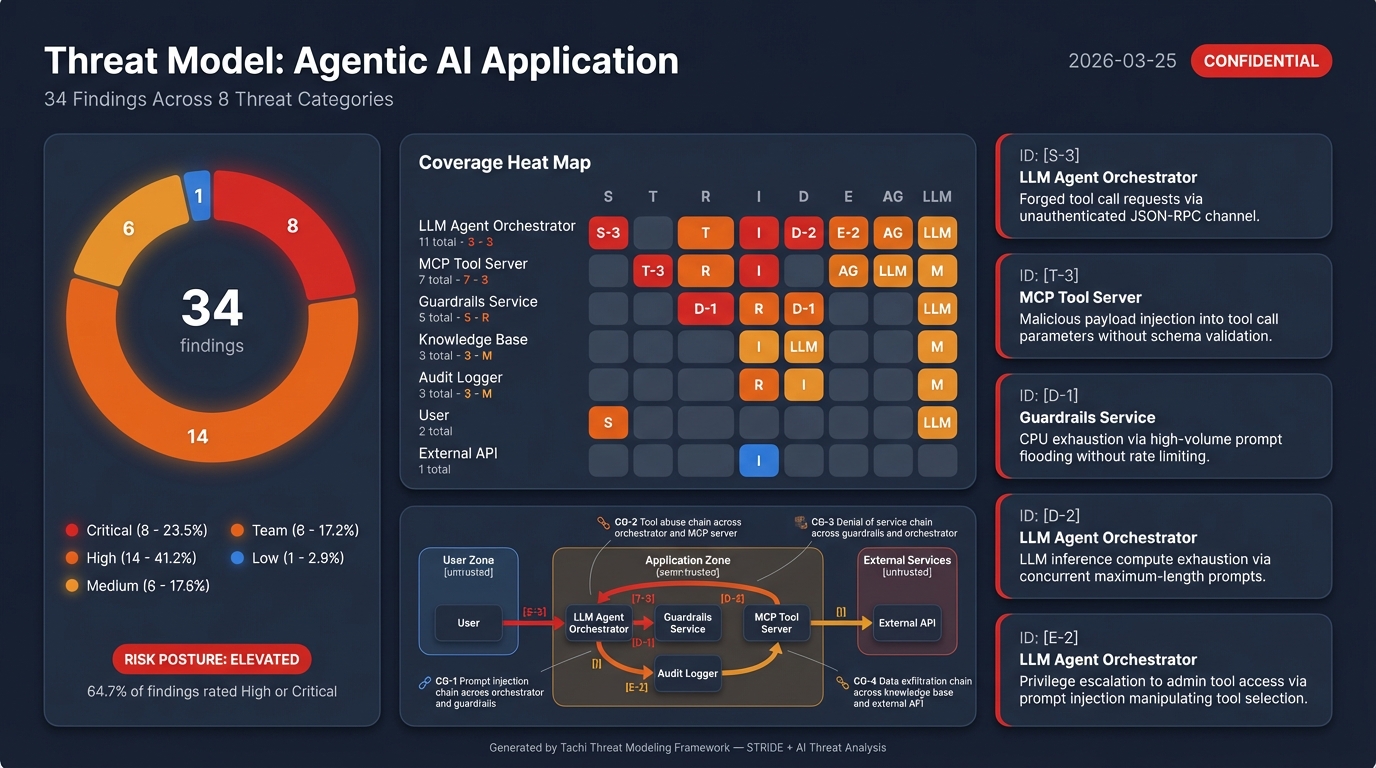
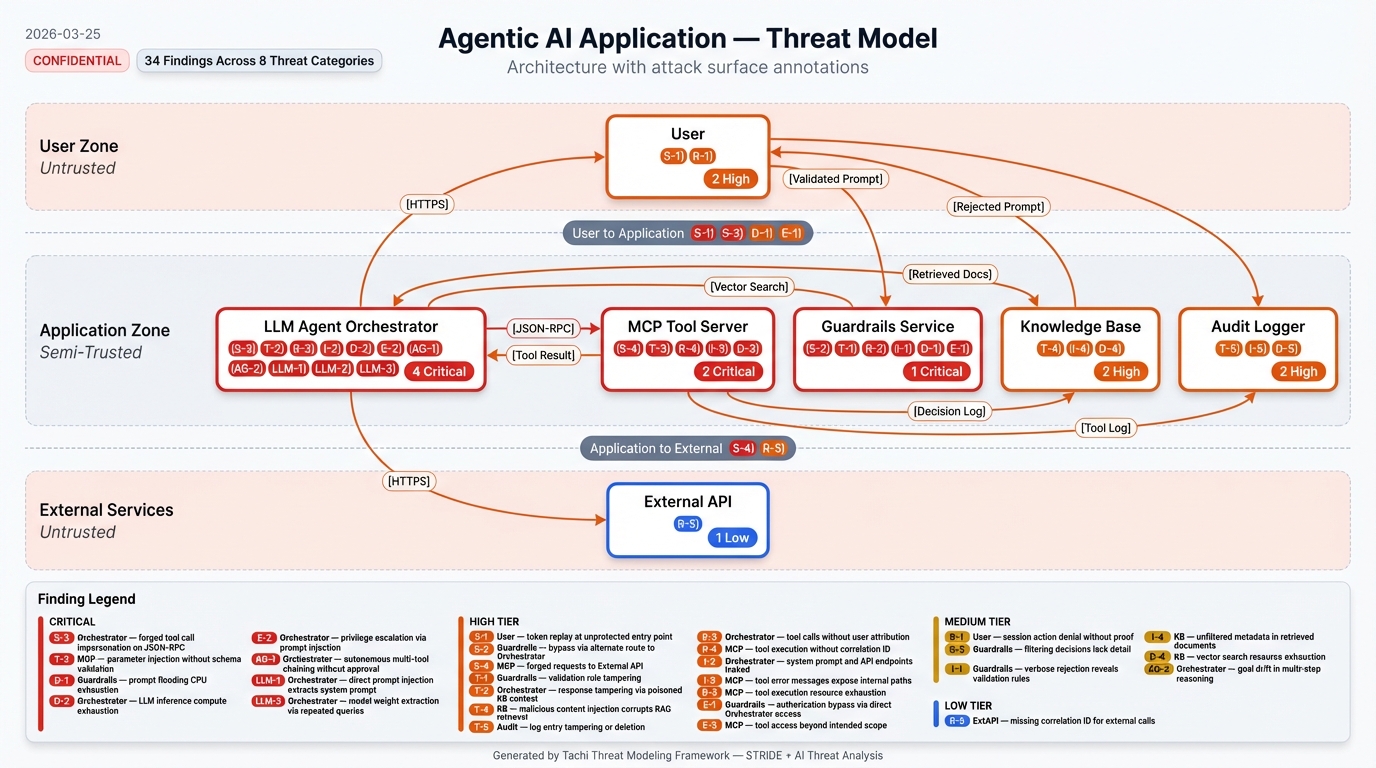
The agentic-app example includes a complete sample report showing every artifact the pipeline produces -- structured findings, SARIF, narrative report, attack trees, and infographics:
Integration Reference
| Resource | Location | Purpose |
|---|---|---|
| Interface Contract | docs/INTERFACE-CONTRACT.md |
Input formats, invocation protocol, output structure |
| Output Templates | templates/tachi/ |
Canonical output structures (threats.md, risk-scores.md, risk-scores.sarif, compensating-controls.md, compensating-controls.sarif) |
| Schemas | schemas/ |
Machine-readable contracts (finding.yaml, input.yaml, output.yaml, risk-scoring.yaml) |
| Threat Agents | agents/stride/ + agents/ai/ |
Agent prompt definitions |
| Developer Guide | docs/guides/DEVELOPER_GUIDE_TACHI.md |
Full walkthrough with worked examples |
Known Issues
Finding count variance between runs
Successive threat model runs on the same architecture may produce slightly different finding counts (typically +/- 10%). This is expected behavior with LLM-based analysis.
What's consistent: Core findings across all STRIDE and AI categories. The same high-severity threats will appear in every run.
What varies: Borderline findings in the long tail -- a Medium-severity finding like "missing correlation ID on external API calls" may appear in one run but not the next, depending on how the agent reasons through the architecture.
Why this happens: Each of the 14 threat agents makes independent LLM calls. LLM output is non-deterministic by nature, so agents may surface slightly different findings on each invocation.
If you need higher consistency:
- Run twice and diff the results to catch edge cases
- Use a previous run's
threats.mdas a baseline for comparison - Treat the threat model as a living document that improves with each run
Built with AOD Kit
tachi is built with the Agentic Oriented Development Kit (AOD Kit), a governance framework for AI agent-assisted development. AOD Kit provides the SDLC Triad methodology (PM + Architect + Team Lead sign-offs), quality gates, and structured workflows that govern how tachi itself is developed and maintained.
Contributing
We welcome contributions. See CONTRIBUTING.md for guidelines.
License
Apache 2.0 License. See LICENSE for details.
Yorumlar (0)
Yorum birakmak icin giris yap.
Yorum birakSonuc bulunamadi