garmin-mcp
Health Uyari
- License — License: MIT
- Description — Repository has a description
- Active repo — Last push 0 days ago
- Low visibility — Only 5 GitHub stars
Code Gecti
- Code scan — Scanned 12 files during light audit, no dangerous patterns found
Permissions Gecti
- Permissions — No dangerous permissions requested
Bu listing icin henuz AI raporu yok.
Local-first MCP server for Garmin Body Battery, HRV, sleep & training data — Claude/Cursor ready
Garmin MCP
Give your AI agent your Garmin Body Battery, training readiness, sleep, HRV and activities.
Local-first MCP server — tokens never leave your machine.









⚡ One-command install with Delx Wellness for Hermes:
npx -y delx-wellness-hermes setup— preconfigures this connector and the full Delx Wellness stack in a dedicated Hermes profile.Or wire it standalone into Claude Desktop / Cursor / ChatGPT Desktop — see the install section below. Runnable examples live in the Delx Agent Workbench.
Public proof: Garmin MCP is tracked in the Delx Open Source Growth Snapshot alongside downloads, stars and next-action priorities. If it saves you Garmin Connect and MCP setup time, star this repo so other training-focused agent builders can find it faster.
First useful prompt:
Use garmin_connection_status, then garmin_daily_summary, then give me a 5-line operating brief for today.
Garmin MCP
Give your AI agent your Garmin Body Battery, training readiness, sleep, HRV and activities — local-first, tokens never leave your machine.
Unofficial project. Not affiliated with, endorsed by or supported by Garmin. This is not official Garmin Health API partnership access — it uses the unofficial Garmin Connect personal-token mode.
- Install one connector —
npx -y garmin-mcp-unofficial setup - Run it in Claude · Cursor · ChatGPT · Hermes · OpenClaw — runnable examples
- Local-first — your Garmin tokens never leave the machine (privacy)
- Which connector should I use? — pick one in the Delx Wellness front door
Part of Delx Wellness, a registry of local-first wellness MCP connectors.
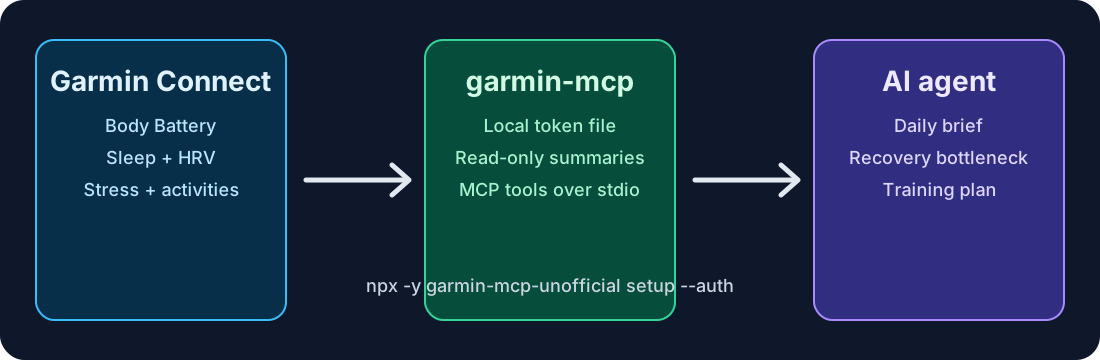
Quickstart in 60 seconds
No Garmin developer app is required. setup only writes local MCP configuration; it does not ask for your Garmin password.
npx -y garmin-mcp-unofficial setup            # writes local config
npx -y garmin-mcp-unofficial auth             # built-in login, prompts for credentials locally (no Python needed)
npx -y garmin-mcp-unofficial doctor           # verifies you're ready
Or one shot: npx -y garmin-mcp-unofficial setup --auth
auth runs a self-contained Node login and prompts locally for Garmin email, password and MFA when needed. The MCP does not store your Garmin password — only Garmin Connect tokens, saved at ~/.garmin-mcp/garmin_tokens.json with user-only permissions. See the auth quickstart walkthrough for real terminal output, or docs/quickstart.md for the full flow.
If Garmin returns HTTP 429, a Cloudflare challenge, or an auth message that says Garmin SSO omitted responseStatus.type, stop retrying for a while. Repeated headless login attempts can make the private endpoint throttle harder. Use docs/auth.md for the safe recovery path.
Then add this to your MCP client config:
{
  "mcpServers": {
    "garmin": {
      "command": "npx",
      "args": ["-y", "garmin-mcp-unofficial"]
    }
  }
}
Try it with your agent
Use garmin_connection_status to check setup, then run garmin_daily_summary.
Give me a 5-line operating brief for today.
Call garmin_weekly_summary with response_format=json. Identify my biggest
recovery/sleep/stress bottleneck and give me a next-week plan.
Use the garmin_intraday_investigation prompt for date=today, focus=stress.
Don't claim Garmin can prove anything it can't.
Tools
Start with garmin_connection_status, then garmin_daily_summary (daily readiness, sleep, load) or garmin_weekly_summary (scorecard, bottlenecks, next-week plan). The server also exposes per-day signals (sleep, HRV, stress, Body Battery, training readiness, heart rate, SpO2, respiration, intensity minutes, hydration), activities, profile/devices and weight, plus prompts and resources.
See docs/tools.md for the full tool list, prompts, resources, data-availability matrix, configuration, Hermes setup and development notes.
Privacy & what runs offline
GARMIN_PRIVACY_MODEdefaults tosummary(more conservative than other Delx Wellness connectors) because the auth model is unofficial.- In
structuredmode, normalized aliases are additive: complete upstream Garmin fields and nested DTOs remain available after secret/GPS redaction. - Activity date ranges preserve the supplied calendar date and reject invalid values before contacting Garmin Connect.
- Garmin Connect tokens are stored at
~/.garmin-mcp/garmin_tokens.jsonwith user-only permissions and are never returned by tools. Your Garmin password is never stored — only short-lived tokens persist locally. - The MCP client never sees Garmin credentials or tokens. Local cache is opt-in via
GARMIN_CACHE=sqlite. - This is not medical advice. The server exposes user-authorized data for personal AI workflows, not diagnosis or treatment.
See docs/privacy.md for the full privacy model.
See the full agent demo →
Want to see a connector like this drive a real end-to-end decision? The shared, reproducible proof lives in delx-living-body:
npx -y delx-living-body demo
It answers the anchor question — "Should I train hard today?" — by combining recovery, sleep and training-load signals across the Delx Wellness connectors.
See also
The full Delx Wellness connector library:
| Provider | Package | Repo |
|---|---|---|
| WHOOP | whoop-mcp-unofficial |
whoop-mcp |
| Oura | oura-mcp-unofficial |
ouramcp |
| Garmin | garmin-mcp-unofficial |
garmin-mcp |
| Strava | strava-mcp-unofficial |
strava-mcp |
| Fitbit | fitbit-mcp-unofficial |
fitbitmcp |
| Withings | withings-mcp-unofficial |
withingsmcp |
| Apple Health | apple-health-mcp-unofficial |
apple-health-mcp |
| Polar | polar-mcp-unofficial |
polarmcp |
| Nourish (nutrition) | wellness-nourish |
wellness-nourish |
One-command setup for Hermes — preconfigures every connector above plus wellness skills + onboarding: delx-wellness-hermes.
📧 Contact & Support
- 📨 [email protected] — general questions, integration help, partnerships
- 🐛 Bug reports / feature requests — GitHub Issues
- 🐦 Updates — @delx369 on X
- 🌐 Site — wellness.delx.ai
License
MIT — see LICENSE.
Disclaimer
This software is provided as-is. It is not a medical device, does not provide medical advice, and should not be used for diagnosis or treatment. The unofficial Garmin Connect mode can break if Garmin changes private auth or endpoints. Always consult qualified professionals for medical concerns.
Yorumlar (0)
Yorum birakmak icin giris yap.
Yorum birakSonuc bulunamadi