cloudroom-gui
Health Pass
- License — License: Apache-2.0
- Description — Repository has a description
- Active repo — Last push 0 days ago
- Community trust — 11 GitHub stars
Code Warn
- process.env — Environment variable access in .github/workflows/check-plugin-sdk-version.mjs
Permissions Pass
- Permissions — No dangerous permissions requested
No AI report is available for this listing yet.
Run Claude Code, Codex, and Pi on your Mac or in the cloud. Move a running agent to the cloud in one click. Open source.
Cloudroom
Website · Download · Join the waitlist · Changelog · Security
Your agents get their own room in the cloud.
Run Claude Code, Codex, and Pi side by side, on your Mac or in the cloud. You keep your harness, your subscriptions, and your traces.
- Teleport a running thread from your Mac to the cloud and back, with the same chat, model, and effort.
- Each cloud agent gets its own sandbox with a copy of your repo.
- Agents call Claude and OpenAI directly, on your own subscriptions.
- Cloud agents can reach your Mac when you allow it.
- Computer use for every agent, on your Mac and in the cloud.
- Self-host the open-source Cloudroom core, or use our hosting.
Local agents are free and need no account. Cloud is invite-only for now, so join the waitlist.
Download the Mac app for Apple Silicon on macOS 13+. A Linux x64 alpha is on Releases. Found a bug? Open an issue.
Why Cloudroom
A year ago you ran 1 agent. Today you run 20. Soon you will run 1,000.
Your laptop can't handle that. Fans go crazy. Windows pop up. Agents grab your browser.
Cloud agents fix this. But Codex cloud, Cursor, and Devin are closed. You use their harness, their app, and their subscription.
Cloudroom runs the agents you already use, each on its own machine in the cloud. It's open source. Use our hosting, or run the core on any Linux machine you own.
How it works
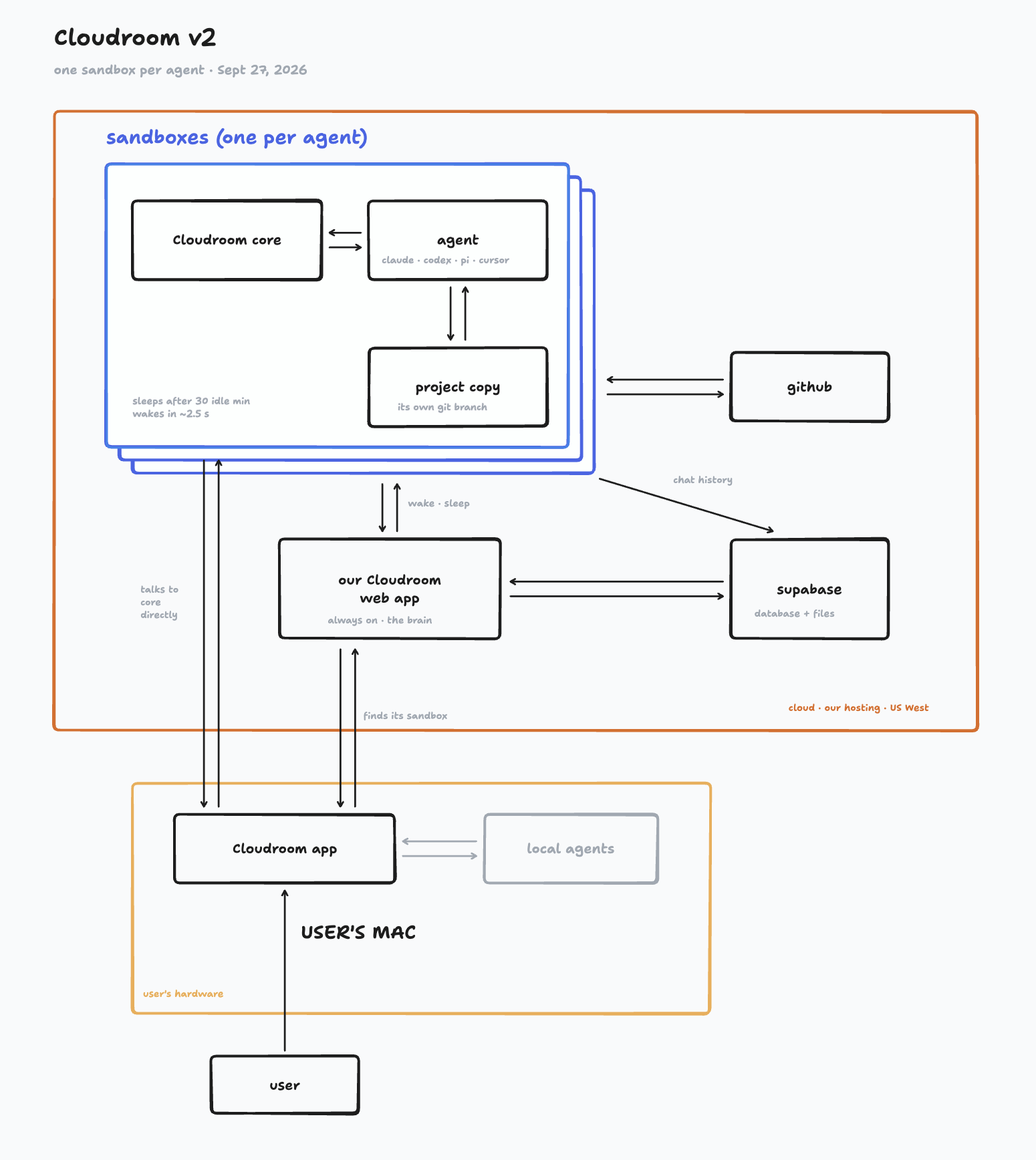
The app runs local agents on your Mac. Each cloud agent runs in its own sandbox, next to Cloudroom core.
Security
- Your core token stays in the app's private data folder, readable only by you. It never reaches the UI or logs.
- The app only connects to remote cores over HTTPS.
- Hosted sign-in works only through cloudroom.dev. Codex and Cursor login links must point to the official OpenAI and Cursor pages.
- Other websites cannot call the app's local API.
- Cloud agents run inside the core's security model.
See cloudroom.dev/security. Report vulnerabilities privately as described in SECURITY.md.
Build from source
Building needs no Cloudroom account or core checkout. See release notes and compatibility.
Use macOS on Apple Silicon for the supported development target. Install Git, Node.js 22.19+, pnpm 9.15.0, Python 3.11+, and Xcode Command Line Tools for native dependencies. Keep the same Node version for installation and builds.
Run these commands from this directory:
pnpm install --frozen-lockfile
pnpm exec turbo run build typecheck --filter=@bb/app --filter=@bb/server --filter=@bb/desktop --concurrency=2
Do not disable dependency install scripts: SQLite, file watching, and terminal support use native modules. If your global pnpm version differs, use npx --yes [email protected] in place of pnpm.
Run locally
Start the development backend and browser UI:
pnpm dev
In another terminal, start Electron:
pnpm exec turbo run dev --filter=@bb/desktop
Development uses checkout-specific ports and a separate profile. The launcher prints both. Stop each command with Ctrl-C. Local agents require their own installed, authenticated provider CLIs.
Use Sign in for hosted access. Cloud execution requires a matching core with direct_workspaces and command_guard capabilities; use public core source-2026-09-23 or newer. Manual connections use POST /api/v1/cloudroom with url and token, but cloud features in the app still need a signed-in account. Remote URLs require HTTPS. Keep tokens out of browser code, URLs, and Git.
Checks
Use the non-interactive checks below. Desktop integration tests can launch real apps; run them only in a dedicated test environment.
pnpm exec turbo run test --filter=@bb/scripts --filter=@bb/config --concurrency=2
pnpm exec turbo run test --filter=@bb/server -- test/app/cloudroom-assets.test.ts
Sync and preview helpers ship in apps/server/src/assets/cloudroom-{sync,preview}/. Maintainers copy them from the core and verify byte-for-byte parity. They use Python's standard library.
The desktop build above creates runnable bundles, not a signed installer. Installer signing, notarization, and publication are separate steps.
Contributing and credits
See CONTRIBUTING.md.
Built on BB. Internal package names still use bb. Cloudroom is licensed under Apache 2.0. BB's MIT license and copyright notice are kept in NOTICE. Bundled third-party notices remain with their components.
Reviews (0)
Sign in to leave a review.
Leave a reviewNo results found