claude-codex-session-link
Health Warn
- License — License: MIT
- Description — Repository has a description
- Active repo — Last push 0 days ago
- Low visibility — Only 9 GitHub stars
Code Warn
- process.env — Environment variable access in lib/ask.mjs
- process.env — Environment variable access in lib/sessions.mjs
Permissions Pass
- Permissions — No dangerous permissions requested
No AI report is available for this listing yet.
MCP server connecting Claude Code and OpenAI Codex: read saved sessions, sync conversation context, and ask Claude follow-ups without interrupting your workflow. | Claude会话读取、上下文同步与协作助手
🔗 Claude–Codex Session Link
A Claude Code session reader and context synchronization MCP server for OpenAI Codex. Find and read saved Claude Code conversations, synchronize new messages before Codex replies, and explicitly ask Claude text-only follow-up questions in a selected session—all while staying in your current workflow.
Previously named Claude Session Link.
If this project helps you, please give it a ⭐ Star! 💡 Suggestions, 🐛 bug reports, and 🛠️ improvements are welcome.
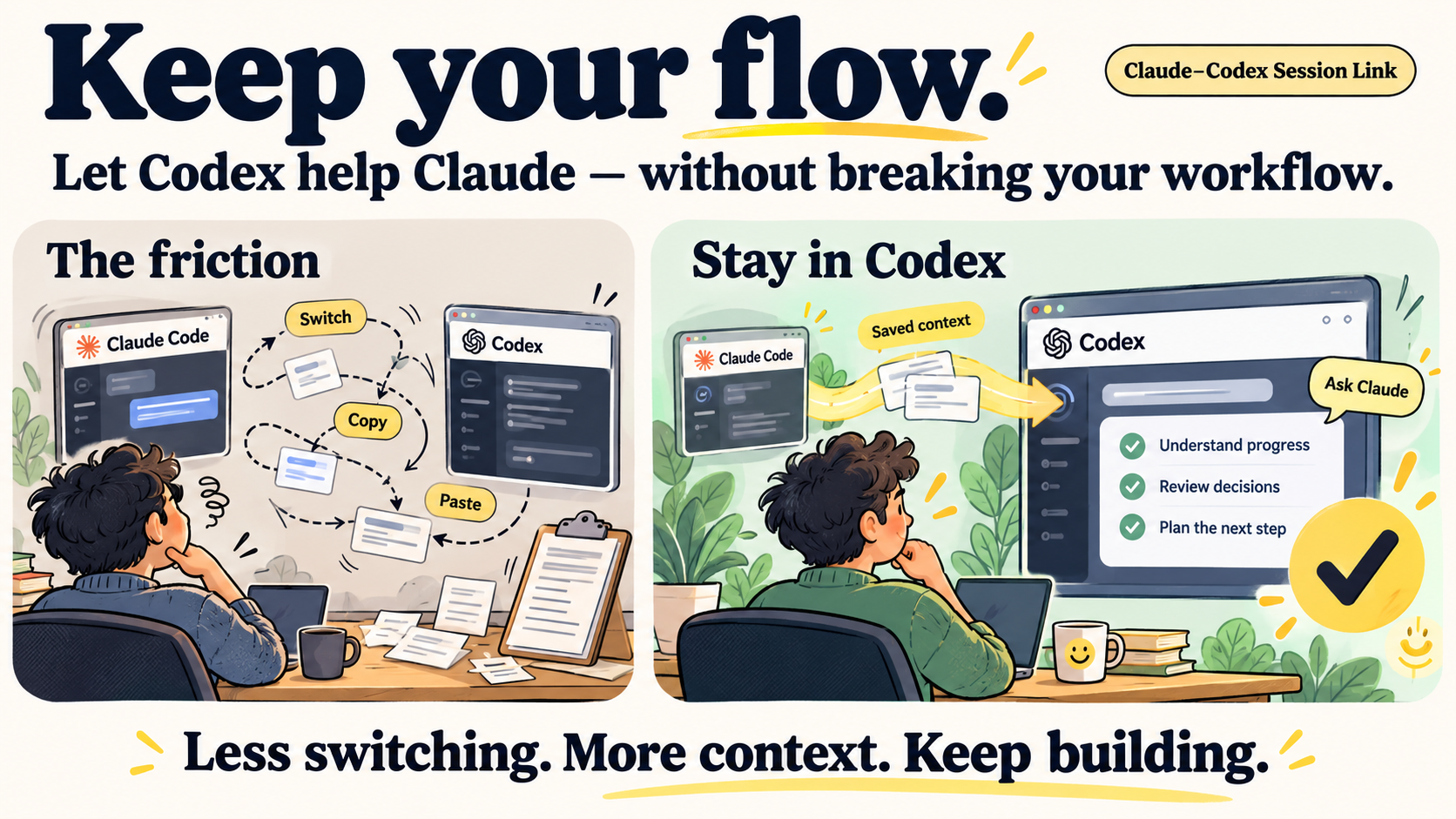
🎯 Motivation
Keep your workflow uninterrupted, and let Codex help you support Claude's ongoing work. Instead of repeatedly switching windows and copying conversation history, stay in Codex and use Claude's saved context to review progress, understand decisions, investigate problems, and plan the next step. When you want Claude's own explanation, send an explicit text-only follow-up in the selected context.
✨ What it does
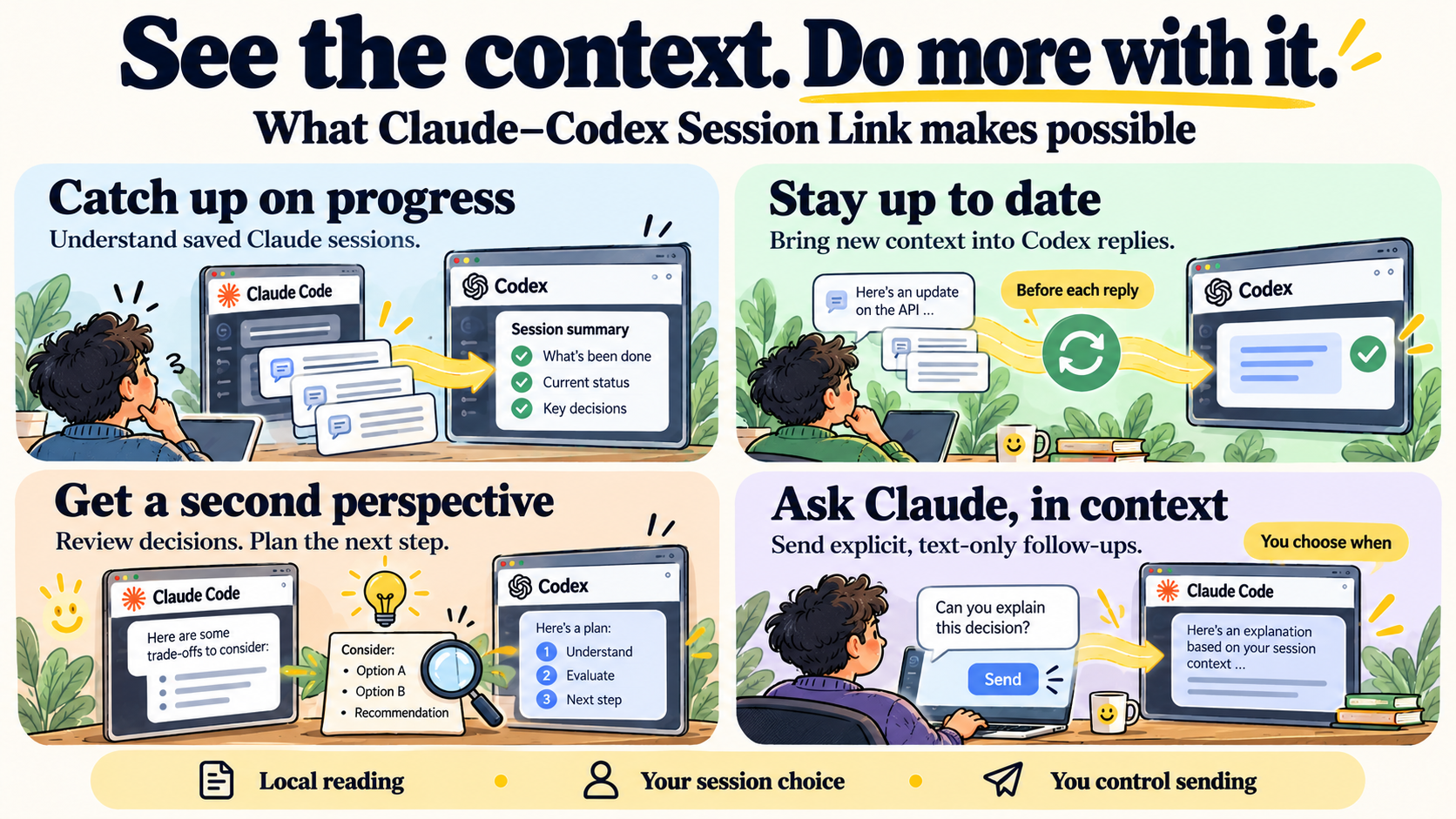
| Tool | Purpose | Behavior |
|---|---|---|
claude_sessions |
List and search local conversations | Read-only metadata; listing does not select a session |
claude_select_session |
Open a session picker and wait for submission | Read-only metadata; waits for client form confirmation |
claude_read_session |
Read a selected conversation | Read-only; follows the current message parent chain |
claude_session_updates |
Retrieve new or revised context with a cursor | Read-only; called before replies after session selection |
claude_ask_session |
Ask a text-only follow-up in that context | Preview by default; explicit sending invokes Claude CLI |
- Supports locally saved Claude Code terminal and VS Code conversations.
- Keeps session selection and sync cursors within the current Codex chat.
- Detects branch changes, compaction, and revisions to previously read messages.
- Supports pagination and continuation of long incremental messages.
- Uses stdio MCP / JSON-RPC, with no HTTP server or runtime npm dependencies.
🧭 When to use it
- Continue your workflow: inspect Claude Code's saved progress from Codex without copying and pasting conversation history.
- Share the latest context: let Codex read incremental Claude session updates before it answers.
- Support Claude's work: use Codex to review decisions, investigate problems, and prepare an optional follow-up question for Claude.
🧰 Requirements
- Node.js 22 or newer. The local reader has been validated on Windows.
- Claude Code conversation files available on the same machine.
- For actual follow-up requests: an authenticated Claude Code CLI supporting the required safety flags.
The reader uses .claude/projects/<encoded-project-path>/<session-UUID>.jsonl under the user profile. Set CLAUDE_CONFIG_DIR or pass --claude-home for a custom directory. Conversations stored in SSH, WSL, or containers must be read from an environment that can access those files. This tool reads Claude Code history, not claude.ai web conversations.
🚀 Quick start
git clone https://github.com/Dayc-l/claude-codex-session-link.git
cd claude-codex-session-link
node.exe cli.mjs list --limit 10
node.exe cli.mjs list --project C:\Projects\demo --query cache
node.exe cli.mjs read --session YOUR_FULL_SESSION_UUID
No npm install is required. Listing, reading, synchronization, and question previews stay local and do not call a model.
Search matches metadata such as titles, first-question previews, session IDs, and project paths; it is not full-text history search. Reading defaults to the last 30 messages on the current parent chain. Use --offset 0 --limit 50 to page from the start or --view all to inspect other saved history. Thinking, image payloads, and tool input/output bodies are excluded; --include-tools adds only tool metadata.
🔌 Connect to Codex
Merge the following entry into the trusted project's .codex/config.toml, replacing the example path with your installation path:
[mcp_servers.claude_session_link]
command = "node.exe"
args = ["C:\\Tools\\claude-codex-session-link\\cli.mjs", "mcp"]
Preserve existing configuration. Reload the client's MCP connection after setup. See the configuration example. A helper can preview project configuration; -Apply explicitly creates it and refuses to overwrite different existing content:
.\scripts\connect-project.ps1 -ProjectPath C:\Projects\demo
.\scripts\connect-project.ps1 -ProjectPath C:\Projects\demo -Apply
You can then tell Codex: “Let me choose a Claude session.” Codex should call claude_select_session, which requests an MCP single-select form using elicitation/create. Select a candidate by its title, project, and time, then click to submit. The tool waits for the client to return an accepted submission before returning status=selected and the full session ID. Even a single candidate requires confirmation, and no default is supplied. The form includes previous/next page options when needed. The target remains specific to the current chat.
Closing, cancelling, declining, invalid input, or a timeout never selects a session or automatically retries. While selection is pending, the server rejects concurrent reads, synchronization, sends, and additional selection requests. The client must advertise MCP form elicitation support; unsupported clients receive an explicit error instead of a transient async question or numbered-reply fallback. The client renders the UI; the server validates the submission but cannot independently prove a physical mouse click.
The server has no selection countdown, but the host can cancel or time out the tool. Add tool_timeout_sec = 360 to this MCP server entry (as in the configuration example) to allow a six-minute tool-call window. A timeout requires a new selection request and never accepts a preselected value. Reload the MCP connection or start a new chat after updating so Codex discovers the new tool and instructions. The desktop click interaction still needs validation in the actual client.
🔄 Default synchronization before replies
Once you select or explicitly identify a Claude session, Codex is instructed to call claude_session_updates after each user message and before replying, unless you explicitly pause or cancel synchronization. The first call establishes a recent-message baseline; later calls pass the returned cursor. Read all pages when hasMore=true. If resetRequired=true, realign with the returned context. Switching sessions establishes a new baseline without reusing the old cursor.
This behavior depends on the host following the MCP instructions. It is triggered before replies, not by a background watcher or push service. Only content already saved in local JSONL files is available.
Equivalent CLI commands:
node.exe cli.mjs updates --session YOUR_FULL_SESSION_UUID
node.exe cli.mjs updates --session YOUR_FULL_SESSION_UUID --cursor PREVIOUS_CURSOR
💬 Optional follow-up questions
Preview a question without sending:
node.exe cli.mjs ask --session YOUR_FULL_SESSION_UUID --question "Why did you choose this approach?"
Send only when you explicitly want an answer from Claude:
node.exe cli.mjs ask --session YOUR_FULL_SESSION_UUID --question "Explain the next step." --send
The default fork mode creates a new session branch and returns its ID. To continue a particular branch, use its returned ID with resume; this appends to that session and requires your confirmation that it is idle:
node.exe cli.mjs ask --session TARGET_SESSION_UUID --mode resume --confirm-idle --question "Continue the explanation." --send
Actual sending accesses the network, consumes Claude usage, and lets Claude CLI save the exchange. Tools, hooks, and MCP are disabled for this text-only call. --confirm-idle is your declaration, not an automatic activity check. Unknown results, timeouts, and cancellation do not trigger automatic retries. Use --expected-version to guard against changes since a prior read; use --question-file for a UTF-8 question file.
🧪 Validation and limitations
node.exe --test test/*.test.mjs
All 35 offline tests passed. They use synthetic local sessions and fake Claude responses. Coverage includes read-only behavior, parent chains, partial writes, pagination, MCP framing, incremental cursors, branch changes, compaction, text revisions, and long-message continuation. Selection tests also cover waiting for form submission, confirmation, cancellation, decline, capability negotiation, pagination, invalid results, cancellation cleanup, concurrent-operation blocking, and the actual stdio subprocess transport.
Real authenticated network follow-ups have not been verified end to end. Client-specific automatic MCP loading also depends on the installation. See validation details and the changelog.
The parser targets locally observed JSONL formats rather than an official internal SDK. It cannot restore discarded history or unsaved content. Full reads reject session files over 128 MiB; individual read messages and pages have output limits. Incremental output supports continuation of long messages.
🏗️ Technical framework
Expand the full architecture diagram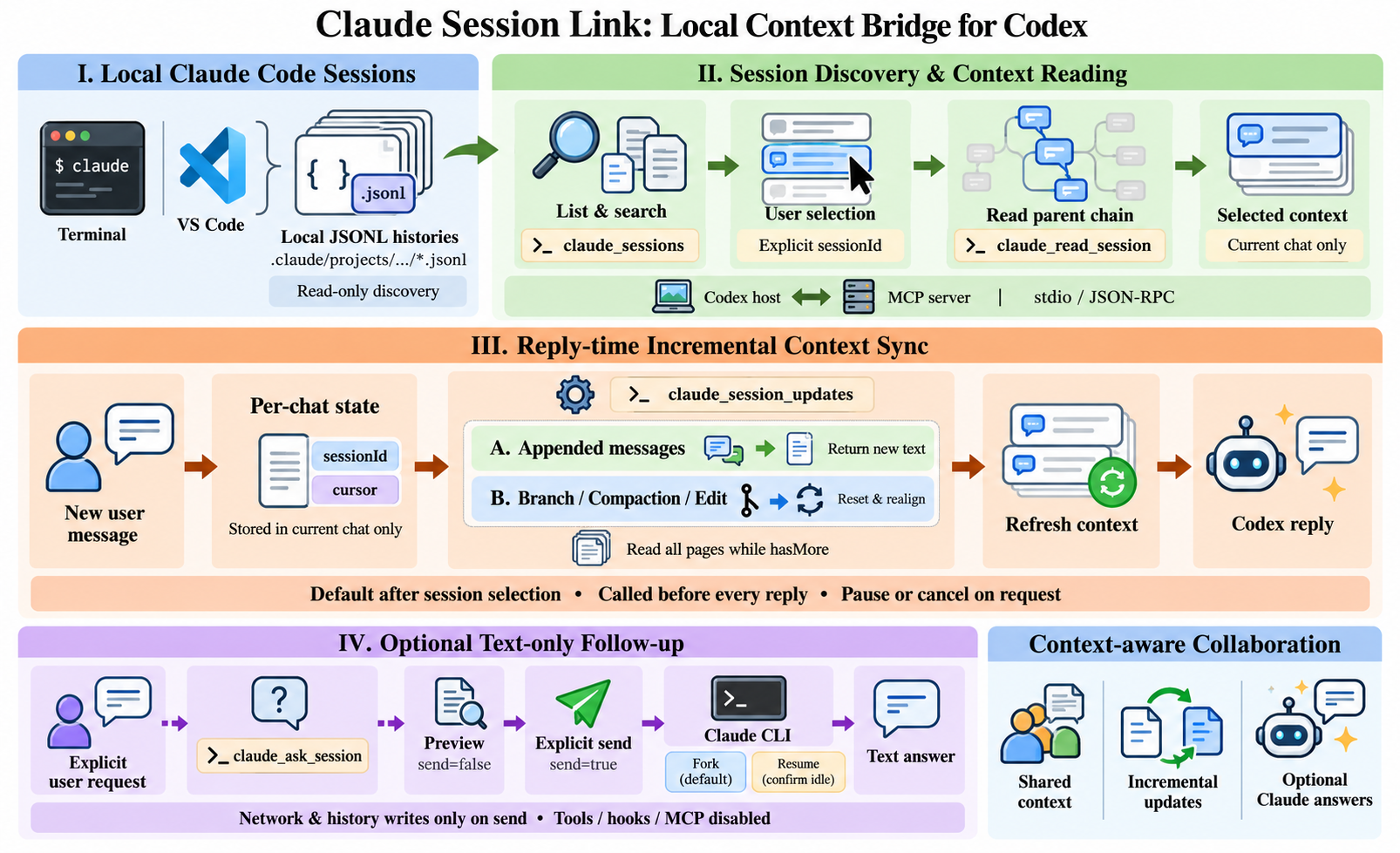
🔒 Repository and data
This public repository contains source code, synthetic tests, documentation, and the framework illustration. Do not commit real conversation records, cursors, credentials, logs, or personal configuration.
📄 License
Released under the MIT License. private: true in package.json prevents accidental npm publishing; it does not control GitHub visibility or the license.
🌟 Enjoy a smoother workflow? Give this repository a Star and help others discover it!
Reviews (0)
Sign in to leave a review.
Leave a reviewNo results found