db-branch
Health Gecti
- License — License: Apache-2.0
- Description — Repository has a description
- Active repo — Last push 0 days ago
- Community trust — 93 GitHub stars
Code Gecti
- Code scan — Scanned 12 files during light audit, no dangerous patterns found
Permissions Gecti
- Permissions — No dangerous permissions requested
Bu listing icin henuz AI raporu yok.
Instant MySQL database branches on ZFS clones, clustered across VMs with ProxySQL routing
db-branch




Instant database branches for MySQL and PostgreSQL, on your own servers. Create a copy-on-write branch of a large database in seconds, break it, reset it, throw it away.
Try it in your browser in 10 seconds: https://demo.db-branch.com/from/readme (nothing real is created).

Test a migration, let an AI agent loose, or give every pull request its own copy of the database. db-branch creates a branch with nothing copied. Built on ZFS clones, self-hosted, Apache-2.0.
Status: Beta. db-branch is usable today, but APIs and command-line details may still change before 1.0. It is an independent open-source project, built from scratch.
Try it
In your browser, 0 minutes. A live console demo runs entirely in the page (nothing real is created): https://demo.db-branch.com/from/readme
On a Mac or Windows machine, about 2 minutes. db-branch needs Linux and ZFS, so run it in an Ubuntu VM with Multipass. One command makes the VM, installs db-branch, initialises it on a file-backed ZFS pool and loads a small sample base,
shop(MySQL 8.4):multipass launch 24.04 --name db-branch-eval --memory 4G --disk 30G --timeout 900 \ --cloud-init https://raw.githubusercontent.com/db-branch/db-branch/main/scripts/eval-cloud-init.yaml multipass exec db-branch-eval -- cloud-init status --wait # wait for the setup (about two minutes) multipass exec db-branch-eval -- cat /etc/motd # console URL and sign-in (admin / admin), or what failed multipass shell db-branch-eval # then: sudo db-branch branch create try --base shop --ttl 1h --recordOn Windows (PowerShell or cmd), put the
multipass launchcommand on one line and drop the\:multipass launch 24.04 --name db-branch-eval --memory 4G --disk 30G --timeout 900 --cloud-init https://raw.githubusercontent.com/db-branch/db-branch/main/scripts/eval-cloud-init.yaml- The history module is turned on, and the paid modules run for 30 days without a key.
--recordrecords a branch so it can be restored to any point. - The pool is a file, so it is slower and not meant for real data. The first admin password is
admin; the console asks for a new one at the first sign-in. - On Apple Silicon (and other arm64 machines) the setup downloads about 800 MB for MySQL, against 80 MB on Intel, because Oracle ships no minimal build for arm64.
--timeout 900keepslaunchfrom giving up on a slow connection. - If the setup fails,
/etc/motdsays so, andsudo tail -n 30 /var/log/cloud-init-output.login the VM shows why. - Delete the VM with
multipass delete --purge db-branch-eval.
- The history module is turned on, and the paid modules run for 30 days without a key.
On your own Ubuntu server. See Install.
Use cases
- AI agent sandboxes. The built-in MCP server lets an LLM agent create a branch, run a risky query or migration on it, and delete the branch, so production data is never touched. For sensitive data, mask at the base snapshot stage rather than after branching (see Design notes and trade-offs).
- A database per pull request. Each CI run or PR gets its own copy of a large database, ready in seconds, and removed by
--ttlwhen it is no longer needed. - Version-upgrade checks. Run a major-version upgrade (for example MySQL 8.0 to 8.4) on one branch first, with
branch upgrade --check-onlyto see what it would run into, before touching the base.
What it does
- Branches in seconds. On our own 3-node test cluster a PostgreSQL branch is ready in about 0.5 s and a MySQL branch in about 3 s, with 0 bytes copied at creation (copy-on-write).
- Reset and expire.
branch resetreturns a branch to its creation state;--ttldeletes it automatically. - Checkpoints.
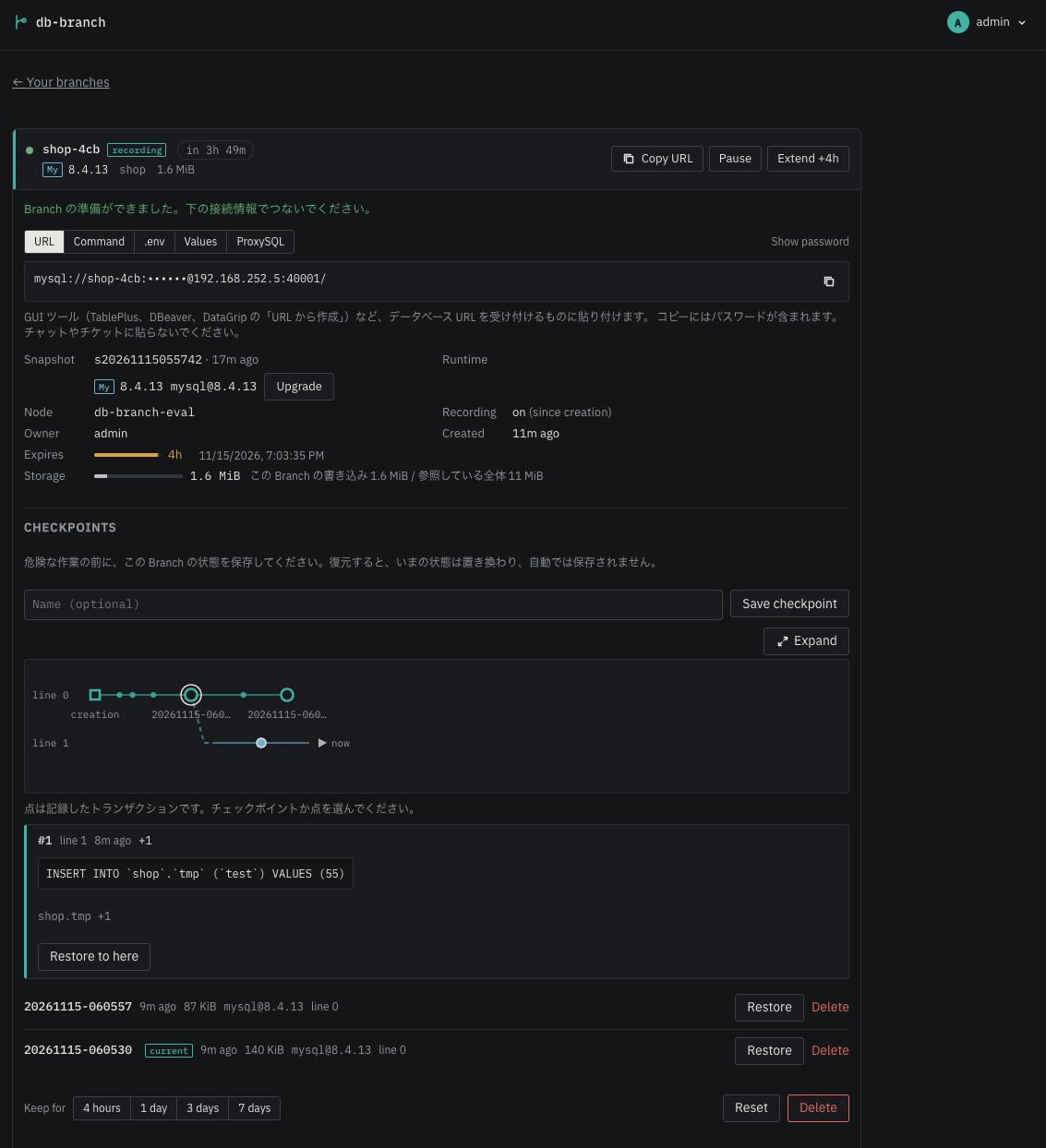
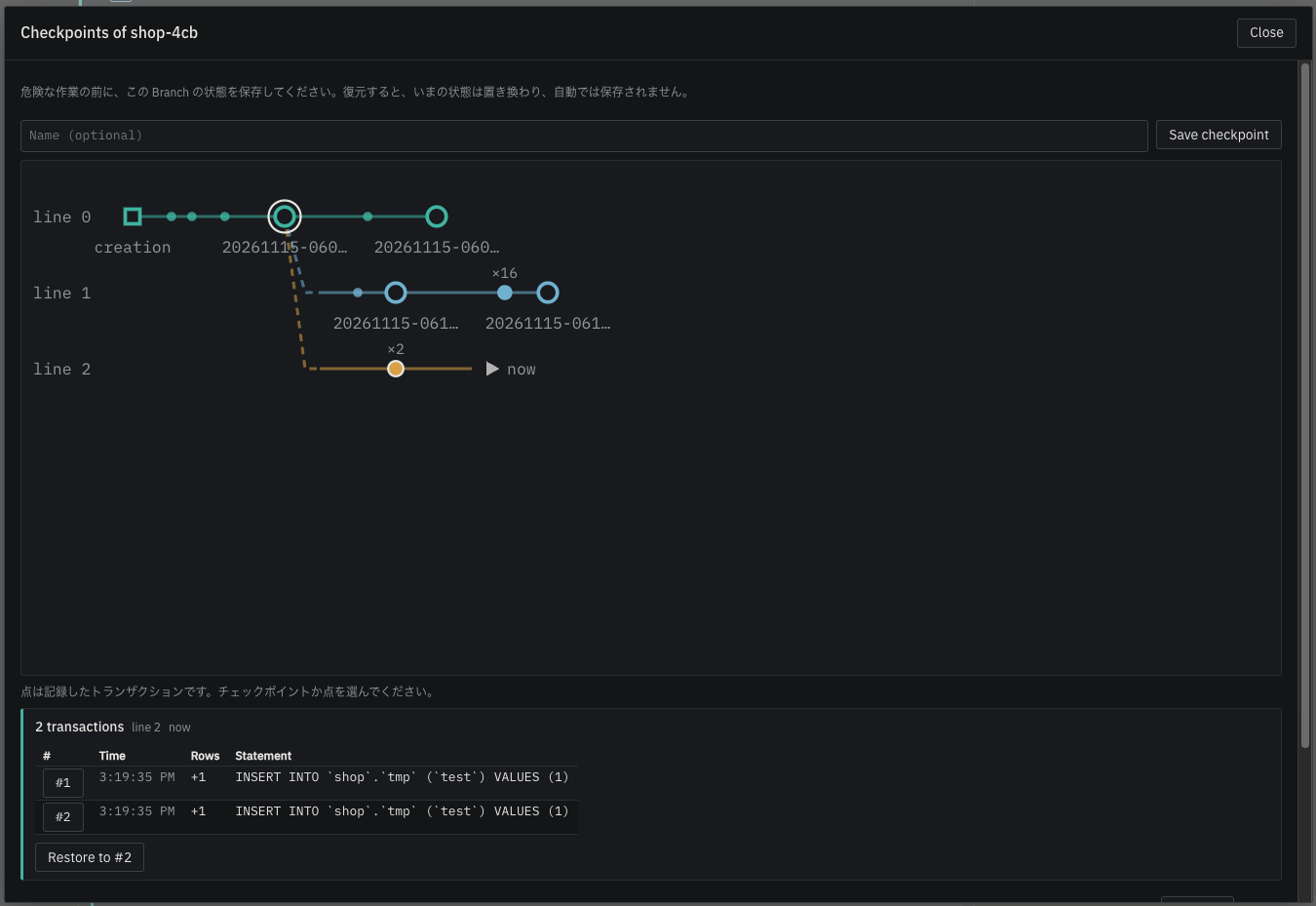
branch checkpointsaves a running branch's state instantly;branch restoreputs it back. Restoring replaces the current state, and every checkpoint you already have stays restorable. - Per-branch upgrades.
branch upgrademoves one branch to a newer MySQL or PostgreSQL version while the base and the other branches stay put. A checkpoint is saved first, and a failed upgrade rolls back by itself. - MySQL and PostgreSQL, several versions at once. Engine runtimes are installed by version and can live side by side.
- One interface everywhere. CLI, REST API, web console and an MCP server (so LLM agents can create and query their own branches) all use the same API.
- Single node or cluster. A Raft cluster of VMs, with optional ProxySQL routing so applications keep one address.
Web Console
Install
Requirements: Ubuntu 24.04 LTS or 26.04 LTS, and a ZFS pool (the zfsutils-linux package is installed as a dependency).
curl -fsSL https://apt.db-branch.com/db-branch.gpg | sudo tee /usr/share/keyrings/db-branch.gpg >/dev/null
echo "deb [signed-by=/usr/share/keyrings/db-branch.gpg] https://apt.db-branch.com stable main" | sudo tee /etc/apt/sources.list.d/db-branch.list
sudo apt update && sudo apt install db-branch
sudo db-branch init --pool <zpool>
The repository signing key fingerprint is 3F404C4E5D49FA653F8385692C6E89E341D4D7A5. db-branch init prints the initial admin password once.
First branch
db-branch runtime install [email protected]                                     # a database engine version
db-branch base create prod --runtime [email protected] --dump prod.sql.gz       # a base: your data, loaded once
db-branch branch create feature-x --base prod --ttl 72h                     # a branch: instant, copy-on-write
db-branch branch dsn feature-x                                              # connection URL (includes the password)
db-branch branch checkpoint feature-x --name before-migration               # save the state (instant)
db-branch branch restore feature-x before-migration                         # go back to the saved state
db-branch branch reset feature-x                                            # discard every change
db-branch branch delete feature-x                                           # remove it
MySQL works the same way, for example [email protected]. List installable versions with db-branch runtime available. To try a version upgrade on one MySQL branch:
db-branch branch upgrade feature-x --runtime [email protected] --check-only      # what would the upgrade run into?
db-branch branch upgrade feature-x --runtime [email protected]                   # move this branch only; a checkpoint is saved first
How it works
A base is a ZFS dataset holding a loaded database. A branch is a ZFS clone of a base snapshot, so creating one copies nothing, and each branch runs its own database server on its own port. Optionally, ProxySQL routes client connections to the right branch by user name (or by a /*db_branch='name'*/ query comment). Several nodes form a Raft cluster that shares bases, branches, settings and users.
Design notes and trade-offs
- Disposable by design (no merge or rebase). Branches are block-level ZFS copy-on-write clones, not hooks into the database engine's MVCC. Divergent writes across concurrent branches cannot be merged or rebased back into a base or another branch like Git. db-branch is built for disposable sandboxes (AI agents, CI runs, migration tests) that you reset or throw away.
- Clean-shutdown vs. live snapshots. Because PostgreSQL and MySQL (InnoDB) are crash-consistent, an atomic ZFS snapshot of a running instance (with data files and WAL/redo logs on the same volume) does work—and db-branch uses crash-consistent live snapshots for running-branch checkpoints. However, starting a branch from a live snapshot triggers crash recovery (WAL/redo log replay), which added about 10 s of startup latency in our MySQL testing. Base snapshots are therefore taken after a clean shutdown to keep branch creation sub-second / a few seconds.
- Mask at the base, not after branching. Branches isolate writes from production, but an AI agent or user with access to a branch can still read everything in it. If you load unmasked production data, sensitive records remain exposed to
SELECTqueries. Mask data when creating the base snapshot (using a masked dump or a masker module distributed separately, such asgreenmask,greenmask-mysql, oranon) rather than relying on post-branch masking. - ZFS
recordsizetuning. ZFS's defaultrecordsize(128K) does not match database page sizes, causing double copy-on-write /fsyncwrite amplification and hurting random I/O. Matchingrecordsizeto the engine's page size—16Kfor MySQL/InnoDB and8Kfor PostgreSQL—avoids this overhead. (db-branchautomatically setsrecordsize=16Kon base datasets, matching InnoDB; for PostgreSQL workloads sensitive to random I/O,8Kis the page-matched setting, trading somelz4compression efficiency.)
Editions
- Core (this repository), Apache-2.0: branches, bases, runtimes, clustering, CLI, API, web console, MCP, monitoring, notifications, anonymous (no sign-in) branches with limits, scheduled base refresh, backup of cluster state.
- Free modules in the same apt repository:
proxysql(routing). Data masking modules (greenmask,greenmask-mysql,anon) are distributed separately from this repository. - Paid modules (auth/SSO, audit, history, diff, FSx storage) are separate, closed-source packages, self-hosted and enabled with a license key (monthly or yearly). A governed masking workflow is planned as an opt-in beta and is not part of any plan yet. See docs/modules.md for the extension points they use.
There is no hosted or cloud version of db-branch.
Team and Business are not on sale yet and have no price. If you are interested, tell us with this form (which plan, what database, how big, how many nodes). Email to [email protected] works too.
Documentation
- docs/README.md: index of the design and reference documents (written in Japanese)
- docs/roadmap.md: public roadmap toward 1.0 (written in Japanese)
- English user documentation: https://db-branch.com/docs/getting-started/
- Website: https://db-branch.com (English), https://db-branch.com/ja/ (Japanese)
- api/openapi.yaml: machine-readable REST API definition
- CHANGELOG.md
Contributing, security, support
- Contributions are welcome: see CONTRIBUTING.md. Commits need a DCO sign-off (
git commit -s). - Security issues: see SECURITY.md. Please use private vulnerability reporting, not public issues.
- Support: see SUPPORT.md. No support is promised; Issues are read when possible.
- Sponsor: if db-branch is useful to you, you can support its development on GitHub Sponsors. It is optional and does not buy support or paid modules.
- Please follow the Code of Conduct.
License
Apache-2.0. See LICENSE and NOTICE.
日本語
db-branch は、ZFS クローンで MySQL / PostgreSQL のデータベースブランチを発行・リセット・破棄するツールです。現在は Beta で、1.0 までに API が変わる可能性があります。コアは Apache-2.0 で、有償モジュール(認証/SSO・監査・履歴・差分・FSx ストレージ)は別パッケージ(クローズドソース、セルフホスト、ライセンスキー)です。
Mac / Windows では、Multipass のコマンド1つで試せます: https://db-branch.com/ja/docs/getting-started/#multipass-ですぐ試す。日本語のサイトは https://db-branch.com/ja/、設計ドキュメントは docs/ にあります(日本語)。
開発を支援する場合は、GitHub Sponsors から行えます(任意です。サポートや有償モジュールの提供は伴いません)。
Yorumlar (0)
Yorum birakmak icin giris yap.
Yorum birakSonuc bulunamadi