dcc-mcp-maya-mgear
Health Warn
- License — License: MIT
- Description — Repository has a description
- Active repo — Last push 0 days ago
- Low visibility — Only 5 GitHub stars
Code Pass
- Code scan — Scanned 12 files during light audit, no dangerous patterns found
Permissions Pass
- Permissions — No dangerous permissions requested
No AI report is available for this listing yet.
mGear Shifter deep integration skills for dcc-mcp-maya
dcc-mcp-maya-mgear
Agent workflow
AI agents should use the shared gateway through dcc-mcp-cli; IDE users may
continue to use the MCP endpoint. Prefer typed skills and tools over raw scripts.
Install or update the CLI
dcc-mcp-cli is the preferred control path for every shell-capable agent. If
it is missing, ask the user before installing the latest official release:
# Linux/macOS
curl -fsSL https://raw.githubusercontent.com/dcc-mcp/dcc-mcp-core/main/scripts/install-cli.sh | sh

# Windows PowerShell
powershell -ExecutionPolicy Bypass -c "irm https://raw.githubusercontent.com/dcc-mcp/dcc-mcp-core/main/scripts/install-cli.ps1 | iex"
Keep an official build current through the release manifest:
dcc-mcp-cli update check
dcc-mcp-cli update apply
update apply downloads and stages the latest CLI for the next launch. It
does not update a running dcc-mcp-server; update that server in its own
environment.
dcc-mcp-cli dcc-types
dcc-mcp-cli list
dcc-mcp-cli search --query "<task>" --dcc-type maya
dcc-mcp-cli describe <tool-slug>
dcc-mcp-cli call <tool-slug> --json '{"key":"value"}'
dcc-types reports release-catalog support; list reports live sessions. If a
tool belongs to an inactive progressive skill, call dcc-mcp-cli load-skill <skill-name> --dcc-type maya before retrying. For post-task improvement,
attach a stable session id with --meta-json, query dcc-mcp-cli stats --range 24h --session-id <task-id>, then pass the bounded evidence to thereview_skill_improvement prompt from dcc-mcp-skills-creator.
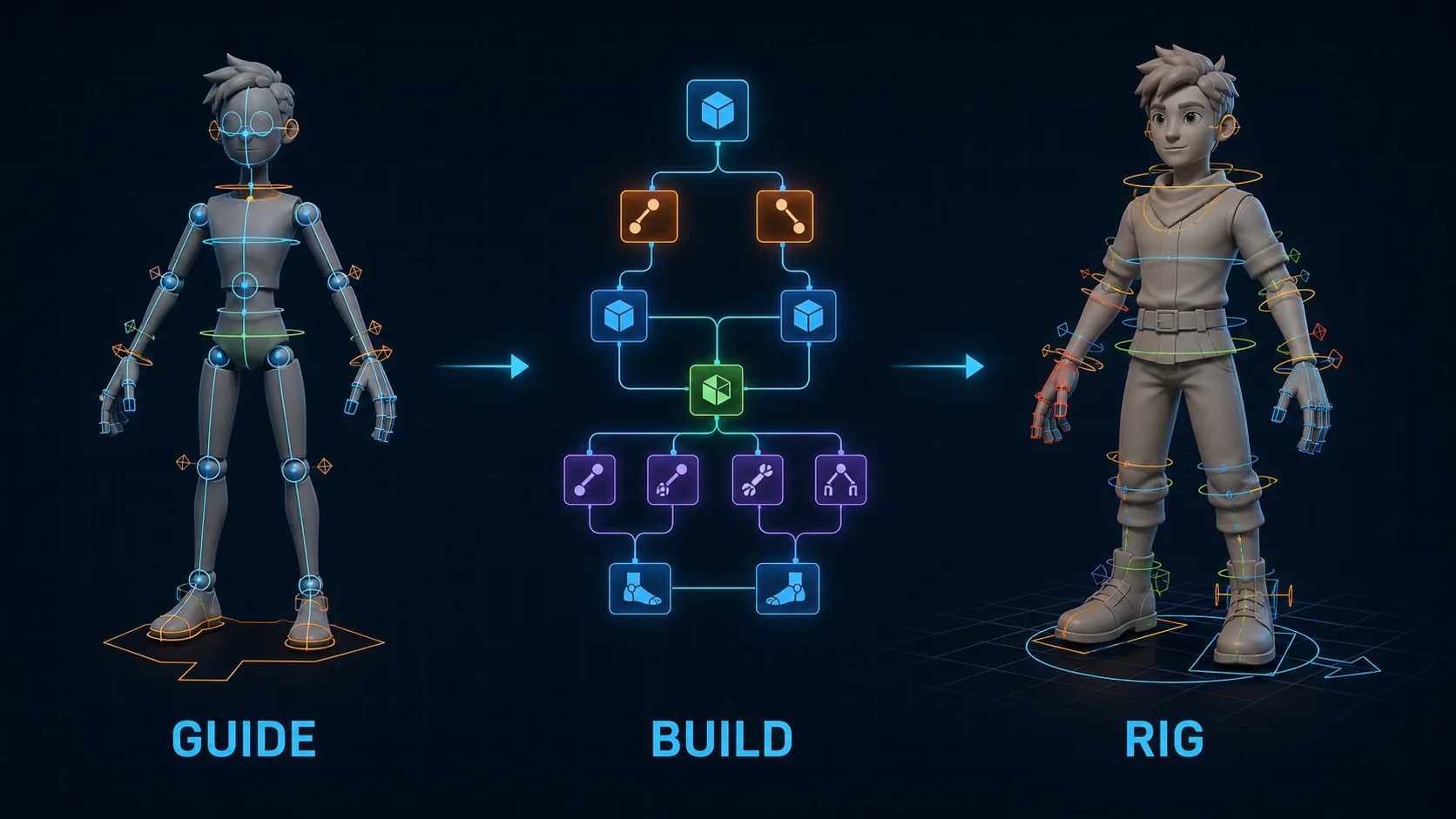


mGear Shifter rigging integration for the DCC-MCP ecosystem — inspect mGear
environments, list Shifter components, create guides, build rigs, and export
templates through typed MCP tools.
Repository Layout
skill/maya-mgear/               ← canonical installable skill package
├── SKILL.md
├── tools.yaml
├── metadata/depends.md
└── scripts/                    ← 6 mGear tools
skill/mgear-import-to-scene/    ← import-to-scene skill package
├── SKILL.md
├── tools.yaml
├── metadata/depends.md
└── scripts/                    ← 1 import tool

marketplace.json                ← marketplace catalog entry
icon.png                        ← marketplace icon
.github/workflows/              ← CI/CD
Key Rules
skill/maya-mgear/andskill/mgear-import-to-scene/are the only canonical paths for SKILL.md, tools.yaml,
metadata/, and scripts/. No duplicates anywhere else.marketplace.jsonandicon.pnglive at the repo root — they are catalog
metadata, not skill runtime files.
Install
dcc-mcp marketplace install dcc-mcp-maya-mgear --dcc maya
Installed to ~/.dcc-mcp/marketplace/maya/dcc-mcp-maya-mgear/. After install,
the skill is automatically registered with the running Maya adapter.
Skills
| Skill | Tools | Description |
|---|---|---|
maya-mgear |
6 | Inspect, list, create, build, export, and import mGear Shifter components |
mgear-import-to-scene |
1 | Import mGear rigs into the Maya scene via an AssetDescriptor contract |
Tools
maya-mgear
| Tool | Description |
|---|---|
inspect_mgear_environment |
Check mGear availability, version, and module diagnostics |
list_shifter_components |
List Shifter component types and scene guides |
create_shifter_guide_from_template |
Create a guide from a named template at a position |
build_shifter_rig |
Build a rig from an existing Shifter guide |
export_shifter_guide_template |
Export a guide or component as a reusable template |
import_shifter_sample_template |
Import an official sample template (e.g. quadruped.sgt) with structured metadata |
mgear-import-to-scene
| Tool | Description |
|---|---|
mgear_import_to_scene |
Import an mGear rig into the scene from a file path with optional loader configuration |
Prerequisites
- Autodesk Maya 2022+
- dcc-mcp-maya installed and configured
- mGear Shifter installed and accessible from Maya
- dcc-mcp-core >= 0.18.2
Related
- DCC-MCP Marketplace — skill catalog
- dcc-mcp-core — runtime
- dcc-mcp-maya — Maya adapter
License
MIT
Reviews (0)
Sign in to leave a review.
Leave a reviewNo results found