mlx-serve
Health Uyari
- License — License: MIT
- Description — Repository has a description
- Active repo — Last push 0 days ago
- Low visibility — Only 7 GitHub stars
Code Basarisiz
- rm -rf — Recursive force deletion command in .github/workflows/release.yml
- rm -rf — Recursive force deletion command in app/build.sh
Permissions Gecti
- Permissions — No dangerous permissions requested
This tool is a native LLM inference server built with Zig and C++ for Apple Silicon, designed to run MLX-format models locally. It provides OpenAI and Anthropic-compatible HTTP APIs, alongside a macOS menu bar application featuring an agent mode with tool calling and chat capabilities.
Security Assessment
The overall risk is rated as Medium. The included agent mode is explicitly designed to execute shell commands and perform file system operations (reading, writing, editing), which are highly sensitive actions. No hardcoded secrets were detected, and the application does not request dangerous system permissions. However, the automated scan flagged two failures for recursive force deletion commands (`rm -rf`) located in `.github/workflows/release.yml` and `app/build.sh`. While this is a common practice in build and release scripts for cleaning directories, it still warrants a manual code review to ensure these commands cannot be maliciously manipulated or pointed at critical system paths.
Quality Assessment
The project is actively maintained, with its last code push occurring today. It uses the standard, permissive MIT license and has a clear description. The primary concern is its extremely low community visibility; having only 7 GitHub stars indicates that the codebase has undergone very little public scrutiny. Because of this low adoption rate,潜在 security flaws or bugs may remain undiscovered.
Verdict
Use with caution — the tool is active and licensed, but low community visibility and the presence of `rm -rf` in build scripts mean you should review the code before running it.
Native LLM inference server for Apple Silicon. OpenAI + Anthropic API compatible. No Python. Includes MLX Core macOS app with chat, agent mode, and tool calling.
mlx-serve




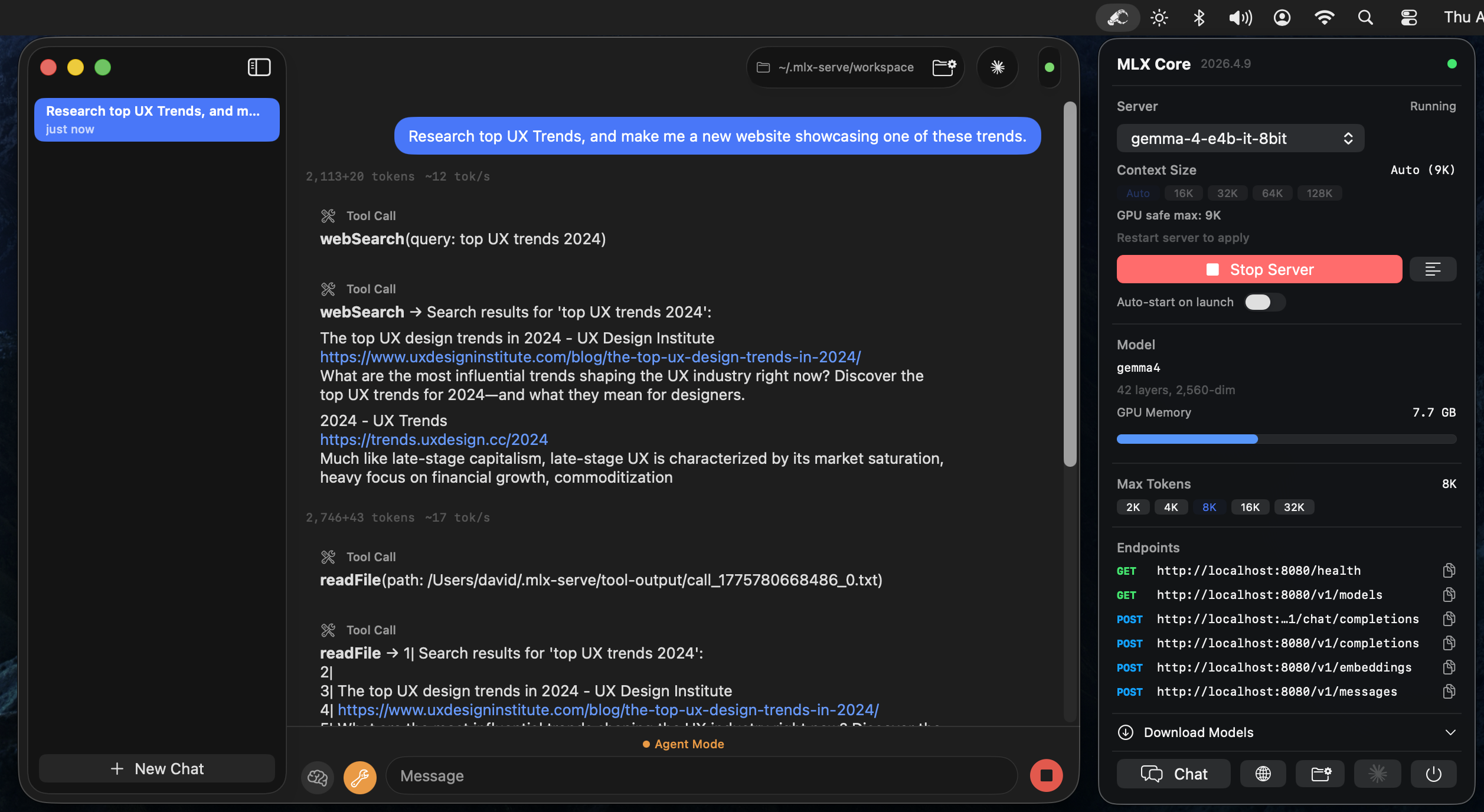
Native Zig server that runs MLX-format language models on Apple Silicon and exposes OpenAI-compatible and Anthropic-compatible HTTP APIs. No Python. Comes with MLX Core, a macOS menu bar app with built-in chat, agent mode, and model management.
 Download MLX Core.app — latest release for macOS (Apple Silicon)
Install via Homebrew
brew tap ddalcu/mlx-serve https://github.com/ddalcu/mlx-serve
brew install --cask mlx-core   # GUI menu bar app
brew install mlx-serve          # CLI server only
Features
- OpenAI-compatible API (
/v1/chat/completions,/v1/completions,/v1/models) - Anthropic-compatible API (
/v1/messages) — works with Claude Code - Streaming and non-streaming responses
- Tool calling (function calling) with automatic detection
- KV cache reuse across requests for fast multi-turn conversations
- Sampling: temperature, top-k, top-p, repeat penalty, presence penalty
- Reasoning/thinking mode support
- Chat templates via Jinja2 (Jinja_cpp) with fallback formatting
- TUI status bar with CPU, memory, and GPU metrics
MLX Core (macOS App)
Menu bar app that wraps the server with a full UI:
- Model browser -- download models from HuggingFace with resumable downloads
- Chat interface -- multi-session chat with markdown rendering
- Agent mode -- 8 built-in tools (shell, readFile, writeFile, editFile, searchFiles, browse, webSearch, saveMemory) with automatic tool calling loop
- Editable system prompt -- customize agent behavior via
~/.mlx-serve/system-prompt.md(Agent menu → Edit System Prompt) - Persistent memory -- agent can save memories across sessions to
~/.mlx-serve/memory.md - Prompt-based skills -- drop
.mdfiles in~/.mlx-serve/skills/to teach the agent custom capabilities - Server management -- start/stop server, view logs, configure max tokens
Supported Models
| Architecture | Examples | Chat Format |
|---|---|---|
| Gemma 4 | gemma-4-e2b-it-4bit, gemma-4-e4b-it-8bit, gemma-4-26b-a4b-it-4bit |
Gemma turns |
| Gemma 3 | gemma-3-12b-it-qat-4bit |
Gemma turns |
| Qwen 3 / 3.5 | Qwen3-4B, Qwen3.5-MoE, Qwen3-next |
ChatML |
| Llama / Mistral | Llama 3, Mistral | ChatML / Llama-3 |
Any quantized MLX model using one of the above architectures should work.
Prerequisites
- macOS with Apple Silicon (M1/M2/M3/M4)
- Zig 0.15+
- mlx-c:
brew install mlx-c
Quick Start
Download a model
The MLX Core app can download models directly, or use the CLI:
pip install huggingface-hub
huggingface-cli download mlx-community/gemma-4-e4b-it-4bit --local-dir ~/.mlx-serve/models/gemma-4-e4b-it-4bit
Build and run
zig build -Doptimize=ReleaseFast
./zig-out/bin/mlx-serve --model ~/.mlx-serve/models/gemma-4-e4b-it-4bit --serve --port 8080
Build the app
cd app && SKIP_NOTARIZE=1 bash build.sh
open "MLX Core.app"
Requires APPLE_DEVELOPER_ID and APPLE_TEAM_ID environment variables for code signing.
Usage
Interactive mode
./zig-out/bin/mlx-serve --model /path/to/model --prompt "What is 2+2?"
HTTP server
./zig-out/bin/mlx-serve --model /path/to/model --serve --port 8080
CLI options
| Flag | Default | Description |
|---|---|---|
--model PATH |
required | Path to the MLX model directory |
--serve |
off | Start the HTTP server |
--host ADDR |
127.0.0.1 |
Host address to bind |
--port N |
8080 |
Port for the HTTP server |
--prompt TEXT |
"Hello" |
Prompt for interactive mode |
--max-tokens N |
100 |
Maximum tokens to generate |
--temp F |
0.0 |
Sampling temperature (0 = greedy) |
--ctx-size N |
auto | Context window size (auto = computed from GPU memory) |
--timeout N |
300 |
Request timeout in seconds |
--reasoning-budget N |
0 |
Thinking token budget (0 = disabled) |
--log-level |
info |
Log level (error, warn, info, debug) |
API
POST /v1/chat/completions
curl http://localhost:8080/v1/chat/completions \
  -H "Content-Type: application/json" \
  -d '{
    "messages": [{"role": "user", "content": "Write a haiku about programming."}],
    "max_tokens": 256,
    "stream": true
  }'
Supports messages, max_tokens, temperature, top_p, top_k, stream, tools, repetition_penalty, presence_penalty, and logprobs.
POST /v1/messages (Anthropic)
curl http://localhost:8080/v1/messages \
  -H "Content-Type: application/json" \
  -H "anthropic-version: 2023-06-01" \
  -d '{
    "model": "mlx-serve",
    "max_tokens": 256,
    "messages": [{"role": "user", "content": "Write a haiku about programming."}]
  }'
Compatible with Claude Code (ANTHROPIC_BASE_URL=http://localhost:8080 claude) and Anthropic SDKs. Supports streaming, tool calling, and extended thinking.
Other endpoints
GET /health-- health checkGET /v1/models-- list loaded modelsPOST /v1/completions-- text completionsPOST /v1/messages-- Anthropic Messages API
Performance
Benchmarked on Apple M4 (16 GB unified memory):
| Model | Prefill | Decode | Memory |
|---|---|---|---|
| Gemma-4 E4B (4-bit) | ~300 tok/s | ~33 tok/s | 4.0 GB |
| Qwen3-4B (4-bit) | ~220 tok/s | ~37 tok/s | 2.17 GB |
Matches mlx-lm (Python) generation speed while using less memory and starting 3x faster. Key optimizations: fully-lazy async pipeline with reordered eval (submit-first pattern), JIT-compiled activations (GELU, GeGLU, softcap via mlx_compile), and GPU memory wiring.
# Prefill (~840 token prompt):
./zig-out/bin/mlx-serve --model ~/.mlx-serve/models/gemma-4-e4b-it-4bit \
  --prompt "$(python3 -c "print('Explain the following topics in extreme detail: ' + ', '.join([f'topic {i} about science and technology and its impact on human civilization throughout history' for i in range(1,50)]))")" \
  --max-tokens 1

# Decode (256 tokens, temp=0):
./zig-out/bin/mlx-serve --model ~/.mlx-serve/models/gemma-4-e4b-it-4bit \
  --prompt "Write a detailed essay about quantum computing" \
  --max-tokens 256
Run 3 times and take the average of runs 2-3 (run 1 includes model loading from disk).
License
MIT
Yorumlar (0)
Yorum birakmak icin giris yap.
Yorum birakSonuc bulunamadi