nosynotch
Health Gecti
- License — License: MIT
- Description — Repository has a description
- Active repo — Last push 0 days ago
- Community trust — 27 GitHub stars
Code Basarisiz
- child_process — Shell command execution capability in bin/nosynotch.js
- spawnSync — Synchronous process spawning in bin/nosynotch.js
- fs.rmSync — Destructive file system operation in bin/nosynotch.js
- os.homedir — User home directory access in bin/nosynotch.js
- process.env — Environment variable access in bin/nosynotch.js
- fs module — File system access in bin/nosynotch.js
- network request — Outbound network request in bin/nosynotch.js
- rm -rf — Recursive force deletion command in scripts/build-app.sh
- rm -rf — Recursive force deletion command in scripts/record-gifs.sh
Permissions Gecti
- Permissions — No dangerous permissions requested
Bu listing icin henuz AI raporu yok.
Your MacBook notch keeps an eye on Claude Code, Codex and Cursor: live status, approve commands with a click or a nod, usage limits, and your music while they rest. npx nosynotch
Nosy Notch
Your MacBook notch keeps an eye on Claude Code, Codex and Cursor –
with Nosy, a tiny helper who lives in it.
npx nosynotch · macOS 14+ · free · no account, no App Store, no Xcode
Coding agents spend a lot of time working on their own – and then sit there waiting for a "yes" you never saw.
Nosy Notch turns the black notch of your MacBook into a tiny status display: it slides open while an agent thinks,
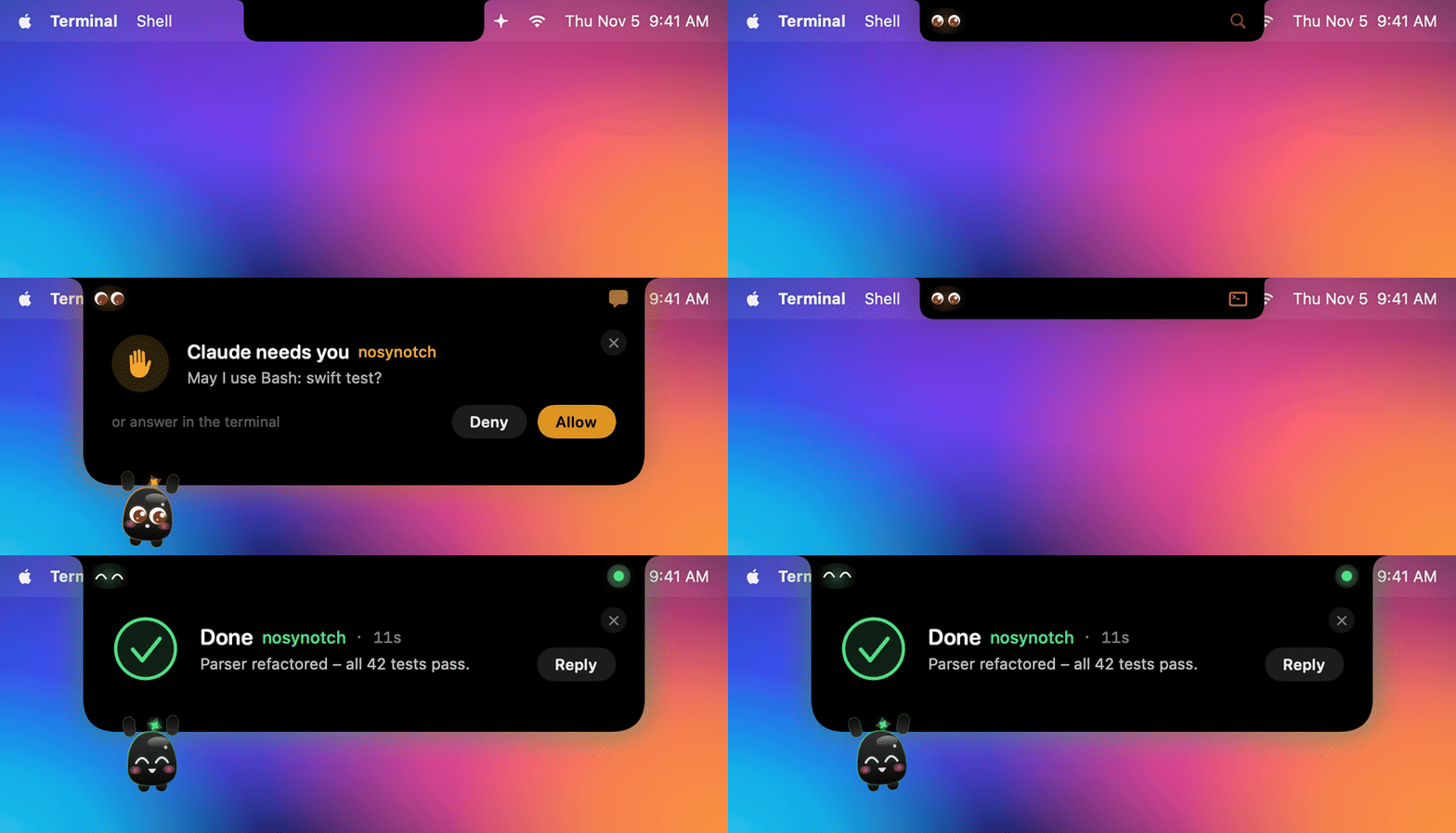
shows which tool it's running, waves when it needs you, and throws confetti when it's done. You can approve a command
right there, with a click or a nod of your head – or read the conversation and reply without leaving what you're doing.
Living in the notch is Nosy, a little helper who works along, cheers when a task is done and falls asleep when
nothing happens. And in between, the notch is your music player, file shelf, focus timer and meeting reminder.
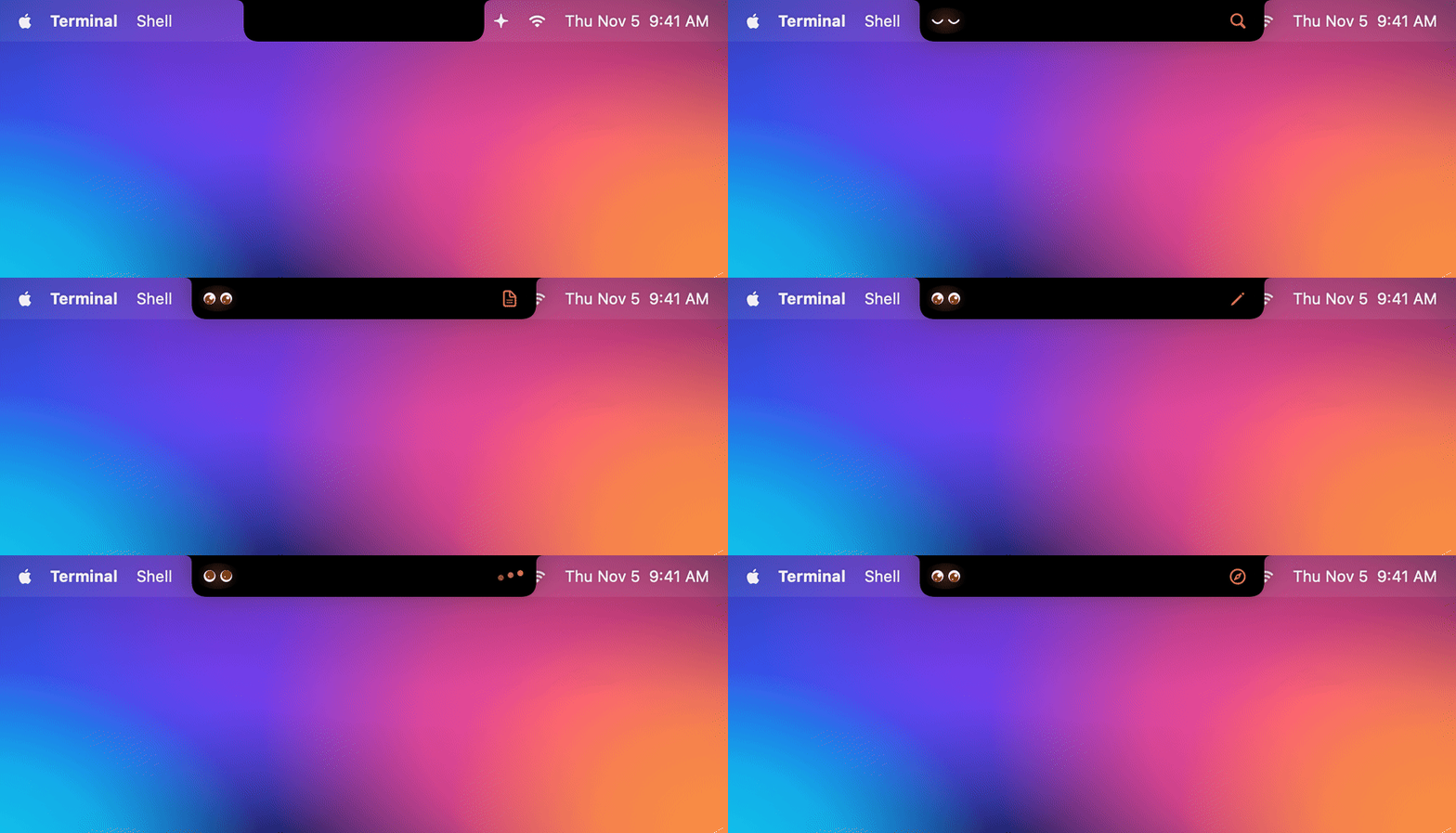 Live status Thinking, the tool it's running, how long it's been |
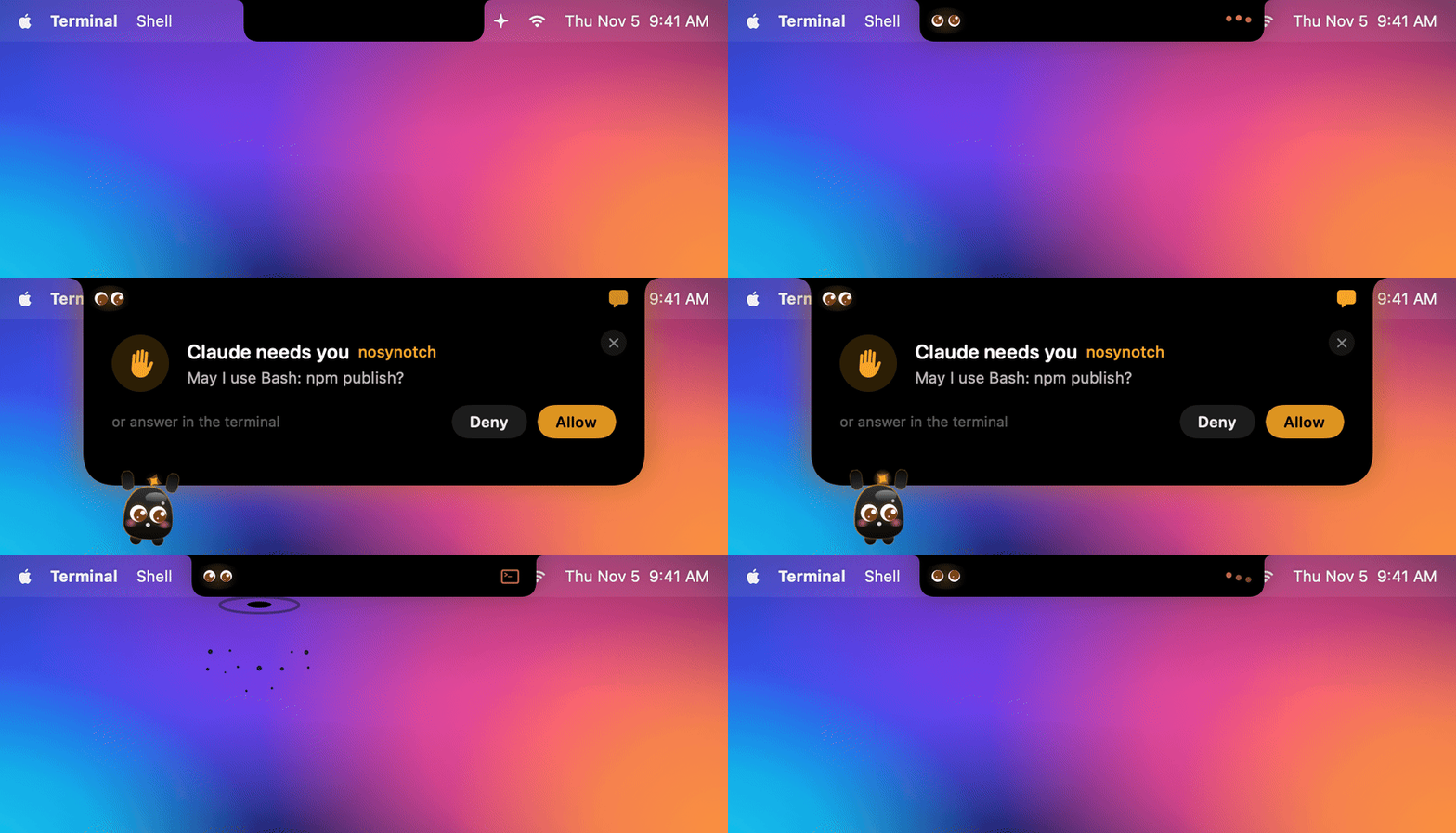 Allow from the notch Deny · Always allow · Allow – or just nod |
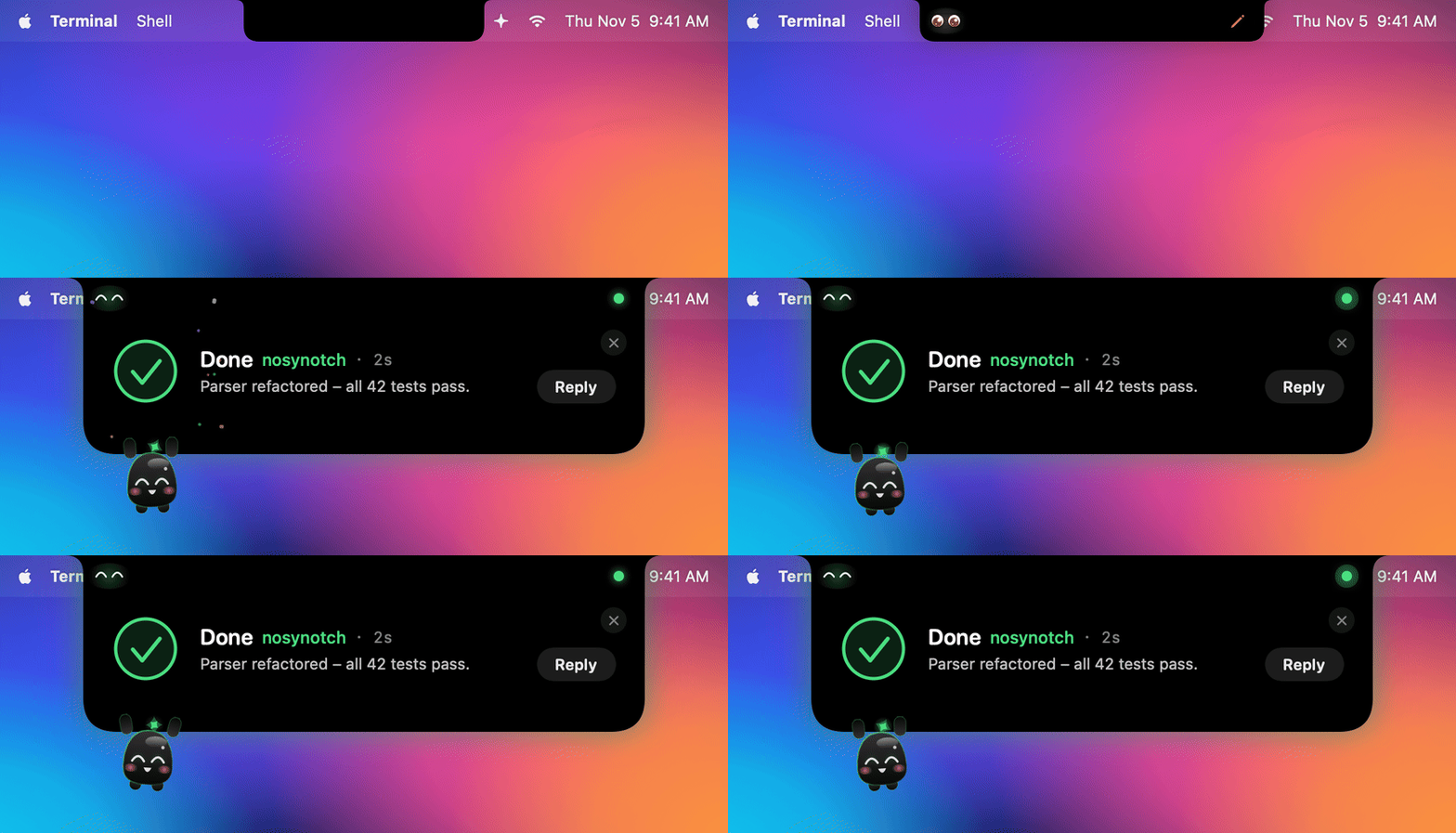 Done Checkmark, confetti and the gist of the answer |
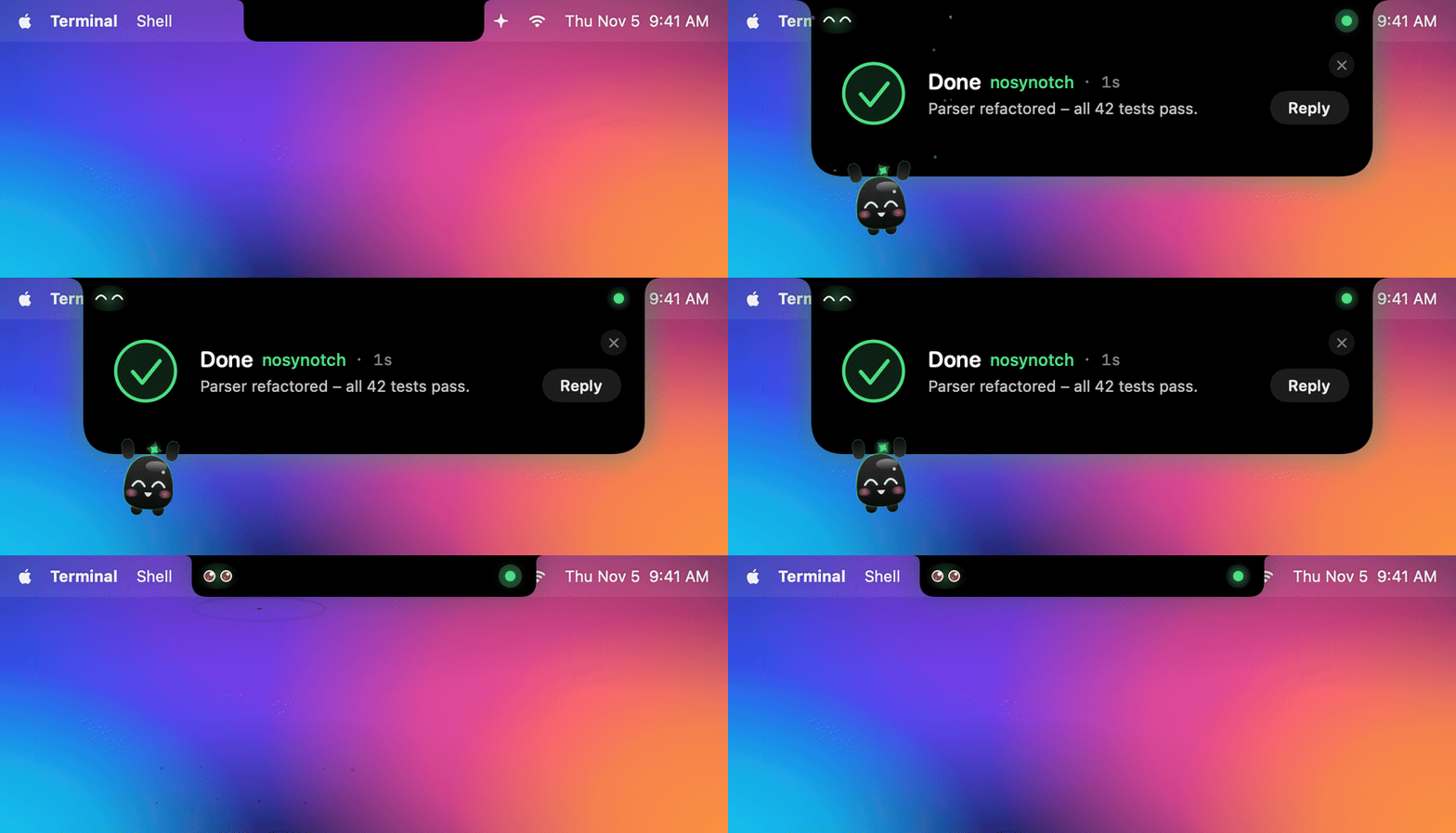 Didn't see it? A green dot waits until you look |
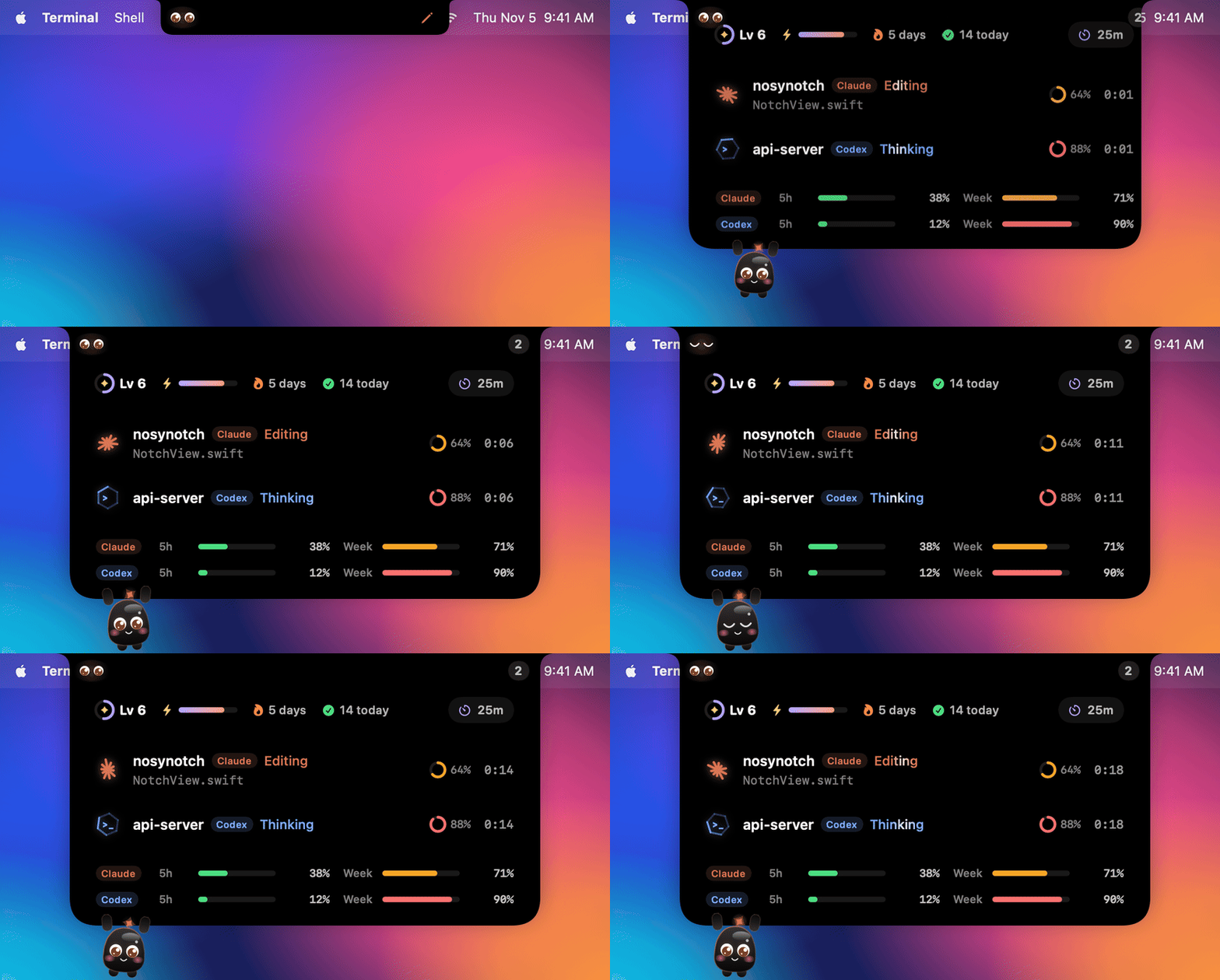 Every session, every limit Hover for all sessions, context fill and usage limits |
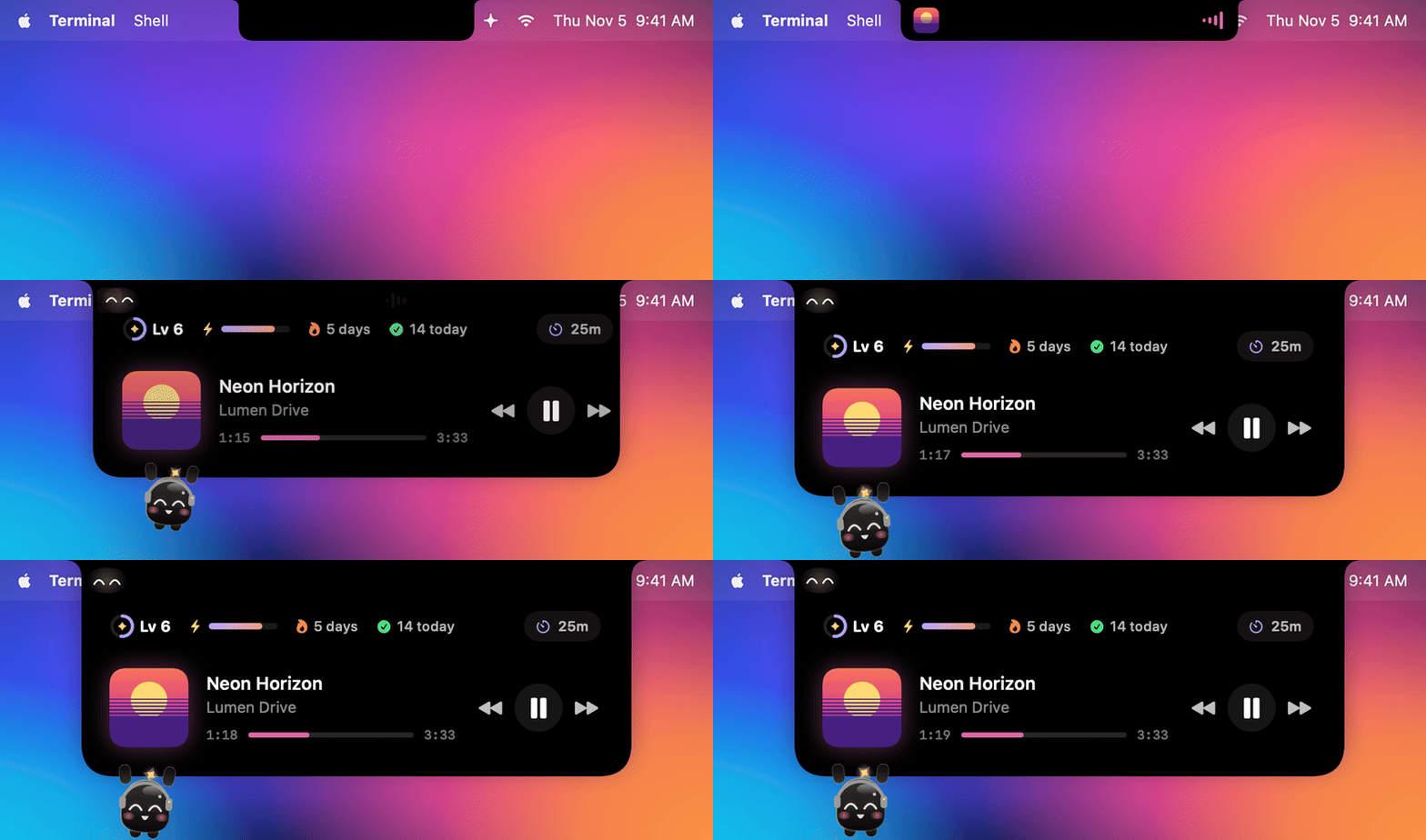 Music in between Spotify / Apple Music, with an equalizer that follows the beat |
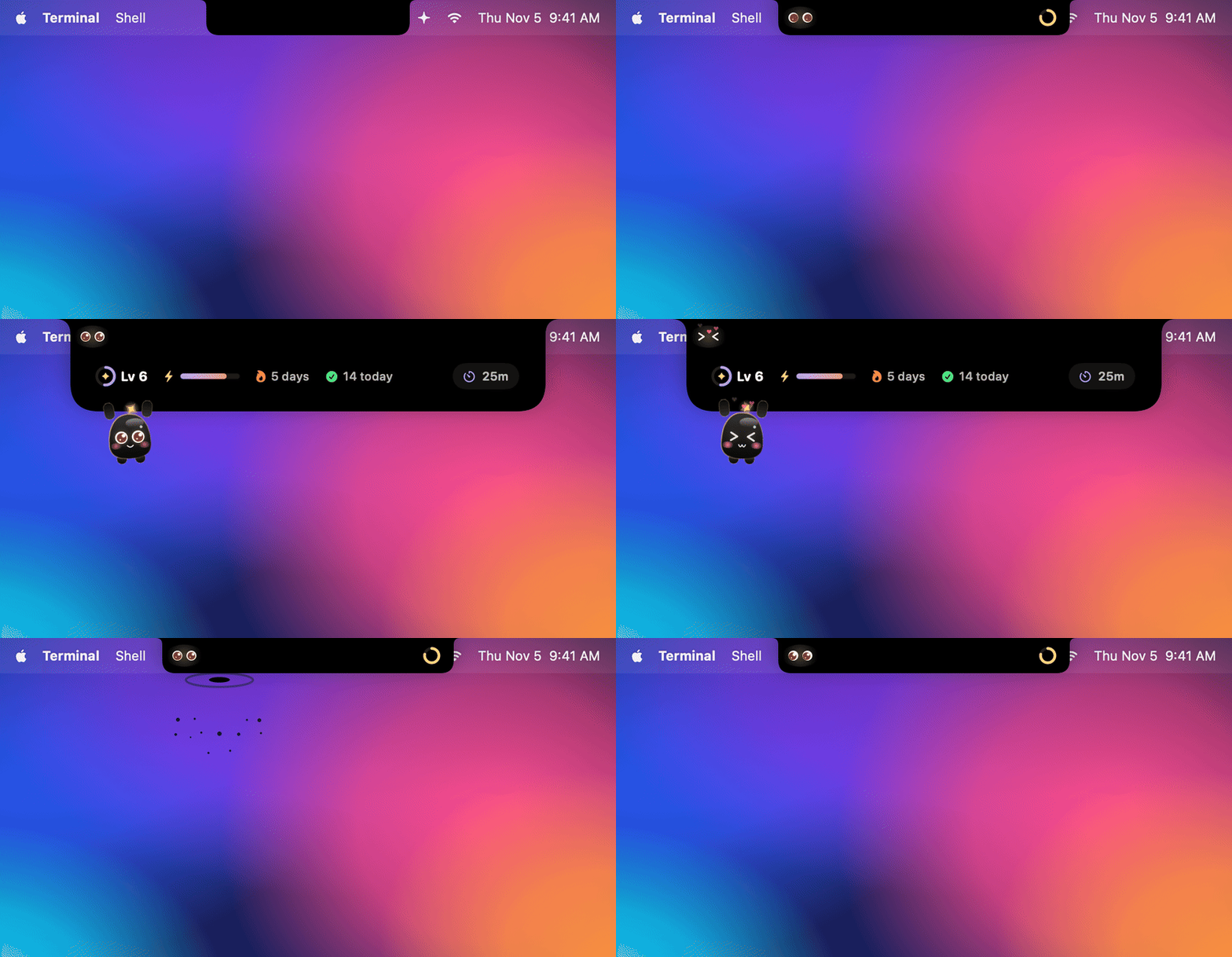 Meet Nosy Peeks out, follows your pointer, dives back into the notch |
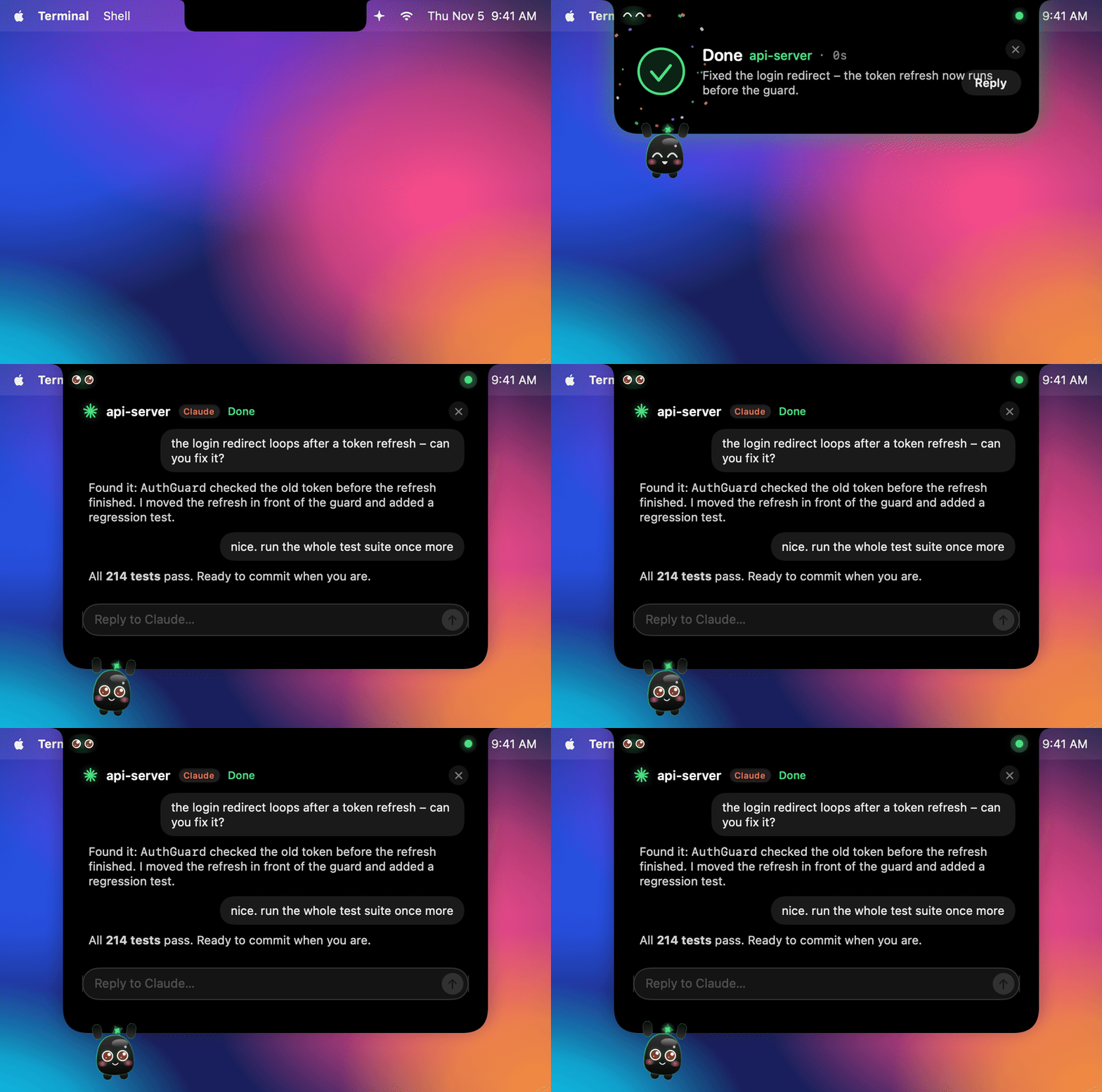 Reply from the notch The conversation and a reply field, right there |
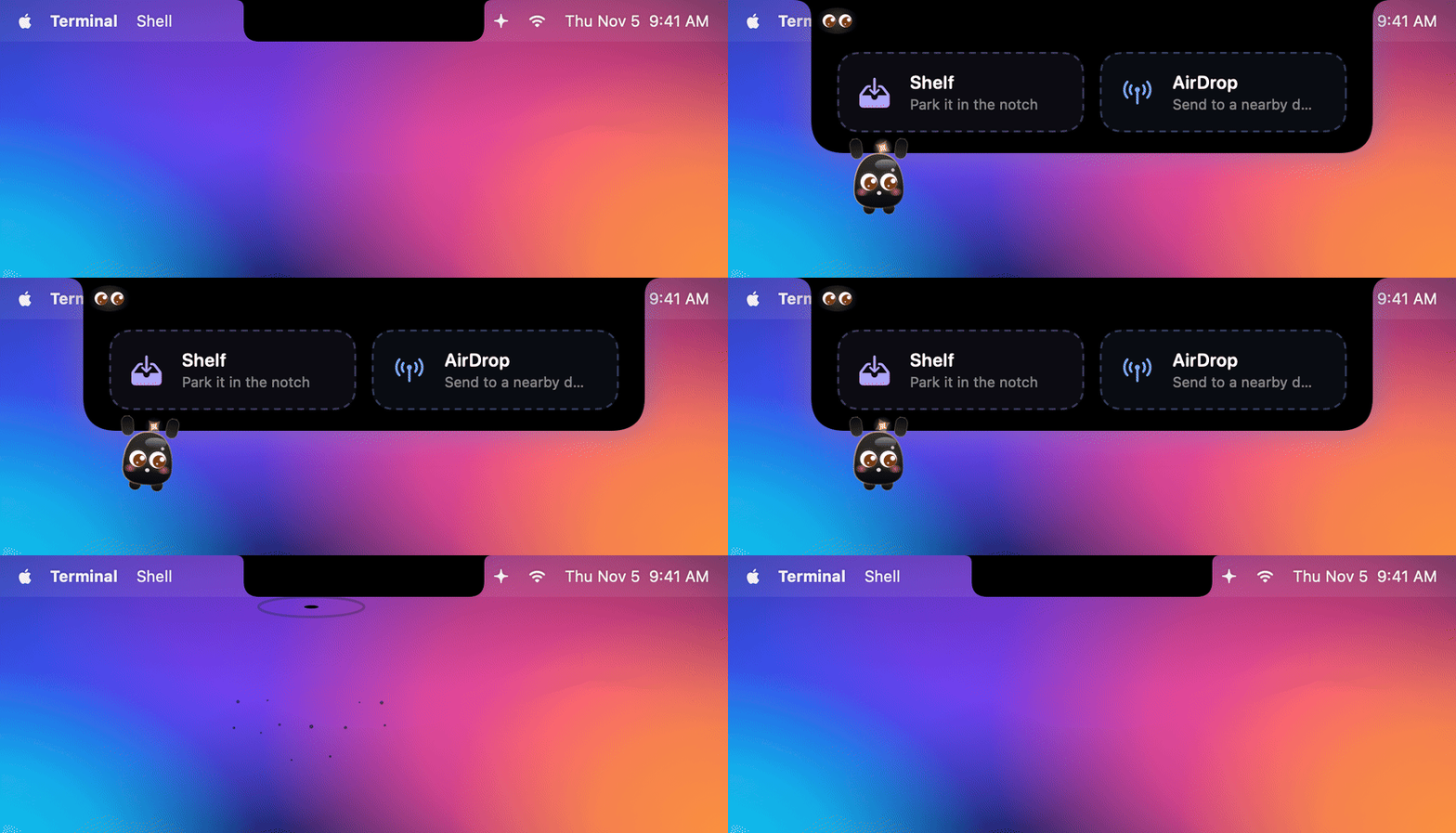 Shelf and AirDrop Drag files onto the notch |
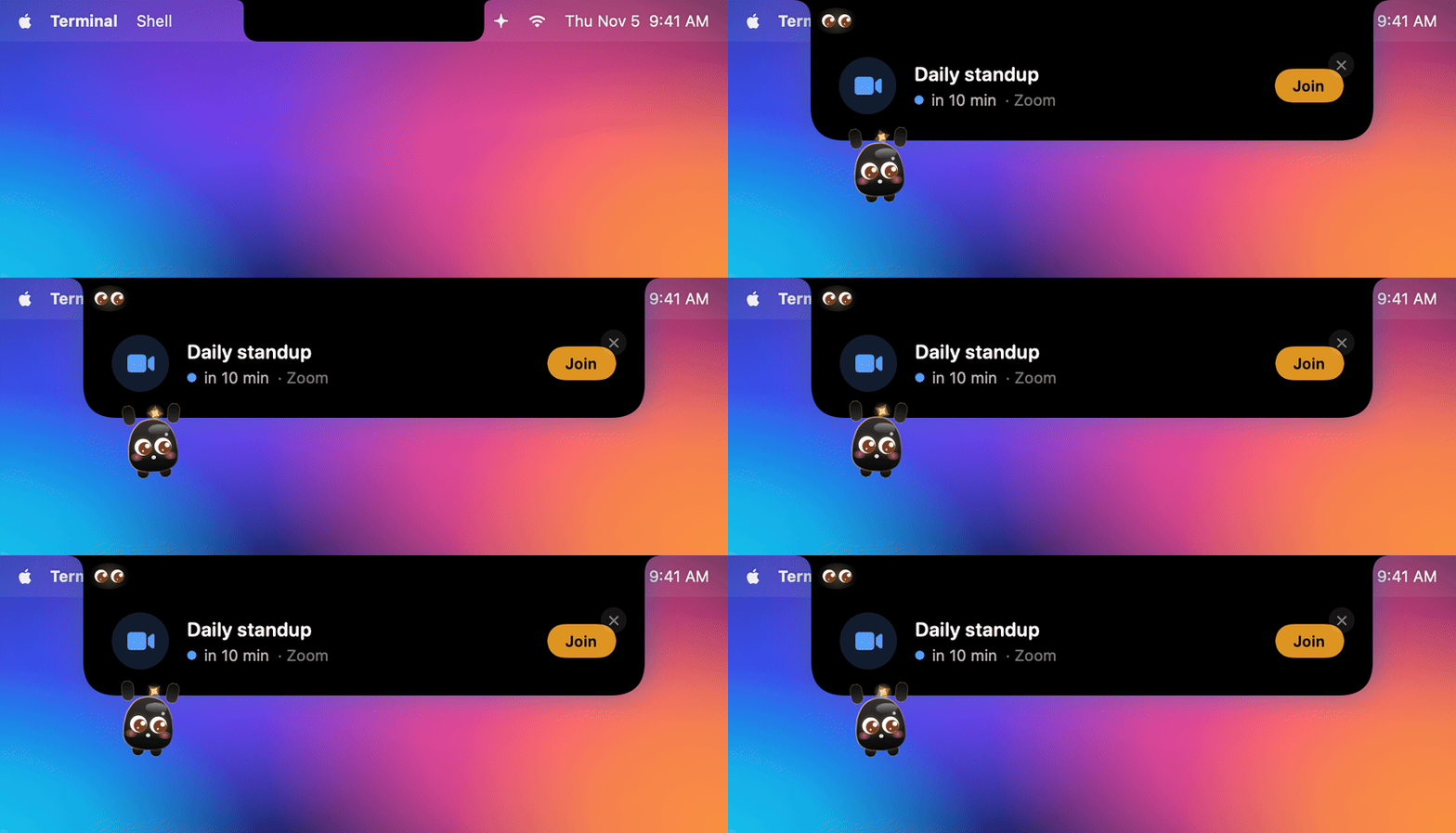 Your next meeting A heads-up 10 minutes before, Join in one click |
Install
npx nosynotch
That one command downloads the app to ~/.nosynotch/, connects every agent it finds and starts Nosy Notch in the
background – no Dock icon, just a ✦ in the menu bar. You need Node.js 18+ for npx
(brew install node works too, or grab the installer from the website).
Two small things afterwards: restart Claude Code sessions that were already running, and – if you use Codex – trust the
new hooks once in Codex (ChatGPT app → Codex → Settings → Hooks, or /hooks in the CLI). Codex runs no hook you
haven't trusted.
npx nosynotch demo        # play every animation
npx nosynotch settings    # open the settings window
npx nosynotch status      # what is installed and running
npx nosynotch autostart   # start at login (autostart off to disable)
npx nosynotch stop
npx nosynotch uninstall   # removes app, hooks and autostart
Works with
| Live status | Allow / deny in the notch | Usage limits | Context fill | |
|---|---|---|---|---|
| Claude Code – terminal, VS Code, desktop app | ✓ | ✓ | ✓ Pro / Max | ✓ |
| Codex – CLI and the ChatGPT app's Codex mode | ✓ | ✓ | ✓ | ✓ |
| Cursor – Cursor's agent | ✓ | ✓ commands outside its sandbox | – | ✓ |
Cursor doesn't share its usage limits with any hook, so that column stays empty for now.
Several sessions at once are no problem, mixed across agents. Each one gets a small badge and its own colour:
orange for Claude, blue for Codex, silver for Cursor. Macs without a notch get a virtual one in the middle of the menu bar.
What the notch does
While an agent works, the notch slides out sideways: a spark spins on the left, the current tool on the right
(terminal, pencil, magnifier, globe …). Hover it to see every session with its status, a ring for how full its context
window is, and your 5-hour and weekly limits as bars. If a limit was at 80 % or more, the notch tells you the moment it resets.
A click on a session brings its terminal or app to the front.
When it needs you, the notch opens with an amber glow, shakes and shows the exact command. Click Allow,
Deny or Always allow – the agent carries on, no hunting for the right window. Claude Code keeps its own dialog
open at the same time, so you can answer wherever you are. With head gestures turned on, a nod with your AirPods allows
and a head shake denies.
When it's done, a checkmark draws itself, confetti flies and you get the start of the answer. Missed it? A small
green dot stays in the notch until you switch to that app or hover the list, and after five minutes you get one gentle
reminder. Already looking at the app? Then everything stays small and silent.
Want to answer? Click Reply on the done card (or the bubble next to a session) and the notch shows the
conversation with a reply field. Your reply is pasted into the session's app and sent – or, if you prefer, run in the
background with claude --resume / codex exec resume.
When nothing's running, Spotify or Apple Music takes over: cover on the left, equalizer on the right, a full player
on hover. The agents always win – the music comes back as soon as they're done.
Meet Nosy
Nosy is a tiny helper who lives in your notch. Only its eyes look out of the black – they follow your pointer, and
they change with your agents: focused while one thinks, looking down while it types, a sweat drop on long turns,
spiral eyes while it compacts, wide eyes and a wave when it needs you, ^^ and a jump when it's done.
When the notch opens, Nosy drips out of the edge and hangs from it by its paws; when it closes, Nosy dives back in
like into a puddle of tar – splash included. Bring the pointer close and it peeks out; leave it alone for a while
and it falls asleep (sooner at night). Click it and it giggles.
Energy, levels and streaks – every finished task feeds Nosy, days with tasks make a streak, and levels, streaks
and finished tasks earn a little wardrobe (headphones, glasses, cap, bow, party hat, crown, halo). Deliberately guilt-free: Nosy never gets sad or sick, a missed day just
starts a new streak. Eight colours to pick from – Obsidian, the default, glows in the colour of the agent that's
working. All of it stays in your Mac's settings, and you can turn Nosy off for the classic agent symbols.
More in the notch
- Clock – when nothing is running, the time sits next to Nosy, with a countdown before your next meeting. Hover for
the big clock, the date and a second time zone; agents, music and the focus timer always go first. - Task progress – "3/7" on the wing while an agent works through its list.
- Next prompt – type the follow-up while the agent is busy. It goes out when the turn ends, without pulling you away
from what you're doing. - Shelf and AirDrop – drag files onto the notch: park them on the shelf and drag them out later, or AirDrop them.
- Open ports – every dev server on your Mac with its folder and who started it (Claude Code in Ghostty, Cursor …).
Click to open it in the browser, ✕ to stop it; sessions show the ports their agent opened. RunNosyNotch --portsfor the same list in the terminal. (Opt-in.) - Focus timer – 15 / 25 / 50 minutes from the hover view or the menu bar, a ring in the notch, agent sounds stay
quiet until the break. - Calendar – your next meeting in the hover view and a heads-up 10 minutes before, with Join for Zoom, Meet,
Teams, Webex and FaceTime links. (Opt-in.) - Charging and AirPods – a little animation when you plug in, a heads-up at 20 %, and your headphones with
left / right / case battery when they connect. (Headphones are opt-in.)
Settings
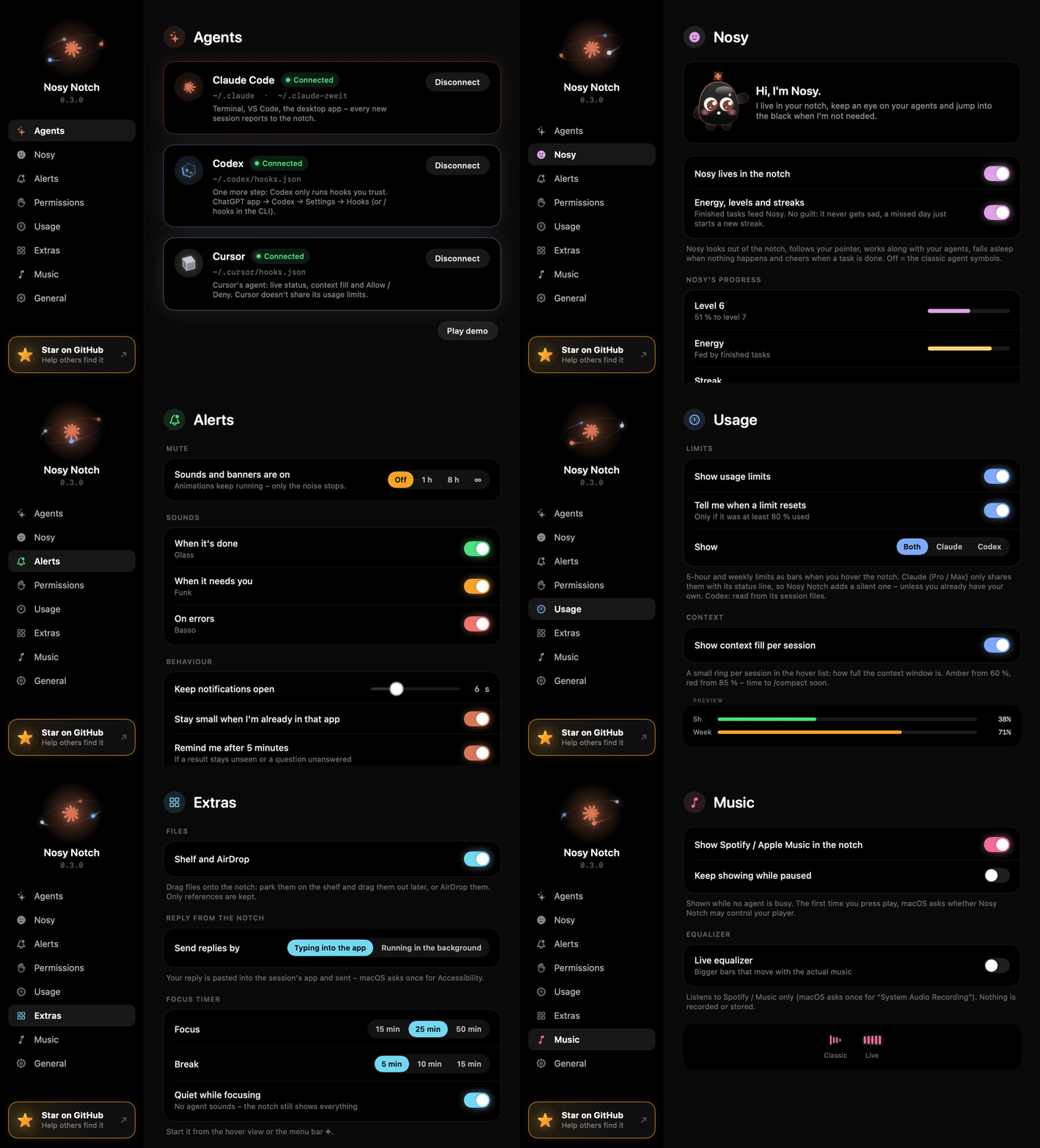
Click the ✦ in the menu bar → Settings…
- Agents – connect Claude Code, Codex and Cursor
- Nosy – Nosy on or off, energy / levels / streaks, colour and wardrobe
- Alerts – sounds, mute for 1 h / 8 h / ∞, reminders
- Permissions – the notch buttons and head gestures
- Usage – which limits to show, a heads-up when a limit resets, context rings
- Extras – Shelf and AirDrop, open ports, how replies are sent, focus timer, battery, headphones, calendar
- Music – player and the live equalizer
Mute and the focus timer are also right in the menu bar menu. Everything that needs a macOS permission (controlling
your player, the live equalizer, head gestures, headphones, the calendar, replying by typing into an app) is off until
you turn it on – or asks only the first time you use it.
Privacy
Everything stays on your Mac. The hooks talk to 127.0.0.1 only and nothing is uploaded. The only network requests
are for album covers (Spotify's public oEmbed with the track ID, Apple's iTunes Search with artist and title). The live equalizer analyses the
player's audio in memory and records nothing; head gestures only read motion while a request is open. The calendar,
headphone batteries, open ports and the conversation in the notch are read locally and never sent anywhere; Nosy's progress and the
shelf live in the app's settings. A reply typed in the notch goes to the session's own app (pasted with ⌘V, your
clipboard is put back) or to the agent's own CLI. Approvals are protected by a secret in~/.nosynotch/approval-token, so no other process can answer in your name.
How it works
Claude Code / Codex / Cursor ──hook (curl, ~15 ms)──▶ 127.0.0.1:7823 ──▶ Nosy Notch (SwiftUI panel over the notch)
All three agents have hooks: little commands they run at every step (prompt sent, tool started, permission needed,
done …). Nosy Notch adds a one-line curl that forwards each event to the app. If the app isn't running, curl fails
instantly and the agent carries on as if nothing happened – hooks never slow it down.
| Where the hooks live | Extra | |
|---|---|---|
| Claude Code | settings.json in ~/.claude, $CLAUDE_CONFIG_DIR and every ~/.claude-* account folder |
Usage limits and context via a silent status line – your own status line keeps working and is restored on disconnect |
| Codex | ~/.codex/hooks.json |
Limits and context from its session files |
| Cursor | ~/.cursor/hooks.json |
Prints {} so Cursor never waits on it – except beforeShellExecution for commands outside the sandbox, which waits for Allow / Deny |
The permission hook is the one exception that waits: it holds the request until you click in the notch. Answer in the
terminal instead, or let it time out, and the agent's own prompt takes over.
Build from source
Requires macOS 14+ and the free Xcode Command Line Tools (xcode-select --install).
swift run                      # run directly
./scripts/build-app.sh --open  # build and open build/Nosy Notch.app
./scripts/record-gifs.sh       # re-record the GIFs in docs/gifs and the website videos (needs ffmpeg)
./scripts/record-gifs.sh done  # just one scene ("settings" = the settings window)
With the macOS 27.2 SDK, standalone Command Line Tools can fail to build SwiftUI @State
macros because they do not include the SwiftUIMacros plugin. Use full Xcode with that SDK,
or select an installed macOS 26.5 SDK when building with Command Line Tools only:
SDKROOT=/Library/Developer/CommandLineTools/SDKs/MacOSX26.5.sdk swift build -c release
SDKROOT=/Library/Developer/CommandLineTools/SDKs/MacOSX26.5.sdk ./scripts/build-app.sh --open
The SDK path must exist on your machine. This workaround was tested with Swift 6.4.2
and the macOS 26.5 SDK on macOS 27.2.
The recorder renders on a virtual clock, so no frame is ever dropped – a slow Mac just takes longer. Each scene
becomes a GIF for this README (30 fps, 840 px) and an MP4 + JPG poster in website/public/demo/. Options as
environment variables: FPS=60 capture rate, SCALE=3 for sharper 1680 px frames (default 2), GIF_WIDTH /GIF_FPS / GIF_COLORS, VIDEO=0 for GIFs only, WEBM=1 for VP9 WebMs too, STILLS=1 for PNG stills.
Releases: bump the version in package.json and Resources/Info.plist, push a tag vX.Y.Z. GitHub Actions builds a
universal binary, attaches it to the release and publishes to npm if the NPM_TOKEN secret is set.
bin/nosynotch.js                     npx CLI (download, hooks, start/stop, autostart)
Sources/NosyNotch/
├── main.swift / AppDelegate.swift   app lifecycle, menu bar item, CLI flags
├── EventServer.swift                tiny HTTP server (Network.framework, loopback only)
├── HookEvent.swift                  hook JSON → event (Claude, Codex and Cursor dialects)
├── SessionStore.swift               event stream → state per session, unseen results, reminders
├── Session.swift                    states, agents, tool icons/labels, colours, error texts
├── HookInstaller.swift              hooks for Claude Code, Codex and Cursor
├── Approvals.swift                  permission requests waiting for Allow / Deny
├── HeadGestures.swift               nod / shake with AirPods
├── Usage.swift                      usage limits and context fill
├── Nosy/                            Nosy: drawing, moods, energy / levels / streaks, hanging + tar dive
├── Chat.swift                       transcripts → conversation, sending replies
├── Shelf.swift                      parked files, AirDrop
├── Ports.swift                      listening ports, who opened them, quitting them
├── Notices.swift                    charging, low battery, headphones, meetings
├── FocusTimer.swift                 Pomodoro timer
├── CalendarMonitor.swift            next meeting (EventKit)
├── NowPlaying.swift                 Spotify / Apple Music: track, cover, controls
├── AudioSpectrum.swift              live equalizer: Core Audio tap + FFT
├── Notifier.swift                   sounds, banners, mute, bringing the right app to the front
├── NotchViewModel.swift             what the notch shows and how big it is
├── NotchWindow.swift                transparent panel over the notch, hover without stealing clicks
├── Clock.swift                      wall clock, or a virtual one while recording
├── Recorder.swift                   GIF / video recorder (--record, --record-settings)
└── Views/                           notch shape, spark, confetti, media player, settings …
Not affiliated with Anthropic, OpenAI or Anysphere. Claude is a trademark of Anthropic, Codex and ChatGPT are
trademarks of OpenAI, Cursor is a trademark of Anysphere.
Yorumlar (0)
Yorum birakmak icin giris yap.
Yorum birakSonuc bulunamadi