infinitus
Health Uyari
- License — License: MIT
- Description — Repository has a description
- Active repo — Last push 0 days ago
- Low visibility — Only 5 GitHub stars
Code Gecti
- Code scan — Scanned 12 files during light audit, no dangerous patterns found
Permissions Gecti
- Permissions — No dangerous permissions requested
Bu listing icin henuz AI raporu yok.
Every Claude account in one menu bar — swap before you stall. Native macOS app for the claude-swap engine.
Infinitus
Every Claude account in one menu bar — swap before you stall.
May your limits never bind.




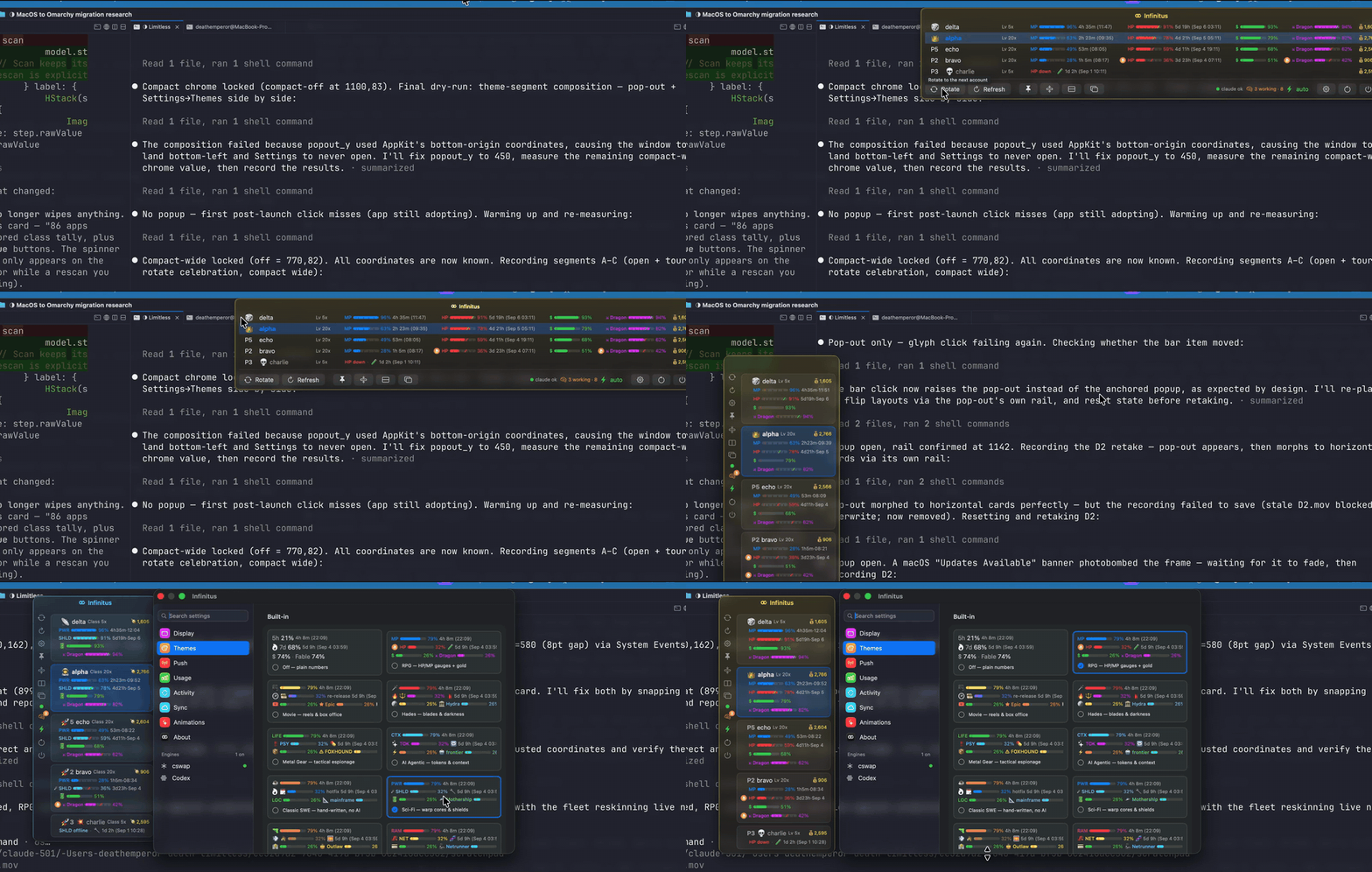
A native macOS menu bar app (Swift/SwiftUI) over the
claude-swap engine: live
usage gauges for a whole fleet of Claude accounts, auto-switch awareness,
and a one-click rotate — wrapped in themes from RPG to Wild West.
Why
Claude usage windows run out at the worst moment. If you keep more than
one account, the juggling — which one has 5-hour headroom, which weekly
window is about to bind, which one just died — is exactly the kind of
state a menu bar should carry for you. Infinitus shows the whole fleet at
a glance and swaps before you stall.
Install
Homebrew
brew install --cask deathemperor/tap/infinitus
Nightly channel (built from main every day; reinstall to update —
or flip the track in-app under About → Update channel):
brew install --cask deathemperor/tap/infinitus@nightly
Releases are Developer ID signed and notarized since 0.4.3, so they
open like any other app. Nightly builds are ad-hoc signed: install
those with --no-quarantine (or right-click → Open once).
GitHub releases
Grab Infinitus-<version>.zip from
releases, unzip,
drop Infinitus.app into /Applications.
Linux — engine CLI + Waybar module (Omarchy-ready)
The menu bar app is macOS-native (AppKit), but its Swift core ports:infinitus-tray renders the same fleet — themes, sentinel notes,
one-click rotate — as a Waybar module for
Omarchy and any Waybar desktop
(see packaging/omarchy/).
The engine itself (fleet gauges, auto-switching, the cswap TUI)
runs anywhere Python 3.12 does:
brew install deathemperor/tap/claude-swap    # Homebrew on Linux (or macOS)
uv tool install claude-swap                  # or straight from PyPI
Arch users can build from packaging/aur/PKGBUILD —cswap in a terminal is the same account switching, Omarchy-style.
Container-tested only. The PyPI install (
python:3.12image), the
PKGBUILD (archlinuximage,makepkg -s) and the staticinfinitus-traybinary (Arch Linux ARM image, themed Waybar JSON
against a demo fleet) all run in containers — no real accounts or
desktop session were involved. Reports from actual Linux desktops
welcome.
Requirements
- macOS 14+ (best on macOS 26 — the glass chrome uses it)
- the
cswapCLI on PATH (uv tool install claude-swap/pipx install claude-swap) — the app's first-run card installs it
for you
Setting it up with a coding agent? Hand it
docs/guides/agent-setup.md — install,
engine, accounts, auto-switch knobs, menu bar, verification — and
docs/guides/infinitusctl-agent.md
to drive the running app.
Features
- Menu bar usage — active account name plus 5h/weekly percentages
in the bar (used or remaining, your pick) and when the fuller window
resets (↺2h14m, a clock time, or off), glyph-only mode too. - One account, one card — a single account gets a card with big
gauges and full reset text instead of a fleet grid, plus a one-line
case for a second account with the sign-in a click away; two accounts
keep the grid. - Every account at a glance — live 5-hour / weekly / per-model
gauges for the whole fleet, pace markers when a window is burning
faster than time passes, reset countdowns, dead rows with the cause. - Auto-switch aware — the next-candidate pick, a themed marker on
the active account, switch history, a celebration sweep on every
switch (and a death beat when an account runs out). - Themes — RPG (HP/MP + gold), Movie, Hades, Metal Gear, AI
Agentic, Classic SWE, Sci-Fi, Wild West, Cyberpunk, Gothic, Musical,
Planet Earth, Cosmos, Ocean, or plain numbers; a Themes settings pane
with card grid, your own skins viathemes.json, and a community
gallery. On the phone the theme names the tabs and every session's
status word too. - Glass popup — real backdrop blur in every focus state, with a
transparency dial; a launch intro (slides, bar fill-up, title
flourish — all tunable in the debug pane). - Right-click menu on the bar icon — themes, rotate, refresh,
pin, pop out, settings, restart, quit; pairs with a setting that
hides the popup's buttons but keeps the status chips. - Sessions & status chips — live Claude Code session counter
(busy/idle breakdown), engine status, auto-mode indicator. - Resume nudges (opt-in) — when the account you're on can work
again, sessions a usage limit stopped get a short "continue" message
typed into their terminal (cmux, tmux, herdr) or sent over Claude
Code's peer socket; optional/rcre-arm after every switch. - Cost estimates — 7-day per-account API-list-price estimates
(estimates, never billing truth). - iCloud settings sync + file export/import (never credentials).
- Push notifications — switch/limit events to Slack, Discord,
Telegram or a webhook; secrets travel over stdin, shown masked. - Pop-out window, compact mode, three layouts (wide rows, stacked
cards, horizontal cards), popup scaling — the pop-out remembers
its spot across restarts. - Sessions by name — Claude Code's session names (
/rename) label
the session rows on the Mac and the phone, with branch, model, kind
and output size alongside; "waiting on you" pushes once per session
that stops for an answer. - Phone companion, four ways in — the iOS app reaches this Mac over
Wi-Fi (Bonjour), Tailscale, your own Cloudflare tunnel hostname, or a
free quick tunnel; one QR carries every route and the pairing token.
A quick tunnel's throwaway URL is published to infinitus.run under a
hash of the token, so the phone finds the new address after a restart
instead of rescanning. The Sync pane lists connected devices with
their route and last-seen time. - Session chat from the phone — each session's transcript as a chat
(markdown replies, tool runs collapsed into one chip, sub-agent cards,
mid-turn prompts), long-polled so replies stream in; answer questions
and permission prompts, type a reply, attach photos (library or
camera) and files — delivered over Claude Code's peer socket or into
the terminal. Tap the header for the account behind the session and
its limits (CLIProxyAPI included). Any app's Share sheet → Infinitus
sends images, files, a link or text into a session with a note, no
app switch — your sessions sit in the sheet's suggestions row. - Start a session from the phone — + on the Quests tab: a
repository, the engine, a first prompt; the Mac opens a cmux
workspace or a Terminal window and the chat follows. Siri:
"Start a session in Infinitus". - Widgets in your theme — home-screen and lock-screen widgets show
the active account's windows as the theme names and colors them
(MP / HP / Dragon under the RPG theme), what's waiting on you, and the
revival countdown when every account is limited. - AWS sign-in from the phone — a session that hits an expired
aws loginshows up on the Mac and the phone; the phone runs the
login on the Mac and opens the AWS page in Safari (passkeys work),
the code pastes back, and the session gets "completed, retry and
continue". Nothing is logged or stored; Infinitus never reads the
AWS credential caches. - Three engines — cswap, CLIProxyAPI and 9Router (every provider
it knows: Claude, Kiro credits, Codex, Gemini) as stacked fleets with
aligned columns; policy stays in each engine, the app sets its knobs. - "At this pace" — measured burn per window, when each runs out,
when the fleet is out, a full per-account forecast dashboard, and a
plain-words battle plan for the next reset. - Stats — commits, lines, PRs, messages (keyboard, phone, agents),
sessions, tool calls, time spent waiting on you, switches and limits,
cost — today, this week, month or year, each with its trend. On the
phone and the wall too. Since 0.4.3 it also shows where the effort
went — minutes, tokens and spend per activity (review, tests, plan,
debugging, browser, simulator, explanations, coding), per model, per
engine (Claude Code and Codex CLI transcripts are both read) and per
effort setting — plus a tokens/min record book: every day's peak
minute, the all-time best and the days it fell, a 30-day sparkline
and a week-over-week trend. - Sessions, named and narrated — sessions you haven't named get a
title from Claude Haiku and keep it fresh as the work moves; the
phone opens on what's waiting for you, with a Continue button for a
session a limit or a crash stopped. - A Claude Code plugin —
infinitusctl plugin installadds hooks
that tell the Mac app the moment a session needs you or ends a turn,
so the phone gets the permission or question at once instead of at
the next poll; the hooks never block a session. Its MCP server gives
every sessionfleet_status,list_sessionsandsession_message
(text to another live session by name), and/infinitus:status
answers "how are the accounts doing" from them.
With the plugin installed, "Allow for this session" on the phone's
permission card skips that tool's prompt for the rest of the session. - Capture the desktop into a session — Capture Screen for a
Session… in the menu-bar menu: a region or window, a session, a note,
delivered like a phone message. - Dictate in any language — the phone's mic takes Vietnamese (or
anything Apple's recognizer knows), translates on the phone into an
editable English draft or sends it as spoken with an English-reply
note, and is handed the session's own terms so "commit" and file
names survive. - All accounts limited, handled — a floating countdown to the first
account back, the sessions waiting to resume counted, and nothing
shown while the account you're on is still fine. - Share → Infinitus from any app — images, files, a link or text go
into a session with a note, picked from the Mac's live list, without
opening the app; your sessions sit in the share sheet's suggestions
row. Your own turns render Markdown, and a message from another
session shows as "Message from @name". - Chat headers in three styles — compact, a stat strip with mini
gauges, or Game HUD: a ringed portrait with the level on its rim, a
name plate, HP/MP-style bars and a buff square per model, all in the
theme's colors (Settings › Appearance › Chat header previews each). - Live Activities that keep moving — with an APNs key on the Mac
(Settings › Devices) the lock-screen countdown and the working card
update with the phone app closed; the app icon follows the theme. - Crash reports, on-device — the phone app and the Mac app record
their own crashes into Settings; nothing leaves your machine, and any
report can go into a session's chat for triage. - Randomize names — every account gets a fresh name from the
theme's pool (Settings › Accounts, orinfinitusctl randomize-names). - Team (preview) —
infinitusctl teamcreates a team on any git
remote and exchanges end-to-end encrypted files between members. infinitusctl— an agent-facing control CLI over a same-user
socket: status, fleets, switch/rotate/hold/rename/prefer/reorder,
proxy settings, AWS logins, stats, windows and perf probes; the same
calls the panes make. An onboarding "Copy for an AI agent" brief anddocs/guides/agent-setup.mdwalk a coding agent through the whole
setup (engine, accounts, proxy, phone).
Privacy
Everything stays on your machine (the phone talks straight to your Mac
over routes you enable; the only thing that ever touches infinitus.run
is a quick tunnel's URL, keyed by a hash of the pairing token — never
the token, never usage). The app talks to the engine throughcswap … --json subprocesses and never reads its files (resume nudges
read Claude Code's own session records and transcripts, nothing of the
engine's); usage-cost
figures are estimates, never billing truth; push-notification secrets
travel over stdin and render masked.
Build from source
./make-app.sh && open Infinitus.app
swift test runs the InfinitusCore unit tests. dev.sh is a rebuild-on-save
loop (needs entr). run-unbundled.sh runs the executable outside the
bundle — a workaround for a login session whose menu bar stops adopting
new bundled apps (see the script header).
Playground (development)
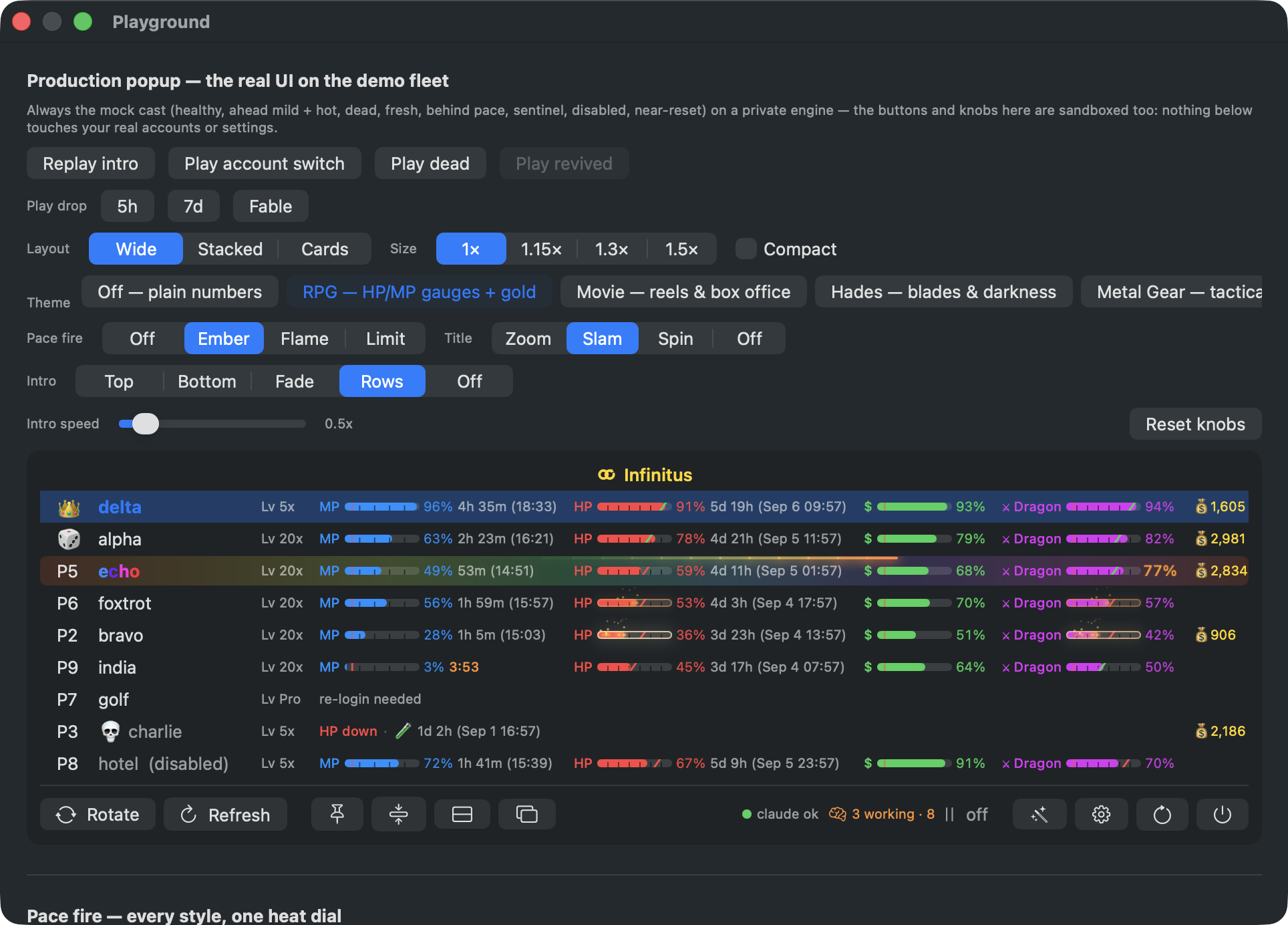
A resizable window for developing the popup's UI and animations against a
fabricated fleet — one account per condition (healthy, mildly and hotly
ahead of pace, dead, fresh, behind pace, needs re-login, disabled,
near-reset) — so every state is always on screen at once.
Open it (debug builds): defaults write <domain> debug_menu -bool true,
then the wand button in the popup footer or Settings → Animations →
Open playground. Dev loops can launch straight into it withINFINITUS_PLAYGROUND=1 ./run-unbundled.sh.
Drive it from the shell with tools/playctl — the playground polls a
command file and acknowledges each line, so scripts (and coding agents)
can flip knobs and replay animations without touching the mouse:playctl theme rpg, playctl layout stacked, playctl drop fable,playctl kill, playctl dead / revive, playctl scenario solo,playctl refresh,playctl themes, and playctl shot out.png to capture the window
by its CGWindowID.
Everything inside is sandboxed twice. The embedded popup is the realMenuContent, but it runs a private AppModel pinned to the bundleddemo-cswap script — never the real engine; switching, rotating and
reordering touch demo state only, and every outward side effect
(snapshot cache, notifications, resume nudges, sync) is suppressed. The
knobs write to a throwaway defaults suite seeded from your live
settings — choices persist across playground opens, "Reset knobs" falls
back to the seed, and your real prefs never change.
The control rail drives the real pipelines, not canned replays:
- Play dead / revived / drop (5h, 7d, Fable) — tmp-file hooks
($TMPDIR/infinitus-demo-*) pin one of the demo windows' numbers and
the ordinary refresh diff plays the rest: death beat, revival fanfare,
HP-drop drama, spring refill. - Play account switch / Replay intro — a real engine switch on the
demo fleet; the celebration fires from the active-number diff. - Scenario — Normal / Empty fleet / All dead / One account / Two
accounts / No engine / Two engines: the fleet shapes that otherwise
need real accounts or waits, one click each. - Layout / size / compact / theme / pace fire / intro — the same
knobs as Settings, sandboxed.
Below the popup sit self-contained demos: the three pace-fire styles
side by side under one heat dial with a zoom slider, HP drops, window
resets, and the inline flashes.
Workflow: keep it open under ./dev.sh, then point whatever you're
iterating on at the demo row that exercises it — echo's Dragon bar sits
at 77% forever (the RPG theme's All Lucky 7s fever), bravo burns hot,
foxtrot mild, charlie is dead, golf wants a re-login. Nothing you do
here can touch a real account.
Architecture rule
Everything is Swift; the engine stays fully isolated behindcswap … --json subprocesses. The app never reads engine internals from
disk.
Themes
Every theme reskins the whole row: gauge labels, the model name, the
active / next / dead markers, and the reset countdown wording.
| Theme | "Fable" becomes | active · next · dead | ready / resetting |
|---|---|---|---|
| Off — plain numbers | Fable | — | — |
| RPG — HP/MP gauges + gold | Dragon | 👑 🎲 💀 | full HP / respawning… |
| Movie — reels & box office | Epic | 🌟 🍿 🔚 | now showing / premiering… |
| Hades — blades & darkness | Hydra | 🌿 🕯 ☠ | unscathed / raising the dead… |
| Metal Gear — tactical espionage | FOXHOUND | 🐍 🎯 ☠ | all clear / extraction inbound… |
| AI Agentic — tokens & context | frontier | 🧠 ⏭ 🔌 | ready to ship / rate limit lifting… |
| Classic SWE — hand-written, no AI | mainframe | ⌨️ ⏭ 🐛 | compiles clean / recompiling… |
| Sci-Fi — warp cores & shields | Mothership | 🧑🚀 📡 💥 | all systems go / recharging… |
| Wild West — six-guns & gold rush | Outlaw | 🏇 🌵 🪦 | saddled up / sun's rising… |
| Cyberpunk — chrome & neon | Netrunner | ⚡ 🕶 💀 | jacked in / rebooting… |
| Gothic — candles & cathedrals | Vampire Lord | 🕯 🌹 ⚰️ | immortal / tolling midnight… |
| Musical — tempo & encores | Maestro | 🎷 🎻 🔇 | in tune / tuning up… |
| Planet Earth — wild documentary | Blue Whale | 🦁 🦋 🦴 | thriving / migrating… |
| Cosmos — stars & black holes | Galaxy | 🪐 🔭 🕳 | shining / orbiting back… |
| Ocean — tides & deep water | Leviathan | ⛵ 🐬 ⚓ | smooth sailing / tide turning… |
Gallery
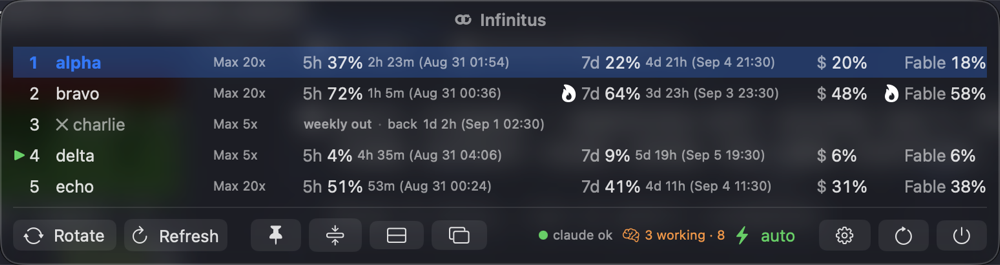
The same five-account demo fleet under every theme (pop-out window,
wide layout; charlie is out of their weekly window).
Off — plain numbers
RPG — HP/MP gauges + gold

Movie — reels & box office

Hades — blades & darkness

Metal Gear — tactical espionage

AI Agentic — tokens & context

Classic SWE — hand-written, no AI

Sci-Fi — warp cores & shields

Wild West — six-guns & gold rush

Cyberpunk — chrome & neon

Gothic — candles & cathedrals

Musical — tempo & encores

Planet Earth — wild documentary

Cosmos — stars & black holes

Ocean — tides & deep water

Built-in row themes live in Sources/InfinitusCore/RowTheme.swift; add your
own in ~/Library/Application Support/Infinitus/themes.json, or share one
through themes/ with a pull request.
Credits
Inspired by CodexBar (MIT) —
the menu-bar-native take on AI usage limits, and the shape of this
README.
License
MIT — by deathemperor · huuloc.com
Yorumlar (0)
Yorum birakmak icin giris yap.
Yorum birakSonuc bulunamadi