Mysti
Health Gecti
- License — License: Apache-2.0
- Description — Repository has a description
- Active repo — Last push 18 days ago
- Community trust — 1025 GitHub stars
Code Basarisiz
- exec() — Shell command execution in resources/marked.min.js
- exec() — Shell command execution in resources/prism-bundle.js
- fs module — File system access in scripts/sync-agents.js
- child_process — Shell command execution capability in src/managers/ActiveModeManager.ts
- exec() — Shell command execution in src/managers/ActiveModeManager.ts
Permissions Gecti
- Permissions — No dangerous permissions requested
Bu listing icin henuz AI raporu yok.
AI coding dream team of agents for VS Code. Claude Code + openai Codex collaborate in brainstorm mode, debate solutions, and synthesize the best approach for your code.
English | 简体中文 | 日本語 | 한국어 | Español | Português | العربية | Deutsch | Français | Türkçe | Русский
Mysti - Your AI Coding Team Working Together







Your AI Coding team for VSCode
12 AI providers — Claude Code, Codex, Gemini, Copilot, Cline, Cursor, OpenClaw, Manus, OpenCode, Qwen Code, Ollama & LocalAI — working solo or in teams
Wisdom of the crowd where the collective intelligence of several agents outperforms a single one.

Providers • Brainstorm • Features • Quick Start • Config • Docs
What's New in v0.4.0
4 New Providers (12 Total)
Mysti now supports 12 AI providers — added OpenCode, Qwen Code, Ollama, and LocalAI alongside Claude Code, Codex, Gemini, GitHub Copilot, Cline, Cursor, OpenClaw, and Manus. Run local models with Ollama/LocalAI or use cloud providers like OpenCode and Qwen Code. Each provider has its own authentic logo in the UI.
Qwen Code
Alibaba's AI coding CLI with deep reasoning capabilities. Uses the same streaming protocol as Claude Code for seamless integration. Supports Qwen3 Coder models with plan, auto-edit, and yolo approval modes.
OpenCode
Multi-backend coding agent supporting Anthropic, OpenAI, Google, and Groq through a single CLI. Uses your configured default model — no lock-in to specific providers.
Local AI Support
Run AI models locally with Ollama and LocalAI — no cloud subscription needed. Full privacy, zero latency, complete control over your models.
Stability & Testing
18 stability fixes across brainstorm mode and @-mention tagging — silence-based timeouts, auth pre-checks, convergence guards, mention limits, and retry cleanup. Plus 360 automated tests via vitest ensuring reliability across all features.
Bug Fixes
- Windows: Fixed
spawn EINVALerror with auto shell mode (#14) - Codex: Brainstorm now respects
mysti.codexPathsetting (#26)
Install in Seconds
From VS Code: Press Ctrl+P (Cmd+P on Mac), then paste:
ext install DeepMyst.mysti
Or install from the VS Code Marketplace
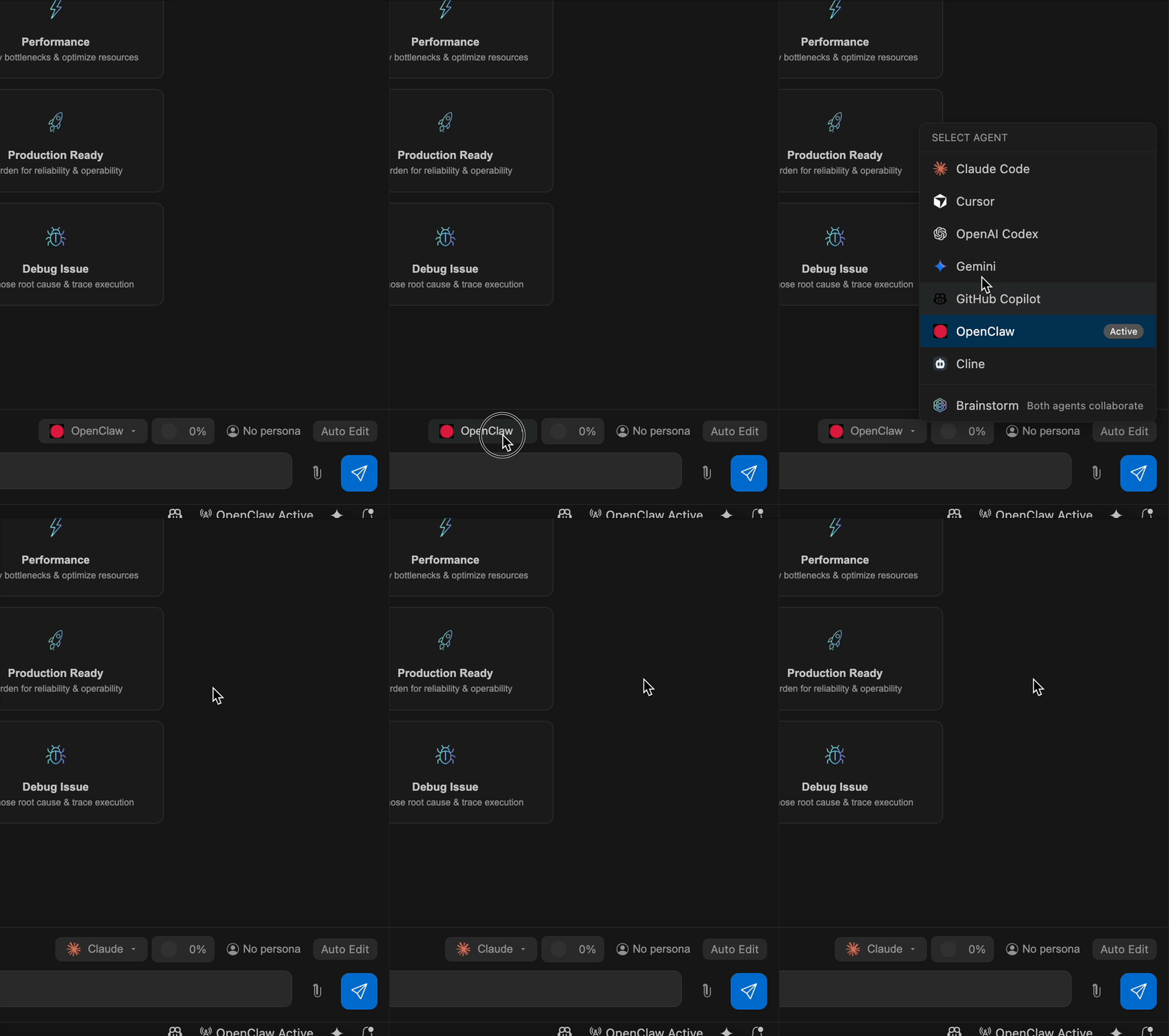
Choose Your AI
Mysti works with the AI coding tools you already have. No extra subscriptions needed.
| Provider | Best For |
|---|---|
| Claude Code | Deep reasoning, complex refactoring, thorough analysis |
| Codex | Quick iterations, familiar OpenAI style |
| Gemini | Fast responses, Google ecosystem integration |
| GitHub Copilot | Multi-model access (Claude, GPT-5, Gemini) via GitHub subscription |
| Cline | Plan/Act mode, structured task completion |
| Cursor | Auto model selection, multi-model with Claude, GPT-5, Gemini |
| OpenClaw | Real-time WebSocket streaming, configurable thinking levels |
| OpenCode | Multi-backend agent (Anthropic, OpenAI, Google, Groq) |
| Qwen Code | Alibaba's AI coding agent, deep reasoning |
| Ollama | Local LLM inference, privacy-first, no subscription |
| LocalAI | Self-hosted AI models, full control |
Switch providers with one click. No lock-in.
Why Mysti?
| vs Copilot/Cursor | Mysti Advantage |
|---|---|
| Single AI | Multi-agent brainstorming — two AIs collaborate with 5 strategies |
| Locked to one provider | 12 providers — Claude, Codex, Gemini, Copilot, Cline, Cursor, OpenClaw, Manus, OpenCode, Qwen, Ollama, LocalAI |
| Black box | Full permission control — read-only to full-access |
| Generic responses | 16 personas — architect, debugger, security expert... |
| Manual workflow | Autonomous mode — AI works independently with safety controls |
| No cross-agent routing | @-mentions — route tasks to specific agents inline |
See It In Action
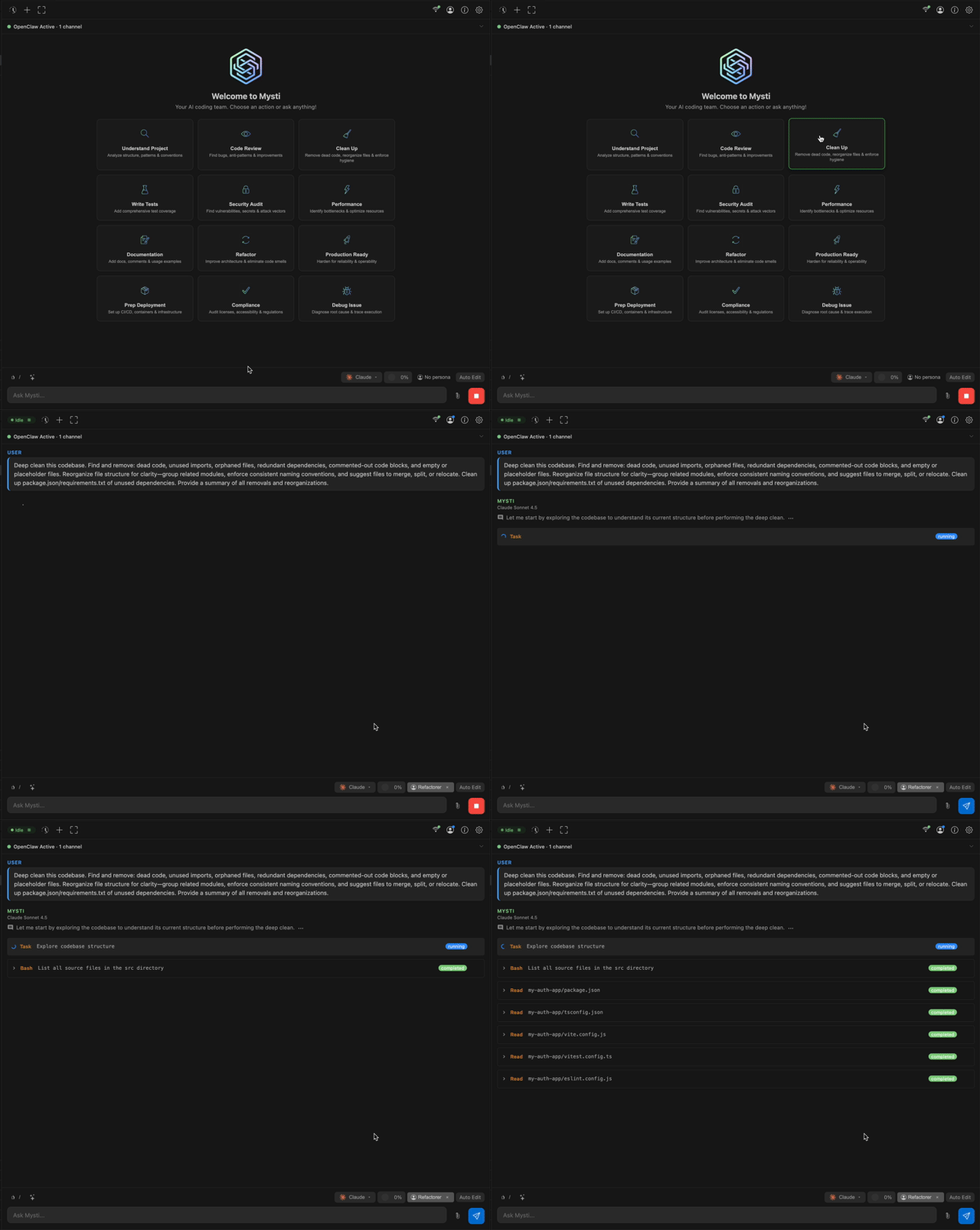
Beautiful, modern chat interface with syntax highlighting, markdown support, and mermaid diagrams
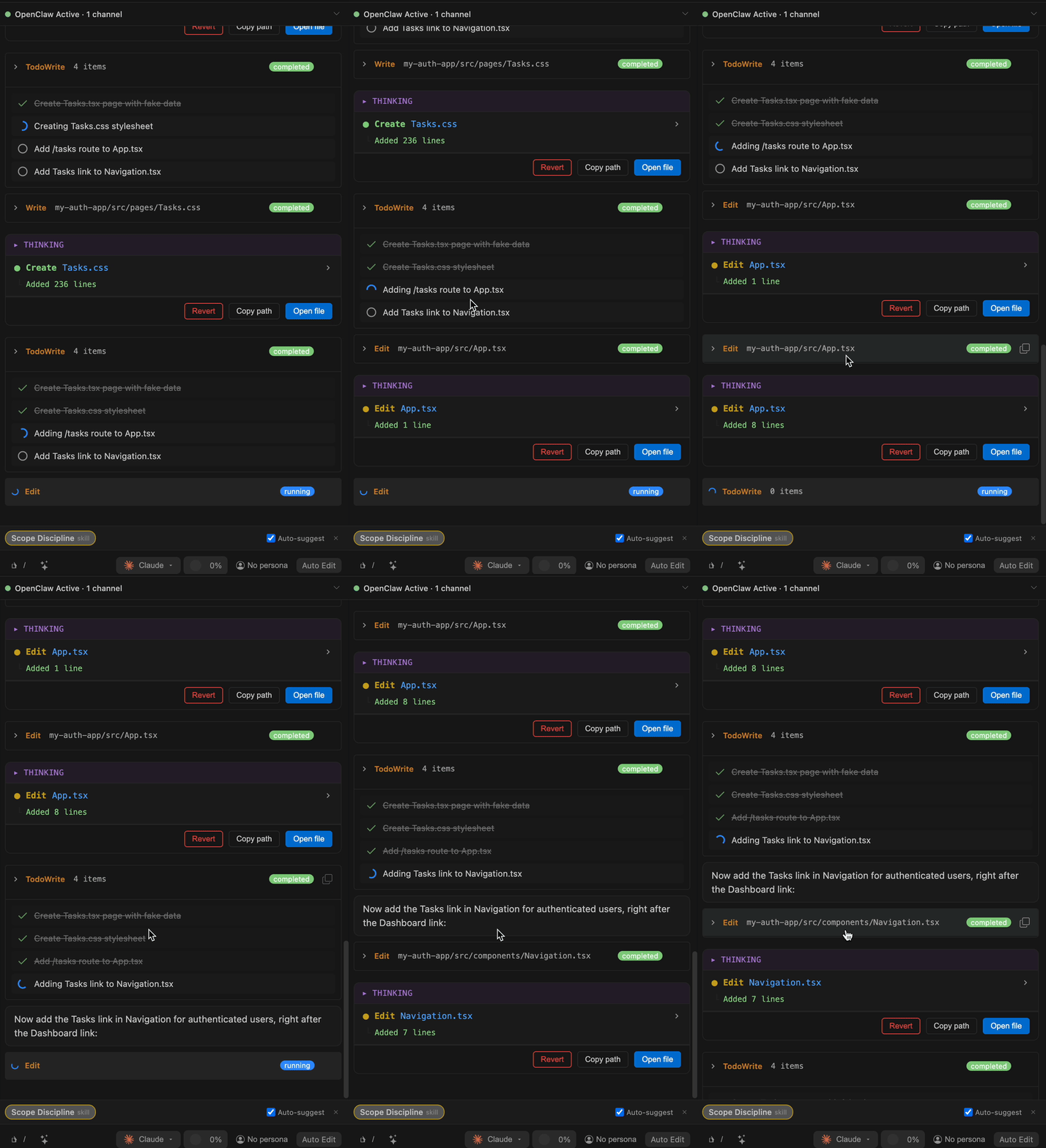
Real-time task list rendering and progress tracking
Brainstorm Mode
Want a second opinion? Enable Brainstorm Mode and let two AI agents tackle your problem together. Choose any 2 of 12 agents from the settings panel.
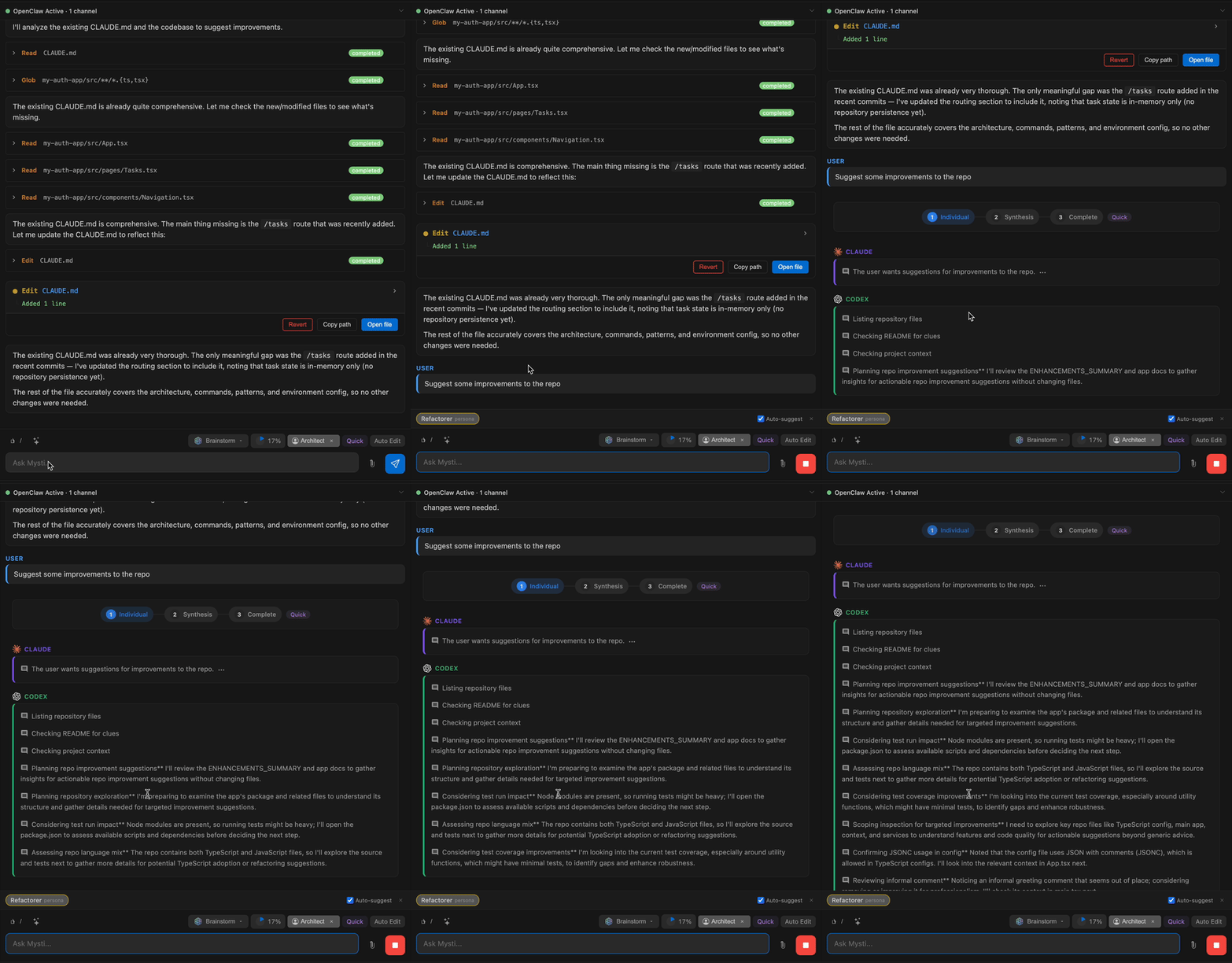
5 Collaboration Strategies
| Strategy | Roles | Best For |
|---|---|---|
| Quick | Direct synthesis | Simple tasks, fast answers |
| Debate | Critic vs Defender | Architecture decisions, trade-offs |
| Red-Team | Proposer vs Challenger | Security reviews, edge case discovery |
| Perspectives | Risk Analyst vs Innovator | Greenfield design, technology selection |
| Delphi | Facilitator vs Refiner | Complex problems, reaching consensus |
Why Two AIs Beat One
Claude Code (Anthropic), Codex (OpenAI), Gemini (Google), GitHub Copilot, Cline, Cursor, OpenClaw, OpenCode, Qwen Code (Alibaba), Ollama, and LocalAI have different training, different strengths, and different blind spots. When any two work together:
- Each AI catches edge cases the other might miss
- Different perspectives lead to more robust solutions
- Together they debate, challenge each other, and synthesize the best solution
It's like having a senior dev and a tech lead review your code—except they actually discuss it first.
Convergence Detection
During discussions, Mysti tracks agent agreement and position stability. When auto-convergence is enabled, the discussion exits early once agents reach consensus — saving time without sacrificing quality.
Choose Your Team
Configure which two agents collaborate in the Settings Panel:
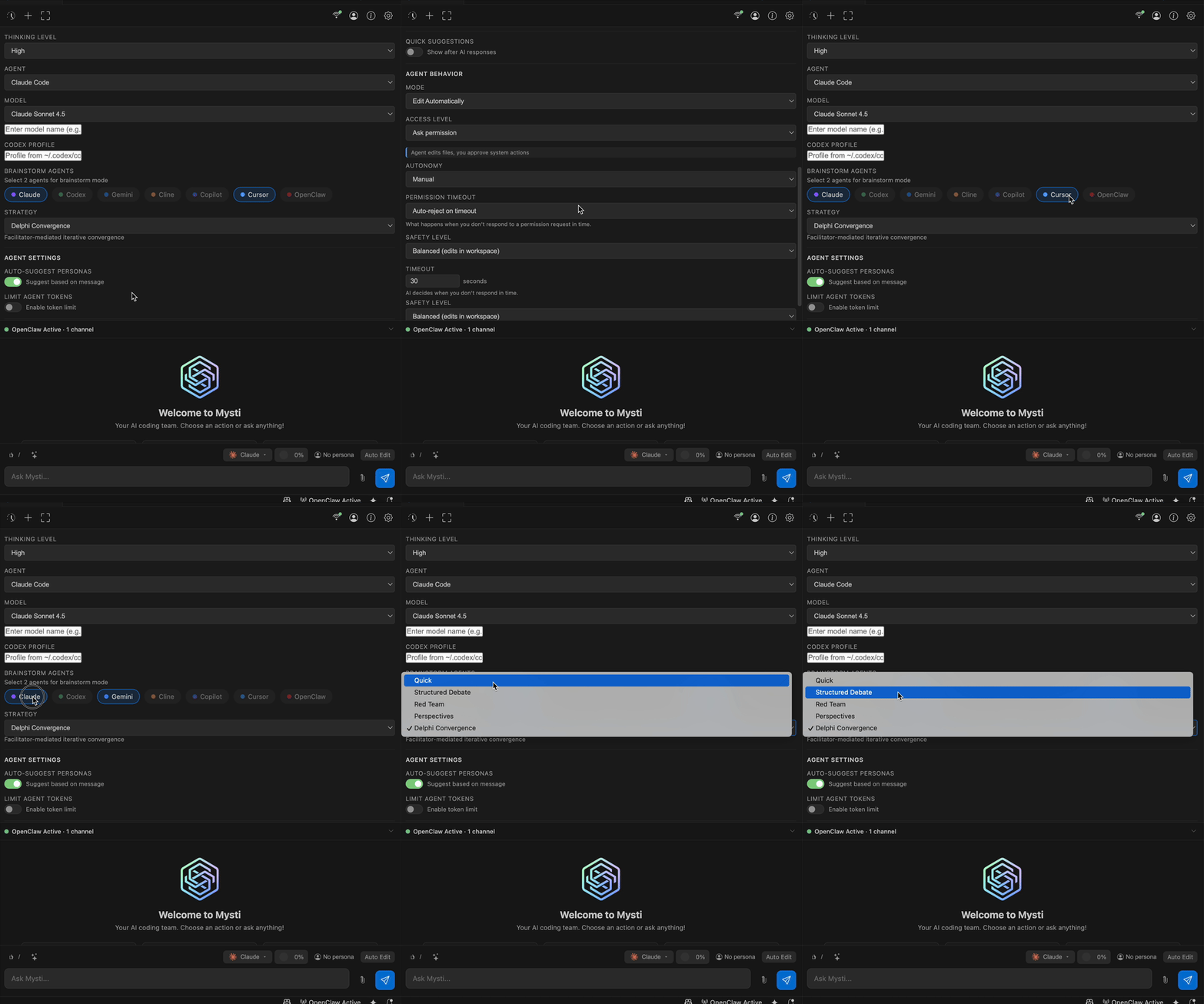
| Combination | Best For |
|---|---|
| Claude + Codex | Deep analysis meets rapid iteration |
| Claude + Gemini | Thorough reasoning with fast validation |
| Claude + Copilot | Compare native Claude vs Copilot's multi-model approach |
| Cursor + Gemini | Multi-model flexibility with Google integration |
| OpenClaw + Claude | WebSocket streaming with deep reasoning |
| Qwen + Claude | Compare Alibaba and Anthropic reasoning |
| OpenCode + Gemini | Multi-backend flexibility with Google speed |
| Ollama + Claude | Local privacy meets cloud intelligence |
Intelligent Plan Detection
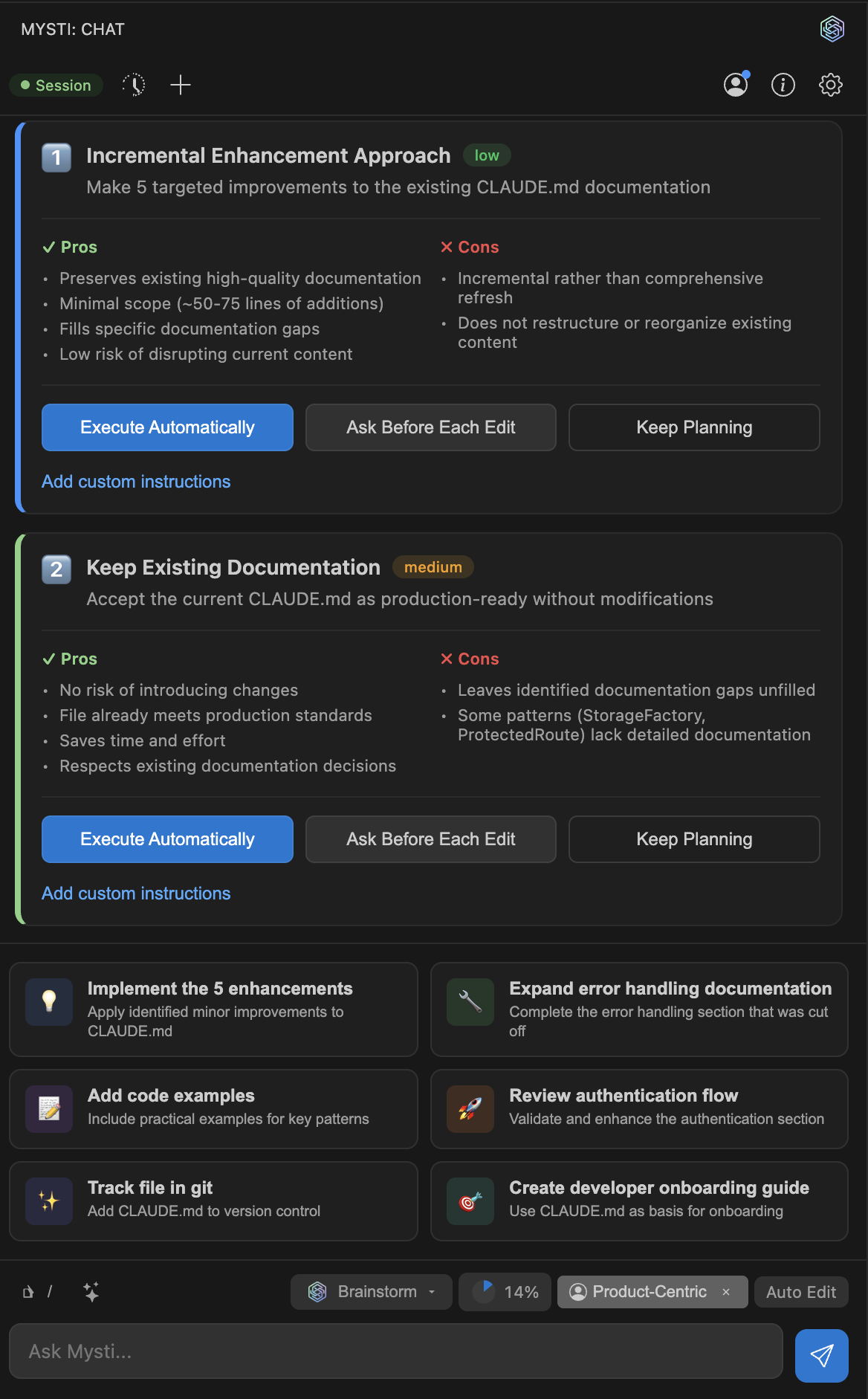
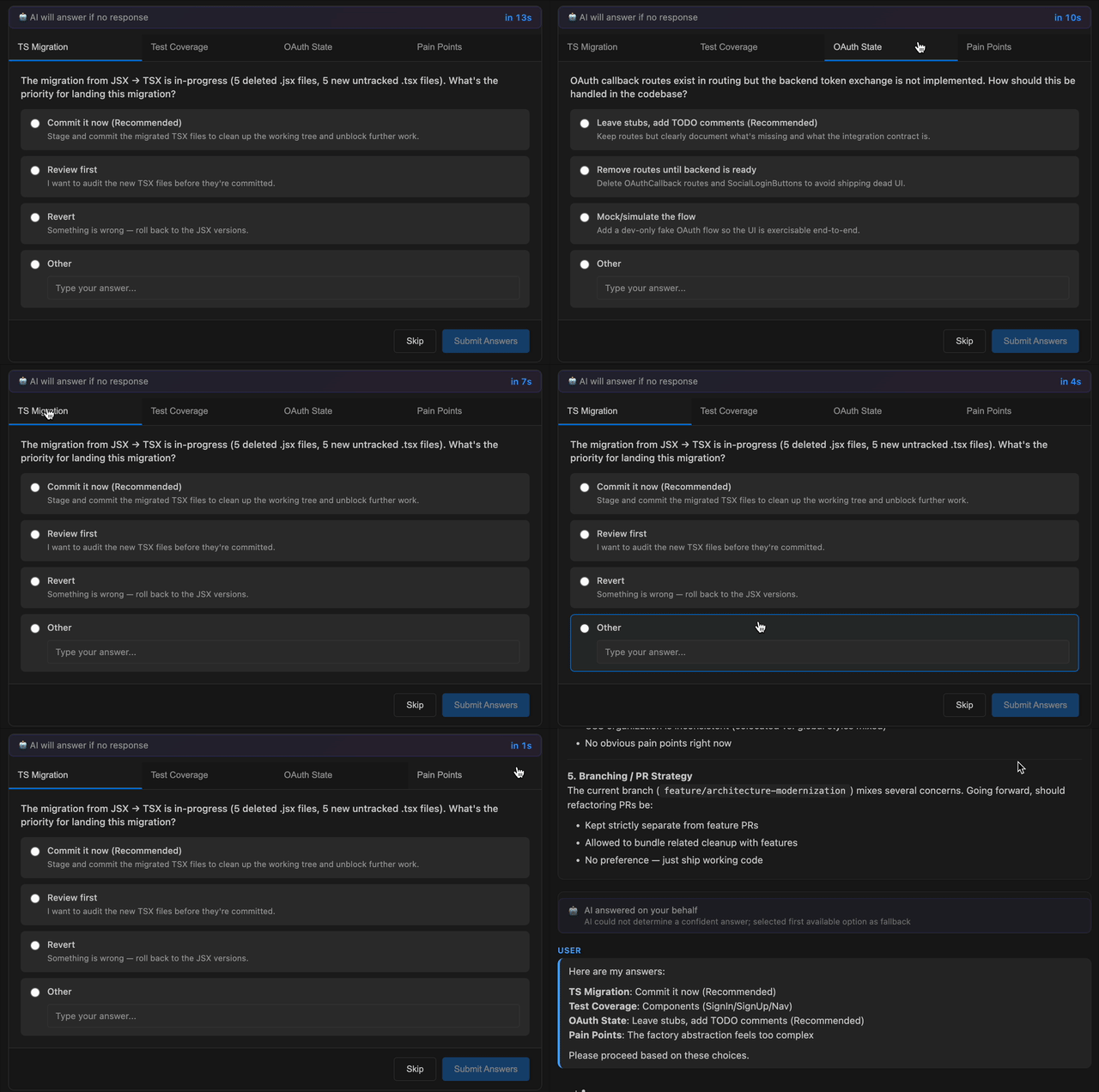
When the AI presents multiple implementation approaches, Mysti automatically detects them and lets you choose your preferred path.
Requires at least 2 CLI tools installed. See Requirements.
Key Features
Autonomous Mode
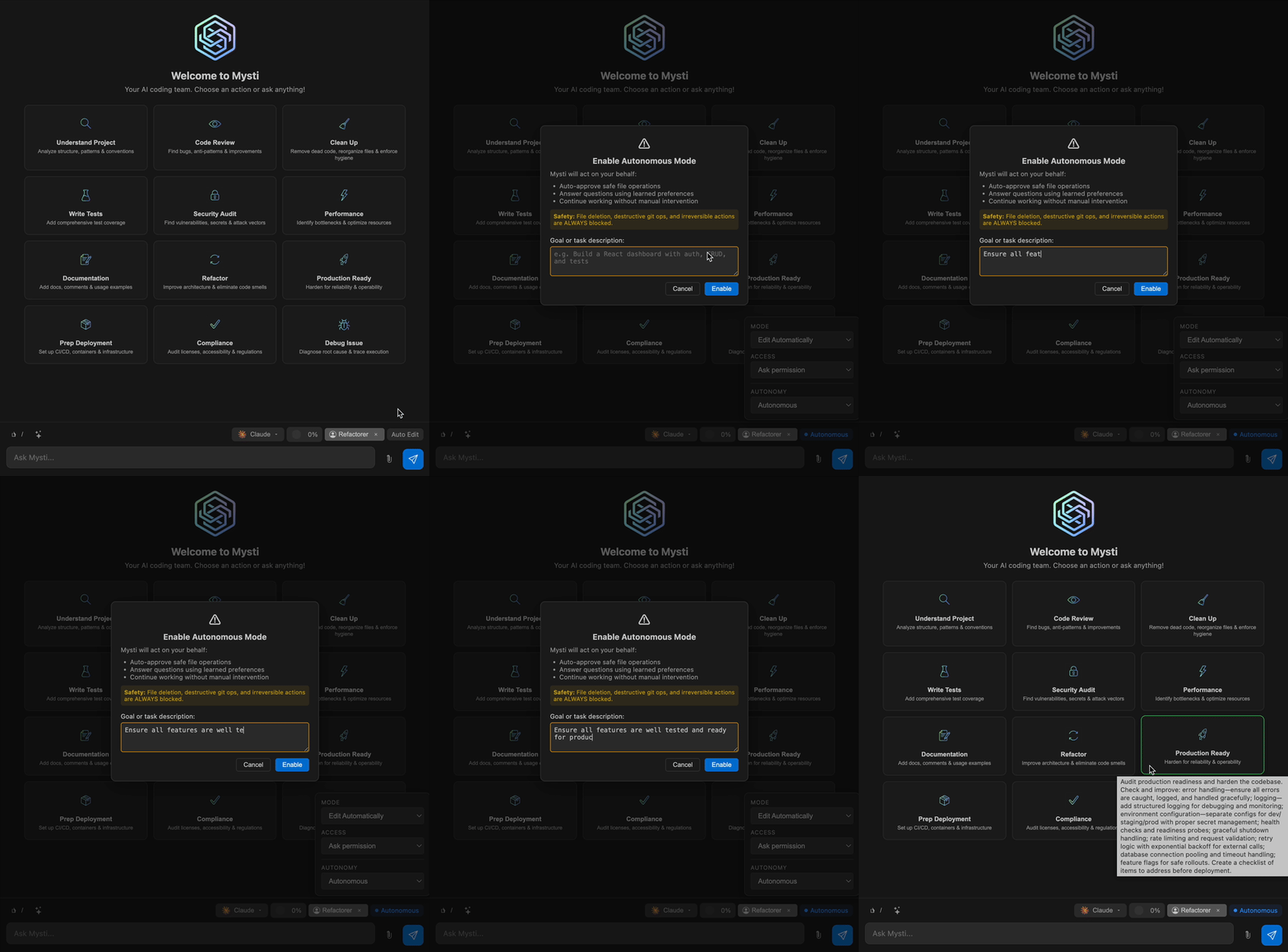
Let the AI work independently with configurable safety controls:
- Safety Classifier: Three levels — safe (auto-approve), caution (mode-dependent), blocked (always deny)
- Three Safety Modes: Conservative, Balanced, Aggressive
- Learning Memory: Remembers your permission preferences and improves over time
- Continuation Modes: Goal-based or task-queue for extended autonomous sessions
- Audit Trail: Every autonomous decision is logged for review
Full Autonomous Mode documentation
@-Mention System
Route tasks to specific agents and reference files inline:
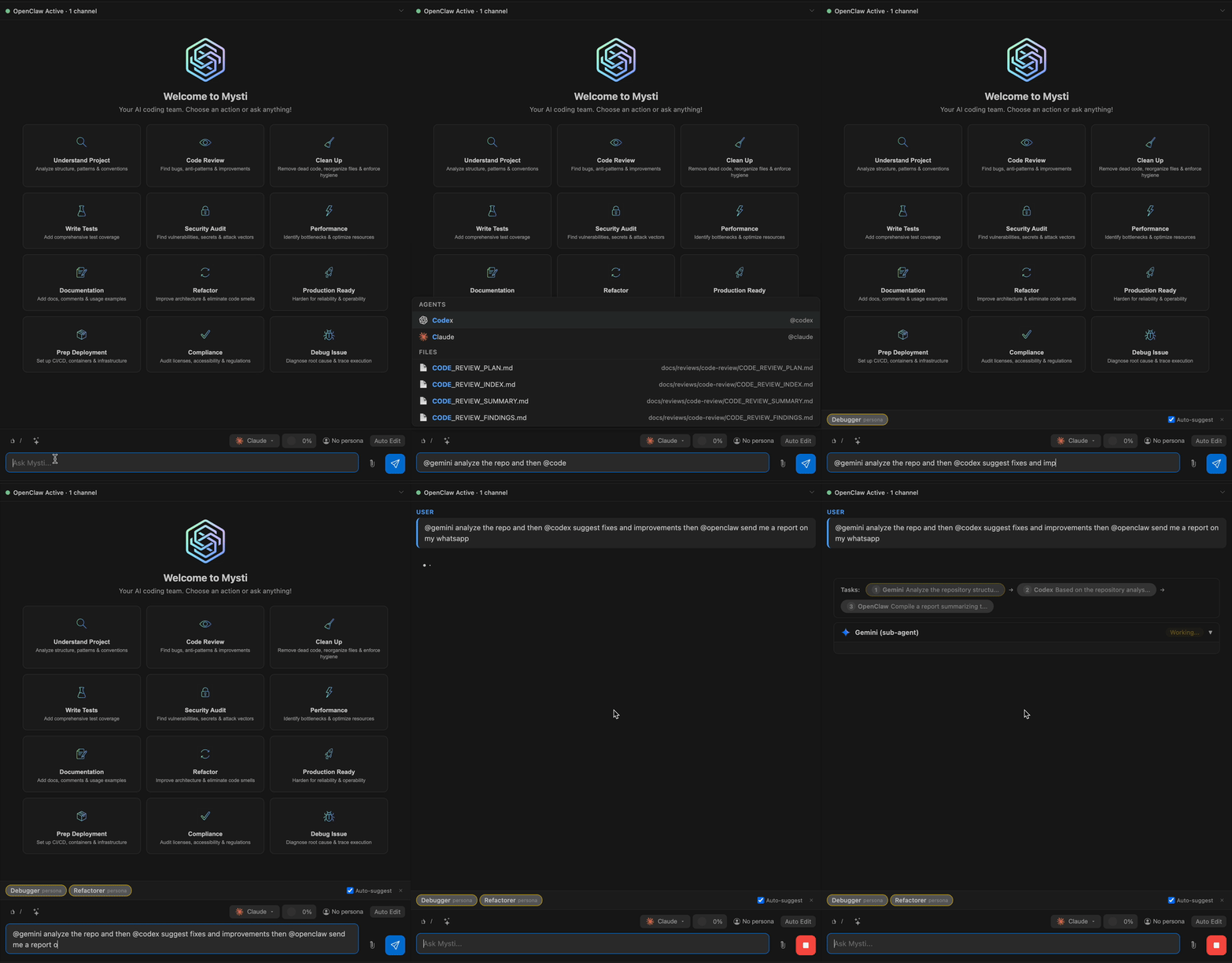
@claude Review this code for security issues
@src/auth.ts @gemini Suggest performance improvements for this file
@claude Write tests, then @codex optimize them
- File mentions:
@filenameadds transient context - Agent mentions:
@agentroutes tasks to that provider - Chaining: Later agents receive earlier agents' responses as context
Context Compaction
Smart conversation management that prevents context overflow:
- Automatic: Triggers when token usage approaches the threshold (default 75%)
- Native support: Claude Code uses built-in
/compactcommand - Client-side: Other providers use intelligent message summarization
- Per-panel tracking: Each chat panel tracks usage independently
16 Developer Personas
Shape how your AI thinks. Select from specialized personas that change the AI's approach to your problems.
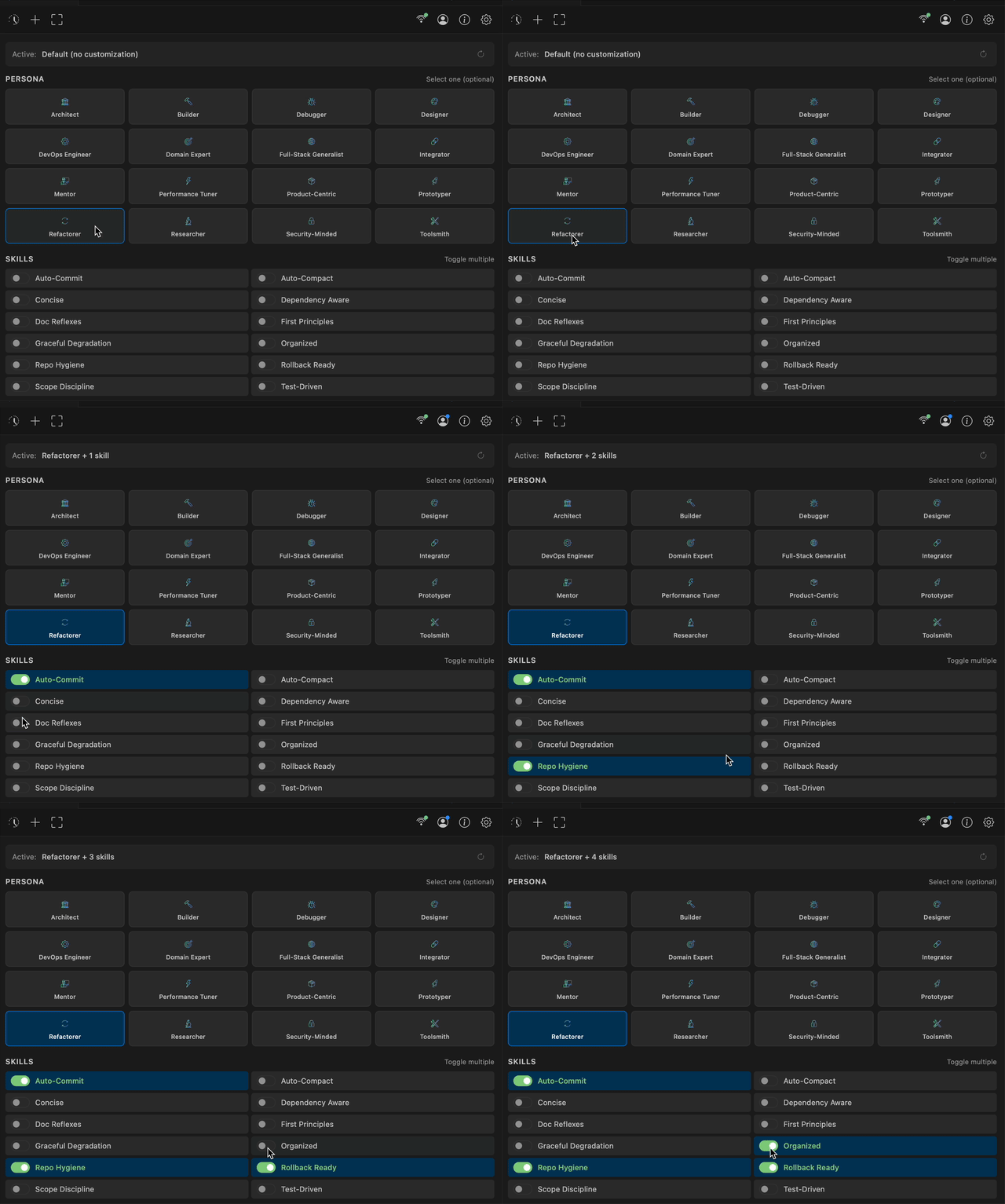
| Persona | Focus |
|---|---|
| Architect | System design, scalability, clean structure |
| Debugger | Root cause analysis, bug fixing |
| Security-Minded | Vulnerabilities, threat modeling |
| Performance Tuner | Optimization, profiling, latency |
| Prototyper | Quick iteration, PoCs |
| Refactorer | Code quality, maintainability |
| + 10 more... | Full-Stack, DevOps, Mentor, Designer... |
Full Personas & Skills documentation
Quick Persona Selection
Select personas directly from the toolbar without opening panels.
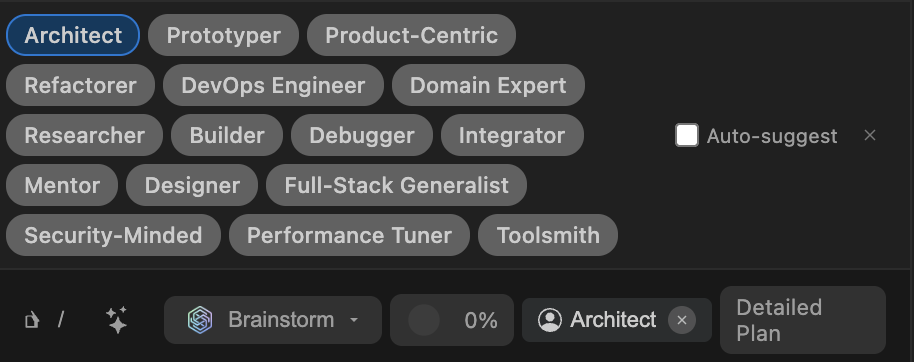
Smart Auto-Suggestions
Mysti automatically suggests relevant personas and actions based on your message.

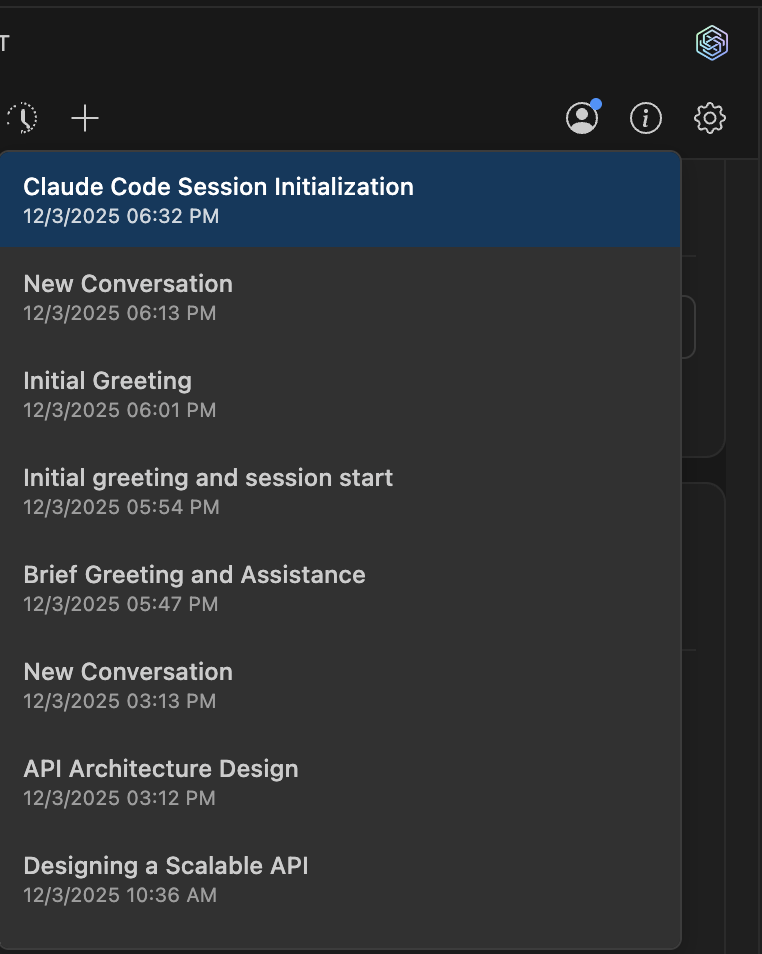
Conversation History
Never lose your work. All conversations are saved and easily accessible.
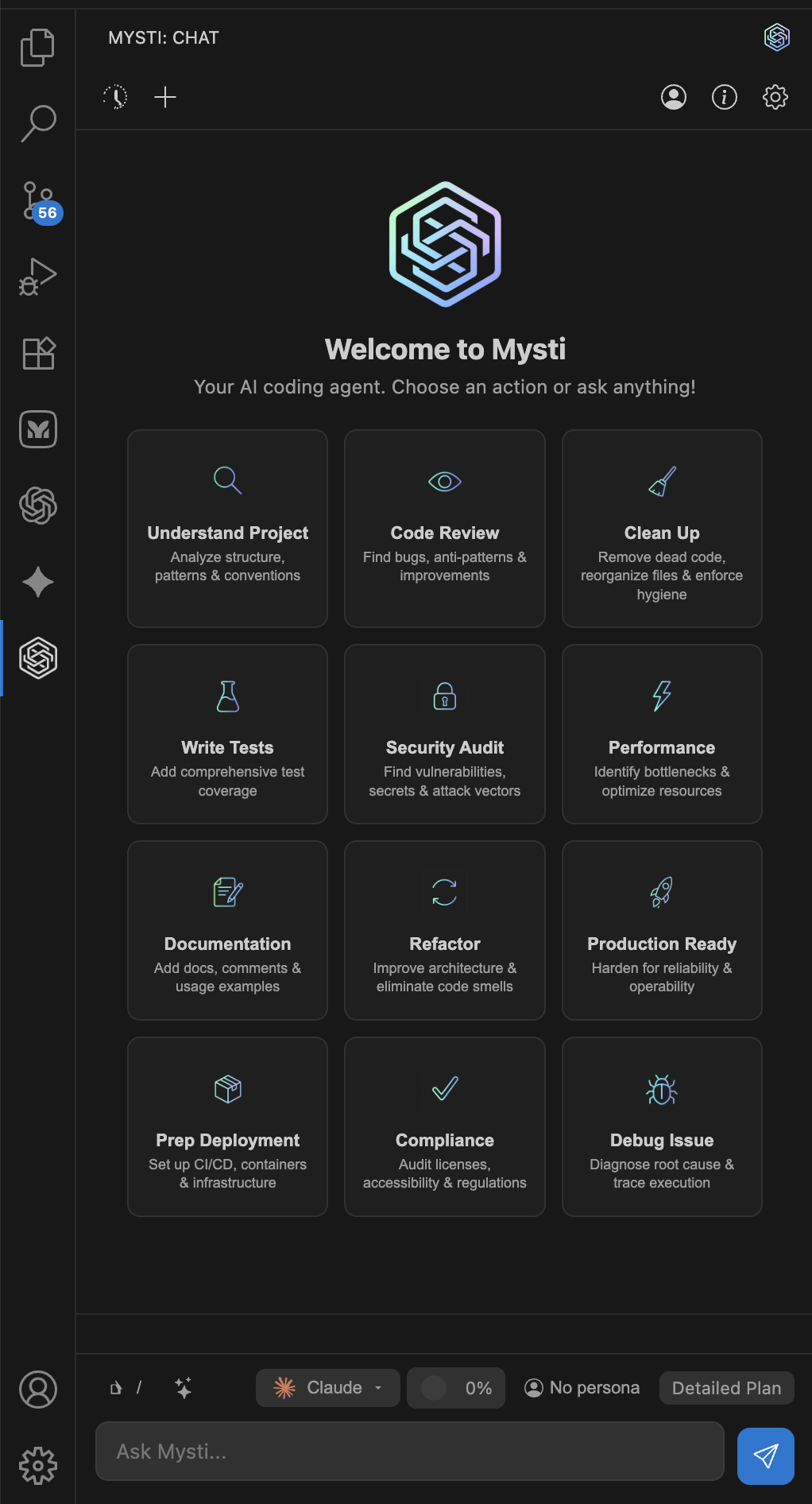
Quick Actions on Welcome
Get started fast with one-click actions for common tasks.
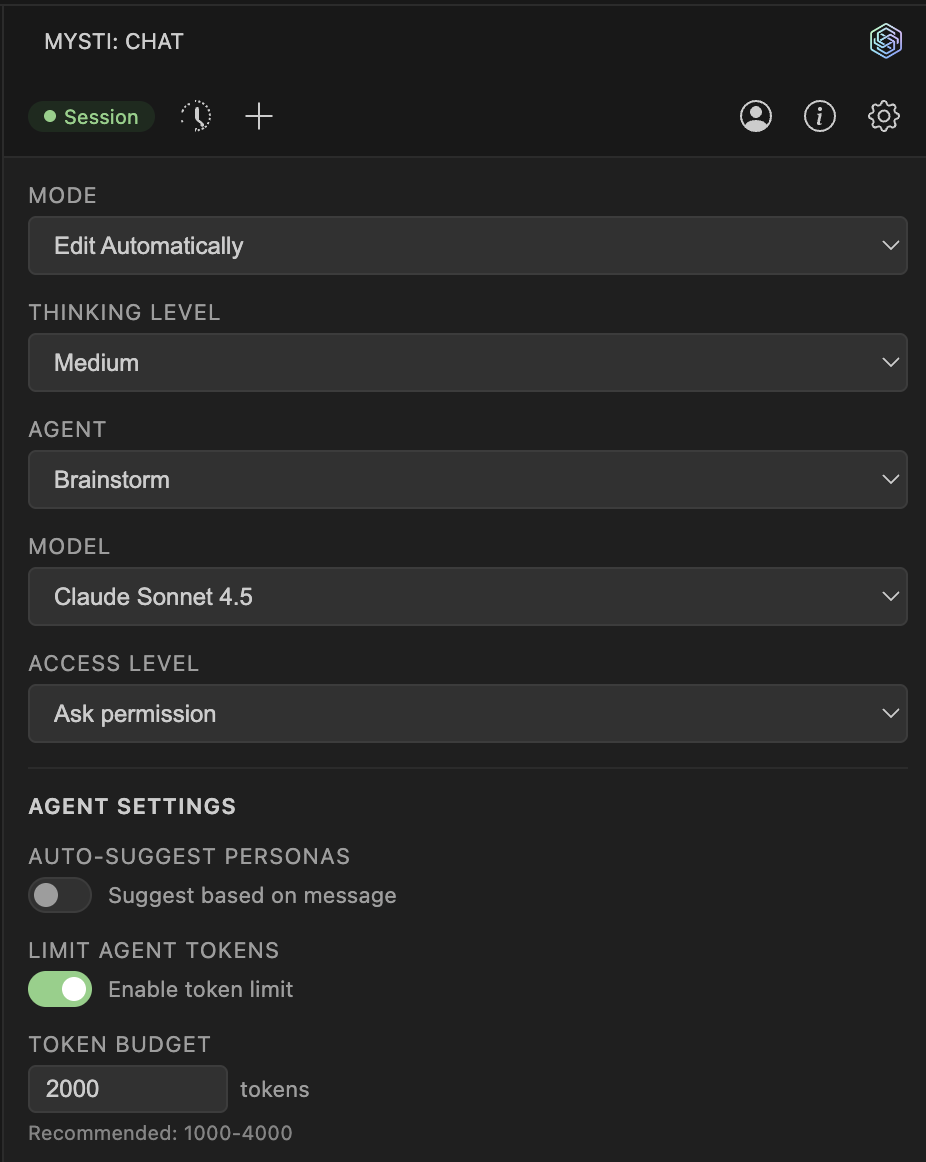
Extensive Settings
Fine-tune every aspect of Mysti including token budgets, access levels, and brainstorm mode.
Requirements
Already paying for Claude, ChatGPT, Gemini, or GitHub Copilot? You're ready to go.
Mysti works with your existing subscriptions—no additional costs!
| CLI Tool | Subscription | Install |
|---|---|---|
| Claude Code (recommended) | Anthropic API or Claude Pro/Max | npm install -g @anthropic-ai/claude-code |
| GitHub Copilot CLI | GitHub Copilot Pro/Pro+/Business | npm install -g @github/copilot-cli |
| Gemini CLI | Google AI API or Gemini Advanced | npm install -g @google/gemini-cli |
| Codex CLI | OpenAI API | Follow OpenAI's installation guide |
| Cline | Depends on model provider | npm install -g cline |
| Cursor | Cursor subscription | curl https://cursor.com/install -fsS | bash |
| OpenClaw | OpenClaw account | npm install -g openclaw@latest && openclaw onboard --install-daemon |
| OpenCode | Provider API keys (Anthropic, OpenAI, etc.) | npm i -g opencode-ai@latest |
| Qwen Code | Qwen OAuth or API keys | npm install -g @qwen-code/qwen-code@latest |
| Ollama | Local (no subscription needed) | Install from ollama.com |
| LocalAI | Local (no subscription needed) | Install from localai.io |
You only need one CLI to get started. Install any two to unlock Brainstorm Mode.
Quick Start
1. Install Mysti
Option A: Press Ctrl+P (Cmd+P on Mac), paste and run:
ext install DeepMyst.mysti
Option B: Install from VS Code Marketplace
2. Install a CLI Tool
# Claude Code (recommended)
npm install -g @anthropic-ai/claude-code
claude auth login

# Or GitHub Copilot CLI (access Claude, GPT-5, Gemini via GitHub)
npm install -g @github/copilot-cli
copilot  # then use /login command

# Or Gemini CLI
npm install -g @google/gemini-cli
gemini auth login

# Or Cursor
curl https://cursor.com/install -fsS | bash
agent login

# Or OpenClaw
npm install -g openclaw@latest && openclaw onboard --install-daemon
openclaw login

# Or OpenCode
npm i -g opencode-ai@latest
opencode auth login

# Or Qwen Code
npm install -g @qwen-code/qwen-code@latest
qwen  # then type /auth
For Brainstorm Mode, install any two CLI tools.
3. Open Mysti
- Click the Mysti icon in the Activity Bar, or
- Press
Ctrl+Shift+M(Cmd+Shift+Mon Mac)
4. Start Coding
Type your request and let the AI assist you!
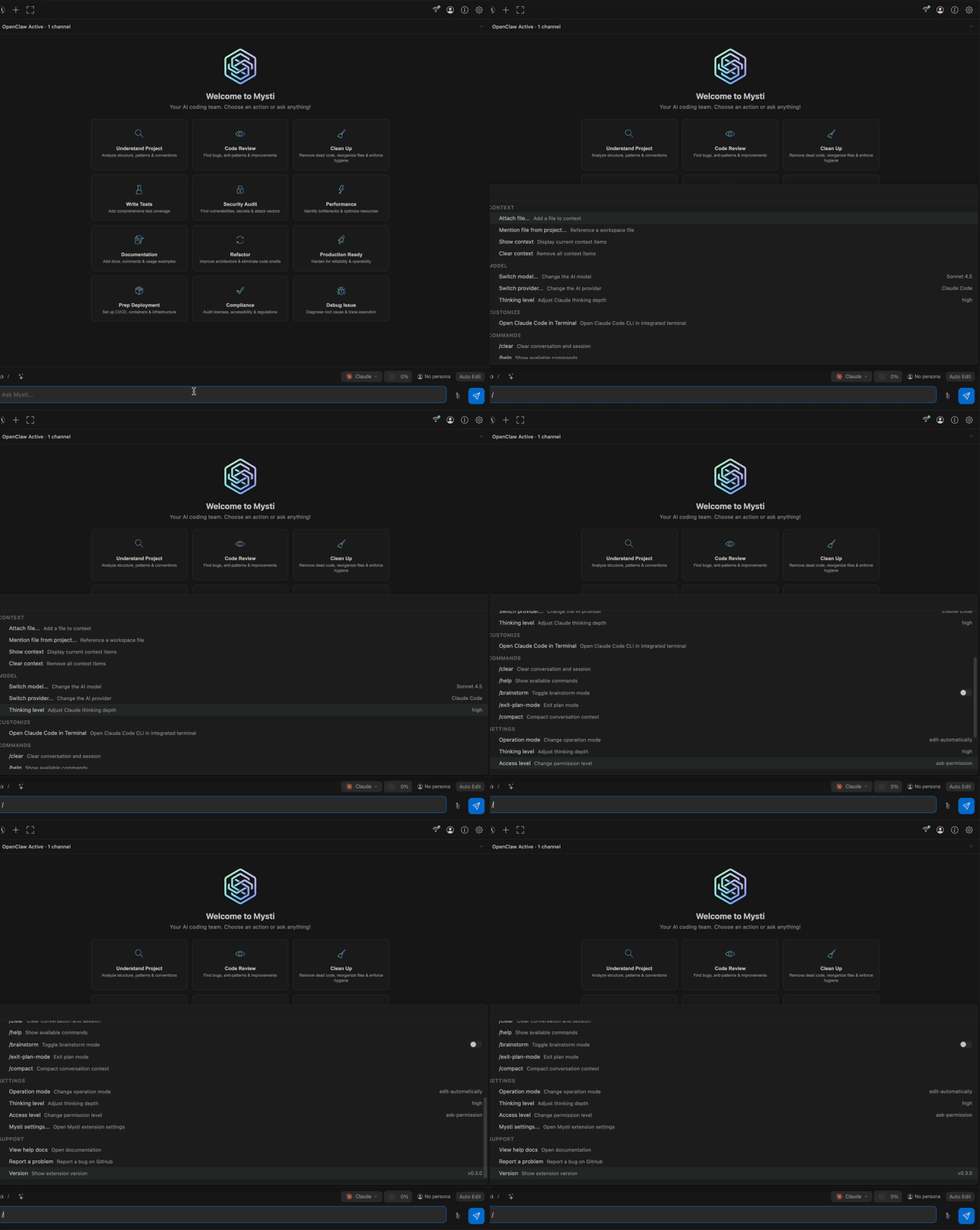
Slash Commands
Access skills and actions quickly with the built-in slash command menu.
12 Toggleable Skills
Mix and match behavioral modifiers:
- Concise - Clear, brief communication
- Test-Driven - Tests alongside code
- Auto-Commit - Incremental commits
- First Principles - Fundamental reasoning
- Scope Discipline - Stay focused on the task
- And 7 more...
Full Personas & Skills documentation
Permission Controls
Stay in control of what the AI can do:
- Read-only - AI can only read, never modify
- Ask-permission - Approve each file change
- Full-access - Let the AI work autonomously
Configuration
Essential Settings
{
  "mysti.defaultProvider": "claude-code",
  "mysti.brainstorm.agents": ["claude-code", "google-gemini"],
  "mysti.brainstorm.strategy": "quick",
  "mysti.accessLevel": "ask-permission"
}
Provider Settings
| Setting | Default | Description |
|---|---|---|
mysti.defaultProvider |
claude-code |
Primary AI provider |
mysti.claudePath |
claude |
Path to Claude CLI |
mysti.codexPath |
codex |
Path to Codex CLI |
mysti.geminiPath |
gemini |
Path to Gemini CLI |
mysti.copilotPath |
copilot |
Path to Copilot CLI |
mysti.clinePath |
cline |
Path to Cline CLI |
mysti.cursorPath |
agent |
Path to Cursor CLI |
mysti.openclawPath |
openclaw |
Path to OpenClaw CLI |
mysti.opencodePath |
opencode |
Path to OpenCode CLI |
mysti.qwenCodePath |
qwen |
Path to Qwen Code CLI |
mysti.ollamaPath |
ollama |
Path to Ollama CLI |
mysti.localaiPath |
localai |
Path to LocalAI CLI |
Brainstorm Settings
| Setting | Default | Description |
|---|---|---|
mysti.brainstorm.agents |
["claude-code", "openai-codex"] |
Which 2 agents to use |
mysti.brainstorm.strategy |
quick |
Strategy: quick, debate, red-team, perspectives, delphi |
mysti.brainstorm.autoConverge |
true |
Auto-exit when agents converge |
mysti.brainstorm.maxDiscussionRounds |
3 |
Maximum discussion rounds |
Autonomous Settings
| Setting | Default | Description |
|---|---|---|
mysti.autonomous.safetyMode |
balanced |
conservative, balanced, aggressive |
mysti.autonomous.blockPatterns |
[] |
Custom patterns to always block |
Compaction Settings
| Setting | Default | Description |
|---|---|---|
mysti.compaction.enabled |
true |
Enable context compaction |
mysti.compaction.threshold |
75 |
Compaction threshold (% of context window) |
General Settings
| Setting | Default | Description |
|---|---|---|
mysti.accessLevel |
ask-permission |
File access level |
mysti.agents.autoSuggest |
true |
Auto-suggest personas |
mysti.agents.maxTokenBudget |
0 |
Max tokens for agent context (0 = unlimited) |
Keyboard Shortcuts
| Action | Windows/Linux | Mac |
|---|---|---|
| Open Mysti | Ctrl+Shift+M |
Cmd+Shift+M |
| Open in New Tab | Ctrl+Shift+N |
Cmd+Shift+N |
Commands
| Command | Description |
|---|---|
Mysti: Open Chat |
Open the chat sidebar |
Mysti: New Conversation |
Start fresh |
Mysti: Add to Context |
Add file/selection to context |
Mysti: Clear Context |
Clear all context |
Mysti: Open in New Tab |
Open chat as editor tab |
Documentation
| Guide | Description |
|---|---|
| Providers | All 12 providers — setup, models, features |
| Brainstorm Mode | 5 strategies, convergence, team selection |
| Personas & Skills | 16 personas, 12 skills, custom agents |
| Autonomous Mode | Safety system, memory, continuation modes |
| @-Mentions | Agent routing and file context |
| Compaction | Context management and summarization |
| Architecture | Technical internals and extension points |
| Features | Complete feature reference |
Telemetry
Mysti collects anonymous usage data to improve the extension:
- Feature usage patterns
- Error rates
- Provider preferences
No code, file paths, or personal data is ever collected.
Respects VSCode's telemetry setting. Disable via:
Settings > Telemetry: Telemetry Level > off
Contributors
Thanks to everyone who has helped make Mysti better!


Want to join them? Check out the Contributing section below.
Star History
If Mysti has been useful to you, consider giving it a star — it helps others discover the project and keeps us motivated!

Contributing
We welcome contributions! Whether it's bug reports, feature requests, or code contributions.
- Good First Issues: Look for
good first issuelabels - Development: Press
F5in VS Code to launch Extension Development Host - Pull Requests: Fork, create a feature branch, and submit a PR
See CONTRIBUTING.md for detailed guidelines.
License
Apache License 2.0 — free to use, modify, and distribute, including for commercial purposes.
See the LICENSE file for full text.
Install • Report Issue • GitHub
Mysti — Built by DeepMyst Inc
Made with Mysti
Yorumlar (0)
Yorum birakmak icin giris yap.
Yorum birakSonuc bulunamadi