ax-studio
Health Uyari
- License — License: Apache-2.0
- Description — Repository has a description
- Active repo — Last push 0 days ago
- Low visibility — Only 5 GitHub stars
Code Basarisiz
- rm -rf — Recursive force deletion command in .github/workflows/ax-studio-linter-and-test.yml
- rm -rf — Recursive force deletion command in .github/workflows/template-tauri-build-linux-x64.yml
Permissions Gecti
- Permissions — No dangerous permissions requested
Bu listing icin henuz AI raporu yok.
Open-source AI desktop app that unifies cloud and self-hosted AI with MCP tools, local inference, artifacts, and multi-agent workflows
AX Studio
AI workspace for teams that need one controlled desktop surface across cloud models, local inference, tools, artifacts, and research workflows.
AX Studio is a native desktop execution environment for general-purpose AI work. It combines provider abstraction, local inference, MCP integrations, artifacts rendering, agent teams, research workflows, and persistent conversation state into one cross-platform app that runs on macOS, Windows, and Linux.
- Unified workspace across cloud providers, self-hosted backends, and OpenAI-compatible endpoints
- Local-first desktop app with direct provider connections and on-device inference options
- Rich execution surface for artifacts, research, diagrams, code execution, and tool-enabled workflows
- Extensible platform through MCP, bundled extensions, agent teams, and a local API
- Cross-platform native delivery with Tauri, React, and a Rust backend
Built by DEFAI Digital.



Why AI Workspaces Break Down
AI work often fragments across too many tools: one app for cloud chat, another for local models, another for research, another for diagram rendering, and another for tool integrations.
- Provider fragmentation makes teams switch between UIs instead of workflows
- Local inference fragmentation separates self-hosted models from the main workspace
- Output fragmentation makes research, artifacts, and code execution feel bolted on rather than native
AX Studio addresses that with a single desktop workspace that unifies providers, local inference, MCP tools, artifacts, research, and persistent threads.
What AX Studio Is
Most AI desktop apps stop at chat plus provider settings. AX Studio is designed as a workspace layer for AI operations. It is more than a desktop chat app: it is a native AI workspace for model interaction, tool use, rendering, and orchestration.
- More unified than provider-specific desktop apps. One workspace can connect cloud models, local inference, and self-hosted endpoints.
- More capable than a thin chat wrapper. Artifacts, MCP, agent teams, research, and rendering are part of the product surface.
- More deployable than cloud-only AI clients. Teams can run against hosted providers, local models, or sovereign infrastructure.
- More extensible than fixed consumer chat apps. Extensions, local APIs, and MCP integrations make it usable as an internal platform surface.
Why Teams Choose AX Studio
Teams adopt ax-studio when they need AI work to happen inside one workspace they can extend, connect, and operate, rather than across disconnected chat clients and local model tools.
| Requirement | Typical AI desktop tooling | AX Studio |
|---|---|---|
| Use multiple cloud and self-hosted models in one place | Often tied to one provider or one API style | Unified workspace across major providers and OpenAI-compatible endpoints |
| Bring local inference into the same product surface | Usually split into separate local-model apps | Built-in local inference paths through llama.cpp and ax-serving |
| Connect tools, APIs, and data sources | Integrations are limited or UI-specific | Built-in MCP client plus extension system |
| Render rich outputs inside the workspace | Often limited to markdown or plain chat output | Artifacts engine for HTML, React, SVG, Chart.js, Vega-Lite, and Mermaid |
| Operationalize team workflows | Chat is usually isolated from reusable execution flows | Persistent threads, agent teams, execution logs, and local API surface |
Primary Users
Primary
- AI-native product and operations teams that need one workspace across providers, research, and artifacts
- Advanced users and researchers who switch frequently between hosted and local models
- Developer and infrastructure teams building local-AI or MCP-enabled workflows into their daily work
Secondary
- General knowledge workers who want a stronger local and multi-provider alternative to provider-specific chat apps
Workspace Architecture
This is the product workspace itself, independent of the broader ecosystem:
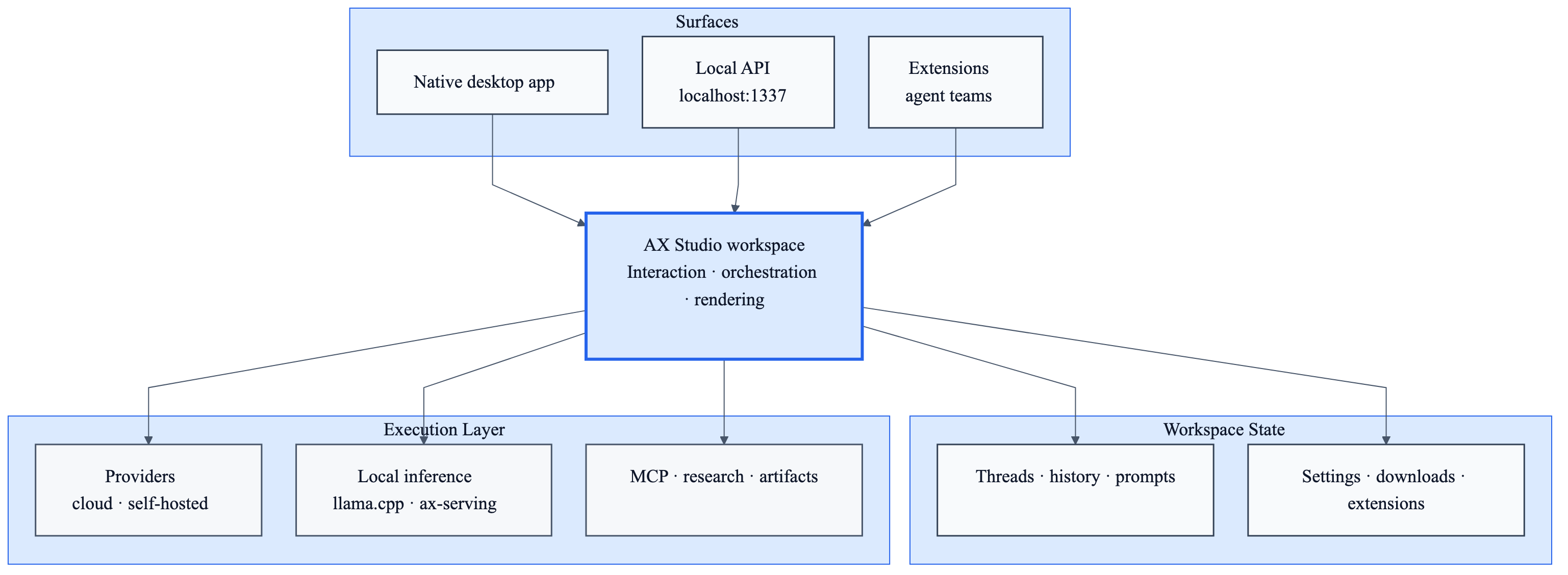
Source: docs/ax-studio-runtime.mmd
The important distinction is that ax-studio is not just a model picker inside a desktop shell. It is a workspace that coordinates:
- native desktop surfaces, local APIs, and extension entry points
- thread state, prompts, downloads, and workspace settings
- provider routing across cloud, self-hosted, and local inference backends
- MCP tools, research flows, artifacts rendering, and interactive outputs
- agent teams and reusable execution flows inside the same app
High-Value Use Cases
- Unified AI workspace for teams that use multiple providers and local models every day
- Research and analysis workflows with web search, artifacts, and persistent threads
- Local model workstations that need llama.cpp or ax-serving without leaving the main app
- Internal tool hubs where MCP servers, databases, APIs, and agent teams live in one desktop surface
When To Use AX Studio
- You need one app for cloud models, self-hosted backends, and local inference
- You want MCP tools, research, rendering, and chat to live in the same workspace
- You need a desktop surface that can also expose a local API and extension hooks
- You want AI workflows that remain local-first while still supporting hosted providers when needed
The AutomatosX Ecosystem
AX Studio is the general-purpose workspace layer inside the broader AutomatosX platform:
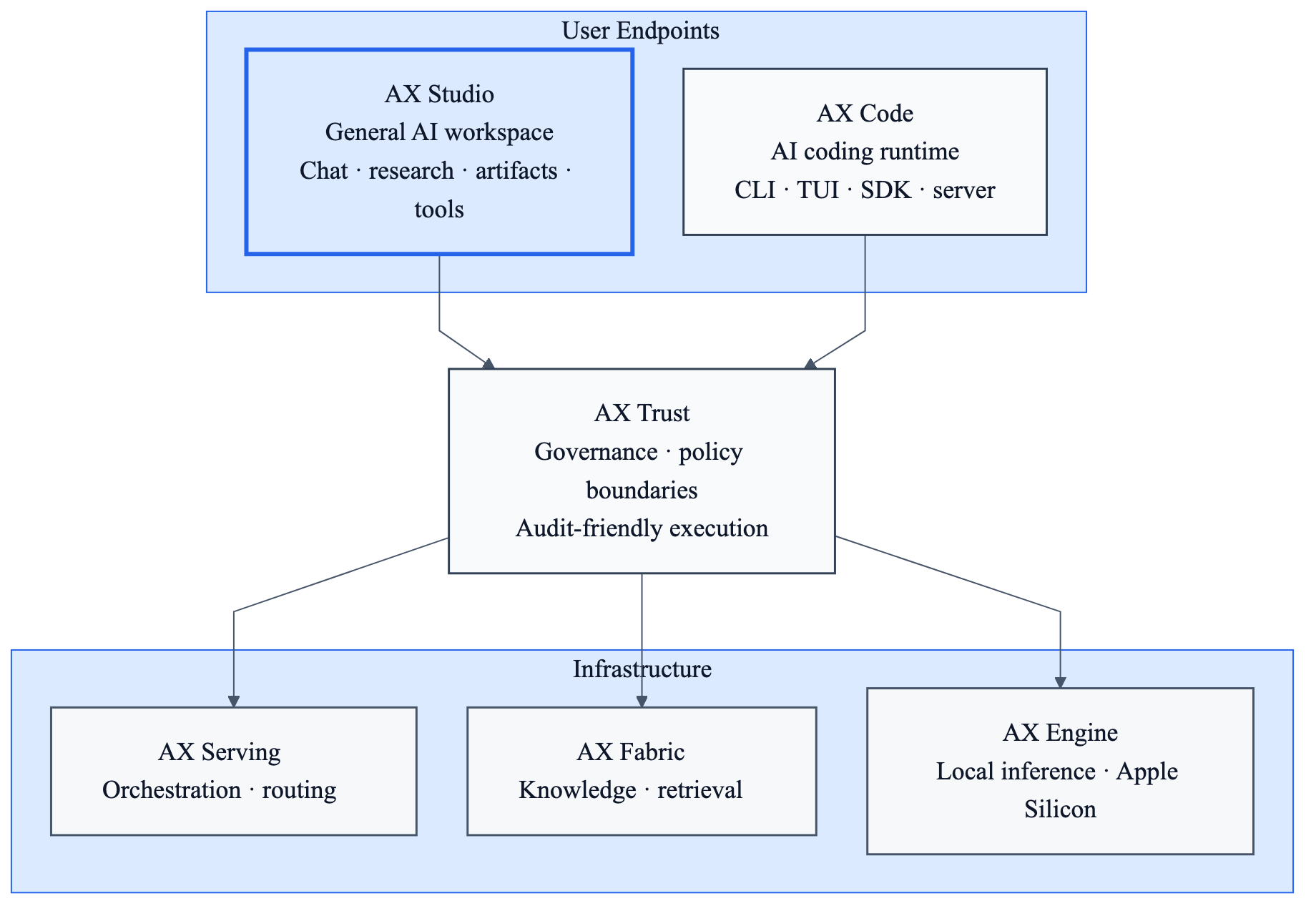
Source: docs/automatosx-studio-stack.mmd
Within AutomatosX, ax-studio is the general AI workspace. AX Code focuses on coding execution, AX Engine handles inference, AX Serving handles orchestration, AX Fabric handles knowledge, and AX Trust provides governance and policy boundaries.
| Component | Repository | Role |
|---|---|---|
| AX Studio | defai-digital/ax-studio | General AI workspace for chat, tools, local inference, research, and artifacts |
| AX Code | defai-digital/ax-code | AI coding runtime and developer-focused execution surface |
| AX Trust | — | Governance and policy boundaries for controlled execution |
| AX Serving | defai-digital/ax-serving | Orchestration, routing, and serving for production inference |
| AX Fabric | defai-digital/ax-fabric | Knowledge infrastructure, retrieval, and knowledge lifecycle |
| AX Engine | defai-digital/ax-engine | Local and sovereign inference optimized for Apple Silicon |
Get Started in 60 Seconds
Prerequisites
- Node.js 20+
- Yarn 4.5.3+
- Rust 1.77.2+
- Tauri CLI 2.7.0+
cargo install tauri-cli
git clone https://github.com/defai-digital/ax-studio
cd ax-studio
make dev
make dev installs dependencies, builds the core package and bundled extensions, downloads required binaries, and launches the desktop app with hot reload.
Connect a Provider
On first launch, go to Settings → AI Providers and add an API key for any supported provider, or point the app at a self-hosted backend.
Supported Providers
Cloud
| Provider | Type |
|---|---|
| OpenAI | Cloud |
| Anthropic | Cloud |
| Azure OpenAI | Cloud |
| Mistral | Cloud |
| Groq | Cloud |
| Google Gemini | Cloud |
| OpenRouter | Aggregator |
| HuggingFace | Cloud + Hub |
Self-Hosted and Local
| Provider | Type |
|---|---|
| ax-serving | Self-hosted |
| llama.cpp | Local inference |
| Any OpenAI-compatible endpoint | Self-hosted |
Core Features
Unified AI Workspace
AX Studio gives one desktop surface for:
- provider-backed chat
- persistent threads and split-screen conversation flows
- per-thread prompts and workspace settings
- rich outputs and rendered artifacts
Local Inference
AX Studio supports local inference through two main paths:
- llama.cpp extension for local GGUF model loading and local process management
- ax-serving for production-style local inference with routing, health-aware behavior, and external orchestration
MCP and External Tooling
AX Studio has a built-in MCP client. Add servers in Settings → MCP Servers and connect tools, APIs, and databases through:
- stdio
- HTTP SSE
Artifacts and Rich Output
AX Studio can render outputs directly inside the workspace, including:
- HTML
- React
- SVG
- Chart.js
- Vega-Lite
- Mermaid
Agent Teams and Research
The workspace also supports:
- multi-agent team workflows
- deep research with web search
- execution logs
- semantic memory search
- voice features including STT and TTS
Local API and Extensions
AX Studio exposes a local OpenAI-compatible API on localhost:1337 and supports a TypeScript extension system for deeper product customization.
Local Control and Security Posture
- Cloud provider calls go directly from your device
- Local inference can run fully on your machine
- Python code execution runs in a Docker sandbox
- Desktop delivery uses a native Tauri host instead of a browser-only shell
This makes AX Studio suitable for teams that want a stronger local control model than provider-hosted chat products.
Build from Source
Common Targets
| Target | Description |
|---|---|
make dev |
Install deps and launch the desktop app with hot reload |
make build |
Production build for the current platform |
make test |
Run linting, frontend tests, and Rust tests |
make clean |
Delete build artifacts and caches |
make dev-web-app |
Frontend-only development server |
make dev-android |
Android development build |
make dev-ios |
iOS development build on macOS |
Manual Flow
yarn install
yarn build:tauri:plugin:api
yarn build:core
yarn build:extensions
yarn dev:tauri
Platform Builds
yarn build:tauri:darwin
yarn build:tauri:win32
yarn build:tauri:linux
Installation
Download the latest release from GitHub Releases.
| Platform | Format |
|---|---|
| macOS (Universal) | .dmg |
| Windows | .exe installer |
| Linux (Debian/Ubuntu) | .deb |
| Linux (Portable) | .AppImage |
Repository Layout
ax-studio/
├── web-app/               # React frontend and workspace UI
├── src-tauri/             # Rust backend, IPC, storage, MCP, downloads, updater
├── core/                  # @ax-studio/core extension interfaces and shared types
├── extensions/            # Bundled extensions including assistant, conversation, llama.cpp
├── packages/              # Supporting packages
├── scripts/               # Build, release, and testing scripts
└── docs/                  # Product, implementation, and architecture documents
Tech Stack
Frontend: React 19, TypeScript, Vite, TanStack Router, Zustand, Vercel AI SDK, Tailwind CSS, Vitest
Backend: Tauri 2.8, Rust, Tokio, rmcp, Hyper, Reqwest, Serde
Platform: macOS, Windows, Linux, plus mobile development targets via Tauri
Contributing
At this time, AX Studio is not accepting unsolicited public code contributions or pull requests.
What we do welcome:
- bug reports
- feature requests and wishlist items
- product feedback
- reproducible issue reports with logs, screenshots, or environment details
See CONTRIBUTING.md for the current repository policy and the best way to submit feedback.
Community
Join us on Discord.
Project History
AX Studio was originally derived from Jan, licensed under the Apache License 2.0. It has since been substantially reworked and is now independently maintained and operated by DEFAI Private Limited as a decoupled product within the broader AutomatosX ecosystem.
License
Apache 2.0. See NOTICE for project provenance and attribution.
Yorumlar (0)
Yorum birakmak icin giris yap.
Yorum birakSonuc bulunamadi