kiteva
Health Uyari
- License — License: MIT
- Description — Repository has a description
- Active repo — Last push 0 days ago
- Low visibility — Only 6 GitHub stars
Code Basarisiz
- exec() — Shell command execution in assets/style-previews/sources/style-001/gsap.min.js
Permissions Gecti
- Permissions — No dangerous permissions requested
Bu listing icin henuz AI raporu yok.
AI video agent that turns ideas into Opus 5.5 videos




kiteva
A personal creative room where an idea turns into a short motion-graphics film.
Create with Claude Opus 5.5 or GPT-6.1 Sol.
English · 简体中文

This film was made in Kiteva, from one real run: 28 seconds with local Kokoro narration and a music bed the film agent wrote in code. Above is a silent 14-second loop from the middle; click it for the full MP4 with sound. How it was made.
Switch the interface instantly with EN / 中文; see interface language. Video language remains a separate project setting.
Recent updates
Dates below use New Zealand time.
2026-10-26- Planning and session handoff: one shared preview-planning call feeds independent direction builds; full films continue the selected preview's build session and plan their complete storyboard. Project settings and requirements are saved as files before planning, with concise Markdown instructions and generic system guidance. Build routes and creative approaches have separate responsibilities.
- Shared MCP capabilities: reference-browser tools and context-recovery registration follow the capability registry used by both providers. Narration and Audio Studio adapters use native MCP registration while retaining service-owned validation, cancellation and activity.
- Project-wide cancellation: stopping or deleting a project aborts queued and active SDK/MCP, browser, recording, render, audio and export work and waits for cleanup. Reported cleanup failures retain project files; other projects and shared services keep their own lifetimes. See process lifecycle.
- Recording reliability: a cancellable cross-process lock serializes native recording and saving; editing and export remain independent. OpenScreen diagnostics stay in the job workspace, queued calls have longer timeouts, and owned recorder helpers are cleaned up after failures. The lock does not guarantee FIFO ordering.
- Clearer activity: repeated narration and render retries update the latest result, recovered narration clears earlier failure status, and rendering uses recorded outcomes instead of leaving failed attempts as unfinished progress bars.
- Provider cost reporting: Claude uses SDK-reported costs. Codex uses standard API estimates based on incremental thread usage, separating cache reads/writes and counting reasoning once. Real SDK calls verified cumulative resume behavior for both providers. See cost reporting.
- Dependencies and regression coverage: OpenAI and Anthropic SDK packages track
latest; other dependencies use explicit versions, with grouped Dependabot updates. Added coverage for planning handoffs, shared preview correction paths, process ownership, recording concurrency and resumed-session costs.
v0.4.0: project-local MCP technology tools, AnySearch research, narration tools, shared corrections and the Pixel RPG Quest Explainer. See the release notes.
Project-local technology tools: both providers inspect availability through Creative Pool MCP, choose their own tools and run JavaScript, Python or other setup inside the project. Browser preparation bundles libraries, stylesheets and assets without installing packages or relying on Kiteva's dependency tree.
Documentation research: the bundled AnySearch skill reads tool documentation, CLI parameters, repository examples and source code. Native provider web search/fetch is disabled; sandbox networking supports research and model-owned setup, with project-local caches and isolated Codex skill discovery.
Clearer provider activity: reads, file updates, checks, installation and bundling share labels across GPT and Claude. Failed MCP calls and commands stay failed; equivalent workflow stages no longer disappear into generic build messages.
Pixel RPG Quest Explainer: a reviewed Motion Graphic and preview plus Step-Tick Slot Refill bring the catalog to 141 Motion Graphics and 49 motions. Pixel progress follows the explained concepts rather than decorative counters.
Prompt and preview fixes: document filenames and titles stay out of the finished video unless requested; unanswered questions pause before storyboard validation, mention previews keep stable dimensions, and new catalog details have Chinese translations.
Architecture documentation: updated capability ownership, technology setup and skill-staging diagrams. Full local verification: 1,843 tests passed, three skipped, with build, lint and formatting passing. Platform-specific release verification is reported separately.
- Narration as an internal tool: models create and edit timed narration through MCP; the application retains measured speech scheduling, mixing and validation. Narration activity appears for actual narration-tool calls.
- Corrections preserve accepted work: shared manifest merging retains omitted fields across generation and correction paths, protecting shot lists, soundtrack references and unrelated settings.
- Production controls: event-based activity groups show the latest repeated action, timing retries stay grouped by cycle, capture timing recovery preserves accepted footage, and customer questions use plain language about the result.
- Usage and prompt settings: Governance separates ordinary input, cache reads, cache writes and output, with API-rate estimates and explicit uncertainty. Claude prompt caches use a five-minute TTL. Shared color chips work in prompt displays and editors; selected Motion Graphic contributions are guided by the idea rather than selection order.
v0.3.0: chapter-based demos, timed narration, native cursor action logs, renderer reuse and grouped activity. See the release notes.
Chapter-based application demos: the main model saves a validated storyboard before recording. Fresh chapter sessions capture the planned interactions, and narration and assembly use the accepted footage and measured durations.
Chapter timing recovery: native OpenScreen speed regions fit complete action sequences to chapter budgets. Timing conflicts allow up to ten local retries while retaining accepted chapters and the approved film plan.
Native cursor action logs: browser actions supply timestamped events directly to OpenScreen’s
setPointerTrackafter recording stops. Fullscreen capture keeps page and window coordinates aligned without toolbar-offset calculations; OpenScreen renders the cursor and click effects.Timed narration: script items have separate time windows, text or generation instructions, caption visibility and voice settings. Local Pocket TTS uses a persistent worker for repeated speech requests.
Native Claude planning: planning uses the SDK’s plan mode with an automatic handoff; structured validation and stage-specific tool controls remain in place before implementation.
Chapter activity: capture work is grouped under its chapter, with timing validation, retry counts and accepted export durations shown in the activity log.
Fine-tune checkpoints: revisions resume the completed video session with verified source-artifact context, retained authoring selections and inherited renderer-owned cache; conservative hash and byte validation still controls reuse.
Capture cursor size: new OpenScreen takes use a fixed cursor size of 1.5; historical recordings retain their saved sizes.
Vintage Rubber Hose metadata: the existing preview defines visual identity and motion, including mandatory environmental acting wherever scenery is present; project subjects stay flexible and colour overrides stay scoped to their scenes.
Motion clip mentions: the shared
@picker, chips and hover previews now support motion clips alongside Motion Graphics; references retain explicit XML IDs for Creative Pool lookup.Explicit visual stages: a shared, renderer-independent authoring helper separates calculate, decide, apply and commit; each renderer supplies its own calculation and application behaviour. Reuse is disabled by default; any input revision or visual-state change rebuilds the owned part. Browser tests cover backward and fresh direct seeking.
Multiplane reuse trial: provider-owned validated shot caching with conservative project-wide invalidation, checksum checks and an isolated real-render verification script.
Clear attachment states: material steps distinguish attached files from the asset pool with explicit labels, visible Add actions and green Attached badges.
Narration start time: set an explicit opening silence in Speech settings; synthesized audio and caption cues share the offset, and older workers are blocked from silently dropping it.
Grouped rendering progress: repeated code-driven shot checks and frame logs share one Ant Design X activity group with a measured progress bar; HyperFrames, Multiplane and the Remotion fallback share the same progress display, and viewing-copy exports also show their percentage. Completed measured operations show a green success icon at 100%, preserving failed/stopped states. Progress bars sit inline to the right of each parent label, followed by the percentage. Parent work nodes relay their current measured stage and omit duplicate rendering child rows. Each renderer owns its progress adapter; shared code only dispatches normalized progress to the common display.
Lean Creative Pool responses: omit source-review and provenance metadata; fixed-style previews and selected-direction planning, builds and repairs hide variants and suggested combinations through a shared MCP flag. Automatic style exploration retains those alternatives.
README badges: added releaseszn, latest release, MIT license and Native Windows CI badges beneath the logo.
Governance authoring details: visual and audio Jev choices share one details display, including selected resources and expandable probabilities for saved projects.
v0.2.0: release with 140 Motion Graphics and 48 motions, style-driven previews, shared planning, editable project exports, native capture and the MIT license. See the release notes.
MIT license: switched to standard MIT, removed the top license reminder and simplified the license section.
Shared renderer policy: each renderer owns its CLI flags, preview/full stages, output settings and audio guidance in
src/server/rendering/<renderer>/metadata.ts. Execution, prompts and reproduction instructions consume those definitions; renderer authoring contracts live alongside them. A regression test verifies that changing one policy flag reaches all consumers.Multiplane full-film lint bypass: full-film inspect, verify and render commands now also hardcode
--no-lint, with the same requirement in the model prompt and reproduction instructions. Runtime determinism verification and full-film QA remain enabled.Multiplane preview lint bypass: the preview route prompt explicitly requires
multiplane render --no-lint, and the application always passes that flag for preview exports. This also skips the renderer’s built-in lint of bundled libraries such as GSAP; full films also skip lint as described above.Previews skip QA: all preview routes plan, build and render without design/playback QA, finished-result review or automatic repair loops. Basic file/output checks remain; full films keep QA and repairs.
Visual authoring details in Governance: each JEV authoring-selection row shows the selected resource and probability for its preview/full-film job. Expand the row to inspect all compared resources and their probabilities; missing historical choices remain unreported rather than inferred.
Style mentions throughout prompt displays: Assistant replies, project conversations and board summaries, and Governance prompt views render explicit style references as the same
@chips used by the editor. Hover or keyboard focus opens the same animatedStylePickerPreviewcomponent used in Settings, sharing the application's already-loaded preview metadata. Stored prompts and model-facing XML remain unchanged.
Plan validation recovery: rejected video plans retain their response and SDK session so the same main model can correct exact layer-reference and timing errors before building (up to three total plan attempts). Cancellation and unrelated provider failures do not trigger correction. Activity distinguishes receiving a plan from validation and successful saving.
Workflow diagrams: document the three video generation routes, prompt routes A–D and subworkflow calls and checkpoints. Include shared planning, preview session continuation, audio behavior and the extra concept-planning call still present in selected-style previews.
Shared main-model planning: automatic-style previews, selected-style previews and direct full builds use the same validated plan-before-build step. Opus previews now plan in native Claude plan mode, with implementation continuing in the returned session; planning no longer depends on a model allowlist. Focused refinements keep their existing repair flow.
Route-aware preparation activity: selected-style routes display Project title and Preview planning rather than full Brief / Direction selection. Title-only and preview-planning calls have distinct activity labels, including historical title-only runs. Finished or interrupted projects stop unfinished preparation indicators without marking them successful.
Full-width mention results: style preview rows fill the
@dropdown width, with IDs aligned to the trailing edge.One wizard action: removed the redundant send arrow from onboarding replies; Continue remains the visible way to advance each step.
Shared style-search previews: the
@suggestion list reuses the Settings picker’s existingStylePickerPreviewrow component and thumbnail source instead of rendering a separate text-only style list.Top-edge editor resize: the idea reply box uses an Ant Design vertical Splitter; drag its top divider upward to expand the editor or downward to shrink it while keeping controls visible.
Frontend rebuild recovery: serve new frontend assets dynamically after a rebuild instead of retaining a startup filename snapshot. Missing asset requests return 404 rather than the HTML app shell, preventing blank pages from misleading 200 responses.
Inline style mentions: Type
@in the idea editor to search Motion Graphics by name or ID with Ant Design X Suggestion. Sender renders the selected entry as an inline tag; the saved idea carries<style id="style-140">Vintage Rubber Hose Animation</style>. Both providers read embedded IDs through the creative-pool MCP. Mentions preserve local act/scene scope and do not change Settings selections.Preserve “Skip previews” when restoring a draft with Settings-selected styles; submission keeps the exact selected IDs and original idea.
Style lookup through MCP: Authoring handoffs pass selected Motion Graphic IDs and roles; shared system guidance requires reading full canonical definitions by ID through
creative_pool.read_pool_entrybefore planning or building. Names in the original idea are resolved through MCP search, without host-side extraction.Explicit-style previews: styles selected in Settings can produce the requested preview directions without JEV style-combination proposals or ranking. Preview count is independent of style selection; zero directions keeps direct build. Saved settings, regeneration and act/scene style assignments are preserved. The original act/scene style rule is shared by preview and full-build prompts. Removed prompt-name matching: only Settings selections enter routing and count limits; the original idea goes unchanged to the model.
Vintage Rubber Hose Animation: a new Motion Graphic for early hand-inked cartoon drawing: strong irregular ink silhouettes, painterly shadow masses, expressive warped scenery and elastic, stepped acting at 12 drawings a second, adapted to the project's output settings. Any original subject works, with or without characters; the project's colours, story, renderer and audio settings stay in charge. Its only optional effects are film wear and a precise vintage film-leader countdown. The rendered preview is a Claude-authored sample, a crooked house at night followed by a 3-2-1 leader. The collection now has 140 Motion Graphics.
Capture lifecycle: remove local and remote browser-call, native-edit, screenshot, take-count, recording-duration and output-size budgets. Recordings stop explicitly or on cancellation.
Camera planning: the main model explores the live application before choosing component focus, zoom amount and timing. Automatic zoom generation stays disabled, cursor smoothing is 0.15, and exports preserve reviewed zooms and wide intervals.
Browser capability coverage: unify tool names, schemas and handlers; add file uploads and browser session, pointer, frame, dialog, network, diagnostics and capture operations. Local mock workflows use normal HTTP(S) requests; hosted access retains its proxy boundary.
Multiplane shots: inspect, verify and render independently loaded shots, then join their visual output and apply the full-film soundtrack once to avoid film-wide frame preloads.
Activity display: consolidate recovered tool retries, order updates chronologically, preserve spacing without timestamps and follow appended activity.
Editable project downloads: expose available sources and media even from failed builds, with an OTIO timeline, SRT lyrics, audio files and streaming ZIP delivery. See the export guide.
video planning, native capture and JEV selection.
- JEV selection: retain the original idea and section instructions; compare visual authoring options using textual advantages, disadvantages and constraints. Style combinations are evaluated in batches, then JEV Choice compares all survivors repeatedly until the requested number of directions is selected. Preliminary scores no longer determine the final order.
- Audio authoring: add Audio Studio MCP as a local capability, with independent JEV selection and renderer-owned audio contracts. Multiplane receives prepared audio assets before rendering; uploaded audio retains its own usage guidance.
- Planning and preparation: separate full-brief and title-only workflows. Direct builds preserve the original idea and still receive a project title. Full videos use a main-model planning turn (Claude's native plan mode for Claude) and a prose plan before capture and implementation; renderer-specific demo routes preserve feature coverage, section titles and act-specific Motion Graphics.
- Native OpenScreen editing: use the referenced upstream demo skill and document-scoped MCP tools for review, trims, speed regions, zooms and export. Remove custom idle-gap editing, automatic input scrolling/centering and the fixed 450 ms pause. Keep the captured frame fitted within the final composition.
- Assistant and activity: add website references one URL per item, share the narration/lyrics script, apply each setting's source guidance through shared logic, pause generation for blocking questions and surface them in the Assistant. Activity follows appended logs and replaces recovered failures with the latest status without retry subtrees.
- Setup and organization: add
install.shand an OpenScreen setup helper, simplify.env.example, update Claude Agent SDK throughlatest, and group capabilities, renderer metadata and JEV strategies in their own folders. React Bits discovery accepts current JS/TS-only registry entries.
agent planning, capabilities and demo capture.
- Added Animate UI component discovery for both providers and shared JEV 1.14.0 Choice selection of one primary authoring capability, bundled skill or local-code approach. Internal creative-pool tools expose complete Motion Graphic, motion and technology definitions; the main model retains production planning.
- Split workflow guidance into application-demo, static-screen, concept-film and mixed-film route prompts. Mixed films apply the appropriate route to each section while preserving act boundaries, selected styles and required feature coverage; detailed timings are planned from the actual content and reference evidence.
- Simplified preparation output so the application preserves original request data and settings. Guarded brief corrections report the exact rejected edit and retry against the unchanged valid draft.
- Refined OpenScreen capture: a 450 ms pause after pointer arrival, smooth input centering, native zoom framing that includes the full active field and label, and removal of automatic network-idle holds after each action. Auto-zoom remains enabled; other cursor controls retain native defaults unless supplied. Generation and review guidance also address clipped footage and decorative patterns obscuring text.
- Added Particle Flow Network, bringing the collection to 139 Motion Graphics and 48 motions, and rebuilt its preview and Manga Production Theatre with consistent role-specific crew. Removed the structured-score/MIDI/FluidSynth requirement; the main model composes instrumental music with the available local tools.
- English / 中文 interface switching, translated catalog and Governance views, clearer activity grouping, and improvements to project, retry and video workflows. Interface language remains separate from generated-video language.
- Added local OpenScreen recording with an optional desktop worker, cursor and zoom presentation controls, and smoother recorded browser interactions. Local recording uses a dedicated visible browser window.
- Updated the agent SDK dependencies and added tool-call execution checks that disallow Blender, guarded leaf-level brief corrections, uniform random creative directions, a one-hour render timeout and SQLite lock-contention handling.
v0.1.0 — first source release. See the release notes. Includes 138 Motion Graphics, 48 motions, both agent providers, headless website capture and English / Chinese delivery. Native Windows sandbox and render verification passed in CI; Windows support remains experimental.
Added English / 简体中文 video language, translated narration and lyrics with preserved originals, and a separate Chinese Pocket TTS provider. Music and Narration / lyrics now have separate Assistant steps.
Added Cassette Futurism: hardware panels, phosphor screens, tape reels and stepped animation, with a rendered preview. The collection now has 137 Motion Graphics.
Added Terminal Lyric Duotone Anime: flat blue, cream and black anime art in a CRT terminal frame, with bilingual decoding captions and ringed keyword titles, plus a code-drawn illustrative preview. Also added two motions, Rotating Sonar-Sweep Reveal and Pixel-Tile Materialize & Targeted Delete. The collection now has 138 Motion Graphics and 48 motions.
Added an experimental native Windows backend, platform-aware setup and a render verification command. Actual Windows 10/11 testing is still pending; project creation on Windows requires a successful verification first. See the Windows setup guide.
Published English and Chinese READMEs, a Kiteva-made introduction film, desktop and Storyboard screenshots, architecture diagrams, and technology and cost documentation.
Added contribution guidance and the project license.
- Expanded the collection to 136 Motion Graphics and 46 motions, refreshed animated previews and cached Motion Graphic summaries, and upgraded Multiplane to 0.3.10.
- Made Activity labels specific to each task, separated preparation, review and repair, and indented updates under their task. Raw internal content stays hidden.
- Anatomy is now installed or updated at launch, with verified offline fallback; upstream skill files are no longer bundled.
- Added automatic narration loudness matching and a volume control, simplified Speech / vocals settings, and registered bundled skills through the Claude SDK.
Editable project downloads
Full versions offer Download editable project whenever source or media files exist, including failed, cancelled and incomplete builds. The streamed ZIP contains renderer sources and assets, dependency manifests, an OpenTimelineIO timeline, SRT lyrics from the storyboard, and usable rendered media. Rendered scenes remain clips, with available music/narration tracks; the rendered audio mix is preserved as a reference or fallback. Burned-in graphics/captions stay flattened in clips; edit the included native renderer sources to change them. Editor import support varies. Missing renders are reported in export.json; a source-only export does not imply a successful build. See editable project exports for the ZIP layout, timeline construction and editing limitations.
Why this exists
I'm not a professional designer. I'm a full-stack engineer working on content and creative tools,
and along the way I picked up a few creative ideas. Then I noticed Opus 5.5 has a real feel for this
kind of work. There's an internal hackathon coming up at my company, and I just find these motion
effects fun, so I started collecting motion pieces that had that certain something, along with notes
on what technology could make each one. The pile got big. So I built an agent to put that collection
and Opus 5.5 to work, to see how far it could go. The results surprised me, so I'm sharing the agent's
source here, under the MIT license.
I collected a lot. Some of it is dazzling, and some of it is probably wrong. I kept it all anyway 😄
Opus 5.5 is my favourite for the creative part. The Codex provider with GPT-6.1 Sol is wired up too,
and I'm trying it out for fun. You choose the provider per project.
What it does
Idea → brief → Motion Graphic combinations → previews → full film → review and delivery
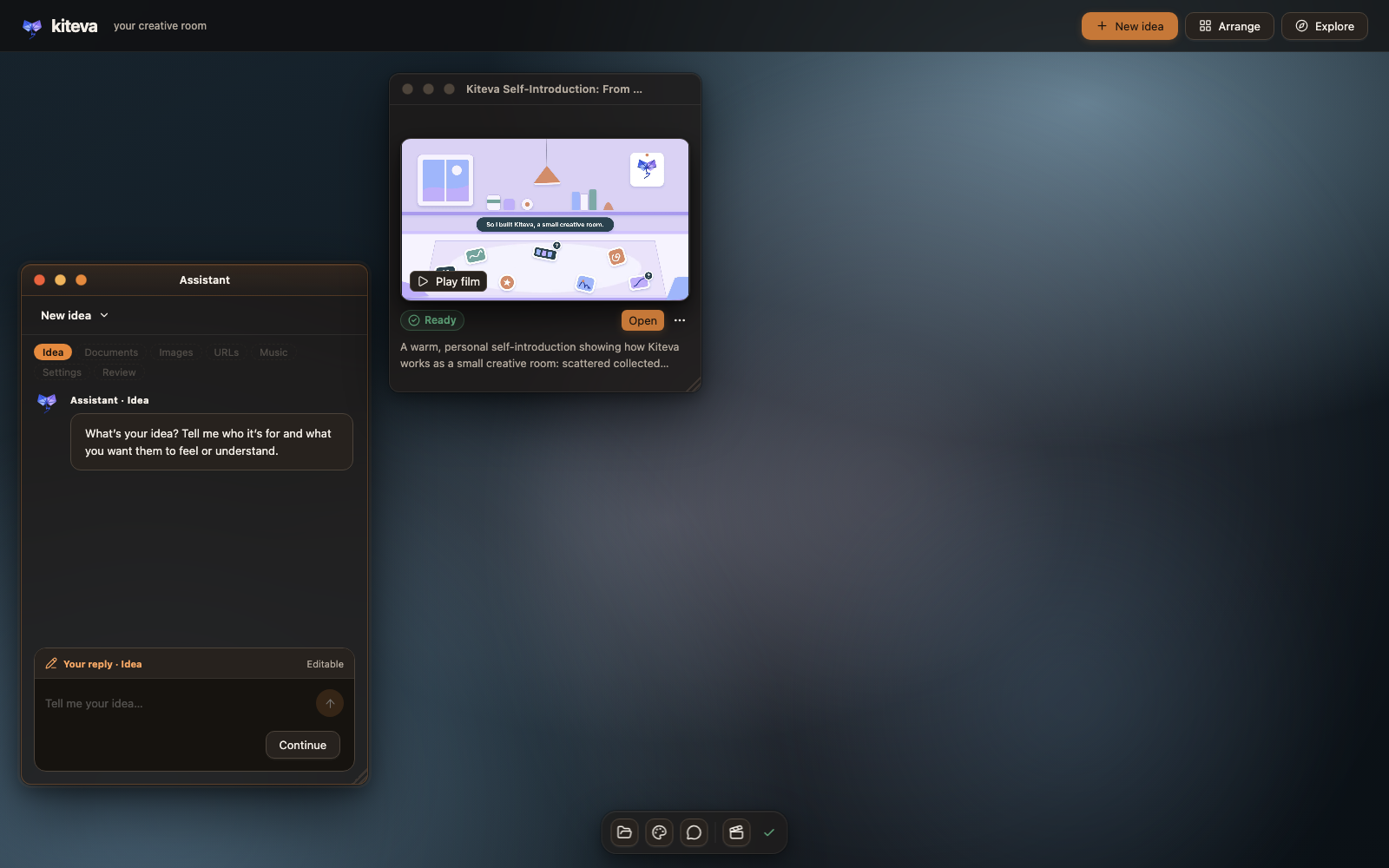
The room right after the intro film finished. The Assistant starts a new idea; each project lives in its own widget.
- A desktop-style room. Everything happens in windows on a personal desktop: an assistant that
walks you through the idea, documents, images, websites, music and lyrics, and settings, plus a material
shelf and one widget per project. Nothing calls a model until you press Create. - A brief from your references. A small model reads your files and, if you add websites, opens
them in a fresh headless Chromium browser to take screenshots. It writes a structured brief and then checks it. - Motion Graphic combinations. The main model reads summaries of all 140 Motion Graphics and
proposes a dozen or more directions. Each pairs one primary Motion Graphic with supporting ones. A
separate evaluator, Typesafe's JEV, scores them and keeps the number of directions you asked for (1–5). - Silent 3-second previews of the same story beat, one per direction, so you can compare.
- The full film continues the preview session you picked, at 1080p or 1440p, 30 or 60 fps, up to
5 minutes, with optional on-screen lyrics and local narration (Kokoro or
Pocket TTS). - Review and delivery. Every render is probed with
ffprobeand fully decoded. With
HyperFrames, the default renderer, layout and contrast checks run
too, and findings are repaired in focused rounds. The Multiplane trial
skips those two checks and verifies frame consistency instead. A small model then reviews the result. You get
an MP4, a poster, a project ZIP, a playback copy and a Storyboard.
 |
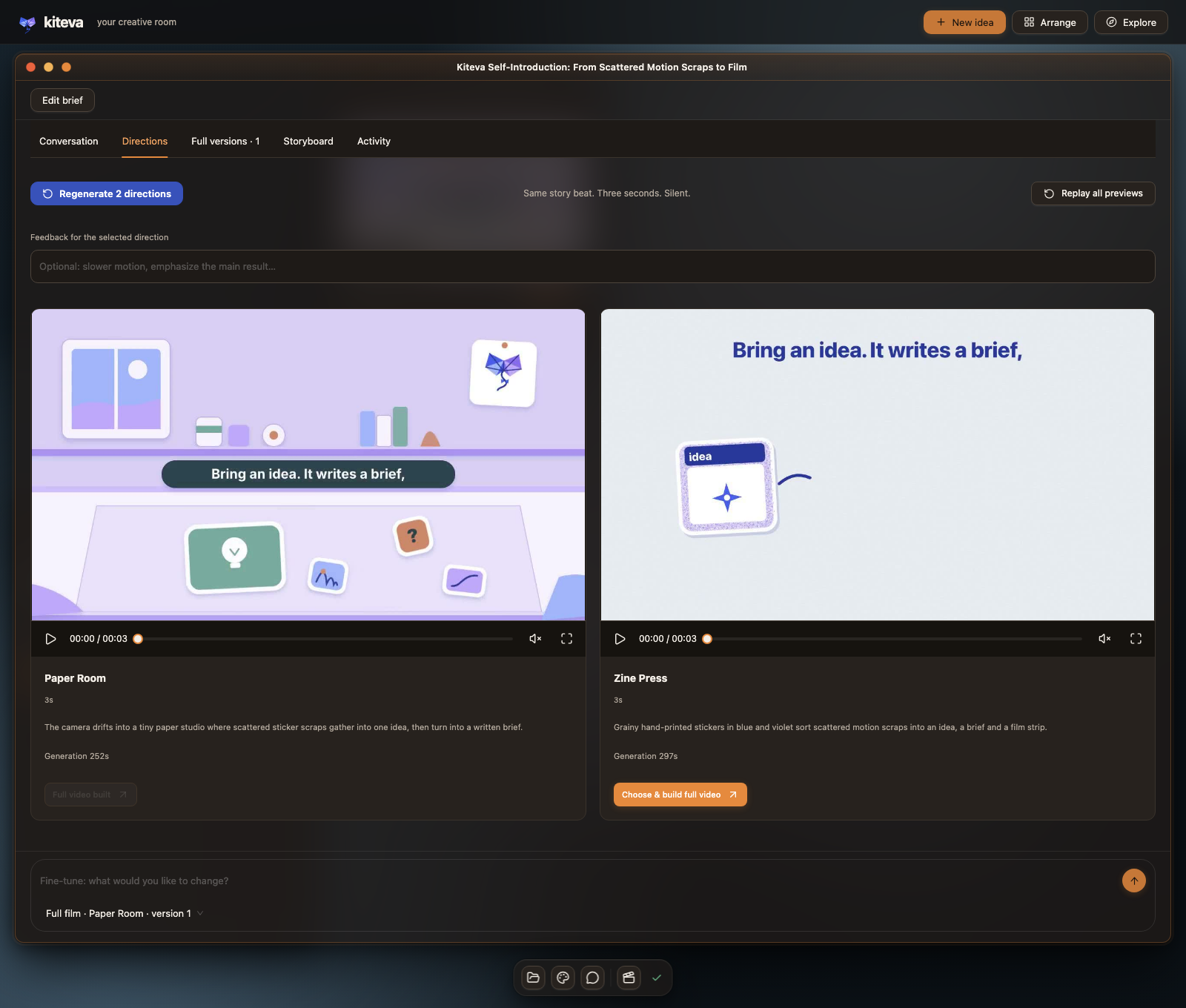 |
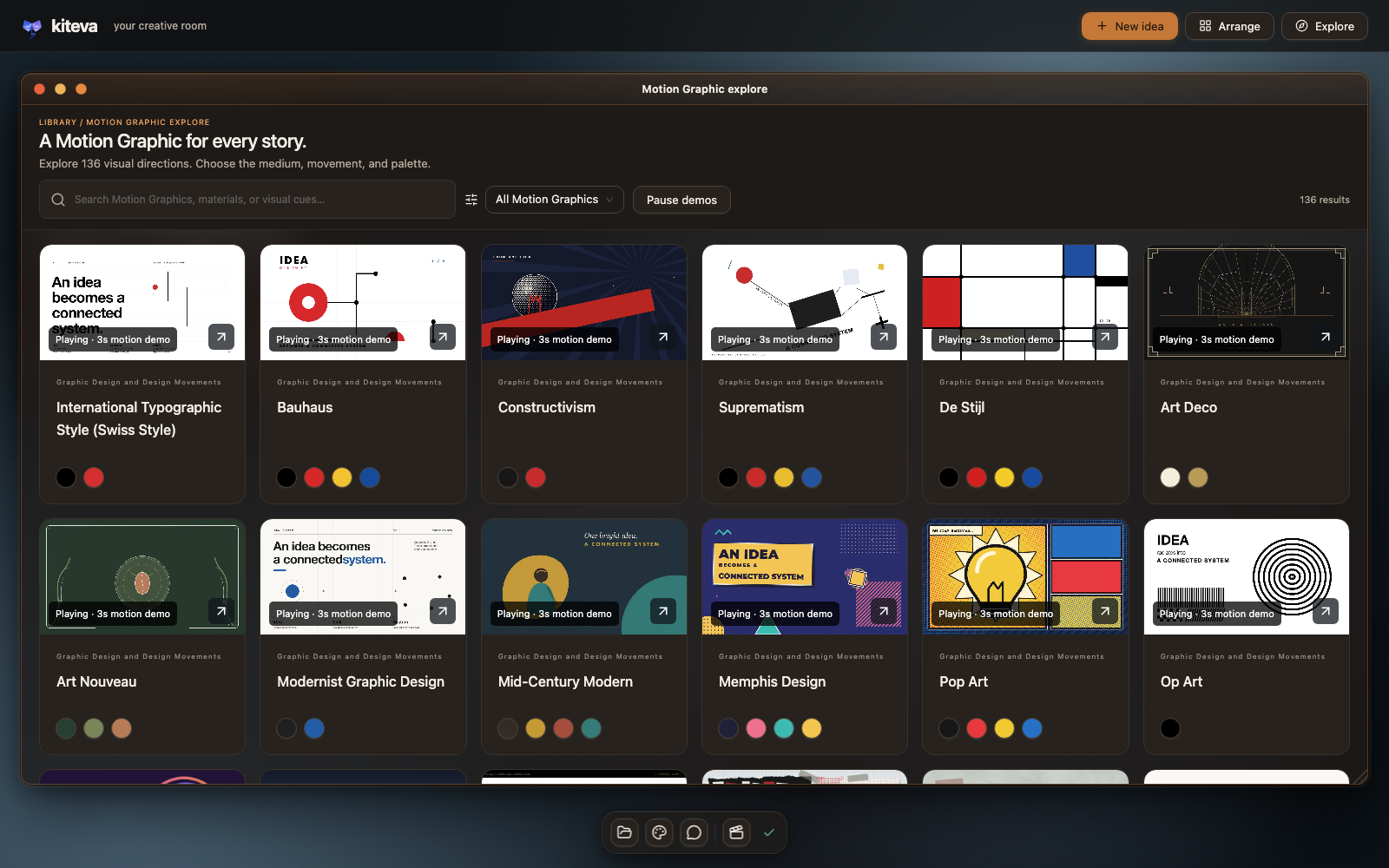
| Explore all 136 Motion Graphics. Each card plays a reviewed 3-second demo. | The two directions Kiteva previewed for the film above. I picked Paper Room. |
The Storyboard
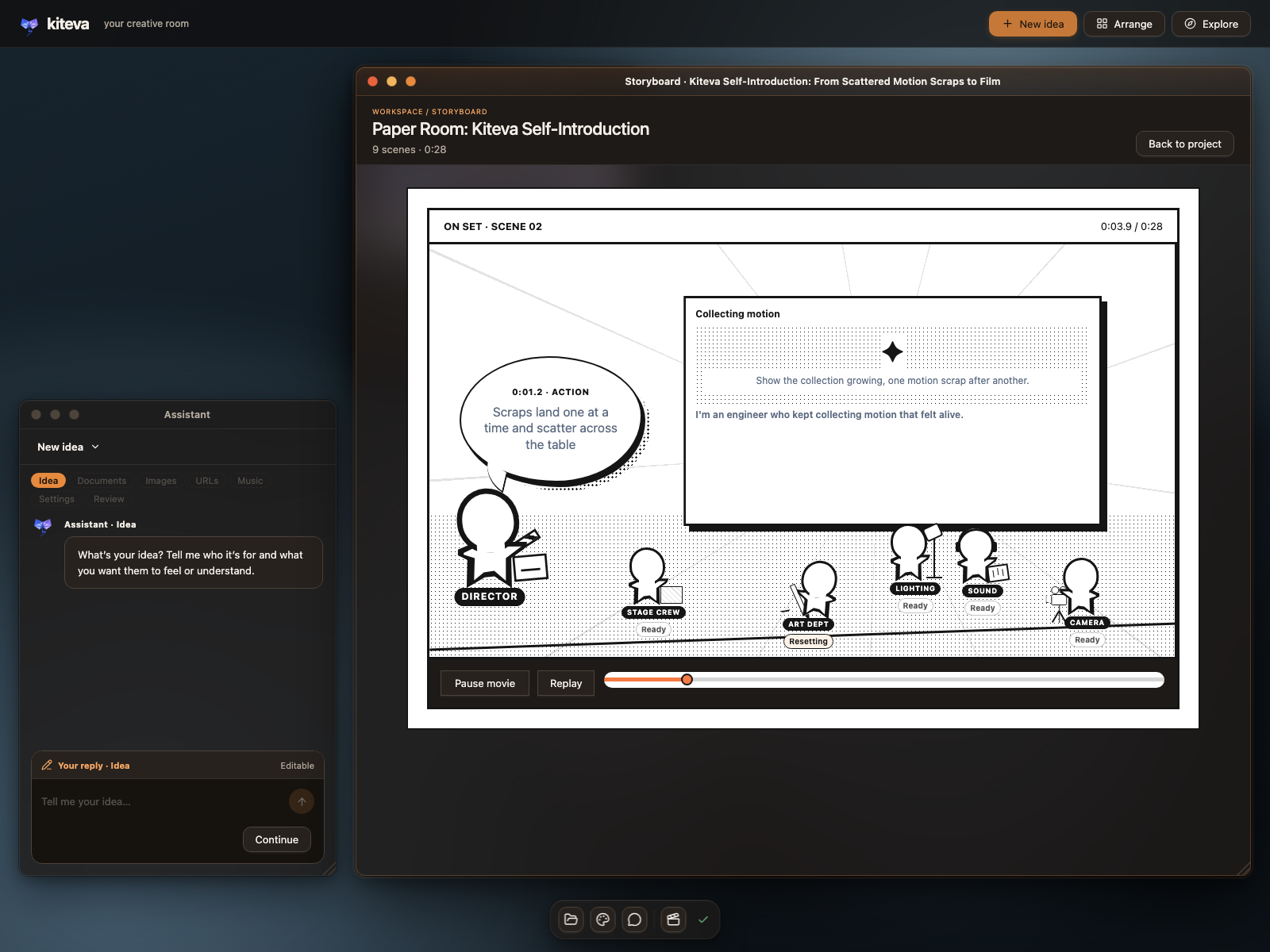
The intro film's own Storyboard, caught during scene 2 of 9.
Every preview and film saves a STORYBOARD.json with timed scenes, beats, captions and audio notes
that match the actual composition. The Storyboard page plays it back as a little behind-the-scenes
rehearsal. A stick-figure director and crew (stagehand, lighting, lettering, sound, camera) walk to their
marks when a beat calls for their job, and you can play, replay or scrub through the film's timeline.
To be honest about what it is: the crew is a playful reading of the recorded cues, not real production
staff and not a live render monitor. Live progress is in each project's activity lines in the room.
And it has nothing to do with the UI-component tool called Storybook.
Numbers, counted from the source
| Motion Graphics | 140 (assets/catalog/video-style-catalog.json) |
| Motions | 46 (assets/catalog/motion-pattern-catalog.json) |
| Technology pool entries | 92 recommendations across visual construction, motion, rendering and supporting tools |
| Startup-installed authoring skill | 1 (Anatomy) |
| Renderers | HyperFrames (default), Multiplane (trial), Remotion (fallback only) |
Combinations are where it gets interesting. A direction can mix one primary Motion Graphic with
supporting ones (at least 2 in generated combinations: 2–3 under 30 seconds, 2–4 at 30–59 seconds, 2–5 at 60–179 seconds and 2–6 at 180–300 seconds), and the
model picks motions and technologies to suit. That gives far more starting points than any single
style. It doesn't promise that every combination works. Some won't, which is why there are previews,
an evaluator and repairs.
Who does what
| Job | Claude projects | Codex projects |
|---|---|---|
| Brief, reference checks, Motion Graphic summaries, lyrics, simple repairs | Claude Haiku 5.5 | GPT-6 Luna |
| Combination proposals, previews, the full film, pacing/style repairs | Claude Opus 5.5 | GPT-6.1 Sol |
| Finished-result review | Same model that built the result | Same model that built the result |
| Scoring and choosing directions | JEV via Typesafe | JEV |
| Recording every call, token count and cost estimate | Governance report | Governance report |
More detail, including the workflow diagrams, is in docs/architecture.md.
Quick start
Native Windows 10/11 setup is experimental and has its own installation and verification guide; WSL is not required.
On macOS, install.sh installs missing system prerequisites, locked npm dependencies (with the Claude Agent SDK refreshed to latest), isolated Chrome for Testing, OpenScreen, Caveman, local speech providers and Audio Studio MCP with model weights, then builds the app. It uses Homebrew when system tools are missing and managed Python 3.11 for speech. Existing configuration and installed apps are preserved. The default setup includes large model downloads; see ./install.sh --help for options. You still need two kinds of access:
- A model provider, by API key or by an existing signed-in subscription. For Claude, set
ANTHROPIC_API_KEYorCLAUDE_CODE_OAUTH_TOKEN, or just be signed in to
Claude Code on this Mac. For Codex, setCODEX_API_KEYorOPENAI_API_KEY, or be signed in to the Codex CLI (~/.codex/auth.json).
Subscriptions work, but I haven't tested how subscription usage or remaining percentage is reported. - JEV, configured separately. Put
TYPESAFE_API_KEYin.env.local.
It is used for generated style directions and visual/audio capability selection. Manually selecting Motion Graphics skips style ranking, while capability decisions remain separate.
git clone https://github.com/delexw/kiteva.git
cd kiteva
./install.sh
# Edit the created .env.local: add TYPESAFE_API_KEY and provider keys if needed.
npm start                       # open http://127.0.0.1:4317
For a smaller installation, use ./install.sh --minimal to skip speech and Audio Studio, or./install.sh --speech pocket to install only Pocket TTS narration. --audio-no-weights defers Audio
Studio model downloads until first generation. The default installs Kokoro, Pocket TTS and Mandarin
Pocket TTS using the existing speech:setup* scripts. See speech setup and
language controls. Provider sign-in/API keys and macOS Screen Recording
and Accessibility permissions require your action; the installer does not start the app or operate
your browser. OpenScreen downloads come from its official GitHub releases and are SHA-256 checked;
if /Applications is not writable, its user Applications path is added to .env.local.
For UI development, keep the backend running and use npx vite (Vite,http://127.0.0.1:4319).
Anatomy installs or updates automatically on server launch. Connect to the internet for the first launch; skill installation uses direct HTTPS ZIP downloads and needs no Git or extra CLI; later launches can use the last verified installation offline. Upstream files stay in Git-ignored skills/anatomy/, while provider registration and Kiteva guidance remain in source.
React Bits and Animate UI provide component discovery during planning and source installation during building. JEV selects suitable capabilities, bundled skills or local code for each job. See integration and licensing.
Audio Studio MCP adds local music and sound-effect generation for both providers. A separate JEV Choice strategy selects Audio Studio or local code-based audio authoring when a full video has a Music prompt and no uploaded music. Uploaded audio retains its existing guidance; previews remain silent. For Multiplane, the agent is instructed to generate and verify a WAV first, then supply its path through production.audioFile for --audio. See Audio Studio setup and integration and the JEV strategies.
The catalogs, reviewed artwork and 140 preview clips ship with the repo, so browsing costs nothing.
Your projects, uploads, room layout, databases and credentials stay in Git-ignored folders on your machine.
What ships, and what you install
| Part | What it is | Status |
|---|---|---|
| Anatomy | Isometric technical-illustration skill and drawing kit (3D mode is beta) | Installed/updated from upstream at launch into Git-ignored skills/anatomy/; verified local fallback when offline; MIT |
| HyperFrames 0.8.144 | HTML video composition and export | npm dependency, pinned, default renderer |
| Multiplane 0.3.10 | render(t) shot renderer with motion blur |
npm dependency, pinned, trial setting |
| Remotion 4.x | React video renderer | npm dependency, fallback only (has its own license terms) |
reference_browser / capture_video |
Website inspection via Puppeteer; recording via local or worker OpenScreen worker | Built into Kiteva, for both providers |
| Kokoro, Pocket TTS | Local narration | Python set up by npm run speech:setup*. Weights downloaded to Git-ignored models/ |
Claude Agent SDK, Codex SDK, @typesafe-ai/sdk |
Model providers and JEV | npm dependencies |
| Caveman | Local token-compression proxy for SDK calls | npm dependency, on by default |
| GSAP, Three.js, PixiJS, Paper.js, Rough.js, Motion, chroma.js, Pica | Drawing and motion libraries offered to generated films | npm dependencies |
| React, Ant Design + Ant Design X, Radix, Tailwind CSS, Vite, Fastify, Zod | App UI, server and shared contracts | npm dependencies |
| FFmpeg, Chrome/Chromium, Python, Blender (optional) | External tools | Not bundled. install.sh sets up the supported macOS tools; Blender remains optional and separate |
Being in the 92-entry technology pool doesn't mean a library is installed. Twelve pool entries are
recommendations only, and generation can't install packages or use the network. The full list with a
status for every entry, plus all 77 direct npm dependencies, is in docs/technology-pool.md.
What it costs
From Kiteva's own governance report (snapshot 2026-10-17, app pricing date 2026-10-13), my three
earlier development projects (all Claude, 90–120 s films, five preview directions each) came to
$16.46, $18.73 and $37.42 in SDK-estimated, API-equivalent model usage. More than 90 % of input
tokens were cache reads. Nearly all of the cost is Opus writing previews and the film. Haiku's
preparation and review work cost cents, and JEV ranking under a cent. The expensive one regenerated
its directions and needed nine repair calls.
That's three projects, not a benchmark or a per-minute price. Local compute (render time, electricity)
isn't priced, and there's no GPT-6.1 Sol example yet. These are token counts priced at API rates. If
you're signed in with a subscription instead of an API key, they are not your bill and not a meter of
your plan's allowance. I haven't tested subscription usage or remaining-percentage reporting. Method and caveats:
docs/costs.md.
Known limits
- macOS is the tested platform. Native Windows 10/11 support is experimental; see Windows setup and required checks. Single user, local only.
- Multiplane is a trial: one sound file, recorded clips require prepared frames, and there are no automatic layout or contrast checks (frame consistency is still verified).
- Remotion is a fallback, not a setting, and its renders skip the HyperFrames layout/contrast checks too.
- No generated singing, image generation or stock footage. Visuals are drawn in code, or come from your uploads and website captures.
- The catalog is my personal collection. Some descriptions or technology suggestions may be off. Issues are welcome.
- Generation takes a while, often many minutes per preview, and uses real API credit or subscription usage.
Docs
- Editable project exports: OTIO, captions, audio tracks, source bundles and failed builds
- Architecture: components, three video generation routes, renderers, capture, skills, storage (Mermaid diagrams)
- Prompt routes A–D · Subworkflow diagrams
- Technology inventory: all 92 pool entries, the startup-installed skill, renderers, TTS and every dependency
- Costs: how the governance numbers are computed
- Intro film provenance: how the film above was made in Kiteva
- README references: open projects whose READMEs I learned from
- Application guide · Speech setup · Multiplane trial
Contributing
Bug reports, catalog corrections and focused PRs are welcome. See CONTRIBUTING.md
for setup, the checks to run (npm run lint, npm test, npm run build), the creative quality bar
(seekable compositions, real rendered frames) and third-party rules.
License
MIT © 2026 Yang Liu. Third-party components retain their own licenses; see dependency licenses.
Website video recording uses OpenScreen locally by default, in a dedicated visible browser window. An isolated desktop worker is optional.
Yorumlar (0)
Yorum birakmak icin giris yap.
Yorum birakSonuc bulunamadi