relmio
Health Uyari
- License — License: Apache-2.0
- Description — Repository has a description
- Active repo — Last push 0 days ago
- Low visibility — Only 8 GitHub stars
Code Uyari
- process.env — Environment variable access in scripts/build-npm-package.js
- process.env — Environment variable access in scripts/check-release-metadata.js
- network request — Outbound network request in src/domain/safety.js
- network request — Outbound network request in src/domain/templates.js
Permissions Gecti
- Permissions — No dangerous permissions requested
Bu listing icin henuz AI raporu yok.
A safe local browser wizard for installing an OpenAI OAuth sidecar beside self-hosted n8n.

Relmio
Relay a supported ChatGPT/Codex sign-in to OpenAI-compatible clients, starting with self-hosted n8n.
Get started · Hosted ChatGPT site · Report an issue · Leave a star




See it working first
Before setup, this sample n8n configuration shows GPT-5.6 model aliases in the
OpenAI Chat Model selector. The exact model list depends on the signed-in
ChatGPT account and can change over time.
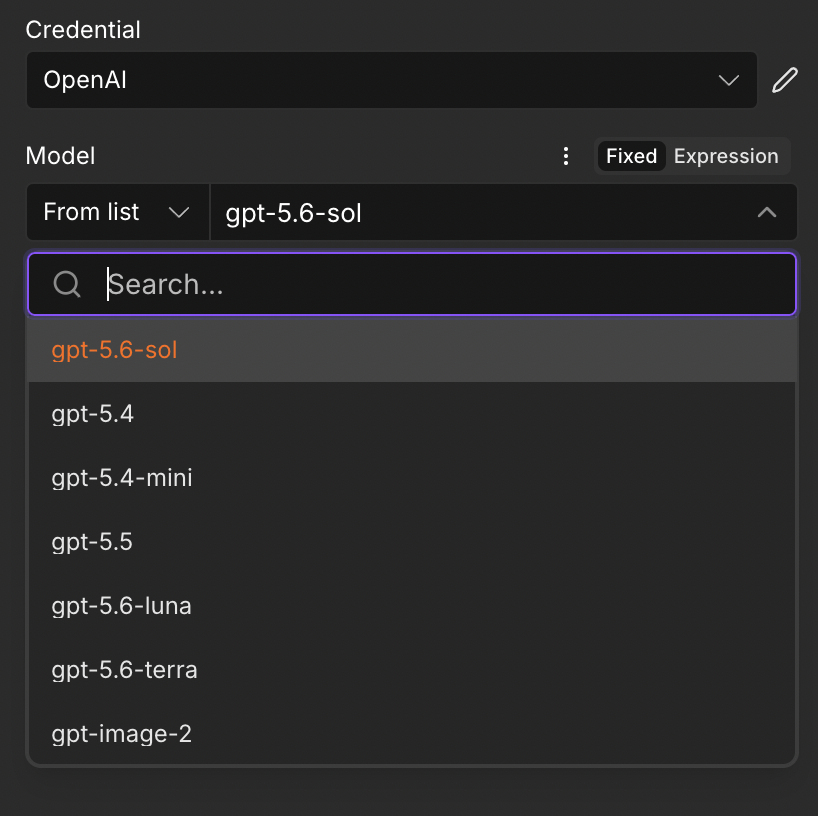
gpt-5.6-sol, gpt-5.6-luna, and gpt-5.6-terra.After Relmio completes the installation, Docker shows the existing n8n stack
and the new private OAuth sidecar running together.

n8n stack and the n8n-openai-oauth sidecar are both running.Quick install
Copy and paste this into your terminal on your own computer:
npx --yes --ignore-scripts relmio@latest
Relmio is a local browser wizard that currently installs[email protected]
as a separate Docker sidecar beside a self-hosted n8n instance. It guides a
VPS owner through ChatGPT sign-in, SSH host verification, n8n discovery, an
exact installation plan, and the final n8n credential settings.
The existing n8n image, Compose file, container, and workflows stay untouched.
The public name is intentionally broader than n8n. The current release is an
n8n-focused setup path; the product direction is to make the same private,
OpenAI-compatible endpoint usable by local chatbots, custom applications, the
OpenAI SDK, and other compatible clients without tying the project identity to
one automation platform.
[!IMPORTANT]
This does not create an OpenAI Platform API key. It creates a private,
OpenAI-compatible endpoint that authenticates through a local ChatGPT/Codex
OAuth session. Thelocal-onlyvalue entered in n8n is only a placeholder
for n8n's required API-key field.
[!WARNING]
This project andopenai-oauthare unofficial community projects. They are
not affiliated with or endorsed by OpenAI. Access, supported models, and
limits depend on the signed-in ChatGPT account and can change. Use this only
for personal, experimental workflows; protect the OAuth file like a
password; and follow OpenAI's current terms and usage policies.
[!CAUTION]
This is experimental software provided without warranty. You use it at your
own risk. To the fullest extent permitted by applicable law, the maintainer
is not responsible for account restrictions, lost access, data loss, service
interruption, financial loss, or any direct, indirect, incidental, or
consequential loss resulting from use of this project. Review OpenAI's
Terms of Use, usage policies,
ChatGPT/Codex terms, your n8n terms, and the upstream project's license and
legal notices before using it. OpenAI may change or restrict the underlying
service at any time.
Table of contentsSimilar community tools may use related OAuth/Codex flows, including Hermes
Agent, but that similarity is not an OpenAI endorsement or a guarantee that
every use is permitted. This project is not intended to bypass quotas,
safeguards, account controls, or service restrictions.
- What this does, in plain English
- What is a sidecar?
- See it working first
- Current scope and direction
- GPT-5.6 AI Agent example
- Hosted ChatGPT site
- Choose a setup path
- Quick start with the npm package
- Run from a repository clone
- Manual setup and debugging
- How it works behind the scenes
- What the wizard can and cannot change
- Refresh, update, and remove
- Troubleshooting first steps
- Release and version synchronization
- Documentation
- Supported bridge behavior
- Known limitations
- Legal
- Contributing
- Security and responsible disclosure
- Sources and further reading
- License
What this does, in plain English
n8n normally expects to talk to an OpenAI-compatible API using an API-key
field. This project adds a small, private “translator” beside n8n. n8n sends
its normal requests to that translator, and the translator uses your
ChatGPT/Codex OAuth sign-in for the upstream connection.
flowchart LR
  You["You build or run<br/>an n8n workflow"]
  N8N["Your existing n8n<br/>stays unchanged"]
  Bridge["Private translator<br/>OAuth sidecar"]
  OpenAI["Upstream OpenAI service"]

  You --> N8N
  N8N -->|"Normal OpenAI-shaped request<br/>inside Docker only"| Bridge
  Bridge -->|"Uses your protected<br/>OAuth sign-in"| OpenAI
  OpenAI -->|"Answer"| Bridge
  Bridge -->|"OpenAI-shaped response"| N8N
Think of the sidecar as an interpreter in a private room: n8n speaks the API
format it already knows, while the sidecar handles the different sign-in
method. The sidecar shares a private Docker network with n8n; port 10531 is
not published to the internet.
What is a sidecar?
A sidecar is a small helper program that runs beside a larger program. It adds
one missing capability without changing the main program. In Relmio, your n8n
stays as it is; the private sidecar handles ChatGPT/Codex sign-in and translates
n8n's normal requests. Remove the sidecar and your existing n8n is still
unchanged.
flowchart LR
  N8N["Your n8n<br/>stays the same"]
  Sidecar["Relmio sidecar<br/>small private helper"]
  ChatGPT["ChatGPT/Codex<br/>your sign-in"]

  N8N -->|"sends a request"| Sidecar
  Sidecar -->|"handles sign-in"| ChatGPT
  ChatGPT -->|"returns an answer"| Sidecar
  Sidecar -->|"sends the answer"| N8N
This is the standard sidecar pattern: a small, modular helper alongside an
existing application. For a beginner-friendly overview, see
Justin Rice's explanation of software sidecars.
A tricycle is a useful analogy
Think of n8n as a motorcycle: it already gets your workflow where it needs to
go. Relmio adds a sidecar, turning the pair into a tricycle with extra room for
passengers. The motorcycle remains the same, while the sidecar adds a new
capability, in this case ChatGPT/Codex sign-in and translation for n8n.
flowchart LR
  Motorcycle["Motorcycle<br/>your existing n8n"]
  Sidecar["Sidecar<br/>Relmio helper"]
  Tricycle["Tricycle<br/>n8n + Relmio"]
  Passengers["Extra seats<br/>new capabilities for more workflows"]

  Motorcycle -->|"stays unchanged"| Tricycle
  Sidecar -->|"adds sign-in and translation"| Tricycle
  Tricycle -->|"makes room for"| Passengers
Current scope and direction
Available now: Relmio signs in locally, verifies a VPS over SSH, and
deploys a private sidecar beside self-hosted n8n. The wizard provides tested
settings and recipes for the OpenAI Chat Model, AI Agent, Basic LLM Chain, and
HTTP Request nodes.
Designed to grow: the Relmio name, mark, and package are client-neutral
so later releases can offer safe setup paths for OpenAI-compatible SDKs, local
chatbots, and other custom applications. Those broader clients are a product
direction, not a claim about the current installer: today, do not expose the
sidecar port publicly or deploy it outside the documented n8n safety boundary.
See the provider and client roadmap, including the gated
SuperGrok/xAI OAuth feasibility track.
GPT-5.6 AI Agent example
The screenshots below show a successful n8n AI Agent test using the GPT-5.6
model aliases gpt-5.6-sol and gpt-5.6-luna. The workflow combines a chat
trigger, an AI Agent, an OpenAI Chat Model, and Simple Memory. Both model
configurations successfully answer the same what is a bidet? prompt.
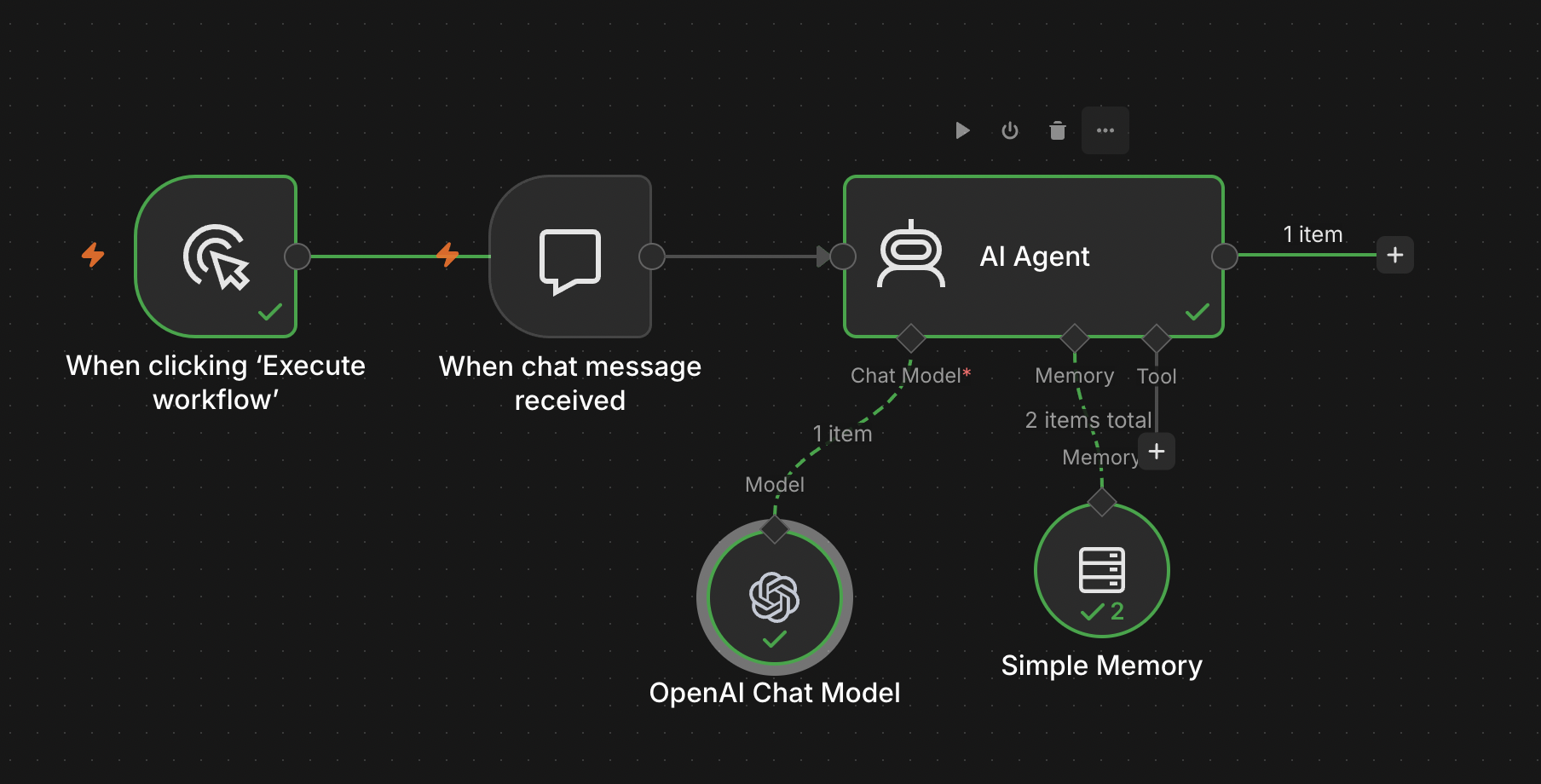
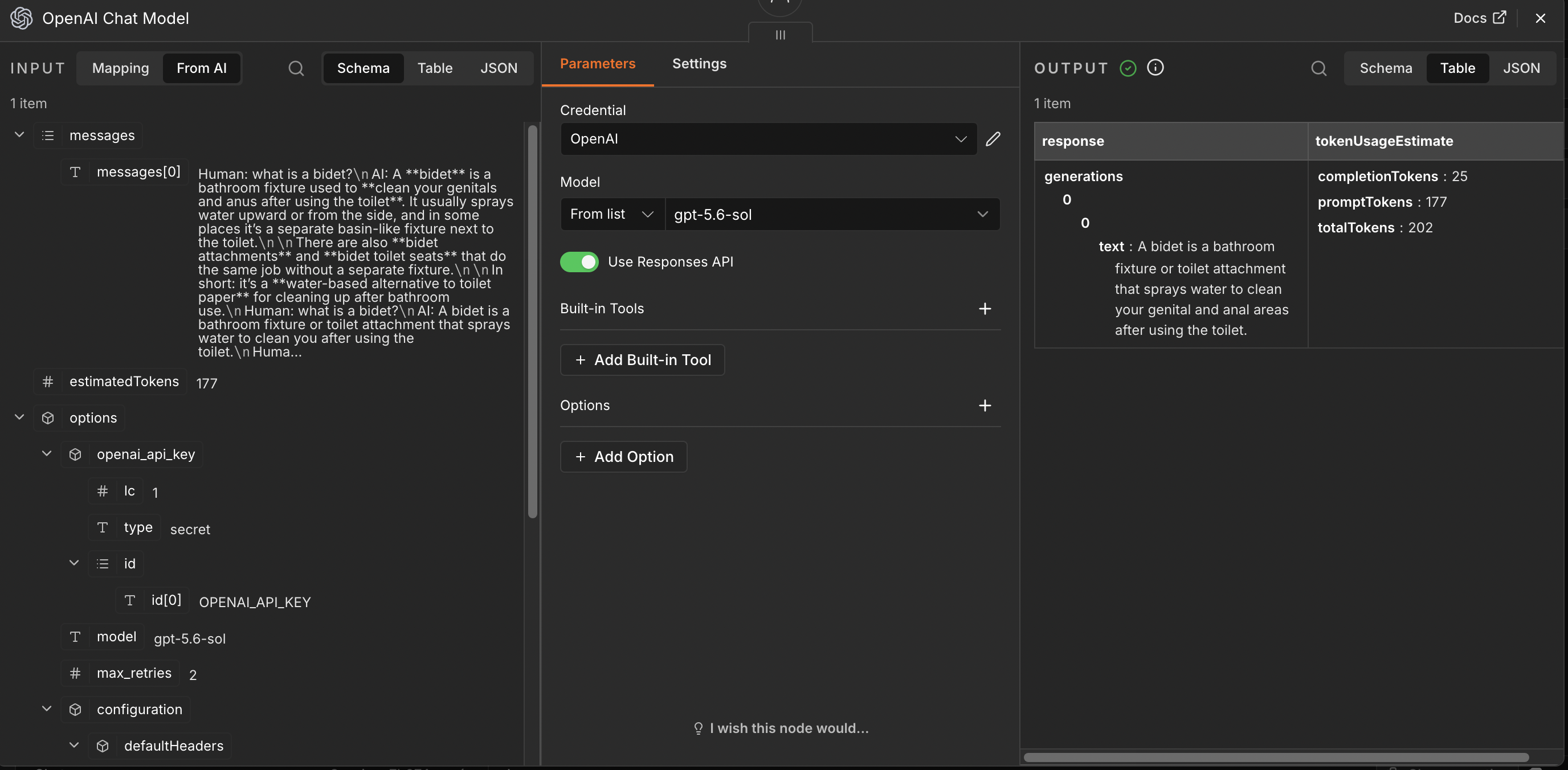
gpt-5.6-sol through the Responses API and returns a successful response with token estimates.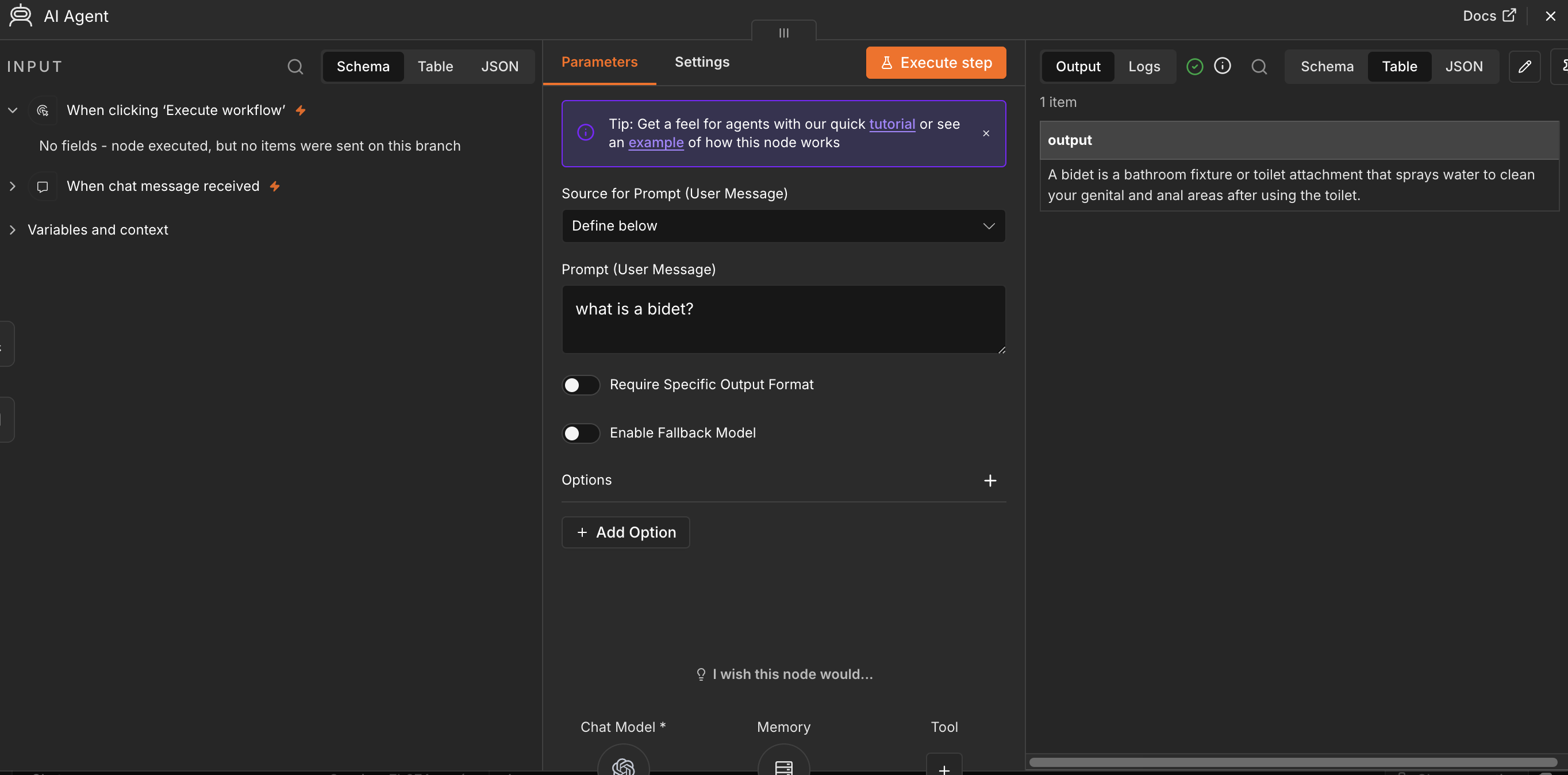
what is a bidet? returns a successful answer.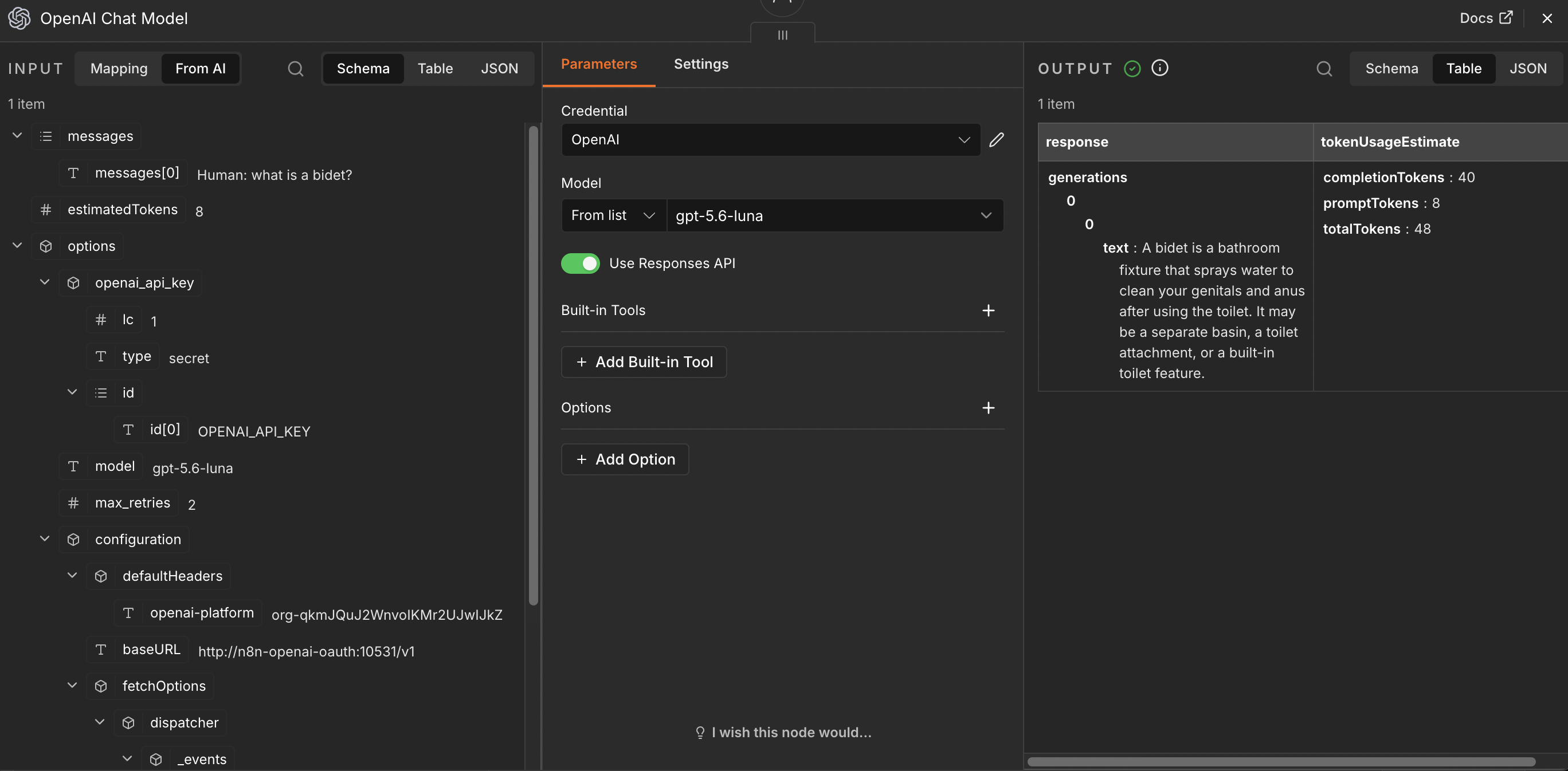
gpt-5.6-luna through the Responses API and returns a successful answer with token estimates.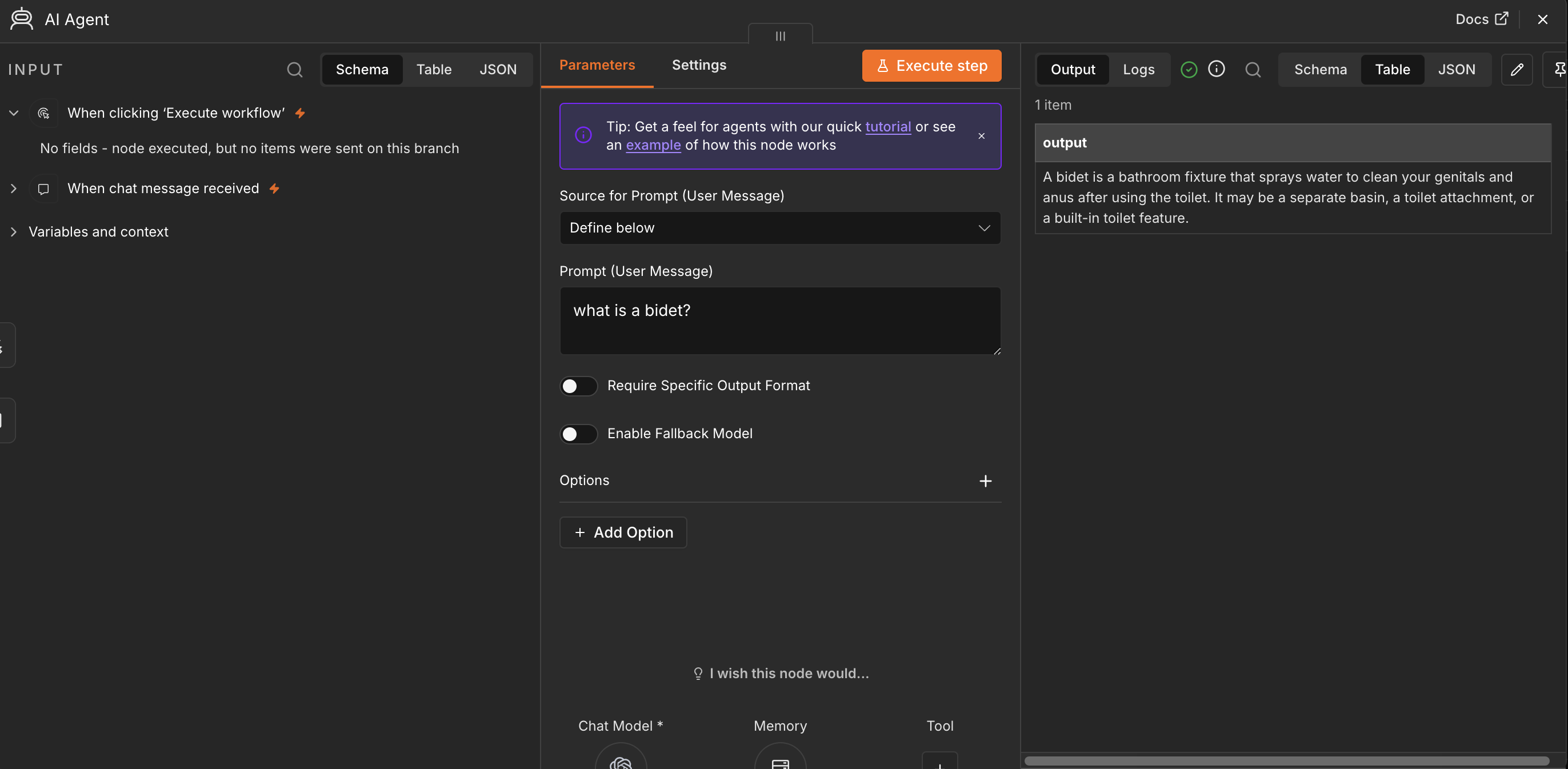
Hosted ChatGPT site
Try the hosted browser experience at
relmio.vercel.app. It provides a separate
ChatGPT sign-in and a small request-bound chat demo; it does not create an
OpenAI Platform API key or replace the local n8n setup wizard.
The site's Install wizard page provides
the copyable npm command for the current self-hosted n8n and Hostinger VPS
setup path.
Choose a setup path
Both methods create the same separate sidecar and leave the existing n8n
container, image, Compose file, and workflows alone.
| Path | Best for | What you do |
|---|---|---|
| npm browser wizard | Most users | Follow guided screens, verify the server identity, review the plan, then approve |
| Manual setup | Wizard failures, unusual VPS setups, debugging, and contributors | Run the underlying login, SSH, file, and Docker Compose steps yourself |
flowchart TD
  Start["I want to connect my<br/>self-hosted n8n"]
  Choice{"Can I use the local<br/>browser wizard?"}
  Wizard["Option A<br/>Run the npm wizard"]
  Manual["Option B<br/>Follow the manual commands"]
  Review["Review what will change<br/>before remote writes"]
  Result["Same result<br/>one private OAuth sidecar beside n8n"]
  Configure["Point the n8n OpenAI credential<br/>to n8n-openai-oauth:10531/v1"]

  Start --> Choice
  Choice -->|"Yes"| Wizard
  Choice -->|"No, or I need to debug"| Manual
  Wizard --> Review
  Manual --> Review
  Review --> Result
  Result --> Configure
The wizard is a convenience layer, not a requirement. If it cannot run, or if
you want to inspect, reproduce, improve, or debug the method, use
Manual setup and debugging.
Quick start with the npm package
Requirements
- A local macOS, Windows, or Linux computer with
Node.js 22 or newer - A browser and a ChatGPT account eligible to use the upstream Codex flow
- A self-hosted n8n Docker container on a VPS
- Docker Engine and Docker Compose v2 on the VPS
- The VPS address, SSH port, and root password
- A Docker network that n8n and the new sidecar can share
[!WARNING]
Export or otherwise back up your n8n workflows before using the wizard.
The wizard is designed to create or update only its separate sidecar and
does not issue n8n deletion, restart, or rebuild commands, but it still
authenticates to your VPS and writes files there. Keep a recoverable backup
before granting it access.
Do not run the npm command on the VPS. Run it on the computer where you
will complete the browser sign-in.
1. Start the newest published wizard
Open Terminal, PowerShell, or another local shell:
npx --yes --ignore-scripts relmio@latest
Releases before the rename used the package namen8n-openai-oauth-setup. Package lookup does not redirect automatically, so
update saved commands to relmio. The new package still exposes the legacy
executable alias, and existing sidecar directories, service names, hostnames,
and credentials remain compatible.
Keep that terminal open. The command starts a one-time web server on127.0.0.1, prints a private session URL, and opens the wizard in your
browser. It does not globally install this package.
To confirm which version npm currently publishes:
npm view relmio version
[!NOTE]
Every wizard screenshot below comes from the built-in sanitized preview. It
uses a reserved documentation IP, fake fingerprint, fake container data, and
fake models. No real VPS, credential, or browser session is shown.
2. Complete or reuse the local ChatGPT sign-in
The wizard stores its validated credential at:
~/.n8n-openai-oauth/auth.json
It does not reuse or overwrite the Codex app's ~/.codex/auth.json. If a
credential already exists, Continue to VPS reuses it. Use Refresh
ChatGPT sign-in when it is expired, belongs to another account, or you want
a new session.
After a fresh login, check the Credential updated timestamp. It is shown
in your computer's local time so you can tell that the browser approval
actually reached the wizard.
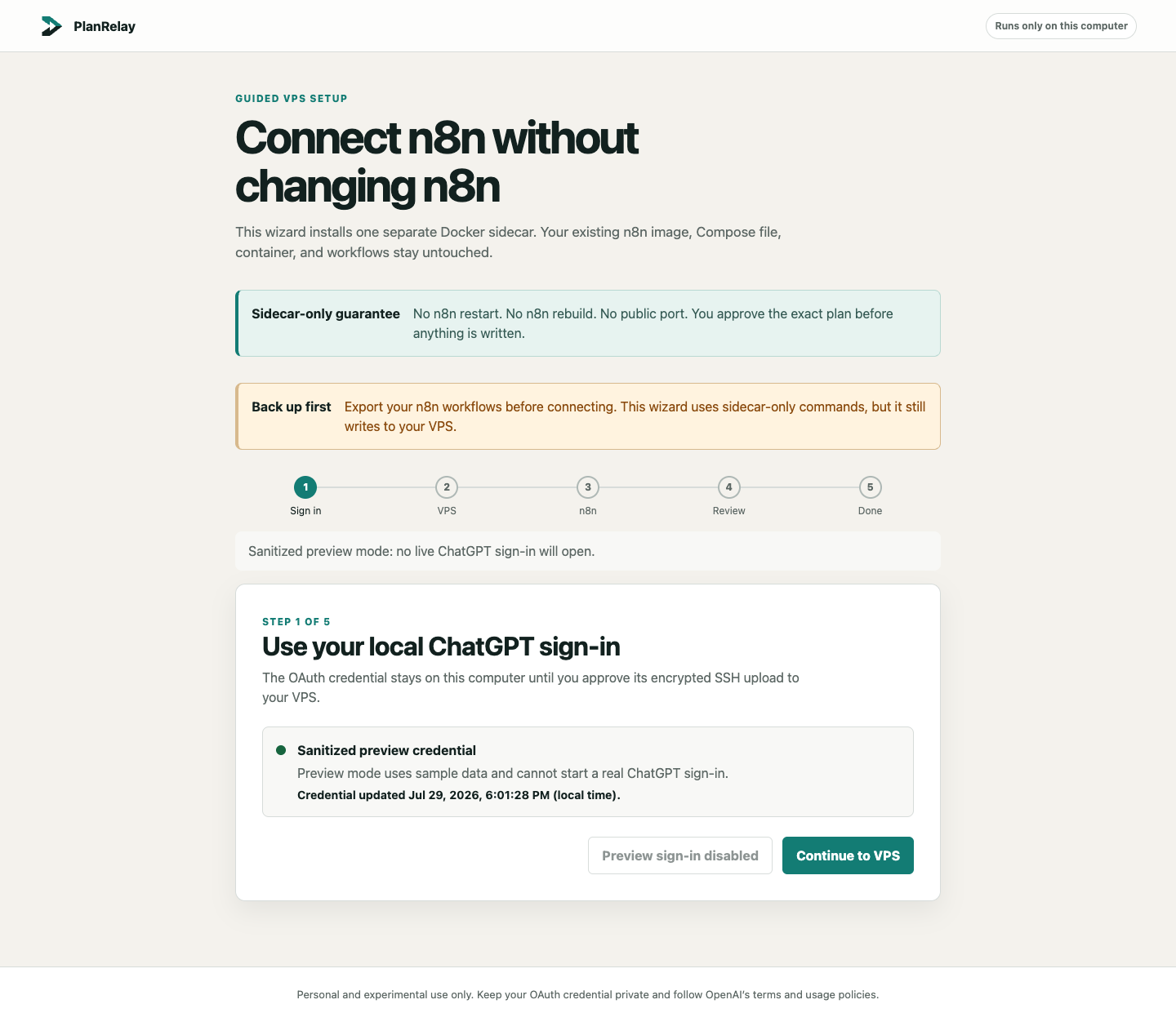
If a browser extension named Sign in with ChatGPT or OpenAI OAuth
captures the callback, temporarily disable that extension and start the
refresh again from the wizard. The active wizard must receive the callback onlocalhost:1455.
3. Verify the VPS before entering its password
Enter the VPS address exactly as your provider shows it. Select Check server
identity, compare the SHA-256 fingerprint with the intended server, and
confirm it before the password field unlocks.
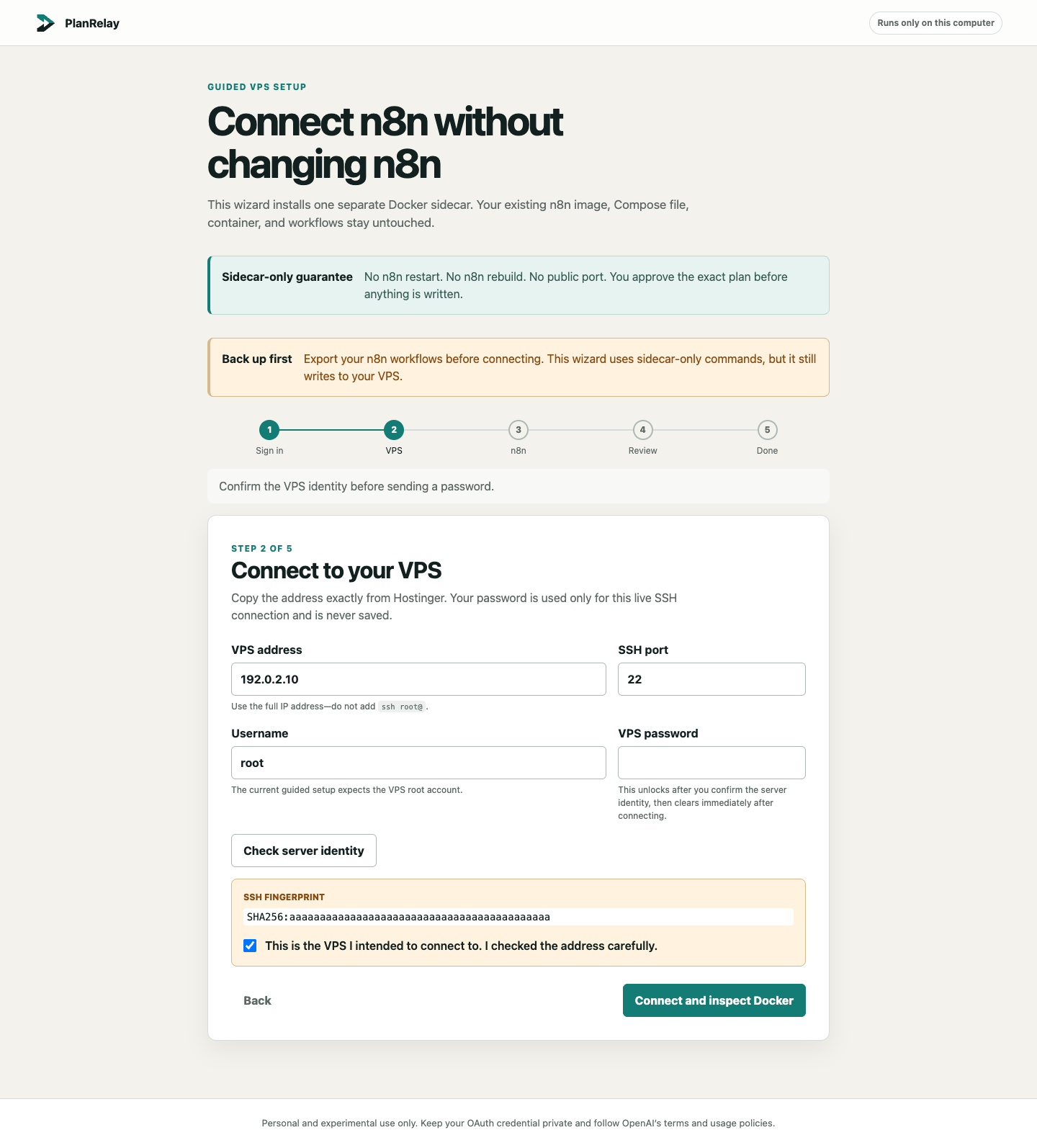
The screenshot uses the reserved documentation address 192.0.2.10, a fake
fingerprint, and an empty password field. Never publish a real password,
private key, session URL, or OAuth file.
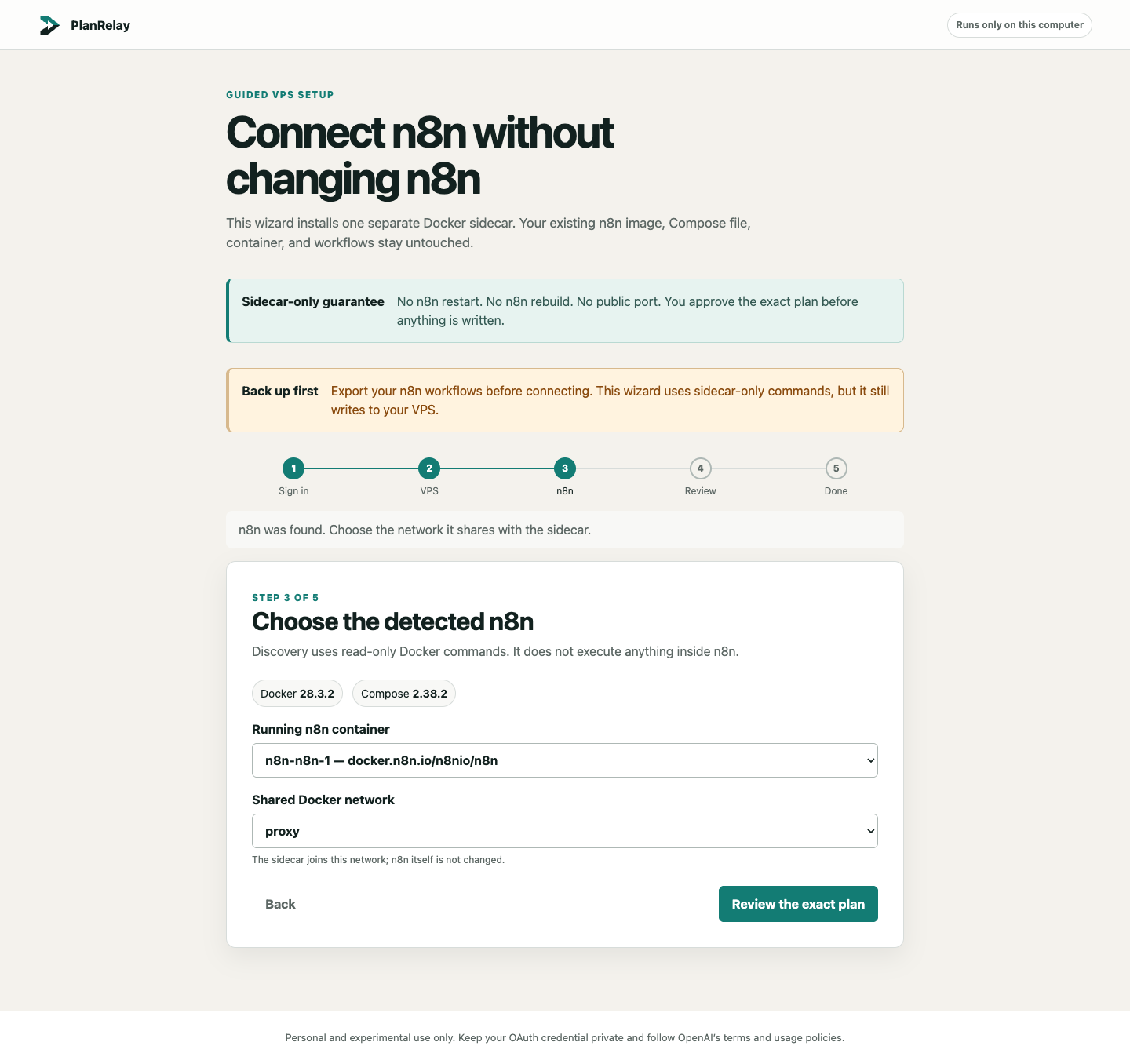
4. Choose the detected n8n container and shared network
The wizard connects over SSH, runs read-only Docker discovery, and lists the
running n8n container and its networks. Choose the network that n8n should
share with the sidecar; on many Hostinger templates it is named proxy.
5. Review and approve the exact plan
Nothing is written during discovery. The review screen shows the single
managed directory, service, Docker network, and private hostname. It also
states the forbidden actions: no n8n edit, rebuild, restart, or recreation;
no host port; and no Traefik route.
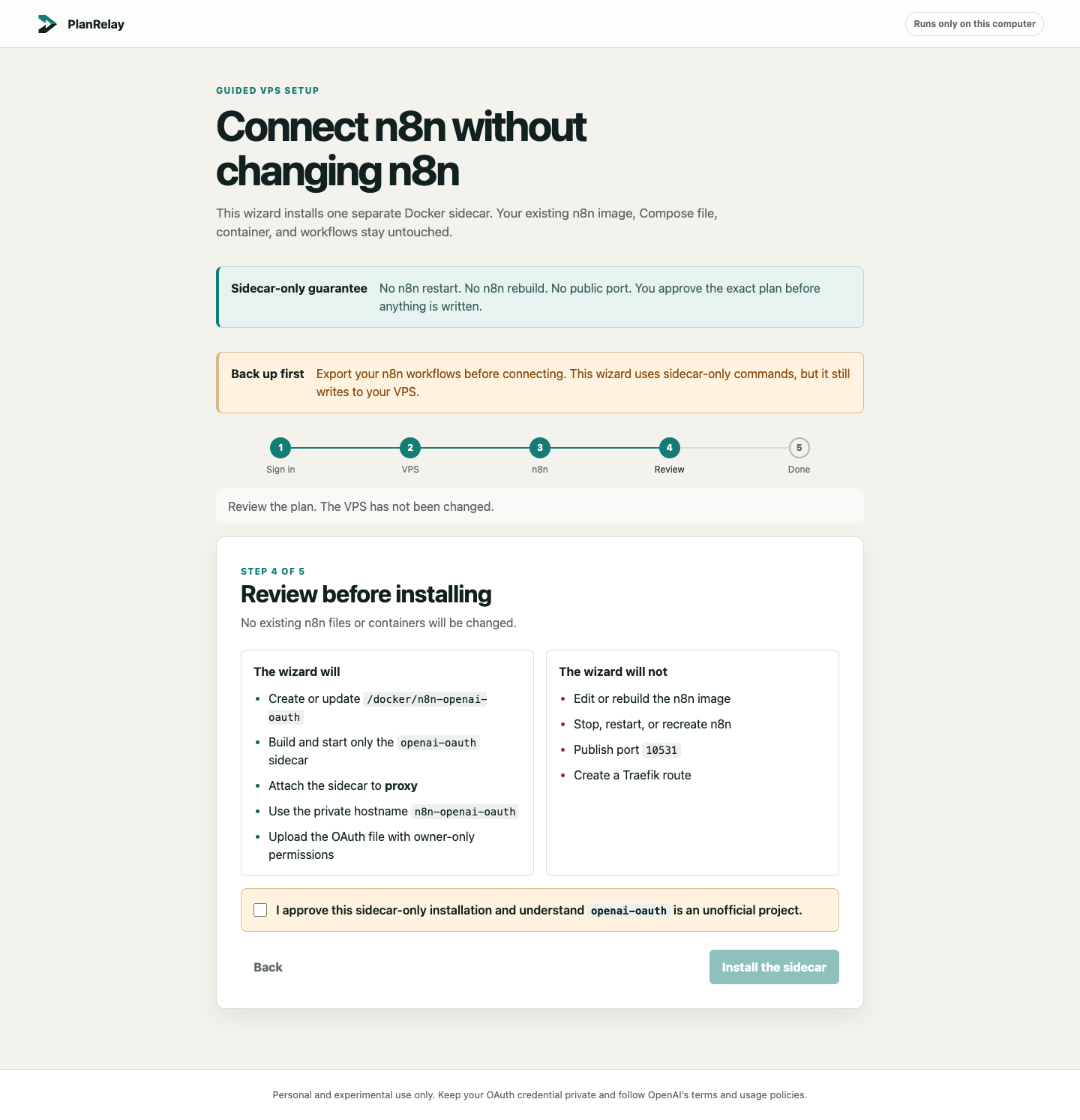
Only after you select the approval checkbox can the wizard upload the OAuth
file and build the separate sidecar.
6. Copy the verified settings into n8n
The final screen appears only after the sidecar is healthy, the model list is
reachable, and Docker reports no published host port.
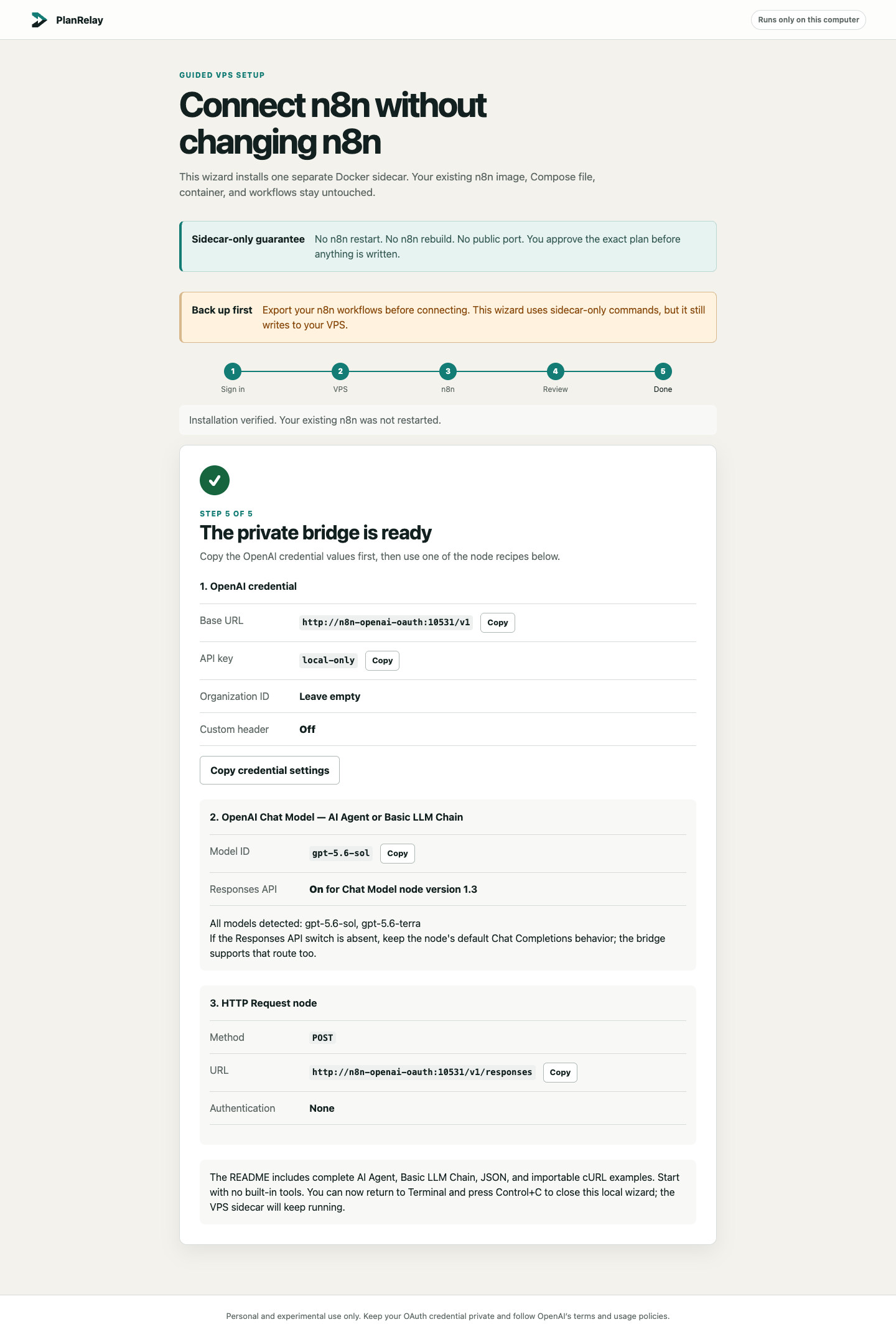
Use the button beside each value to copy it individually, or select
Copy credential settings for the labeled credential set. Then create or
edit an OpenAI credential in n8n:
API Key
local-only
Base URL
http://n8n-openai-oauth:10531/v1
Organization ID: leave empty.
Add Custom Header
Off
For an OpenAI Chat Model:
- select one of the models returned by the bridge;
- on Chat Model node version 1.3, keep Use Responses API on;
- if that switch is absent, keep the node's default Chat Completions behavior;
- begin with a simple prompt and no built-in tools;
- add tools only after the basic request succeeds.
The bridge supports both /v1/responses and /v1/chat/completions.
For an HTTP Request node, an example endpoint is:
POST http://n8n-openai-oauth:10531/v1/responses
n8n may send Authorization: Bearer local-only. The bridge does not treat
that placeholder as an OpenAI API key or secret.
For complete copy-paste recipes for an AI Agent, Basic LLM Chain, and
HTTP Request node, including an importable cURL command, open
Configure n8n nodes.
Run from a repository clone
The npm command above is the recommended path. Contributors can instead run
the source checkout:
git clone https://github.com/Demonbane18/relmio.git
cd relmio
npm ci --ignore-scripts
npm start
On macOS, Start Wizard.command performs the install-and-start steps. On
Windows, use Start Wizard.bat.
Manual setup and debugging
The manual method is intentionally supported. It is the fallback when the npm
wizard does not work, and it exposes every underlying step so technical users
can reproduce problems and contribute fixes. It creates the same separate
sidecar; it does not modify the existing n8n Compose project.
You need a POSIX shell (macOS, Linux, WSL, or Git Bash), Node.js 22 or newer,
SSH access to the VPS, Docker Compose v2 on the VPS, and the name of a Docker
network already used by n8n. Back up your n8n workflows before starting.
[!CAUTION]
Manual commands do not provide the wizard's validation guardrails. Check
every replacement value, verify the SSH host fingerprint before entering a
password, never print the OAuth file, and stop for a final review before the
first remote write in step 3.
1. Create the OAuth file on your computer
Run this on your own computer, not on the VPS:
install -d -m 0700 "$HOME/.n8n-openai-oauth"
npx --yes --ignore-scripts [email protected] login \
  --open \
  --login-timeout-ms 300000 \
  --oauth-file "$HOME/.n8n-openai-oauth/auth.json"
test -s "$HOME/.n8n-openai-oauth/auth.json" \
  && echo "OAuth file is ready"
Complete the browser sign-in opened by the newest command. The dedicated file
does not reuse or overwrite ~/.codex/auth.json. Treat both files like
passwords.
2. Verify and inspect the VPS
Connect from your computer:
ssh root@YOUR_VPS_IP
On the first connection, compare the displayed SSH fingerprint with the one
from your VPS provider before accepting it. Then list the containers:
docker ps --format 'table {{.Names}}\t{{.Image}}\t{{.Ports}}'
Find the container using the official n8n image and inspect its networks,
replacing n8n-n8n-1 with its actual container name:
docker inspect n8n-n8n-1 --format '{{range $name, $_ := .NetworkSettings.Networks}}{{println $name}}{{end}}'
Record one existing network name that the new sidecar can share with n8n. It
is commonly proxy, but use the name returned by your own VPS.
3. Review, then create only the sidecar directory
Before continuing, confirm all three facts:
- the SSH fingerprint belongs to the intended VPS;
- the selected container is your existing n8n container;
- the selected Docker network is already attached to that n8n container.
Only after that final human review, create the separate directories:
install -d -m 0755 /docker/n8n-openai-oauth
install -d -m 0700 -o 1000 -g 1000 /docker/n8n-openai-oauth/auth
Create /docker/n8n-openai-oauth/Dockerfile with exactly:
FROM node:22-bookworm-slim

RUN npm install --global --ignore-scripts [email protected] \
    && npm cache clean --force

USER node

ENTRYPOINT ["openai-oauth"]
CMD ["--host", "0.0.0.0", "--port", "10531", "--oauth-file", "/home/node/.codex/auth.json"]
Create /docker/n8n-openai-oauth/docker-compose.yml with exactly the following.
If the chosen network is not proxy, change only the final name: proxy line.
services:
  openai-oauth:
    build:
      context: .
      dockerfile: Dockerfile
    restart: unless-stopped
    init: true
    volumes:
      - ./auth:/home/node/.codex
    expose:
      - "10531"
    networks:
      n8n-shared:
        aliases:
          - n8n-openai-oauth
    security_opt:
      - no-new-privileges:true
    cap_drop:
      - ALL
    read_only: true
    tmpfs:
      - /tmp:size=16m,mode=1777
      - /home/node/.local:uid=1000,gid=1000,mode=0700
    pids_limit: 128
    mem_limit: 512m
    cpus: 1.0
    healthcheck:
      test:
        - CMD
        - node
        - -e
        - 'fetch("http://127.0.0.1:10531/health").then((response) => process.exit(response.ok ? 0 : 1)).catch(() => process.exit(1))'
      interval: 30s
      timeout: 5s
      retries: 3
      start_period: 20s
    labels:
      io.n8n-openai-oauth.managed: "true"

networks:
  n8n-shared:
    external: true
    name: proxy
There is deliberately no ports: section and no Traefik label.
4. Copy the protected OAuth file
Leave the VPS shell:
exit
Run scp on your own computer:
scp "$HOME/.n8n-openai-oauth/auth.json" \
  root@YOUR_VPS_IP:/docker/n8n-openai-oauth/auth/auth.json
Reconnect and apply owner-only permissions on the VPS:
ssh root@YOUR_VPS_IP
chown 1000:1000 /docker/n8n-openai-oauth/auth/auth.json
chmod 600 /docker/n8n-openai-oauth/auth/auth.json
5. Validate, build, and start only the sidecar
Use the explicit Compose project and file on every command:
docker compose \
  --project-name n8n-openai-oauth \
  --file /docker/n8n-openai-oauth/docker-compose.yml \
  config --quiet

docker compose \
  --project-name n8n-openai-oauth \
  --file /docker/n8n-openai-oauth/docker-compose.yml \
  build openai-oauth

docker compose \
  --project-name n8n-openai-oauth \
  --file /docker/n8n-openai-oauth/docker-compose.yml \
  up -d --wait --wait-timeout 60 --no-deps openai-oauth
These commands name only the separate openai-oauth service. They do not
reference the existing n8n Compose file or service.
6. Verify the private bridge
Check its final logs:
docker compose \
  --project-name n8n-openai-oauth \
  --file /docker/n8n-openai-oauth/docker-compose.yml \
  logs --tail=50 openai-oauth
Prove that port 10531 is not published on the VPS:
docker compose \
  --project-name n8n-openai-oauth \
  --file /docker/n8n-openai-oauth/docker-compose.yml \
  port openai-oauth 10531
Success is no output. Then verify the model endpoint from inside the sidecar:
docker compose \
  --project-name n8n-openai-oauth \
  --file /docker/n8n-openai-oauth/docker-compose.yml \
  exec -T openai-oauth \
  node -e 'fetch("http://127.0.0.1:10531/v1/models").then(async (response) => { console.log(await response.text()); process.exit(response.ok ? 0 : 1); }).catch(() => process.exit(1))'
7. Configure n8n
Use the same credential settings as the wizard:
API Key: local-only
Organization ID: leave empty
Base URL: http://n8n-openai-oauth:10531/v1
Add Custom Header: off
Do not use 127.0.0.1 in n8n; inside its container, that address means n8n
itself. For more explanations, common shell mistakes, and expected output, see
the expanded beginner manual installation guide.
How it works behind the scenes
OpenAI's Codex CLI uses authenticated endpoints atchatgpt.com/backend-api/codex to run models with a ChatGPT account. By using
the same OAuth credential shape as Codex through the upstreamopenai-oauth helper, Relmio can
provide an OpenAI-compatible interface without asking users to buy separate
OpenAI Platform API credits. The exact upstream behavior, supported models,
and access rules can change.
flowchart LR
  subgraph Local["Your computer"]
    U["You"]
    B["Local browser wizard<br/>127.0.0.1"]
    A["Wizard-only OAuth file<br/>owner-readable only"]
    U --> B
    B -->|"ChatGPT sign-in<br/>localhost:1455 callback"| A
  end

  subgraph VPS["Your VPS"]
    N["Existing n8n container<br/>unchanged"]
    S["openai-oauth sidecar<br/>separate Compose project"]
    D["Shared private<br/>Docker network"]
    N -->|"OpenAI-compatible request<br/>Docker DNS"| D
    D --> S
  end

  B -->|"verified SSH + SFTP<br/>after approval"| S
  S -->|"OAuth-authenticated request"| O["OpenAI service used by<br/>the upstream helper"]
The design works because four independent features line up:
- n8n's OpenAI credential accepts a custom Base URL.
openai-oauthexposes OpenAI-compatible routes such as/v1/models,/v1/responses, and/v1/chat/completions.- Docker DNS lets n8n reach the sidecar by the private hostname
n8n-openai-oauthon a shared network. - The upstream helper uses the mounted OAuth credential for its upstream
authentication, while n8n sends the harmlesslocal-onlyplaceholder.
The request flow after installation is:
sequenceDiagram
  participant W as n8n workflow
  participant C as n8n OpenAI credential
  participant S as OAuth sidecar
  participant O as Upstream OpenAI service

  W->>C: Run an OpenAI node
  C->>S: Request to n8n-openai-oauth:10531/v1
  S->>S: Read the mounted OAuth credential
  S->>O: Forward an OAuth-authenticated request
  O-->>S: Model response or stream
  S-->>W: OpenAI-compatible response
See Architecture and n8n safety boundary for the
mutation boundary and command-level design.
What the wizard can and cannot change
The wizard:
- reads the running n8n container and networks with read-only Docker commands;
- writes only under
/docker/n8n-openai-oauth; - creates a separate Compose project named
n8n-openai-oauth; - builds and starts only the
openai-oauthservice; - uploads the OAuth file through SFTP with owner-only permissions;
- joins an existing Docker network;
- verifies that port
10531is not published.
It never edits the n8n Compose file or image and never builds, restarts, stops,
recreates, or removes the n8n container. It also creates no Traefik route.
Automated tests enforce this boundary.
Refresh, update, and remove
To refresh an expired ChatGPT session, run the same npm command again, choose
Refresh ChatGPT sign-in, verify the timestamp, and approve the update to
the same wizard-managed sidecar:
npx --yes --ignore-scripts relmio@latest
The update targets only the sidecar. It does not restart n8n. For rollback,
recoverable uninstall, and pinned upstream upgrades, follow
Refresh, upgrade, rollback, and uninstall.
Troubleshooting first steps
- Old wizard version: close the old terminal and run the
@latestcommand. - Browser did not open: copy the newest printed
127.0.0.1URL into the
browser while its terminal remains open. - Sign-in says expired: close the old OAuth tab and begin a fresh refresh
from the active wizard. - Extension page appears: temporarily disable the extension that captured
localhost:1455. - SSH fails: recheck the full address, port, root password, provider
firewall, and confirmed fingerprint. - n8n cannot connect: use
http://n8n-openai-oauth:10531/v1, never127.0.0.1.
See the full symptom matrix in Troubleshooting.
Release and version synchronization
package.json is the release version source of truth. The repository also
keeps these values synchronized:
package-lock.jsonpackage and root-package versions;- the newest version heading in CHANGELOG.md;
- the Git tag
v<version>for tagged builds.
npm run release:check rejects a mismatch among those local release files
and, on a tag build, the Git tag. The npm badge is an informational view of
the registry's cached latest version; the maintainer guide performs a
separate post-publish equality check against the registry. Maintainers must
bump and commit the repository version before publishing that same immutable
version to npm. Publishing npm first does not automatically rewrite Git
history or the README. Follow the
npm maintainer publishing guide for the ordered release
procedure.
Documentation
- Brand name, mark, and compatibility identifiers
- Changelog
- Troubleshooting
- OpenAI credential and node recipes
- Beginner manual installation
- Security and limitations
- Architecture and n8n safety boundary
- Refresh, upgrade, rollback, and uninstall
- YouTube walkthrough outline
- npm maintainer publishing guide
- Contributing
- Approved scope
Supported bridge behavior
The pinned upstream 2.0.0 release documents:
/v1/models;/v1/responses;/v1/chat/completions;- streaming and tool calls.
Available models depend on the ChatGPT account and may change. The upstream
Responses implementation is stateless, so callers must send the conversation
history needed for each request.
Known limitations
What is intentionally not there yet:
- Only models supported by Codex are available. This list updates over time
and depends on your ChatGPT plan. - There is no stateful replay support on the CLI
/v1/responsesendpoint. The
proxy is stateless and expects callers to send the full conversation history. - Hosted browser sign-in currently supports Chrome and Firefox. Safari is not
yet supported by the upstream Sign in with ChatGPT flow.
Legal
Relmio and the upstream openai-oauth project are unofficial,
community-maintained projects. They are not affiliated with, endorsed by, or
sponsored by OpenAI.
OpenAI OAuth uses ChatGPT credentials, which should be treated like passwords.
Each person must use their own ChatGPT account and keep credentials private. Do
not pool, share, or redistribute access tokens. Apps offering Sign in with
ChatGPT must protect each user's credentials and use them only for requests
that user authorizes.
You are responsible for complying with OpenAI's Terms of
Use, Usage
Policies, and any agreement that
applies to your account. Do not bypass rate limits, restrictions, or safeguards.
This project is provided as-is without warranties. OpenAI may change or
disable the underlying services at any time, and you assume the risks of using
it.
Contributing
Pull requests and focused issue reports are welcome. Before opening a PR,
please read CONTRIBUTING.md, run the local checks, and keep
the change scoped to one improvement. Never commit OAuth files, passwords,
private keys, live session URLs, real VPS addresses, or screenshots containing
account or infrastructure details.
Contribution guide · Submit a pull request · Open an issue
Security and responsible disclosure
Please use the private reporting path described in
Security and limitations for suspected vulnerabilities.
Do not publish credentials, OAuth material, host details, or an exploit in a
public issue.
If this project saves you time, please consider starring the repository.
Sources and further reading
openai-oauthv2.0.0 releaseopenai-oauthv2.0.0 server routesopenai-oauthv2.0.0 login flow- n8n OpenAI credential documentation
- n8n OpenAI credential source
- n8n OpenAI Chat Model source
- Docker Compose networking
- Docker Compose
expose - Docker port publishing
- OpenAI: using Codex with a ChatGPT plan
- OpenAI Terms of Use
- npm semantic versioning
License
Apache License 2.0. Relmio's NOTICE preserves the
upstream openai-oauth attribution; review both projects' notices before
distributing or deploying this setup.
Yorumlar (0)
Yorum birakmak icin giris yap.
Yorum birakSonuc bulunamadi