agentgate-ai
Health Gecti
- License — License: MIT
- Description — Repository has a description
- Active repo — Last push 0 days ago
- Community trust — 19 GitHub stars
Code Gecti
- Code scan — Scanned 12 files during light audit, no dangerous patterns found
Permissions Gecti
- Permissions — No dangerous permissions requested
Bu listing icin henuz AI raporu yok.
Use Codex with DeepSeek and Xiaomi MiMo through a local AI gateway. AgentGate converts OpenAI Responses API, Anthropic Messages and Chat Completions with model routing, failover and GUI config.
AgentGate
Local AI Gateway for Codex, Claude Code, Gemini CLI, OpenCode & AtomCode
Convert when needed, pass through when possible; one local entry point for 24 providers
中文 · Download · 5-Minute Quick Start · Codex + DeepSeek · Codex + MiMo
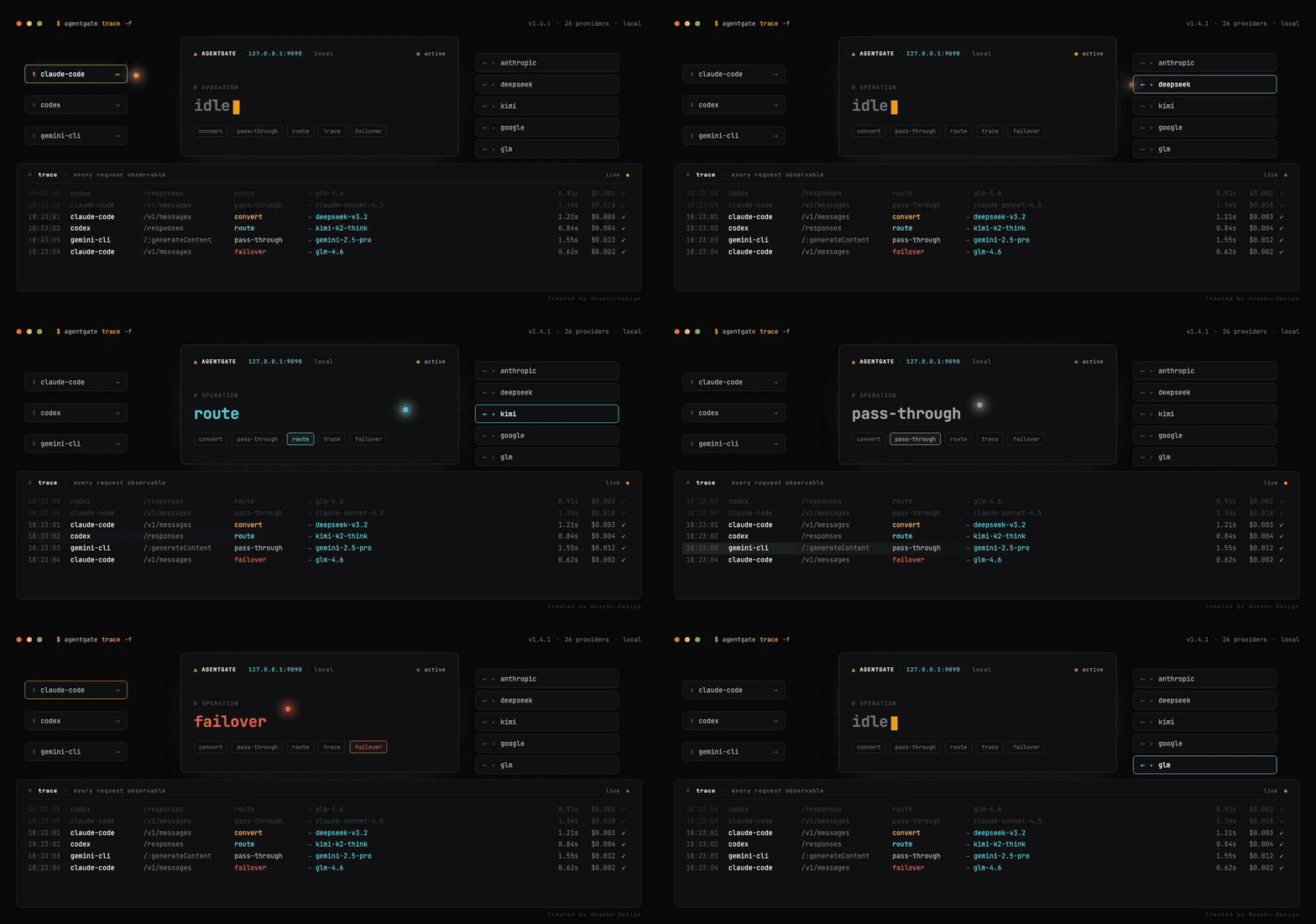
AgentGate is a local model gateway for AI coding agents. It gives Codex, Claude Code, Gemini CLI, OpenCode, and AtomCode one local endpoint, then routes requests to 24 providers including Xiaomi MiMo, DeepSeek, OpenAI, Anthropic, Kimi, GLM, DashScope, SiliconFlow, Volcengine, and more.
It is built for real integration problems:
- Codex speaks the Responses API, while many providers only expose Chat Completions or Anthropic-compatible Messages.
- Claude Code can directly use DeepSeek / MiMo Anthropic-compatible endpoints, but base URLs, model names, and mapping rules are easy to misconfigure.
- Different models from the same provider have different capabilities; sending images, tools, or
web_searchto the wrong model often causes 400 errors. - Multiple providers and multiple API keys should fail over automatically, with request logs, token stats, and cost tracking.
- Switching models should not mean hand-editing
~/.codex/config.tomlor~/.claude/settings.json.
AgentGate's job is: one local gateway + protocol conversion + native pass-through + smart routing + GUI configuration.
Common Use Cases
Guides: Use Codex with DeepSeek · Use Codex with Xiaomi MiMo
| Goal | What AgentGate does |
|---|---|
| Use Codex with DeepSeek | Converts Codex's OpenAI Responses API requests to DeepSeek-compatible Chat Completions or Anthropic-compatible endpoints. |
| Use Codex with Xiaomi MiMo | Routes Codex through a local gateway to MiMo models with model mapping, reasoning support, and capability checks. |
| Use Claude Code with DeepSeek / MiMo | Uses Anthropic-compatible pass-through plus model mapping for DeepSeek and MiMo endpoints. |
| Switch Codex between providers | One local endpoint lets Codex switch between DeepSeek, MiMo, OpenAI, Kimi, GLM, DashScope, and more without hand-editing config files. |
5-Minute Quick Start
- Download AgentGate from Releases and install it.
- Open the app, go to Quick Setup or Providers, and paste your provider API key.
- AgentGate detects known key prefixes and fills base URL, protocols, default model, and capability matrix. If the prefix is ambiguous, select the provider type manually.
- On Overview or Gateway, click Start Gateway. The default address is
127.0.0.1:9090. Note:1420is the development UI port, not the client API gateway. - On Clients, click Apply Config for Codex / Claude Code / OpenCode / Gemini CLI / AtomCode.
- Send a test message in the client. Click Switch to Official whenever you want to restore the original client config.
Most users only need these steps. Model mapping, protocol endpoints, and capability matrices can be left alone at first; AgentGate fills the common defaults for you.
Three Modes
| Mode | When it happens | Model handling | Typical case |
|---|---|---|---|
| Protocol Conversion | Client protocol differs from upstream protocol | Model Mapping wins; otherwise provider default model is used as a compatibility fallback | Codex Responses → DeepSeek / MiMo Chat |
| Native Pass-through | Client protocol matches a native upstream endpoint | Request model is preserved unless a Model Mapping matches; the virtual agentgate model resolves to the model selected by routing |
OpenCode / curl → Chat Completions |
| Pass-through + Model Mapping | Protocol matches, but client model names differ from upstream names | Model Mapping rewrites model |
Claude Code claude-* → DeepSeek / MiMo model |
Rule of thumb: protocol match decides pass-through vs conversion; Model Mapping only renames models. For one-click client integrations, agentgate is a virtual model name that means "let AgentGate pick the provider model for this request."
Features
Protocol Conversion — 4 formats, bidirectional
- OpenAI Responses API (
/v1/responses) → Chat Completions / Claude Messages / Gemini API, for Codex - Anthropic Messages API (
/v1/messages) → Chat Completions conversion / Anthropic pass-through, for Claude Code - Google Gemini API (
/v1beta/models/:model:generateContent) → Chat Completions conversion, for Gemini CLI - Chat Completions (
/v1/chat/completions) pass-through forwarding - Native Anthropic Claude API:
tool_use/tool_result,input_schema,thinking.budget_tokens - Native Gemini API:
contents/functionCall/functionResponse,generationConfig - Full DeepSeek reasoning_content (thinking mode) support without degradation
- Automatic request retry (429/5xx, exponential backoff, Retry-After)
Cost Tracking & Multi-Key Pooling
- 22+ built-in model prices, auto-calculate cost per request
- Dashboard: total/today/average cost cards
- Settings: inline price editing, custom price overrides
- Multi-API-key per provider: round-robin rotation, auto-switch on 429
Smart Routing
- Task-level routing conditions: route by input size, images, tools, system keywords
- Preset scenes: Image Requests / Reasoning / Background / Long Text / Tool-Heavy
- Prompt cache injection for Anthropic (auto
cache_control, ~90% input cost savings) - Cache support auto-detection on provider test
Multimodal Support & Per-Model Capability Matrix
- Image content is fully preserved during protocol conversion (
input_image/image_url→ Chat Completionsimage_url, Anthropicimage sourceformat) - Per-model capability matrix tracks 8 dimensions per model:
text/vision/audio_in/tts/video_in/reasoning/tools/web_search - Capability-aware promotion: when a request includes images, the gateway auto-swaps to a sibling model that supports vision (e.g. routes image requests to
mimo-v2.5instead ofmimo-v2.5-proon the same provider) - Promotion ranking prefers the substitute that preserves the most of the original model's other capabilities, with
supported_modelsorder as tiebreak - The capability matrix also drives tool emission: unchecking
web_searchfor a model stops the gateway from sending the builtin to that model - Matrix auto-seeded from model-name patterns: built-in rules for MiMo / DeepSeek / Kimi / Moonshot, with a generic fallback for others
- Provider test button now combines connectivity check + non-destructive matrix autofill (preserves manual edits)
- In failover mode, requests with images skip providers whose matrix declares no vision-capable model
- Providers that don't support images at the chosen model strip the image content at the provider-specific layer, avoiding upstream 400/404
Multi-Provider Management
- 24 built-in presets (auto-fill base URL / protocols / Anthropic endpoint / default model):
- Domestic: Xiaomi MiMo, DeepSeek, Kimi/Moonshot, MiniMax, GLM (Zhipu BigModel), DashScope (Aliyun Qwen), SiliconFlow, Volcengine (Doubao), Baichuan, StepFun, Yi (01.AI)
- International: OpenAI, Anthropic (Claude), Google Gemini, xAI (Grok), Mistral, Groq, Together, Fireworks, Cerebras, Perplexity, Cohere
- Aggregator: OpenRouter
- Custom: any OpenAI-compatible endpoint (vLLM / Ollama / LiteLLM / local proxies)
- MiMo first-class support: 5 chat models (
mimo-v2.5-pro/mimo-v2-pro/mimo-v2.5/mimo-v2-omni/mimo-v2-flash), multi-turnreasoning_contentround-trip,sk-*/tp-*keys auto-route to the correct Open API or Token Plan host, region-aware Token Plan URLs (cn/sgp/ams), and automaticweb_searchdegradation when the paid plugin is unavailable - Claude Code passthrough for MiMo / DeepSeek uses ordinary provider model IDs by default; AgentGate no longer auto-configures
[1m]suffixed models. - Route Profiles with multi-provider priority chains, auto-matched by protocol
- Manual switching or automatic failover
- Provider cooldown and runtime status tracking
- Per-request failover: Provider A fails → automatically tries Provider B
- Capability-aware routing: requests with images / audio / etc. auto-route to capable models within a provider, fall back to capable providers across the chain
- New providers are automatically added to all route chains
- Automatic model list fetching from providers
- Connection stability: HTTP client tuned with
pool_idle_timeoutandtcp_keepalive, plus app-layer retry on transient connect/timeout errors (avoids stale keep-alive failures after a pause)
Client Configuration
- Codex: one-click config + toggle between official and AgentGate (preserves conversations)
- Claude Code: one-click config + toggle between official and AgentGate
- OpenCode: one-click config
- Local gateway access token (
ag_local_*) authentication
Desktop Experience
- System tray background operation when the window is closed
- Auto-start on system boot, in-app updates, bilingual UI
- Optional desktop pet for gateway status, request stats, and error bubbles; it can be disabled in Settings
Quick Setup & Diagnostics
- First-run onboarding: paste API key → auto-detect provider → select tools → one-click setup
- Quick-add provider: paste an API key; known prefixes are detected automatically, ambiguous prefixes can be selected manually
- Connection test: 3-step status bar (Config → Gateway → Provider) on the Clients page
- Quick Setup page in sidebar (auto-hidden after providers configured, re-enable in Settings)
Diagnostics & Observability
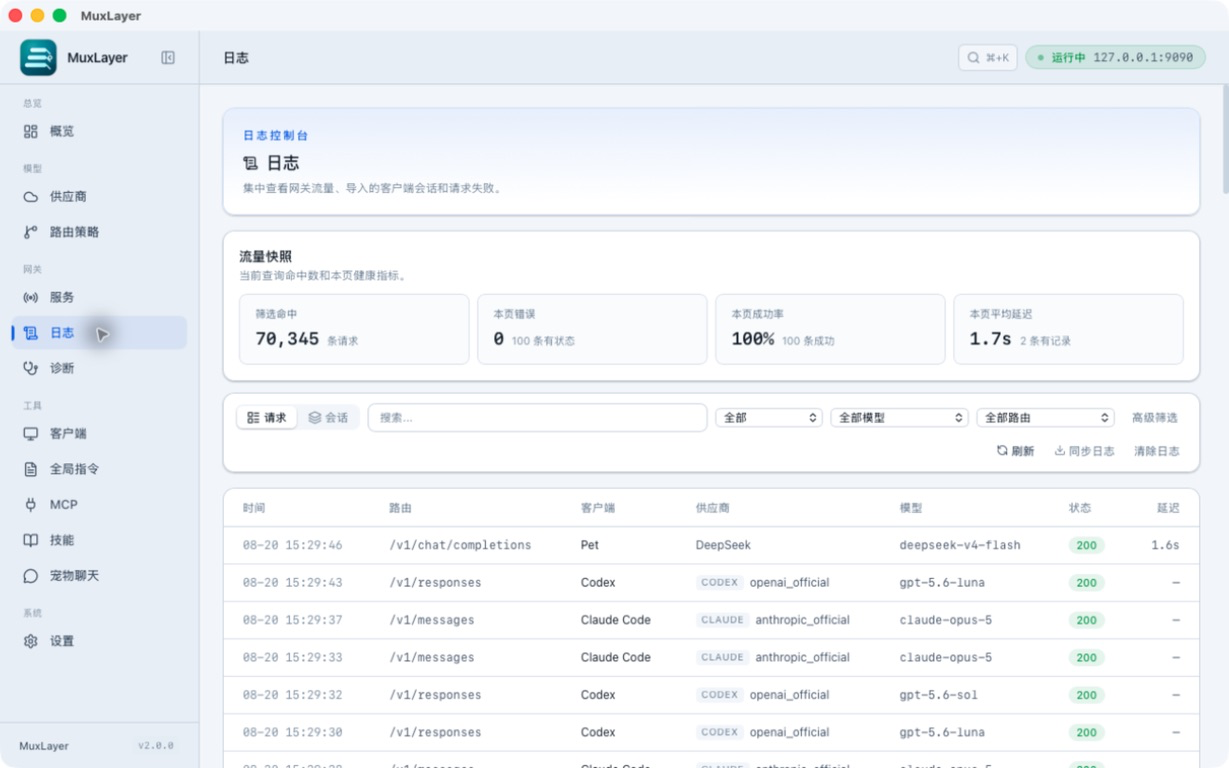
- Request logs, token stats, cost estimates, and provider runtime status
- Self-check and redacted diagnostic bundle export
- Capability degradation events: image stripping, web_search downgrade, MCP advisory, and omitted tool-output images
Screenshots
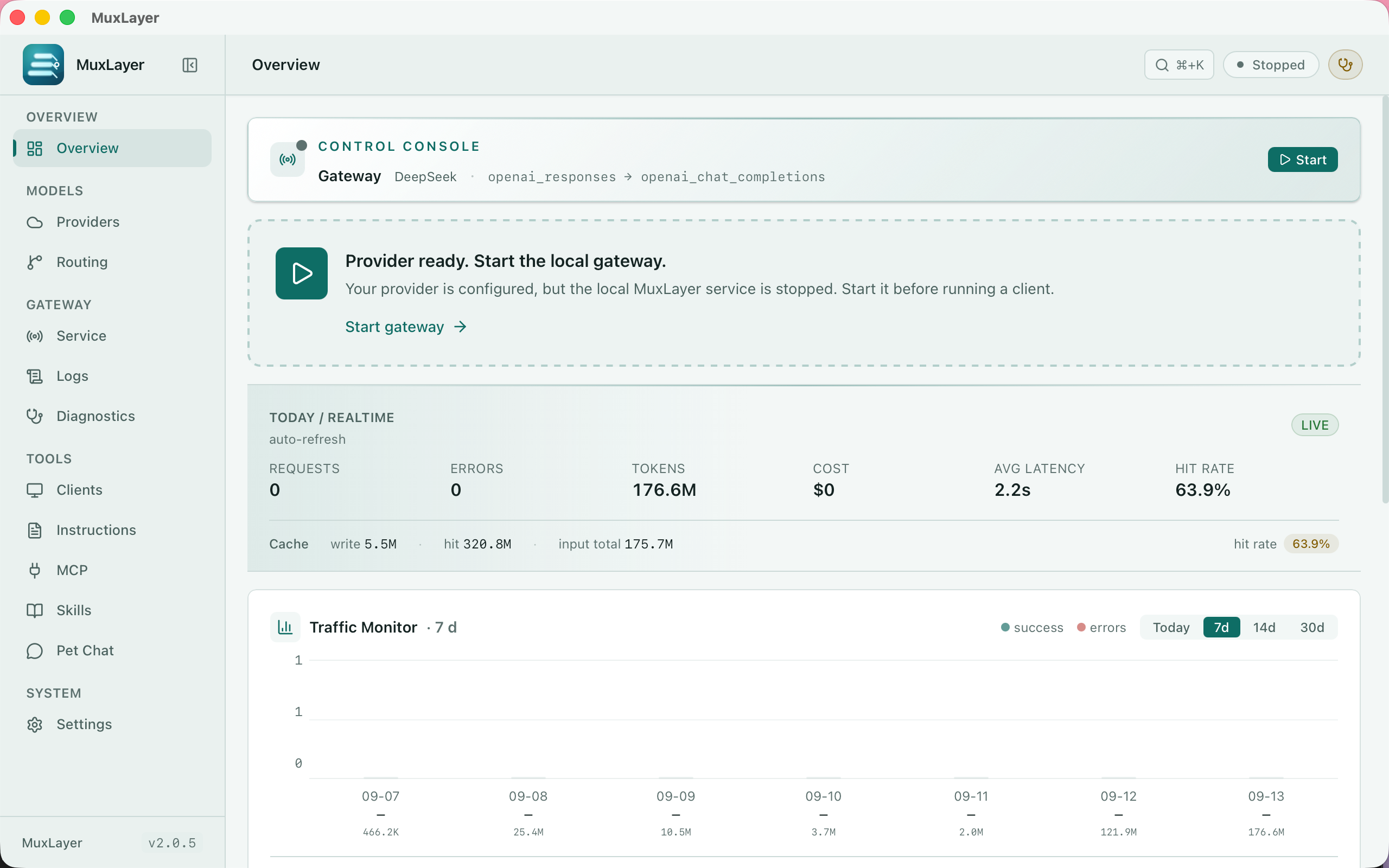
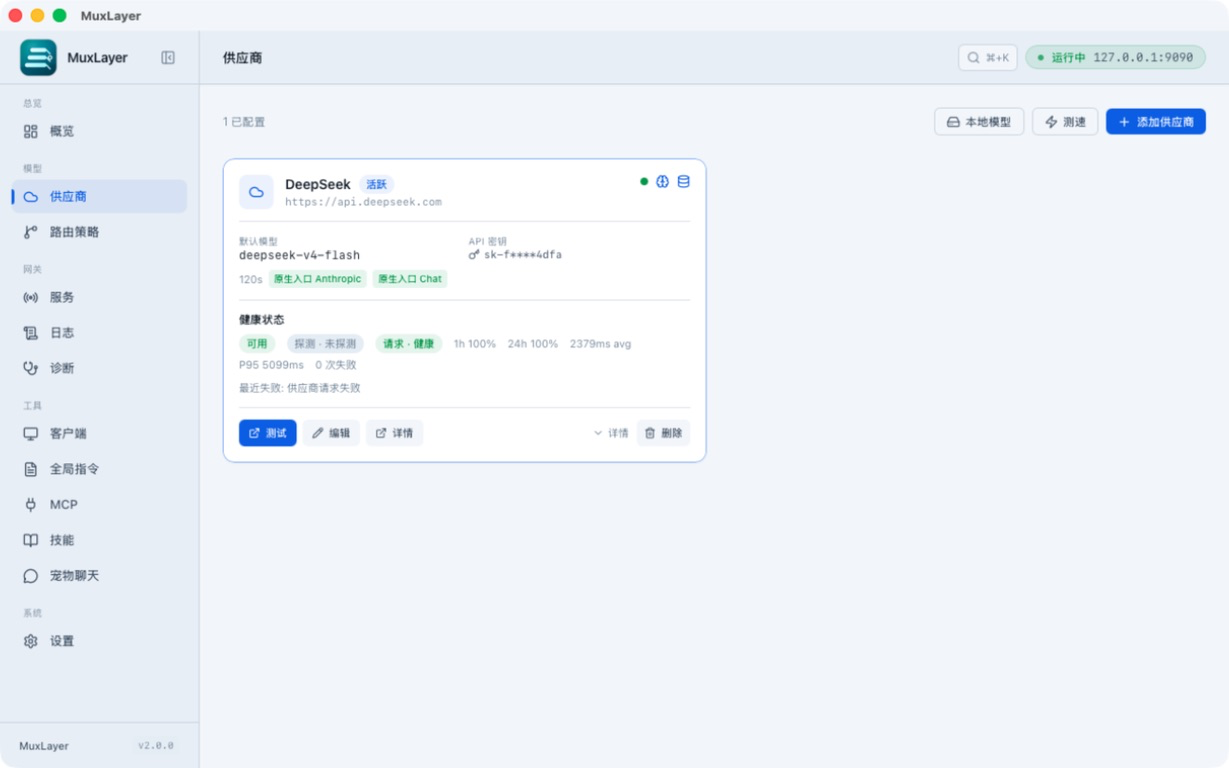
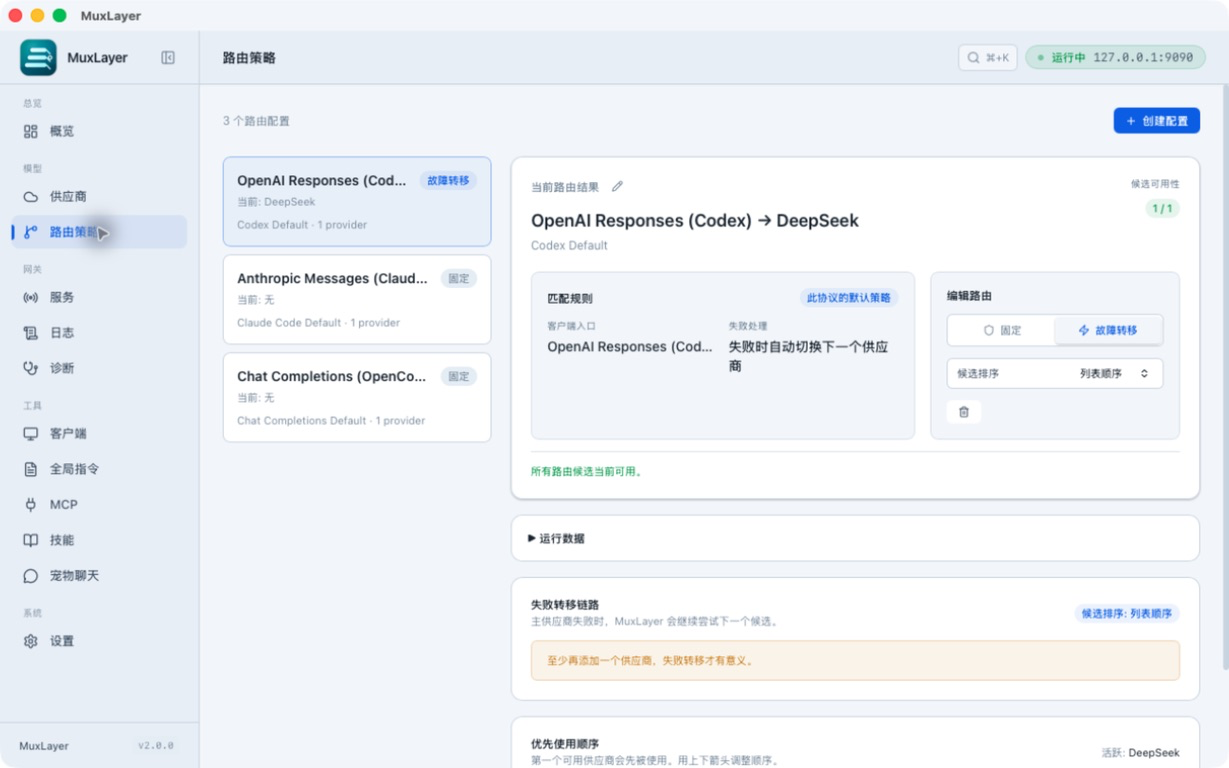
| Overview | Providers |
|---|---|
![]() |
![]() |
| Routes | Gateway |
|---|---|
![]() |
![]() |
| Clients | Logs |
|---|---|
![]() |
![]() |
| Diagnostics | Settings |
|---|---|
![]() |
![]() |
| Quick Setup | Pet Settings |
|---|---|
![]() |
![]() |
| Desktop Pet |
|---|
![]() |
Tech Stack
| Layer | Technology |
|---|---|
| Desktop Framework | Tauri v2 |
| Frontend | React 19 + TypeScript + Tailwind CSS v4 |
| Backend | Rust + Tokio + Axum |
| Database | SQLite (rusqlite, WAL mode) |
| HTTP Client | reqwest |
Installation & Build
Download
Download the installer for your platform from the Releases page.
| Platform | Format |
|---|---|
| macOS (Apple Silicon) | .dmg (aarch64) |
| macOS (Intel) | .dmg (x86_64) |
| Windows | .exe |
| Linux | .AppImage / .deb |
If macOS Gatekeeper blocks the app, use one of these options:
Option 1: System Settings (recommended)
- Double-click AgentGate, click Cancel on the prompt
- Open System Settings → Privacy & Security
- Scroll down, find
"AgentGate" was blocked→ click Open Anyway - Open AgentGate again, click Open
Option 2: Right-click open
- Find AgentGate.app in Finder
- Hold Control and click (or right-click) → select Open
- Click Open on the prompt
Option 3: Terminal
xattr -d com.apple.quarantine /Applications/AgentGate.app
Windows SmartScreen warning? (click to expand)Only needed once.
On first run, SmartScreen may show a warning:
- Click More info
- Click Run anyway
Only needed once.
Build from Source
Prerequisites
- Node.js >= 20
- pnpm >= 10
- Rust >= 1.75
- macOS / Windows / Linux
Install Dependencies
pnpm install
Development Mode
pnpm tauri dev
Build
pnpm tauri build
Headless / Server Mode
Run AgentGate without GUI — for servers, CI, Docker, and team deployments.
# Add a provider
agentgate-serve provider-add -t deepseek -k sk-xxx
# Start the gateway
agentgate-serve serve --host 0.0.0.0 --port 9090
# Other commands
agentgate-serve provider-list # list all providers
agentgate-serve provider-remove NAME # remove provider
agentgate-serve token # show access token
agentgate-serve status # show config summary
Provider presets auto-fill base URL and model for: deepseek, openai, anthropic, kimi, minimax, groq, together, google_gemini, xai, mistral.
Docker:
docker compose up
# or
docker build -t agentgate . && docker run -p 9090:9090 \
-e AGENTGATE_PROVIDER=deepseek -e AGENTGATE_API_KEY=sk-xxx agentgate
Environment variables: AGENTGATE_HOST, AGENTGATE_PORT, AGENTGATE_DB_PATH, AGENTGATE_PROVIDER, AGENTGATE_API_KEY.
Usage Guide
1. Add a Provider
Launch AgentGate → Providers → Add Provider
Fast path (recommended) — paste API key:
- Paste your provider API key into the top input
- AgentGate detects known key prefixes (
sk-ant-/deepseek-/gsk_/ …). If the prefix is ambiguous, select the provider type manually - Click Create — name, base URL, protocols, default/reasoning model, capabilities are all filled in for you. Done.
Manual mode — 3 sections, only Section A is required:
| Section | Fields | Notes |
|---|---|---|
| Basic | Type · Name · API Key (+ Base URL only if custom type) |
Picking a type auto-fills everything else from the preset |
| Models & Capabilities | Default model · Reasoning model · Fetch & detect button · capability matrix toggle |
On a freshly created provider, this is auto-run in the background — you get newest non-mini model as default + newest reasoning model + per-model capability matrix without clicking anything |
| Advanced (collapsed, "usually no need to touch") | Protocols + their endpoints (Chat / Responses / Anthropic) · Extra Headers · Timeout · Auto cache control · Model Mapping | Each protocol you tick shows its own URL — one place to read "which native endpoints this upstream supports" |
Model Mapping is at the bottom of Advanced for a reason: usually not needed. AgentGate auto-fills recommended MiMo / DeepSeek mappings when you create the provider, fetch models, test the provider, or apply Codex / Claude Code config. Existing mappings are preserved. Native pass-through keeps model unchanged unless a mapping matches or the client sends the virtual agentgate model; protocol conversion uses mapping first, then falls back to default_model for compatibility with clients like Codex, Claude Code, and Gemini CLI.
Provider configuration examples:
DeepSeek| Field | Value |
|---|---|
| Name | DeepSeek |
| Type | deepseek |
| Base URL | https://api.deepseek.com |
| Default Model | deepseek-v4-flash |
| Reasoning Model | deepseek-v4-pro |
| Model Mapping | gpt-5.5 → deepseek-v4-flash, o3 → deepseek-v4-pro |
| Anthropic Endpoint | https://api.deepseek.com/anthropic (supports Claude Code pass-through) |
| Field | Value |
|---|---|
| Name | KimiCoding |
| Type | kimi |
| Base URL | https://api.moonshot.cn |
| Default Model | kimi-k2 |
| Extra Headers | {"User-Agent":"KimiCLI/1.40.0"} |
| Model Mapping | gpt-5.5 → kimi-k2 |
OpenAIKimiCoding supports Vision and can serve as a failover target for image requests.
| Field | Value |
|---|---|
| Name | OpenAI |
| Type | openai |
| Base URL | https://api.openai.com |
| Default Model | gpt-4o |
| Responses API Endpoint | https://api.openai.com (OpenAI natively supports Responses API, uses pass-through) |
| Model Mapping | Usually not needed (client model names used directly) |
| Field | Value |
|---|---|
| Name | Anthropic |
| Type | anthropic |
| Base URL | https://api.anthropic.com |
| Default Model | claude-sonnet-4-6 |
| Model Mapping | gpt-5.5 → claude-sonnet-4-6 |
MiniMaxWhen type is set to
Anthropic (Claude), Codex requests are automatically converted using Claude Messages API native format (tool_use/tool_result/input_schema), rather than being converted to Chat Completions.
| Field | Value |
|---|---|
| Name | MiniMax |
| Type | minimax |
| Base URL | https://api.minimax.chat |
| Default Model | MiniMax-M1 |
| Model Mapping | gpt-5.5 → MiniMax-M1 |
| Field | Value |
|---|---|
| Name | OpenRouter |
| Type | openrouter |
| Base URL | https://openrouter.ai/api |
| Default Model | deepseek/deepseek-v4-flash |
| Model Mapping | gpt-5.5 → deepseek/deepseek-v4-flash |
| Field | Value |
|---|---|
| Name | Your custom name |
| Type | custom_openai_compatible |
| Base URL | Your server URL, e.g., http://localhost:8000 |
| Default Model | Your model name |
Works with any OpenAI Chat Completions API-compatible service (e.g., vLLM, Ollama, LiteLLM).
After saving:
- Fetch + capability detection runs automatically in the background — no manual action needed
- Click Test Connection to verify the config — it opens a single dialog with 3 live steps: Connectivity & auth → Capability autofill → Prompt cache detection (auto-skipped for non-Anthropic providers)
2. Start the Gateway
Overview or Gateway page → Start Gateway
Listens on 127.0.0.1:9090 by default.
3. Configure Codex
Clients → Codex → Apply Config
AgentGate will automatically:
- Save original
~/.codex/config.tomlandauth.json - Write AgentGate provider settings and local token
Click Switch to Official to restore the original config at any time — conversations are preserved.
4. Configure Claude Code
Clients → Claude Code → Apply Config
AgentGate writes to ~/.claude/settings.json, setting ANTHROPIC_BASE_URL to the local gateway and ANTHROPIC_API_KEY to the AgentGate local token.
Click Switch to Official to restore the original settings.json.
5. Configure OpenCode
Clients → OpenCode → Apply Config
AgentGate writes to ~/.config/opencode/opencode.json, configuring an OpenAI-compatible provider pointing to the local gateway. It uses openai/agentgate as a virtual model so switching providers in AgentGate does not require editing OpenCode again.
6. Configure Gemini CLI
Clients → Gemini CLI → Apply Config
AgentGate writes Gemini CLI's config to point at the local gateway's /v1beta/... route (Gemini-compatible). One-click toggle back to official.
7. Configure AtomCode
Clients → AtomCode → Apply Config
AtomCode integration writes its config to use AgentGate as the upstream — same toggle pattern as the others. It uses agentgate as a virtual model so the gateway can resolve DeepSeek / MiMo / other provider model names at request time.
8. Direct API Calls
All endpoints (except /health) require a local access token.
Getting the token:
- Copy from UI: AgentGate → Settings → Gateway Auth → click the copy button next to the token
- Read from terminal:
TOKEN=$(cat ~/.agentgate/token) - Regenerate: Settings → Regenerate Token (old token is immediately invalidated)
The token format is ag_local_*. It is only used for local gateway auth and is never forwarded to upstream providers.
Chat Completions (Pass-through)
curl -X POST http://127.0.0.1:9090/v1/chat/completions \
-H "Authorization: Bearer $TOKEN" \
-H "Content-Type: application/json" \
-d '{"model":"deepseek-v4-flash","messages":[{"role":"user","content":"Hello"}]}'
Responses API (Codex Protocol)
curl -X POST http://127.0.0.1:9090/v1/responses \
-H "Authorization: Bearer $TOKEN" \
-H "Content-Type: application/json" \
-d '{"model":"gpt-5.5","input":"Hello","stream":true}'
Messages API (Claude Code Protocol)
curl -X POST http://127.0.0.1:9090/v1/messages \
-H "Authorization: Bearer $TOKEN" \
-H "Content-Type: application/json" \
-d '{"model":"claude-sonnet-4-6","max_tokens":1024,"messages":[{"role":"user","content":"Hello"}]}'
Model List
curl http://127.0.0.1:9090/v1/models -H "Authorization: Bearer $TOKEN"
Health Check (No Auth Required)
curl http://127.0.0.1:9090/health
Client says “network connection failed”?
First check whether the gateway port is actually running:
curl http://127.0.0.1:9090/health
- If the connection fails: go back to AgentGate Overview / Gateway / Clients and click Start Gateway.
- If health works: use the Clients page connection test to narrow it down: Config → Gateway → Provider.
http://localhost:1420is only the development UI; Codex / Claude Code / OpenCode / Gemini CLI / AtomCode callhttp://127.0.0.1:9090.
9. Multi-Provider & Failover
Configure Route Profiles on the Routes page:
- Default routes are auto-created per protocol (Codex / Claude Code / OpenCode)
- Add multiple providers to the provider chain, adjust priorities
- Switch mode: manual / failover
- In failover mode, 429/402/5xx/timeout errors automatically try the next provider
10. Capability-Aware Routing (Multimodal & Reasoning)
AgentGate tracks per-model capabilities across 8 dimensions and uses them for routing — when your request contains images / audio / tools, the gateway picks a model that actually supports it.
Capability matrix per model:
text · vision · audio_in · tts · video_in · reasoning · tools · web_search
Setup:
- Add a provider — model list, capabilities, and best default/reasoning model are detected automatically right after creation
- On the Providers page, the card shows capability icons + native pass-through chips (
Native Chat,Native Anthropic, …) - To re-detect manually: open Edit → click Fetch & detect capabilities
- On the Routes page, switch mode to failover
How it works:
- After provider creation: gateway calls upstream
/models, runs name-pattern seeding for capabilities, picks newest non-mini model as default and newest reasoning-style model as reasoning_model - When a request includes images, the gateway:
- First tries to swap to a sibling model on the same provider that supports vision (e.g.,
mimo-v2.5-pro→mimo-v2.5for images) - If no sibling on the current provider, failover to next provider in the chain whose matrix declares a vision-capable model
- First tries to swap to a sibling model on the same provider that supports vision (e.g.,
- Capability matrix also gates tool emission — unchecking
web_searchfor a model stops the gateway from sending theweb_searchbuiltin to that model - Promotion picker prefers the candidate that preserves the most of the original model's other capabilities;
supported_modelsorder is the tiebreak - Providers without any vision-capable model strip image content at the provider transform layer, avoiding upstream 400/404 on text-only fallback
Example scenario:
Codex sends a request with images
→ Gateway sees request has images
→ MiMo's matrix: mimo-v2.5-pro = text, mimo-v2.5 = text + vision
→ Promote mimo-v2.5-pro → mimo-v2.5 (same provider, capability match)
→ Request goes through, full image + text preserved
11. Diagnostics
On the Diagnostics page:
- Run Self-Check — checks gateway, provider, config, and database status
- Export Diagnostic Bundle — generates a redacted diagnostic report for troubleshooting
- Request log
trace_jsonincludesdegradation_eventswhen AgentGate strips unsupported capabilities such as images, native web search, MCP connectors, or tool-output images.
Supported Providers
Providers marked Provider-specific handling have dedicated transform code in src-tauri/src/transform/providers/. The rest go through the generic Chat Completions / Anthropic pass-through path and work out-of-the-box.
| Provider | Type | Native Protocols | Provider-Specific Handling |
|---|---|---|---|
| Xiaomi MiMo | mimo |
Chat + Anthropic | Multi-turn reasoning_content round-trip, region-aware tp-* host auto-routing, temperature strip in thinking mode, tool_choice non-auto strip, omni web_search strip, web_search builtin gated by matrix, Web Search Plugin auto-degrade / retry |
| DeepSeek | deepseek |
Chat + Anthropic | Image stripping with explicit notice, DeepSeek V4 thinking history reasoning backfill, schema cleaning, message reordering |
| Anthropic (Claude) | anthropic |
Anthropic | tool_use/tool_result, input_schema, thinking budget, native cache_control |
| OpenAI | openai |
Chat + Responses | None (Responses passthrough or Chat conversion) |
| Google Gemini | google_gemini |
Chat | None |
| Kimi / Moonshot | kimi |
Chat | web_search → builtin_function/$web_search, thinking control |
| MiniMax | minimax |
Chat | Strip reasoning_effort / response_format, <think> extraction |
| GLM (Zhipu) | glm |
Chat | Generic |
| DashScope (Qwen) | dashscope |
Chat | Generic |
| SiliconFlow | siliconflow |
Chat | Generic |
| Volcengine (Doubao) | volcengine |
Chat | Generic |
| Baichuan | baichuan |
Chat | Generic |
| StepFun | stepfun |
Chat | Generic |
| Yi (01.AI) | yi |
Chat | Generic |
| xAI (Grok) | xai |
Chat | Generic |
| Mistral | mistral |
Chat | Generic |
| Groq | groq |
Chat | Generic |
| Together | together |
Chat | Generic |
| Fireworks | fireworks |
Chat | Generic |
| Cerebras | cerebras |
Chat | Generic |
| Perplexity | perplexity |
Chat | Generic |
| Cohere | cohere |
Chat | Generic |
| OpenRouter | openrouter |
Chat | None |
| Custom | custom_openai_compatible |
Chat | None (set Base URL yourself) |
Vision / reasoning / tools / web_search capability is tracked per-model in the capability matrix, not at the provider level. See Capability-Aware Routing below.
Data Flow
AgentGate separates protocol handling from model naming. There are three common request modes:
How to tell? First check whether the client protocol matches a native provider endpoint. If it matches, the request is forwarded without protocol conversion. Model names are a separate concern: a matching Model Mapping can still rename
model.
| Client | Sends | Downstream Provider | AgentGate Mode | Trigger |
|---|---|---|---|---|
| Codex | Responses API | Chat Completions | Protocol Conversion | Default (no special URL) |
| Codex | Responses API | Claude Messages API | Protocol Conversion | provider_type is anthropic |
| Codex | Responses API | Responses API | Native Passthrough | responses_base_url is configured |
| Claude Code | Messages API | Chat Completions | Protocol Conversion | No anthropic_base_url |
| Claude Code | Messages API | Anthropic-compatible endpoint | Native Passthrough + Model Mapping | anthropic_base_url is configured and claude-* maps to provider model |
| OpenCode | Chat Completions | Chat Completions | Native Passthrough | Same protocol and upstream model name |
| curl / New API etc. | Chat Completions | Chat Completions | Native Passthrough | Same protocol and upstream model name |
Protocol Conversion
When the client protocol differs from the downstream provider, AgentGate converts the format. This is the most complex path, including vision-aware routing and provider-specific processing.
┌──────────────────┐ ┌──────────────────┐
│ Codex │ │ Claude Code │
│ (Responses API) │ │ (Messages API) │
└────────┬─────────┘ └────────┬─────────┘
│ │
▼ ▼
┌─────────────────────────────────────────────────────────────────────────┐
│ AgentGate (127.0.0.1:9090) │
│ │
│ ① Auth: validate local token (ag_local_*) │
│ ▼ │
│ ② Route Matching: match Route Profile by protocol │
│ /v1/responses → Codex Default │
│ /v1/messages → Claude Code Default │
│ ▼ │
│ ③ Protocol Conversion (shared layer) │
│ Responses API → Chat Completions (input_image → image_url) │
│ Messages API → Chat Completions (image → image_url) │
│ ▼ │
│ ④ Capability-Aware Routing (failover mode) │
│ Has images → promote to vision sibling on same provider, or │
│ failover to next provider with a vision-capable model │
│ No images → select by priority as normal │
│ ▼ │
│ ⑤ Provider-Specific Transform │
│ DeepSeek → strip images + reasoning_content + schema fix │
│ KimiCoding → web_search conversion + thinking control │
│ Anthropic → convert to Claude Messages (image→source.base64) │
│ Others → send directly │
│ ▼ │
│ ⑥ Failover: 429/402/5xx/timeout → cooldown → try next provider │
│ ▼ │
│ ⑦ Logging → SQLite │
│ ▼ │
│ ⑧ Response reverse-conversion: back to original protocol for client │
└─────────┬───────────────────────────────┬───────────────────────────────┘
│ │
▼ ▼
┌──────────────┐ ┌──────────────┐
│ DeepSeek │ │ KimiCoding │ ...
│ (text only) │ │ (text+image) │
└──────────────┘ └──────────────┘
Native Passthrough
When the client protocol matches the downstream provider, AgentGate does not convert the request format. It replaces the URL and credentials. Model handling follows one rule: Model Mapping wins; otherwise the request model is preserved. If the request model is agentgate or openai/agentgate, AgentGate resolves it to the model selected by routing for that request. If the client omits model, AgentGate uses the provider default.
┌──────────────────┐ ┌──────────────────┐ ┌──────────────────┐
│ Claude Code │ │ OpenCode │ │ curl / New API │
│ (Messages API) │ │(Chat Completions)│ │(Chat Completions)│
└────────┬─────────┘ └────────┬─────────┘ └────────┬─────────┘
│ │ │
▼ ▼ ▼
┌─────────────────────────────────────────────────────────────────────────┐
│ AgentGate (127.0.0.1:9090) │
│ │
│ ① Auth: validate local token (ag_local_*) │
│ ▼ │
│ ② Route Matching: match Route Profile by protocol │
│ /v1/messages → Claude Code Default │
│ /v1/chat/completions → OpenCode Default │
│ ▼ │
│ ③ Native Passthrough │
│ Replace target URL (base_url or anthropic_base_url) │
│ Inject provider API key │
│ Optional model mapping (claude-* → mimo/deepseek model) │
│ Forward request body as-is ──→ Proxy response stream as-is │
│ ▼ │
│ ④ Logging → SQLite │
└─────────┬───────────────┬───────────────────┬───────────────────────────┘
│ │ │
▼ ▼ ▼
┌──────────────┐ ┌──────────────┐ ┌──────────────┐
│ DeepSeek │ │ OpenAI │ │ New API │ ...
│ /anthropic │ │ │ │ / aggregator│
└──────────────┘ └──────────────┘ └──────────────┘
Trigger conditions:
• /v1/messages + Provider has anthropic_base_url → Messages API native passthrough
• /v1/chat/completions → Chat Completions native passthrough (all providers)
Flow Examples
Codex with images (protocol conversion + vision-aware routing):
Codex sends input_image
→ /v1/responses (Responses API)
→ ① Auth passes
→ ② Matches Codex Default Route Profile
→ ③ Protocol conversion: input_image → image_url (image preserved)
→ ④ Vision routing: image detected → skip DeepSeek (No Vision) → select KimiCoding (Vision)
→ ⑤ KimiCoding transform: no image stripping, send directly
→ ⑥ KimiCoding returns success → mark healthy
→ ⑦ Log request
→ ⑧ Reverse-convert to Responses API format → return to Codex
Claude Code → DeepSeek (native passthrough + model mapping):
Claude Code sends Messages API request
→ /v1/messages
→ ① Auth passes
→ ② Matches Claude Code Default Route Profile
→ ③ DeepSeek has anthropic_base_url → native passthrough
→ Model Mapping: claude-sonnet-4-6 → deepseek-v4-pro
→ Replace URL with api.deepseek.com/anthropic + inject API key
→ Request body proxied as-is → SSE response stream proxied as-is
→ ④ Log request
OpenCode / curl / New API (native passthrough):
Client sends Chat Completions request
→ /v1/chat/completions
→ ① Auth passes
→ ② Matches Route Profile
→ ③ Native passthrough: replace URL + API key; model unchanged unless mapping matches
→ Request body forwarded as-is → SSE response stream proxied as-is
→ ④ Log request
Gateway Routes
| Method | Path | Mode | Description |
|---|---|---|---|
| GET | /health |
internal | Health check (no auth) |
| GET | /v1/models |
internal | Model list |
| POST | /v1/responses |
auto | responses_base_url set → pass-through; Anthropic type → Claude conversion; otherwise → Chat Completions conversion |
| POST | /v1/chat/completions |
pass-through | Chat Completions direct |
| POST | /v1/messages |
auto | anthropic_base_url set → pass-through; otherwise → Chat Completions conversion |
Project Structure
AgentGate/
├── provider-catalog/ # Provider/model source of truth for generated defaults
├── src/ # Frontend (React)
│ ├── app/App.tsx # App entry point
│ ├── pages/ # Pages (Overview/Quick Setup/Providers/Routes/Gateway/Clients/Logs/Diagnostics/Settings)
│ ├── components/ # UI components (layout/common/dashboard/providers/logs/tools/onboarding)
│ ├── pet/ # Desktop pet system (PetApp/Bubble/greetings/9 pet SVG components)
│ ├── lib/ # API wrapper, i18n, utilities
│ └── types/ # TypeScript type definitions
├── src-tauri/ # Backend (Rust)
│ └── src/
│ ├── gateway/ # HTTP gateway (server/routes/SSE/SSE Anthropic/pass-through/failover)
│ ├── protocol/ # Protocol types (Responses/ChatCompletions/Messages/SSE events)
│ ├── transform/ # Protocol conversion (responses→chat/responses→anthropic/schema cleanup/tool_calls/reasoning store/providers)
│ ├── providers/ # Provider adapters
│ ├── storage/ # SQLite storage layer
│ ├── models/ # Data models
│ ├── tools/ # Client config management (Codex/Claude Code/OpenCode)
│ ├── security/ # Authentication & redaction
│ ├── diagnostics/ # Diagnostics & self-checks
│ ├── app/ # Tauri commands & app state
│ └── errors/ # Unified error types
├── scripts/ # Test and generation scripts
└── package.json
Security
- Gateway uses local token authentication by default
- Provider API keys are stored only in local SQLite and never sent to clients
- Client tokens are never forwarded to upstream providers
- Logs and diagnostic bundles automatically redact sensitive information
- Gateway binds only to
127.0.0.1by default;0.0.0.0is rejected - Token file permissions set to
0600(Unix)
Development
Provider Catalog
Built-in provider/model data is maintained in provider-catalog/providers/*.json.
Run this after editing catalog files:
pnpm provider:catalog:generate
pnpm provider:catalog:check
pnpm provider:catalog:sync:check
provider:catalog:sync:check calls provider /models endpoints when the matching API key environment variable is present, and skips providers without credentials. It fails when a catalog model is no longer returned upstream; pass --strict to also fail on newly discovered upstream models. To refresh a provider explicitly, run:
pnpm provider:catalog:sync -- --provider deepseek --update
pnpm provider:catalog:generate
The generated TS/Rust files feed provider presets, endpoint defaults, capability seeds, pricing defaults, supported-model gates, and recommended mapping policy. Provider-specific runtime behavior still lives in code, not in the catalog.
Upstream model sync is intentionally a local maintenance step, not part of the GitHub release workflow. Release CI only checks that generated catalog artifacts are up to date.
Test Scripts
# Health check
./scripts/test-gateway-health.sh
# Auth test
./scripts/check-gateway-auth.sh
# Responses API test
./scripts/test-responses-stream.sh
# Chat Completions test
./scripts/test-chat-completions-pass-through.sh
License
MIT
Yorumlar (0)
Yorum birakmak icin giris yap.
Yorum birakSonuc bulunamadi