annot
Health Uyari
- License — License: AGPL-3.0
- Description — Repository has a description
- Active repo — Last push 0 days ago
- Low visibility — Only 5 GitHub stars
Code Gecti
- Code scan — Scanned 12 files during light audit, no dangerous patterns found
Permissions Gecti
- Permissions — No dangerous permissions requested
Bu listing icin henuz AI raporu yok.
Human-in-the-loop annotation tool for AI workflows
annot
An annotation tool for human-in-the-loop AI workflows.
Platform: macOS (Apple Silicon), Linux (NixOS/Wayland tested), and Windows (build from source).
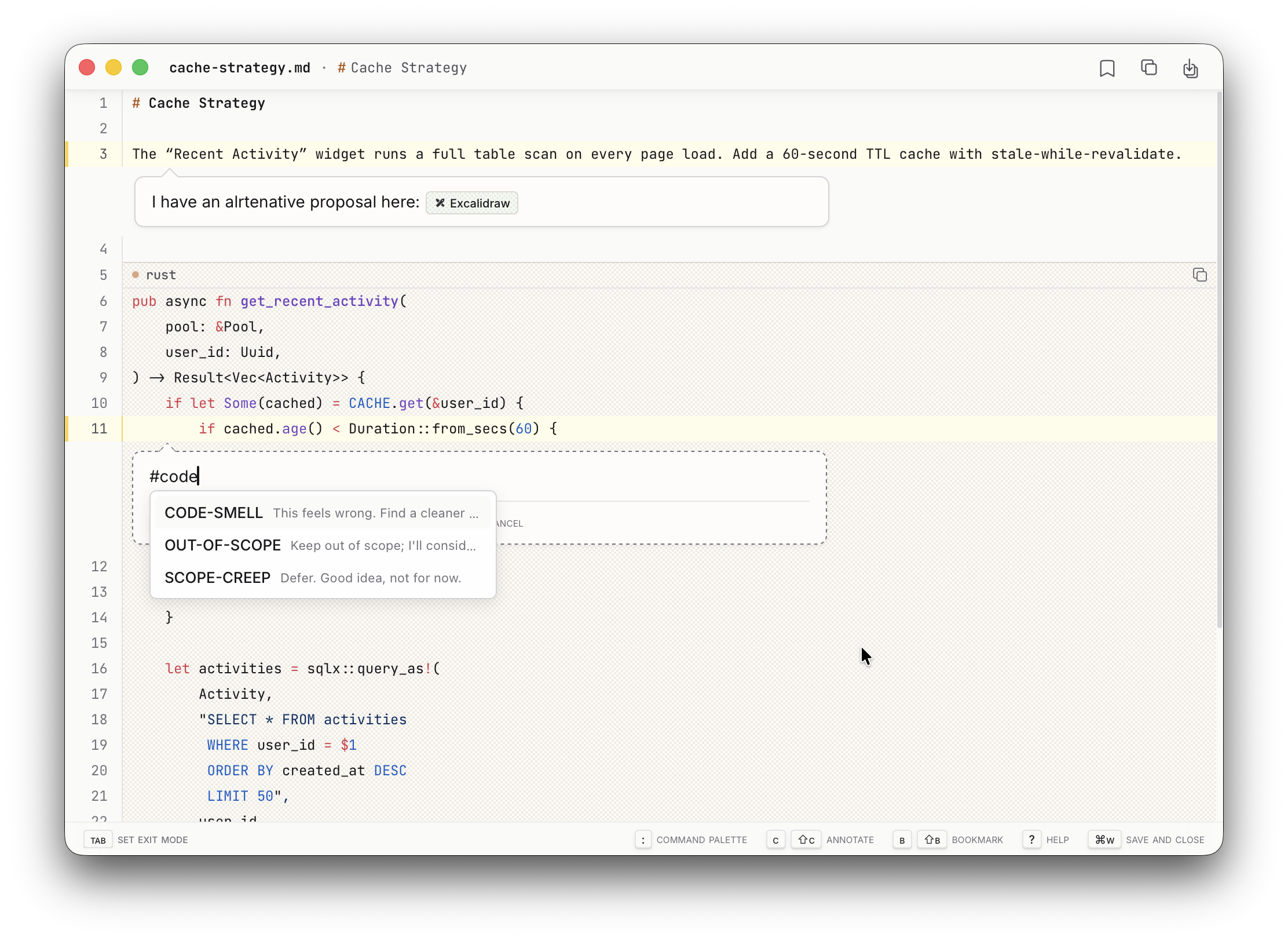
Why
AI agents work fast, but "make it better" is a lossy feedback channel. When an agent drafts a plan, proposes a refactor, or generates code — you need a way to point at specific lines and say what you actually mean, before any of it becomes real.
annot is that moment of review. It opens a window, you shape the content with located, structured feedback, then it closes and gets out of the way.
Install
macOS:
brew install denolehov/tap/annot
git clone https://github.com/denolehov/annot.git && cd annot
pnpm install
pnpm tauri build
git clone https://github.com/denolehov/annot.git && cd annot
nix develop          # enter dev shell with all build dependencies
pnpm install
pnpm tauri build     # .app bundle at src-tauri/target/release/bundle/macos/
Install system dependencies:
sudo apt-get update
sudo apt-get install -y \
  libwebkit2gtk-4.1-dev \
  build-essential \
  file \
  libxdo-dev \
  libssl-dev \
  libayatana-appindicator3-dev \
  librsvg2-dev \
  libgstreamer1.0-dev \
  libgstreamer-plugins-base1.0-dev \
  gstreamer1.0-plugins-good \
  gstreamer1.0-plugins-bad \
  libgstreamer-plugins-bad1.0-dev
Install Rust, Node.js 22, and pnpm, then build:
curl --proto '=https' --tlsv1.2 -sSf https://sh.rustup.rs | sh
git clone https://github.com/denolehov/annot.git && cd annot
pnpm install
pnpm tauri build     # binary at src-tauri/target/release/annot
git clone https://github.com/denolehov/annot.git && cd annot
nix develop          # enter dev shell with all build dependencies
pnpm install
pnpm tauri build     # binary at src-tauri/target/release/annot
Or install into your Nix profile (wraps the binary with required env vars):
nix profile add path:.
Build from source (Windows)Wayland note: The installed binary automatically sets
GDK_BACKEND=x11andWEBKIT_DISABLE_DMABUF_RENDERER=1via the Nix wrapper, which prevents broken
text rendering in WebKit2GTK under Wayland.
Install prerequisites:
- Rust — install via rustup
- Node.js 24 — install via nodejs.org
- pnpm —
npm install -g pnpm - WebView2 Runtime — preinstalled on Windows 11; Windows 10 users can download the
Evergreen Bootstrapper from Microsoft.
Clone and build:
git clone https://github.com/denolehov/annot.git
cd annot
pnpm install
pnpm tauri build
The binary is at src-tauri\target\release\annot.exe. There is no installer bundle yet —
add the src-tauri\target\release\ directory to your PATH, or reference the .exe directly.
Quick start
With Claude Code
Run the following command on macOS, Linux, or Windows:
claude mcp add --scope user annot annot mcp
Make sure annot.exe is on your PATH first (see build instructions above), or pass
the full path: claude mcp add --scope user annot "C:\path\to\annot.exe" mcp.
Claude now has review tools (review_file, review_diff, review_content). Ask it to review something and a window opens for your feedback.
Standalone
annot file.rs           # Open a file for annotation
annot --json file.rs    # Output as JSON (for agent consumption)
How it works
- A window opens with your content (code, diff, or markdown)
- Click line numbers to select ranges, then type your annotation
- Weave tags into prose for structured feedback:
[# VERIFY] this claim with a test - Select an exit mode (Tab) to signal intent — "Apply", "Reject", "Needs changes"
- Close the window — structured annotations return to the caller
No data leaves your machine. No accounts. No cloud.
Features
Tags
Composable mini-prompts you build over time. Type / in the annotation editor to insert one:
[# VERIFY] this with a dedicated test
Make this configurable. Add a new section in @config.rs.
[# ELABORATE] on the error handling here
Tags carry semantic meaning that LLMs interpret. They appear in a LEGEND block in the output. Create your own via the command palette (:).
Exit modes
Signal intent when closing a review. Instead of just closing, indicate what should happen next.
User-defined modes persist across sessions. Agent-defined modes are ephemeral and passed via MCP:
{
  "exit_modes": [
    {"name": "Apply", "instruction": "Apply all changes exactly as annotated", "color": "green"},
    {"name": "Reject", "instruction": "Reject and explain reasoning", "color": "red"}
  ]
}
Session context
Press Shift+C to add comments that apply to the entire review — framing context like "focus on error handling, ignore style."
More
- Syntax highlighting for 50+ languages
- Mermaid diagrams rendered inline
- Portal links — embed live code from other files
/excalidraw— draw diagrams inside annotations/replace— propose inline code changes
MCP tools
review_file
| Parameter | Type | Required | Description |
|---|---|---|---|
file_path |
string | yes | Absolute or relative path to the file |
exit_modes |
array | no | Ephemeral exit modes for this session |
review_diff
| Parameter | Type | Required | Description |
|---|---|---|---|
git_diff_args |
array | no* | Git diff arguments (e.g., ["--staged"]) |
diff_content |
string | no* | Raw unified diff content |
label |
string | no | Display name (default: "diff") |
exit_modes |
array | no | Ephemeral exit modes for this session |
*Either git_diff_args or diff_content must be provided.
review_content
| Parameter | Type | Required | Description |
|---|---|---|---|
content |
string | yes | Markdown-formatted text content |
label |
string | yes | Display name with .md extension |
exit_modes |
array | no | Ephemeral exit modes for this session |
Keyboard shortcuts
| Shortcut | Function |
|---|---|
| Click line numbers | Select/deselect lines |
| Shift+Drag | Select range |
| c | Comment hovered line |
| Shift+C | Session context (global comment) |
| Tab / Shift+Tab | Cycle exit modes |
| Alt+Tab | Exit mode picker |
| : | Command palette |
| Cmd+F / Ctrl+F | Search |
| Cmd+S / Ctrl+S | Save to file |
| ? | Help overlay |
In annotation editor:
| Shortcut | Function |
|---|---|
| # | Insert tag |
| @ | Reference (annotations, sections, files) |
| / | Slash commands (/replace, /excalidraw) |
License
Yorumlar (0)
Yorum birakmak icin giris yap.
Yorum birakSonuc bulunamadi