scumble
Health Gecti
- License — License: GPL-3.0
- Description — Repository has a description
- Active repo — Last push 0 days ago
- Community trust — 30 GitHub stars
Code Uyari
- network request — Outbound network request in electron/main/assistant/help.js
- network request — Outbound network request in electron/main/assistant/index.js
Permissions Gecti
- Permissions — No dangerous permissions requested
Bu listing icin henuz AI raporu yok.
Free, open-source desktop editor for AI inpainting: select, prompt, get a colour-matched layer. FLUX 3 Image, FLUX.2, GPT Image, Nano Banana, Seedream and Qwen through your API key or your own ComfyUI. Layers, PSD export, MCP.
Scumble
A free, open-source desktop editor for AI inpainting. Select part of a picture, describe what should be there,
and the result comes back as an editable layer, colour-matched to its surroundings. Scumble renders with FLUX 3 Image,
FLUX.2, GPT Image, Nano Banana, Seedream, Qwen Image Edit and more through your own API key, or locally on your own
ComfyUI, and keeps the work in layers you can export to PSD. Manual, videos and the dev blog:
denrakeiw.com/scumble.
Work in progress. Scumble is in an early state (0.1.x). Not every feature has been
tested end to end yet. Expect rough edges, keep backups of your images, and please report
what breaks in the issues.
How it works: open an image, select an area (brush, shape, magic
wand, object hover or a text description), write a prompt, generate. The result lands as a
layer over the selection and can be blended in with colour match, erased in parts,
regenerated, stacked with filter and text layers, and exported with all layers to PSD or
OpenRaster. Or open the assistant and say what you want: it drives the same editor through
the same commands an external agent gets, one card per step, and asks before anything costs
money.
Watch: Scumble, explained by someone who did not ask (4:40): two
voices, one sceptic, the whole app recorded in the app.
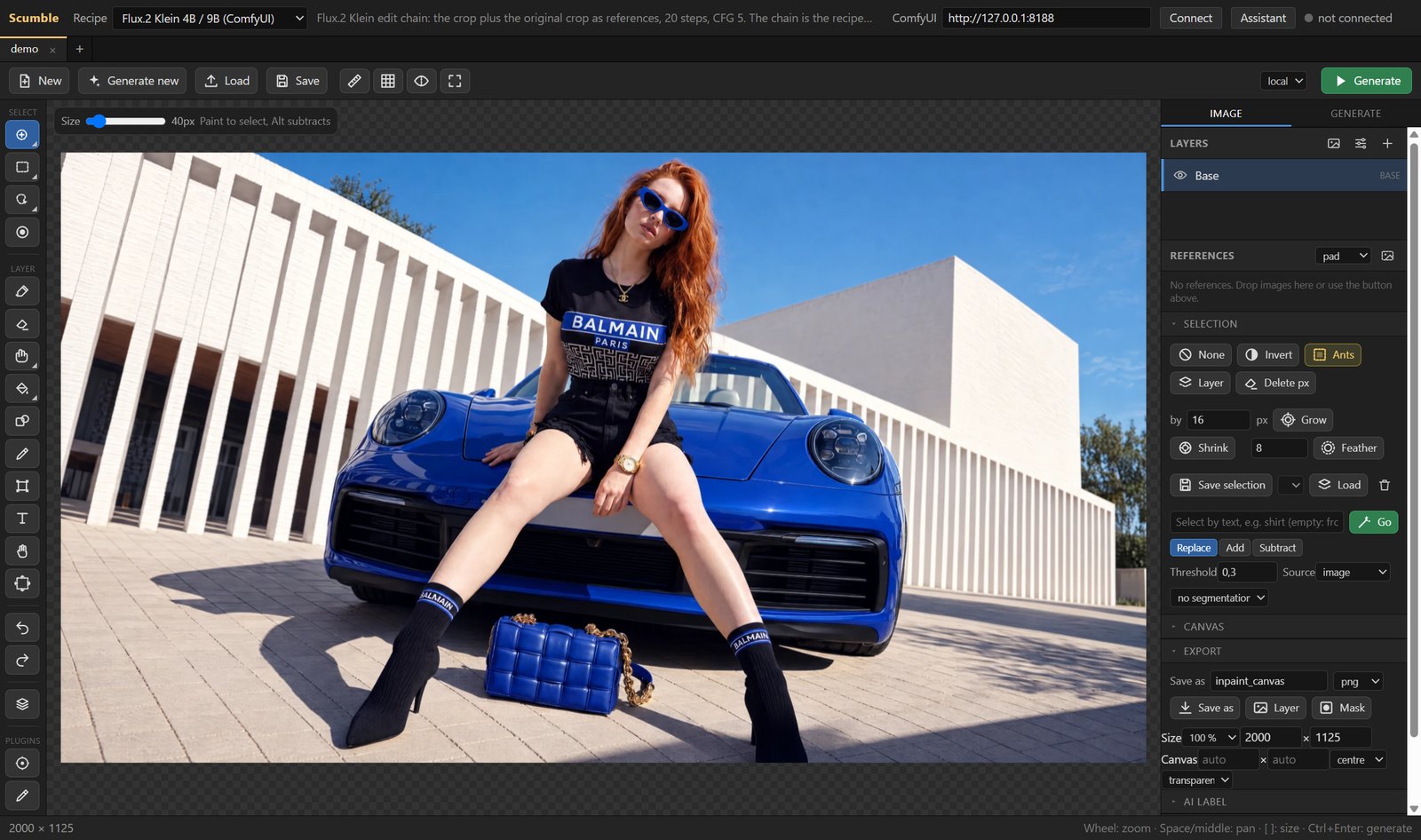
Rendering happens on your own ComfyUI
(local or remote, for example on RunPod) or through API providers: Google (Nano Banana
2 / 2 Lite / Pro), OpenAI (GPT Image 2.5 Flare / Sunburst, 2), Black Forest Labs
(FLUX 3 Image, FLUX.2 max / pro / flex / klein, FLUX.1 Fill), ByteDance Seedream 5 and 4.5, Qwen Image Edit and Qwen Image 2.1,
Magnific's Mystic, Ideogram's mask inpainting and Image Expand outpainting (FLUX Pro, Ideogram, Seedream 4.5),
each through the model's own API where Scumble has one (for Seedream that is ByteDance's BytePlus ModelArk) or
through ToAPIs, fal.ai, Replicate, WaveSpeedAI, Comfy Cloud, OpenRouter, Oxen.ai and Magnific. Object masks and background removal
run inside the app through ONNX Runtime (SAM2, BiRefNet, RMBG). The editor is the same
code as the ComfyUI node Inpaint Canvas;
Scumble is the standalone window around it, plus recipes, plugins, an MCP server and the assistant.
Windows first (from the Microsoft Store or the installer below), a Linux build (AppImage, .deb) that has not been tried on Linux yet, macOS is planned. Free software, GPL-3.0.
What has been verified so far: local rendering through ComfyUI, the in-app helper models,
the film pack, the command core, the MCP server, the tile engine on large documents and
auto-update, and among the API providers FLUX 3 Image on Black Forest Labs and GPT Image 2.5 through OpenRouter; the
other API providers and the assistant's model calls are untested against the live services.
Features
Select, prompt, generate
Paint a selection (or draw a rectangle, an ellipse, a lasso, use the magic wand, hover an
object, or type "the handbag" for a text selection), write the prompt in the Generate tab,
press Generate. The recipe decides where it runs: your ComfyUI, or a provider with a key.
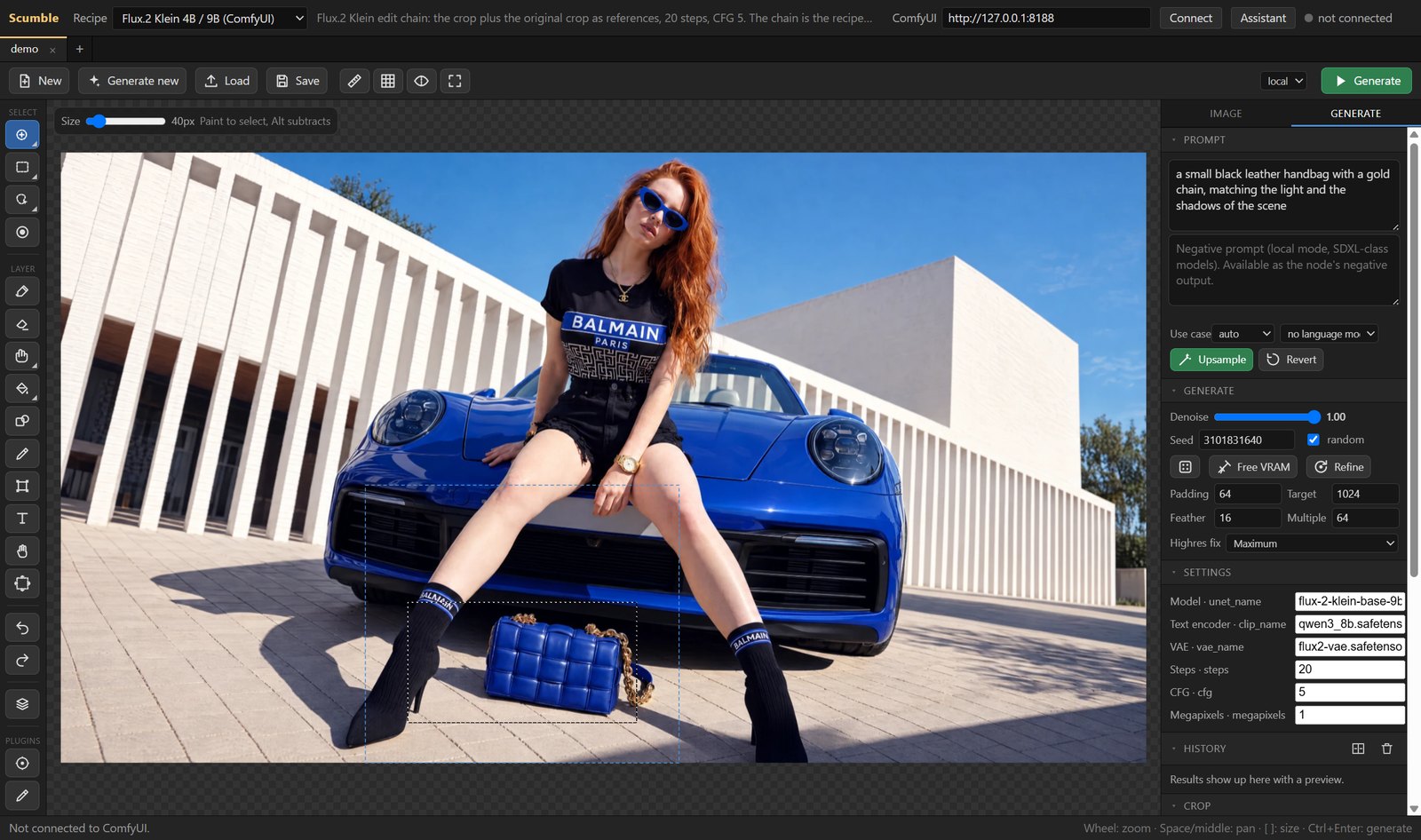
- Selection by brush, rectangle, ellipse, lasso, magic wand, object hover (SAM2 in-app)
or by text (SAM3 on the ComfyUI side); grow, shrink, feather, invert, from layer, saved
selections. - Recipes instead of node graphs: pick a model ("FLUX.2 [max]", "Nano Banana 2") and the
provider it runs on (ToAPIs, its own API such as BytePlus ModelArk for Seedream, fal.ai, Replicate, WaveSpeedAI,
Comfy Cloud, OpenRouter, Oxen.ai, Magnific); import your own ComfyUI
workflow as a recipe if it holds an Inpaint Canvas node, or a copy of a shipped model recipe with
a variant of your own. - API runs go out at the size the provider really takes (Highres fix picks the tier), with
reference layers, and transparent results from the OpenAI image models land as cut-outs. - Start from nothing: Generate new makes the base image from the prompt alone, locally
or through a provider, and you edit it from there. - Prompt upsampling through a stored API key, an OpenRouter, Oxen.ai or ToAPIs key, or a local Ollama /
LM Studio, with your own prompt-writing rules as Markdown templates.
Layers, filters, text
Every result is a layer. Match its colours to what is below it, mask it, erase parts, set a
blend mode, put filter layers and text on top. Nothing is baked in until you flatten.
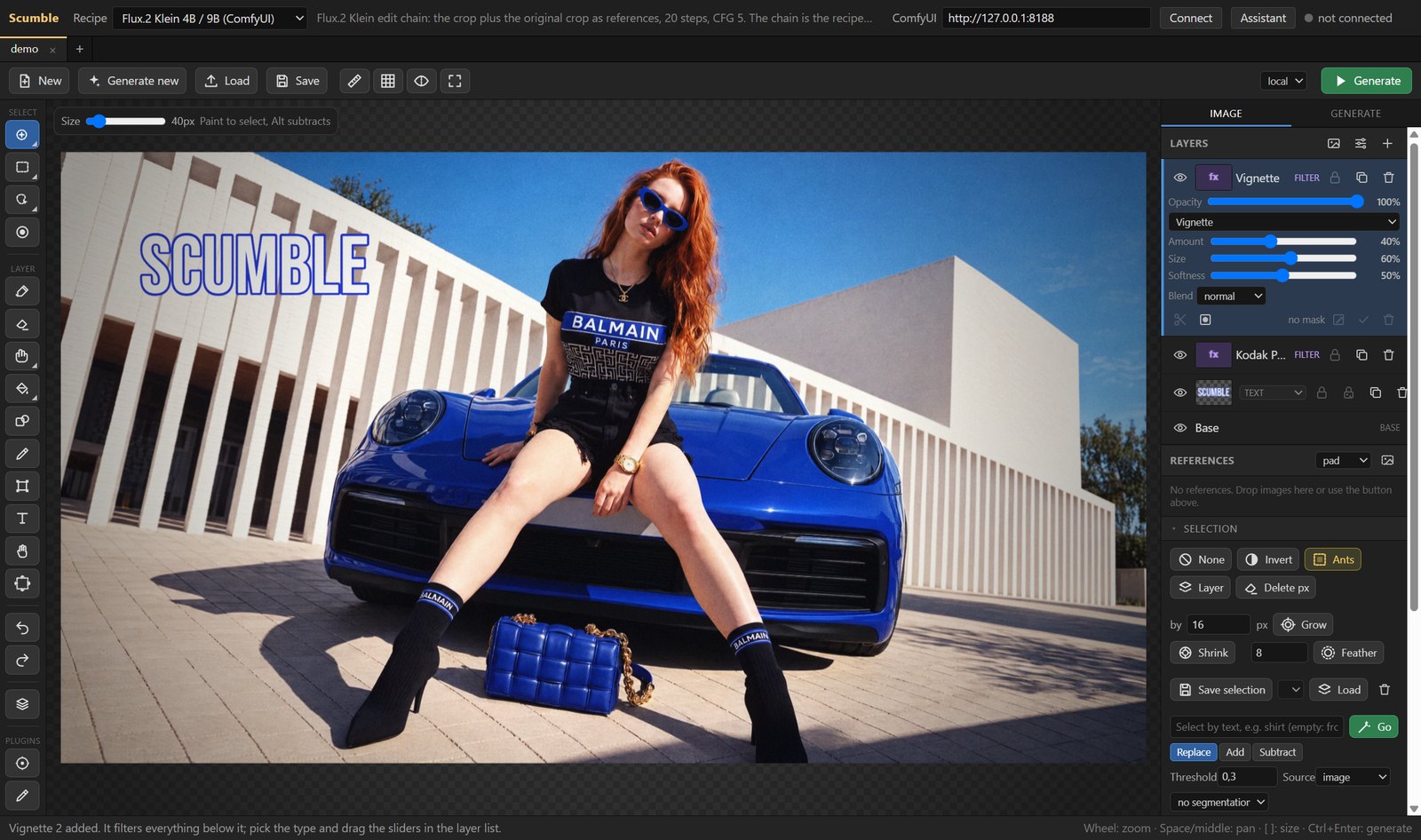
- A full layer stack: paint, image, text and filter layers, masks, blend modes, opacity,
retouch tools (clone, heal, smudge), transform, crop and extend, copy and paste of whole
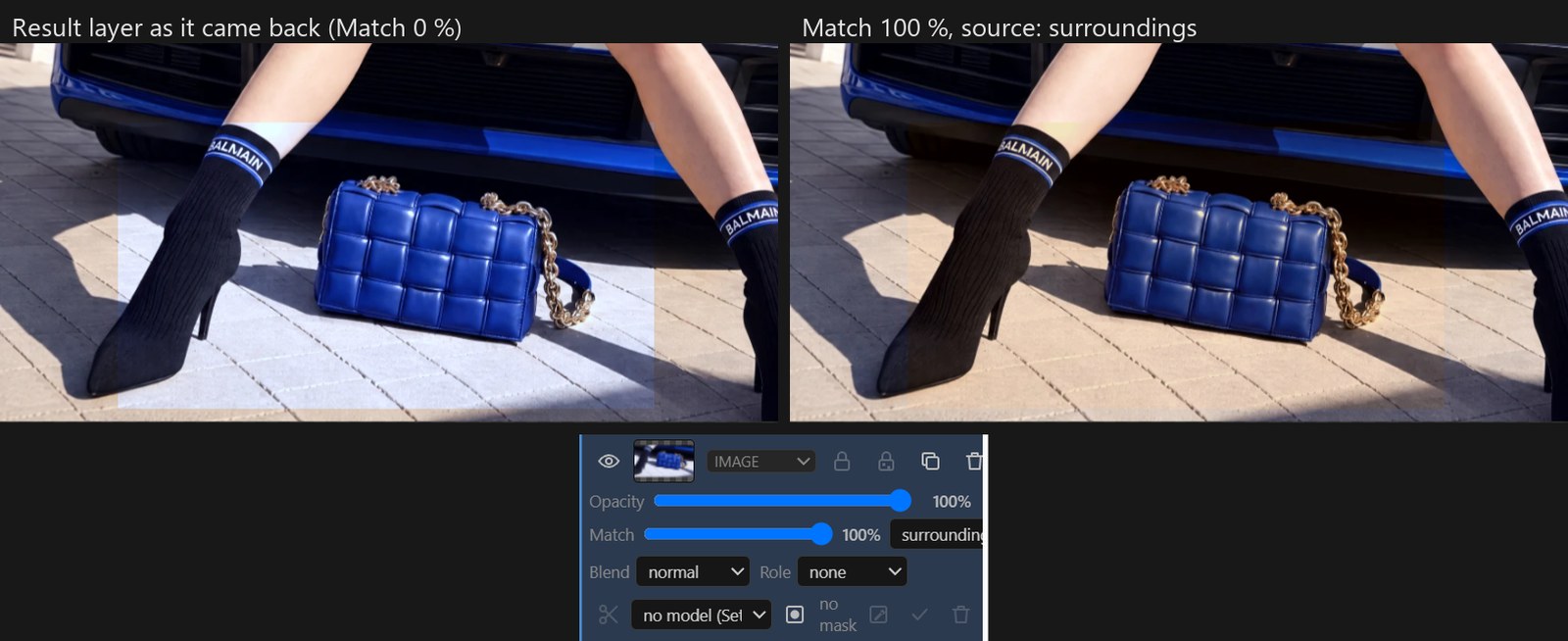
layers between tabs, SVG files as layers. - Colour match per layer: a result that came back a shade off is matched to its
surroundings (or to what lies below it) with one slider in the layer row, non-destructively;
the slider can also stay at 40 % when the model's own tone is worth keeping.
- Filter layers on the GPU (WebGL2): grain with film presets, curves, levels, colour
balance, HSL, LUT (.cube), vignette, normalise, sharpen, blur and more; a film pack plugin with
film looks, halation, glow, bleach bypass, cross processing, split toning, light leaks,
frames and control points. - A shape tool (rectangle, ellipse, polygon, Bezier, freehand path, fill and outline),
custom brushes from Photoshop.abrfiles, and 3D objects (.glb) placed into the picture
with their own light. - Export PNG, JPEG, WebP, PSD and ORA with layers, masks and selections, at a percentage or
in a frame of a given size; an AI label panel writes the EU AI label into the file.
The assistant
A chat column next to the canvas. It runs on your own API key, on Anthropic, OpenAI, Google
or any OpenAI-compatible endpoint (OpenRouter, DeepSeek, Moonshot / Kimi, Z.ai / GLM,
ToAPIs, WaveSpeed, Oxen.ai, or a local server), and drives the editor through the same 60+ commands
an external MCP client gets. Every call is a card you can open; everything that costs money,
queues on your ComfyUI, clears the undo stack or touches a layer that is not its own asks
first.
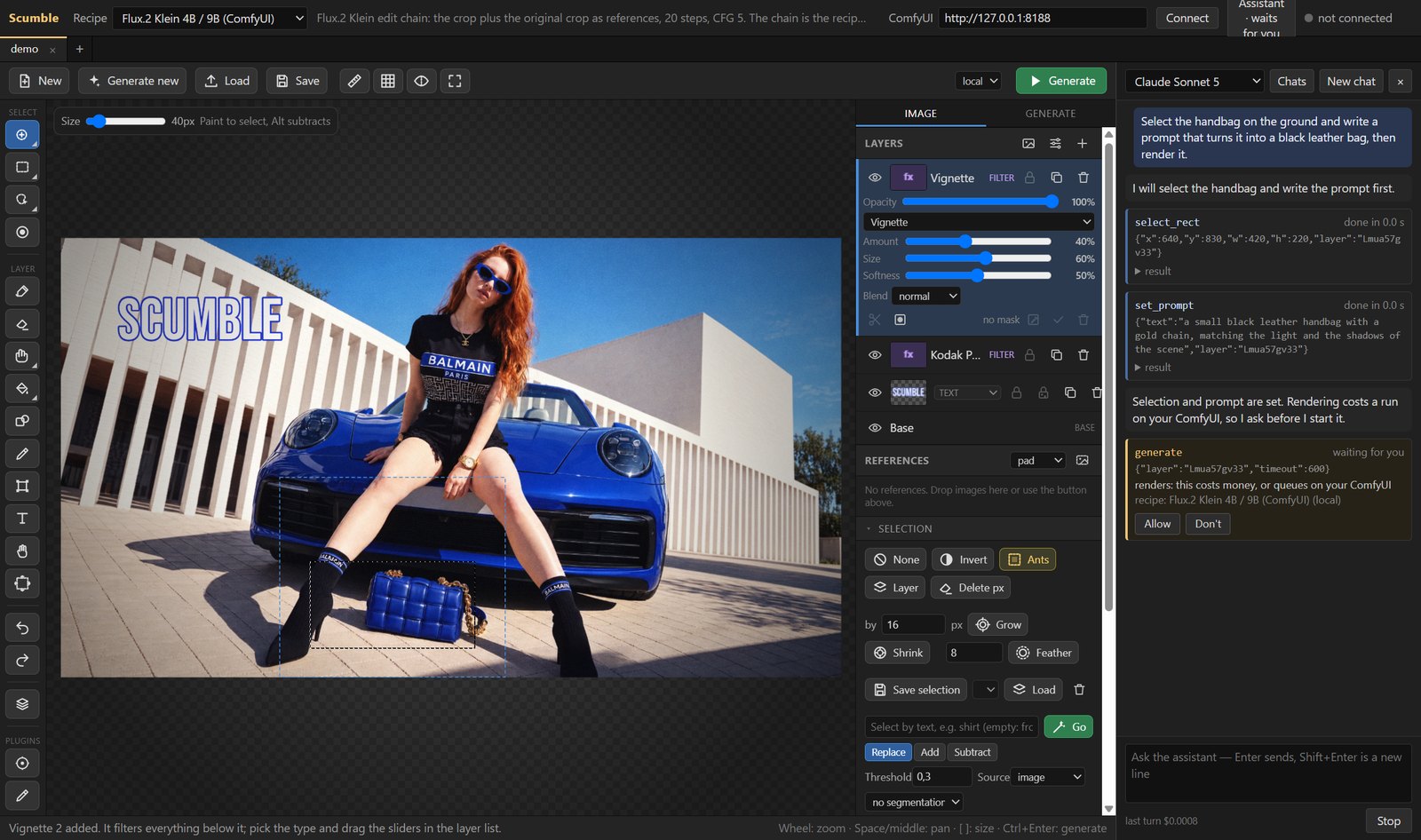
- Ctrl+Z takes back each of its steps, and Undo this turn puts every document the turn
touched back to what it was before, even when the turn was longer than the undo stack. - Chats are saved as they go, with their screenshots, and can be reopened; Settings >
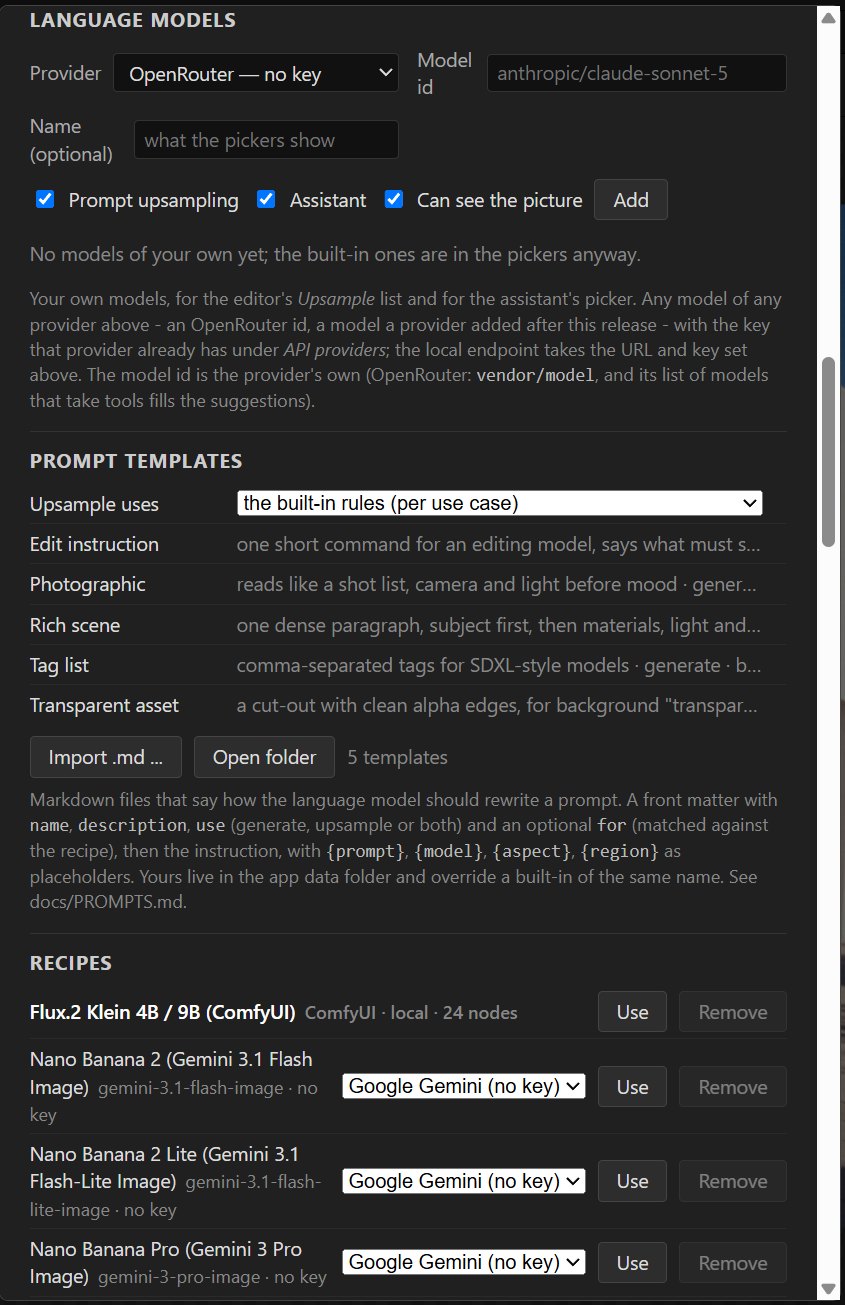
Assistant deletes everything the assistant ever stored, your keys excepted. - Your own model ids: Settings > Language models takes any model of any listed provider
(an OpenRouter id, a model released after this version) for the assistant, for prompt
upsampling, or both, on the key that provider already has. - The whole feature, what leaves your machine per provider and what it costs:
docs/ASSISTANT.md.
Large pictures, plugins, agents
- A tile engine keeps the picture, every layer and every mask in tiles; the pixel kernels
run as compiled Rust in workers, so a 15,000 x 10,000 document paints, saves, selects and
exports without freezing the window, and PNGs beyond the canvas limit (up to 65,535 px a
side, a gigapixel) open and save in strips. - JavaScript plugins (filters with CPU and WebGL2 paths, panels, menu actions, tools,
commands) and a command core with 60+ documented commands (docs/COMMANDS.md). - MCP server: Claude Code, Claude Desktop or any MCP client can drive the editor (Help >
Copy MCP registration puts the line for your client on the clipboard);--headlessand--cmdfor scripts (docs/MCP.md). - Tabs with session restore, a local file mirror (no server needed to reopen your work),
API keys in the OS credential store, a console and a log file (Ctrl+Shift+L), auto-update
from GitHub releases with the release notes shown before you restart.
The picture in the screenshots is a sample photo used to show the features; nothing in it
was generated with Scumble.
Install (Windows)
Two ways to the same app:
- From the Microsoft Store: Scumble in the Microsoft Store.
Microsoft signs the Store copy, so it installs without a SmartScreen warning, and the Store
keeps it up to date. A new version reaches the Store after Microsoft has certified it, so it
can arrive a little later than the GitHub release. The Store copy keeps its own settings, API
keys and files (%APPDATA%\Scumble Store), so it can be installed beside the GitHub one. - From GitHub: download
Scumble Setup <version>.exefrom the
latest release and run it. This
installer is not code-signed, so SmartScreen shows "Windows protected your PC" once: click
More info, then Run anyway. Updates are downloaded by the app itself (Settings >
Updates), which also shows what changed, and do not go through SmartScreen again.
CHANGELOG.md lists every version. How releases are built, who approves
them and what the app sends over the network is in the
code signing policy.
For local rendering you need a ComfyUI with the node pack
ComfyUI-InpaintCanvas installed and
the models of the recipe you pick (the shipped Flux.2 Klein recipe wants the Flux.2 Klein
9B model, the Qwen3 8B text encoder and the Flux.2 VAE; the recipe's Settings panel lets
you choose the file names you have). For an API provider put the key into Settings > API
providers; no ComfyUI is needed then. The same key rows serve the assistant and prompt
upsampling (Anthropic, OpenAI, Google, OpenRouter, DeepSeek, Moonshot, Z.ai, ToAPIs,
WaveSpeed, Oxen.ai), plus a local OpenAI-compatible endpoint that needs no key. The get a key links
of ToAPIs and WaveSpeedAI carry the author's referral code.
Install (Linux)
The same release carries scumble-<version>.AppImage and scumble-<version>.deb (x64). The Linux build is built
by CI and has not been run by the author; reports are welcome in the
issues. The AppImage: chmod +x it and start it; it updates itself
like the Windows app (the .deb does not, install the next one over it). On Ubuntu 23.10 and later AppArmor's limit on
unprivileged user namespaces may keep Electron's sandbox, and so the AppImage, from starting; the .deb installs
the sandbox helper properly. The
helper models (SAM2, background removal) run on the CPU on Linux. API keys go into the desktop's keyring (GNOME
Keyring, KWallet); without one Settings › API providers says the keys are only obfuscated.
First steps
Type the ComfyUI URL in the top bar (default http://127.0.0.1:8188), Connect, open an
image (Ctrl+O, drop, paste), paint a selection, type a prompt, Generate (Ctrl+Enter).
Ctrl+S saves the visible image. Every document is a tab (Ctrl+T new, Ctrl+W close,
Ctrl+Tab next); a run keeps going while another tab is in front. Ctrl+, opens the settings
(server and auth, API keys, language models, recipes, helper models, assistant, plugins,
local files, rendering, updates). Ctrl+Shift+A opens the assistant.
Every image the editor uploads or receives is kept under %APPDATA%/Scumble/files/
(input/ and output/, mirroring ComfyUI's folders). The server only holds copies:
before a run the app uploads what the server lacks, so a fresh or restarted ComfyUI
(RunPod) works without re-loading the document, and the last session is restored at
start even while no server is connected.
Run from source
npm install
npm start
Build the installer with npm run dist (dist/Scumble Setup <version>.exe, NSIS,
unsigned). Releases are built by GitHub Actions: pushing a tag v<version> that matchespackage.json publishes a draft release with the installer, its blockmap and latest.yml
(the auto-update feed); publishing the draft makes it visible to the app. The Rust pixel
kernels are committed as renderer/editor/px/px.wasm; python tools/build_px.py rebuilds
them.
Tests (tools/): smoke_test.py (needs a ComfyUI), commands_test.py (command core and
the sample plugin), film_test.py (GPU and CPU paths of the film pack), mcp_test.py
(the MCP server over stdio), assistant_test.py (the assistant against a scripted mock of
all four model families, with assistant_test.js for the loop in plain Node),llm_test.py (the OpenAI-compatible upsample endpoint against a mock server, and the
user's own model rows), toapis_test.py, openrouter_test.py, ark_test.py, oxen_test.py and magnific_test.py (each
adapter in plain Node, then the app against a mock of the service), recipes_test.py
(every shipped recipe's settings rows and the importer), editor_test.py (editor
behaviour that is easy to break again), composite_test.py (the GPU compositor against
Canvas 2D), generate_test.py (making an image from the prompt alone, against the
loopback provider), export_test.py, huge_test.py and perf_test.py (large
documents), px_test.js (the Rust kernels against their JavaScript twins),helpers_test.js (ONNX modules without Electron). tools/run_gates.sh runs a list of
them on a fresh instance. See CLAUDE.md for the development notes.
Layout
electron/main/     main process: window, scumble:// scheme with the ComfyUI proxy, websocket, menu, dialogs, settings,
                   file mirror, keys.js (safeStorage), recipes.js, llm.js + llm_custom.js (prompt upsampling, the user's
                   own models), providers/ (toapis, fal, replicate, bfl, openai, gemini, wavespeed, comfycloud, openrouter, ark, oxen, magnific),
                   onnx/ (SAM2, matting), plugins.js, updater.js (GitHub releases), bridge.js + local.js + mcp/ (agents),
                   assistant/ (the loop, the policy, the four model adapters, the chat store)
electron/preload.js
renderer/          shell.js (connection bar, recipe picker, tabs, settings), commands.js (the command core),
                   plugins.js (plugin loader and the `scumble` API), assistant.js (the chat panel)
renderer/editor/   the editor, shared with the ComfyUI node (docs/BUILD_NODE.md); host.js is the app side of it,
                   inpaint_filters_gl.js the WebGL2 filter path, stitch.js the in-app crop / stitch for provider runs,
                   inpaint_tiles.js + inpaint_arena.js + inpaint_pool.js the tile engine and its workers, px/ the Rust
                   kernels (wasm), inpaint_bands.js the strip writers
crates/px/         the Rust source of the pixel kernels
recipes/           ComfyUI recipes (API-format prompts with a fixed canvas node id) and model recipes (one per model, a variant per provider), docs/RECIPES.md
plugins/           built-in plugins: sample (one of every extension point), film (the film pack), glb (3D objects), ailabel (the EU AI label)
docker/runpod/     Dockerfile + provision.sh for a ComfyUI box on RunPod (draft, docs/RUNPOD.md)
tools/             build_node.py (the node's editor), build_px.py (the kernels), cdp.py (DevTools driver), the tests, run_gates.sh
docs/              BRIEF.md (vision, decisions, phases), ASSISTANT.md, COMMANDS.md, PLUGINS.md, FILM.md, MCP.md, RECIPES.md,
                   HELPERS.md, PROMPTS.md, BRUSHES.md, GLB.md, PERFORMANCE.md, BUILD_NODE.md, CODE_SIGNING_POLICY.md, images/
.github/workflows/ build.yml (Windows installer, Linux AppImage and .deb, draft release on a version tag)
Licence
GPL-3.0, the same licence as the Inpaint Canvas node and ComfyUI. See LICENSE. Free to
use, modify and redistribute; modified versions must be published under the same licence.
Bundled fonts are OFL / Apache licensed, see renderer/editor/fonts/licenses. Film names
in the grain presets and the film pack are trademarks of their owners; the looks are
Scumble's own approximations, not licensed products.
Yorumlar (0)
Yorum birakmak icin giris yap.
Yorum birakSonuc bulunamadi