depwire
Health Gecti
- License — License: NOASSERTION
- Description — Repository has a description
- Active repo — Last push 0 days ago
- Community trust — 16 GitHub stars
Code Basarisiz
- process.env — Environment variable access in dist/index.js
- network request — Outbound network request in dist/index.js
- process.env — Environment variable access in dist/mcpb-entry.js
- network request — Outbound network request in dist/viz/public/arc.js
- rm -rf — Recursive force deletion command in scripts/build-mcpb.sh
Permissions Gecti
- Permissions — No dangerous permissions requested
This tool analyzes your codebase to build a cross-reference graph showing how files, functions, and imports connect. It provides an interactive visualization, dependency health scoring, and deep codebase context for AI-assisted refactoring tools like Cursor or Claude.
Security Assessment
The application makes outbound network requests and accesses environment variables, likely to gather analytics or fetch necessary data. No hardcoded secrets were detected, and it does not request explicitly dangerous permissions. However, the codebase fails a basic safety check due to a `rm -rf` recursive force deletion command hardcoded in a build script (`scripts/build-mcpb.sh`). While this might be intended just for cleaning up build directories, recursive force deletions are inherently risky and can cause accidental data loss if the path variables are ever improperly resolved. Overall risk is rated as Medium.
Quality Assessment
The project appears to be actively developed, with its last push occurring just today. It has a small but growing community with 16 GitHub stars. The repository includes a comprehensive description and a detailed README. The license is listed as BUSL-1.1 (Business Source License), though automated checks returned "NOASSERTION"—meaning developers should manually verify the license terms to ensure it aligns with their intended use, as BUSL is not a standard open-source license.
Verdict
Use with caution — while the actively maintained project provides valuable features for AI context, verify the non-standard license terms and be wary of the potentially destructive `rm -rf` command in the build scripts.
The missing context layer for AI-assisted refactoring
Depwire






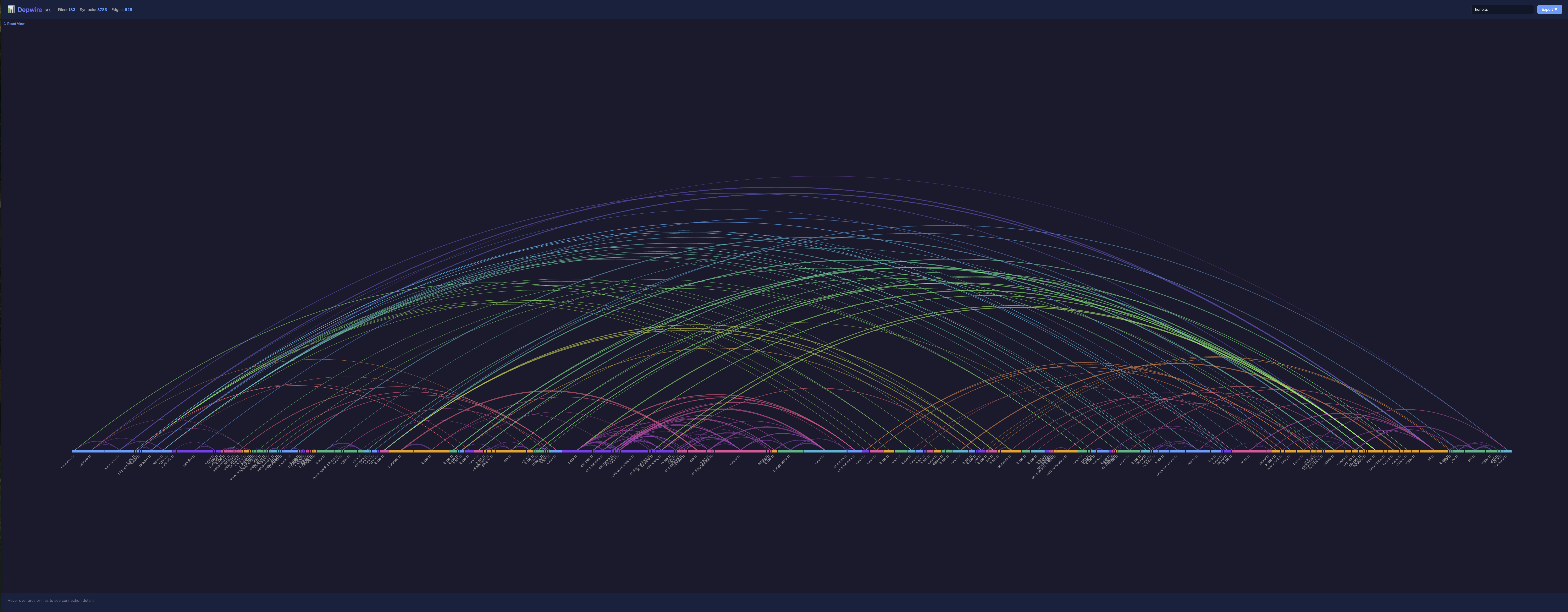
See how your code connects. Give AI tools full codebase context.
⭐ If Depwire helps you, please star the repo — it helps this open-source project grow into an enterprise tool.
Depwire analyzes codebases to build a cross-reference graph showing how every file, function, and import connects. It provides:
- 🎨 Beautiful arc diagram visualization — Interactive Harrison Bible-style graphic
- 🤖 MCP server for AI tools — Cursor, Claude Desktop get full dependency context
- 📊 Dependency health score — 0-100 score across 6 dimensions (coupling, cohesion, circular deps, god files, orphans & dead code, depth)
- 📄 Auto-generated documentation — 13 comprehensive documents: architecture, conventions, dependencies, onboarding, file catalog, API surface, error patterns, test coverage, git history, full snapshot, TODO/FIXME inventory, health report, and dead code analysis
- 🔍 Impact analysis — "What breaks if I rename this function?" answered precisely
- 🧹 Dead code detection — Find symbols that are defined but never referenced, categorized by confidence level
- 👀 Live updates — Graph stays current as you edit code
- 🌍 Multi-language — TypeScript, JavaScript, Python, Go, Rust, and C
Why Depwire?
AI coding tools are flying blind. Every time Claude, Cursor, or Copilot touches your code, it's guessing about dependencies, imports, and impact. The result: broken refactors, hallucinated imports, and wasted tokens re-scanning files it already saw.
Lost context = lost money + lost time + bad code.
Depwire parsed the entire Hono framework — 305 files, 5,636 symbols, 1,565 dependency edges — in 2.3 seconds.
Depwire fixes this by giving AI tools a complete dependency graph of your codebase — not a fuzzy embedding, not a keyword search, but a deterministic, tree-sitter-parsed map of every symbol and connection.
Stop Losing Context
- No more "start from scratch" chats — Depwire is the shared knowledge layer that every AI session inherits. New chat? Your AI already knows the architecture.
- Stop burning tokens — AI tools query the graph instead of scanning hundreds of files blindly
- One command, every AI tool — Claude Desktop, Cursor, VS Code, any MCP-compatible tool gets the same complete picture
Ship Better Code
- Impact analysis for any change — renaming a function, moving a file, upgrading a dependency, deleting a module — know the full blast radius before you touch anything
- Refactor with confidence — see every downstream consumer, every transitive dependency, 2-3 levels deep
- Catch dead code — find symbols nobody references anymore with confidence-based classification (high/medium/low)
Stay in Flow
- Live graph, always current — edit a file and the dependency map updates in real-time. No re-indexing, no waiting.
- Works locally, stays private — zero cloud accounts, zero data leaving your machine. Just
npm installand go.
15 MCP Tools, Not Just Visualization
Depwire isn't just a pretty graph. It's a full context engine with 15 tools that AI assistants call autonomously — architecture summaries, dependency tracing, symbol search, file context, health scores, dead code detection, temporal evolution, and more. The AI decides which tool to use based on your question.
Installation
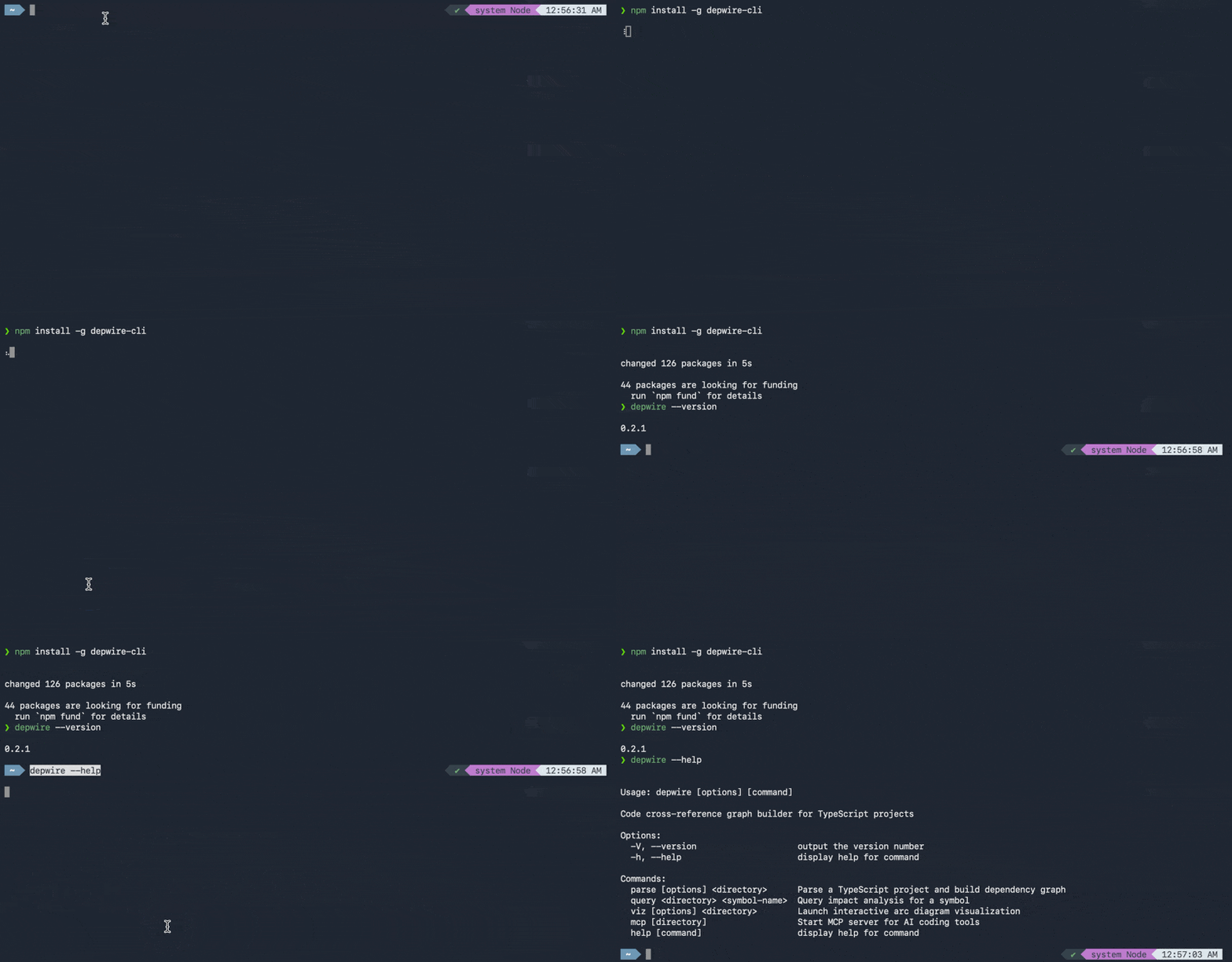
npm install -g depwire-cli
Or use directly with npx:
npx depwire-cli --help
Telemetry
Depwire collects anonymous usage data to help us understand which features are most useful and prioritize development.
What we collect:
- Command name (e.g.
parse,mcp,viz) - Depwire version
- Operating system (mac/linux/windows)
- Node.js version
What we never collect:
- File paths or code content
- Repo names or URLs
- Usernames, emails, or any personal data
To opt out, set this environment variable:
DEPWIRE_NO_TELEMETRY=1 depwire parse
# Or add to your shell profile:
export DEPWIRE_NO_TELEMETRY=1
Telemetry data is used solely to improve Depwire. View our privacy policy
Quick Start
CLI Usage
# Auto-detects project root from current directory
depwire viz
depwire parse
depwire docs
depwire health
depwire dead-code
depwire temporal

# Or specify a directory explicitly
npx depwire-cli viz ./my-project
npx depwire-cli parse ./my-project
npx depwire-cli dead-code ./my-project
npx depwire-cli temporal ./my-project

# Temporal visualization options
npx depwire-cli temporal --commits 20 --strategy monthly --verbose --stats

# Exclude test files and node_modules
npx depwire-cli parse --exclude "**/*.test.*" "**/node_modules/**"

# Show detailed parsing progress
npx depwire-cli parse --verbose

# Export with pretty-printed JSON and statistics
npx depwire-cli parse --pretty --stats

# Generate codebase documentation
npx depwire-cli docs --verbose --stats

# Custom output file
npx depwire-cli parse -o my-graph.json
Claude Desktop
Add to your Claude Desktop config (~/Library/Application Support/Claude/claude_desktop_config.json on macOS):
{
  "mcpServers": {
    "depwire": {
      "command": "npx",
      "args": ["-y", "depwire-cli", "mcp"]
    }
  }
}
Depwire auto-detects your project root. No path configuration needed.
Then in chat:
Show me the architecture.
Cursor
Settings → Features → Experimental → Enable MCP → Add Server:
- Command:
npx - Args:
-y depwire-cli mcp
Depwire auto-detects your project root from the current working directory.
Available MCP Tools
| Tool | What It Does |
|---|---|
connect_repo |
Connect to any local project or GitHub repo |
impact_analysis |
What breaks if you change a symbol? |
get_file_context |
Full context — imports, exports, dependents |
get_dependencies |
What does a symbol depend on? |
get_dependents |
What depends on this symbol? |
search_symbols |
Find symbols by name |
get_architecture_summary |
High-level project overview |
list_files |
List all files with stats |
get_symbol_info |
Look up any symbol's details |
visualize_graph |
Generate interactive arc diagram visualization |
get_project_docs |
Retrieve auto-generated codebase documentation |
update_project_docs |
Regenerate documentation on demand |
get_health_score |
Get 0-100 dependency health score with recommendations |
find_dead_code |
Find dead code — symbols defined but never referenced |
get_temporal_graph |
Show how the graph evolved over git history |
Supported Languages
| Language | Extensions | Features |
|---|---|---|
| TypeScript | .ts, .tsx |
Full support — imports, classes, interfaces, types |
| JavaScript | .js, .jsx, .mjs, .cjs |
ES modules, CommonJS require(), JSX components |
| Python | .py |
Imports, classes, decorators, inheritance |
| Go | .go |
go.mod resolution, structs, interfaces, methods |
| Rust | .rs |
Functions, structs, enums, traits, impl blocks, use declarations |
| C | .c, .h |
Functions, structs, enums, typedefs, macros, #include directives |
Visualization
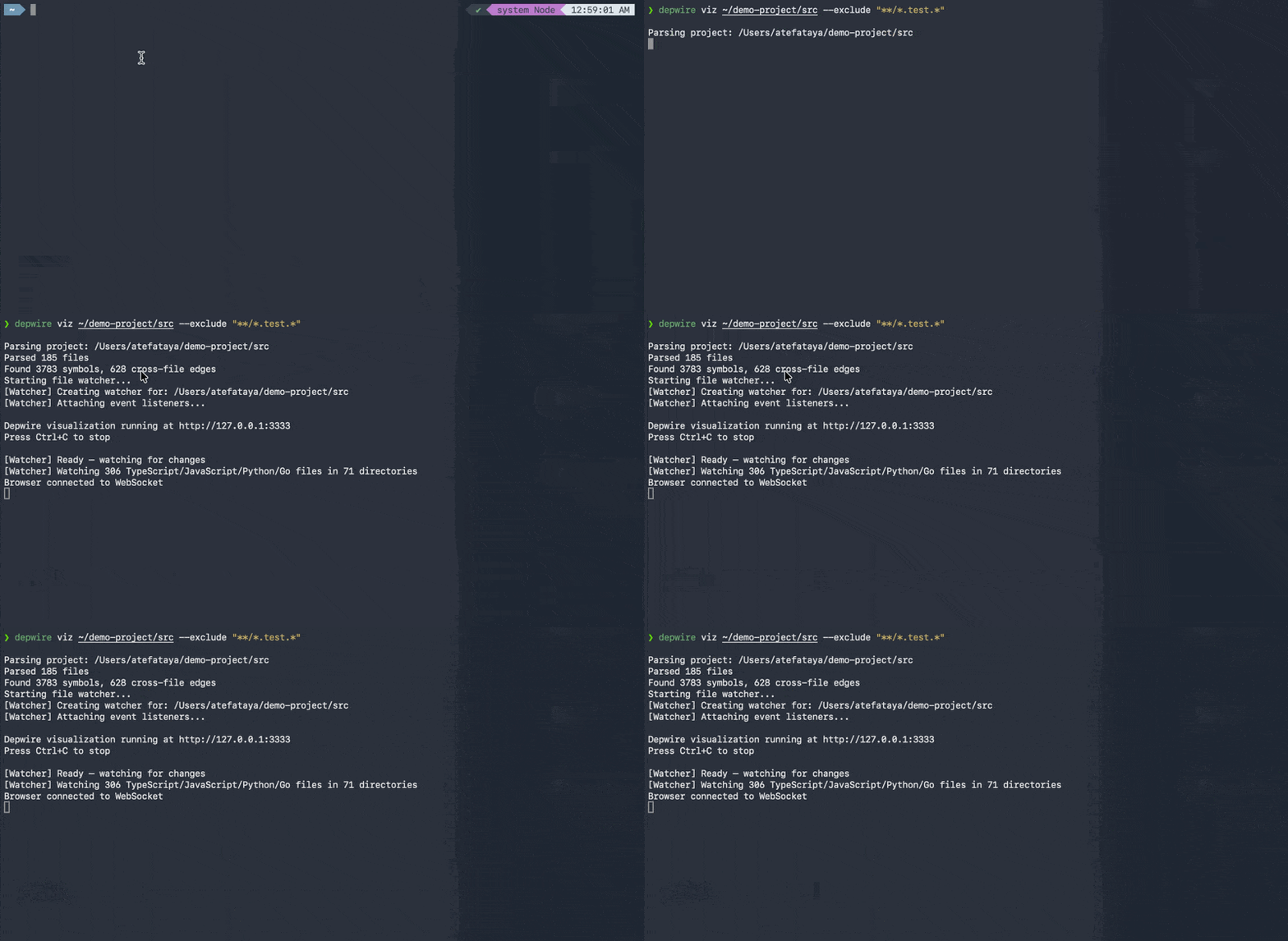
# Auto-detects project root (run from anywhere in your project)
depwire viz

# Or specify a directory explicitly
depwire viz ./my-project

# Custom port
depwire viz --port 8080

# Exclude test files from visualization
depwire viz --exclude "**/*.test.*"

# Verbose mode with detailed parsing logs
depwire viz --verbose

# Don't auto-open browser
depwire viz --no-open
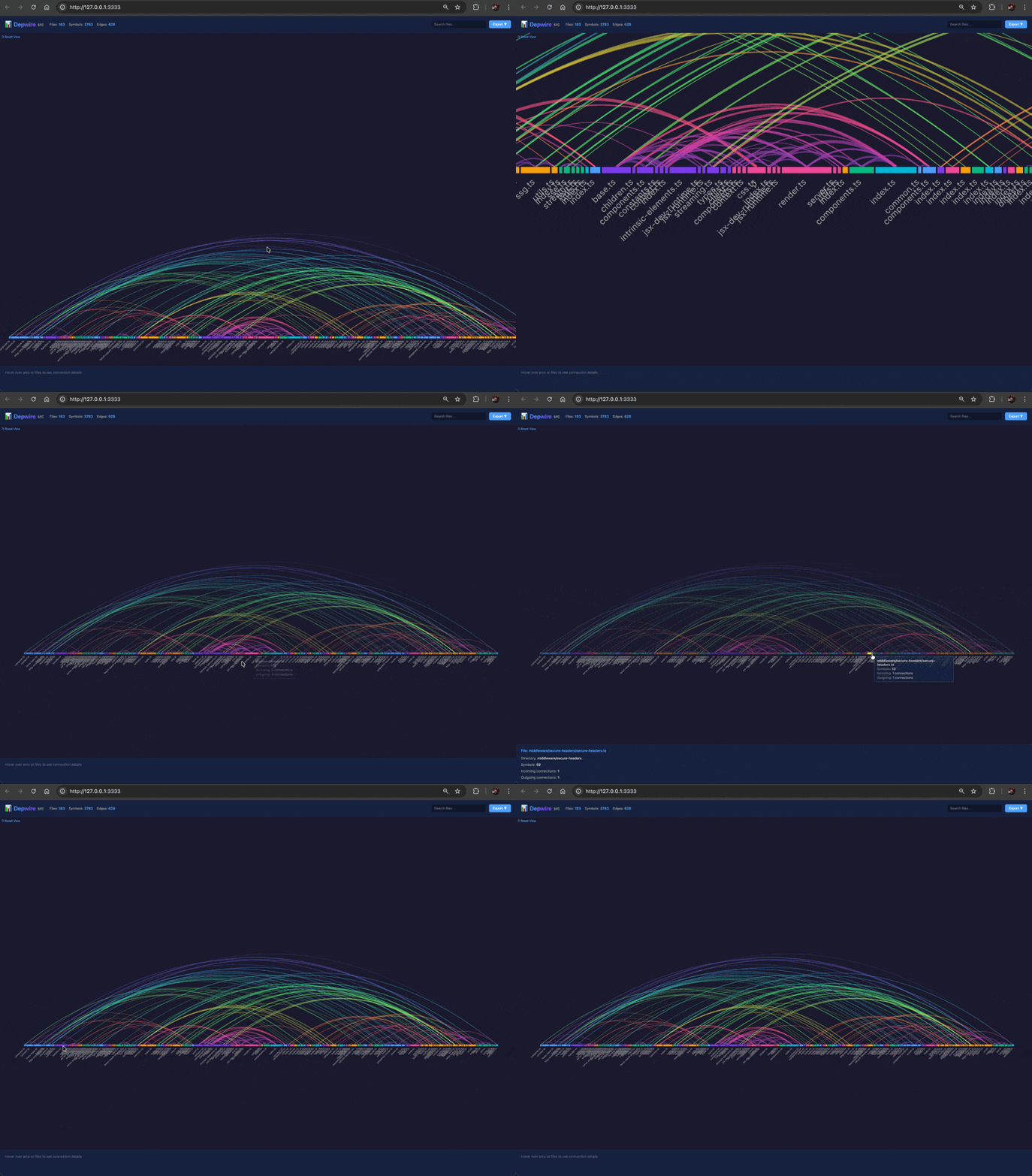
Opens an interactive arc diagram in your browser:
- Rainbow-colored arcs showing cross-file dependencies
- Hover to explore connections
- Click to filter by file
- Search by filename
- Live refresh when files change — Edit code and see the graph update in real-time
- Export as SVG or PNG
- Port collision handling — Automatically finds an available port if default is in use
Temporal Graph
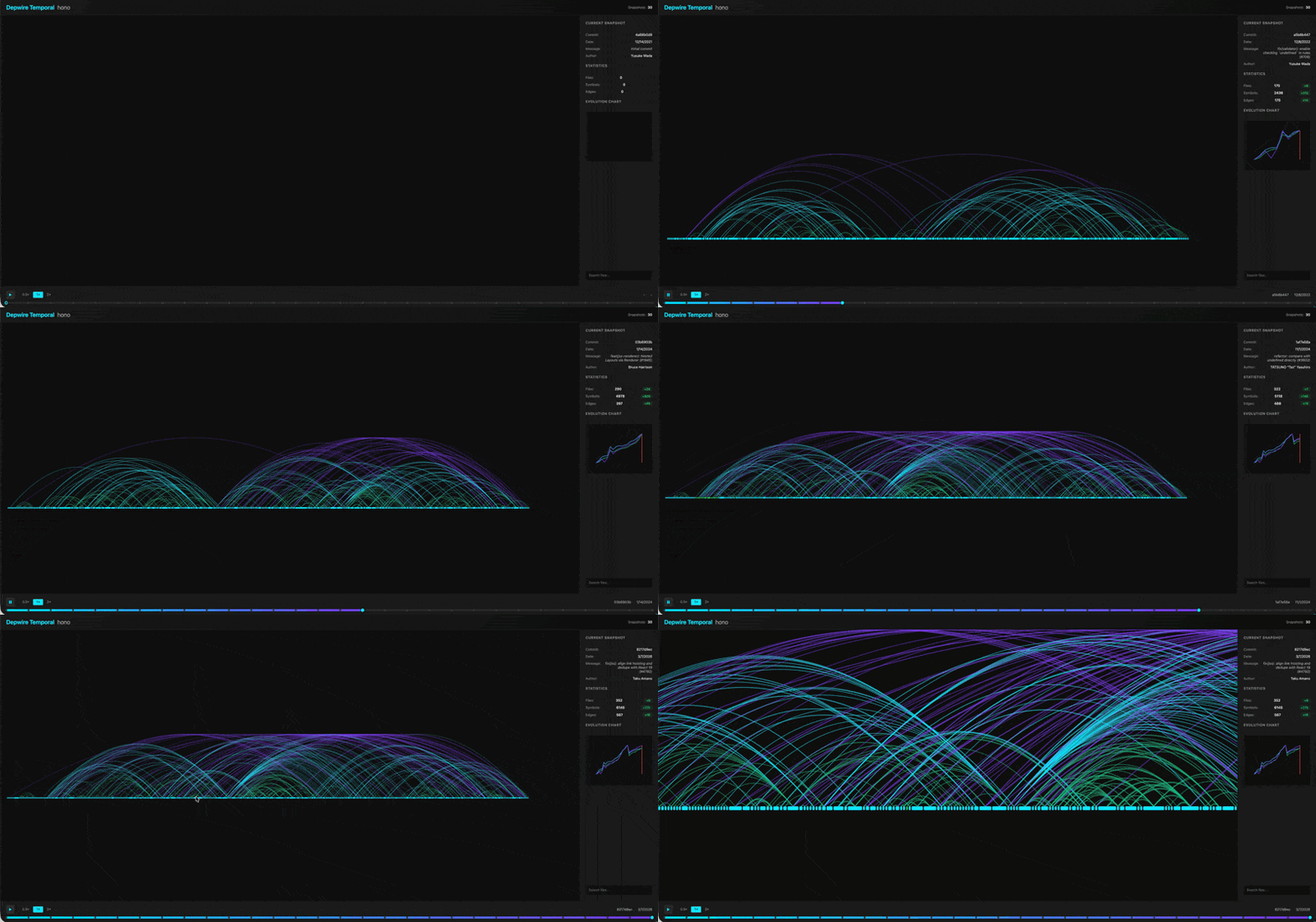
Visualize how your codebase architecture evolved over git history. Scrub through time with an interactive timeline slider.
# Auto-detects project root
depwire temporal

# Sample 20 commits with monthly snapshots
depwire temporal --commits 20 --strategy monthly

# Verbose mode with detailed progress
depwire temporal --verbose --stats

# Custom port
depwire temporal --port 3335
Options:
--commits <number>— Number of commits to sample (default: 20)--strategy <type>— Sampling strategy:even,weekly,monthly(default:even)-p, --port <number>— Server port (default: 3334)--output <path>— Save snapshots to custom path (default:.depwire/temporal/)--verbose— Show progress for each commit being parsed--stats— Show summary statistics at end
Opens an interactive temporal visualization in your browser:
- Timeline slider showing all sampled commits
- Arc diagram morphing between snapshots
- Play/pause animation with speed controls (0.5×, 1×, 2×)
- Statistics panel with growth deltas
- Evolution chart tracking files/symbols/edges over time
- Auto-zoom to fit all arcs on snapshot change
- Search to highlight specific files across time
🪦 Dead Code Detection
Find unused symbols across your codebase before they become technical debt.
- Detects symbols with zero incoming references (never called, never imported)
- Confidence scoring: high (definitely dead), medium (probably dead), low (might be dead)
- Smart exclusion rules — ignores entry points, test files, barrel files, and config files to reduce false positives
- Filter by confidence level, export as JSON for CI pipelines
- Integrated into the health score (orphans dimension)
- New MCP tool:
find_dead_code— AI assistants can query dead code directly - New document generator:
DEAD_CODE.md— auto-generated dead code report
depwire dead-code
depwire dead-code --confidence high
depwire dead-code --stats
depwire dead-code --json
Confidence Levels:
- 🔴 High confidence (definitely dead): Not exported with zero references, or exported but never used
- 🟡 Medium confidence (probably dead): Exported from barrel files with zero dependents, or only used in test files
- ⚪ Low confidence (might be dead): Exported from package entry points, types with zero dependents, or in dynamic-use directories (routes, middleware, etc.)
The dead code detector automatically excludes:
- Entry point files (index.ts, main.ts, server.ts, etc.)
- Test files (.test., .spec., tests/)
- Config files (.config.)
- Type declarations (*.d.ts)
- Framework auto-loaded directories (pages/, routes/, middleware/, commands/)
How It Works
- Parser — tree-sitter extracts every symbol and reference
- Graph — graphology builds an in-memory dependency graph
- MCP — AI tools query the graph for context-aware answers
- Viz — D3.js renders the graph as an interactive arc diagram
CLI Reference
depwire parse [directory]
Parse a project and export the dependency graph as JSON.
Directory argument is optional — Depwire auto-detects your project root by looking for package.json, tsconfig.json, go.mod, pyproject.toml, setup.py, or .git.
Options:
-o, --output <path>— Output file path (default:depwire-output.json)--exclude <patterns...>— Glob patterns to exclude (e.g.,"**/*.test.*" "dist/**")--verbose— Show detailed parsing progress (logs each file as it's parsed)--pretty— Pretty-print JSON output with indentation--stats— Print summary statistics (file count, symbol count, edges, timing)
Examples:
# Auto-detect project root
depwire parse

# Explicit directory
depwire parse ./src

# Exclude test files and build outputs
depwire parse --exclude "**/*.test.*" "**/*.spec.*" "dist/**" "build/**"

# Full verbosity with stats
depwire parse --verbose --stats --pretty -o graph.json
depwire viz [directory]
Start visualization server and open arc diagram in browser.
Directory argument is optional — Auto-detects project root.
Options:
--port <number>— Port number (default: 3456, auto-increments if in use)--exclude <patterns...>— Glob patterns to exclude--verbose— Show detailed parsing progress--no-open— Don't automatically open browser
Examples:
# Auto-detect and visualize
depwire viz

# Explicit directory
depwire viz ./src

# Custom port without auto-open
depwire viz --port 8080 --no-open

# Exclude test files with verbose logging
depwire viz --exclude "**/*.test.*" --verbose
depwire mcp [directory]
Start MCP server for AI tool integration (Cursor, Claude Desktop).
Directory argument is optional — Auto-detects project root and connects automatically.
Examples:
# Auto-detect and connect (recommended)
depwire mcp

# Explicit directory
depwire mcp /path/to/project
depwire docs [directory]
Generate comprehensive codebase documentation from your dependency graph.
Directory argument is optional — Auto-detects project root.
Options:
--output <path>— Output directory (default:.depwire/inside project)--format <type>— Output format:markdownorjson(default:markdown)--include <docs...>— Comma-separated list of docs to generate (default:all)- Values:
architecture,conventions,dependencies,onboarding,files,api_surface,errors,tests,history,current,status,health,all
- Values:
--update— Regenerate existing documentation--only <docs...>— Used with--update, regenerate only specific docs--verbose— Show generation progress--stats— Show generation statistics--gitignore— Add.depwire/to.gitignoreautomatically--no-gitignore— Don't modify.gitignore
Examples:
# Auto-detect and generate all docs
depwire docs

# Explicit directory
depwire docs ./my-project

# Show generation progress and stats
depwire docs --verbose --stats

# Regenerate existing docs
depwire docs --update

# Generate specific docs only
depwire docs --include architecture,dependencies

# Custom output directory
depwire docs --output ./docs

# Regenerate only conventions doc
depwire docs --update --only conventions
Generated Documents (13 total):
| Document | What It Contains |
|---|---|
ARCHITECTURE.md |
Module structure, entry points, hub files, layer analysis, circular dependencies |
CONVENTIONS.md |
Naming patterns, import/export style, detected design patterns |
DEPENDENCIES.md |
Module dependency matrix, high-impact symbols, longest dependency chains |
ONBOARDING.md |
Reading order (Foundation/Core/Entry Points), module map, key concepts, high-impact file warnings |
FILES.md |
Complete file catalog with stats, orphan files, hub files |
API_SURFACE.md |
All exported symbols (public API), most-used exports, unused exports |
ERRORS.md |
Error handling patterns, error-prone files, custom error classes |
TESTS.md |
Test file inventory, test-to-source mapping, untested files |
HISTORY.md |
Git history + graph analysis, file churn, feature timeline |
CURRENT.md |
Complete codebase snapshot (every file, symbol, connection) |
STATUS.md |
TODO/FIXME/HACK inventory with priority matrix |
HEALTH.md |
Dependency health score (0-100) across 6 dimensions with recommendations |
DEAD_CODE.md |
Unused symbols by confidence level (high/medium/low) with smart exclusions |
Documents are stored in .depwire/ with metadata.json tracking generation timestamps for staleness detection.
depwire health [directory]
Analyze dependency architecture health and get a 0-100 score across 6 quality dimensions.
Directory argument is optional — Auto-detects project root.
Options:
--json— Output as JSON (for CI/automation)--verbose— Show detailed per-dimension breakdown
Dimensions Measured:
- Coupling (25%) — How tightly connected are modules? Lower coupling = easier changes
- Cohesion (20%) — Do files in the same directory relate? Higher cohesion = better organization
- Circular Dependencies (20%) — Files depending on each other in cycles
- God Files (15%) — Files with abnormally high connection counts
- Orphan Files (10%) — Files with zero connections (dead code?)
- Dependency Depth (10%) — How deep are the dependency chains?
Examples:
# Auto-detect and analyze
depwire health

# Explicit directory
depwire health ./my-project

# Detailed breakdown
depwire health --verbose

# JSON output for CI
depwire health --json
Output:
- Overall score (0-100) with letter grade (A-F)
- Per-dimension scores and grades
- Actionable recommendations
- Trend indicator (↑/↓ from last check)
Health history is stored in .depwire/health-history.json (last 50 checks).
depwire dead-code [directory]
Detect unused symbols across your codebase with confidence-based classification.
Directory argument is optional — Auto-detects project root.
Options:
--confidence <level>— Minimum confidence level to show:high,medium,low(default:medium)--include-low— Shortcut for--confidence low--verbose— Show detailed info for each dead symbol (file, line, kind, reason)--stats— Show summary statistics--include-tests— Include test files in analysis (excluded by default)--json— Output as JSON for CI/automation
Confidence Levels:
- 🔴 High confidence (definitely dead): Not exported with zero references, or exported but never used
- 🟡 Medium confidence (probably dead): Exported from barrel files with zero dependents, or only used in test files
- ⚪ Low confidence (might be dead): Exported from package entry points, types with zero dependents, or in dynamic-use directories (routes, middleware, etc.)
Examples:
# Analyze dead code (default: medium confidence and above)
depwire dead-code

# Show only high-confidence dead code
depwire dead-code --confidence high

# Show all potential dead code (including low confidence)
depwire dead-code --confidence low
# Or use shortcut
depwire dead-code --include-low

# Detailed analysis with reasons and statistics
depwire dead-code --verbose --stats

# Include test files in analysis (excluded by default)
depwire dead-code --include-tests

# JSON output for CI/automation
depwire dead-code --json
Automatic Exclusions:
The dead code detector automatically excludes:
- Entry point files (index.ts, main.ts, server.ts, etc.)
- Test files (.test., .spec., tests/)
- Config files (.config.)
- Type declarations (*.d.ts)
- Framework auto-loaded directories (pages/, routes/, middleware/, commands/)
depwire temporal [directory]
Visualize how the dependency graph evolved over git history.
Directory argument is optional — Auto-detects project root.
Options:
--commits <number>— Number of commits to sample (default: 20)--strategy <type>— Sampling strategy:even(every Nth),weekly,monthly(default:even)-p, --port <number>— Server port (default: 3334)--output <path>— Save snapshots to custom path (default:.depwire/temporal/)--verbose— Show progress for each commit being parsed--stats— Show summary statistics at end
Examples:
# Auto-detect and analyze 20 commits
depwire temporal

# Sample 50 commits with monthly snapshots
depwire temporal --commits 50 --strategy monthly

# Verbose mode with stats
depwire temporal --verbose --stats

# Custom output directory
depwire temporal --output ./temp-snapshots
Output:
- Interactive browser visualization at
http://127.0.0.1:3334 - Timeline slider to scrub through git history
- Arc diagram morphing between snapshots
- Growth statistics showing files/symbols/edges evolution
- Auto-zoom to fit full diagram on each snapshot change
Snapshots are cached in .depwire/temporal/ for fast re-rendering.
Error Handling
Depwire gracefully handles parse errors:
- Malformed files — Skipped with warning, parsing continues
- Large files — Files over 1MB are automatically skipped
- Port collisions — Auto-increments to next available port (3456 → 3457 → 3458...)
- Protected paths — Blocks access to sensitive directories (.ssh, .aws, /etc)
Example Workflows
Refactoring with AI
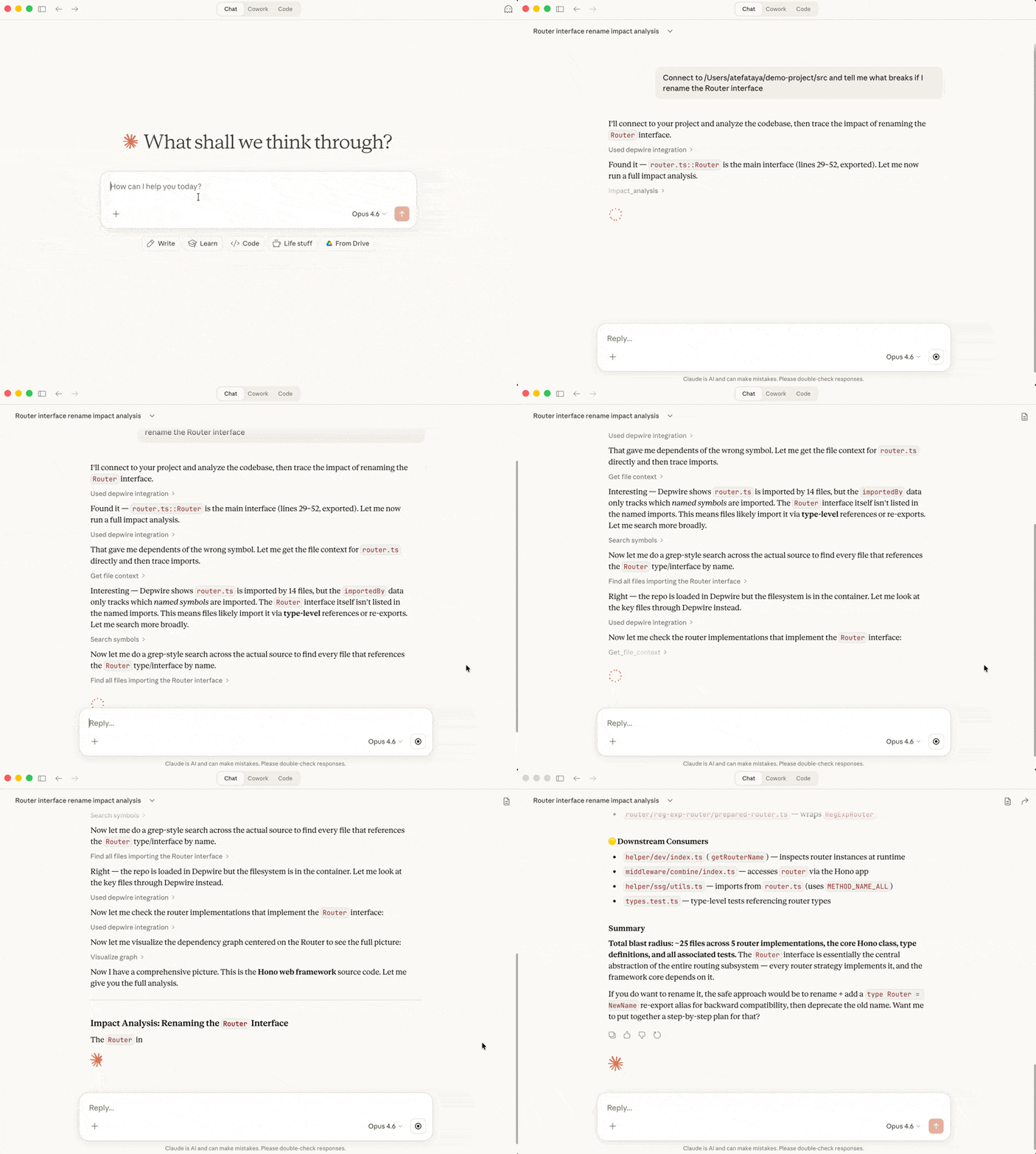
# In Claude Desktop or Cursor with Depwire MCP:

"Analyze the impact of renaming UserService to UserRepository"

# Depwire responds with:
# - All files that import UserService
# - All call sites
# - All type references
# - Suggested find-and-replace strategy
Understanding a New Codebase
"Show me the architecture summary"

# Depwire responds with:
# - Language breakdown
# - Module/package structure
# - Most-connected files (architectural hubs)
# - Entry points
Pre-Commit Impact Check
# Check what your changes affect before committing
depwire viz
# Review the arc diagram — red arcs show files you touched
Security
Depwire is read-only — it never writes to, modifies, or executes your code.
- Parses source files with tree-sitter (the same parser used by VS Code and Zed)
- Visualization server binds to localhost only
- No data leaves your machine — everything runs locally
- Blocks access to sensitive system directories (.ssh, .aws, /etc)
- npm packages published with provenance verification
See SECURITY.md for full details.
Roadmap
✅ Shipped
- Arc diagram visualization
- MCP server (15 tools)
- Multi-language support (TypeScript, JavaScript, Python, Go, Rust, C)
- File watching + live refresh
- Auto-generated documentation (13 documents)
- Dependency health score (0-100)
- Dead code detection with confidence scoring
- Temporal graph — watch your architecture evolve over git history
- PR Impact GitHub Action (depwire-action v1.0.0)
- Auto-detect project root (no path needed)
- WASM migration (Windows support)
🔜 Coming Next
- New language support (Java, C++, Ruby — community requested)
- "What If" simulation — simulate refactors before touching code
- Cross-language edge detection (API routes ↔ frontend calls)
- Cloud dashboard (first paid feature)
- AI-suggested refactors
- Natural language architecture queries
- VSCode extension
Contributing
Contributions welcome! Please note:
- Fork the repository
- Create a feature branch
- Add tests for new functionality
- Submit a pull request
- Sign the CLA (handled automatically on your first PR)
All contributors must sign the Contributor License Agreement before their PR can be merged.
Author
Atef Ataya — AI architect, author, and creator of Depwire.
- 🎥 YouTube — 600K+ subscribers covering AI agents, MCP, and LLMs
- 📖 The Architect's Playbook: 5 Pillars — Best practices for AI agent architecture
License
Depwire is licensed under the Business Source License 1.1.
- Use it freely for personal projects, internal company use, and development
- Cannot be offered as a hosted/managed service to third parties
- Converts to Apache 2.0 on February 25, 2029
For commercial licensing inquiries: [email protected]
Credits
Built by ATEF ATAYA LLC
Powered by:
- tree-sitter — Fast, reliable parsing
- graphology — Powerful graph data structure
- D3.js — Data visualization
- Model Context Protocol — AI tool integration
Yorumlar (0)
Yorum birakmak icin giris yap.
Yorum birakSonuc bulunamadi