nexlore
Health Warn
- License — License: AGPL-3.0
- Description — Repository has a description
- Active repo — Last push 0 days ago
- Low visibility — Only 5 GitHub stars
Code Fail
- exec() — Shell command execution in backend/app/catalog/kanban/main.js
- exec() — Shell command execution in backend/app/catalog/query/main.js
Permissions Pass
- Permissions — No dangerous permissions requested
No AI report is available for this listing yet.
Notes as Markdown files in the browser, with a graph you can zoom into. Self-hosted, friendly to Obsidian.
nexlore

Notes as Markdown files, edited in the browser, with a graph you can zoom into. Self-hosted, for yourself or a
small team, and friendly to Obsidian: the files on disk stay the truth, and Obsidian, Syncthing or any editor may
work on the same folder at the same time.
nexlore is one of the nex apps and looks like them: turquoise, dark and light. What it can do, the full guide and
answers to common questions are on the project site, www.nexlore.de.
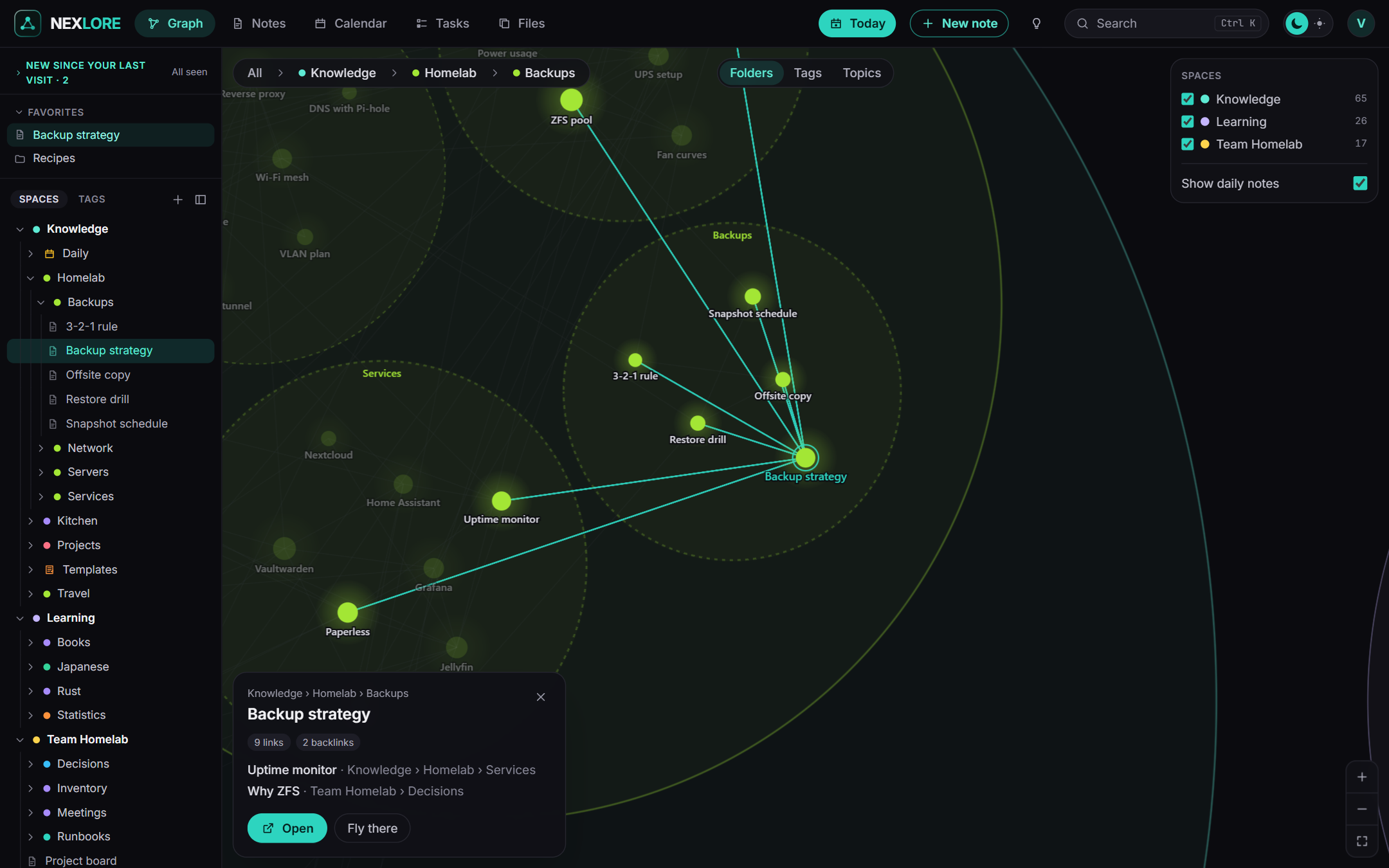
The graph. Folders are bubbles; zoom in and they open to show their notes and the links between them. It is drawn
with WebGL and stays smooth with 100,000 notes. Folders, tags or topics found in the text, at the switch on top.
Screenshots
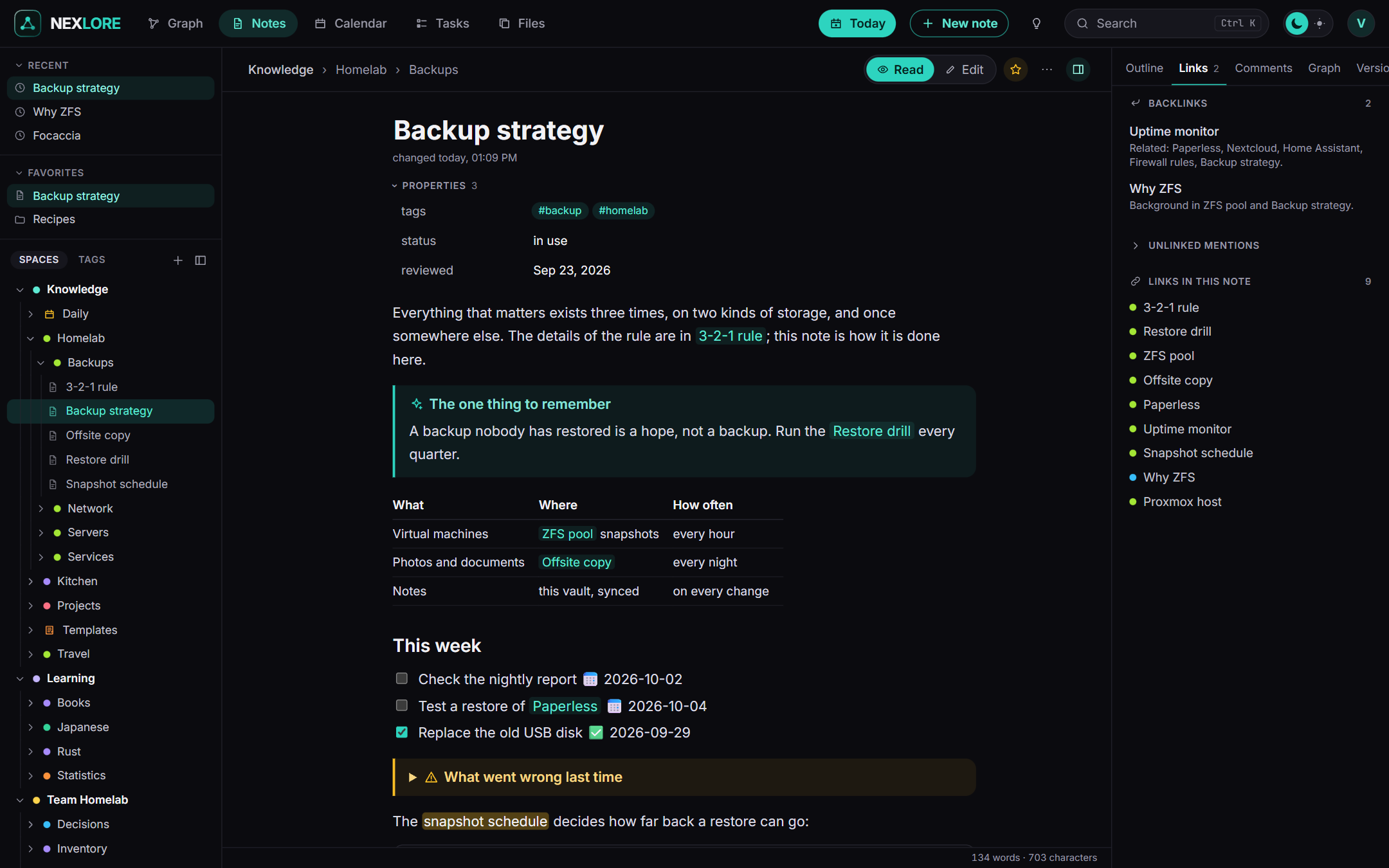
Reading: properties, callouts, tables, tasks, highlights and parts of other notes embedded, the way Obsidian shows
them. Recent notes and favorites on top of the sidebar; on the right the backlinks and every link of the note, next to
the outline, comments, the local graph and the versions.
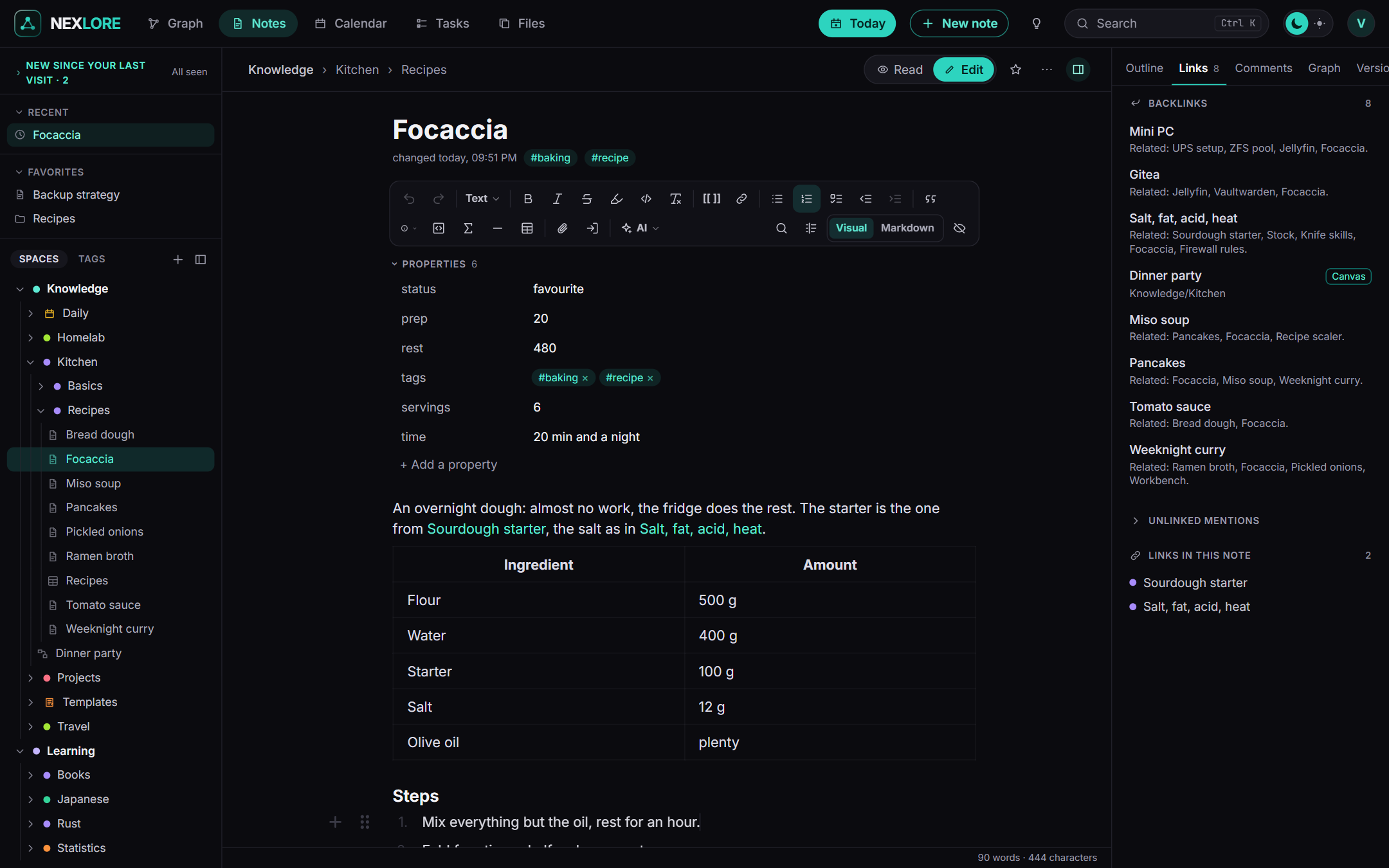
Editing: a visual editor with a toolbar like a word processor's, the front matter as a table of properties, and /
to insert. Only the blocks you touch are written back; the rest of the file stays byte for byte as it was.
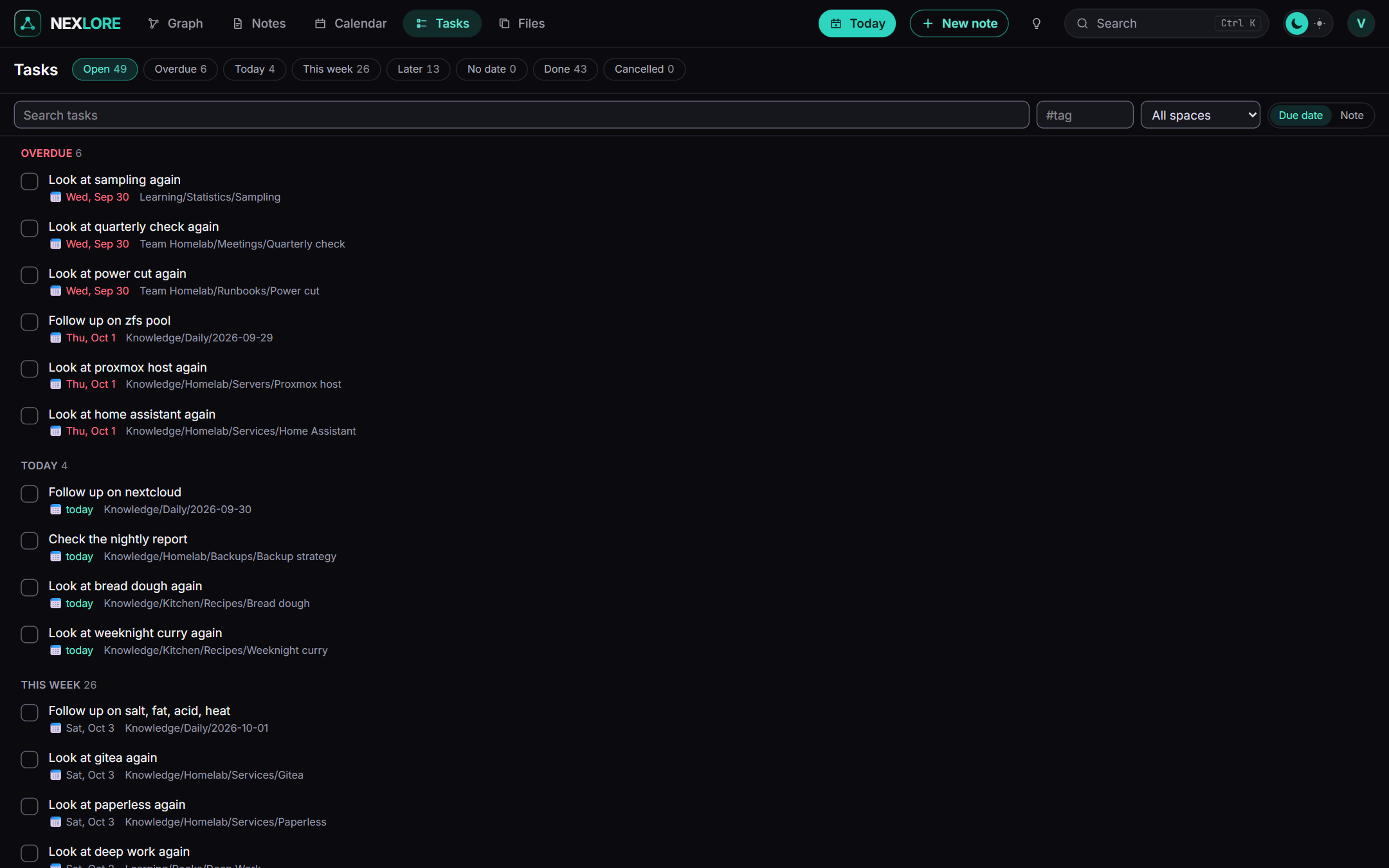
Tasks from every note in the format of the Obsidian Tasks plugin, by due date or by note. Ticking one off writes
that one line and nothing else. Next to it: a calendar with the daily notes, and a daily note one key away.
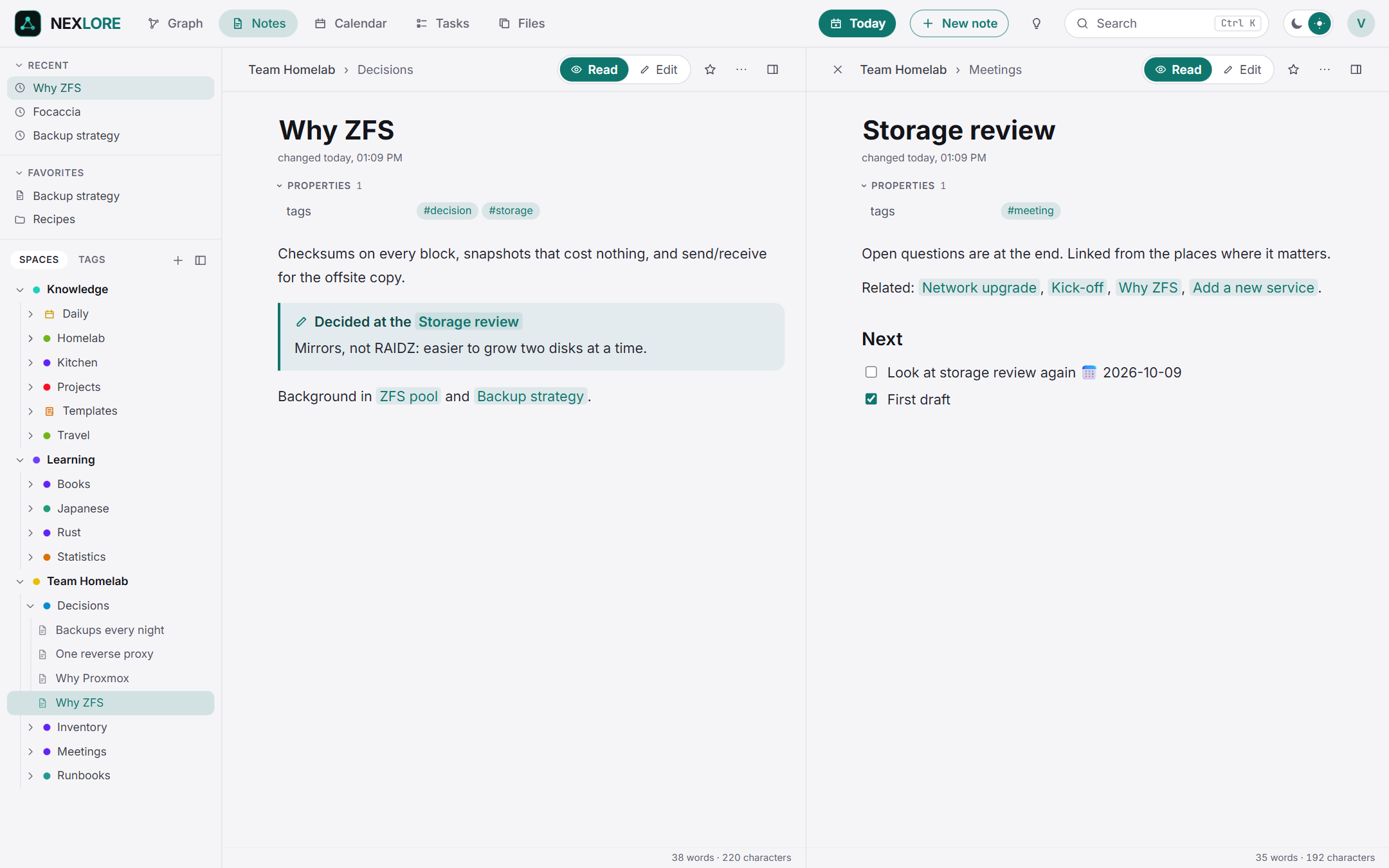
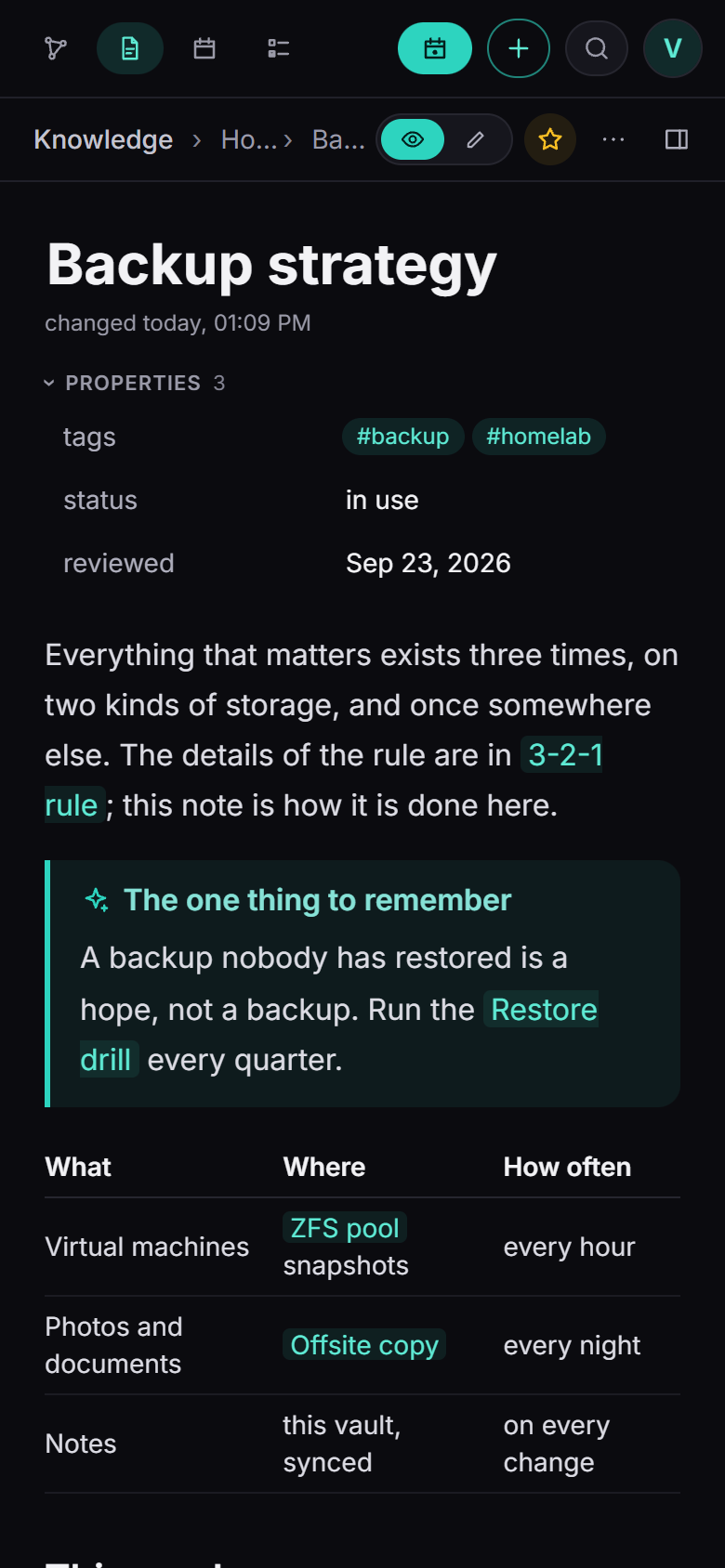
Light and dark, two notes side by side, and on the phone as an installable web app. Spaces for a team, with links
from one space into another that only resolve for people who may read both.
What it does
- Files are the truth. Every note is a Markdown file in a folder you choose. Changes from outside (Obsidian,
VS Code, Syncthing) are picked up by a file watcher plus a full pass every five minutes. When a note changed
elsewhere while you typed, your text goes into a conflict copy next to it; nothing is ever overwritten silently. - An editor that keeps what it did not change. A visual editor (Milkdown) with a fixed toolbar (on a phone one
row above the keyboard),/to insert, Markdown shortcuts, a grip to drag blocks, a context menu, properties from
the front matter as a table. Only the blocks you touched are written back; every other line stays byte for byte as
it was, line endings included. - Finding your way: context menus in the sidebar (new folder, move, rename, symbol and colour for a folder),
favorites on top of the sidebar, notes in tabs, and two notes side by side. - Obsidian's way of writing: wiki links
[[Note]],[[Note#Heading|shown]], embeds![[picture.png|300]]
and of notes or their parts (![[Note#Heading]],![[Note#^block]], one level deep), callouts (folding with-and+), highlights, comments%%…%%, tags, front matter, tasks in the format of the Tasks plugin. Plugin syntax
(Dataview, Templater, Excalidraw) is shown as code and never touched..obsidian/is left alone. - Links follow a rename. Rename or move a note or a folder and every link to it is rewritten in the style it was
written in, also in other spaces. Large renames rewrite their links in small parts, so nobody waits, and a server
stopped half way carries on at its next start. - The graph, drawn with WebGL: folders are bubbles that open as you zoom in (semantic zoom), grouped by folder,
by tag or by topics worked out from the notes themselves. 100,000 notes stay fluid; the layout is computed on the
server and loaded in tiles. It shows every space you may read or only the ones you pick, and every note also
shows its local graph. - Canvases in the open JSON Canvas format (
.canvas, as Obsidian writes them): lay notes, text, pictures and
links on a surface without edges, group them and join them with arrows. Notes show on their cards and open beside
the canvas for editing, text cards are edited in place with the same editor, cards snap to each other while you
move them. A canvas is saved like a note (one person at a time, a conflict copy instead of overwriting, versions),
renaming a note rewrites its path on every canvas, and a change rewrites only the lines of the cards it touched. - Everyday use: daily notes with a calendar, templates (
{{date}},{{title}}and friends), a task overview
across all spaces (due, scheduled, recurring, done), installable on a phone as an app. - Attachments next to the note in an
Attachmentsfolder, pasted pictures named after the note. Place and
device are removed from photos and videos on upload (on by default), HEIC gets a WebP copy, duplicates are found
by content, PDFs are searched. SVG and HTML are always downloaded, never run. - PDFs open in nexlore's own reader: pages with their text to select and find, pictures of the pages, the PDF's
contents, zoom and a link to any page.![[Manual.pdf#page=3&height=400]]embeds a reader in a note,[[Manual.pdf#page=3]]opens that page, and a PDF opens beside a note to read and write at the same time. The
file's page lists the notes that link the PDF, with their pages. - Print and PDF: a note, or a whole folder with contents and page numbers, as a PDF set on the server (Typst),
with a preview of the pages and the choices that matter on paper. Also through the API. - Spaces, accounts and rights: a space is a folder at the top of the vault with members who read, write or
manage. Links may lead into another space ([[Team/Note]]) and resolve only for whoever may read it. What
somebody may not read does not show up anywhere, not in search, graph, backlinks or tasks, not even its title. - Sign-in with a password and optionally a second factor (codes from an authenticator app, recovery codes), or
through OpenID Connect (with a one-button setup for authentik). Invitations by link or by mail. - Public pages: share a note or a folder as a reading page, with an expiry and a password if you like. Off until
the operator opens it. - Versions and trash: every save is a version (bundled per session, thinned out over time), deleted files wait
30 days in the trash. - Backups of the database and every file on a schedule, with a check that shows what a restore would change,
a download (the password is asked again) to keep a copy somewhere else, and an upload to move to a new server. - AI in notes (off by default, each account brings its own service: any address that speaks the usual chat
interface, in the cloud or at home): correct spelling, rewrite in one of nine tones, translate, summarize, or write
from a request with the note as material. The result always stands next to the text first and changes nothing until
it is taken over; what went out is listed word for word for 14 days. - Ask Lore (with AI in notes and Ask Lore switched on): ask about your own notes and get an answer from them, as it is
written, with a numbered source for every statement and a plain word where the notes say nothing. Lore looks only
in the spaces you may read (and of those the ones you leave in), on a page of its own with your conversations, or
in a chat window in the corner of every page, which takes the open note along and can turn an answer into
a proposal for it. Conversations are encrypted, only
yours, and kept as long as the operator says. The operator chooses whether every account brings its own service
or one service serves all, such as Ollama at home. With one for all and a model for vectors, Lore also finds
notes that mean the question in other words, and every note shows the ones most like it. A model that can call
tools lets Lore look further by herself. - AI from outside over MCP (off by default): everything the interface can do as a tool, with keys or as a
connector that signs in (OAuth), at three levels (read, drafts, write), each optionally limited to some spaces.
Rights per tool (allow, ask, deny): asked calls wait for your approval in nexlore, drafts wait on the note. See
docs/mcp.md. - An API for programs such as n8n, nexdeck or a script (off by default): tokens per account, reading or writing,
each optionally limited to some spaces and running out after a chosen time. Read spaces, notes, search, links,
tasks and the numbers for a dashboard; make notes (also from a template), change them with conflict copies, append,
write the daily note and the inbox, tick tasks off. Never delete, move or share. See docs/api.md. - Plugins, locked up in the browser: installed from the checked catalog that comes with nexlore (contents and
reading time, queries, Kanban boards, rediscover old notes), let out by the operator, switched on by each person.
See docs/plugins.md. - Import of a ZIP as a new space (a space downloaded from another nexlore, or an Obsidian vault), with a report of what is special in it.
- A guide to start with: a new installation gets the space "nexlore", a guide in German or English whose notes
use what they explain (links, tasks, callouts, a Kanban board, a template), with pictures of the interface. - English and German; another language is one JSON file, uploaded by the operator.
Start
services:
  nexlore:
    image: ghcr.io/derkezorm/nexlore:latest
    container_name: nexlore
    restart: unless-stopped
    ports:
      - "8470:8000"
    volumes:
      - ./data:/data
    environment:
      PUID: 1000
      PGID: 1000
      TZ: Europe/Berlin
docker compose up -d
Built from source instead: clone this repository, put build: . in place of image: and rundocker compose up -d --build.
Open http://<your-host>:8470. The first account you create there is the operator. It needs the setup code
from the server's log, so that nobody who reaches a fresh instance first can take it:
docker logs nexlore
shows a line The setup code is 3F9A-0C21-B7E4, new at every start until nexlore is set up. To choose it yourself,
set NEXLORE_SETUP_TOKEN. docker-compose.yml in this repository has the same service with every option explained.
Put nexlore behind a reverse proxy with TLS before you use it from anywhere but your own desk. Installing it on
a phone also needs HTTPS; browsers offer it only on secure origins.
nexlore on the internet
nexlore is made to be reachable from outside, for yourself on the road or for a small team. Before you open it:
- Set it up first, from your own network, with the setup code from the log. Only then forward a port.
- TLS at a reverse proxy, and nexlore reachable only through it: publish the port as
127.0.0.1:8470:8000
when the proxy runs on the same host, or keep both on a Docker network without a published port. Send HSTS from
the proxy. - Tell nexlore about the proxy:
NEXLORE_PUBLIC_URL(the address people use),NEXLORE_TRUSTED_PROXIES(the
proxy's address or network; without it every sign-in seems to come from the proxy and the brake against guessing
cannot tell people apart; the log says so), andNEXLORE_COOKIE_SECURE: "on". - A second factor: set up your own under My account, then Settings, Sign-in, "Require a second factor". Or sign
in through your OpenID Connect provider. - Leave the switches closed you do not need: MCP and connectors, API tokens, public pages, calendar feeds, AI in
notes, page titles for pasted links, uploaded plugins, own CSS. Each is off until you open it. - Optionally keep the operator's settings at home:
NEXLORE_OPERATOR_NETWORKS: "192.168.0.0/16"refuses them
from anywhere else (behind a proxy only together withNEXLORE_TRUSTED_PROXIES). - Backups somewhere else: nexlore makes them daily; they hold everything,
secret.keyincluded. Copy one off
the machine now and then, as carefully as the data directory, and try a restore with "Check". - Pin a version (
ghcr.io/derkezorm/nexlore:1.0) instead oflatest, update on purpose, back up before. - Harden the container if you like: the commented lines in
docker-compose.yml(read_only,cap_drop,no-new-privileges, a memory limit, log rotation) work with nexlore. - Rate-limit sign-in at the proxy if it can (fail2ban, or the proxy's own limits): nexlore brakes guessing per
sender and name, but a proxy can turn a flood away before it costs anything.
Whatever is in nexlore leaves only where you open a way: the webhooks and mail of each account, the AI service an
account enters (public addresses, or hosts in your own network you list), the daily update check against GitHub (off
on the About page), and connectors you sign in.
Your notes in a folder of their own
By default the notes live in data/vault. To keep them elsewhere, for example in a folder that Obsidian or
Syncthing also works on, mount it and point nexlore at it:
    volumes:
      - ./data:/data
      - /srv/notes:/vault
    environment:
      NEXLORE_VAULT_DIR: /vault
The container adjusts the owner of /data to PUID/PGID on every start, but not of a vault mounted elsewhere:
that folder must already be writable for the user PUID/PGID.
Every folder at the top of the vault is a space. A space without members belongs to the operator; invite people
into it under Settings.
Some network shares and container mounts deliver no change notifications. Set NEXLORE_WATCH_POLLING: "true"
there, or rely on the full pass every five minutes.
Where things are stored
Everything else lives in /data: the SQLite database nexlore.db (index, versions, trash, accounts), secret.key,backups/, logs/, trash/, locales/. Mount it from a local disk, never from an SMB or NFS share: SQLite's
locking does not work reliably over network filesystems.
The database can always be rebuilt from the files, except for versions and the trash. Back it up with nexlore's own
backups (Settings, Backups), which copy it consistently while it runs, never by copying the file.
secret.key protects what the server must read on its own (the OIDC client secret, the mail password, the seeds of
second factors). It goes into every backup. A different key means second factors can no longer be checked; the
operator resets them.
A backup archive is a plain ZIP: the database, every note and file, and secret.key. Whoever has it has everything,
so keep downloaded copies as carefully as the data directory itself.
Moving to a new server: download a backup, set up nexlore there, upload the backup under Settings, Server,
Backups, check it and restore it. Afterwards the new server has the old accounts, spaces, notes and files.
Updating
With an image: docker compose pull && docker compose up -d. Built from source: pull the new code and rundocker compose up -d --build. nexlore adds what the database lacks at the start and backs the database up first;
nothing needs doing by hand. Make a backup before a big jump anyway (Settings, Backups).
Environment
| Variable | Default | Meaning |
|---|---|---|
NEXLORE_DATA_DIR |
/data |
Database, logs, backups, trash, languages |
NEXLORE_VAULT_DIR |
<data>/vault |
The notes, as Markdown files |
NEXLORE_LOCALES_DIR |
<data>/locales |
Extra languages, one JSON file each |
NEXLORE_SECRET_KEY |
created on first start | Protects server-side secrets; when set, it wins over secret.key |
NEXLORE_PUBLIC_URL |
from the request | The address people use to reach nexlore, for invitation links, public pages and the OIDC redirect. The setting under Settings, Sign-in wins when set |
NEXLORE_TRUSTED_PROXIES |
none | Addresses or networks of reverse proxies whose X-Forwarded-For is believed, comma separated. Without it every request counts as coming from its peer |
NEXLORE_SETUP_TOKEN |
made at start | The code the first account needs; without it nexlore makes one at every start until set up and writes it to the log |
NEXLORE_OPERATOR_NETWORKS |
none | Networks the operator's settings may be changed from, comma separated (192.168.0.0/16); everything else stays reachable from anywhere |
NEXLORE_WATCH_POLLING |
false |
Watch the vault by polling, for mounts without change notifications |
NEXLORE_SCAN_INTERVAL |
300 |
Seconds between two full passes over the vault; 0 turns them off |
NEXLORE_SESSION_DAYS |
30 |
A browser session ends after this many days |
NEXLORE_LOG_LEVEL |
stored setting | quiet, normal, detailed or trace; overrides the setting, the way out when the app does not start |
NEXLORE_COOKIE_SECURE |
auto |
on, off or auto (from the request or X-Forwarded-Proto) |
NEXLORE_API_DOCS |
false |
Serves /api/docs and /api/openapi.json |
NEXLORE_PORT |
8000 |
Port inside the container, for host networking |
PUID, PGID |
1000 |
Owner of the files in the data directory |
Working next to Obsidian
nexlore reads a vault the way Obsidian does: a link finds the note of that name in the same folder first, then the
one with the shortest path; [[Folder/Note]] and relative Markdown links are read as paths. A link with the name
of another space in front ([[Team/Note]]) leads into that space; the own space always answers first, so a folder
called Team in your space wins over the space Team.
What nexlore writes stays readable for Obsidian: links in the style they had, file names that are safe on Windows,
macOS and Linux (a title with other characters goes into the front matter as title:), conflict copies namedNote (conflict 2026-09-28 101500).md. Tasks are counted outside code blocks and %%comments%% only.
Security in short
- Passwords are at least 12 characters and hashed with Argon2id, at most four checks at a time. Ten failed checks
in a row lock an account for fifteen minutes, whatever address they come from; the browser that signed in before
still gets in, so that a stranger's guesses cannot keep the owner out. A brake per sender and name, and per sender,
slows guessing on top; a locked account answers like a wrong password. - With a second factor, the password alone opens nothing: the sign-in waits for the code at most five minutes and
five tries, a code counts once, and a right password does not reset the count of wrong codes. The seed is stored
encrypted, recovery codes as hashes. - A session alone is not enough for what would hand over other people's notes: downloading, deleting or going back
to a backup, giving another account a password, resetting its second factor, changing a role or deleting an account
ask for the operator's own password once more, counted like a sign-in. An operator who signs in through the provider has no
password in nexlore and is not asked. - Every changing request needs the header
X-Nexlore-Client, which a page on another site cannot send. - A space somebody may not read answers exactly like one that does not exist, in every route.
- Uploaded files are served with their own sandboxing policy; SVG, HTML and PDF only as downloads. PDFs are drawn
by pdf.js in a sandboxed frame without an origin and without any network; the page hands it the bytes. - PDFs made by nexlore are set by Typst in a process of its own with a time limit, from a folder holding nothing
but the source and the pictures the reader may see; every word of a note reaches Typst as a string, never as code. - Plugins run in sandboxed frames without an origin, without cookies and without network, and may only ask the page
for what their manifest lists. - MCP keys and API tokens are shown once and stored as hashes, work only as a Bearer header, never from a web page,
and never reach further than their account (or the spaces chosen for them); a program never has the operator's
powers over other people's spaces. A new password ends every connector that signed in over OAuth. - Requests nexlore makes on its own go to the address checked once (no way into the own network by a name that
answers differently later), follow no redirects, and read answers only up to a limit. - The key, the database, the backups and the log are readable for nexlore's own user only.
- The log never contains note contents, passwords, keys or tokens, nor the tokens in invitation, share or sign-in
addresses; a test scans the code for the obvious mistakes.
Development
cd backend && python -m venv .venv && .venv/Scripts/python -m pip install -r requirements-dev.txt
.venv/Scripts/python -m uvicorn app.main:app --port 8470
cd frontend && npm ci && npx vite
On Linux the virtual environment's programs are in .venv/bin. The frontend on port 5470 sends /api to the
backend. Tests: python -m pytest -q in backend; npx vitest run, npm run test:browser (the editor in a real
browser) and npm run e2e (builds, starts its own backend, runs headless) in frontend.
License
AGPL-3.0.
The symbols for spaces and folders include the Lucide icons (ISC, partly MIT from Feather);
their notice is in frontend/public/licenses/lucide.txt and ships with the app at /licenses/lucide.txt.
Everything else nexlore ships or depends on, with its licence, is listed in THIRD-PARTY.md.
Reviews (0)
Sign in to leave a review.
Leave a reviewNo results found