nextime
Health Warn
- License — License: AGPL-3.0
- Description — Repository has a description
- Active repo — Last push 0 days ago
- Low visibility — Only 9 GitHub stars
Code Warn
- network request — Outbound network request in backend/app/middleware.py
Permissions Pass
- Permissions — No dangerous permissions requested
No AI report is available for this listing yet.
A self-hosted calendar for families and small groups: own calendars, iCloud, Google and CalDAV in one place, sharing, and a CalDAV server for iPhone and Android.
nextime
A self-hosted calendar for families and small groups: your own calendars on your own server, in the browser and, later,
on iPhone and Android through CalDAV.
Early days. Everything below is built and in daily use; this is an early release, so keep a backup and open an
issue when something is wrong. The native app for iPhone and iPad comes separately; until then phones connect through CalDAV.
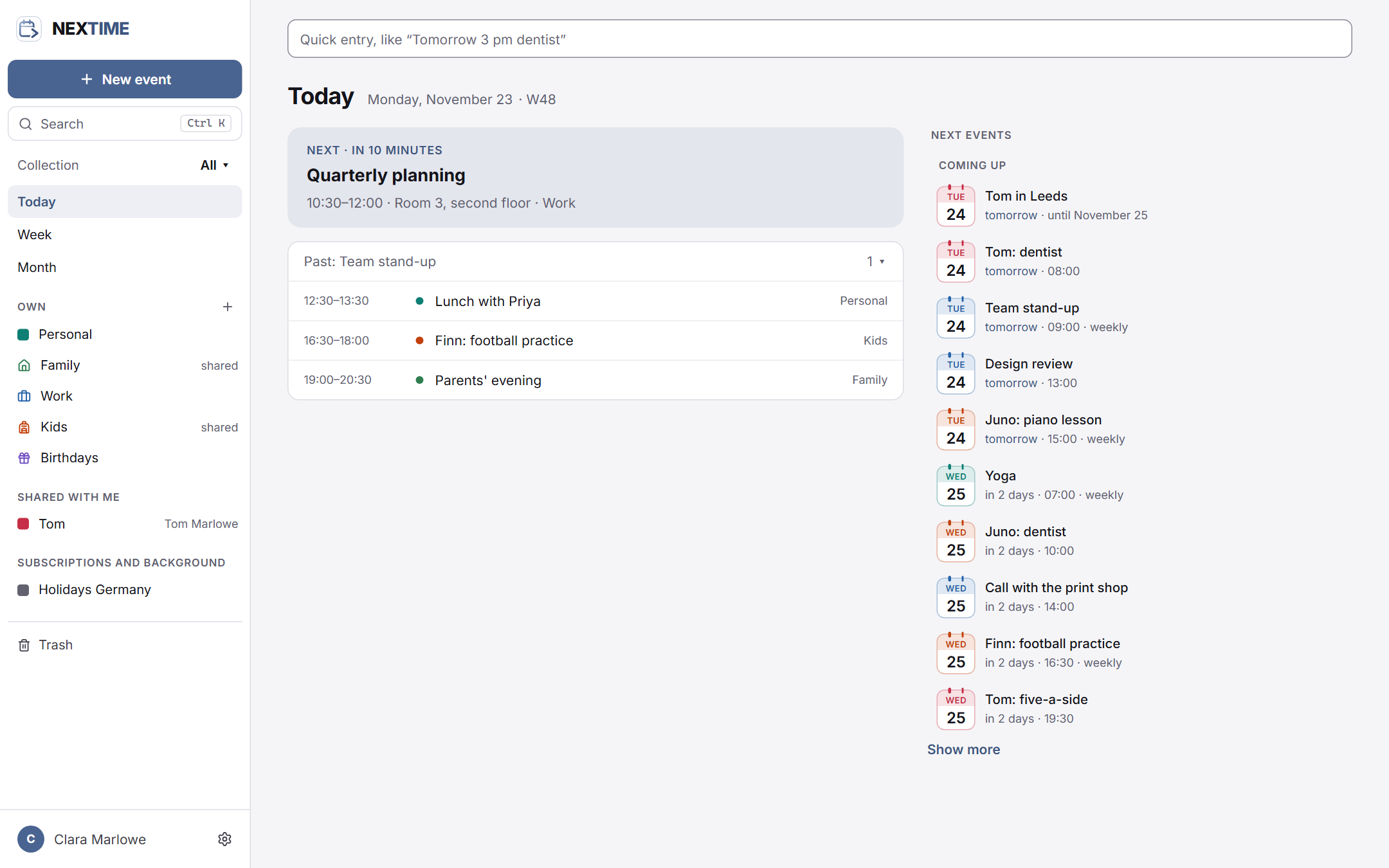
Today, across every calendar: what comes next and how soon, the rest of the day, and the next events of the days
after. Quick entry at the top understands a line like "Tomorrow 3 pm dentist". On the left the views, own calendars,
calendars shared with you, and public holidays in the background.
Screenshots
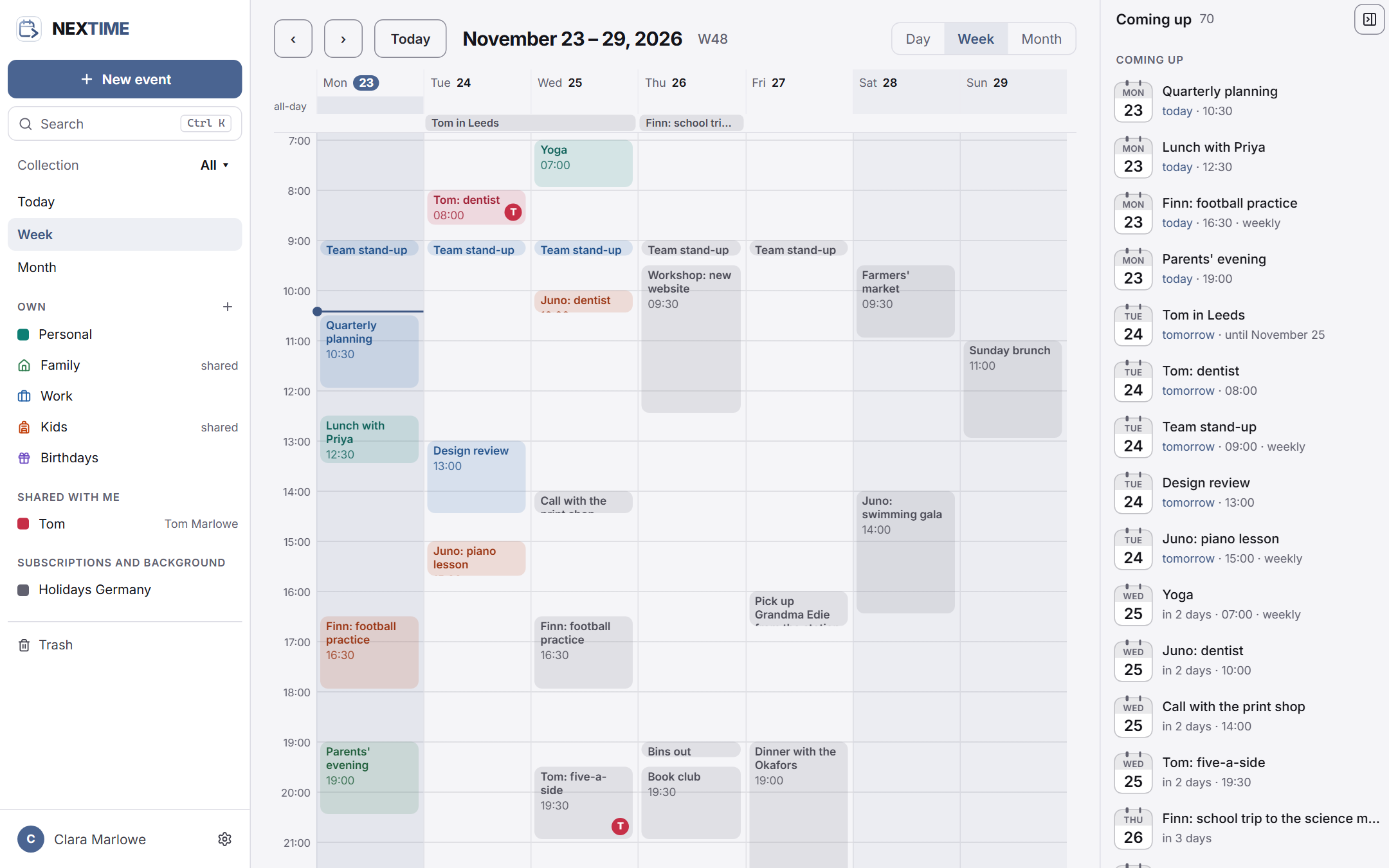
The week, with an event from a calendar shared by someone else carrying their initial. Events move by dragging;
the column "Coming up" on the right folds away.
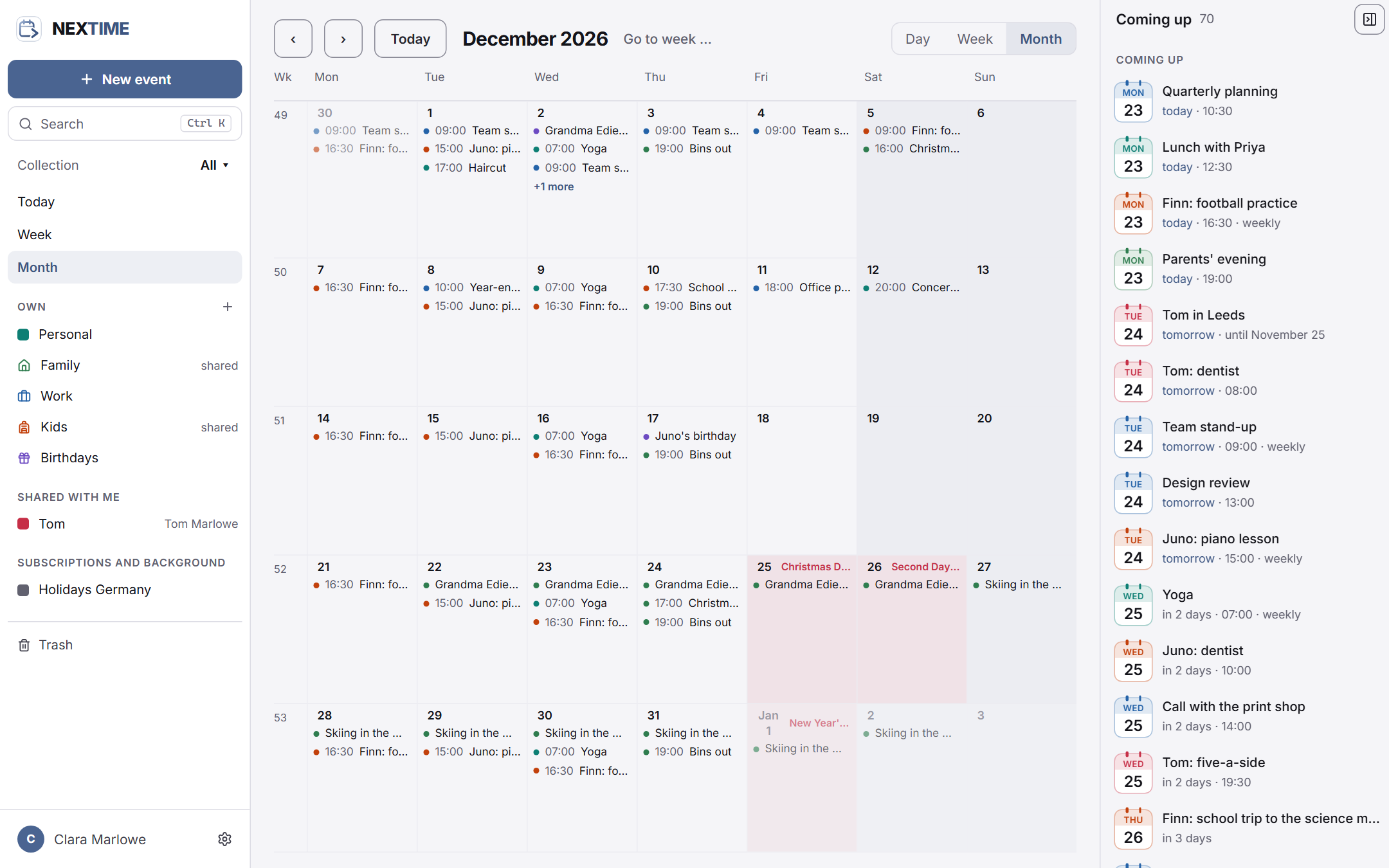
The month. Built-in public holidays stand out, and an event over several days shows on each of them.
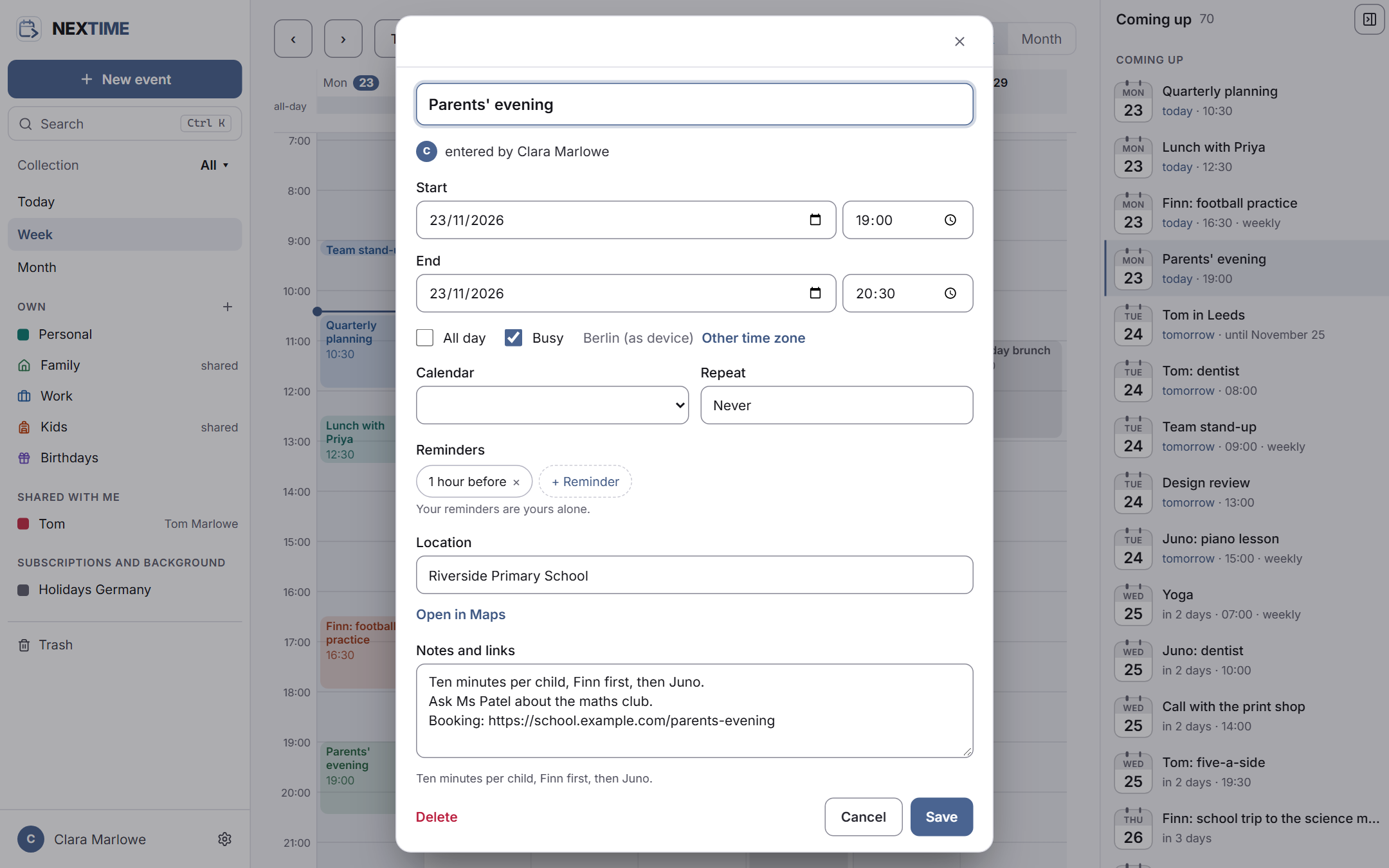
An event opens over the page: times and time zone, busy or free, calendar and repeat, reminders that are yours alone,
a place with a link to a map, notes with links.
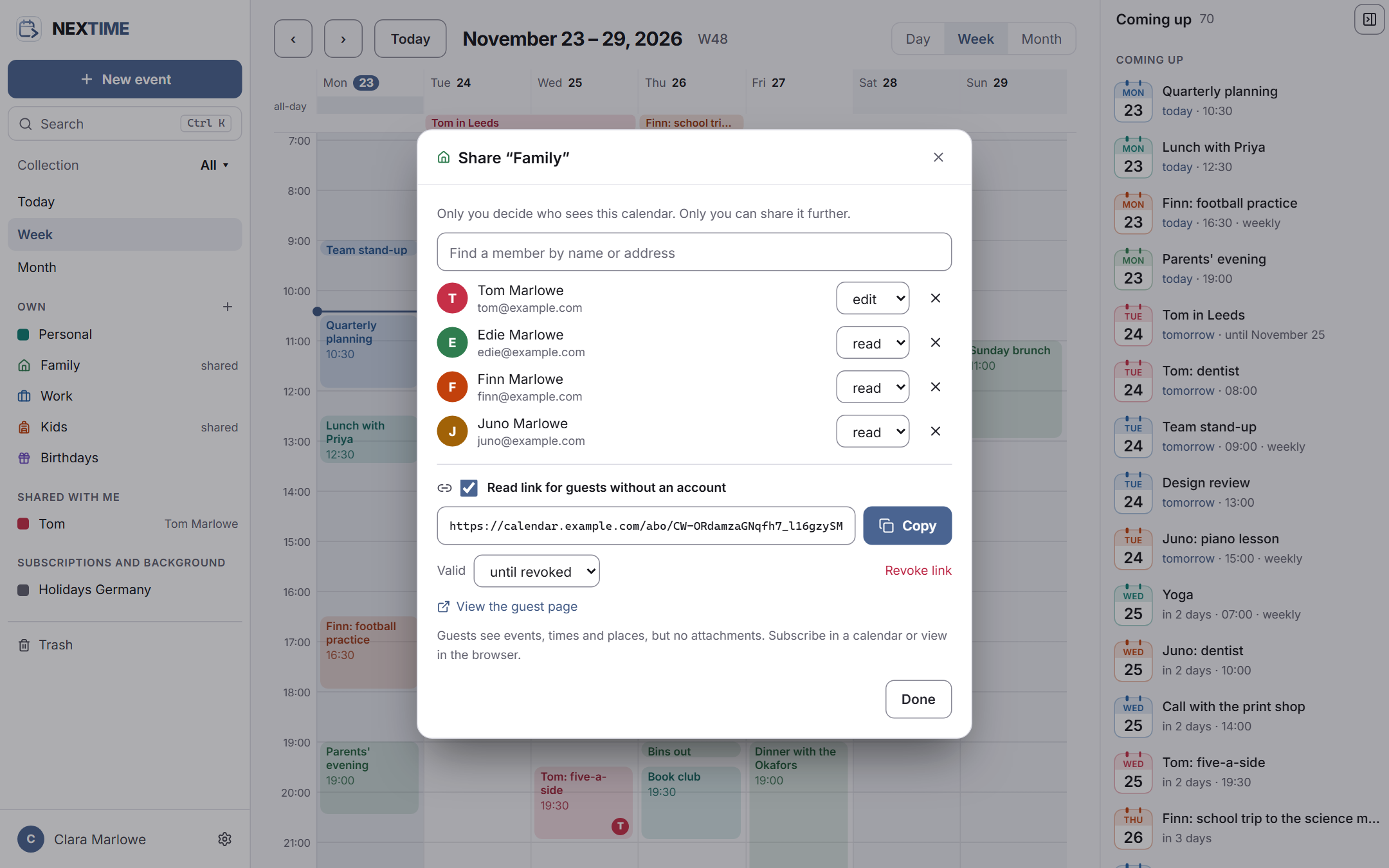
Share a calendar with members of the server, each with a right of their own, or with guests through a read link they
can subscribe to.
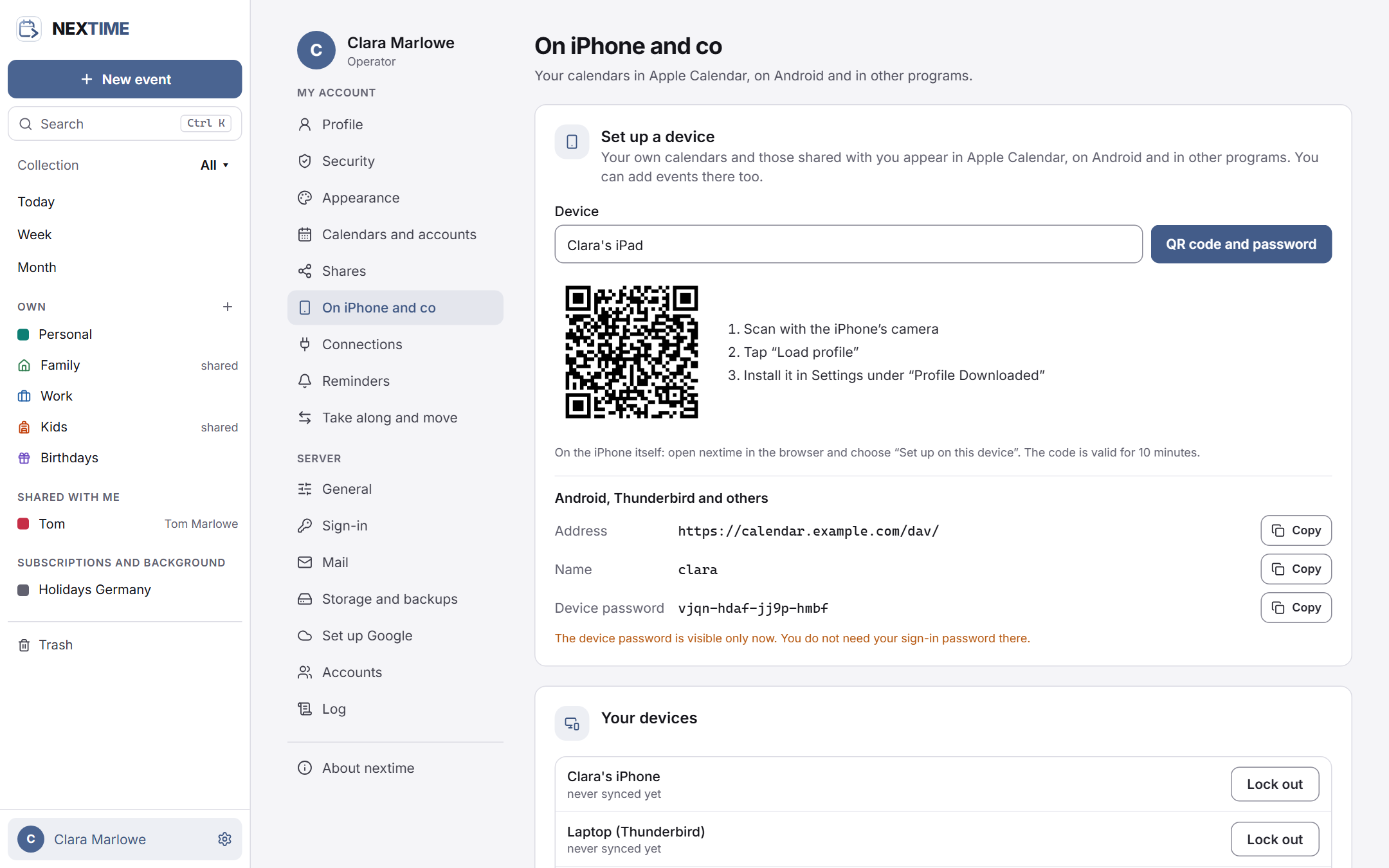
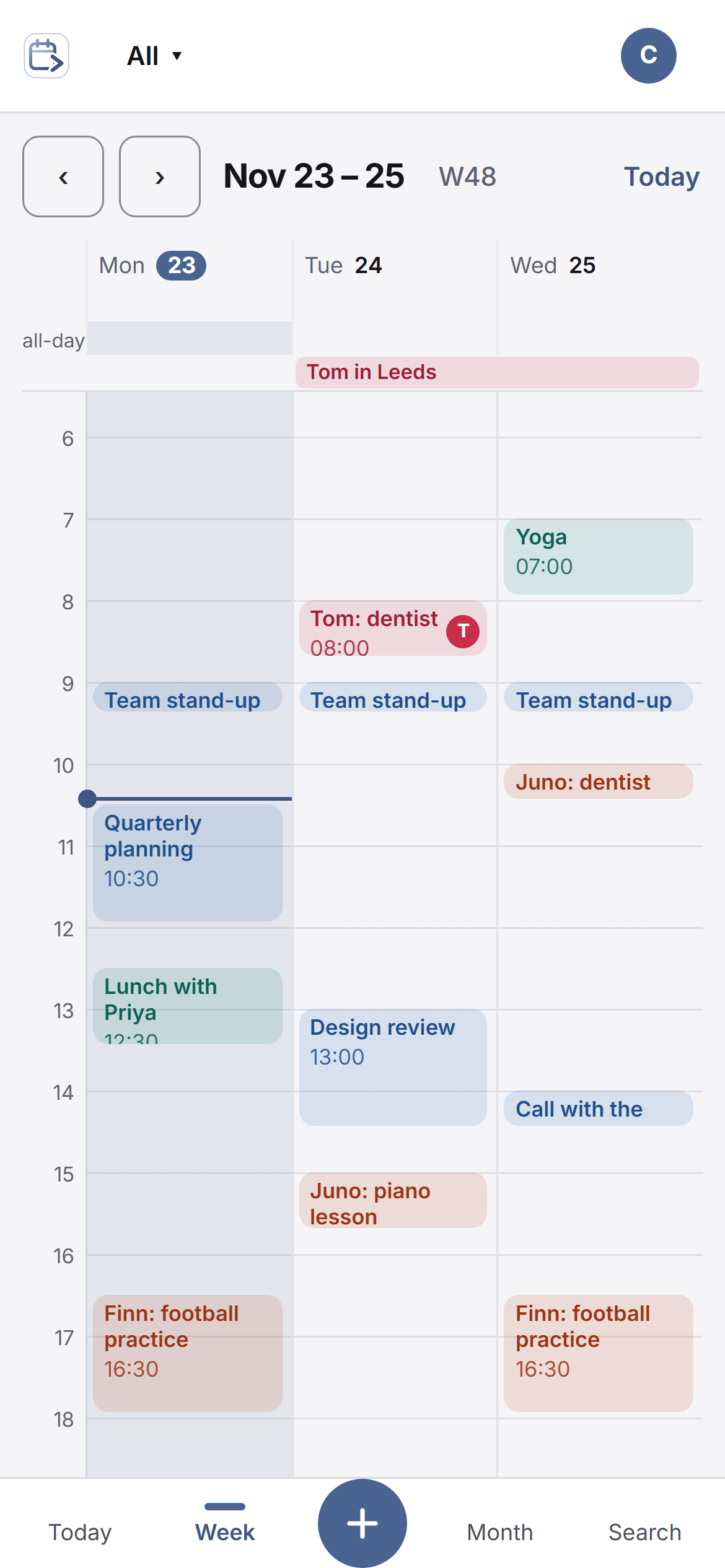
A device gets its own password: the iPhone scans a QR code and loads a profile, Android and Thunderbird take the
address. On a phone the week shows three days, and nextime installs from the browser as an app.
What is there
- One container. FastAPI and SQLite, the interface built in. The first account is the operator; it needs the
setup code from the log or the one you set. - Accounts. Usernames, invitations, roles, blocking, deleting with 30 days to bring an account back, a second
factor (TOTP), passkeys, a new password by a link in a mail, sign-in through OpenID Connect providers such as
authentik or Microsoft Entra ID. - Operation. Backups every night at 03:00 in the server's time zone, or every week or month (14 kept, all
adjustable), one made by hand with a note of its own; restore with a check of what comes, changes and goes; a log
with four levels that blacks out keys and guest links; system mail through the operator's mail server; limits and
switches for the whole server. "Ready for the internet?" checks HTTPS, the second factor, the brake on guessing,
cookies, the proxy and whether the server reaches the internet. Only the operator sees when a new version is out. - Calendars and events. Own calendars with eleven colors or one of your own and a symbol, hidden or shown, in an
order of one's own; events with whole days, time zones, busy or free, notes with links and "Join" for video
meetings; series daily, weekly, monthly or yearly with exceptions, stored as iCalendar objects. - Calendar account. A CalDAV server under
/dav/for Apple Calendar, DAVx5, Thunderbird: a password per device,
a QR code and a profile for the iPhone, each device locked out on its own. Needs HTTPS. - Ready for the iPhone and iPad app. Pair a device with a QR code (valid 10 minutes) or by signing in from the
app, see and disconnect devices, sync every event offline with changes taken exactly once, both versions after a
conflict, a silent nudge and notifications of shared calendars through a push relay that sees only ciphertext. The
app itself comes separately. - Other sources. iCloud (with an app-specific password), Google (with the operator's own Google Cloud client, or
read only through a calendar's secret address) and other CalDAV servers such as Nextcloud, read and written, synced
every minute; changes made while a source is away wait and go out later. Subscriptions to calendar links, fetched
hourly. Public and school holidays of Germany, Austria and Switzerland built in (no service asked). Invitations from
iCloud and Google answered from nextime, and attendees invited to events there (iCloud or Google sends the
invitation). Access data is stored encrypted and never shown again. - Sharing. Own calendars shared with other accounts (see busy only, read, change) and with guests through a
read-only link; the picture of whoever entered an event in a shared calendar; notifications by web push when others
change something. - Everyday. Reminders per person and device, a place with address suggestions and a small map, attachments, quick
entry in one line with day and time, defaults for new events per calendar (an all-day yearly birthday with a
reminder the day before), a search over everything, a trash with undo, public holidays standing out in the views. - Connect nex apps. Each person connects nextime with the other nex apps by one click and one consent for both
directions, each app with only the rights it needs: due tasks from nextasks in the calendar, ticked off there;
open deadlines from nexpaper as all-day entries; a note for an event in nexnotes; nexmail shows your calendars,
makes events from mails and answers invitations; nexdiary shows a day's events while you write it up. You choose
which calendars an app may read. The operator enters the other apps' addresses once; connections made with a key
keep working. - For programs. A REST API with keys per person, each key with its own rights, and an MCP server for AI
assistants: an MCP key, or a program that signs itself in with the person's consent; each tool allowed, asked for or
denied, and a request that waits for a yes. The operator decides who may use them, the highest level and blocked
tools. - Languages and appearance. German and English, more as files from the operator; light, dark or like the device,
kept with the account on every device; the first day of the week, ISO week numbers, 12 or 24 hours and the time
zone per account. - Phone and installed web app. A bar at the bottom below 1024 px, the week as three days on a phone; installable
from the browser with its own symbol. Without a connection the installed app keeps showing the next four weeks to
read and search (kept in the browser, gone when signing out); adding events needs a connection. - Take along and move. Every calendar as an ICS file, all of them as a ZIP with the attachments beside; ICS files
loaded into an own calendar with a preview and without duplicates; a calendar from iCloud or Google moved into an own
one, while iCloud and Google stay untouched.
Start
services:
  nextime:
    image: ghcr.io/derkezorm/nextime:latest
    container_name: nextime
    restart: unless-stopped
    ports:
      - "8585:8000"
    volumes:
      - ./data:/data
    environment:
      PUID: 1000
      PGID: 1000
      TZ: Europe/Berlin
Then docker compose up -d. Images for linux/amd64 and linux/arm64 are on the GitHub Container Registry and on
Docker Hub (derkezorm/nextime), one tag per release (0.1.0) and latest. The docker-compose.yml
in this repository has the same service with every option explained; it builds from source withdocker compose up -d --build.
Open http://<your-host>:8585 and create the first account: it becomes the operator and needs the setup code from the
log (docker logs nextime). Calendars on iPhones and Android connect only over HTTPS: put nextime behind a reverse
proxy that ends TLS and name it in NEXTIME_TRUSTED_PROXIES.
Locked out as the operator? A link to set a new password comes from inside the container:
docker exec -u nextime nextime python -m app.emergency reset-link <username or email>
Settings
| Variable | Meaning |
|---|---|
NEXTIME_DATA_DIR |
Database, attachments, backups, logs, added languages. In the container /data. A local disk, never a network share. |
NEXTIME_SETUP_TOKEN |
The code the first account needs, at least 16 characters. Without it nextime makes one at every start until it is set up and writes it to the log. |
NEXTIME_SECOND_FACTOR_OFF |
Emergency only: true asks nobody for a second factor (passkey or code) until it is removed. The log warns while it is set. |
NEXTIME_PUBLIC_URL |
The address people reach nextime under (invitation links, the providers' redirect). Can also be set in the interface. |
NEXTIME_TRUSTED_PROXIES |
Addresses or networks of reverse proxies whose X-Forwarded-For and X-Forwarded-Proto count. |
NEXTIME_OPERATOR_NETWORKS |
Networks the operator's settings may be changed from. Empty: from anywhere. |
NEXTIME_SECRET_KEY |
The key for the server's own secrets. Empty: a random one in the data folder. |
NEXTIME_LOG_LEVEL |
Overrides the log level set in the interface: quiet, normal, detailed, trace. |
NEXTIME_DAV_ALLOW_HTTP |
true lets the calendar account answer over plain HTTP too. For development only: off, devices connect over HTTPS only. |
NEXTIME_COOKIE_SUFFIX |
Keeps the sign-ins of two instances on one host apart. |
NEXTIME_PLACES_URL |
The address search behind the suggestions in the place field, a Photon service. Empty: the free one at photon.komoot.io. nextime asks it, not the browser, and sends only the typed place. The operator can switch suggestions and maps off. |
NEXTIME_TILES_URL |
Where the small map of a place is drawn from, with {z}/{x}/{y} in it. Empty: the tiles of OpenStreetMap. |
NEXTIME_PUSH_RELAY |
The push relay that wakes the nextime app on iPhone and iPad when something changed (only the device's ticket and an encrypted note go there, never the content). Empty: nothing goes out. Default https://push.nexapps.dev. |
NEXTIME_INTERNET_PROBE_URL |
The address nextime asks (a plain HEAD, at most every five minutes) to know whether the server reaches the internet; iCloud, Google and subscriptions pause without it. Default https://api.github.com. Empty: no check, and these syncs pause. |
NEXTIME_MEDIA_MEMORY_MB |
Memory of the process that reads pictures and PDFs of attachments for their previews (1024 MB from the start). |
TZ |
The server's time zone; the daily backup runs in it. |
PUID, PGID |
Who owns the files in the data folder. |
A variable with a wrong value stops the start with a line in the log that names it and the values it takes.
Development
cd backend && python -m venv .venv && .venv/bin/pip install -r requirements-dev.txt
NEXTIME_DATA_DIR=../data .venv/bin/uvicorn app.main:app --port 8585
cd frontend && npm ci && npm run dev   # http://localhost:5585
Checks: pytest -q -n 4 and ruff check . in backend, npx vitest run, npm run lint and npm run build infrontend.
Licence
AGPL-3.0, see LICENSE. What nextime ships or depends on, with its licence, is listed in
THIRD-PARTY.md.
Reviews (0)
Sign in to leave a review.
Leave a reviewNo results found