ai-agent
Health Warn
- License — License: NOASSERTION
- Description — Repository has a description
- Active repo — Last push 0 days ago
- Low visibility — Only 7 GitHub stars
Code Warn
- network request — Outbound network request in src/helpers/http-request.helpers.ts
Permissions Pass
- Permissions — No dangerous permissions requested
This TypeScript agent simplifies the implementation of generative AI using LangChain. It allows developers to integrate Large Language Models (LLMs) with conversation history, custom databases, and vector stores.
Security Assessment
The overall risk is rated as Low. The tool requires configuration to handle sensitive data, such as database hosts, ports, and LLM API keys, which developers must provide securely via the config object. There are no hardcoded secrets present in the codebase, and the rule-based scan confirmed it does not request any dangerous system permissions or execute arbitrary shell commands. However, it does make outbound network requests via an HTTP helper file, which is expected behavior for an application designed to communicate with external cloud AI services and databases.
Quality Assessment
The project is actively maintained, with its most recent code push happening today. However, it suffers from very low community visibility, having accumulated only 7 GitHub stars. This indicates a lack of widespread testing and peer review from the broader developer community. Additionally, the repository's license is marked as NOASSERTION. While the code is public, the absence of a clear, standardized open-source license means there could be legal ambiguities regarding how it can be used, modified, or distributed in commercial projects.
Verdict
Use with caution due to low community adoption and an ambiguous software license.
AI Agent simplifies the implementation and use of generative AI with LangChain.


AI Agent
AI Agent simplifies the implementation and use of generative AI with LangChain, you can add components such as vectorized search services (check options in "link"), conversation history (check options in "link"), custom databases (check options in "link") and API contracts (OpenAPI).
Installation
Use the package manager npm to install AI Agent.
npm install ai-agent
Simple use
LLM + Prompt Engineering
const agent = new Agent({
  name: '<name>',
  systemMesssage: '<a message that will specialize your agent>',
  llmConfig: {
    type: '<cloud-provider-llm-service>', // Check availability at <link>
    model: '<llm-model>',
    instance: '<instance-name>', // Optional
    apiKey: '<key-your-llm-service>', // Optional
  },
  chatConfig: {
    temperature: 0,
  },
});

// If stream enabled, receiver on token
agent.on('onToken', async (token) => {
  console.warn('token:', token);
});

agent.on('onMessage', async (message) => {
  console.warn('MESSAGE:', message);
});

await agent.call({
  question: 'What is the best way to get started with Azure?',
  chatThreadID: '<chat-id>',
  stream: true,
});
Using with Chat History
When you use LLM + Chat history all message exchange is persisted and sent to LLM.
  const agent = new Agent({
    name: '<name>',
    systemMesssage: '<a message that will specialize your agent>',
    chatConfig: {
      temperature: 0,
    },
    llmConfig: {
      type: '<cloud-provider-llm-service>', // Check availability at <link>
      model: '<llm-model>',
      instance: '<instance-name>', // Optional
      apiKey: '<key-your-llm-service>', // Optional
    },
    dbHistoryConfig: {
      type: '<type-database>', // Check availability at <link>
      host: '<host-database>', // Optional
      port: "<port-database>", // Optional
      sessionTTL: '<ttl-database>' // Optional. Time the conversation will be saved in the database
      limit: '<limit-messages>' // Optional. Limit set for maximum messages included in conversation prompt
    },
  });

  // If stream enabled, receiver on token
  agent.on('onToken', async (token) => {
    console.warn('token:', token);
  });

  agent.on('onMessage', async (message) => {
    console.warn('MESSAGE:', message);
  });

  await agent.call({
    question: 'What is the best way to get started with Azure?',
    chatThreadID: '<chat-id>',
    stream: true,
  });
Using with Vector stores
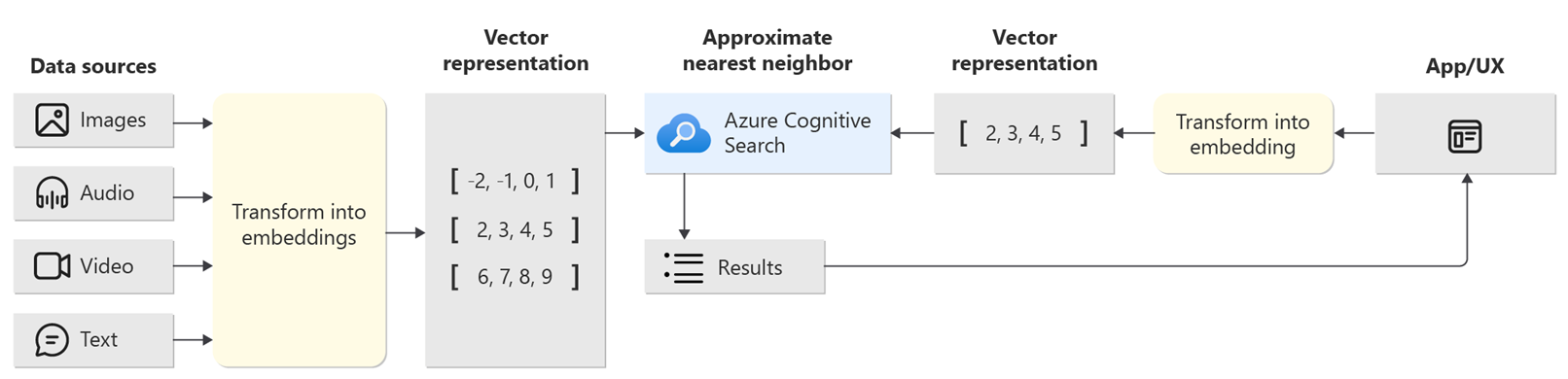
When using LLM + Vector stores the Agent finds the documents relevant to the requested input.
The documents found are used for the context of the Agent.
Example of the concept of vectorized search
  const agent = new Agent({
    name: '<name>',
    systemMesssage: '<a message that will specialize your agent>',
    chatConfig: {
      temperature: 0,
    },
    llmConfig: {
      type: '<cloud-provider-llm-service>', // Check availability at <link>
      model: '<llm-model>',
      instance: '<instance-name>', // Optional
      apiKey: '<key-your-llm-service>', // Optional
    },
    vectorStoreConfig: {
      type: '<type-vector-service>', // Check availability at <link>
      apiKey: '<your-api-key>', // Optional
      indexes: ['<index-name>'], // Your indexes name. Optional
      vectorFieldName: '<vector-base-field>', // Optional
      name: '<vector-service-name>', // Optional
      apiVersion: "<api-version>", // Optional
      model: '<llm-model>' // Optional
      customFilters: '<custom-filter>' // Optional. Example: 'field-vector-store=(userSessionId)' check at <link>
    },
  });

  // If stream enabled, receiver on token
  agent.on('onToken', async (token) => {
    console.warn('token:', token);
  });

  agent.on('onMessage', async (message) => {
    console.warn('MESSAGE:', message);
  });

  await agent.call({
    question: 'What is the best way to get started with Azure?',
    chatThreadID: '<chat-id>',
    stream: true,
  });
Using with Database custom
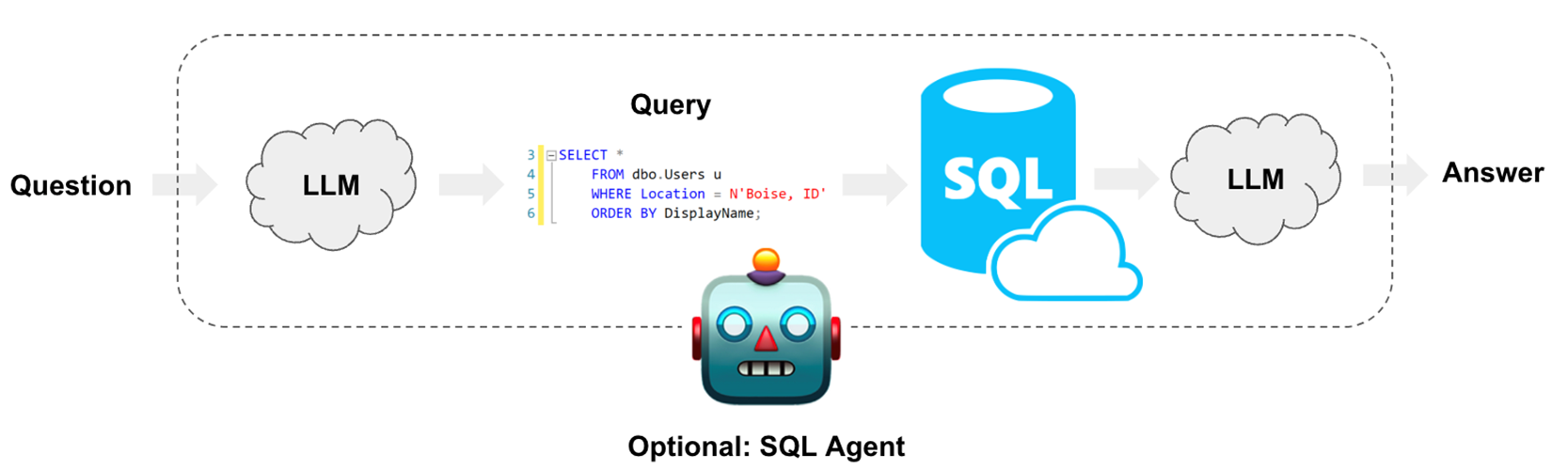
SQL + LLM for prompt construction is a concept that involves using both Structured Query Language (SQL) and LLMs to create queries or prompts for data retrieval or interaction with databases. This approach leverages the power of SQL for database-specific commands and the capabilities of LLMs to generate natural language prompts, making it easier for users to interact with databases and retrieve information in a more user-friendly and intuitive manner.
Example of the concept of SQL + LLM
const agent = new Agent({
  name: '<name>',
  systemMesssage: '<a message that will specialize your agent>',
  chatConfig: {
    temperature: 0,
  },
  llmConfig: {
    type: '<cloud-provider-llm-service>', // Check availability at <link>
    model: '<llm-model>',
    instance: '<instance-name>', // Optional
    apiKey: '<key-your-llm-service>', // Optional
  },
  dataSourceConfig: {
    type: '<type-database>', // Check availability at <link>
    username: '<username-database>', // Require
    password: '<username-pass>', // Require
    host: '<host-database>', // Require
    name: '<connection-name>', // Require
    includesTables: ['<table-name>'], // Optional
    ssl: '<ssl-mode>', // Optional
    maxResult: '<max-result-database>', // Optional. Limit set for maximum data included in conversation prompt.
    customizeSystemMessage: '<custom-chain-prompt>', // Optional. Adds prompt specifications for custom database operations.
  },
});

// If stream enabled, receiver on token
agent.on('onToken', async (token) => {
  console.warn('token:', token);
});

agent.on('onMessage', async (message) => {
  console.warn('MESSAGE:', message);
});

await agent.call({
  question: 'What is the best way to get started with Azure?',
  chatThreadID: '<chat-id>',
  stream: true,
});
Using with OpenAPI contract
OpenAPI + LLM for prompt construction is a concept that combines OpenAPI, a standard for documenting and describing RESTful APIs, with large language models (LLMs). This fusion allows for the automated generation of prompts or queries for interacting with APIs. By using LLMs to understand the OpenAPI specifications and generate natural language prompts, it simplifies and streamlines the process of interfacing with APIs, making it more user-friendly and accessible.
Example of the concept of SQL + OpenAPI

const agent = new Agent({
  name: '<name>',
  systemMesssage: '<a message that will specialize your agent>',
  chatConfig: {
    temperature: 0,
  },
  llmConfig: {
    type: '<cloud-provider-llm-service>', // Check availability at <link>
    model: '<llm-model>',
    instance: '<instance-name>', // Optional
    apiKey: '<key-your-llm-service>', // Optional
  },
  openAPIConfig: {
    xApiKey: '<x-api-key>', // Optional. Using request API
    data: '<data-contract>', // Require. OpenAPI contract
    customizeSystemMessage: '<custom-chain-prompt>', // Optional. Adds prompt specifications for custom openAPI operations.
  },
});

// If stream enabled, receiver on token
agent.on('onToken', async (token) => {
  console.warn('token:', token);
});

agent.on('onMessage', async (message) => {
  console.warn('MESSAGE:', message);
});

await agent.call({
  question: 'What is the best way to get started with Azure?',
  chatThreadID: '<chat-id>',
  stream: true,
});
Contributing
If you've ever wanted to contribute to open source, and a great cause, now is your chance!
See the contributing docs for more information
Contributors ✨
 JP. Nobrega 💬 📖 👀 📢 |
License
Reviews (0)
Sign in to leave a review.
Leave a reviewNo results found