local-llm-searxng-agent
Health Uyari
- License — License: MIT
- Description — Repository has a description
- Active repo — Last push 0 days ago
- Low visibility — Only 6 GitHub stars
Code Gecti
- Code scan — Scanned 10 files during light audit, no dangerous patterns found
Permissions Gecti
- Permissions — No dangerous permissions requested
Bu listing icin henuz AI raporu yok.
Python agent connecting local LLM and local SearxNG for web search
LLM Web Agent with Local SearxNG
A Python command-line agent that enhances a local Large Language Model (LLM) with real-time web search capabilities using a self-hosted SearxNG instance.
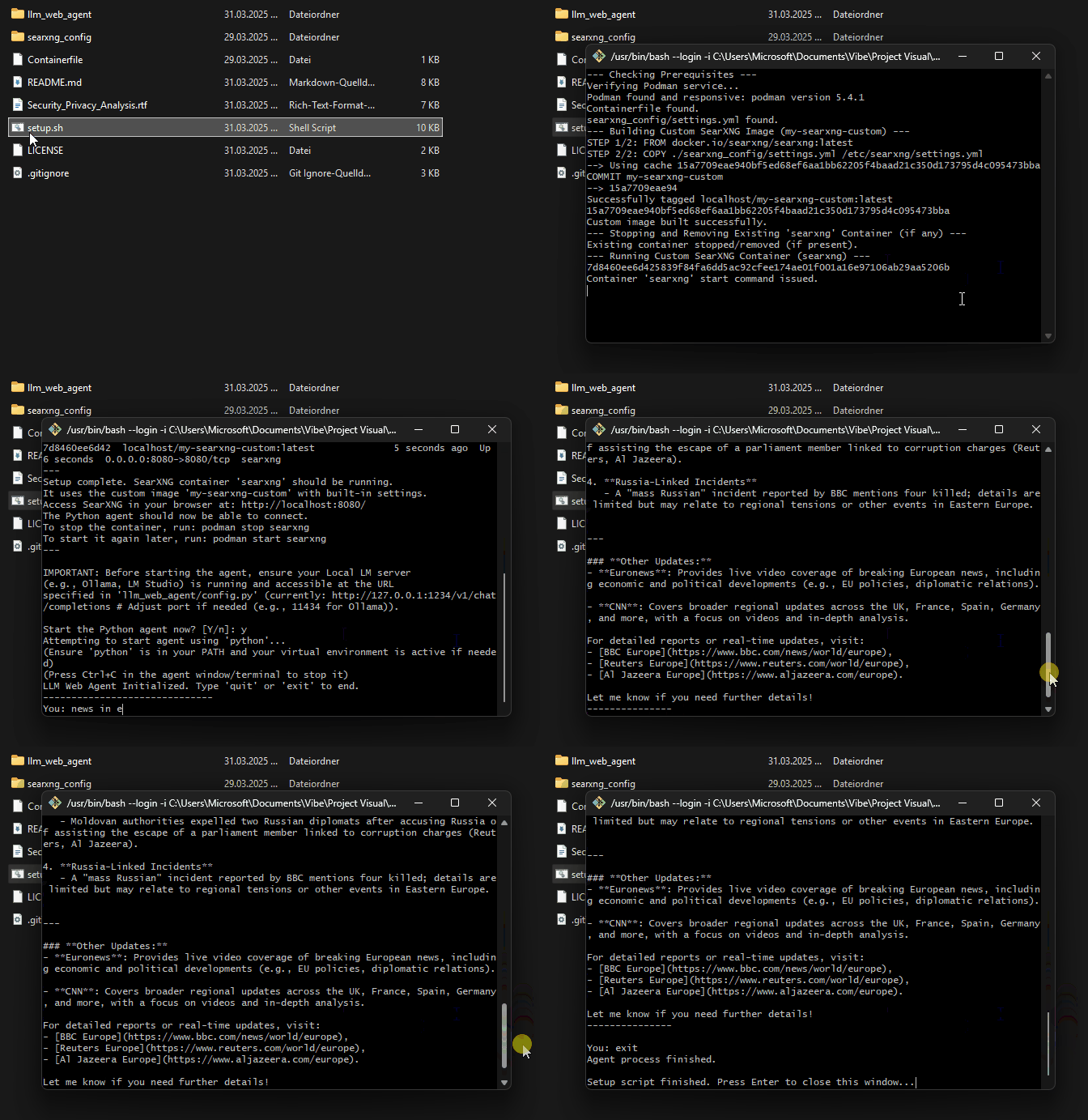
This project provides a tool that accepts user prompts via the command line. When keywords indicating a need for current information or images are detected, it queries a local SearxNG instance. Text results are combined with the original prompt and sent to a local LLM (like Ollama, LM Studio, etc.), while image results (URLs) are displayed directly. The setup uses a custom-configured SearxNG instance running in Podman.
Features
- Accepts user prompts via CLI.
- Detects keywords indicating a need for current information or images.
- Queries a local SearxNG instance for relevant text snippets or image URLs. Note: SearxNG acts as a metasearch engine and forwards these queries to external search engines (like Google, Bing, DuckDuckGo, etc., depending on configuration).
- For text searches, combines the original prompt with search context and sends it to a local LLM (via an OpenAI-compatible API).
- For image searches, displays the found image URLs directly.
- Hides intermediate processing logs for a cleaner user experience.
- Uses a custom Podman image for SearxNG to ensure correct configuration.
Project Structure
./
├── Containerfile                 # Definition for custom SearxNG image
├── setup.sh                      # Script to build and run SearxNG container
├── README.md                     # This file
├── llm_web_agent/                # Python agent code
│   ├── agent.py                  # Main agent script
│   ├── config.py                 # Configuration (URLs, keywords)
│   └── requirements.txt          # Python dependencies
└── searxng_config/               # SearxNG configuration for custom image
    └── settings.yml              # Pre-configured SearxNG settings
├── Security_Privacy_Analysis.rtf # Notes on security/privacy aspects
Prerequisites
- Python: Version 3.8 or higher recommended. Ensure
pythonandpipare in your system's PATH. - Podman: A container engine. The
setup.shscript will attempt to install it using common package managers (apt,dnf,brew,winget) if it's not found. If the automatic installation fails, you'll need to install it manually: https://podman.io/docs/installation. - Bash Environment (for setup script):
- Windows: Git Bash (recommended) or Windows Subsystem for Linux (WSL).
- macOS/Linux: Default terminal is usually sufficient.
- Local LM Server (e.g., Ollama, LM Studio, Jan):
- Install your preferred local LLM server.
- Download a compatible LLM (e.g., Llama 3, Mistral, etc.) using your server's interface.
- Start the server and ensure it provides an OpenAI-compatible API endpoint (often at
http://127.0.0.1:1234or similar). - Verify the server is running and accessible at its address.
- Ensure this address matches the
LOCAL_LM_URLconfigured inllm_web_agent/config.py.
Setup
Clone/Download: Obtain the project files (e.g.,
git clone <repository_url>).Configure SearxNG (Optional but Recommended):
- Review the
searxng_config/settings.ymlfile. It has been pre-configured to enable the JSON API for local access (127.0.0.1) and allow thejsonformat. - You may wish to customize other settings (e.g., enabled search engines under
engines:). - Important: Ensure the
secret_key(around line 105) is changed from the default"ultrasecretkey"for security if this instance might be exposed. The current file uses a randomly generated key.
- Review the
Run SearxNG Setup Script:
- Open your Bash terminal (Git Bash, WSL, etc.).
- Navigate to the project's root directory (where
setup.shis located). - Make the script executable (if needed):
chmod +x setup.sh - Run the script:
./setup.sh - This script will:
- Check if Podman is installed and attempt installation if missing.
- Verify the Podman service is running and attempt to start it if needed.
- Build the custom
my-searxng-customPodman image. - Stop and remove any previous container named
searxng. - Start a new container named
searxngfrom the custom image, mapping port 8080.
- Wait for the script to complete. Check the output for any errors.
- The script will remind you about the Local LM server and ask if you want to start the Python agent immediately.
Set up Python Environment:
- Navigate to the agent directory:
cd llm_web_agent - (Recommended) Create and activate a virtual environment:
python -m venv venv # Windows: venv\Scripts\activate (cmd) or venv\Scripts\Activate.ps1 (PowerShell) # macOS/Linux: source venv/bin/activate - Install dependencies:
pip install -r requirements.txt
- Navigate to the agent directory:
Running the Agent
- Ensure Services are Running:
- The SearxNG container should be running (started by
setup.sh). Verify withpodman ps --filter name=searxng. - Ensure your Local LM API server (Ollama, LM Studio, etc.) is running.
- The SearxNG container should be running (started by
- Run the Python Script:
- Make sure your Python virtual environment is activated (if used).
- Navigate to the agent directory:
cd llm_web_agent - Run the agent:
python agent.py(or letsetup.shstart it).
- Interact: Type your prompts at the
You:prompt. Use keywords like "latest news", "image of a cat", etc., to trigger web/image searches. Typequitorexitto stop the agent.
Security and Privacy
Please review the Security_Privacy_Analysis.rtf file for important considerations regarding the security and privacy implications of using this tool, particularly concerning how SearxNG interacts with external search engines and how prompts/results are handled.
Troubleshooting
- SearxNG Container Fails to Start: Check Podman logs (
podman logs searxng). Look for port conflicts (8080) orsettings.ymlerrors. - Agent Can't Connect to SearxNG: Ensure the container is running (
podman ps) and accessible athttp://127.0.0.1:8080. Check firewalls. - Agent Can't Connect to Local LM: Verify the LM server is running and the
LOCAL_LM_URLinllm_web_agent/config.pyis correct. - 403 Forbidden from SearxNG: Check
searxng_config/settings.ymlfor correctness before runningsetup.sh. Rebuild the image (./setup.shwill do this) if you changed the settings file after the initial build.
Contributing
Contributions are welcome, especially local-first setup fixes, tests, and safer search/LLM handling. See CONTRIBUTING.md for the full checklist.
Before opening a pull request, run:
python3 -m pytest -q
python3 -m py_compile llm_web_agent/*.py
License
This project is licensed under the MIT License - see the LICENSE file for details.
Yorumlar (0)
Yorum birakmak icin giris yap.
Yorum birakSonuc bulunamadi