OpenQuota
Health Pass
- License — License: MIT
- Description — Repository has a description
- Active repo — Last push 0 days ago
- Community trust — 111 GitHub stars
Code Pass
- Code scan — Scanned 12 files during light audit, no dangerous patterns found
Permissions Pass
- Permissions — No dangerous permissions requested
No AI report is available for this listing yet.
Open-source, cross-platform tracker for AI coding usage, limits, reset times, and spend.

OpenQuota
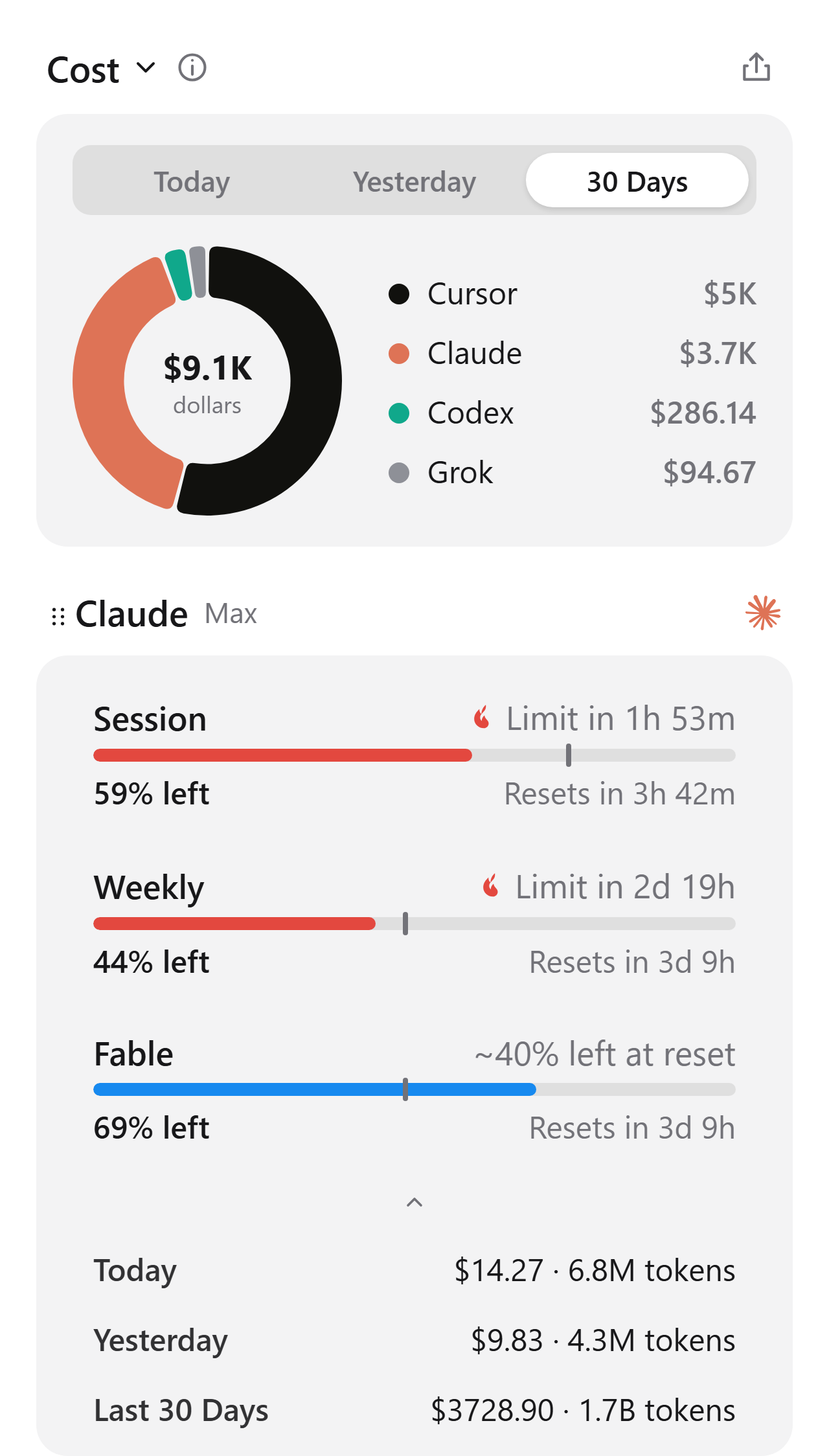
Track usage and limits across your AI coding tools.




OpenQuota brings usage data from Claude Code, Codex, Cursor, Copilot, and other AI coding providers
into one compact panel. See session and weekly limits, reset times, token usage, and estimated
spend at a glance.
Download
| Platform | Available builds | Download |
|---|---|---|
| Windows | x64 and ARM64 installers | Download for Windows |
| macOS | Universal DMG for Apple Silicon and Intel | Download for macOS |
| Linux | x64 and ARM64 AppImage and Debian packages | Download for Linux |
Open the latest release and choose the file for your platform:
- Windows:
_x64-setup.exeor_arm64-setup.exe - macOS:
_universal.dmg— requires macOS 11 or later - Linux:
.AppImageor.deb
OpenQuota checks for updates automatically. Installable updates are cryptographically signed.
Supported providers
- Claude Code — session and weekly limits, model-specific usage,
token history, and estimated spend - Codex — session and weekly limits, credits, token history, model
breakdown, and estimated spend - Cursor — total, Auto and API usage, credits, token history, and
estimated spend - Antigravity — shared Gemini and Claude quota pools
- Copilot — premium requests, extra usage, chat and completion
quotas, plus organization billing - Devin — daily and weekly limits, reset times, and extra usage balance
- Grok — weekly allowance, extra usage status, token history, and
estimated spend - OpenCode — OpenCode Go session, weekly and monthly spend caps,
plus local hosted usage history - OpenRouter — credit balance and daily, weekly and monthly spend
(API key) - Z.ai — GLM Coding Plan session, weekly, and web-search quotas (API key)
Most providers use credentials already available on your computer. OpenRouter and Z.ai require API
keys, which you can add in Customize; OpenQuota stores them securely in your operating system's
credential store. Codex subscription limits require a ChatGPT login and are not available in
API-key-only sessions.
Features
- Tray dashboard. View all provider quotas and reset times in a compact popup.
- Pinned metrics. Keep important values visible in the tray or macOS menu bar.
- Used or left. Display how much quota you have consumed or how much remains.
- Usage history. Review today, yesterday, and the last 30 days of token usage and estimated
spend. - Pacing alerts. See whether your current usage is likely to last until the next reset.
- Custom layouts. Reorder providers and metrics, hide rows, and choose what stays visible.
- Desktop integration. Launch at login, use a global shortcut, and follow the system theme.
- Fast refresh. Cached values appear immediately and providers refresh automatically in the
background.
OpenQuota runs locally and has no account, cloud backend, analytics, or usage telemetry of its own.
Development
Requirements:
- Node.js 22 or later
- pnpm 11.11.0
- Stable Rust toolchain
- Tauri 2 platform prerequisites
Install dependencies and start the development app:
corepack pnpm install --frozen-lockfile
corepack pnpm tauri dev
Run the complete quality checks:
corepack pnpm verify
Build an installer for the current platform:
corepack pnpm build:installer             # Windows
corepack pnpm build:linux                 # Linux
corepack pnpm tauri build --bundles dmg   # macOS
Contributing
Issues and pull requests are welcome. Read CONTRIBUTING.md before contributing,
and report security problems privately as described in SECURITY.md.
License
Reviews (0)
Sign in to leave a review.
Leave a reviewNo results found