quater
Health Gecti
- License — License: MIT
- Description — Repository has a description
- Active repo — Last push 0 days ago
- Community trust — 10 GitHub stars
Code Gecti
- Code scan — Scanned 12 files during light audit, no dangerous patterns found
Permissions Gecti
- Permissions — No dangerous permissions requested
Bu listing icin henuz AI raporu yok.
Backend web framework for building applications where a single handler can be exposed as http endpoint, MCP tool or CLI action.
Quater




Most backend frameworks were designed for one main job: serve data to a
frontend, then let humans click through that frontend to get work done.
That model still matters, but it is no longer enough. Moving ahead, more work is going to be
done by AI agents. Asking those agents to use a product through screens, buttons,
and forms is slow, fragile, and often the wrong level of access. Agents need a
safe way to work with the backend directly.
That does not mean giving agents unlimited access. It means exposing the right
operations, with clear inputs, clear descriptions, real auth, audit trails, and
approval gates where the action is sensitive.
Quater is a Python backend framework built for this shift. You build a normal
backend for people and services, and you can expose selected views directly
to MCP Clients through MCP or to AI agents through the CLI. The same operation can
serve the app, power an agent, and support production workflows without becoming
three different pieces of code.
The goal is simple: make the backend usable by humans and operable by AI agents,
without losing safety, structure, or ownership of the application logic.
Highlights
- One view serves HTTP, MCP, and CLI. You annotate the route once and all three entry points share the same handler logic, while auth is configured per surface.
- Exposing a view to AI agents takes a single flag. No extra service, no separate schema file, no adapter to maintain.
- Request safety is on by default. Host checking, CORS, body limits, and request IDs run without you touching configuration; authentication is enabled per surface with
AuthConfig, and surfaces without one are deliberately public. - Every request carries source and entrypoint metadata, so audit logs always know whether a human or an AI agent used your backend and how it arrived.
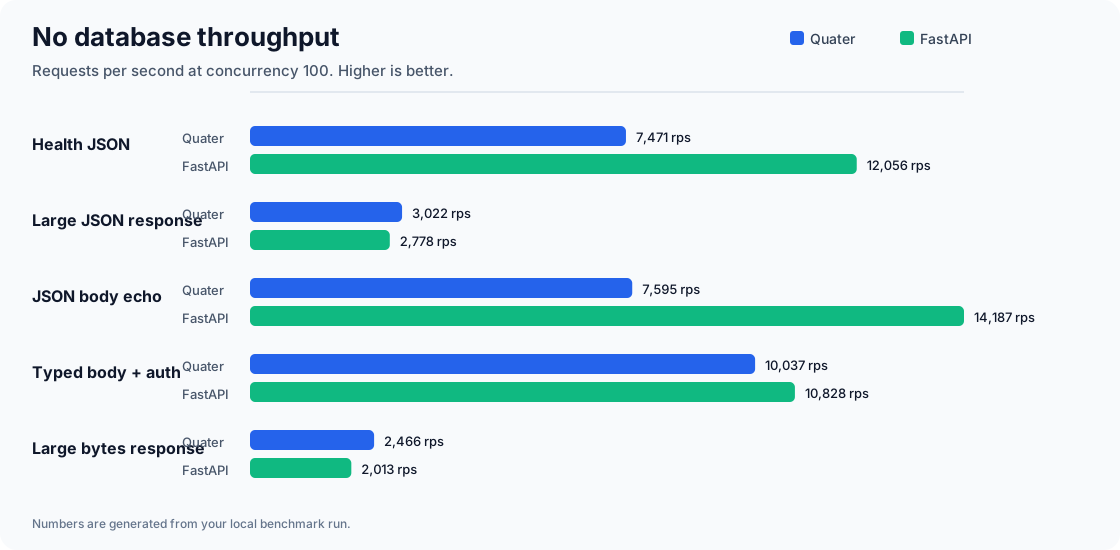
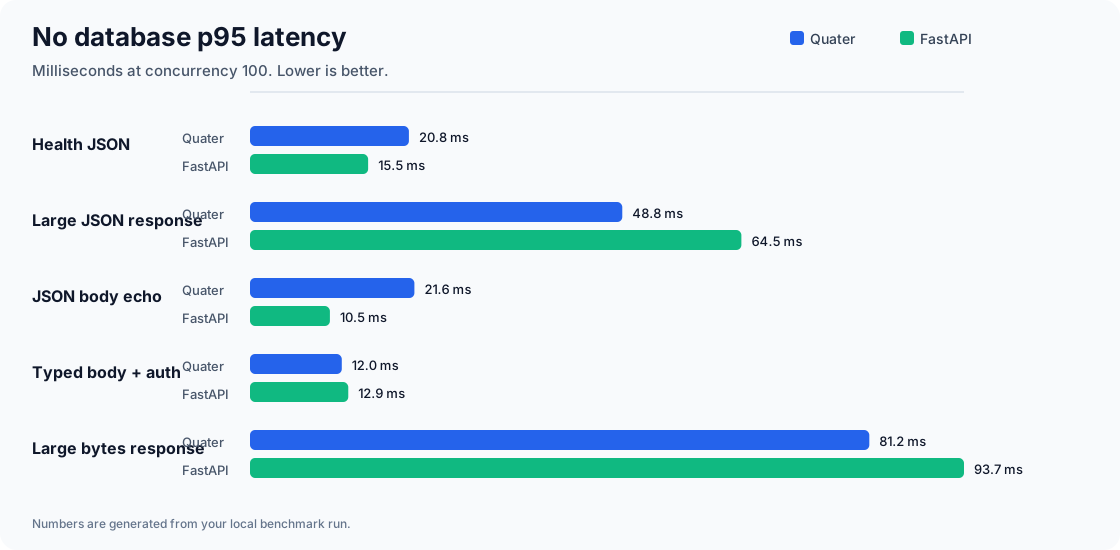
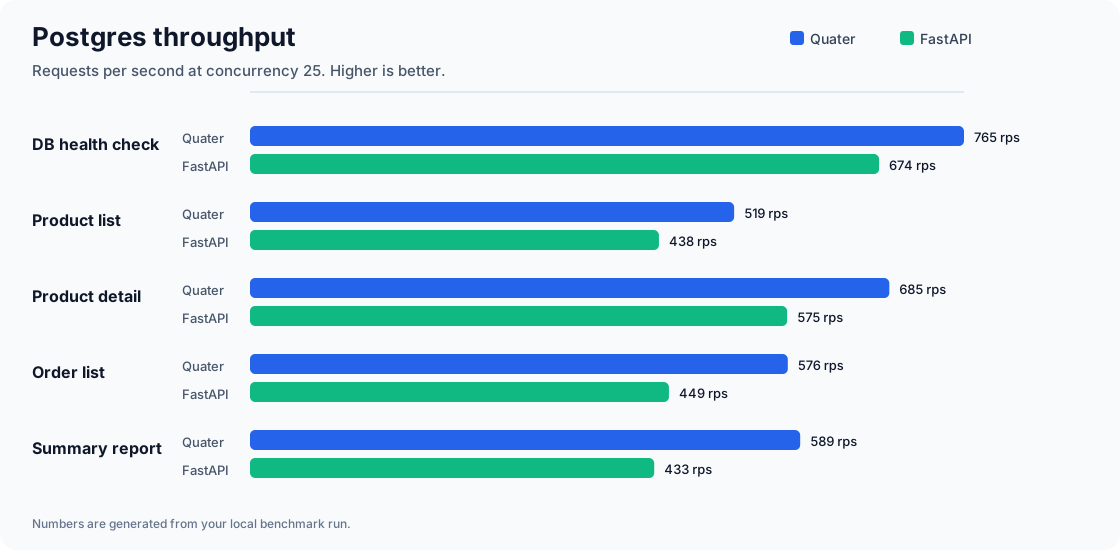
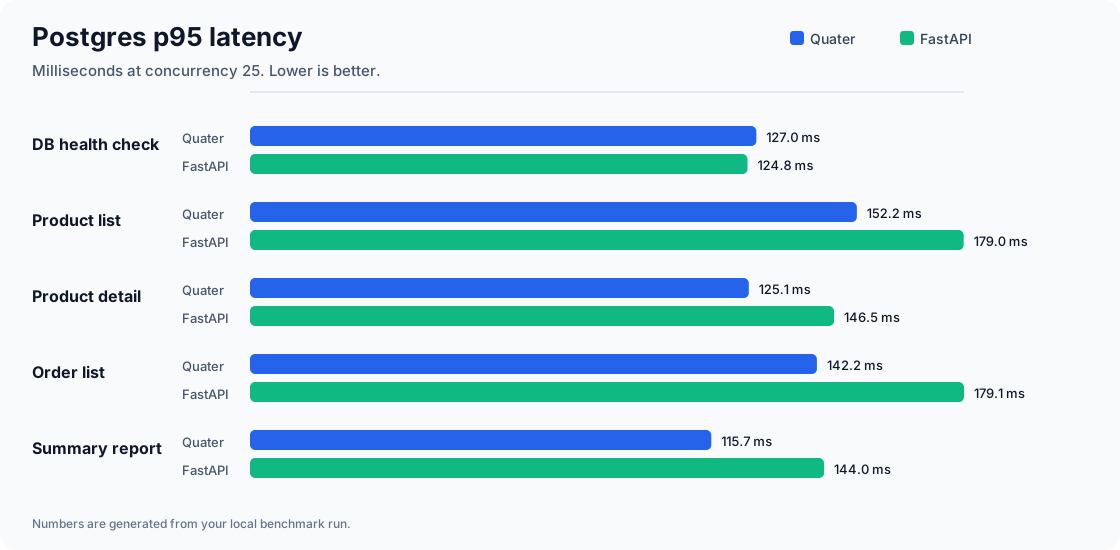
- It gives slightly better performance than FastAPI for real workloads, with no measurable overhead when database I/O dominates.
- It's simple to use, with a small API surface and no extra configuration required.
A Small App
from quater import AuthConfig, AuthContext, HTTPError, Quater, Request


async def authenticate(request: Request) -> AuthContext | None:
    if request.headers.get("authorization") != "Bearer admin-token":
        return None
    return AuthContext(subject="admin")


app = Quater(auth=[AuthConfig(authenticate, surfaces=["api", "mcp", "cli"])])

ORDERS: dict[str, dict[str, object]] = {
    "ord_1001": {"id": "ord_1001", "status": "paid", "total": 42.5}
}


@app.get("/health", public=True)
async def health() -> dict[str, bool]:
    return {"ok": True}


@app.get(
    "/orders/{order_id}",
    tool=True,
    cli=True,
    description="Fetch one order by id.",
)
async def get_order(order_id: str, request: Request) -> dict[str, object]:
    order = ORDERS.get(order_id)
    if order is None:
        raise HTTPError("Order not found", status_code=404)
    assert request.auth is not None
    return {
        **order,
        "subject": request.auth.subject,
        "source": request.context.source,
        "entrypoint": request.context.entrypoint,
    }
Run it:
python -m pip install quater
quater dev main.py
If you use uv, install with uv add quater
instead.
Expected server output:
[INFO] Starting granian
[INFO] Listening at: http://127.0.0.1:8000
- Call HTTP:
curl -H "Authorization: Bearer admin-token" \
  http://127.0.0.1:8000/orders/ord_1001
{
  "id": "ord_1001",
  "status": "paid",
  "total": 42.5,
  "subject": "admin",
  "source": "api",
  "entrypoint": "server"
}
- Call the same handler as an MCP tool:
curl http://127.0.0.1:8000/mcp \
  -H "Authorization: Bearer admin-token" \
  -H "Content-Type: application/json" \
  -d '{"jsonrpc":"2.0","id":1,"method":"tools/call","params":{"name":"get_order","arguments":{"order_id":"ord_1001"}}}'
{
  "jsonrpc": "2.0",
  "id": 1,
  "result": {
    "content": [
      {
        "type": "text",
        "text": "{\"id\":\"ord_1001\",\"status\":\"paid\",\"total\":42.5,\"subject\":\"admin\",\"source\":\"mcp\",\"entrypoint\":\"server\"}"
      }
    ],
    "isError": false
  }
}
- Call the same handler from the local CLI without a server round trip:
export QUATER_APP=main:app
export QUATER_TOKEN=admin-token
quater actions list
quater call get_order --order-id ord_1001
{
  "id": "ord_1001",
  "status": "paid",
  "total": 42.5,
  "subject": "admin",
  "source": "cli",
  "entrypoint": "local"
}
- For a hosted app, connect once and call the named remote, just like git:
quater connect store https://api.example.com --token admin-token
quater actions describe store get_order
quater call store get_order --order-id ord_1001
Production demo
If you want to see how an app built on Quater behaves in production, check out
DevilsAutumn/frustrated. It is a
demo Quater app that users can operate through their AI agents and MCP clients,
along with normal HTTP routes. It's not 100% production-ready, but it serves as a
good example of how Quater can be used in a real-world app.
Data flow diagram
flowchart TB
    caller["Caller\nperson, service, or AI agent"]
    http["HTTP request\nGET /orders/ord_1001"]
    mcp["MCP tool call\ntools/call get_order"]
    remote_cli["Remote CLI action\nquater call store get_order"]
    adapter["Server adapter\nRSGI / ASGI / WSGI"]
    checks["Framework checks\nhost, body limit, CORS, request id"]
    router["Route metadata\nmethod, path, public, resources"]
    auth["Per-surface Auth\none authenticator, by source,\nsharing the request scope"]
    handler["Your handler\nget_order(...)"]
    response["Serialized response\nJSON, text, bytes, stream"]

    caller --> http
    caller --> mcp
    caller --> remote_cli
    http --> adapter
    mcp --> adapter
    remote_cli --> adapter
    adapter --> checks
    checks --> router
    router -->|HTTP api| auth
    router -->|MCP| auth
    router -->|remote CLI| auth
    auth --> handler
    handler --> response
Why This Shape
Quater treats HTTP, MCP, and CLI as different ways to reach the same backend
capability, not as three products you have to maintain.
- For people and services: Quater gives you normal HTTP APIs with route
decorators, OpenAPI, Swagger UI, request binding, response classes, route
groups, middleware, and tests. - For MCP Clients:
tool=Trueexposes selected routes through MCP with
required descriptions, generated input schemas, per-surface transport auth,
MCP docs, and audit hooks. - For AI agents:
cli=Trueexposes selected routes as local or remote CLI
actions with discovery, dry-run, approval hooks, and JSON output for scripts. - For the app itself: auth context, resources,
app.state, lifespan hooks,
and serialization stay attached to the handler instead of drifting into
wrappers. - For performance: the request path stays deliberately small with
Granian/RSGI, msgspec JSON, and a native route matcher.
Benchmarks
To measure performance, we ran benchmarks on an Apple M2 with an 8-core CPU, 16 GiB RAM, macOS 26.3, Python 3.11.12, and one worker per app. Quater performed slightly better than FastAPI when real database work was involved.
For very small endpoints without database access, FastAPI can be faster because the benchmark mostly measures framework overhead. Quater still runs built-in checks such as host validation, request IDs, body limits, and security headers on every request.
In the latest run, Quater used Granian/RSGI, while FastAPI used Uvicorn with uvloop and httptools. Full setup, commands, and CSV files are available in benchmarks.
 |
 |
 |
 |
Current Status
Quater is still moving quickly. Current versions are 0.x.x, and any release
can potentially include breaking changes. Pin the exact version that works with
your app, read the release notes before upgrading, and run your tests after each
upgrade.
Documentation
- Quickstart: build the first app.
- Why Quater Exists: understand the problem
Quater is built around. - Manual: read the full guide and reference.
Contributing
Quater is meant to be a community-driven project. Please read
CONTRIBUTING.md before you start contributing.
Agent Skills
Quater ships two agent skills:
quater-apps: for operating applications built with Quater through MCP, CLI actions, and
HTTP. The applications build on quater can have their own skills for operating their applications.quater-framework: for building and debugging applications with Quater.
Install the app-operator skill:
npx -y skills add \
  https://github.com/DevilsAutumn/quater/tree/main/agent-skills/quater-apps
Install the framework-development skill:
npx -y skills add \
  https://github.com/DevilsAutumn/quater/tree/main/agent-skills/quater-framework
Working On Quater
This repo uses uv for local development:
uv sync --group dev
uv run pytest
uv run mypy
uv run ruff format --check src tests scripts
uv run ruff check src tests scripts
uv build
Docs use VitePress:
npm install
npm run docs:reference
npm run docs:dev
npm run docs:build
npm run docs:build:site
docs/en/dev is the only docs source tree. npm run docs:build publishes the
dev channel under /en/dev/. npm run docs:build:site builds the deployable
site in one VitePress pass: the dev channel from the working tree plus a stable
channel materialized from the latest release tag at /en/stable/. Release docs
are frozen by the Git tag, never copied into the repo.
Yorumlar (0)
Yorum birakmak icin giris yap.
Yorum birakSonuc bulunamadi