shopifyql-skill
Health Uyari
- License — License: MIT
- Description — Repository has a description
- Active repo — Last push 0 days ago
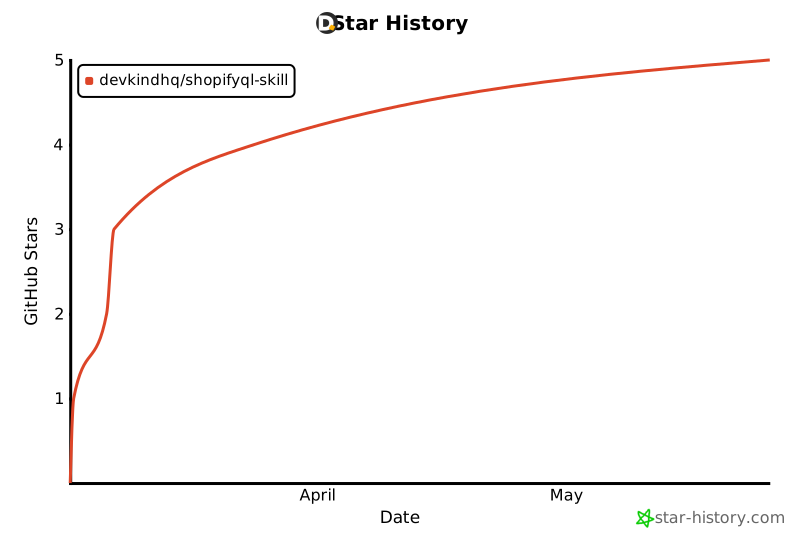
- Low visibility — Only 5 GitHub stars
Code Gecti
- Code scan — Scanned 6 files during light audit, no dangerous patterns found
Permissions Gecti
- Permissions — No dangerous permissions requested
Bu listing icin henuz AI raporu yok.
ShopifyQL & Segment Query Language skill for Claude Code — write, debug, and explain Shopify analytics queries and customer segment filters





ShopifyQL Skill for Claude Code
The fastest way to query, execute, and debug Shopify analytics — ask a business question in plain English, get live results from your store.

Ask Claude a business question → ShopifyQL query written → executed against your live Shopify store → results in chat.
Quick Install
/plugin marketplace add devkindhq/shopifyql-skill
/plugin install shopifyql@shopifyql-skill
Works with Claude Code CLI, VS Code extension, JetBrains extension, and Claude.ai web app.
Why Use This Instead of...
| Approach | What you get | What you lose |
|---|---|---|
| Raw Shopify GraphQL API | Full control | Must know ShopifyQL syntax, zero AI help, no debugging |
| Shopify Analytics dashboards | Visual UI | No automation, no custom queries, no AI interpretation |
| shopifyql-py (official SDK) | Python bindings | No AI layer, no natural language, no agent execution |
| This skill | AI writes + runs + debugs queries for you | Nothing |
Who It's For
Shopify merchants and analysts — Ask "what were my top 10 products by revenue last quarter?" and get a formatted table without opening the Shopify dashboard or writing a single line of ShopifyQL.
Shopify app developers — Test and iterate ShopifyQL queries against the Admin API directly from your editor. Claude catches syntax errors, handles rate limits, and routes output automatically.
eCommerce agencies — Automate recurring analytics reports and Segment Query Language expressions across client stores. Run queries from CI, cron jobs, or agentic pipelines.
Built by Devkind
This plugin is built and maintained by Devkind — a Melbourne-based agency specialising in Shopify Plus development, Shopify development, and AI platform & integration services.
We build agentic AI systems for eCommerce — automated reporting, cross-channel attribution, and custom AI agents that pull insights from Shopify, Meta, Google Ads, and GA4. Get in touch if you want a custom analytics pipeline for your store.
What It Does
Triggers automatically when you ask Claude to:
- Write a ShopifyQL report query against your store data
- Run or execute a query against your live Shopify store
- Build a Shopify customer segment filter
- Debug a ShopifyQL syntax error
- Translate a business question into a Shopify analytics query
- Understand available ShopifyQL tables, dimensions, or metrics
Also works as a standalone skill for Cursor, GitHub Copilot CLI (Codex), and Gemini CLI — drop skills/shopifyql/SKILL.md into any AI coding tool.
Quick Start
Install the plugin
/plugin marketplace add devkindhq/shopifyql-skillSet your credentials
export SHOPIFY_STORE_URL=my-store.myshopify.com
export SHOPIFY_ACCESS_TOKEN=shpat_xxxx
Ask Claude a question
"What were my top 10 products by revenue last quarter?"
Say "run it" to execute the query against your live store.
Get results as a table in chat (≤ 20 rows) or CSV file (> 20 rows).
Execution Setup
Requirements
- Python 3.11:
brew install [email protected] - Dependencies:
pip3.11 install 'shopifyql[all]' pandas python-dotenv certifi - A Shopify Custom App with scopes:
read_analytics,read_reports,read_customers,read_orders
Credentials
Credentials must be set as OS environment variables before launching Claude:
export SHOPIFY_STORE_URL=my-store.myshopify.com
export SHOPIFY_ACCESS_TOKEN=shpat_xxxx
Or pass them inline:
SHOPIFY_STORE_URL=my-store.myshopify.com SHOPIFY_ACCESS_TOKEN=shpat_xxxx claude
For guided setup:
/shopifyql-setup
Running the script directly
python3.11 scripts/execute_query.py \
  --query "FROM sales SHOW net_sales SINCE 2026-01-01 UNTIL 2026-01-31"
ShopifyQL Syntax Reference
ShopifyQL is a SQL-like querying language designed specifically for Shopify Plus merchants to analyze store data — including sales, inventory, and customer behavior — without needing advanced coding skills.
It supports powerful features such as time-based filtering, data visualization, and automatic period comparisons. ShopifyQL is accessed via ShopifyQL Notebooks, Shopify Analytics reports, or the GraphQL Admin API.
Clause Order
| Clause | Purpose | Example |
|---|---|---|
FROM |
Data source | FROM sales |
SHOW |
Metrics to return | SHOW net_sales, orders_count |
WHERE |
Filter by dimensions | WHERE sales_channel = 'online_store' |
GROUP BY |
Group results | GROUP BY product_title |
HAVING |
Filter by metrics (not WHERE) |
HAVING net_sales > 1000 |
TIMESERIES |
Data over time | TIMESERIES day |
SINCE / UNTIL |
Date range | SINCE 2026-01-01 UNTIL 2026-01-31 |
COMPARE TO |
Period comparison | COMPARE TO previous_year |
ORDER BY |
Sort results | ORDER BY net_sales DESC |
LIMIT |
Limit rows | LIMIT 20 |
Powerful ShopifyQL Features
DURING— time range shorthand (DURING last_30_days)COMPARE TO— automatic period comparison (COMPARE TO previous_period,previous_year)TIMESERIES— aggregate data over time (TIMESERIES week)VISUALIZE— declare chart type for Shopify NotebooksWITHmodifiers — control rounding, currency display, and more- Semi-joins — filter using subqueries
- Math on metrics —
(net_sales / orders_count) AS average_order_value TOP N— return top N results per group
Analytics Reports
Build tailored reports within Shopify Analytics — top products, revenue by channel, sales trends over time.
FROM sales
SHOW net_sales, orders_count
GROUP BY sales_channel
SINCE 2026-01-01 UNTIL 2026-03-31
ORDER BY net_sales DESC
Customer Segmentation
Modify and query customer data segments — repeat vs. new buyers, high-value customers, re-engagement targets.
FROM customers
SHOW customer_count
WHERE customer_type = 'returning'
GROUP BY customer_cohort_month
TIMESERIES month
Comparing Sales Periods
Use COMPARE TO for automatic period comparisons — no manual date math needed.
FROM sales
SHOW net_sales, orders_count
SINCE 2026-01-01 UNTIL 2026-03-31
COMPARE TO previous_year
App Development
Leverage the GraphQL Admin API to fetch ShopifyQL data programmatically — for custom dashboards, reporting apps, and agentic pipelines.
Known SDK Quirk
Columns ending in _ms (lcp_p75_ms, inp_p75_ms) trigger a type-cast bug in query_pandas(). Use --raw for these — the executor agent handles this automatically.
# For _ms duration columns (LCP, INP):
python3.11 scripts/execute_query.py --raw \
  --query "FROM web_performance SHOW lcp_p75_ms GROUP BY day TIMESERIES day SINCE 2026-01-01 UNTIL 2026-01-31"

# CSV output:
python3.11 scripts/execute_query.py --output csv \
  --query "FROM sales SHOW net_sales GROUP BY product_title SINCE 2026-01-01 UNTIL 2026-01-31 ORDER BY net_sales DESC LIMIT 20"
Segment Query Language
The skill also covers Shopify Segment Query Language — used to build customer segments with attribute filters, behavioral conditions, and date-based expressions.
Supported features:
- All attribute types (string, boolean, date, number)
- All operators (
=,!=,>,<,>=,<=,CONTAINS,NOT CONTAINS,IS NULL,IS NOT NULL) - Date formats and relative date expressions
- Functions:
products_purchased,orders_placed,shopify_email,anniversary,customer_within_distance,storefront_event - Common patterns: re-engagement segments, high-value customers, wholesale/B2B filters
Common ShopifyQL Mistakes (and How to Avoid Them)
1. Double quotes instead of single quotes
ShopifyQL requires single quotes for string values.
-- Wrong
WHERE sales_channel = "online_store"

-- Correct
WHERE sales_channel = 'online_store'
2. Filtering on metrics in WHERE instead of HAVING
WHERE filters dimensions (text/category fields). HAVING filters metrics (numbers).
-- Wrong (net_sales is a metric)
WHERE net_sales > 1000

-- Correct
HAVING net_sales > 1000
3. Missing GROUP BY when showing dimensions
If you SHOW a dimension alongside a metric, you must GROUP BY that dimension.
-- Wrong
FROM sales SHOW net_sales, product_title

-- Correct
FROM sales SHOW net_sales, product_title GROUP BY product_title
4. Rate Limits — 429 errors
ShopifyQL enforces rate limits. If you hit a 429 Too Many Requests error, you must wait 60 seconds before retrying. The executor agent handles this automatically with a backoff retry.
Common eCommerce Patterns
Top products by revenue
FROM sales
SHOW net_sales, orders_count
GROUP BY product_title
SINCE 2026-01-01 UNTIL 2026-03-31
ORDER BY net_sales DESC
LIMIT 10
Revenue by sales channel
FROM sales
SHOW net_sales, orders_count
GROUP BY sales_channel
SINCE 2026-01-01 UNTIL 2026-03-31
ORDER BY net_sales DESC
Sales trend over time
FROM sales
SHOW net_sales
TIMESERIES week
SINCE 2026-01-01 UNTIL 2026-03-31
New vs returning customers
FROM customers
SHOW customer_count
WHERE customer_type = 'returning'
GROUP BY customer_cohort_month
TIMESERIES month
Period-over-period comparison
FROM sales
SHOW net_sales, orders_count
SINCE 2026-01-01 UNTIL 2026-03-31
COMPARE TO previous_year
Use with Cursor, Codex CLI, or Gemini CLI
The ShopifyQL skill is a universal Markdown instruction file that works in any AI coding tool that supports skill/context injection.
To add it manually:
cp skills/shopifyql/SKILL.md .cursor/rules/shopifyql.md  # Cursor
cp skills/shopifyql/SKILL.md .github/copilot-instructions.md  # GitHub Copilot
Note: The live execution layer (Python script + executor agent) is Claude Code-specific. The ShopifyQL knowledge and syntax guidance works in any AI coding tool.
Star History
Contributing
PRs and issues are welcome. See CONTRIBUTING.md for guidelines.
Found a useful ShopifyQL query? Share it with the community.
Built by Devkind
This plugin was built and is maintained by Devkind — a Melbourne-based development and AI agency specialising in Shopify, custom web applications, and agentic AI systems.
Agentic reporting for Shopify
Devkind builds agentic reporting pipelines that go beyond standard Shopify Analytics dashboards. Instead of switching between tabs and manually interpreting numbers, an AI agent does the analytical heavy lifting — pulling data from Shopify, ad platforms, and Google Analytics, then surfacing what changed, why, and what to do next.
This ShopifyQL plugin is one piece of that stack. If you want:
- Automated daily Shopify analytics reports delivered to Slack or email
- Cross-channel attribution (Shopify + Meta + Google Ads unified)
- A custom AI analytics agent for your ecommerce store
- ShopifyQL dashboards and Segment Query Language automation
...Devkind can scope and build it for you.
Get in touch
- Website: devkind.com.au
- Email: [email protected]
Further Reading
- ShopifyQL overview — Shopify Dev Docs
- ShopifyQL Notebooks — Shopify Help Center
- I built a Claude Code skill for ShopifyQL — dev.to
License
MIT
Yorumlar (0)
Yorum birakmak icin giris yap.
Yorum birakSonuc bulunamadi