tars
Health Uyari
- License — License: MIT
- Description — Repository has a description
- Active repo — Last push 0 days ago
- Low visibility — Only 5 GitHub stars
Code Basarisiz
- rm -rf — Recursive force deletion command in .github/workflows/release-on-version-bump.yml
Permissions Gecti
- Permissions — No dangerous permissions requested
Bu listing icin henuz AI raporu yok.
Local AI agent runtime in a single Go binary — browser console, sub-agents, memory, scheduled jobs.




TARS runs a development task from plan to merged pull request, on your own machine.
Homepage: tars.marvin-42.com — project overview, features, and quickstart.
You give TARS a goal and a folder. It plans the work, makes the change, reviews it, opens the pull request, watches CI, and merges. You decide at the gates: the plan, the pull request, the merge. Or you turn on goal mode and nobody has to be there.
It runs locally as one Go binary with a browser console, uses the model providers you already have (the Claude Code CLI on your subscription, or Anthropic, OpenAI and Gemini API keys), and keeps every session, tool call and decision where you can read it.
A task, start to finish
Focus mode runs one task as a pipeline of stages.
| Stage | What happens | What moves it on |
|---|---|---|
| plan | The agent reads the code and proposes the tasks, which stages apply, and the commands that prove the work. Nothing is edited. | You approve or edit the plan |
| build | The agent makes the change | The plan's verification commands exit 0 |
| review | The agent reviews the diff since the task began and lists findings | You fix or dismiss each finding, and verification passes again |
| pr | The agent drafts the pull request | You approve the draft; it pushes and opens the pull request |
| pr_review | TARS watches CI and review comments; a failed check or a requested change becomes a finding | Checks are green and findings are closed |
| merge | The pull request is ready | You approve; it merges |
No stage ends because a model said it was done. TARS reads the facts itself: the exit code of your verification commands, and the pull request's real CI and review state from a read-only gh pr view. A small fix can skip stages; the plan says which.
Goal mode
Goal mode walks the same gates with nobody at them, on a fixed policy: approve the plan, the pull request and the merge; fix every review finding except the ones marked low; retry a stuck gate. It has a push budget (20 by default) and backs off when turns fail. When the budget runs out or someone closes the pull request, it stops and the gates are yours again.
It never asks a model whether the work is finished. The same facts decide.
Other kinds of work
The development pipeline is one template. writing and research ship too, and you can add your own as a short YAML file or by describing the stages in plain language at /console/focus/templates.
Releases
A task ends at merge. Merged work is released in batches: the release train lists what merged since the last tag and starts one release for all of it.
More on focus mode: the design and templates.
What else is in the box
Focus mode stands on a general agent runtime, and the rest of it is there to use:
- A chat workbench with sessions, per-session folders and worktrees, permission modes, and tool cards for everything the agent runs
- Model routing across heavy, standard and light tiers, with role-level defaults
- Unattended work: cron jobs, a watchdog, and an approval queue for tool calls nobody was there to answer
- Memory, skills, plugins and MCP servers, loaded when used so they do not grow every prompt
- A desktop shell with a tray, notifications and approve/reject buttons
Each has a section under Key Features.
[!NOTE]
Where the work is going. The focus pipeline and goal mode are the product; the other areas are maintained or frozen. The decision lists which is which. Computer use, the speak-first initiative loop, reflection and a few providers are frozen: they work and get no new features.
The name comes from the TARS in Interstellar — practical, direct, dependable when things get complicated. TARS aims for that. Not affiliated with the film; the name is borrowed.
Key Features
Focus Mode
Focus mode runs one task as a template — an ordered list of stages, each one of plan / build / review / pr / pr_review / merge. The built-in dev template (plan → build → review → pr → pr_review → merge) is the default; writing and research ship too, and workspace-local templates (<workspace>/focus-templates/*.yaml) or ones drafted in plain language at /console/focus/templates add more without ever replacing a built-in. Stage transitions are decided by facts, not a model's opinion: plan approval, a verification command's exit code, finding triage, and the PR's real CI/review state (gh pr view, read-only, polled every 60s).
- Gates (plan, PR draft, PR review, merge) wait for a developer decision unless the task is in goal mode — nobody at the gates, fixed policy (approve G1/G3/G4, fix everything but
lowfindings, retry on a stuck gate), a push budget (default 20), and backoff on repeated turn failures. - An approved plan can still be edited — goal,
verify,e2e,e2e_setup,e2e_teardown— without moving a stage, throughfocus_plan_edit, a<focus-plan-edit>block, orPOST /v1/focus/pipelines/{id}/plan; every edit leaves a "plan edited" card. - A task can ask for a second opinion review (off by default;
second_opinion: {tier}onPOST /v1/focus/pipelines): the first round of each review stage is reviewed once more, read-only, on a tier you pick, without seeing the first review's findings. Its findings join the same triage with a second opinion badge, and it never changes a stage transition. - End-to-end checks are plain-language goals ("
@App do the thing") run through the same engine as thecomputer_usechat tool, socomputer_useonly drives what's already on screen. A plan'se2e_setupshell commands build the working folder and bring that build to the screen before each check;e2e_teardownstops it afterward. - The console's Focus page (
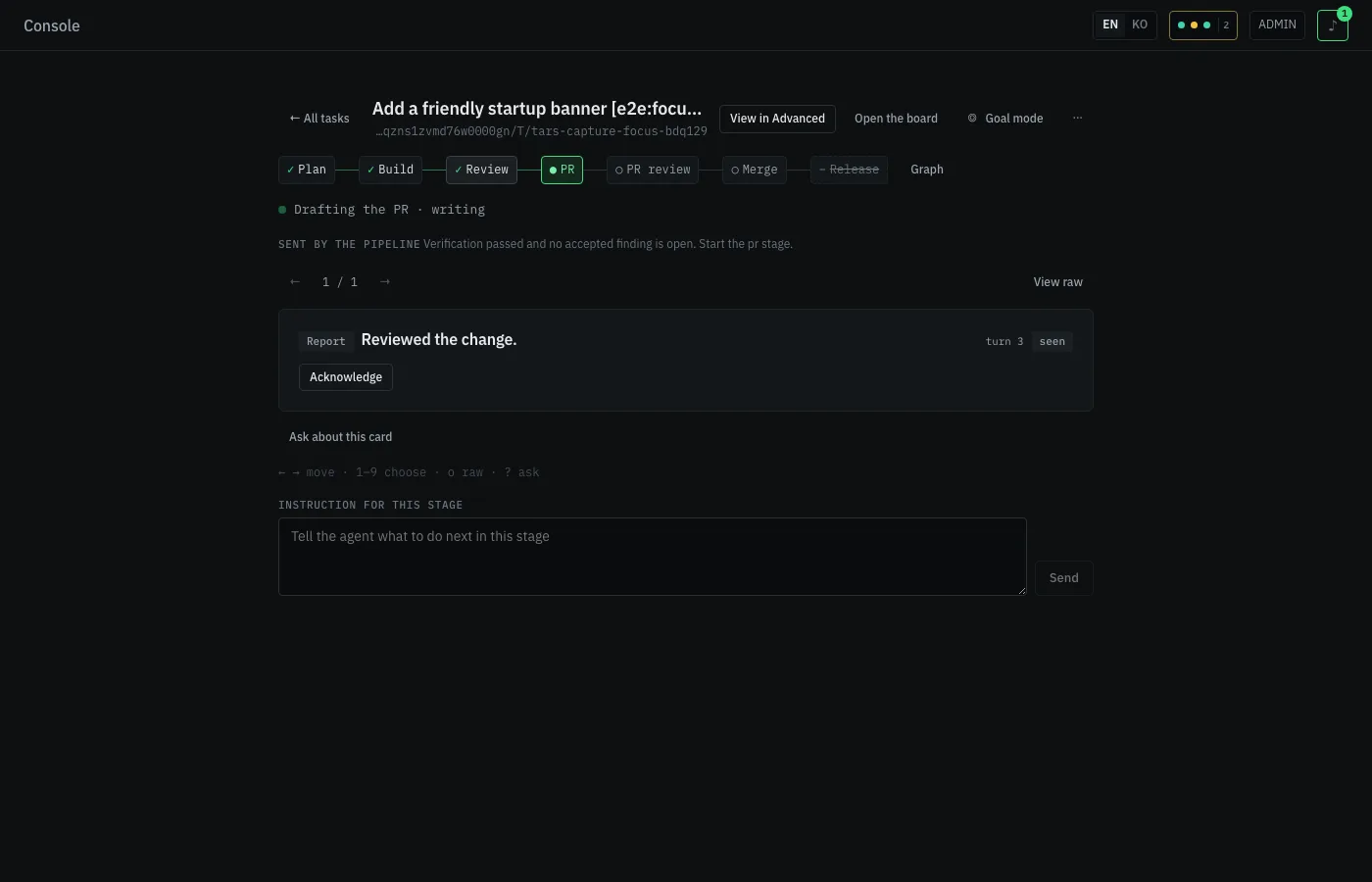
/console/focus) shows the stage stepper, a card deck (gate/report/decision/change cards) you can page through, and a graph view;/console/focus/releaseis the release train.
See docs/decisions/focus-mode.md and docs/focus-templates.md for the full design and template schema.
Public Agent Packages
Public packages under pkg/ turn the runtime primitives into a small Go agent-building kit. Lightweight apps can reuse provider-normalized LLM contracts, the tool registry, the iterative agent loop, memory helpers, skill loading, and MCP adaptation without copying internal/ code.
pkg/llm,pkg/tools, andpkg/agentloopare the core loop: provider client, registered tools, and tool-calling iterations.pkg/memory,pkg/skill, andpkg/mcpexpose the first helper surfaces for durable memory,SKILL.mdloading, and MCP tool adaptation.examples/min-agentshows the minimal no-network composition, while docs/public-agent-packages.md documents package boundaries and what still intentionally remains internal.- That page also carries the stability policy: which packages are stable versus experimental, what deprecation means here, and how a breaking change is caught. The surface itself is checked in at docs/public-api-surface.txt and diffed in CI, so a change to what consumers can rely on shows up in review.
Chat + Memory
The primary interface is the browser console at http://127.0.0.1:43180/console.
- Multi-session chat with tool-calling loops, session search, pins, archives, cleanup review, and message-level forks.
- Dockable panels for sessions, files, terminal, Git inspection, Changes, tool calls, prior context, Tasks, Session Health, and session-specific policy.
- Durable memory through
MEMORY.md, reviewed experiences, daily logs, semantic search, structured compaction, and a Memory Inbox review queue. - Explicit context injection through
@file/directory mentions,/command autocomplete, and user-invocable skills. - Configurable system prompts through
USER.md,IDENTITY.md,AGENTS.md, andTOOLS.md. - CASE, an always-floating companion that badges and shows what is waiting on you across sessions (approvals, running turns, recent failures), reacting with expression and motion, with a bounded handoff into Chat for typed questions.
See docs/console.md for the detailed console page and panel inventory.
Native exec uses POSIX shell syntax for quoted arguments, pipes, redirects, and chained commands in both foreground and background runs (Git sh/bash on Windows). Existing tool approvals still apply; shell command validation is defense in depth, not a sandbox. Tool cards show exit status and error output, and follow-up messages added after reconnecting to a running turn continue automatically when that turn finishes.
A chat turn's context lives apart from the request that started it, so a turn keeps running after the console navigates away, refreshes, or disconnects — POST /v1/chat/cancel is the only way to stop it. Every event a turn sends is kept in a per-session feed and replayed when a console reattaches, including approval cards still waiting on an answer. The same feed backs the dock's Side session panel, so a second session can be watched and answered alongside the active one.
Session Worktrees & Permissions
A chat session's active working directory can be a plain checkout or, when another session already holds the write lease on that git repository, an automatically isolated session worktree (tars/session-<id> branch) — shown as an ⑂ chip in the chat header, with isolate, apply (patch the checkout), keep (commit the branch), and discard actions. .tars/worktree_include copies gitignored files or folders (.env, node_modules) into a new worktree with copy-on-write where the filesystem supports it, so an isolated session still has what it needs to run.
Each session has a permission mode — manual (ask), accept_edits, plan, or auto — set from the status bar, ⇧Tab in the composer, or pinned for a task with /goal. A cron run, Telegram turn, or subagent started by a session that isn't auto asks before a risky tool call too: the question queues as an Ops approval, a notification goes out, and an unanswered question expires after 30 minutes rather than blocking forever. See docs/console.md for the full session-override (.tars/) and permission-mode reference.
Durable Work Ledger
TARS opens a local SQLite Work Ledger at workspace/_shared/work-ledger/work-ledger.db. Versioned Work, Step, Attempt, Event, Approval, Artifact, Proof, CapabilityVersion, EvaluationRun, and CapabilityOutcome records use workspace-scoped idempotency keys and transactional state transitions. SQLite runs in WAL mode with foreign keys, full synchronous writes, checksummed migrations, and indexed read projections.
During the compatibility window, startup imports existing Session Goal/Plan/Task/Contract/Evidence and Agent Runtime runs.json records without deleting or rewriting those files. Session task saves and Agent Runtime snapshots keep only the newest ledger revision unless an attempt, approval, schedule, receipt, or child work is attached to an older one; existing task/run API shapes read the latest projection with a legacy fallback.
The durable dependency scheduler is on by default (work_ledger.scheduler.enabled) and runs whenever Agent Runtime is enabled; without Agent Runtime the server starts and the scheduler stays off. subagents_orchestrate calls submit the complete DAG, return a work_id, and continue independently from the originating request. Atomic leases and heartbeats prevent duplicate valid claims; recovery reconnects supported Agent Runtime attempts or deterministically reclaims them into the configured retry, replan, decompose, review, or blocked policy. Scheduled attempts execute through native Agent Runtime in the configured workspace. Mutating local tools write pending and committed effect receipts around invocation, so checkpoint replay can suppress a completed effect and require a human decision for an ambiguous unsafe effect. Proof-gated Steps record worker output as reported, run declared command/artifact/HTTPS verification under a separate identity and environment, and stop in review or blocked when evidence is missing, failed, or stale. The Tasks timeline follows scheduler events live and allows an operator to cancel work or resume a reviewed/blocked step with a durable reason.
Set work_ledger.enabled: false (or TARS_WORK_LEDGER_ENABLED=false) and restart to stop ledger writes and return readers to the untouched legacy stores. The SQLite database is retained for inspection or recovery. See Work Ledger operations for backup, JSONL export, restore, doctor, quarantine, and preview rollback procedures, checkpoint recovery for retry/replay/resume semantics, independent proof verification for proof policies, provenance, freshness, and deterministic verifier limits, and reviewed self-improvement for capability evaluation, approval, rollout, regression review, and rollback.
Sub-Agent Orchestration
Spawn read-only agents for research, planning, and specialized tasks:
# workspace/agents/explorer/AGENT.md
---
name: explorer
tier: light
tools_allow: [read_file, list_dir, glob, memory_search]
---
Use subagents_run when tasks are independent and can fan out in parallel:
{"tasks": [
  {"prompt": "find all API endpoints", "tier": "light"},
  {"prompt": "design the migration plan", "tier": "heavy"}
]}
Use compare mode when 2-3 safe subagents should inspect the same prompt independently and TARS should keep their outputs side-by-side:
{"mode":"compare","tasks": [
  {"agent": "explorer", "title": "Explorer pass", "prompt": "find the root cause"},
  {"agent": "reviewer", "title": "Reviewer pass", "prompt": "find the root cause"}
]}
In Console Chat, subagents_run renders as a progress card with running/completed/failed counts, elapsed time, compact task titles, and direct links to each Agent Runtime run once they are available. Compare-mode results add common findings, conflict candidates, sourced evidence snippets, and side-by-side output panes.
Advanced staged-flow tools are available only when explicitly allowed for a session: subagents_orchestrate runs dependency-aware parallel / sequential steps, and subagents_plan uses the heavy-tier planner model to draft such a flow. With the durable scheduler enabled, orchestration is projected directly from the Work Ledger instead of independently mutating the legacy session task mirror. With it disabled, the existing request-bound implementation and task mirror remain available as the rollback path.
Experimental consensus mode remains hidden from the default subagents_run schema unless agentruntime.consensus.enabled is explicitly set.
Tier resolution priority: task tier > agent YAML tier > config default.
The Console Agent Runtime page keeps run history, run topology, event replay, versioned recovery checkpoints, explicit Retry/Replay/Resume actions, checkpoint safety decisions, cost/token flow, file attention, git diff attribution, and subagent profile management in one operational surface. See docs/console.md, checkpoint recovery, and docs/tutorials/22-agentruntime.md for details.
3-Tier Model Routing
Route workloads to different models for cost and quality optimization:
| Tier | Purpose | Example |
|---|---|---|
| heavy | Planning, complex reasoning, architecture | claude-opus-4-6, gpt-5.4 |
| standard | General chat, agent loops, tool calling | claude-sonnet-4-6, gpt-5.4 |
| light | Summarization, classification, pulse, reflection | claude-haiku-4-5, gpt-4o-mini |
# tars.config.yaml
llm:
  providers:
    default:
      kind: anthropic
      auth_mode: api-key
      api_key: ${ANTHROPIC_API_KEY}
  tiers:
    heavy:
      provider: default
      model: claude-opus-4-6
    standard:
      provider: default
      model: claude-sonnet-4-6
    light:
      provider: default
      model: claude-haiku-4-5
  default_tier: standard
  role_defaults:
    pulse_decider: light
    agentruntime_planner: heavy
System roles such as chat, pulse, reflection, compaction, cleanup, and agent runtime agents map to tiers. Background work defaults to light, Chat can recommend a tier before the first expensive turn, and runtime logs record the resolved role, tier, provider, model, and source for traceability. Tier bindings and providers can be edited directly in Settings; the onboarding wizard remains available for guided setup. Search or filter settings, edit typed fields or advanced JSON, then choose Save or Save and apply. Saved YAML, environment-effective values and running values are shown separately. Applying changes that require a server restart asks for explicit confirmation and checks the new runtime after reconnecting. Masked or omitted provider credentials are preserved; environment overrides remain authoritative.
Provider kind is anthropic, openai, openai-codex, gemini, gemini-native, or one of two providers that reuse a local CLI's own sign-in instead of an API key: claude-code-cli (the local claude CLI; multi-turn chats resume the CLI's own session via --resume to avoid repaying for system prompt and transcript, and tool calls stream as the same native-looking cards) and antigravity-cli (the local agy CLI; no credentials pass through TARS at all — the CLI uses its own Google sign-in). Both reuse that CLI's existing subscription usage rather than metered API billing, and claude-code-cli is single-user only — never expose a server using it to more than one person. See docs/llm-providers.md for setup and the full provider/tier reference.
Background Surfaces
Two isolated surfaces run independently from user chat:
- Pulse — 1-minute watchdog scanning cron failures, stuck runs, stalled chats, disk pressure, Telegram delivery health, and reflection status. Deterministic Go rules pick
ignore/notify/autofixby default (automation.pulse.decider: rules) from the severity and autofix-eligibility the signals already carry;decider: llmopts back into a model (light tier,pulse_decideonly), asked just when a signal's fingerprint changes or after a 6-hour re-decide window. The Console renders recent signals as incident cards with likely cause, evidence, recommended action, safe navigation, and re-check controls, while repeated chat-attention notifications are grouped with occurrence counts instead of inflating unread rows. Autofixes are whitelisted in config, cleanup-like autofixes are opt-in, and stalled-chat continuation requires per-session auto-resume consent. - Reflection — Nightly batch (default 02:00–05:00) running memory reflection (Memory Inbox candidate extraction) and stale empty-session pruning.
Both use the light tier by default and have no access to user-facing tools (enforced at compile time via RegistryScope).
Scheduling
Native cron with session binding:
- Cron expressions and one-shot
at:schedules - Session-bound jobs inherit the session's tool policy, work dirs, and prompt override
- Audit logs:
artifacts/<session_id>/cronjob-log.jsonl - Console Cron page for global job management plus per-session Cron tabs in chat context
Channels
Multi-channel I/O beyond the web console:
- Telegram — Bidirectional messaging with pairing-based access control
- Webhooks — Inbound HTTP triggers for external integrations
- Assistant — macOS popup and voice helpers that share the core
~/.tars/workspacedefault unless overridden - Local — Direct API calls for scripts and automation
- Remote Access — Tailscale Serve can publish the loopback-only console over tailnet HTTPS with a TARS-owned target, while browser sessions use admin/user password auth and remote/mobile logins stay user-scoped.
Embodiment
TARS has a core embodiment subsystem for body providers. The shipped default is enabled: false with no providers, so existing chat/runtime behavior is unchanged and no LLM tools are registered. When enabled, known providers can post Percepts; owner audio becomes an autonomous directive turn, while ambient/stranger observations stay non-triggering by default. Cognition turns can emit structured tars-body-action blocks, which TARS routes back to the bound provider only when the provider declares the matching capability.
In the Console, open Settings and use the Quick Start Embodied Bot and Embodied Bot providers cards to edit the same settings without switching to raw YAML. The providers card opens a structured form with Mac Host, StackChan, and Custom presets, field hints, and grouped capability toggles. For MCP providers, endpoint must match an mcp.servers key from the companion server config.
embodiment:
  enabled: true
  providers:
    - name: stackchan
      enabled: true
      transport: mcp
      endpoint: tars-stackchan
      capabilities: [vision, hearing, speech, expression, motion, led]
      session_id: sess_main
      owner_only_directive: true
      min_trigger_interval: 30s
      max_triggers_per_hour: 60
    - name: host
      enabled: true
      transport: mcp
      endpoint: tars-stackchan-host
      capabilities: [hearing, speech]
      session_id: sess_main
      owner_only_directive: false
      trigger_observations: true
      min_trigger_interval: 30s
      max_triggers_per_hour: 60
Providers may also use the existing webhook inbox path /v1/channels/webhook/inbound/{provider} or the direct percept path /v1/embodiment/percept/{provider}. TARS persists the Percept in the channel inbox first, then routes self-sensory Percepts through the embodiment gate and agent runtime. Successful percept intake also publishes a category: "embodiment" notification event like any other (stored in /v1/events/history, counted toward unread, eligible for a desktop notification) — the Console does not route it to CASE, the floating companion: CASE shows only chat activity, recent failures, and server-sent category: "companion" cues. Body actions map to provider capabilities (speak → speech, express → expression, move → motion, led → led); unsupported capabilities are dropped gracefully instead of failing the cognition loop. MCP providers receive actions through their existing MCP server, so this does not add any built-in LLM tool surface.
Remote Access
TARS can expose the local console to your phone or another trusted device through Tailscale without binding the server to 0.0.0.0.
# Create or rotate console passwords
tars auth init
tars auth passwd admin
tars auth passwd user

# Publish the loopback console through Tailscale Serve
tars remote status
tars remote enable
tars remote url
Remote Access requires api_auth_mode: required, configured admin/user passwords, and a logged-in Tailscale client. The Settings page shows both the saved YAML value and the effective runtime value when environment variables override config, so a local dev launch such as TARS_API_AUTH_MODE=off is visible before enabling remote access.
Computer Use
computer_use is enabled by default and drives a desktop app toward a one-sentence goal. Each step reads the window's accessibility tree through cua-driver, asks the existing LLM router's computer_use role (default: light) for one structured action, validates it, and observes the next screen after acting. It reuses your configured provider credentials; calls count toward that provider's billing or subscription limits. No separate Jev key is needed. Text to type is passed as named inputs; only the key names reach the model. Risky actions and secure-field typing pause with needs_confirmation until you answer. Screen text goes to the configured LLM provider. Install and start cua-driver and grant its OS permissions; without a driver the tool returns unavailable with setup guidance. tars doctor checks the driver and selected backend. The native driver path is supported on macOS; other platforms still need verification.
Set tools.computer_use.enabled: false to disable it. To use Jev instead, set tools.computer_use.backend: jev and configure jev.base_url plus jev.api_key for hosted Jev (or a local compatible server). Jev keeps its probability-based gates; LLM decisions use schema validation, confirmation, and post-action observation rather than generated confidence numbers. Override llm.role_defaults.computer_use to select a different tier. The antigravity-cli provider cannot disable its built-in tools for decision-only calls and is unavailable for this role; use another tier/provider or Jev.
Extensibility
TARS favors on-demand extension over always-resident tool registrations. Domain-specific capabilities are shipped as skills (plus optional companion CLIs) from the Skill Hub rather than compiled into the TARS binary — this keeps the chat system prompt small no matter how many capabilities a user installs.
- Skill Hub — Public registry of skills, plugins, MCP servers, and domain packs. Install individual packages with
tars skill install <name>,tars plugin install <name>,tars mcp install <name>, or install a reviewed bundle withtars pack install <name>. Skill, plugin, MCP, and pack member installs/updates are first materialized in a temporary workspace and sandbox-validated before the realworkspace/skills/<name>/,workspace/plugins/<name>/,workspace/mcp-servers/<name>/, orskillhub.jsonchanges. Hub entries can publish quality metadata such as score, last update, passing tests, required tools, permissions, companion CLI presence, and install count; the Extensions console renders these trust signals before install. Update commands report updated, skipped, and failed entries so failed package refreshes are visible. The hub is the first place to look before writing a new capability, and the only place to publish one. - External skill hubs (federation) —
tars skillalso federates across external MIT-compatible hubs. Pass--from <hub>to install fromopenclaw(steipete/openclaw),hermes(NousResearch/hermes-agent), oranthropic(anthropics/skills). External installs always preview first (--dry-runor the console hub-selector + dry-run modal showing per-file sha256, adapter warnings, and the ATTRIBUTION notice), generate anATTRIBUTION.mdcarrying the source's license body and copyright, and refuse to materialize source-available content (Anthropic's docx/pdf/pptx/xlsx skills are blocked at the attribution layer). Bothtars skill search(no--from) and the console Hub Skills list span every registered source. Seedocs/tutorials/14-skill-hub.mdfor the federation architecture. - Skills — Markdown instruction files (YAML frontmatter + body) with optional companion scripts. A skill's frontmatter can set
recommended_tools: [bash],slash: /name,aliases: [...], andsmoke_tests: [...]; users can invoke eligible skills directly from chat via/nameautocomplete. Companion CLIs keep their interface out of the system prompt until the skill itself is picked. The Chat Skill Inbox extracts reusable candidates and preserves provenance, evidence, and success/failure/dead-end/correction signals, but it no longer writes an active skill on approval. Candidates advance through sandbox, offline, shadow, human approval, and canary gates; only an explicit promotion atomically activatesworkspace/skills/<name>, and one action restores the previous known-good version. The Extensions console can also draft, sandbox-test, and save explicitly authored local skills before publishing to the hub, and shows sandbox pass/fail reports for hub skill installs. Seedaily-briefingin the hub for the canonical pattern. - Plugins — Advanced packages that bundle skill directories and optional MCP server declarations with manifest metadata and runtime gating. Plugin-declared MCP servers are disabled by default and require
extensions.plugins.allow_mcp_servers: truebefore they can launch. Built-in Go plugins and plugin HTTP routes are not an active extension surface. - MCP — Configured, hub-installed, or plugin-declared local stdio and remote HTTP/SSE/WebSocket servers with bearer or OAuth auth. Use MCP for third-party integrations that cannot be expressed as a CLI the bash tool can call. The Extensions console can draft, stdio-test, save, diagnose, and repair local
workspace/mcp-servers/<name>/MCP packages before you publish them to the hub. - Browser — Playwright-based automation for web interaction (shipped as a hub plugin).
- Per-project overrides (
.tars/) — Runtars init local --cwd <project>or drop a.tars/settings.json(team-shared, commit it) plus.tars/settings.local.json(per-user, gitignore it) under the chat session's active working directory and TARS will fold those values into the session'stool_config/prompt_overridefor chats run in that directory. A sibling.tars/skills/<name>/SKILL.mdadds full project-only skills that the LLM can select automatically, while.tars/commands/<name>.mdadds standalone slash-command prompts that only run when the user explicitly invokes/name. Theproject_skillbuilt-in tool can create both forms in the active cwd, and the Session Config panel reloads, enables, disables, and persists session-local choices to.tars/settings.local.json; custom local tool, skill, command, and MCP lists replace inherited project allowlists so per-user narrowing is effective. The active cwd is shown as an amber chip in the chat header (or via/cwd); merged values render with ashared/localsource badge in the Session Config panel. The whitelist is narrow on purpose — credentials, hooks, and arbitrary binary paths are blocked at load time. SeeCLAUDE.mdfor the full schema.
The Extensions console validates MCP draft names before requesting generated files, so incomplete drafts stay local to the form instead of sending avoidable server requests.
When to build a hub skill vs. a core feature: if the capability is domain-specific (one site's logs, one vendor's API, one workflow), it belongs in tars-skills as a skill + CLI. Builtin tools inside this repo are reserved for universal surfaces (file ops, memory, agent runtime, channels) that every session uses.
Install
Homebrew:
brew tap devlikebear/tap
brew install --cask devlikebear/tap/tars-desktop   # macOS: desktop app with the server and the tars command
brew install devlikebear/tap/tars                  # or the server + CLI alone, without the app
The desktop app carries its own server, so it is the only thing to install on
macOS. Choose Start server from the tray menu when the server is not
running. This installs the service and starter workspace if needed.
The setup wizard detects locally installed Claude Code and Codex sign-ins.
A single ready provider fills the empty first-run form automatically; when both
are ready, choose one. Claude model tiers use opus / sonnet / haiku, and
Codex recommendations come from the live provider catalog with cached fallback.
The setup model-source label identifies live provider catalogs, cached recommendations, bundled fallbacks, and Claude CLI aliases.
Missing tools show installation or sign-in instructions. Existing settings and
manual entries are preserved, and changes are saved only after review.
Codex currently requires credentials readable from its file-based login; a
keychain-only CLI login is shown as needing a compatible sign-in.
Curl:
curl -fsSL https://raw.githubusercontent.com/devlikebear/tars/main/install.sh | sh
Windows (PowerShell):
irm https://raw.githubusercontent.com/devlikebear/tars/main/install.ps1 | iex
This installs tars.exe into %LOCALAPPDATA%\Programs\TARS and adds that
folder to your user PATH. No administrator rights are needed. To install
the desktop app into the same folder as well, and start it in the tray
when you sign in, pass options:
& ([scriptblock]::Create((irm https://raw.githubusercontent.com/devlikebear/tars/main/install.ps1))) -Desktop -StartAtLogin
Both archives are checked against the release's checksums.txt first.
Running the script again updates an install in place, even while the server
or the app is running; restart them to use the new version. Windows has notars service, so the desktop app starts tars serve for you, or run it
yourself.
Winget (Windows):
winget install Devlikebear.TARS
winget install Devlikebear.TARS.Desktop   # depends on the server
Each release publishes tars.exe plus share/ as a portable winget package,
so no separate archive download or PATH edit is needed. A winget install is
upgraded only by winget (winget upgrade Devlikebear.TARS); tars update
and the desktop app's own self-update both refuse to touch a winget-managed
install and point you at winget upgrade instead.
Updating: tars update replaces an install.ps1 or install.sh install
with the latest release, checks it against checksums.txt, and restarts the
server running on --server-url onto it (--check only reports, --yes
skips the question, --admin-api-token is needed when the server requires
auth). The desktop app does this by itself on Windows and macOS: it checks
every six hours and updates the server only while no chat is running and
nothing waits on an approval. When a newer app is out, it tells you; click
the notification to install it. On macOS the app's own update brings its
server along, and the app restarts the service onto it. Homebrew formula
installs update with brew upgrade, which the macOS desktop app runs for you
and then restarts the service.
Winget installs update only with winget upgrade, on both the server and
the desktop app.
Quick Start
# Initialize workspace and config
tars init

# Start the server (it boots in setup-only mode if no LLM is configured yet)
tars serve

# Open the web console — the onboarding wizard runs automatically when needed
tars
On first run, if ~/.tars/config/config.yaml has no llm_providers / llm_tiers, the server boots in setup-only mode: only the wizard endpoints + /console are active and tars api serving on … (setup-only mode) is printed to stdout. Open http://127.0.0.1:43180/console, the SPA detects needs_setup=true from /v1/healthz, and walks you through provider setup, heavy/standard/light tier binding, optional Tailscale Remote Access, then save & restart. The wizard is also re-runnable later from the Settings page (/console/config → "Re-run setup wizard") if you need to swap providers, tweak tier bindings, or enable remote access later.
To skip the wizard and edit by hand, set credentials directly and validate:
export ANTHROPIC_API_KEY="your-key"   # or OPENAI_API_KEY, etc.
# Edit ~/.tars/config/config.yaml under llm.providers / llm.tiers
tars doctor --fix
tars serve --config-check              # exits 1 in setup-only mode
On macOS, tars service install && tars service start manages tars serve as a LaunchAgent. Once a plist exists, tars service start, stop, and status keep working from the plist and launchctl state even if the config needs repair.
When TARS is exposed behind a reverse proxy path, pass that base path in --server-url; CLI API calls and the console opener resolve /v1/* and /console from the same base.
For local console development, set TARS_CONSOLE_DEV_URL=http://127.0.0.1:5173 while Vite is running. The dev proxy keeps Vite assets, HMR, and favicon requests mounted under /console.
Console Pages
The console runs at http://127.0.0.1:43180/console. The sidebar groups pages under Work, Build, and System. /console itself is the session board — every chat, grouped by the folder it works in, with live needs-input/running/done status (the Mission Control status-strip-and-delivery overview moved to /console/system, under System as Overview). The footer keeps server, Pulse, Reflection, and active session status visible with direct jumps to each detail page. ⌘K opens the command palette for every route, including ones hidden from the sidebar.
| Group | Page | Path | Purpose |
|---|---|---|---|
| Work | Sessions | /console |
The session board: every chat grouped by working folder, with live status and filters |
| Work | Focus | /console/focus |
Goal-driven pipelines (plan → build → review → pr → pr_review → merge, template-selectable) with gate approvals, goal mode, and the progress graph |
| Work | Chat | /console/chat |
Agent chat, tool calls, files, terminal, Git, Changes, tasks, session policy, and memory context |
| Build | Agent Runtime | /console/agentruntime |
Run history, topology views, replay, restart, costs, file attention, and subagent profiles |
| Build | Memory | /console/memory |
Review memory candidates, edit stored knowledge, and test recall paths |
| Build | Extensions | /console/extensions |
Skills, plugins, MCP packages, hub installs, diagnostics, and local drafts |
| Build | System Prompt | /console/sysprompt |
Edit USER.md, IDENTITY.md, AGENTS.md, and TOOLS.md |
| System | Overview | /console/system |
Mission Control: Pulse/Reflection/disk status strip, recent notifications, recommended actions, and delivery (version, PRs) |
| System | Approvals | /console/approvals |
Review cleanup plans and queued unattended tool-call approvals before TARS applies them, plus the automation audit |
| System | Pulse | /console/pulse |
Watchdog status, incident cards, and run-now trigger |
| System | Reflection | /console/reflection |
Nightly batch status and run-now trigger |
| System | Cron | /console/cron |
Manage global scheduled jobs with delivery targets, pause/resume, run-now, delete, and run history |
| System | Logs | /console/logs |
Tail configured runtime logs with file, level, component, line-count, refresh, and auto-refresh controls |
| System | Analytics | /console/analytics |
Visualize usage totals, daily token bars, model cost rows, and tool or skill call counts |
| System | Settings | /console/config |
Settings in eight tabs (General, LLM, Chat & Tools, Automation, Channels & Remote, Agents, Extensions, Advanced) with search across all of them, table editors for LLM providers, tiers and role defaults, wizard reentry, credential entry, remote access, restart, and workspace reset |
These routes stay reachable through ⌘K and in-context links (not listed in the sidebar):
| Page | Path | Purpose |
|---|---|---|
| Plans | /console/tasks |
Active plans across sessions with progress and chat links |
| Channels | /console/channels |
Telegram pairing requests: approve, revoke, and review the DM policy |
The narrowing is recorded as normative policy in frontend/console/DESIGN.md (Console Purpose & Surface Policy). Detailed console behavior, panel inventory, localization, usage budget chips, and frontend API type policy live in docs/console.md and docs/frontend-api-types.md.
Screenshots
Captured from a running tars serve built from a v0.57.0-era snapshot of main with make console-screenshots (frontend/console/e2e/capture) — a throwaway workspace and a deterministic mock model, so the counters are small and the text in the transcript is a scripted demo, not a real model's output. A short demo video walking through the same screens is on the project homepage.
Sessions — /console
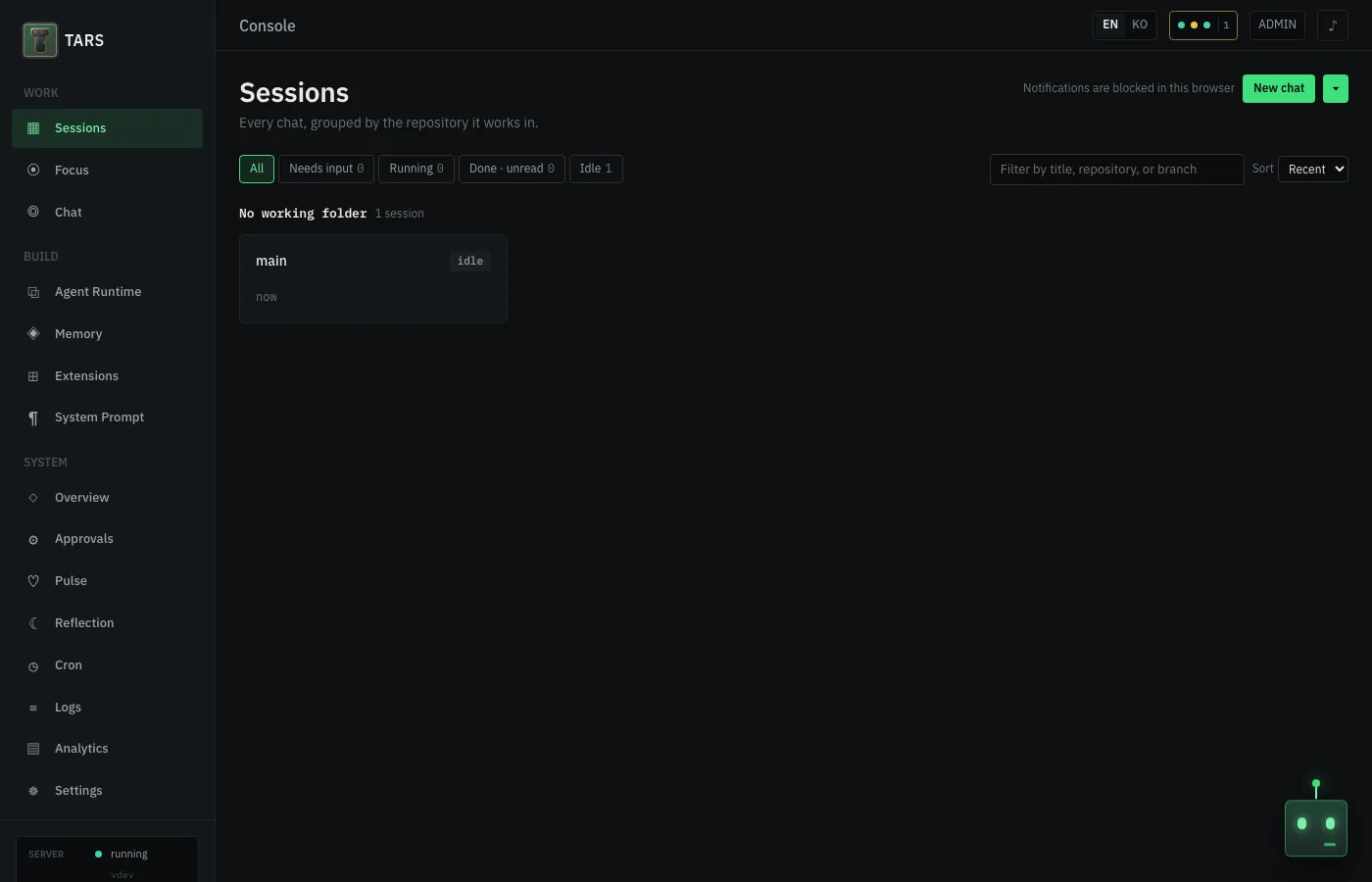
The landing page. Every chat, grouped by the repository or folder it works in, with Needs input / Running / Done / Idle filters and live status per card.
Focus — /console/focus
A goal-driven pipeline mid-run: the stage stepper across the top, the latest card from the deck, and a box to steer the current stage. Templates, goal mode, and approved-plan edits are described below.
Chat — /console/chat
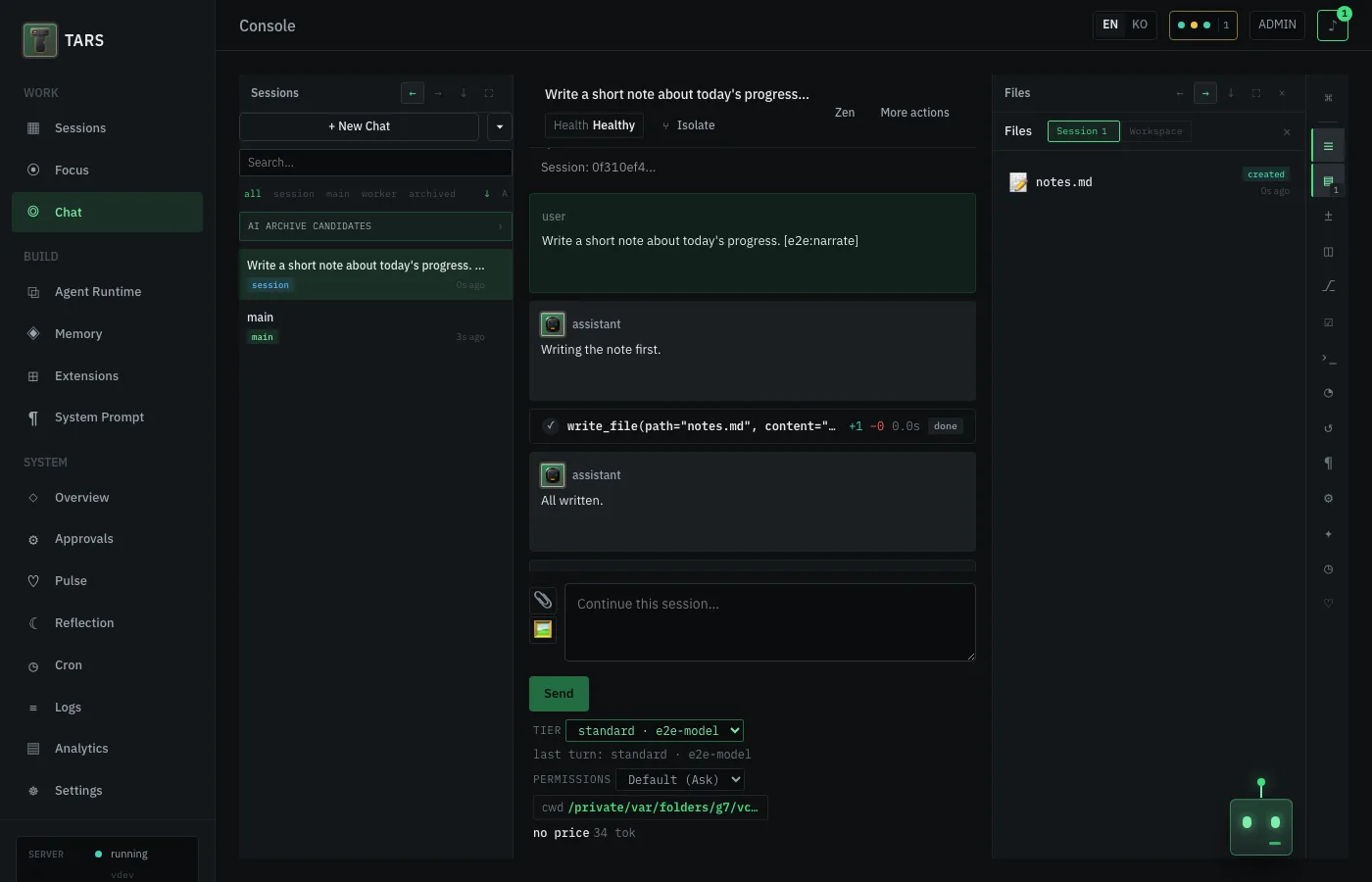
Panel tabs across the top dock Sessions, Files, Git, Tasks, Health and the rest beside the transcript; tool calls render as inline cards, and the header carries session health and the active working directory.
Overview — /console/system
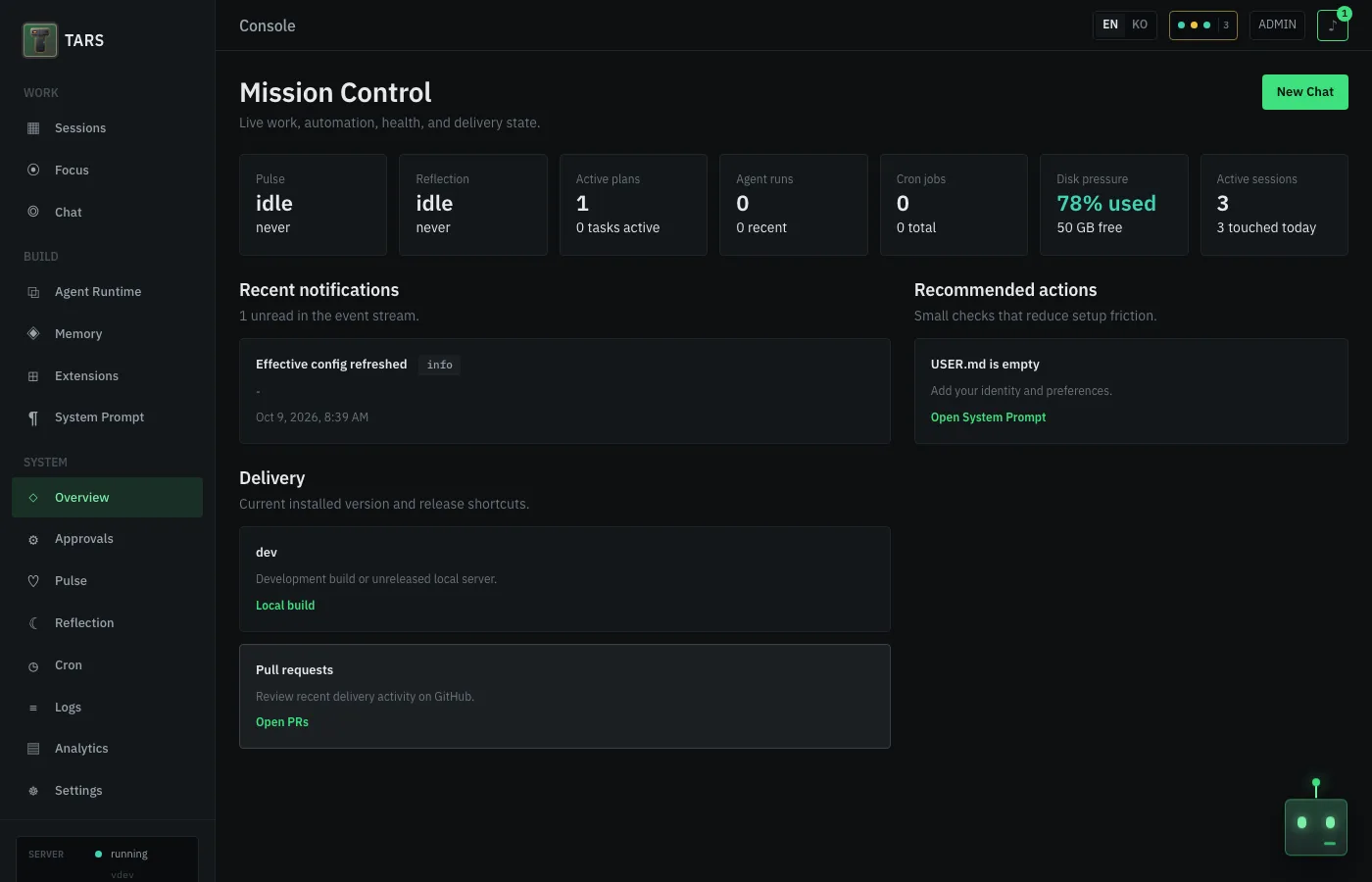
The status strip, recent notifications, recommended setup actions, and current version/PR shortcuts in one place — what used to live at /console before the session board took over as the landing page.
Approvals — /console/approvals
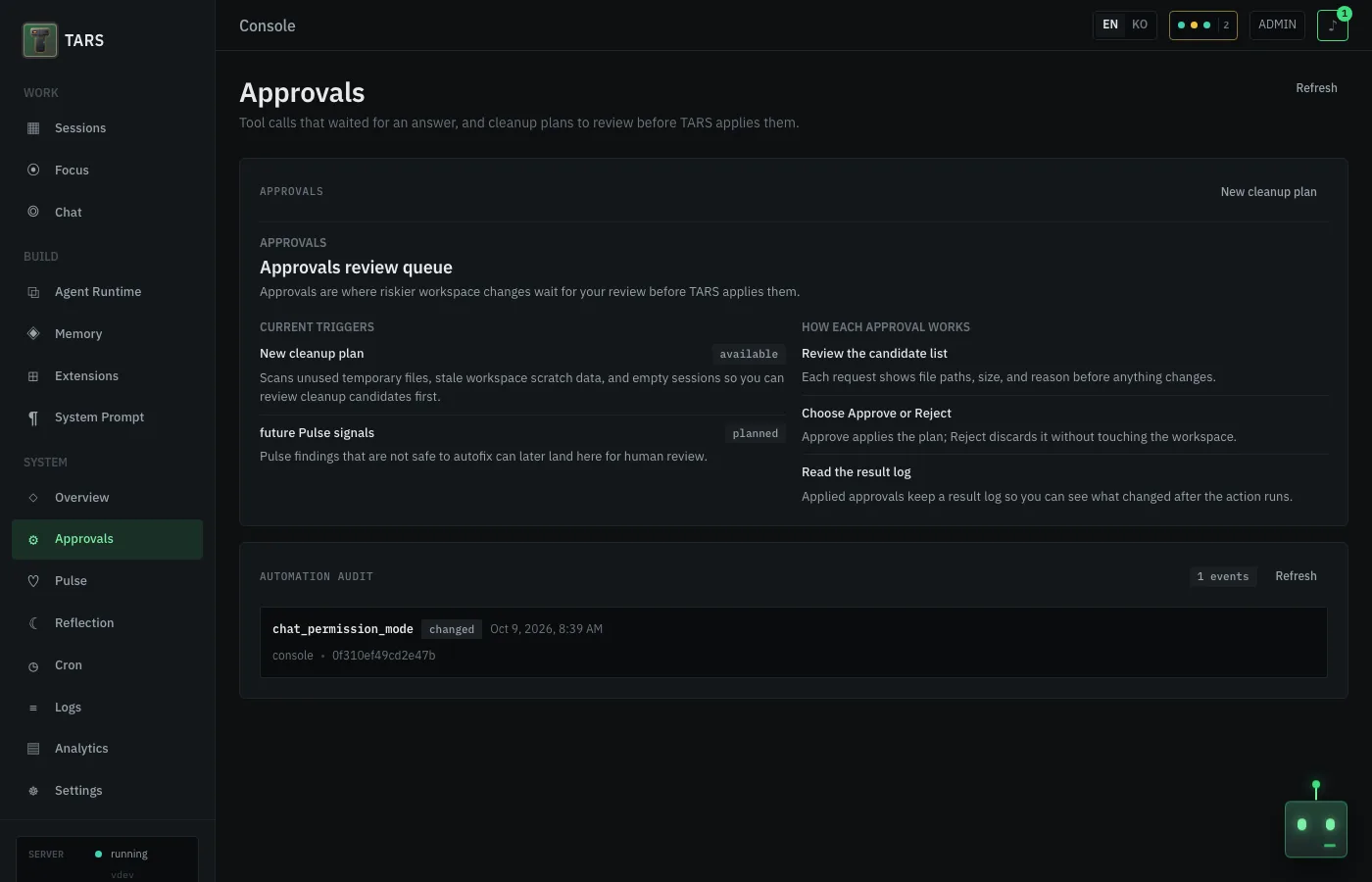
Cleanup plans and queued unattended tool-call approvals wait here for review before TARS applies them; the automation audit below records every automated decision. A session's own in-chat tool approvals stay inline in the transcript instead.
Settings — /console/config
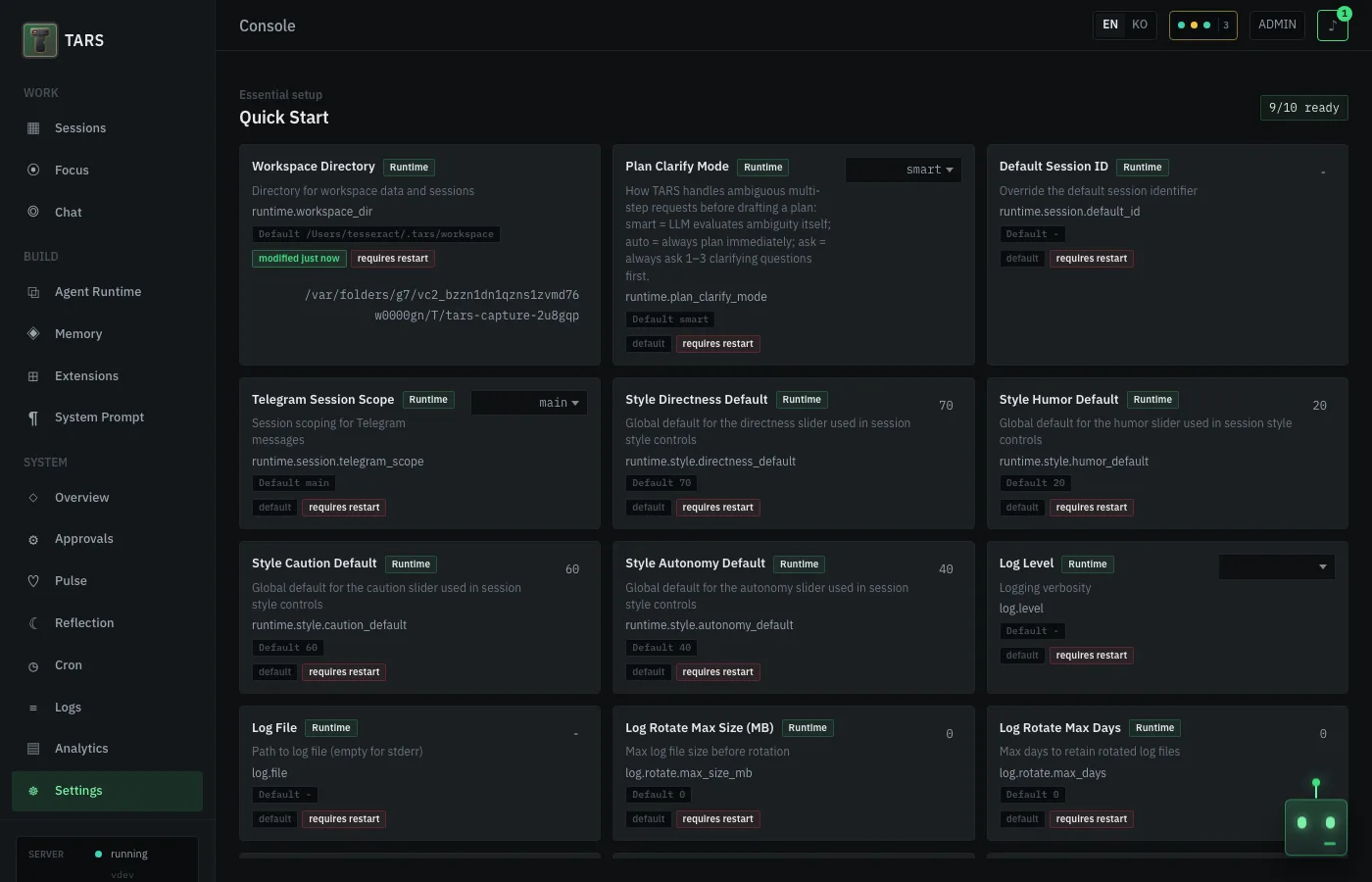
Quick Start readiness cards sit below the schema search and Remote Access. Each card is one gate between you and a working install, with a readiness badge and a note when the change needs a restart.
Requirements
- Go 1.25.6+ (for building from source)
- LLM provider credentials (Anthropic, OpenAI, Gemini, or a local Claude Code/Antigravity CLI sign-in)
- Optional: Gemini API key for semantic memory embeddings
- Optional: Node.js for Playwright browser automation
Build
make build-bins
bin/tars version
For development with hot-reload:
make dev-console # Vite (5173) + Go API (43180), open http://127.0.0.1:43180/console
For pull-request preflight checks:
make ci-static-analysis-check
make lint-diff
make test-cover-diff
cd frontend/console && npm run check && npm run test:ci
Comparison with other agent runtimes
| OpenClaw | Hermes Agent | TARS | |
|---|---|---|---|
| Release used | Stable v2026.7.1 |
Stable v0.19.1 (v2026.7.30) |
v0.65.0 (latest tagged release) |
| Packaging | TypeScript Gateway plus web/native apps and plugins | Python agent/gateway plus TUI, web, and desktop surfaces | Go single binary with embedded browser console and CLI |
| Delegation / harnesses | Native subagents, Codex runtime, and ACP-backed external harness sessions | Isolated delegate_task children, live transcripts, MoA, and coding-runtime adapters |
Native Agent Runtime plus an opt-in bounded Claude Code execution adapter, model tiers, tool policy, depth limits, and experimental consensus |
| Durable async work | Background-task ledger plus SQLite-backed automations | Durable Kanban/goals, delegated-result recovery, and delivery-obligation ledger | SQLite Work Ledger plus a dependency scheduler with leases, retries, budgets, and operator escalation |
| Restart behavior | Persistent automation/task records; the latest beta adds broader crash recovery | Gateway auto-resume and durable delegation/delivery recovery | Opt-in staged flows reconnect or reclaim attempts; standalone runs restore as canceled and then expose capability-bounded Retry, Replay, or provider Resume |
| Proof of completion | Completion handoff asks the parent to verify; task audit surfaces unhealthy work | Goal completion contracts and recorded verification evidence | Proof-gated Steps separate worker reports from deterministic independent verification, provenance, and stale evidence |
| Scheduling | Persistent Automations, cron alias, heartbeat monitors | Cron, blueprints, watchdog/no-agent jobs | Session cron, Pulse, Reflection, and a durable dependency scheduler |
| Skills / learning | Skills and plugin catalog | On-demand skills, /learn, background review, and Curator |
On-demand skills, reviewed memory extraction, skill creation, and Skill Hub |
Verified on 2026-08-02 from official project documentation and release pages. OpenClaw v2026.7.2-beta.6 capabilities are treated as pre-release, not stable. See the status-separated market scan and reproducible evaluation baseline for sources, limitations, and the TARS evolution roadmap.
Documentation
- Project homepage
- Getting Started
- Console Guide
- Plugin and MCP Packaging Guide
- Contributing
- Changelog
Status
Development resumed. TARS is no longer archived and development has resumed. Latest tagged release is v0.65.0. TARS is pre-1.0; see the stability policy for the public pkg/ API guarantees.
Module path: github.com/devlikebear/tars. MIT licensed. Contributions are welcome; see Contributing.
Yorumlar (0)
Yorum birakmak icin giris yap.
Yorum birakSonuc bulunamadi