kerf-cli
Health Uyari
- License — License: MIT
- Description — Repository has a description
- Active repo — Last push 0 days ago
- Low visibility — Only 5 GitHub stars
Code Gecti
- Code scan — Scanned 12 files during light audit, no dangerous patterns found
Permissions Gecti
- Permissions — No dangerous permissions requested
Bu listing icin henuz AI raporu yok.
Cost intelligence for Claude Code. Real-time dashboards, pre-flight estimation, budgets, and ghost token auditing.
kerf-cli
The missing cost intelligence layer for Claude Code.
kerf (n.) — the width of material removed by a cutting tool. Every token operation has a kerf.


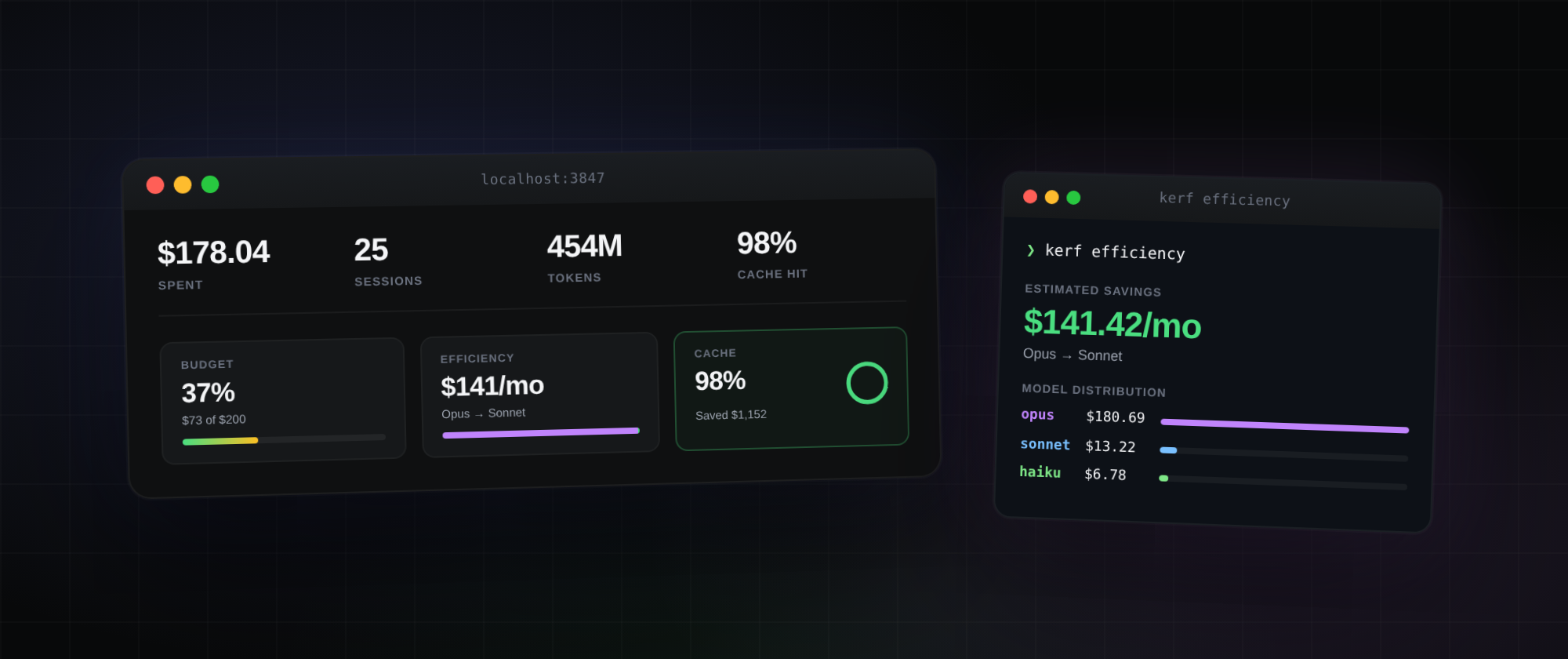
Real screenshot from my own machine —
$178.04 spent in the last 7 days, 25 sessions, 98% cache hit rate, 37% of weekly budget used, $141/mo Opus → Sonnet savings. Your numbers will look different.
Kerf reads your Claude Code sessions into a local SQLite database you can query with SQL. It surfaces wasted Opus spend, tracks cache hit rate, enforces budgets via Claude Code hooks, and ships a polished local web dashboard.
100% local. No API keys. No telemetry. No cloud.
Install
npm install -g kerf-cli
Or use without installing:
npx kerf-cli@latest <command>
Both kerf and kerf-cli work as command names after a global install.
60-second tour
kerf init          # one-time setup (creates DB, installs hooks)
kerf sync          # import your Claude Code sessions into SQLite
kerf summary       # what did I spend today?
kerf efficiency    # am I wasting money on Opus?
kerf dashboard     # open the polished web UI
That's the whole tool in 5 commands. The rest is detail.
The dashboard
kerf dashboard
Opens a polished local web UI at http://localhost:3847.
- Hero metrics — cost, sessions, tokens, cache hit rate, with trend arrows vs prior period
- Budget card — progress bar, remaining amount, reset timer
- Efficiency card — potential monthly savings if Opus traffic were routed to Sonnet
- Cache card — hit rate donut chart, money saved from cache
- Cost chart — stacked area chart broken down by Opus/Sonnet/Haiku
- Session table — click any row to expand full details
- Period picker — today / week / month / all
- Live indicator — auto-refreshes every 5 seconds
- Linear-inspired dark theme
Loads in <100ms even with thousands of sessions (queries SQLite directly).
Commands reference
Setup
kerf init
First-time setup. Creates ~/.kerf/, initializes the SQLite database, detects compatible tools, and optionally installs Claude Code hooks.
kerf init                      # warning-mode hooks (default, safe)
kerf init --enforce-budgets    # also install PreToolUse hook that BLOCKS over budget
kerf init --global             # install hooks in ~/.claude/ (applies to all projects)
kerf init --no-hooks           # just create the database, skip hooks
kerf init --hooks-only         # just install hooks, skip database setup
kerf doctor
Diagnose your setup. Checks 10 things and tells you how to fix each one.
kerf doctor                    # human-readable checklist
kerf doctor --json             # machine-readable
Example output:
[OK]   Claude Code installed: /Users/you/.claude
[OK]   Claude projects directory has 53 JSONL files
[OK]   kerf database at /Users/you/.kerf/kerf.db
[OK]   Database schema up to date (v3)
[WARN] No budgets configured
       Fix: kerf budget set 50 --period weekly
kerf sync
Ingests Claude Code session JSONL files into the SQLite analytics database. Incremental — only processes files that have changed since the last sync.
kerf sync                      # ingest everything
kerf sync --json               # machine-readable stats
Analytics
kerf summary
The bread-and-butter command. What did I spend?
kerf summary                       # today
kerf summary --period week         # last 7 days
kerf summary --period month        # last 30 days
kerf summary --period all          # everything

kerf summary --model               # per-model breakdown
kerf summary --by-project          # per-project breakdown
kerf summary --model --by-project  # both

kerf summary --project ~/code/app  # filter to one project
kerf summary --no-sync             # skip auto-sync (faster)

kerf summary --json                # JSON output
kerf summary --csv                 # CSV output
Example:
  kerf summary — today

  Cost:      $26.39
  Messages:  146
  Sessions:  5
  Input:     186
  Output:    107.6K
  Cache rd:  60.9M
  Cache wr:  1.7M
kerf sessions
List individual sessions or drill into one.
kerf sessions                      # 20 most recent
kerf sessions --limit 50           # show more
kerf sessions --sort cost          # most expensive first
kerf sessions --sort messages      # longest sessions
kerf sessions --sort duration      # longest duration
kerf sessions --since 2026-04-01   # after a date
kerf sessions --project ~/code/app # filter by project
kerf sessions --json

kerf sessions fa775f86             # drill into one session (partial ID match)
kerf efficiency
Model usage analyzer. Shows how much you'd save if unnecessary Opus traffic were routed to Sonnet.
kerf efficiency                      # last 30 days
kerf efficiency --period week
kerf efficiency --period month
kerf efficiency --project ~/code/app
kerf efficiency --expensive-sessions # top 10 expensive sessions
kerf efficiency --cross-tool         # cross-model/cross-tool optimization recs
kerf efficiency --json
--cross-tool (shown by default when more than one model has data) adds ranked
optimization recommendations — model-downgrade opportunities, cache-optimization
opportunities where a low hit rate is inflating cost, and, on multi-tool installs,
tool-consolidation recs that move routine work to the cheaper tool you already use.
Example:
  kerf efficiency report  (month)

  Estimated savings: $144.55 (72.0% of spend)
  if Opus traffic were routed to Sonnet for this month.

  Total spend: $200.69

  Model breakdown:
    opus       $180.69 (90.0% — 2569 msgs, 30 sessions) ##############################
    sonnet      $13.22 (6.6% — 365 msgs, 3 sessions) ##
    haiku        $6.78 (3.4% — 239 msgs, 21 sessions) #
Run this weekly. If your Opus share is over 50%, you're leaving money on the table.
kerf forecast
Projects your spend for the current week or month from your run-rate so far,
compared against your typical spend over prior periods.
kerf forecast                  # this month
kerf forecast --period week    # this week
kerf forecast --json
Example:
  kerf forecast — this month

  Spent so far:    $86.40
  Daily run-rate:  $8.64/day
  Projected total: $259.20 ($172.80 remaining)
  vs. your usual:  ↑ 18% above
  Confidence:      high
A one-line projection is also appended to kerf summary --period week|month.
kerf cache
Cache hit rate analysis across all your sessions.
kerf cache                      # last 30 days
kerf cache --period week
kerf cache --project ~/code/app
kerf cache --poor-sessions      # sessions with bad cache utilization
kerf cache --json
Example:
  kerf cache report  (month)

  Cache hit rate: 100.0%  (426.7M read / 426.8M cacheable)

  Cost:
    Cache read cost:    $128.02
    Saved by cache:    $1152.17
    Could still save:     $0.00 (at 80% hit rate)
kerf query
Read-only SQL escape hatch. Run arbitrary SQL against the analytics database.
kerf query --schema                # print the schema
kerf query --examples              # 5 useful example queries
kerf query --file query.sql        # run SQL from a file

kerf query "SELECT model, SUM(cost_usd) FROM messages GROUP BY model"

kerf query --json "SELECT * FROM sessions_meta LIMIT 5"
kerf query --csv "SELECT date(timestamp), SUM(cost_usd) FROM messages GROUP BY 1"
Safety: kerf rejects INSERT, UPDATE, DELETE, DROP, ALTER, CREATE, ATTACH, PRAGMA, REPLACE, TRUNCATE. Your data is safe from typos.
Useful queries to memorize:
-- Top 10 most expensive projects, all time
SELECT project_path, ROUND(SUM(cost_usd), 2) as cost
FROM messages
GROUP BY project_path
ORDER BY cost DESC LIMIT 10;

-- Daily spend, last 30 days
SELECT date(timestamp) as day, ROUND(SUM(cost_usd), 2) as cost
FROM messages
WHERE timestamp > date('now', '-30 days')
GROUP BY day ORDER BY day DESC;

-- Sessions over $5
SELECT session_id, project_path, total_cost_usd, message_count
FROM sessions_meta
WHERE total_cost_usd > 5
ORDER BY total_cost_usd DESC;
kerf report
Historical reports with hourly bar charts and anomaly alerts.
kerf report                     # today
kerf report --period week
kerf report --period month
kerf report --sessions          # per-session breakdown
kerf report --model             # per-model breakdown
kerf report --sessions --model  # both
kerf report --csv               # CSV export
kerf report --json
kerf import
Sync historical data into the budget tracking tables (separate from the analytics sync).
kerf import                        # import all sessions
kerf import --since 2026-03-01     # only recent data
kerf import --dry-run              # preview without writing
Live monitoring
kerf watch
Real-time terminal dashboard for your active Claude Code session. Run in a second terminal tab while Claude Code is running.
kerf watch                       # auto-finds active session
kerf watch --session abc123      # specific session
kerf watch --interval 5000       # slower refresh
kerf watch --project ~/code/app  # filter
kerf watch --alerts              # also fire desktop notifications on anomalies
Shows: cost meter, context bar, cache health (HEALTHY/DEGRADED/BROKEN), anomaly alerts, recent messages with per-turn cache ratio.
Press q to quit, b to toggle budget view.
kerf monitor — real-time anomaly alerts
A headless background watcher that tails your active sessions and alerts you the instant a cost anomaly appears — the runaway agent loop burning money while you're not looking. Runs locally, no data leaves your machine (except an optional webhook you configure).
kerf monitor                              # watch all active sessions, alert on critical anomalies
kerf monitor --severity warning           # also alert on warnings
kerf monitor --webhook <slack/discord url> # post alerts to a webhook
kerf monitor --interval 5000              # poll every 5s (default 3s)
kerf monitor --once                       # single check then exit (good for cron)
Alert channels (terminal bell, desktop notification, webhook), minimum severity, debounce, and a default webhook can be persisted in ~/.kerf/config.json:
{
  "alerts": {
    "channels": ["terminal", "desktop", "webhook"],
    "minSeverity": "critical",
    "webhookUrl": "https://hooks.slack.com/services/...",
    "debounceSeconds": 120
  }
}
Desktop notifications use osascript (macOS), notify-send (Linux), or a PowerShell toast (Windows) — all best-effort and never block the watcher.
kerf dashboard
Opens the polished web dashboard in your browser.
kerf dashboard              # http://localhost:3847
kerf dashboard --port 8080  # custom port
kerf dashboard --no-open    # don't auto-open browser
kerf estimate
Pre-flight cost estimation. Know what a task will cost before you start.
kerf estimate "fix typo in README"
kerf estimate "refactor the auth module"
kerf estimate "build a complete dashboard from scratch"

kerf estimate --compare "add feature"       # sonnet vs opus vs haiku table
kerf estimate --model opus "complex task"   # specific model
kerf estimate --files 'src/auth/*.ts' "add OAuth"  # with file context
kerf estimate --precise "refactor parser"   # uses Anthropic API (needs ANTHROPIC_API_KEY)
kerf estimate --json "fix bug"
Example compare output:
  kerf-cli estimate: 'add feature'

  Model      Turns          Low          Expected     High
  ----------------------------------------------------------
  sonnet     5-15           $0.67        $1.05        $1.45
  opus       5-15           $3.35        $5.24        $7.26
  haiku      5-15           $0.18        $0.28        $0.39

  Cheapest: haiku at $0.28
  Priciest: opus at $5.24
Budgets & enforcement
kerf budget
Set spending limits per project.
kerf budget set 50 --period weekly   # set budget
kerf budget set 10 --period daily
kerf budget set 200 --period monthly

kerf budget show                      # current project budget
kerf budget show --json
kerf budget list                      # all projects with budgets
kerf budget remove                    # remove current budget

kerf budget check                     # exit code 0 if under, 2 if over (for hooks)
kerf budget check --json
Example:
  kerf budget

  Period:  weekly (2026-04-07 to 2026-04-13)
  Budget:  $50.00
  Spent:   $42.30
  [████████████████░░░░] 84.6%
Two enforcement modes
Warning mode (default):
kerf init # installs Notification + Stop hooks
You get warnings at 80% and alerts at 100% but Claude Code keeps running.
Blocking mode (opt-in):
kerf init --enforce-budgets
Also installs a PreToolUse hook that returns exit code 2 to Claude Code when over budget. Claude Code physically stops the tool call.
Optimization
kerf audit
Find invisible token waste eating your 200K context window.
kerf audit                      # full audit
kerf audit --claude-md-only     # per-section CLAUDE.md analysis
kerf audit --mcp-only           # MCP server analysis
kerf audit --fix                # auto-reorder CLAUDE.md for optimal attention
kerf audit --json
Example:
  kerf-cli audit report

  Context Window Health: B (69% usable)

  Ghost Token Breakdown:
    System prompt:         14,328 tokens (7.2%)
    Built-in tools:        15,000 tokens (7.5%)
    MCP tools (0 srv):          0 tokens (0.0%)
    CLAUDE.md:                427 tokens (0.2%)
    Autocompact buffer:    33,000 tokens (16.5%)
    ----------------------------------------
    Total overhead:        62,755 tokens (31.4%)
    Effective window:     137,245 tokens (68.6%)
Grades: A (>70% usable) · B (50-70%) · C (30-50%) · D (<30%)
The CLAUDE.md attention curve: Claude's attention is U-shaped. Rules at the top (0-30%) and bottom (70-100%) of the file get high attention. The middle 30-70% is a "dead zone." Run kerf audit --fix to auto-reorder critical rules (NEVER, ALWAYS, MUST) out of the dead zone. It creates a .kerf-backup first.
All commands at a glance
| Command | What it does |
|---|---|
kerf init |
First-time setup |
kerf init --enforce-budgets |
Setup + blocking PreToolUse hook |
kerf doctor |
Diagnose setup issues |
kerf sync |
Ingest Claude Code sessions into SQLite |
kerf summary |
Cost summary |
kerf sessions |
List/inspect sessions |
kerf efficiency |
Model usage analyzer |
kerf cache |
Cache hit rate analysis |
kerf query "<sql>" |
Read-only SQL escape hatch |
kerf report |
Historical reports |
kerf import |
Budget data import |
kerf watch |
Live terminal dashboard |
kerf dashboard |
Web dashboard (localhost:3847) |
kerf estimate <task> |
Pre-flight cost estimation |
kerf estimate --compare <task> |
Compare Sonnet vs Opus vs Haiku |
kerf budget set <amt> --period <p> |
Set project budget |
kerf budget show / list / remove / check |
Budget management |
kerf audit |
Ghost token + CLAUDE.md audit |
kerf audit --fix |
Auto-reorder CLAUDE.md |
Global flags on most commands: --json, --csv, --period <today|week|month|all>, --project <path>.
Recommended workflow
Daily (30 sec):
kerf summary --by-project
Weekly (2 min):
kerf summary --period week
kerf efficiency
kerf cache
Before a big task:
kerf estimate --compare "what I'm about to do"
kerf budget show
When something looks wrong:
kerf doctor
kerf audit
When you want a custom view:
kerf query "SELECT ... FROM messages WHERE ..."
When you want visuals:
kerf dashboard
How kerf works
Claude Code session
       ↓ writes JSONL
~/.claude/projects/<encoded-path>/<session>.jsonl
       ↓ kerf sync (or auto on open)
~/.kerf/kerf.db (SQLite)
       ↓
┌──────────────┬──────────────┬─────────────┐
↓              ↓              ↓             ↓
CLI commands   Web dashboard  SQL queries   Hooks (live)
Kerf reads Claude Code's native JSONL session logs (they're already being written — kerf doesn't change how Claude Code works) and imports them into a local SQLite database. All subsequent queries hit SQLite, which is why they're fast.
For live monitoring, kerf installs optional hooks that run during Claude Code sessions: a Notification hook logs every message, a Stop hook enforces budget warnings, and (opt-in) a PreToolUse hook blocks tool calls when over budget.
Privacy
- Local-only. Data never leaves your machine. No telemetry. No network calls except for the optional
--preciseflag which uses Anthropic's freecount_tokensAPI. - No API key required for the core features.
- No cloud. Your
~/.kerf/kerf.dbis yours — inspect it withsqlite3, back it up, delete it, wipe it at any time. - Open source, MIT licensed. Read the code, audit it, fork it.
Files & paths
~/.claude/projects/                  # Claude Code's session JSONLs (kerf reads from here)
~/.claude/settings.json              # Hooks live here after `kerf init`
~/.kerf/
├── kerf.db                          # SQLite database (analytics + budgets)
├── session-log.jsonl                # Hook event log
└── hooks/
    ├── notification.sh
    ├── stop.sh
    └── pretool.sh                   # Only if --enforce-budgets
Why not ccusage?
ccusage is a great quick cost reporter. Kerf is what you reach for when you need:
- A queryable analytics layer —
kerf query "SELECT ..." - Real budget enforcement — blocks Claude Code via hooks, not just warns
- Cost-per-project attribution
- Model efficiency analysis with concrete $ savings
- Cache hit rate visibility
- A polished web dashboard
- Long-term history beyond Claude Code's 30-day log deletion
They complement each other. Use ccusage for a quick check, kerf when you need to actually do something about your spend.
Learn more
- CHANGELOG.md — version history
- ARCHITECTURE.md — project structure and design decisions
Contributing
git clone https://github.com/dhanushkumarsivaji/kerf-cli.git
cd kerf-cli
npm install
npm test
Issues and PRs welcome. Please open an issue first for any large changes.
License
MIT — Dhanush Kumar Sivaji
Yorumlar (0)
Yorum birakmak icin giris yap.
Yorum birakSonuc bulunamadi