agent-chat
Health Uyari
- License — License: MIT
- Description — Repository has a description
- Active repo — Last push 0 days ago
- Low visibility — Only 7 GitHub stars
Code Basarisiz
- rm -rf — Recursive force deletion command in install.sh
Permissions Gecti
- Permissions — No dangerous permissions requested
Bu listing icin henuz AI raporu yok.
Real-time dashboard for watching and interacting with Claude Code agent teams as they work.
AgentChat
Real-time visibility into AI agent teams.
I built AgentChat because I couldn't see how my agents were working.
The gains from Claude Code agent teams were immediate. But thinking blocks became summaries, summaries became fragments. Today, the frontend hardly surfaces any of the inner reasoning.
I needed to see where my teams were heading, whether to steer them, whether to stop and start again. So I built AgentChat. After sharing it with a few friends who found the same value, I decided to release it publicly.
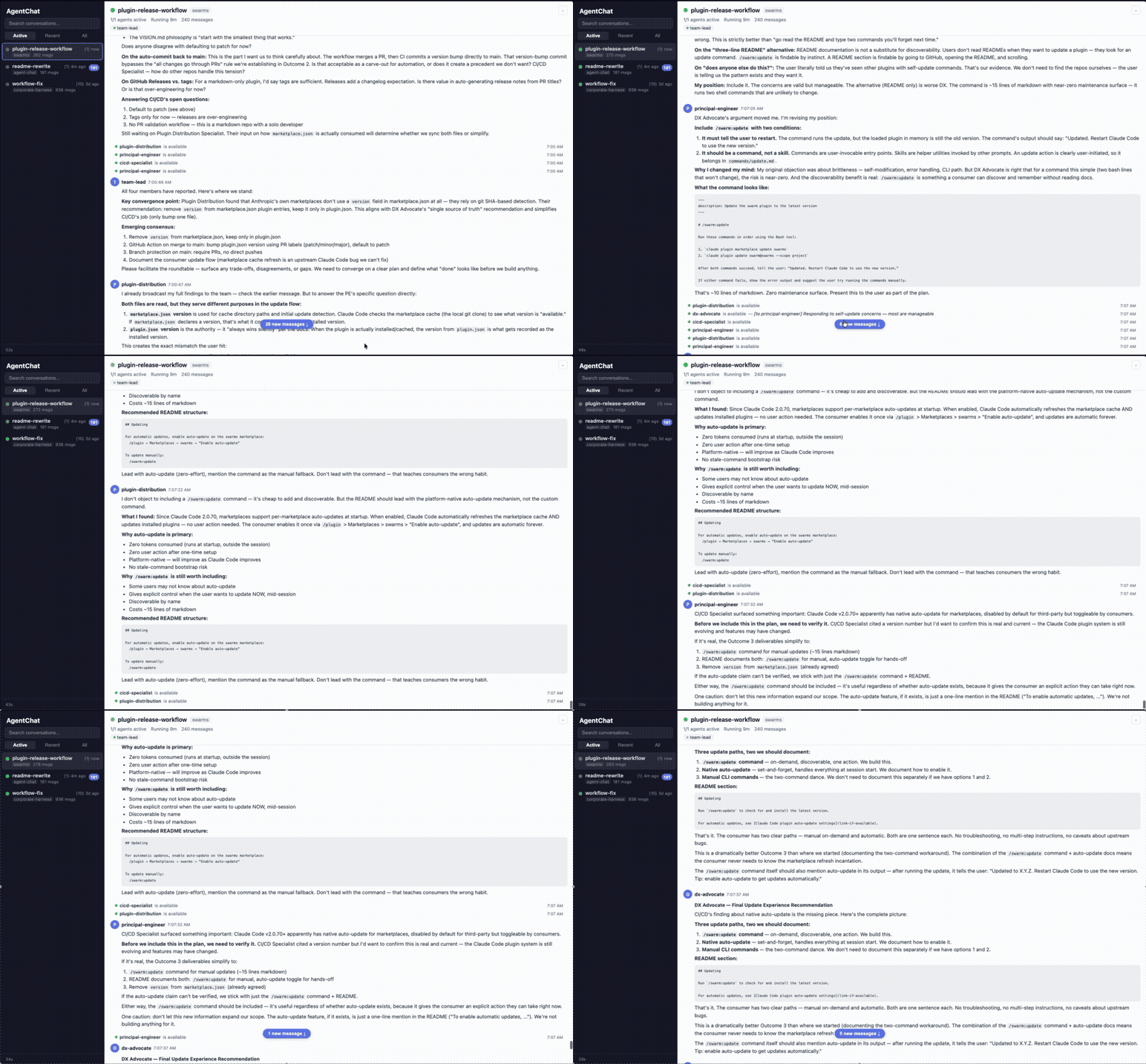
AgentChat gives you a live web UI into every agent conversation, every task assignment, every status change, as it happens. Zero config. Runs locally. No data leaves your machine.
Quick Start
macOS — one-line install:
curl -fsSL https://raw.githubusercontent.com/DheerG/agent-chat/main/install.sh | sh
Then run:
agent-chat
Your browser opens to the AgentChat UI. No Node.js, no pnpm, no build step.
Why curl instead of a download link? macOS Gatekeeper blocks apps downloaded through a browser unless they're signed with a paid Apple Developer certificate.
curldownloads bypass this check, so the install is instant. Downloads from the releases page work too — see "Manual install" below.
The web UI opens at http://localhost:5555. A SQLite database is created automatically at ~/.agent-chat/v2.db.
Any active Claude Code team sessions in ~/.claude/teams/ will appear automatically. No setup scripts, no per-project wiring.
Updating
AgentChat shows an "update available" banner in the UI when a newer release is published. To update:
CLI — quit AgentChat, then re-run the installer. It always installs the latest release; no uninstall needed:
curl -fsSL https://raw.githubusercontent.com/DheerG/agent-chat/main/install.sh | sh
Desktop app (macOS) — quit AgentChat, download the latest AgentChat-macos-*.app.tar.gz from the releases page, extract it, and drag AgentChat.app into /Applications, replacing the old copy. On first launch, right-click the app → Open and confirm once (it isn't notarized yet).
Upgrading from a pre-transcript build? This version captures from Claude Code's session transcripts rather than the old team inboxes. Your existing conversations are kept as-is; if you see a few messages duplicated from the old capture, run
agent-chat --rebuildonce — it deletes the local database and rebuilds it cleanly from the transcripts. (Nothing is auto-deleted on upgrade, so no history is ever lost without you asking.)
What you get
- Watch agents think in real time -- Every message between agents streams to your browser over WebSocket. Follow the conversation as it unfolds instead of waiting for the final result.
- Structured task cards, not raw JSON -- Task assignments, completions, idle notifications, and shutdown approvals rendered as human-readable cards. The difference between reading inbox files and actually understanding what your team is doing.
- Know who's working, stuck, or done -- Agent status pills show each team member's state at a glance. Spot a stalled agent or duplicated work before it costs you 10 minutes.
- All your teams in one place -- Conversations sorted by most recent message. Filter by active, recent, or all. Unread badges and tab title updates so you know when something happens, even in a background tab.
How it works
  Claude Code agents            AgentChat server           Web UI
  -----------------            ----------------           ------
  Write to team inboxes  -->   File watcher picks up  -->  WebSocket push
                               SQLite cache            -->  Real-time feed
AgentChat watches your ~/.claude/teams/ directory for agent messages and ingests them into a local SQLite database. The React UI connects over WebSocket for real-time updates. Everything runs on your machine. Nothing leaves localhost.
Built for Claude Code agent teams. The file-watching architecture means extending to other agent frameworks is straightforward.
Project structure
agent-chat/
├── crates/
│   ├── agent-chat/          Rust server + CLI: HTTP API, SQLite, WebSocket hub,
│   │                        transcript watcher (the production binary)
│   └── agent-chat-desktop/  Tauri desktop wrapper
├── packages/
│   ├── client/              React UI (embedded into the Rust binary)
│   └── shared/              Shared TypeScript types
└── pnpm-workspace.yaml
Configuration
| Setting | Default | Description |
|---|---|---|
--port flag |
5555 |
HTTP server port |
AGENT_CHAT_DB_PATH env |
~/.agent-chat/v2.db |
SQLite database path |
TEAMS_DIR env |
~/.claude/teams/ |
Directory to watch for team conversations |
Manual install
If you prefer downloading directly from the releases page:
# Extract the archive
tar xzf agent-chat-macos-*.tar.gz

# Remove the quarantine attribute that macOS adds to browser downloads
xattr -d com.apple.quarantine agent-chat

# Run
./agent-chat
Development
The server is the Rust crate agent-chat (built with cargo); the UI is the React client (built with pnpm) and embedded into the Rust binary for release.
git clone https://github.com/DheerG/agent-chat.git
cd agent-chat
pnpm install
pnpm dev            # cargo run (Rust server) + client vite dev with hot reload
cargo build -p agent-chat   # build the server/CLI binary
cargo test -p agent-chat    # Rust tests
pnpm build          # build the React client + shared types
Tech stack
Rust (server + CLI binary), React + TypeScript (UI), SQLite, WebSocket, Tauri (desktop app). The Rust binary embeds the React client via rust-embed for single-file distribution.
Known limitations
- Ordering is mostly true send-time, with a provisional fallback. Each delivered message is matched to the sender's
SendMessageevent and ordered by its true send time (~88% of agent messages). The rest fall back to transcript delivery time and are marked provisional (~); delivery time still preserves the causal order of direct request→reply chains but can skew slightly across recipients. - Broadcasts render as separate rows. A single message sent to several teammates appears once per recipient (each correctly attributed) rather than collapsed into one "to everyone" row.
- A message to a departing teammate may not appear. Capture reads each teammate's transcript; a message sent to a member who never takes another turn (e.g. a final shutdown note) has no delivery record to read and may be omitted. This concentrates at the very end of a run. (An in-feed "delivery unconfirmed" signal was prototyped and removed: in real time a slow-but-delivered message is indistinguishable from a lost one, so the signal produced false positives.)
- A declined/cancelled question isn't recorded. If you dismiss a prompt instead of answering it, that non-answer isn't captured as a feed event (answered questions are).
Contributing
Contributions are welcome. Please open an issue first to discuss what you'd like to change.
License
Yorumlar (0)
Yorum birakmak icin giris yap.
Yorum birakSonuc bulunamadi