conduit
Health Uyari
- License — License: MIT
- Description — Repository has a description
- Active repo — Last push 0 days ago
- Low visibility — Only 5 GitHub stars
Code Basarisiz
- execSync — Synchronous shell command execution in .opencode/skills-to-test/writing-skills/render-graphs.js
- exec() — Shell command execution in .opencode/skills-to-test/writing-skills/render-graphs.js
- fs module — File system access in .opencode/skills-to-test/writing-skills/render-graphs.js
Permissions Gecti
- Permissions — No dangerous permissions requested
This tool provides a web-based user interface for OpenCode, allowing you to monitor coding sessions and approve tool permissions from any device via push notifications.
Security Assessment
The tool operates as a network server that streams local development sessions to external devices, meaning it inherently makes network requests and handles sensitive local data. The automated scan flagged multiple failures for shell command execution (`execSync` and `exec()`) and file system access within a testing script (`.opencode/skills-to-test/writing-skills/render-graphs.js`). While these capabilities are standard for an IDE-style UI that needs to read files and execute commands, the risk profile is elevated. No hardcoded secrets or dangerous repository permissions were found. Overall risk: Medium.
Quality Assessment
The project is very new and currently has low community visibility, evidenced by only 5 GitHub stars. However, it is actively maintained (last pushed 0 days ago), has continuous integration set up, and uses a standard MIT license. Given its early stage, the codebase should be considered experimental rather than battle-tested.
Verdict
Use with caution — verify your network security setup before exposing your local OpenCode sessions.
Web UI for opencode. Any device. Push notifications. Zero install.
Conduit
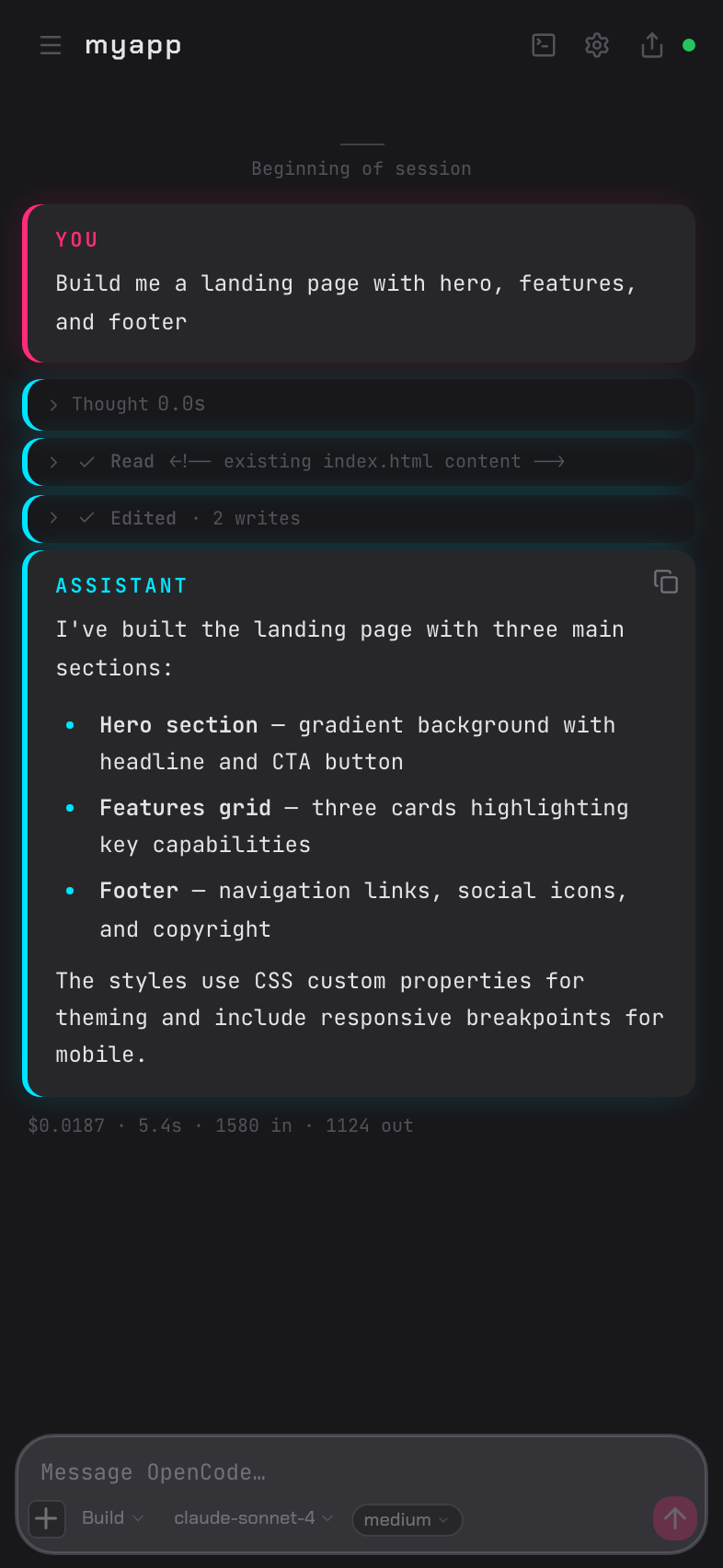
Browser UI for OpenCode. Any device, one command.





Conduit connects to opencode serve and streams your session to a browser.
Phone, tablet, desktop — anything on your local network. Scan the QR code. Done.
The part worth setting up for: when OpenCode needs permission to run something,
you get a push notification. Tap Allow. OpenCode continues. You don't need to
be at your desk.
Getting started
# Requires: opencode serve (running on port 4096)
npx conduit-code

First run opens a setup wizard: set a port and PIN, optionally enable HTTPS,
scan the QR code with your phone. About two minutes.
For access beyond your local network, Tailscale is
the cleanest option — encrypted tunnel, no port forwarding, free for personal
use.
Approve from your phone
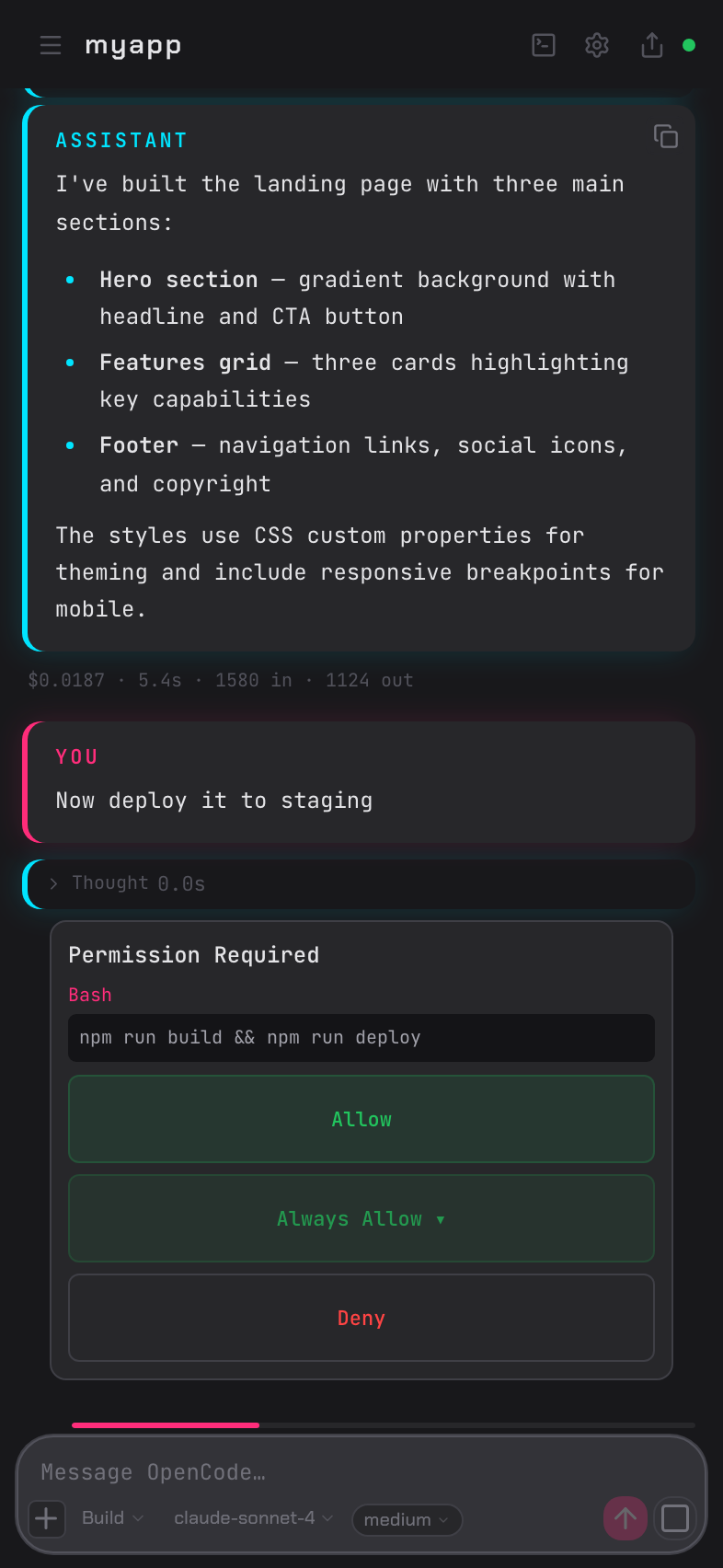
OpenCode pauses on every tool permission request. Conduit sends a push
notification — tap Allow or Deny from wherever you are.
Open browser tabs get a blinking favicon and title change. Sound alerts are
optional.
Full OpenCode UI in any browser
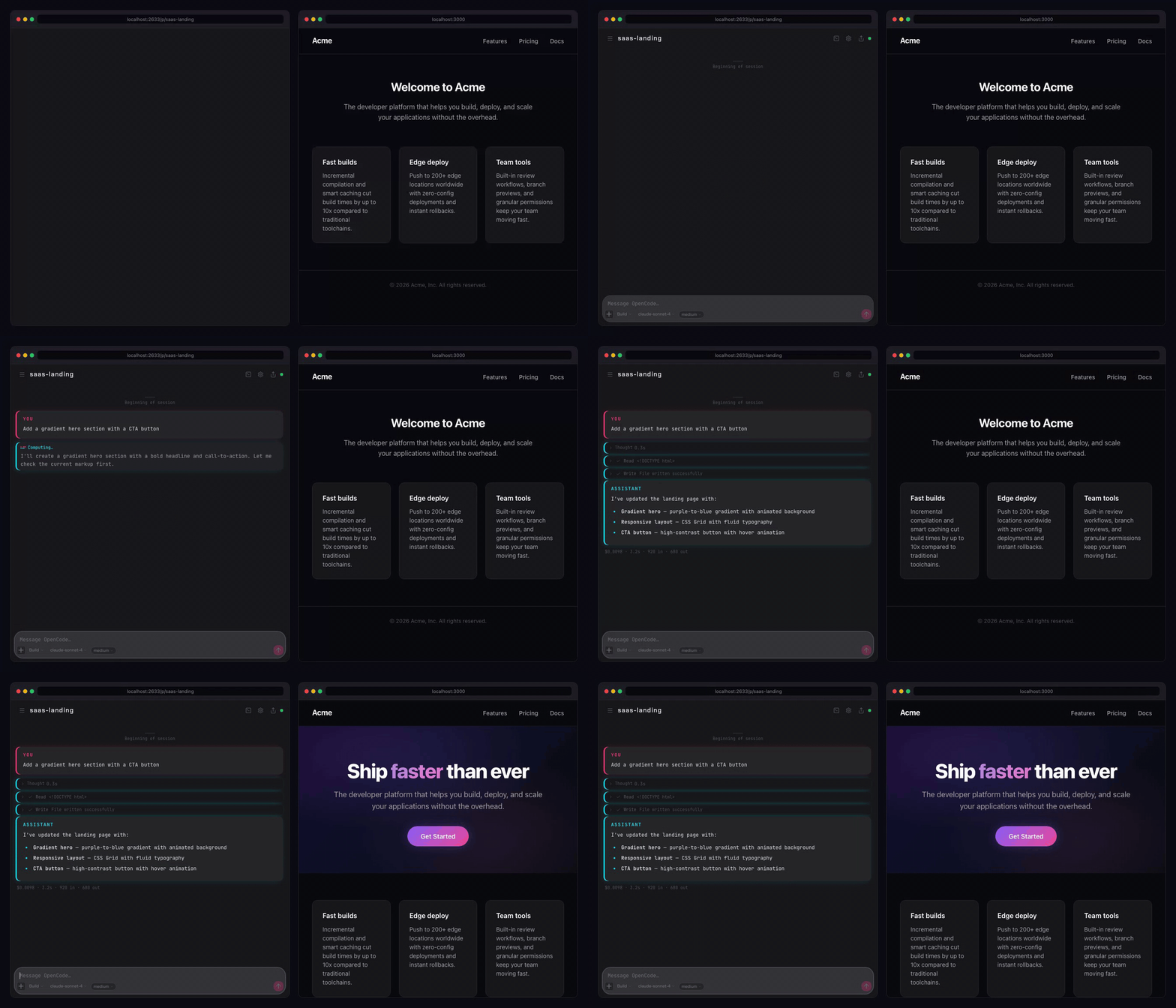
Chat history, tool output with diff rendering, file browser with live reload,
xterm.js terminal tabs, session forking, slash command autocomplete, todo
progress overlay. The complete interface — on a phone screen or a 4K monitor.
OpenCode's agent and model selectors are in the header. Mermaid diagrams render
as diagrams. Code blocks have syntax highlighting and copy buttons.
One daemon, every project
cd ~/backend  && npx conduit-code    # registers project
cd ~/frontend && npx conduit-code    # adds to same daemon
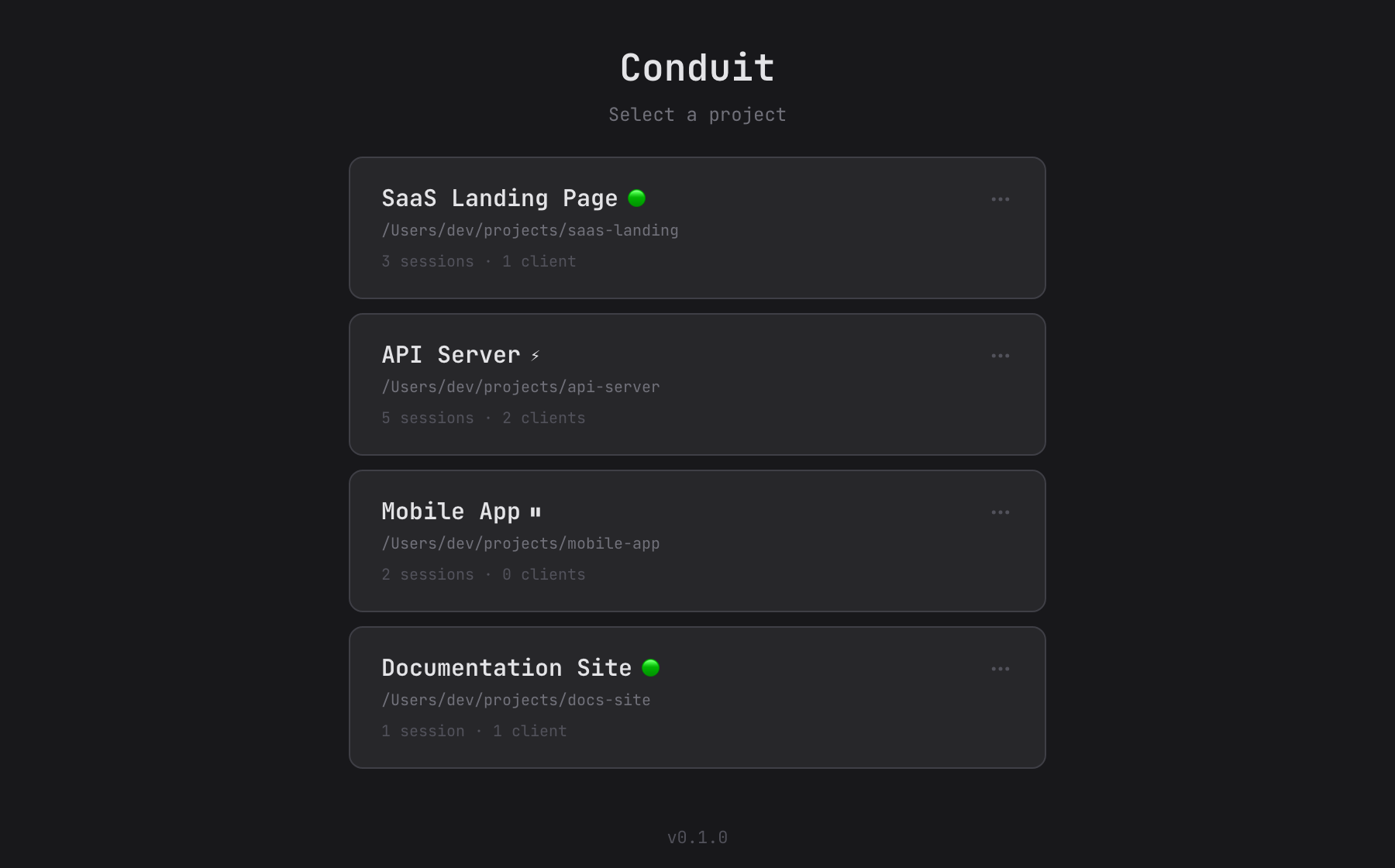
One port, all projects. Switch between registered sessions from the browser.
The daemon stays running after the terminal closes — sessions survive.
Why Conduit?
| tmux / SSH | ntfy / Pushover hooks | ngrok / tunnel | Clay | Conduit | |
|---|---|---|---|---|---|
| Mobile UI | ❌ Raw terminal | ❌ Alert only | ❌ Raw terminal | ✅ Full GUI | ✅ Full GUI |
| Push notifications | ❌ | ✅ | ❌ | ✅ | ✅ |
| One-tap approval | ❌ | ❌ No action UI | ❌ | ✅ | ✅ |
| Stays on your network | ✅ | ✅ | ❌ Third-party relay | ✅ | ✅ |
| Multi-project | ❌ | ❌ | ❌ | ❌ | ✅ |
| PWA / home screen | ❌ | ❌ | ❌ | ✅ | ✅ |
| Works with any model | ❌ | ❌ | ❌ | ❌ Claude only | ✅ |
Why not tmux + Termius?
No push notifications. No way to approve OpenCode permissions without switching
back to the terminal. Raw terminal on a phone is painful to navigate.
Why not adding notification hooks?
Hooks with ntfy or Pushover get you alerts, but when the notification arrives
there's no approval UI — you're back in a terminal. Conduit gives you the
notification and the one-tap response in the same place.
Why not ngrok or a tunnel service?
Third-party servers see your traffic. Conduit stays on your local network
or Tailscale — nothing routes through an external service.
Why not SSH + terminal on mobile?
Raw terminal, no approval UI, no push notifications, no mobile-optimised
interface. You end up checking manually instead of getting notified.
What about Clay (claude-relay)?
Conduit exists because of Clay. I loved
what Clay did for Claude Code — a browser UI on any device, push
notifications, mobile approvals — and wanted the same experience for
OpenCode, where I could use any model and provider.
Much of Conduit's original implementation was built on Clay's approach, and
that foundation made this project possible.
Where the two diverge: Clay embeds the Claude Agent SDK and drives Claude Code
directly, while Conduit is a relay for opencode serve. If you use Claude
Code, Clay is the project you want. If you use OpenCode, Conduit brings that
same vision to your setup. I do plan, however, to add support for Claude Code
now that opencode doesn't officially support Claude subscription accounts
using OAuth.
Features
Full feature listNotifications
- Push notifications for approvals, completions, errors, and questions (HTTPS required)
- Favicon blink and tab title change when input is awaited
- Configurable sound alerts
Sessions
- Session persistence across reconnects, terminal closes, and daemon restarts
- Session forking — branch from any assistant message
- Draft persistence — unsent messages restored when you switch back
Rendering
- LCS-based diff rendering for file edits
- Mermaid diagram support with dark theme
- Syntax highlighting for 180+ languages with copy buttons
- Collapsible thinking blocks with streaming spinner
Input
- Slash command autocomplete with keyboard navigation and preview
- Image paste, drag-and-drop, and camera attachment
- Todo progress overlay — sticky, auto-hides on completion
File and terminal
- File browser with breadcrumbs, preview modal, and live reload on external changes
- xterm.js terminal tabs — multi-tab, rename, resize-aware, font resizing for easier mobile viewing, mobile special-key toolbar
OpenCode-specific
- Agent selector (Claude, custom agents)
- Model and provider picker with thinking level selector
- Question/ask-user response UI
Mobile
- PWA-installable — add to home screen, receive notifications without opening the browser
- Large approve and deny touch targets
- Camera attachment from mobile browser
- QR scan to connect instantly
Server
- Background daemon — persists after terminal close
- Multi-project support — single port, all registered projects
- PIN authentication (4–8 digits)
- HTTPS with auto-generated certificates via mkcert
- Keep-awake mode — prevents macOS sleep while sessions are active
Push notifications (HTTPS setup)
Push requires HTTPS. One-time setup:
brew install mkcert && mkcert -install
Conduit generates certificates automatically on first run. The wizard
handles the rest. If push registration fails, check that your browser trusts
the certificate and that your phone can reach the address.
Security
Conduit binds to 127.0.0.1 by default. Set HOST=0.0.0.0 to expose on
your LAN. Set a PIN. Anyone on your network with the URL and PIN can access
your OpenCode session.
Do not expose this to the public internet. For remote access, use
Tailscale or a VPN.
FAQ
Common questions"Does my code leave my machine?"
No. Conduit runs locally and relays between your browser and opencode serve.
Files stay on your machine. Only OpenCode's own API calls go out, same as the CLI.
"Is this a terminal wrapper?"
No. Conduit connects to OpenCode's HTTP/SSE API directly. It doesn't scrape
or parse terminal output.
"Can I continue a CLI session in the browser?"
Yes. Conduit picks up existing sessions from opencode serve. Switch between
the terminal and browser freely.
"Does it work with my existing OpenCode config?"
Yes. Agents, models, MCP servers, and project-level configuration all carry
over as-is.
"Do I need mkcert for basic use?"
No. Conduit works over plain HTTP on localhost. mkcert is only needed for
HTTPS, which is required for push notifications and LAN access.
"What happens if the daemon crashes?"
Sessions are owned by OpenCode (SQLite), not Conduit. Restart the daemon and
your sessions are still there. Conduit includes a crash counter that prevents
restart loops.
CLI reference
npx conduit-code                                  Interactive setup + main menu
npx conduit-code --add .                          Register current directory
npx conduit-code --add /path                      Register project by path
npx conduit-code --remove                         Unregister current project
npx conduit-code --list                           List registered projects
npx conduit-code --status                         Show daemon status
npx conduit-code --stop                           Stop the daemon
npx conduit-code --pin <PIN>                      Set or update PIN
npx conduit-code --title <name>                   Set project display name
npx conduit-code -p, --port <port>                HTTP port (default: 2633)
npx conduit-code --oc-port <port>                 OpenCode port (default: 4096)
npx conduit-code --no-https                       Disable TLS
npx conduit-code -y, --yes                        Skip prompts, accept defaults
npx conduit-code --dangerously-skip-permissions   Bypass permission prompts (PIN required)
npx conduit-code --foreground                     Run in foreground (dev mode)
npx conduit-code --log-level <level>              error | warn | info | verbose | debug
npx conduit-code --log-format <format>            pretty | json
Environment variables: OPENCODE_URL, HOST, CONDUIT_CONFIG_DIR,OPENCODE_SERVER_PASSWORD.
Architecture
┌──────────┐  WebSocket  ┌──────────────────────┐  HTTP/SSE  ┌────────────────┐
│ Browser  │◄───────────►│ Conduit daemon       │◄──────────►│ opencode serve │
│          │             │ :2633                │            │ :4096          │
└──────────┘             └──────────────────────┘            └────────────────┘
Conduit is a stateless translation layer. OpenCode owns all state (SQLite).
The relay handles WebSocket lifecycle, event translation, PIN authentication,
TLS termination, and Web Push delivery.
graph LR
    Browser["Browser (Phone / Desktop)"]
    WS["WebSocket"]
    Daemon["Conduit Daemon"]
    SSE["SSE Consumer"]
    OC["opencode serve :4096"]
    Push["Web Push"]

    Browser <-->|Real-time stream| WS
    WS <--> Daemon
    Daemon <--> SSE
    SSE <-->|HTTP / SSE| OC
    Daemon -->|Permission event| Push
    Push -->|Notification| Browser
Requirements
- OpenCode —
opencode serverunning (port 4096) - Node.js 20.19+
- mkcert — push notifications (optional)
- Tailscale — remote access beyond LAN (optional)
Contributing
Bug fixes and typo corrections are welcome. For feature suggestions, please
open an issue first:
github.com/dibstern/conduit/issues
If you're using Conduit, let us know how in Discussions:
github.com/dibstern/conduit/discussions
Disclaimer
Independent project. Not affiliated with the OpenCode project or its authors.
Conduit is provided "as is" without warranty of any kind. Users are responsible for complying with the terms of service of underlying AI providers (e.g., Anthropic, OpenAI) and all applicable terms of any third-party services. Features such as multi-user mode are experimental and may involve sharing access to API-based services. Before enabling such features, review your provider's usage policies regarding account sharing, acceptable use, and any applicable rate limits or restrictions. The authors assume no liability for misuse or violations arising from the use of this software.
Future plans
- Automated version updates in the UI
- UI design improvements
- Claude Agent SDK integration (removing the need for Claude-specific workarounds)
- Edited-files UI with split and unified diff views
- Quota usage info panel
- Keyboard shortcuts
- Session rewind support - revert session state from the browser
- Automatic certificate download
- Code quality improvements and performance optimisations
License
MIT
Yorumlar (0)
Yorum birakmak icin giris yap.
Yorum birakSonuc bulunamadi