didit-events
Health Uyari
- License — License: MIT
- Description — Repository has a description
- Active repo — Last push 0 days ago
- Low visibility — Only 8 GitHub stars
Code Gecti
- Code scan — Scanned 12 files during light audit, no dangerous patterns found
Permissions Gecti
- Permissions — No dangerous permissions requested
Bu listing icin henuz AI raporu yok.
Open-source event management with liveness verification, optional ID checks and face check-in at the door. Built on Didit.
Didit Events
Event management with liveness verification and face check-in, built on Didit. Open source.



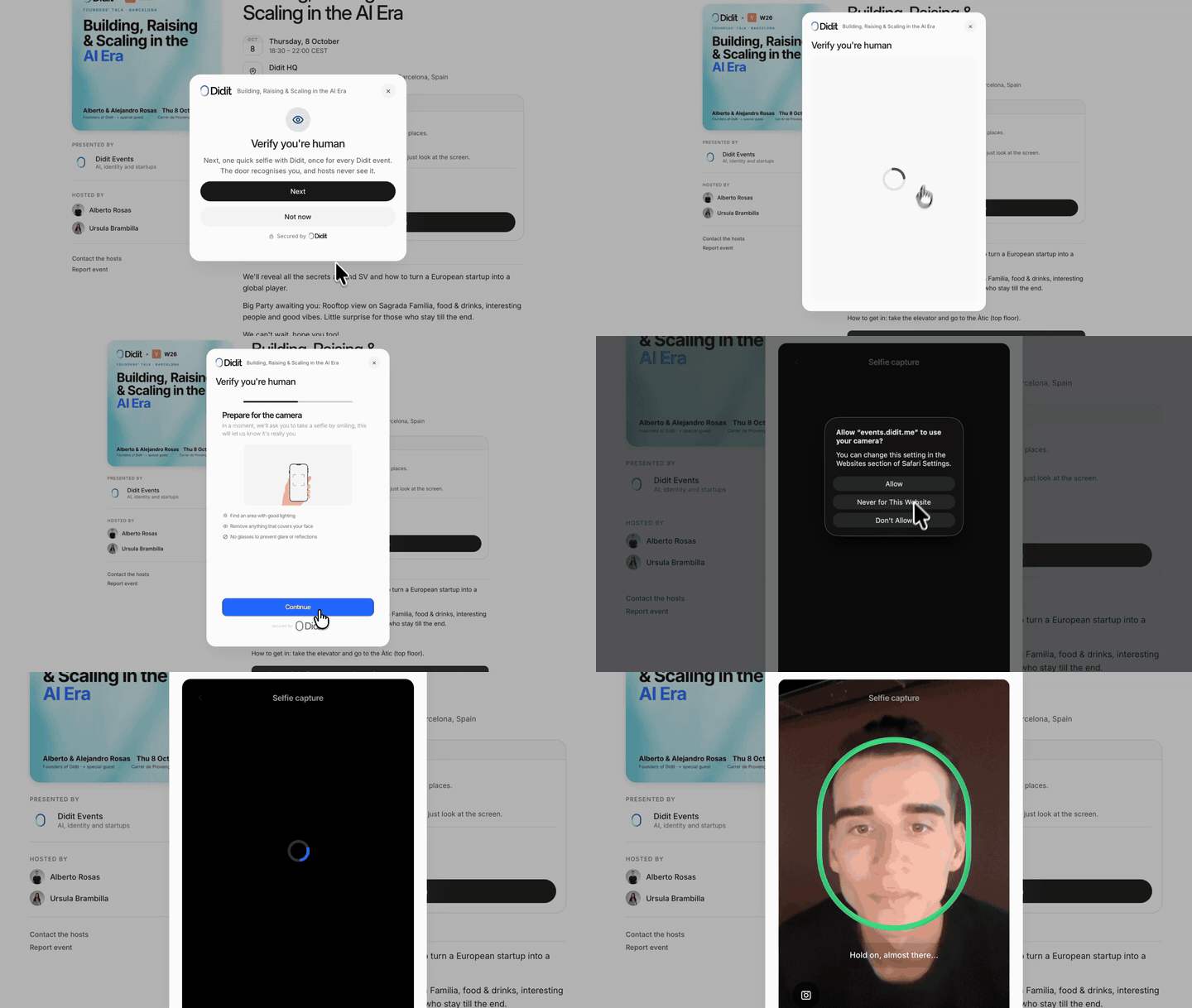
Click the preview to watch the full demo (47 seconds, docs/media/demo.mp4).
Didit Events is the app Didit uses for its own events at events.didit.me. This repository
is the same code, published as a complete example of what you can build on Didit's identity APIs: sign-in, liveness,
ID checks and face search.
Contents
- Why
- Features
- How it works
- Tech stack
- Quick start
- Didit setup
- Configuration
- Scripts
- MCP server
- Testing
- Deployment
- Security model
- Privacy and biometrics
- Project structure
- Roadmap and ideas
- Contributing
- License
Why
Most apps add identity at the end: a login form, then a pile of rules to guess who is real.
An identity-native app starts from the other side. A verification provider checks each account before it can do
anything that matters, and the product is built on the result of those checks:
- A live person behind each account. Every account passes one selfie liveness check before it can request a place.
- Proofs are reusable. A guest verifies once and brings that proof to the next event.
- The face is the ticket. No QR codes to forward, no lists to tick by hand.
- Results, not documents. Didit holds the selfies, the documents and the enrolled faces. The app keeps the
session id and the outcome of each check and, for a limited time, the raw decision Didit returned and the webhook
that announced it. At the door it keeps which sessions matched and how closely, never the image. The full list
and how long each record stays are under Privacy and biometrics.
What the checks do and do not establish:
- Liveness is evidence that a live person was in front of the camera, not a photo or a replay. It does not say who
that person is. That is the optional ID check, which a host turns on per event. - Liveness alone does not stop one person from opening two accounts with two email addresses. Didit can compare
each new face with the faces already enrolled in your application (a 1:N duplicate check) and send a repeat to
review or decline it. That is a setting of the liveness workflow in the Didit console; the app adds no rule of its
own. Hosts do see a "Possible duplicate" label when two applicants share a name. - The door is built for a staffed entrance. In supervised mode, the default, the kiosk matches a face against the
guest list and a person at the door is the check against a photo held up to the camera. Strict mode adds a passive
liveness check on each frame. Staff the door in both modes: strict mode is an extra check, not a replacement for
the person at the door, and manual check-in is always there.
Didit Events is a small, complete example of that pattern. Read it, run it, or fork it for your own events.
Features
- Request to join. Guests open an event page, sign in with an email code or Google (both through Didit) and send a request. Hosts can add their own questions.
- Liveness. Every account takes one selfie liveness check. It is evidence that a live person was present, and it enrolls the face used later at the door.
- Optional ID verification. Per event, hosts can also ask for a phone check, an identity document, the name on the document or a minimum age. Guests who already hold a valid proof reuse it.
- Host approval. Hosts review each applicant with their profile, answers and check results, then approve, waitlist or decline. Open events can confirm places automatically.
- Face check-in at the door. Any laptop or tablet becomes a kiosk in the browser. It detects faces on the device (MediaPipe), sends a crop to Didit face search and checks the guest in. Supervised mode relies on the person at the door; strict mode also runs passive liveness on the frame. Manual check-in is the fallback. On the kiosk, press O (or long-press the top-left corner on a touch screen) to open the operator panel: camera, test mode and exit.
- Guest list privacy. Each event decides what its public page shows about who is going: nothing (the default), only a count, or names.
- Emails. Request received, approved, waitlisted, reminders, calendar invites and more, sent through a transactional outbox with Resend. Hosts can preview and edit them.
- Admin. Events, applicants, guests, check-in log, event teams (hosts and door operators), spend limits and a calendar profile.
- Spend limits. Every billable Didit call reserves budget first. Ceilings per event, per day and in total stop the app from spending past them.
- MCP server for agents.
/api/mcpexposes the admin as tools (list events, approve applicants, invite guests, check in), so an AI agent can run an event with a personal access token.
How it works
sequenceDiagram
    autonumber
    actor Guest
    participant App as Didit Events
    participant Didit
    actor Host
    participant Door as Door kiosk

    Guest->>App: Request to join (sign in with an email code or Google)
    App->>Didit: Create a liveness session
    Didit-->>Guest: Selfie check in the hosted flow
    Didit->>App: Signed webhook: the session finished
    App->>Didit: Fetch the decision again
    Didit-->>App: Liveness passed, face enrolled
    Host->>App: Review the applicant and approve
    App-->>Guest: Confirmation email and calendar invite
    Note over Guest,Door: Event day
    Door->>App: Face crop, detected in the browser
    App->>Didit: Face search
    Didit-->>App: Best match
    App->>App: Re-check the place and proofs in one transaction
    App-->>Door: Checked in
- Didit sessions. The server creates verification sessions with the Didit API and sends the guest to the hosted flow at
verify.didit.me. Every billable call first reserves budget in a spend ledger. - Didit webhooks. Results arrive at
/api/webhooks/didit, signed with HMAC. They go to an inbox table, and a worker fetches the decision again from the API before applying it. A reconciler polls for results that never arrived, which also covers localhost. - Didit face search. The door posts a face crop to
/api/door/{eventId}/scan. The server asks Didit who it is. A match is only a hint: the server then re-checks the guest's place inside one database transaction. - Outbox emails. Emails are rows written in the same transaction as the change that causes them. A worker delivers them through Resend with idempotency keys and retries.
- Workers run inside the server process. Inbox, outbox and jobs start with the Node server, so the app needs a long-running process, not a serverless runtime. There is no command that runs them on their own yet:
WORKERS=0turns them off for tests, and a server started that way processes no webhooks, emails or jobs.
More detail: docs/architecture.md.
Tech stack
| Layer | What is used |
|---|---|
| App | Next.js 16 (App Router, standalone output), React 19, TypeScript |
| Identity | Didit: email-code and Google sign-in, liveness, ID checks, face search, webhooks |
| Database | Postgres with Drizzle. PGlite (embedded Postgres) when no database is configured |
| Resend behind a transactional outbox | |
| Door | MediaPipe face detection in the browser |
| UI | CSS Modules and design tokens in packages/ui, no CSS framework |
| Agents | A Model Context Protocol server at /api/mcp |
| Tooling | pnpm workspaces, Vitest, ESLint, Docker |
| Monitoring | Sentry, optional and off by default |
Quick start
Prerequisites: Node 22 (22.7 or newer; .nvmrc is included) and pnpm 11 through corepack enable. Docker runs the
Postgres container of both paths below; path 2 also works without Docker, on the embedded database
(Without Docker).
Set up Didit with an AI agent
A coding agent (Claude Code, Cursor, Codex and others) can do the whole Didit part for you: create the account, get the
API key, create the liveness workflow, fill apps/events/.env.local, start the app and check that it works. You give
it an email address and the code Didit sends there.
First install the Didit agent skills from the root of the clone, so the
agent has Didit's API reference at hand. ClawHub installs one skill per command:
npx clawhub@latest install didit-verification-management
npx clawhub@latest install didit-liveness-detection
npx clawhub@latest install didit-face-search
ClawHub writes them to skills/ and .clawhub/ in the repository root; both are git-ignored. If ClawHub is not
available, copy the same three folders from https://github.com/didit-protocol/skills.
Then open the agent in a fresh clone of this repository and paste this prompt:
Set up Didit for this repository (Didit Events) and prove that it works. Follow docs/didit-setup-prompt.md step by
step: read it fully before you start, and read README.md ("Quick start", "Didit setup") and .env.example.

1. Install the Didit agent skills, one per command (they land in skills/ and .clawhub/, both git-ignored):
   npx clawhub@latest install didit-verification-management
   npx clawhub@latest install didit-liveness-detection
   npx clawhub@latest install didit-face-search
   (fallback: copy the three folders from https://github.com/didit-protocol/skills)
2. Ask me for five things and wait: a real email address for the Didit account, my staff email domain, my own
   address on that domain, whether I have a public https URL for this app, and the database: Docker, or a Postgres
   URL of mine where you create an empty database.
   Then run: corepack enable && pnpm install
3. Get DIDIT_API_KEY. If I already have one, I add it to apps/events/.env.local myself where step 1 of the file
   says. Otherwise register with
   POST https://apx.didit.me/auth/v2/programmatic/register/ (email, password), ask me for the 6-character code from
   the email, and send it to POST https://apx.didit.me/auth/v2/programmatic/verify-email/ (email, code). The key is
   application.api_key in the response.
4. Create one published liveness-only workflow with POST https://verification.didit.me/v3/workflows/ (header
   x-api-key), unless the application already has it (read every page of GET /v3/workflows/), and put its
   workflow_id in DIDIT_FACE_WORKFLOW_ID, DIDIT_RENEWAL_WORKFLOW_ID and DIDIT_WORKFLOW_ID.
5. Write apps/events/.env.local with exactly the variables and the order that file gives (its steps 1 to 3 write
   it), then run pnpm db:migrate, the provisioning script (apps/events/scripts/provision.mjs 18) and pnpm seed.
6. Register the webhook with apps/events/scripts/webhook.mjs only if I give you a public https URL. On localhost,
   skip it.
7. Run pnpm smoke:local before pnpm dev (the two cannot run together), then start pnpm dev.
8. Validate: the provisioning script prints 6 workflows, the webhook tests pass, pnpm smoke:local printed only PASS
   lines, pnpm e2e:journey --provider sandbox passes, and I confirm the browser checklist at the end of the file
   (I take the selfie myself, on a device with a camera).

Rules: never print, log or commit a key, a secret, a password or a token. Secrets go only into
apps/events/.env.local, which is git-ignored. Use a sandbox application for testing. Stop and ask me whenever you
need a code, a decision or my consent. Report each validation command with its result.
The full version, with every command, the expected output of each check and the browser checklist, is in
docs/didit-setup-prompt.md. To do the same by hand, follow path 2 below and
Didit setup.
1. See it run with a fake Didit (no account needed)
git clone https://github.com/didit-protocol/didit-events.git
cd didit-events
corepack enable
pnpm install
pnpm smoke:local
pnpm smoke:local starts the app against local fake Didit and Resend servers in a throwaway Postgres database and
walks the main paths: sign-in, liveness, request, approval, door scan, emails. It prints PASS or FAIL for each step
and then stops. It takes a few minutes. It needs Docker running (it starts a postgres:17 container), or a Postgres of your own inTEST_DATABASE_URL. No real provider is called and no email leaves your machine.
It is a test run, not a place to click around: when it finishes, the app and the fakes are gone. To explore the
interface, use a sandbox application (path 2). It is free and nothing in it is billed.
2. Run it yourself with a Didit sandbox application
You need two values from a free Didit account, which take a few minutes to get: the API key of a sandbox application
and the id of a liveness workflow (steps 1 and 2 of Didit setup). A coding agent can get both for you:
Set up Didit with an AI agent.
Then, in the repository you cloned and installed above, replace the placeholder values in the middle block and paste
everything into bash or zsh:
# Postgres in Docker
docker run -d --name didit-events-db -p 127.0.0.1:5432:5432 -e POSTGRES_PASSWORD=pg postgres:17
until docker exec didit-events-db pg_isready -U postgres >/dev/null 2>&1; do sleep 1; done

# The configuration: your domain and your own address on it, your API key and your workflow id (three times)
cat > apps/events/.env.local <<EOF
DATABASE_URL=postgres://postgres:[email protected]:5432/postgres
APP_URL=http://localhost:3000
SESSION_SECRET=$(openssl rand -base64 32)
STAFF_EMAIL_DOMAIN=yourcompany.com
[email protected]
DIDIT_API_KEY=your-sandbox-api-key
DIDIT_FACE_WORKFLOW_ID=your-liveness-workflow-id
DIDIT_RENEWAL_WORKFLOW_ID=your-liveness-workflow-id
DIDIT_WORKFLOW_ID=your-liveness-workflow-id
DIDIT_SPEND_CAP_USD=100
DIDIT_APP_DAILY_CAP_USD=25
DIDIT_EVENT_DAILY_CAP_USD=10
[email protected]
DEV_AUTH=1
EOF

pnpm db:migrate     # creates the schema and the first owner, the address in SEED_OWNER_EMAIL
pnpm seed           # two sample events
pnpm dev            # http://localhost:3000
apps/events/.env.local is the one place the configuration lives. pnpm dev, pnpm db:migrate and pnpm seed all
read it; a variable exported in the shell wins over the file. .env.example explains every variable,
including the optional ones this block leaves out.
STAFF_EMAIL_DOMAIN, SEED_OWNER_EMAIL and DIDIT_FACE_WORKFLOW_ID have no default. Without them the migration,
the seed and the server stop with a message that names what is missing, so no instance starts with someone else's
staff domain, owner or Didit workflow.
The three DIDIT_*_CAP_USD lines are spend ceilings, kept small on purpose: a billable Didit call is refused once
a ceiling is reached. Raise them when a real event needs more.
With DEV_AUTH=1 (ignored in production) you sign in by opening a link:
- Guest:
http://localhost:3000/api/auth/[email protected] - Admin:
http://localhost:3000/api/auth/dev?as=staff&[email protected](the address inSEED_OWNER_EMAIL)
A dev sign-in marks the address as verified, on Postgres and on the embedded database alike, so a guest goes
straight from the link to the profile, the selfie check and the request. Nothing else is needed: no email code and
no change in the database. The link works only while APP_URL is a localhost address.
The first selfie check needs no extra setup. When it starts, the app reads your liveness workflow from Didit, checks
that it is a published, liveness-only workflow and stores its maximum price; the check is then sent with that amount
reserved. If the workflow id is wrong or the workflow has other features, the check does not start and nothing is
sent. The optional checks (phone, document, name, age) do need the provisioning script: step 3 of
Didit setup.
To start again from an empty database: docker rm -f didit-events-db, then run the block again.
pnpm dev always listens on port 3000. For another port, set APP_URL to that origin in apps/events/.env.local
and start Next.js yourself:
NEXT_MANUAL_SIG_HANDLE=1 pnpm --filter @didit-events/events exec next dev --port 3400
Without Docker: the embedded database
With DATABASE_URL empty the app uses PGlite, an embedded Postgres in apps/events/.data. The whole guest journey
runs on it. Take the block of path 2 and leave out the two docker lines and the DATABASE_URL line:
cat > apps/events/.env.local <<EOF
APP_URL=http://localhost:3000
SESSION_SECRET=$(openssl rand -base64 32)
STAFF_EMAIL_DOMAIN=yourcompany.com
[email protected]
DIDIT_API_KEY=your-sandbox-api-key
DIDIT_FACE_WORKFLOW_ID=your-liveness-workflow-id
DIDIT_RENEWAL_WORKFLOW_ID=your-liveness-workflow-id
DIDIT_WORKFLOW_ID=your-liveness-workflow-id
DIDIT_SPEND_CAP_USD=100
DIDIT_APP_DAILY_CAP_USD=25
DIDIT_EVENT_DAILY_CAP_USD=10
[email protected]
DEV_AUTH=1
EOF

pnpm db:migrate && pnpm seed    # before pnpm dev: PGlite serves one process at a time
pnpm dev
Then, as a guest: open http://localhost:3000/api/auth/[email protected], pick an event, complete the
profile, take the selfie check (the sandbox offers a test result) and send the request. As the owner: openhttp://localhost:3000/api/auth/dev?as=staff&[email protected] in another browser or a private window and
approve it under Requests. DEV_AUTH=1 is the only sign-in this path needs; a dev sign-in counts as a verified
email on PGlite exactly as on Postgres.
To start again from an empty database, stop pnpm dev and delete apps/events/.data.
Which database
PGlite is enough to look around, and less than Postgres:
PGlite (DATABASE_URL empty) |
Postgres | |
|---|---|---|
The app in pnpm dev: sign-in, the selfie check and its price, requests, approval, door, emails, MCP |
yes | yes |
pnpm db:migrate and pnpm seed |
yes, while pnpm dev is stopped: PGlite serves one process at a time |
yes |
| Optional checks per event: phone, document, name, age | no: the provisioning script needs Postgres | yes, after provisioning |
Command-line tools that take DATABASE_URL: the provisioning script, mcp:token, psql |
no | yes |
pnpm smoke:local, pnpm e2e:journey, the locking and migration test suites |
no: they start or need a Postgres | yes |
| The Docker image and docker compose | no | yes |
| More than one server process, and production | no | yes |
What works with a sandbox application
A Didit sandbox application is enough to see almost everything. Two things behave differently from production:
- Email codes cannot be confirmed. The sandbox never accepts a sign-in code, so "Email me a code" always ends in
"That code is not right". Inpnpm dev, sign in with theDEV_AUTHlinks above: a dev sign-in counts as a
verified email on both databases, so the request flow goes straight to the profile and the selfie check. For real
codes, put the API key of a production application inDIDIT_OTP_API_KEY: codes are then sent and checked by that
application, and the rest stays on the sandbox. A production build and the Docker image ignoreDEV_AUTH, so
there one of the two real sign-ins is required:DIDIT_OTP_API_KEY, or Google with your own OIDC client. - The selfie check offers test results. The hosted flow shows "Choose a test result" (verified, needs review,
declined) and still asks for the camera. No real check runs and nothing is billed.
Some actions ask for a recent sign-in (deleting the account is one). With DEV_AUTH, open the dev link again and
repeat the action. The dev link refuses an account that is being deleted, so "Keep my account" (the undo) can only be
tried with a real sign-in.
Without RESEND_API_KEY no email is sent: messages wait in the outbox and go out when you add a key. The email
preview in the event editor works either way. A key needs a sender and a footer too: set EMAIL_FROM to an address on a domain you
verified in Resend, and EMAIL_FOOTER to your organization's name and postal address, the line under each email. With
a key and without either of them, migrations and the server stop with a message.
An event created through the MCP server starts with face check-in off. Turn it on in the event's Door settings (or
with event_update) before you start door mode.
Google sign-in needs an OIDC client of your own (step 5 of Didit setup). The code has no built-in
client. While DIDIT_OIDC_CLIENT_ID is unset the app starts no Google sign-in: "Continue with Google" is still
shown, and a click returns to the sign-in screen with a notice that Google sign-in did not finish. Email codes and
the dev links are not affected.
Admin accounts
Two kinds of people can manage events:
- Event teams. Hosts and door operators are added per event, by any email address.
- Global staff (owner, admin, staff) reach every event. Their addresses must be on a domain listed in
STAFF_EMAIL_DOMAIN(one domain, or several separated by commas), and they must be invited from the Team page.
The first owner is created by the migrations: the address in SEED_OWNER_EMAIL, which must be on a staff domain.
That owner signs in like anyone else (email code or Google) and invites the rest of the team at /admin/team.
Neither setting has a default. For your own instance:
- Set
STAFF_EMAIL_DOMAIN=yourcompany.comand[email protected]before the first migration
(pnpm db:migrate, or the first start of the Docker image). The migration, the seed and the server stop with a
message while either is missing or the owner is not on the staff domain. - Give the build the same
STAFF_EMAIL_DOMAIN: the Team page checks invites against the value it was built with.
The Docker build refuses to run without it. A plainpnpm builddoes not check: it readsapps/events/.env.locallikepnpm dev, so the value is there after the quick start; in CI or on a host, set it
in the environment of the build. - Changing
SEED_OWNER_EMAILafter the first migration does not rename the owner. Runpnpm seedwith the new
value to add another owner (on a production database it needsSEED_ALLOW=1), then disable the old one on the
Team page.
Didit setup
If a coding agent helps you with these steps, give it Didit's API reference first by installing the
Didit agent skills, one per command:
npx clawhub@latest install didit-verification-management
npx clawhub@latest install didit-liveness-detection
npx clawhub@latest install didit-face-search
The prompt in docs/didit-setup-prompt.md makes the agent do steps 1 to 4 through
Didit's API and check the result. By hand:
Create an application in the Didit Business Console and copy its API key into
DIDIT_API_KEY. A sandbox application is fine for development. API reference: docs.didit.me.Create the liveness workflow. In the console, add a workflow with a single feature, passive liveness, and publish it. Put its id in
DIDIT_FACE_WORKFLOW_ID,DIDIT_RENEWAL_WORKFLOW_IDandDIDIT_WORKFLOW_ID. There is no built-in workflow: the migration and the server stop with a message whileDIDIT_FACE_WORKFLOW_IDis unset. This is all the first selfie check needs: the app reads the workflow and its maximum price from Didit the first time a guest starts the check, and refuses to send it if the workflow is not liveness only. The same workflow holds the duplicate-face setting described under Why.Provision the extra checks (only if you use them). Phone, document, name and age checks run on workflows the provisioning script creates in your application. It also verifies the liveness workflow (it never changes it). It stores each workflow's configuration hash and maximum price in the database, so it needs a Postgres
DATABASE_URL; PGlite is not supported. Pass the minimum ages you plan to use as arguments, for example18. A check with no stored price is never sent, and the event editor offers a check only while its workflow was verified in the last seven days. Run the script once per Didit application and database, and again if the editor stops offering the checks:DATABASE_URL=... DIDIT_API_KEY=... DIDIT_FACE_WORKFLOW_ID=... DIDIT_RENEWAL_WORKFLOW_ID=... node --experimental-transform-types apps/events/scripts/provision.mjs 18Register the webhook. With the app on a public https URL:
DIDIT_API_KEY=... node apps/events/scripts/webhook.mjs register https://your-domain/api/webhooks/diditThis creates the destination in Didit and writes
DIDIT_WEBHOOK_SECRETtoapps/events/.env.local. Copy the secret to your production environment.removeinstead ofregisterdeletes the destination. You can also create the destination by hand in the console (Webhooks) and copy its secret.On localhost Didit cannot reach you, so skip this step. While the guest keeps the page open the app asks Didit for the result itself and shows it within seconds. A result nobody is waiting for is picked up by the reconciler, which asks Didit again every five minutes during the first hour of a check and every hour after that.
Google sign-in (optional). "Continue with Google" is an OpenID Connect sign-in at Didit with Google as the identity provider. It needs an OIDC client that belongs to you:
What the client needs Value Redirect URI, exact match <APP_URL>/api/auth/oidc/callback, for examplehttps://events.yourcompany.com/api/auth/oidc/callbackorhttp://localhost:3000/api/auth/oidc/callbackFlow Authorization code with PKCE (S256) and a client secret at the token endpoint Scopes openid email profilePut the client id in
DIDIT_OIDC_CLIENT_IDand its secret inDIDIT_OIDC_CLIENT_SECRET. The endpoints are built in (DIDIT_OIDC_ISSUERand the three URL variables override them). One redirect URI serves oneAPP_URL, so each environment needs its own.How to create the client is not in Didit's public documentation at the time of this release. Ask Didit for an OIDC client for your application and give them the redirect URI above. Until you have one, leave both variables unset: the app then starts no Google sign-in (the button returns to the sign-in screen with a notice). Use email codes: they need only
DIDIT_API_KEY, and on a sandbox application alsoDIDIT_OTP_API_KEY(see What works with a sandbox application).
Face data belongs to one Didit application. If you move to another application, guests have to verify again.
Configuration
Everything is read from the environment: apps/events/.env.local in development, .env for docker compose, your
host's secret store in production.
There is one reference, .env.example: every variable with its purpose, default, an example and
where to get the value. The table below is the short form of the same list, in the same order: what a local run
needs first, then Didit in the order you obtain the values, sign-in, email, the optional integrations, monitoring,
runtime settings and, last, what only development and tests use. This repository has no command that builds one
from the other: a change to a variable is made by hand in both places, at the same position.
Eight values are needed to start: APP_URL, SESSION_SECRET, STAFF_EMAIL_DOMAIN and SEED_OWNER_EMAIL (see
Admin accounts), DIDIT_API_KEY and the three workflow ids (DIDIT_FACE_WORKFLOW_ID,DIDIT_RENEWAL_WORKFLOW_ID, DIDIT_WORKFLOW_ID). Set CONTACT_EMAIL and the three spend ceilings as
well. EMAIL_FROM and EMAIL_FOOTER become required as soon as you add a Resend key. "Build time" means the value is read bypnpm build or passed as a Docker build argument; "build time and runtime" means the build and the running server
both need it, with the same value.
| Variable | Group | Required | Default | What it does |
|---|---|---|---|---|
DATABASE_URL |
Required to run locally | production | PGlite | Postgres connection string. sslmode=require in the URL turns TLS on. |
APP_URL |
Required to run locally | yes | none | Public origin of the app. Used in links, emails, cookies and same-origin checks. |
SESSION_SECRET |
Required to run locally | yes | none | Signs session and CSRF cookies. At least 32 characters. Use a different one per environment. |
STAFF_EMAIL_DOMAIN |
Required to run locally | yes, build time and runtime | none | Email domains whose addresses may be global staff (owner, admin, staff), comma-separated. Membership still needs an invite. Event teams are not limited by it. |
SEED_OWNER_EMAIL |
Required to run locally | yes | none | The first owner, created by the first migration. Must be an address in STAFF_EMAIL_DOMAIN. |
DIDIT_API_KEY |
Didit | yes | none | Server-side key for the Didit API: sessions, decisions, face search, sign-in codes. |
DIDIT_WEBHOOK_SECRET |
Didit | for webhooks | none | Verifies the HMAC signature of Didit webhooks at /api/webhooks/didit. Without it the route answers 503 and results arrive by polling: within seconds while the guest keeps the page open, otherwise through the reconciler, which asks again every five minutes during the first hour of a check and every hour after that. |
DIDIT_FACE_WORKFLOW_ID |
Didit | yes | none | The liveness-only workflow every account takes once. It enrolls the face used at the door. On the first selfie check the app reads this workflow from Didit, checks that it is liveness only and stores its maximum price. There is no built-in workflow: pnpm db:migrate, pnpm seed, the Docker image and the server stop with a message until it is set. |
DIDIT_RENEWAL_WORKFLOW_ID |
Didit | yes | none | The workflow used when a guest renews an expired face check. It is also the one the provisioning script verifies. Set it to the same id as DIDIT_FACE_WORKFLOW_ID. Left out, the app still starts and new checks use DIDIT_FACE_WORKFLOW_ID, but renewals fail, so treat it as required. Set but empty, it is rejected as a configuration error. |
DIDIT_WORKFLOW_ID |
Didit | yes | none | Workflow id that sessions created by older versions refer to. The server refuses to start without it. |
DIDIT_AGE_WORKFLOW_ID |
Didit | no | none | Age-estimation workflow from an older version, kept so its existing sessions still resolve. New installs do not need it. |
DIDIT_AGE_WORKFLOW_MAX_PRICE_USD |
Didit | no | none | Maximum price of one session of DIDIT_AGE_WORKFLOW_ID, reserved in the spend ledger. |
DIDIT_ENV |
Didit | no | guessed from the webhook URL | Environment label: development, staging or production. Names the webhook destination (didit-events-<label>) and is the default Sentry environment. |
DIDIT_SPEND_CAP_USD |
Didit | recommended | 1000 | Total ceiling for Didit spend, in USD. 0 blocks every billable call. When it is reached, calls are refused, not queued. |
DIDIT_APP_DAILY_CAP_USD |
Didit | recommended | 300 | Daily ceiling for the whole app, in USD. |
DIDIT_EVENT_DAILY_CAP_USD |
Didit | recommended | 150 | Daily ceiling for one event, in USD. |
DIDIT_OTP_API_KEY |
Sign-in | no | DIDIT_API_KEY |
Key of a second application that sends and checks the sign-in codes. Needed for email-code sign-in when DIDIT_API_KEY belongs to a sandbox application: the sandbox never confirms a code. |
DIDIT_OIDC_CLIENT_ID |
Sign-in | for Google sign-in | none | Id of the Didit OIDC client behind "Continue with Google". There is no built-in client: while it is unset, the app starts no Google sign-in. |
DIDIT_OIDC_CLIENT_SECRET |
Sign-in | for Google sign-in | none | Secret of the Didit OIDC client behind "Continue with Google". Without it Google sign-in is unavailable and email codes still work. |
DIDIT_OIDC_ISSUER |
Sign-in | no | https://auth.didit.me/ | OIDC issuer the id token must name. |
DIDIT_OIDC_AUTHORIZE_URL |
Sign-in | no | https://apx.didit.me/auth/oidc/authorize | OIDC authorization endpoint. |
DIDIT_OIDC_TOKEN_URL |
Sign-in | no | https://apx.didit.me/auth/oidc/token | OIDC token endpoint. |
DIDIT_OIDC_JWKS_URL |
Sign-in | no | https://apx.didit.me/auth/config/jwks | Keys that verify the id token. |
RESEND_API_KEY |
for email | none | Sends email. Without it messages stay pending in the outbox and nothing is sent; the email preview in the event editor still works. Setting it makes EMAIL_FROM and EMAIL_FOOTER required. |
|
EMAIL_FROM |
with RESEND_API_KEY |
none | Sender address of every email. Required as soon as RESEND_API_KEY is set: migrations and the server stop with a message without it. A display name is used too: Events <[email protected]> sends as "Events". A bare address sends as "Didit Events". |
|
EMAIL_FOOTER |
with RESEND_API_KEY |
none | The line under every email: who sends it and the postal address (one line, up to 300 characters). Required as soon as RESEND_API_KEY is set: migrations and the server stop with a message without it, so no email leaves with another organization's name. Without a key, the email preview shows Didit's line as a placeholder. |
|
CONTACT_EMAIL |
recommended, build time and runtime | [email protected] | The address people are told to write to: "Questions?" links, error screens, the Reply-To of every email and the calendar organizer. | |
EMAIL_ASSETS_URL |
no | APP_URL when it is public https, else https://events.didit.me |
Public https origin that serves /email and /email-icons (images inside emails). A public https APP_URL serves them itself. On localhost the emails cannot load images from your machine, so their logo and icons point at Didit's deployment unless you set this: a mail client that opens such an email makes a request to events.didit.me. |
|
RESEND_WEBHOOK_SECRET |
no | none | Verifies Resend delivery events (delivered, bounced) at /api/webhooks/resend. Without it the route answers 404. |
|
GOOGLE_MAPS_API_KEY |
Optional integrations | no | none | Location search in the event form (Places API, called from the server only). Without it hosts type the address by hand. |
FIRECRAWL_API_KEY |
Optional integrations | no | none | Suggests the guest's LinkedIn and X profiles on the profile step (a web search by name and company). |
SENTRY_DSN |
Monitoring | no | none | Error reporting for the server. |
NEXT_PUBLIC_SENTRY_DSN |
Monitoring | no, build time | none | Error reporting for the browser. Usually the same DSN. |
SENTRY_ENVIRONMENT |
Monitoring | no | DIDIT_ENV, else development |
Environment name on Sentry events. |
NEXT_PUBLIC_ENVIRONMENT |
Monitoring | no, build time | production in the Docker image |
Environment name for browser events when SENTRY_ENVIRONMENT is not set at build time. |
SENTRY_RELEASE |
Monitoring | no | the build id | Release name on Sentry events and source maps. |
SENTRY_TRACES_SAMPLE_RATE |
Monitoring | no | 0 | Share of requests traced, from 0 to 1. 0 sends errors only. |
SENTRY_AUTH_TOKEN |
Monitoring | no, build time | none | Uploads source maps during pnpm build. Without it the build is the plain Next.js build. |
SENTRY_ORG |
Monitoring | with the token, build time | none | Sentry organization slug for the source map upload. |
SENTRY_PROJECT |
Monitoring | with the token, build time | none | Sentry project slug for the source map upload. |
PORT |
Runtime and tuning | no | 3000 | Port of the standalone server (the Docker image). pnpm dev always uses 3000; the quick start shows how to pick another one. |
WORKERS |
Runtime and tuning | no | on | 0 turns off every in-process worker (webhook inbox, email outbox, jobs). |
VERIFICATION_WORKERS |
Runtime and tuning | no | on | 0 turns off only the verification workers. WORKERS=0 takes precedence. |
TRUSTED_PROXY_HOPS |
Runtime and tuning | no | 1 | Number of reverse proxies in front of the app. Decides which X-Forwarded-For entry is the client address (rate limits). |
NEXT_MANUAL_SIG_HANDLE |
Runtime and tuning | no | none | 1 lets the workers drain on SIGTERM or SIGINT before the process exits. |
PGLITE_DIR |
Runtime and tuning | no | apps/events/.data/pglite |
Folder where PGlite keeps its files when DATABASE_URL is empty. |
GIT_SHA |
Runtime and tuning | no, build time | none | Build id. The door kiosk compares it with the server's and offers a reload after a deploy. Also the default Sentry release. |
NEXT_PUBLIC_BUILD_ID |
Runtime and tuning | no, build time | GIT_SHA, else a timestamp |
Overrides the build id when you do not want to use the commit. |
DEV_AUTH |
Development and tests only | no | off | 1 enables /api/auth/dev, a sign-in without codes that marks the address as verified (on PGlite and on Postgres). It works only when APP_URL is localhost and is ignored when NODE_ENV=production. |
TEST_DATABASE_URL |
Development and tests only | CI | none | A disposable Postgres where tests may create and drop databases. Adds the locking and migration suites to pnpm test (they are skipped without it, and mandatory when CI is set); used by pnpm smoke:local and pnpm e2e:journey. |
DIDIT_SANDBOX_API_KEY |
Development and tests only | no | none | Read only by pnpm e2e:journey --provider sandbox, the one opt-in run that makes real calls to a sandbox application. Nothing else in the tests reads a real key. |
DIDIT_API_URL |
Development and tests only | no | https://verification.didit.me/v3/ | Points the Didit client at a fake server. Only loopback http is accepted, and never in production. |
RESEND_API_URL |
Development and tests only | no | https://api.resend.com | Points email delivery at a fake server. |
SEED_ALLOW |
Development and tests only | no | off | 1 allows pnpm seed when NODE_ENV=production. |
FRAMES |
Development and tests only | no | off in production | 1 serves the component gallery at /_frames in a production build. Always on in development. |
EMAIL_AUDIT_OFFLINE |
Development and tests only | no | off | 1 makes pnpm email:audit skip the network check of image URLs. |
NEXT_DIST_DIR |
Development and tests only | no | .next | Build folder of Next.js. The journey script uses its own so it does not clash with pnpm dev. |
OG_OUT |
Development and tests only | no | none | File prefix where the Open Graph image tests save their PNGs so you can look at them. |
The code also reads NODE_ENV, CI, NEXT_PHASE, NEXT_RUNTIME, NEXT_PUBLIC_CONTACT_EMAIL,NEXT_PUBLIC_STAFF_EMAIL_DOMAIN, NEXT_PUBLIC_SENTRY_ENVIRONMENT and NEXT_PUBLIC_SENTRY_RELEASE. Node, Next.js, CI
or the build set those; do not set them by hand.
Scripts
Run from the repository root.
| Command | What it does |
|---|---|
pnpm dev |
Starts the app in development on port 3000 |
pnpm build |
Production build (Next.js standalone output) |
pnpm typecheck |
Type-checks every package |
pnpm lint |
ESLint |
pnpm test |
Unit and integration tests (Vitest) |
pnpm db:migrate |
Applies pending migrations to DATABASE_URL, or to PGlite when it is empty. The first one creates the owner in SEED_OWNER_EMAIL |
pnpm db:generate |
Generates a migration from a schema change (Drizzle Kit) |
pnpm seed |
Applies migrations and creates two sample events. pnpm db:seed is the same |
pnpm smoke:local |
Runs the app against fake Didit and Resend servers, walks the main paths and exits |
pnpm e2e:journey |
Drives the whole product over HTTP: sign-up, verification, approval, door |
pnpm size |
Reports bundle sizes against the budgets in scripts/size-budgets.json (after a build) |
pnpm check:standalone |
Checks that the standalone output is complete (after a build) |
pnpm email:audit |
Renders every email template and checks its images |
pnpm --filter @didit-events/events mcp:token <email> <name> |
Creates an MCP access token for a staff account (Postgres only; needs DATABASE_URL and STAFF_EMAIL_DOMAIN in the environment) |
node --experimental-transform-types apps/events/scripts/provision.mjs <ages> |
Provisions the Didit workflows for extra checks (Postgres only) |
node apps/events/scripts/webhook.mjs register <url> |
Registers the Didit webhook and saves its secret |
MCP server
Agents reach the admin through /api/mcp with a personal access token.
Create a token on the Team page (
/admin/team/tokens, owner or admin), or from the command line for a staff account:DATABASE_URL=... STAFF_EMAIL_DOMAIN=yourcompany.com pnpm --filter @didit-events/events mcp:token [email protected] "My agent"The command does not read
apps/events/.env.local: give it the database and the staff domain as shown.The token is shown once. The database keeps only its hash.
Copy
.mcp.json.exampleto.mcp.json(git-ignored) and exportDIDIT_EVENTS_MCP_TOKENin the shell that starts your MCP client.
Tools: events_list, event_get, event_create, event_update, event_cover_set, event_publish, event_cancel, event_delete,applicants_list, applicant_get, applicant_approve, applicant_reject, applicant_waitlist, applicant_undo,invite_guests, guests_list, guest_check_in, guest_check_in_undo, event_team_list, event_team_add,event_team_remove, door_status, calendar_get, calendar_update, team_list, team_invite, team_disable,system_status, outbox_requeue and whoami. Each tool runs with the permissions of the staff member who owns the token.
Testing
The checks CI runs, in the same order:
pnpm typecheck && pnpm lint
pnpm test
pnpm build && pnpm size && pnpm check:standalone
Unit and integration.
pnpm testruns on PGlite. The concurrency (locking) and migration suites need a real Postgres: they run whenTEST_DATABASE_URLpoints at a disposable one and are skipped without it. CI always sets it, and withCIset a missingTEST_DATABASE_URLis an error. Run them locally before you send a change to the schema, a migration or anything that takes a lock:docker run -d --name didit-events-test-db -p 127.0.0.1:5433:5432 -e POSTGRES_PASSWORD=pg postgres:17 until docker exec didit-events-test-db pg_isready -U postgres >/dev/null 2>&1; do sleep 1; done TEST_DATABASE_URL=postgres://postgres:[email protected]:5433/postgres pnpm testSize and standalone.
pnpm sizecompares the built bundles with the budgets inscripts/size-budgets.jsonand fails when one is exceeded.pnpm check:standalonechecks that the standalone server has every file it needs. Both read the output ofpnpm build.Smoke with a fake Didit.
pnpm smoke:localruns the app against local fake Didit and Resend servers and walks the main paths in a throwaway database. No real provider calls, no email leaves the machine. It needs Docker orTEST_DATABASE_URL. CI does not run it.End-to-end journey.
pnpm e2e:journeydrives the whole product over HTTP: four guests sign up, verify, request a place, get approved and check in at the door. It needs Postgres (TEST_DATABASE_URL) or Docker. See scripts/e2e/README.md. CI does not run it.
pnpm test, the smoke run and the default journey never read a real key: they talk to the fake servers only. The one
exception is opt-in. pnpm e2e:journey --provider sandbox makes real calls to a Didit sandbox application with the
key in DIDIT_SANDBOX_API_KEY; nothing runs it for you and CI has no such key.
The face fixtures used by the journey are public-domain portraits; sources and licenses are in
scripts/e2e/fixtures/README.md.
CI (.github/workflows/ci.yml) runs the three lines above against a Postgres service on
every pull request. It uses no secrets, so it runs the same way on a fork. The tests bring their own fixture
settings, and the build step gets a placeholder STAFF_EMAIL_DOMAIN (example.com) from the workflow file, because
the Team page is built with that value. Nothing in CI needs a Didit key, a Resend key or a repository setting.
Deployment
The app is one long-running Node server plus Postgres. Any host that runs a container, or Node 22, works.
Docker compose
cp .env.example .env      # fill in the required values, and one way to sign in (below)
docker compose up --build
Signing in needs one more value. The container runs a production build, where DEV_AUTH is ignored. With only
the required values and the API key of a sandbox application, the app starts and its pages load, but nobody can sign
in: a sandbox never confirms an email code. Set one of these in .env before you start it:
DIDIT_OTP_API_KEY, the API key of a production Didit application. Email codes are then sent and checked by that
application, and everything else stays on the sandbox.DIDIT_OIDC_CLIENT_IDandDIDIT_OIDC_CLIENT_SECRET, an OIDC client of your own for Google sign-in (step 5 of
Didit setup).
A DIDIT_API_KEY that already belongs to a production application needs neither: its email codes work as they are.
docker-compose.yml starts Postgres and the app on port 3000 and sets DATABASE_URL for you. It passesCONTACT_EMAIL and STAFF_EMAIL_DOMAIN from .env to the build as well, and stops with a message whenSTAFF_EMAIL_DOMAIN is missing. The container then stops at its first start if SEED_OWNER_EMAIL is missing.
Docker
docker build -t didit-events \
  --build-arg [email protected] \
  --build-arg STAFF_EMAIL_DOMAIN=yourcompany.com \
  --build-arg GIT_SHA=$(git rev-parse --short HEAD) .
docker run -p 3000:3000 --env-file .env -e DATABASE_URL=postgres://user:password@host:5432/didit_events didit-events
The image is multi-stage, runs as a non-root user and serves the Next.js standalone output. On start it applies
pending migrations under an advisory lock (the first one creates the owner in SEED_OWNER_EMAIL), then starts the
server. The build needs STAFF_EMAIL_DOMAIN as a build argument, and the container needs STAFF_EMAIL_DOMAIN andSEED_OWNER_EMAIL in its environment: each step stops with a message when its value is missing. /api/healthz checks the database and backs the
container health check. One image serves every environment: only the build-time values are fixed in it.
Any Node host
pnpm install --frozen-lockfile
pnpm build
cp -r apps/events/.next/static apps/events/.next/standalone/apps/events/.next/static
cp -r apps/events/public apps/events/.next/standalone/apps/events/public
pnpm db:migrate
NODE_ENV=production NEXT_MANUAL_SIG_HANDLE=1 node apps/events/.next/standalone/apps/events/server.js
pnpm build writes a self-contained server to apps/events/.next/standalone. The two cp lines add the static
files, which the standalone output does not include. Provide the environment through your host and runpnpm db:migrate with the production DATABASE_URL before each release.
The standalone server does not read apps/events/.env.local. To try the production build on your machine, pass the
file to Node and override what differs (PORT and HOSTNAME choose where it listens):
NODE_ENV=production NEXT_MANUAL_SIG_HANDLE=1 PORT=3001 APP_URL=http://localhost:3001 \
  node --env-file=apps/events/.env.local apps/events/.next/standalone/apps/events/server.js
DEV_AUTH is ignored in a production build, so sign-in there needs working email codes (a productionDIDIT_API_KEY, or DIDIT_OTP_API_KEY next to a sandbox one) or Google with your own OIDC client.
Production checklist
- Serve it over https and set
APP_URLto that origin. Cookies use the__Host-prefix and need a secure origin. Plain http works only for a local try-out, and some browsers (Safari) refuse secure cookies without https even on localhost. - Use a real Postgres (
DATABASE_URL). PGlite is for development. - Set
TRUSTED_PROXY_HOPSto the number of proxies in front of the app. - Set
STAFF_EMAIL_DOMAINandSEED_OWNER_EMAILbefore the first migration, so the first owner is yours.RESEND_API_KEYneedsEMAIL_FROMandEMAIL_FOOTERwith it: the server does not start with a key and without them. - Decide how long you keep database backups and door requests in Didit: see Privacy and biometrics.
- Give
CONTACT_EMAILandSTAFF_EMAIL_DOMAINto the build (Docker build arguments) and to the running server, with the same values.NEXT_PUBLIC_SENTRY_DSNis a build argument only. - Leave
DEV_AUTHunset. - Run one long-lived process per instance. The workers need it; a serverless runtime will not keep them alive.
- Register the Didit webhook for the public URL.
- Set the three spend ceilings to what your events need. Unset, they default to 1000 USD in total, 300 a day for the app and 150 a day per event, which is more than a first deployment should risk.
- Staff the door in both door modes. Strict mode adds a liveness check to each scan; it does not replace the person at the door.
Security model
A short summary. The full description, and how to report a vulnerability, are in SECURITY.md.
- Auth. Sign-in is a Didit email code or Google through Didit. There are no passwords. Sessions are server-side rows behind signed,
HttpOnly,__Host-cookies. Admin access is checked on every request against a capability matrix. - CSRF. State-changing requests need a same-origin
Originand a CSRF token bound to the session. - Rate limits and budgets. Sign-in codes, door scans, API tokens and provider spend all have limits. Request bodies are size-capped.
- Webhook HMAC. Didit webhooks are verified with a shared secret and a timestamp, stored, and the decision is fetched again from the API before it is trusted.
- CSP. A small enforced policy on every response, plus a full nonce-based policy in report-only mode. No route can be framed.
- Secrets. Every key stays on the server. Nothing secret is sent to the browser, and
.envfiles are git-ignored. - The door. Face check-in is built for a staffed entrance, in supervised and in strict mode. Strict mode adds a liveness check to every scan and does not replace the person at the door.
Please report security problems privately, through the Security tab of this repository, not in a public issue.
Privacy and biometrics
Face check-in means biometric data is involved. This is how the app handles it.
| Data | Where it lives |
|---|---|
| Selfies, liveness captures, identity documents, the enrolled face | Didit, inside your Didit application. The app does not copy them into its database. |
| Didit session ids, the outcome of each check and when it expires | The app's Postgres |
| The raw decision Didit returned for each check, which can hold what the check read (for a document check, the details on the document) | The app's Postgres, until 30 days after the proof it produced expires, or 30 days after the check ended when it produced none (see Retention and deletion) |
| The body of each Didit webhook | The app's Postgres, for 14 days |
| Account email, profile (name, role, company, one link), answers to host questions | The app's Postgres |
| Profile photo, if the guest adds one | The app's Postgres, re-encoded and stripped of metadata |
| Door scans | The image goes to Didit face search and is never stored by the app. The app logs the result: which sessions matched and their similarity scores, kept with the check-in history until the account or the event is deleted. Didit saves every door search as a request in your application, labelled with the event, so staff can review it there. |
| Consent | Stored with the request: what the guest accepted and when |
- Consent. Guests accept the terms before the selfie check and again when an event asks for more checks. Hosts can set their own consent text per event.
- Minimal by default. An event asks only for the checks its host turned on, and a guest who already holds a valid proof is not asked again.
- Staff access. A staff member who opens an applicant's selfie sees it through an authenticated route that fetches it from Didit on demand.
- Public pages. An event's page does not show who is going unless the host turns that on.
- Error reports. Sentry is off by default. When on, it collects no cookies, request bodies, query strings or user identifiers, and emails and tokens are masked.
Retention and deletion
What the app removes by itself, without anyone asking:
| Record | Kept for |
|---|---|
| The details of a request: answers to host questions and staff notes | 90 days after the event ends. The request and its decision history stay. |
| The raw decision Didit returned for a check | Until 30 days after the proof it produced expires. A check that produced no proof has its own deadline: 30 days after the decision when it was declined, expired or abandoned, and 30 days after the session was created when no decision ever arrived. The outcome stays. |
| Raw webhook bodies | 14 days |
| Sign-in sessions, sign-in codes and unfinished request drafts | About a day after they expire |
| Accounts, profiles, requests, check-ins, audit history, sent-email records | No automatic limit: until the account or the event is deleted |
When a guest deletes their account (from their settings):
- The account is disabled at once: sessions are revoked, requests are cancelled and proofs are invalidated. For seven days the guest can undo it.
- After the seven days the app first asks Didit to delete every verification session of the account, face data included. Nothing is deleted locally at this step.
- Only when Didit has confirmed every session does the app delete the account with its profile, requests, proofs, check-ins and door scan results, and blank the stored webhook bodies and queued emails that mention it. This happens in one database transaction.
When step 2 does not succeed, step 3 does not run. If Didit cannot be reached, the app tries again about every five minutes. If Didit answers without confirming a deletion, the record is flagged for manual follow-up and the app stops trying. In both cases the account stays disabled, its records stay in the app's database and its sessions may still exist in Didit, and the account is not reported as deleted.
What account deletion does not reach, and you handle yourself:
- Audit history. Entries about the account stay, with their details emptied, so the record of who did what remains consistent. A deletion record also stays: it keeps the ids of the deleted Didit sessions, so a late webhook cannot bring the data back, and no email address.
- Door requests saved in Didit. They are stored by event, not by guest, and are not part of a verification session. Delete them in the Didit console, or set a retention period for your application there.
- Backups. The app does not make or prune database backups. Deleted data stays in the ones you keep until they rotate, so choose a rotation you can state to your guests.
- Emails already sent. They are in the recipient's mailbox and in your Resend account's logs.
- Anything else Didit keeps for your application follows the retention settings of that application in the Didit console.
Requests to other services
Didit receives what the checks need: the account email (as the reference of each session and for sign-in codes), the
selfie and documents the guest submits in the hosted flow, and the face crops from the door.
One request goes to Didit's own deployment without you setting anything: on localhost, and whenever APP_URL is not
a public https origin, the emails take their logo and icons from https://events.didit.me, because a mail client
cannot load images from your machine. Whoever opens such an email makes that request. Set EMAIL_ASSETS_URL to a
public deployment of your own to avoid it; a public https APP_URL serves the images itself.
The optional services below are off until you set their key.
| Service | What it receives |
|---|---|
Resend (RESEND_API_KEY) |
The recipient's address and the content of each email: names, event details and links. |
Firecrawl (FIRECRAWL_API_KEY) |
The name and company a guest types on the profile step, as a web search that suggests their LinkedIn and X profiles. Leave it off unless your privacy notice covers it. |
Google Maps (GOOGLE_MAPS_API_KEY) |
What a host types into the location field of the event form. No guest data. |
Sentry (SENTRY_DSN) |
Error reports, scrubbed as described above. |
If you run your own instance you decide how this data is used and you are responsible for it. Check the rules on
biometric data that apply where your guests are, and tell them clearly what you do.
Project structure
apps/events/app            Routes: public pages, /login, /me, /admin, /api
apps/events/src            Feature code: accounts, admin, auth, door, emails, mcp, public, server, verification
apps/events/scripts        Seed, Didit provisioning, webhook registration
packages/core/drizzle      SQL migrations
packages/core/src          db, didit, domain, identity, admission, door, email, notifications, verification, workers
packages/ui/src            Tokens, components, kiosk surfaces, OG images
scripts                    smoke-local, e2e journey, size report, standalone check
docker                     Entrypoint and migration runner for the container image
docs                       Architecture notes, the Didit setup prompt for coding agents and the demo media
The app imports the two packages as TypeScript source, so there is no separate build step for them.
Roadmap and ideas
Not promises. Things that would make the project easier to adopt, and good places to contribute:
- A fake-provider mode that stays up (
pnpm dev:fake): the app with fake Didit and Resend servers and a local page that stands in for the hosted selfie flow, so the interface can be explored without a Didit account. This is the first thing we would add. Today onlypnpm smoke:localuses the fakes, and it exits. - Hide "Continue with Google" when no OIDC client is configured. Today the button stays and returns to the sign-in screen with a notice.
- A command that runs the workers in their own process. Today they run only inside the server.
- More languages for the guest pages and the emails.
- Wallet passes as a fallback when a guest prefers not to use their face.
- Guides for common hosts (Fly.io, Railway, Render, a plain VM).
Have another idea? Open an issue.
Contributing
Fixes and improvements are welcome. Read CONTRIBUTING.md and the Code of Conduct
first. Changes are listed in the CHANGELOG.
License
MIT. Copyright (c) 2026 Didit.
Built on Didit, the identity platform for sign-in, liveness, ID verification and face search.
Start with the docs at docs.didit.me.
Yorumlar (0)
Yorum birakmak icin giris yap.
Yorum birakSonuc bulunamadi