claude-code-jsonl-editor
Health Gecti
- License — License: MIT
- Description — Repository has a description
- Active repo — Last push 0 days ago
- Community trust — 12 GitHub stars
Code Basarisiz
- rm -rf — Recursive force deletion command in install.sh
- network request — Outbound network request in src/app.tsx
Permissions Gecti
- Permissions — No dangerous permissions requested
Bu listing icin henuz AI raporu yok.
🚀 Interactive JSONL editor for Claude Code conversation files with real-time file system synchronization. Efficient prompt engineering through conversation editing.
Claude Code JSONL Editor
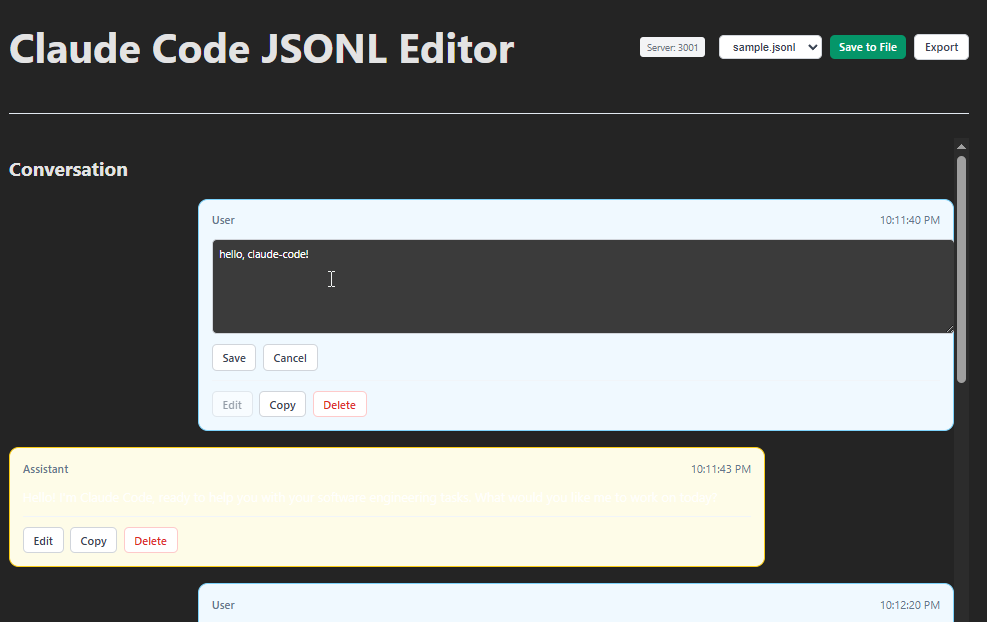
🚀 Interactive JSONL editor for Claude Code conversation files with real-time file system synchronization.
Why? Core Concept & Philosophy
Efficient Prompt Engineering Through Conversation Editing
Editing Claude Code logs (JSONL files) makes prompt engineering significantly more efficient through a powerful technique: output modification. This approach enables infinite iteration and refinement of AI interactions without starting from scratch.
The Philosophy
Traditional prompt engineering requires:
- Write prompt → Get response → Analyze → Rewrite entire prompt → Repeat
Our approach enables:
- Write prompt → Get response → Edit the response directly → Continue conversation → Infinite refinement
Why This Works
- Context Preservation: By editing assistant responses in the conversation log, you maintain the full context while perfecting the output
- Iterative Refinement: Transform mediocre responses into perfect ones without losing conversation flow
- Prompt Engineering Acceleration: Test different response styles and approaches by editing outputs, then use successful patterns in future prompts
- Training Data Creation: Build high-quality conversation datasets by refining real interactions
- Debugging Conversations: Fix errors or improve responses retroactively to understand what works
Practical Applications
- Template Creation: Edit responses to create reusable conversation templates
- Response Quality Control: Perfect Claude's outputs for documentation or examples
- Conversation Branching: Edit responses to explore different conversation paths
- Prompt Pattern Discovery: Identify what response styles work best for specific use cases
- Knowledge Base Building: Curate high-quality Q&A pairs from real interactions
By making conversation editing as simple as chat editing, this tool transforms how you work with AI conversations - from linear interactions to iterative masterpieces.
Features
- 📝 Interactive Chat Interface - Edit conversations in a familiar chat-style UI
- 💾 Real-time File Sync - Direct file system editing with automatic backups
- 🔧 Multi-file Support - Handle single files or entire directories
- ✏️ Rich Editing - Edit, copy, delete messages with inline editing
- 🌐 Network Access - Expose to network for remote editing
- 🎨 Beautiful CLI - Colorful, informative command-line interface
- 🔒 Safe Operations - Automatic backup creation before saves
Installation
One-Line Install (Recommended)
curl -fsSL https://raw.githubusercontent.com/anthropics/claude-code-jsonl-editor/main/install.sh | bash
After installation, reload your shell or add ~/.local/bin to your PATH:
export PATH="$HOME/.local/bin:$PATH"
Manual Installation
# Clone the repository
git clone https://github.com/anthropics/claude-code-jsonl-editor.git
cd claude-code-jsonl-editor

# Install dependencies
npm install

# Start the application
npm start
Quick Start
# Start with default samples directory
jsonl-editor

# Start with specific file
jsonl-editor -p ./conversation.jsonl

# Start with directory
jsonl-editor -p ./conversations

# Expose to network
jsonl-editor --expose
Upgrading
# Using the same install command will upgrade existing installation
curl -fsSL https://raw.githubusercontent.com/anthropics/claude-code-jsonl-editor/main/install.sh | bash
Uninstalling
# Download and run uninstall script
curl -fsSL https://raw.githubusercontent.com/anthropics/claude-code-jsonl-editor/main/uninstall.sh | bash

# Or if you have the repository
bash uninstall.sh
CLI Options
jsonl-editor [options]

Options:
  -p, --jsonl-path <path>    Path to JSONL file or directory
  -P, --port <port>          Server port (default: 3001)
  --client-port <port>       Client port (default: 5173)
  --host <host>              Host to bind to (default: localhost)
  --expose                   Expose to network (same as --host 0.0.0.0)
  --no-backup                Disable automatic backup creation
  --server-only              Start only the server
  --client-only              Start only the client
  -v, --verbose              Enable verbose logging
  -q, --quiet                Suppress non-error output
  -h, --help                 Display help information
Examples
# Start with default samples
jsonl-editor

# Edit specific file
jsonl-editor -p ./conversation.jsonl

# Edit directory of files
jsonl-editor -p ./jsonl-files

# Network access
jsonl-editor -p ./data --expose
jsonl-editor -p ./data --host 192.168.1.100

# Custom ports
jsonl-editor -p ./data --port 4000 --client-port 8080

# Server only mode
jsonl-editor -p ./data --server-only

# Verbose logging
jsonl-editor -p ./data -v
Project Structure
claude-code-jsonl-editor/
├── src/                    # Frontend source
│   ├── components/        # React/Preact components
│   ├── utils/            # Utilities and parsers
│   └── types.ts          # TypeScript definitions
├── samples/              # Default sample files
├── public/               # Static assets
├── server.js             # Express API server
├── start.js              # CLI entry point
└── package.json          # Project configuration
Development
# Start development with file watching
npm run dev

# Build for production
npm run build

# Run server only
npm run server

# Run client only
npm run client
API Endpoints
GET /api/config- Get server configurationGET /api/files- List available filesGET /api/files/:filename- Read file contentPOST /api/files/:filename- Save file content
File Format
The editor works with Claude Code JSONL files containing conversation entries:
{"type":"summary","summary":"General Project Development","leafUuid":"..."}
{"type":"user","message":{"role":"user","content":"Hello, claude-code!"},"uuid":"...","timestamp":"..."}
{"type":"assistant","message":{"role":"assistant","content":"Hello! How can I help?"},"uuid":"...","timestamp":"..."}
License
MIT License - see LICENSE file for details.
Contributing
- Fork the repository
- Create a feature branch
- Make your changes
- Add tests if applicable
- Submit a pull request
Support
- 📖 Documentation: See inline help with
jsonl-editor --help - 🐛 Issues: Report bugs on GitHub Issues
- 💬 Discussions: GitHub Discussions for questions
Built with ❤️ for the Claude Code community
Related projects
- ai-bwrap — Run AI coding agents (Claude Code, opencode, Grok, ...) inside a bubblewrap sandbox — one wrapper, any agent.
- opencode-bwrap — Run opencode inside a bubblewrap sandbox — confine AI file access to your current working directory
- agent.txtar — Portable text block for giving structured context to AI agents — embed anywhere, parse anywhere
Yorumlar (0)
Yorum birakmak icin giris yap.
Yorum birakSonuc bulunamadi