ai-agent
Health Warn
- License — License: MIT
- Description — Repository has a description
- Active repo — Last push 0 days ago
- Low visibility — Only 5 GitHub stars
Code Pass
- Code scan — Scanned 12 files during light audit, no dangerous patterns found
Permissions Pass
- Permissions — No dangerous permissions requested
No AI report is available for this listing yet.
可扩展的本地 AI Agent:模块链内核 + 插件系统 + 上下文管理 + 工具执行 + Web 界面。
English | 中文
AI Agent
An extensible, composable AI Agent foundation
Runs locally or as a service. Inspectable execution, controlled writes.
Extend and compose models, tools, plugins, and business integrations.


Download
Open Releases, choose a version, and download from Assets.
Windows
ai-agent-<version>-full-pack-windows.zip
For first-time use. Unzip and runagent-gui.exe.ai-agent-<version>-update-pack-windows.zip
Only for automatic updates of an installed copy. It cannot run standalone.
macOS
ai-agent-<version>-full-pack-macos.zipai-agent-<version>-update-pack-macos.zip
macOS packages are not built yet. Current releases provide Windows packages only.
Highlights
- Local-first, model-endpoint agnostic — sessions, files, tools, and write gates run on the local machine. Configure model endpoints and reasoning levels as needed.
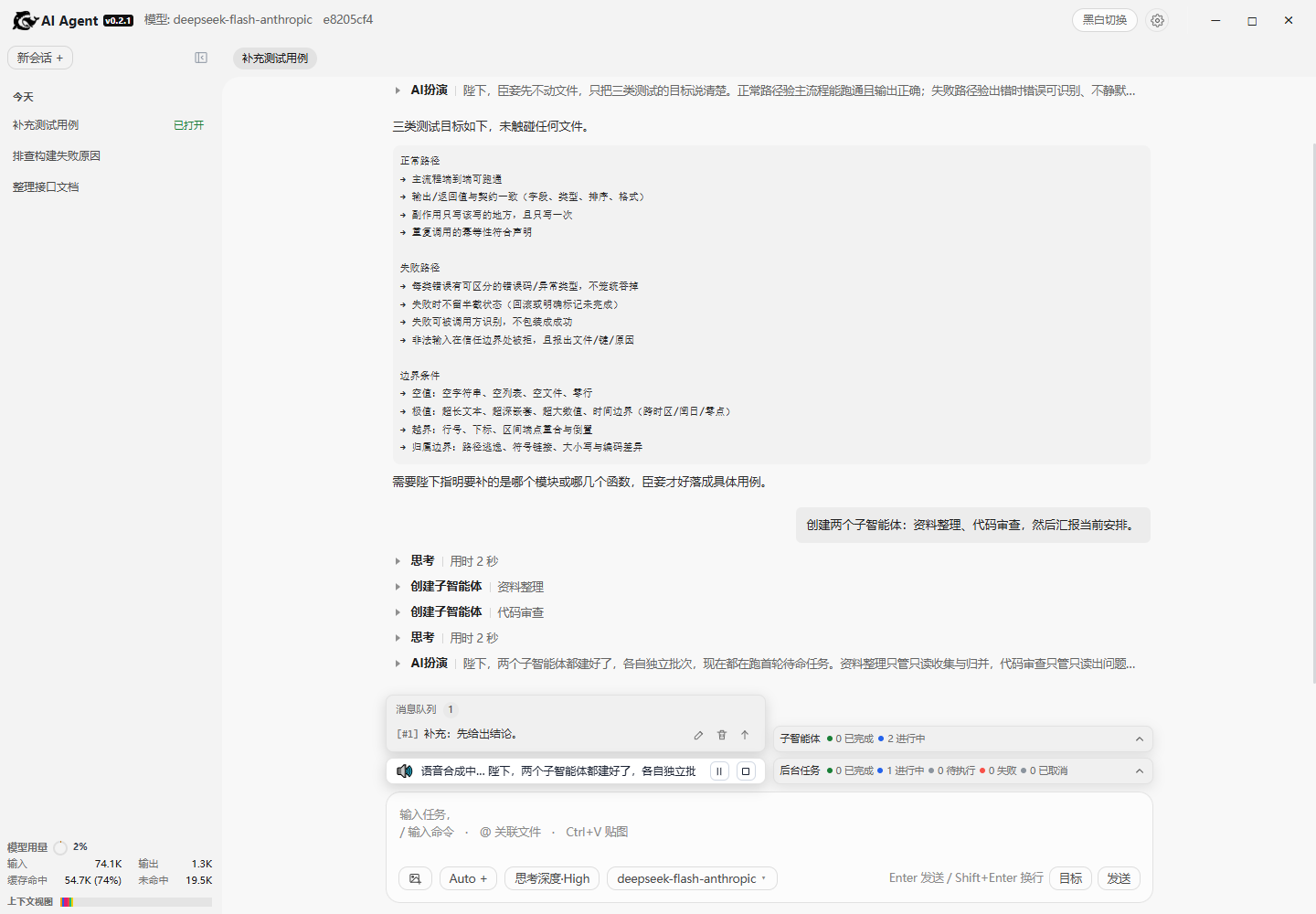
- Four entry points, one kernel — desktop GUI, Web UI, interactive terminal, and headless execution share sessions, tools, and gates. Switching entry points does not change behavior.
- Service-ready — the kernel is not tied to a UI. The Web entry provides local HTTP/SSE and health checks. The headless entry targets scripts, CI, tickets, and external systems. Plugins can add their own HTTP endpoints.
- Access control — browser login, one-time GUI auto-login, scrypt passwords, HttpOnly sessions, CSRF, scoped tokens, login rate limiting, and TLS for public bindings.
- Plugin extensions — tools, executors, context, prompts, gates, model catalogs, HTTP endpoints, and UI assets can be added without changing the kernel. Built-in plugins include Skills, Rules, Knowledge, Multi-model, Visual Operator, and AI Speak.
- Visual operation — continuous visual capability; after authorization, operate the system smoothly, with takeover available at any time and a traceable process. (Windows only for now.)
- Multi-agent collaboration — subagents are created in batches with independent sessions and role-specific tool views. Parent/child messaging, queues, and work reports are supported.
- Manageable long-running work — background tasks are isolated per session with concurrency limits, timeouts, cancellation, and output retrieval. Goals, todos, and message queues support multi-turn progress.
- Scheduled wakeups — register relative or absolute wake jobs; the host delivers them after the turn ends and the target is idle or queued.
- Four-step writes — preview → review → commit → re-read, so changes are confirmed before they land; automatic backup before edits makes failures and wrong results rollback-safe, and deletions go to the recycle directory.
- Context management — segment budgets, over-budget summaries, context usage, and request snapshots. Persisted fact streams and SSE resume by event coordinates.
- Safe updates — update-pack hash checks, staging, health checks, and rollback on failure. Regular files are replaced;
*.inifiles merge user settings.
Plugin architecture
A plugin is the install/enable unit; the plugin tree is the contribution view, and the slot tree (SlotTree) is the assembled result. The whole app is recursively assembled from the startup tree; it is not a fixed app with an extension point. Kernel, host, tools, and shell are startup slots; plugins replace or add nodes before assembly. App is only the facade; boot_app() reads the tree, merges overrides, and assembles recursively.
Startup flow (whole app)
App starts
  |
  |-- read agent/boot/slot_tree.json
  |     `-- base tree: kernel / host / tools / shell / facade
  |
  |-- scan plugins/
  |     |-- plugins.ini           enable + order
  |     `-- plugin-assembly.json  extra plugin assembly declarations
  |
  |-- merge
  |     |-- replace / add app/... subtree
  |     `-- auth: host-owned, not a SlotTree replaceable subtree
  |
  `-- SlotTree recursive assembly
        |
        v
     App facade ready (no component list)

App runtime
  plugin.py -- register(ctx) --> backend slots / UI slots / settings / routes
                                `-- dynamic nodes attach to the same SlotTree
Plugin directory:
plugins/<name>/
  plugin.py             register(ctx)
  plugin-ui.json        UI slots
  plugin-assembly.json  startup slot overrides; presence auto-loads
  plugin-meta.json      identity / auto_load
  plugin-config.ini     plugin configuration
  ui/                   panel assets
Startup slots can be replaced and an app/... subtree can be added; auth is host-owned and not a replaceable SlotTree subtree. No edit to slot_tree.json or plugins.ini is needed; enabled = 0 still disables.
Quick start
Desktop
Keep the project directory intact and double-click agent-gui.exe in the root.
Requires Python 3.10+ and WebView2. The first run prepares pywebview online. The desktop shell uses fixed port 3156.
Command line
Install:
python3 -m pip install -e ".[gui,tts]" -c constraints.txt
Web UI
agent-web --host 127.0.0.1 --port 8765
Open http://127.0.0.1:8765/. On Windows, double-click start.bat; on Linux/macOS, run ./start.sh.
Interactive terminal
agent-cli
agent-cli --session <session-id>
Headless execution
agent-headless "question"
agent-headless --session <session-id> "question"
Prints the event stream and session ID. Suitable for tickets, troubleshooting, CI, and scripts.
Desktop window
python3 -m agent.gui.launcher
Uses port 3156; independent of agent-web on 8765.
Documentation
Documentation is available in English and Chinese; English pages are canonical.
User guides
| Document | Contents |
|---|---|
| Configuration | Configuration keys, launch arguments, environment variables |
| Desktop entry | agent-gui.exe, Python desktop shell, prerequisites |
Developer documentation
| Document | Contents |
|---|---|
| Architecture | Plugin tree, five-layer base, module chain, ports, event protocol, state lifecycle |
| Engineering standards | Module structure, single responsibility, asset ownership, extension paths, gates |
| Glossary | Project-specific terms |
| Kernel | Module contracts, chain executor, host loop |
| Context | Three-part assembly, segment accounting, compaction and summaries |
| Model calls | Request bodies, streaming, tool-call merging, error mapping |
| Tools | Registration, execution pipeline, four-step write protocol, built-in tools |
| Plugins | Plugin packages, contributions, UI assets, lifecycle, boundaries |
| Knowledge | File ingestion, selection state, injection, endpoints |
| Multi-model | Catalog entries, settings forms, model pickers |
| Skills | Three-layer disclosure, built-in/external sources, skills tool |
| Rules | rules/ markdown injection and hot toggle |
| Visual Operator 2.0 | Continuous frames, focus, authorization, mouse/keyboard tools |
| AI Speak | Text normalization, speech synthesis, plugin events, player |
| Sessions and collaboration | Fact logs, cross-process locks, runtime registry, collaboration mesh |
| Subagents | Parent/child sessions, batches, tool visibility, messaging |
| Shell | HTTP routes, SSE, UI bundling, adapter layer |
Internal design notes
Design records and trade-offs, not user manuals.
Expand design notes| Document | Contents |
|---|---|
| Background tasks | Per-cid queues, concurrency limits, timeouts, cancellation, output, aggregate notices |
| Software updates | Version checks, hash validation, per-file switch, backup, rollback |
| Conversation queue | Busy-time enqueue, turn-end delivery, safe insertion, edit recovery |
| History paging | Turn paging, cursors, prepend, delayed rendering of oversized payloads |
| Session storage refactor | Incremental append, 10K character windows, round ranges, no full reads, bounded concurrency |
| Multi-model | Model catalogs, provider routing, protocol adapters |
| AI Speak | Text slicing, SSE, player design |
| Visual Operator interaction | Screenshots, UIA, coordinate-control decisions |
| Visual Operator | Visual Operator design record |
| CLI confirmation backlog | Two-stage confirmation gap in the CLI |
| ADR: plugin subprocess isolation | Isolation decision record |
| Document | Contents |
|---|---|
| Standard applicability | N/A 申报与风险承担者 |
| Context dump | 上下文请求视图与导出 |
| Context compression tool | 压缩上下文工具 |
| HTTP authentication | 登录、Token、Cookie、CSRF 与路由策略 |
| Subagents | 父子会话、批次与消息投递 |
| Wake scheduler | 定时唤醒与重试 |
| Quality gates | 门禁、预算与跳过规则 |
| Silent exceptions | 静默异常判据与留痕 |
| Write gate | 写类工具的四步门禁 |
| Visual Operator subsystem | Screenshots, coordinate contract, platform backends |
| Complexity inventory | 超阈值文件与拆分理由 |
| Unit-test catalog | 测试名称、数量与分层 |
Environment
Dependencies use a lock file shared with CI:
pip install -e . -c constraints.txt
CI
scripts/ci.py runs 37 steps: 24 gates → unit tests → 10 acceptance scripts → coverage collection → package coverage.
The 24 gates cover dependency direction, architecture constraints, config drift, generated-doc consistency, static checks, UI/copy, complexity, applicability, slot config, slot field whitelist, effective view, slot replaceability (stub injection), retired-field sweep, and concurrency. Run --list for the full list.
The single source of truth for gates is scripts/ci_steps.py, kept aligned with GitHub Actions by check_ci_workflow.
python scripts/ci.py           # all checks
python scripts/ci.py --fast    # skip acceptance
python scripts/ci.py --list    # list checks
Tests
docs/unit-tests.md is a generated readable test catalog; the source of truth is tests/.
Unit tests (2474 cases):
python -m unittest discover -s tests -p "test_*.py" -t tests
Debugging tools
Dump the real request context of a session:
python scripts/dump_context.py --cid <session-id> --format json --out context.json
Inspect context segments and compaction decisions:
python scripts/inspect_compact.py                 # list sessions with logs
python scripts/inspect_compact.py <session-id>    # inspect one
python scripts/inspect_compact.py <session-id> --digest
Audit local JS event bindings:
python scripts/scan_js_events.py
Author
- Author: Fan
- Email: [email protected]
License
MIT License. Third-party notices are in NOTICE.
Reviews (0)
Sign in to leave a review.
Leave a reviewNo results found