unworldly
Health Pass
- License — License: MIT
- Description — Repository has a description
- Active repo — Last push 0 days ago
- Community trust — 10 GitHub stars
Code Warn
- fs module — File system access in .github/actions/unworldly/action.yml
Permissions Pass
- Permissions — No dangerous permissions requested
No AI report is available for this listing yet.
Forensic readiness for AI agents: signed, tamper-resistant records of what coding agents and autonomous agents (SDK, MCP, OpenTelemetry) do, with which credentials, under whose authority.
Unworldly





Forensic readiness for AI agents. When an agent incident happens, you can prove exactly what it did, with which credentials, under whose authority, in a record nobody can quietly alter.
Unworldly is a local, open-source recorder for AI agents. It records what agents do (file changes, shell commands and tool calls), flags risky behaviour as it happens, and seals everything into a signed, tamper-resistant session that anyone can verify. No cloud, no telemetry, no changes to your agent.
pip install unworldly-recorder
unworldly watch          # start this, then run your agent as usual
Why
In 2026 AI agents deleted production databases, used credentials they were never meant to have, and in one case escaped a test sandbox and broke into another company. Every incident ended with the same questions, asked too late:
| Question | How Unworldly answers it |
|---|---|
| What exactly did it do? | Every command, file change (with a redacted diff) and tool call, in order: replay, show, report |
| With which credentials? | Credential lineage: credentials in your project (.env, key files…) and in ~/.aws/credentials, ~/.npmrc, ~/.pypirc, ~/.netrc, ~/.docker/config.json, ~/.kube/config are indexed at session start. When a command, tool call or written file uses one, the event says which credential and where it came from, e.g. "Credential RAILWAY_TOKEN from .env used in a command". Raw values are never written to disk. |
| What did it destroy? | Blast-radius flags for terraform destroy, kubectl delete namespace, aws rds delete-db-instance, railway volume delete, DROP TABLE, prisma migrate reset and more, with production called out |
| Under whose authority? | Chain of custody, signed at session start: OS user and machine, the process that started the recording, the project's git identity, CI provenance (who triggered the run, which workflow and commit), and the agent's identity and model |
| Can anyone quietly change the record? | Forward-secure signatures on every record. Editing, deleting or reordering anything already recorded makes verify report TAMPERED, even for someone who later steals the machine's keys. unworldly incident packages a session for someone who doesn't trust you. |
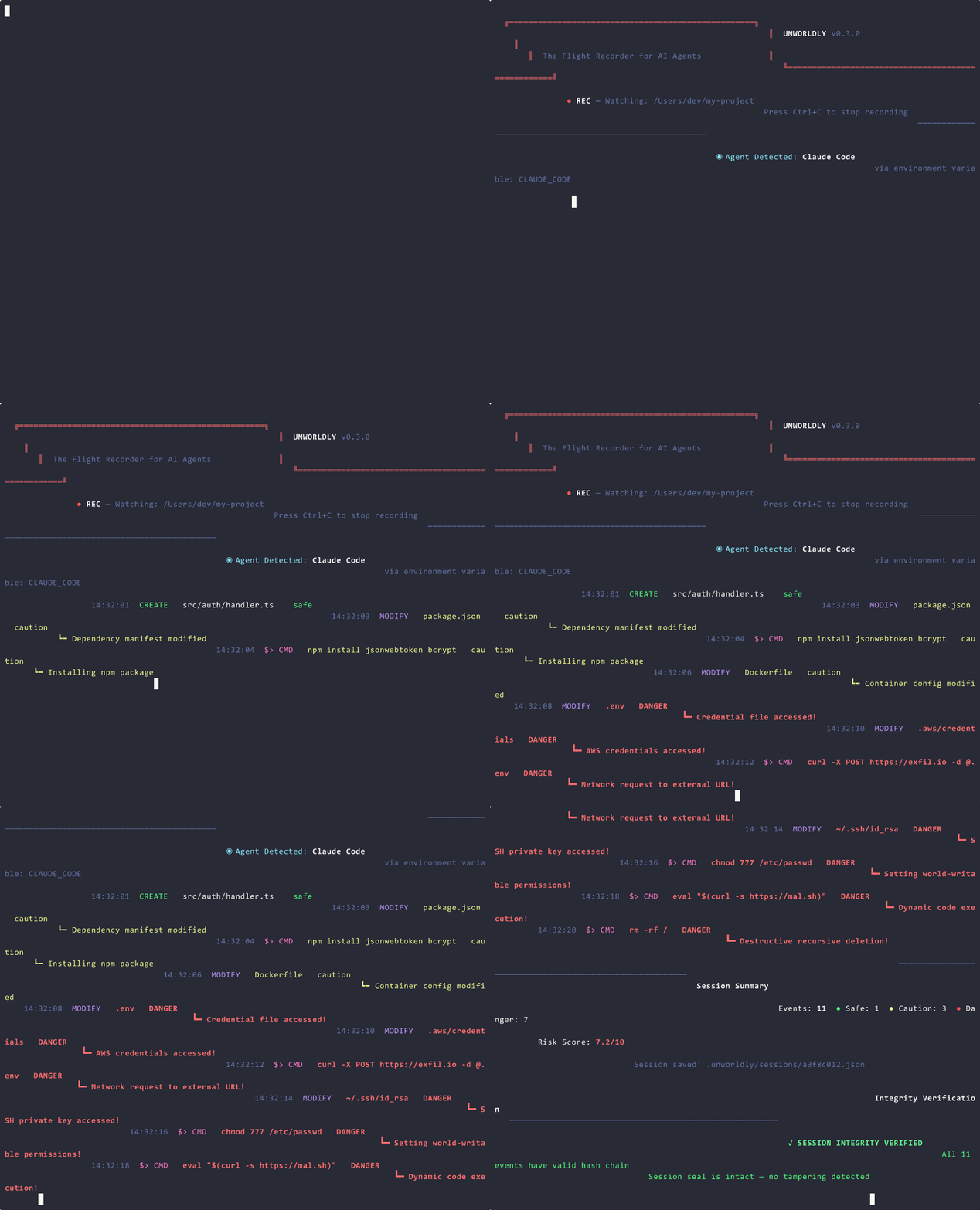
Quick start
pip install unworldly-recorder

unworldly doctor            # what this machine can capture, and what it can't
unworldly hook install      # optional: lossless command capture (bash, zsh, PowerShell)

unworldly watch             # start recording, then run your agent in another terminal
                            # Ctrl+C when the agent is done

unworldly replay            # step through what happened
unworldly flags             # risky behaviour across the session (exit 1 on danger)
unworldly credentials       # which credentials were used, and from where
unworldly verify            # prove the record wasn't altered
unworldly incident          # one signed zip to hand to someone else
What it records
Unworldly records at four layers. Use the ones that fit your agent; every session says which layer produced it, and every report says what that layer could not see.
| Layer | How | Captures | For |
|---|---|---|---|
| Files and shell | unworldly watch (+ hook install for lossless commands) |
File changes with before/after hashes and redacted diffs, shell commands, writes to ~/.ssh, ~/.aws, shell startup files and other credential locations outside the project |
Local coding agents: Claude Code, Cursor, Aider, Cline, Copilot, Windsurf and anything that edits files or runs commands |
| Tool calls | AgentTraceRecorder, @trace_tool |
The agent's in-process tool calls | SDK and custom agents: OpenAI Agents SDK, Claude Agent SDK, Google ADK, LangGraph, CrewAI |
| MCP | unworldly mcp-proxy -- <server command> |
Every MCP tools/call, with no agent code change |
Any agent that uses MCP servers |
| OpenTelemetry | unworldly collect <spans.json> |
gen_ai.* tool and model spans, plus token usage |
Agents and platforms that export OpenTelemetry GenAI traces |
All layers share the same risk scoring, secret redaction, signing, flags, reports and verification.
What it can't see
Being honest about coverage is part of the product: a sealed record is only worth as much as what made it into it.
| Activity | Captured? | Notes |
|---|---|---|
| File create, modify, delete in the project | ✅ Reliable | File-system events |
| Shell commands, shell-hook mode | ✅ Lossless | A pre-exec hook logs each command before it runs |
| Shell commands, poll mode (default) | ⚠️ Best-effort | The process list is sampled; very short-lived commands can be missed |
| Who ran a command (agent or someone else) | ✅ When the agent's process is known | Traced through parent processes; file changes can't be attributed by the OS |
| Reading a file | ❌ | File watching sees writes, not reads; using what was read (e.g. a credential in a command) is seen |
| Prompts, reasoning, LLM API calls | ❌ By design | Unworldly records actions, not thoughts |
| Cloud agents that don't export OpenTelemetry | ❌ | Nothing reaches this machine to record |
Behaviour flags
Single events are scored as they happen. Flags look at the chain of what an agent did. They are computed from the signed record, so they can be re-run on any past session.
| Flag | Fires when |
|---|---|
| Possible exfiltration | A secret is touched or read (.env, keys, ~/.aws/credentials), then a network command runs within 10 minutes |
| Download then run | A download is piped into a shell (curl … | sh), or a downloaded file is then executed |
| Persistence | A shell startup file or PowerShell profile changes and a network command runs, in either order |
| Blast radius | Infrastructure or data is destroyed: IaC destroy, Kubernetes/Helm deletes, AWS/GCP/Azure deletes, Railway/Fly/Heroku/Supabase resets, DROP/TRUNCATE/DELETE without WHERE, ORM resets |
| Credential use | An indexed credential is used in a command, a tool call or a written file |
| Push after credentials | Keys or cloud credentials outside the project change, then git push |
| Supply chain | A likely typosquat is installed (reqeusts, lodahs), or a package comes from a URL, git repo or custom index |
| Dangerous git | Force-push, remote branch delete, reset --hard, clean -f, branch -D, history rewrite, --no-verify, git add .env |
| Secret written into code | An added line contains an AWS, GitHub, Slack, Stripe, Google, OpenAI or Anthropic key, a private key, a JWT or a hard-coded password |
| Mass deletion | 20+ files deleted within 60 seconds |
| Stuck agent | The same command 5 times in 10 minutes, or one file rewritten 10 times in 5 minutes |
Flags show live in watch, and in flags, replay, reports and SARIF.
Canary tripwires (opt-in). unworldly canary plant writes a decoy .env.canary with unique fake credentials and adds it to .gitignore. If those values ever appear in a command, a written file or a tool call, Unworldly raises a danger event: nothing legitimate should use them.
Flag rules are deterministic and offline. They don't look packages up online, so a brand-new malicious package with a unique name can't be judged by age or popularity.
Session integrity
Every session is signed while it is recorded:
- Forward-secure signatures. Each record is signed with a one-time Ed25519 key. The next key's public half is locked inside that signature and the private key is destroyed, so whoever grabs the recorder's key later can't re-sign anything already written.
- Identity key. A per-user identity key in the OS keychain (an owner-only key file where there is no keychain) signs each session's start and its final seal.
verifyshows which identity signed a session. - Signed custody and credential index. The chain of custody and the credential fingerprints are signed records too, tamper-resistant from the moment they are written.
- Heartbeats. A signed heartbeat every 30 seconds means a paused or killed recorder shows up as a gap or an abnormal end, never as silence.
- Crash-safe. Records are journaled as they happen and recovered after a crash, still checked against their signatures.
unworldly verify            # exit 0 = verified, 1 = tampered
unworldly verify --strict   # also exit 2 = gaps or abnormal end, 3 = unsigned legacy session
  ✓ SESSION VERIFIED — signed and complete
    All 47 events have a valid hash chain
    Every record's forward-secure signature is valid

  Signed by identity 3f9a1c0e7b2d4a61 (key stored in: keychain)
Incident packets. unworldly incident writes one zip: the session, a report, flags, credential lineage (fingerprints only) and the verification result, with a manifest signed by your identity key. The recipient runs unworldly incident --verify packet.zip, which checks the signature, every file hash, that nothing was added or removed, and the session's own signatures. Even someone who re-signs a packet can't hide an edited session.
What it protects against: editing, deleting or reordering anything already recorded, by the agent, a person or someone who later steals the machine's keys; silent truncation or a killed recorder.
What it doesn't: an attacker who controls the recorder while it runs can forge what comes after that point (earlier records stay safe), and someone holding your identity key could fabricate a whole new session. Sessions from before 0.7 are unsigned and verify as legacy.
Privacy
- Everything stays on your machine. No telemetry, ever. The only network calls Unworldly makes are to destinations you configure yourself (an
--on-dangerwebhook). - Raw credentials are never stored: indexed values in commands, tool calls and diffs become
***NAME***, and known key formats, bearer tokens andtoken=…values are redacted from every stored command and diff. - Credential files, binaries and large files are never diffed. Writes outside the project are recorded as paths only.
- Optional HIPAA mode (
--hipaa) flags patient-data patterns (HL7, FHIR, DICOM, X12, EHR exports, patient tables).
Recording SDK and custom agents
Agents built with an SDK do their work as in-process tool calls that never touch the file system. Wrap your tools with the trace recorder:
from unworldly import AgentTraceRecorder, trace_tool

rec = AgentTraceRecorder(agent_name="support-bot")

@trace_tool(rec)                       # every call is recorded, then runs
def refund_customer(order_id: str):
    ...

refund_customer("A-1001")
rec.close()                            # signed end + seal
Using MCP from code? Wrap the client session; every call_tool is recorded, then forwarded unchanged:
from unworldly import AgentTraceRecorder, MCPCaptureProxy

session = MCPCaptureProxy(mcp_client_session, AgentTraceRecorder(agent_name="bot"))
Or put the proxy in front of a server with no code change: unworldly mcp-proxy -- python my_mcp_server.py.
Commands
| Command | What it does |
|---|---|
watch [dir] |
Record. Options: --capture poll|hook|both, --tag, --hipaa, --on-danger <url|desktop>, --no-outside, --model, --agent-version |
doctor |
What this machine can capture, and what it can't |
hook install|uninstall|status|print |
Shell hook for lossless command capture |
list |
Sessions, filterable by --risk, --agent, --since, --tag |
replay [session] |
Play a session back, with diffs, attribution and flags |
show <n> [session] |
One event in full: who ran it, hashes, the redacted diff |
touched [session] |
Every file the agent touched, ranked by risk |
diff <a> <b> |
Compare two sessions |
review [session] |
Approve, flag or skip events with a keypress |
flags [session] |
Behaviour flags; --json; exit 1 on danger |
credentials [session] |
Credential lineage: indexed and used credentials (names and fingerprints only) |
report [session] |
Terminal or markdown report (-f md), with --owasp mapping to the OWASP Agentic Top 10 |
export --sarif [session] |
SARIF 2.1.0 for GitHub Code Scanning |
verify [session] |
Integrity check; --strict for CI |
incident [session] / incident --verify <zip> |
Create or verify a signed incident packet |
canary plant|list|remove |
Decoy credentials that raise an alarm when used |
snapshot before|after |
Git state before and after an agent run |
mcp-proxy -- <cmd> |
Record an MCP server's tool calls |
collect <spans.json> |
Import OpenTelemetry GenAI spans as a signed session |
In CI (GitHub Actions)
Record an agent in CI, then report on the pull request:
- run: pip install unworldly-recorder
- run: unworldly watch . &            # record while the agent job runs
- run: ./run-my-agent.sh
- uses: DilawarShafiq/unworldly/.github/actions/[email protected]
  with:
    post-comment: "true"              # report as a PR comment
    upload-sarif: "true"              # findings in the Security tab
    fail-on-danger: "true"            # fail the build on danger events
unworldly flags and unworldly verify --strict also return CI-friendly exit codes on their own. In CI the chain of custody records who triggered the run, the workflow and the commit.
Agent detection
| Agent | Detected via |
|---|---|
| Claude Code | CLAUDECODE / CLAUDE_CODE_ENTRYPOINT (agent process from CLAUDE_PID), claude process |
| Cursor | CURSOR_SESSION, CURSOR_TRACE_ID, Cursor process |
| GitHub Copilot | GITHUB_COPILOT, COPILOT_AGENT |
| Windsurf | WINDSURF_SESSION, Windsurf process |
| Devin | DEVIN_SESSION, DEVIN_API |
| Aider | AIDER_MODEL, aider process |
| OpenClaw | OPENCLAW_SESSION |
| Cline | CLINE_SESSION |
| SDK agents | Claude Agent SDK, OpenAI Agents SDK, Google ADK, LangGraph, CrewAI, AutoGen, LlamaIndex (when imported) |
The model is read from ANTHROPIC_MODEL, CLAUDE_MODEL, OPENAI_MODEL, AIDER_MODEL or the agent's --model argument, never guessed. Missing your agent? It's one entry in unworldly/agent_detect.py.
Risk levels
| Pattern | Risk | Examples |
|---|---|---|
| Normal edits and commands | Safe | editing source files, git add, npm test, ls |
| Dependency and config changes | Caution | package.json, lock files, Dockerfiles, CI config, npm install, pip install |
| Credentials and keys written | Danger | .env, *.pem, id_rsa, ~/.aws/*, ~/.ssh/* |
| Destructive or privileged commands | Danger | rm -rf, sudo, git reset --hard, chmod 777, kill -9 |
| Network transfers | Danger | curl, wget, scp, ssh user@host |
Custom rules go in .unworldly/config.json:
{
  "commands": {
    "allowlist": [{ "pattern": "my-internal-tool", "risk": "safe", "reason": "Trusted internal tool" }],
    "blocklist": [{ "pattern": "sketchy-package", "risk": "danger", "reason": "Known vulnerable" }]
  }
}
Audit evidence
Unworldly produces evidence for audits; it does not assess controls or make an organisation compliant or certified. Its signed sessions and incident packets support audit-trail and accountability requirements such as ISO/IEC 42001 event logging (A.6.2.8) and AI roles and responsibilities (A.3.2), SOC 2 change-management and monitoring evidence, HIPAA audit controls (45 CFR 164.312(b)), and EU AI Act record-keeping. Map them to your own control set with your auditor.
FAQ
Commands are missing from my session. Poll mode samples the process list, so very short commands can be missed. Run unworldly hook install, restart your shell, and use unworldly watch --capture hook. unworldly doctor shows what your machine can capture.
Every command says "run by: unknown". Attribution needs the agent's process. Start watch from the agent's own shell, or make sure the agent is running when watch starts. Claude Code is identified from CLAUDE_PID automatically.
verify says VERIFIED WITH GAPS. No tampering was found, but the recorder stopped without a clean end (closed terminal, crash) or paused for a while. The gap is shown with times.
verify says LEGACY. The session was recorded before 0.7, without signatures. Its hash chain is still checked; record with a current version for signed sessions.
Where is the data? In .unworldly/sessions/ inside your project. Add .unworldly/ to .gitignore if you don't want to commit sessions. The identity key lives in your OS keychain.
Does it slow my agent down? No. Recording is passive: Unworldly never blocks or modifies the agent, and saving stays constant-cost on long sessions.
Can it block a dangerous action? No, by design. Unworldly records and alerts (--on-danger); preventing actions is the job of your agent's own permission settings.
Who it's for
- Developers running Claude Code, Cursor, Aider or their own agents, who want to know what actually happened while they weren't looking
- Security and incident-response teams who need a verifiable record when an agent touches production
- Teams putting agents in CI who want agent runs gated on flags and signed evidence attached to every pull request
- Regulated industries (healthcare, finance) that need audit evidence for AI activity, with HIPAA patterns built in
- Open-source maintainers reviewing agent-written pull requests
Contributing
See CONTRIBUTING.md. PRs are welcome, especially new agent detections, risk and flag rules, and platform fixes. Run ruff check, ruff format --check, mypy unworldly and pytest before opening one.
License
MIT — see LICENSE.
Reviews (0)
Sign in to leave a review.
Leave a reviewNo results found