second-brain-workflow
Health Warn
- License — License: MIT
- Description — Repository has a description
- Active repo — Last push 0 days ago
- Low visibility — Only 5 GitHub stars
Code Pass
- Code scan — Scanned 12 files during light audit, no dangerous patterns found
Permissions Pass
- Permissions — No dangerous permissions requested
No AI report is available for this listing yet.
Second brain workflow for developers — turn coding sessions into a growing, versioned knowledge base for Cursor/Claude Code, plus portable rule rendering across agents
second-brain-workflow
Second brain workflow for developers.
Turn your coding sessions into a growing, queryable knowledge base — instead
of insights evaporating at the end of a chat, or piling up in one rules file
no one re-reads.
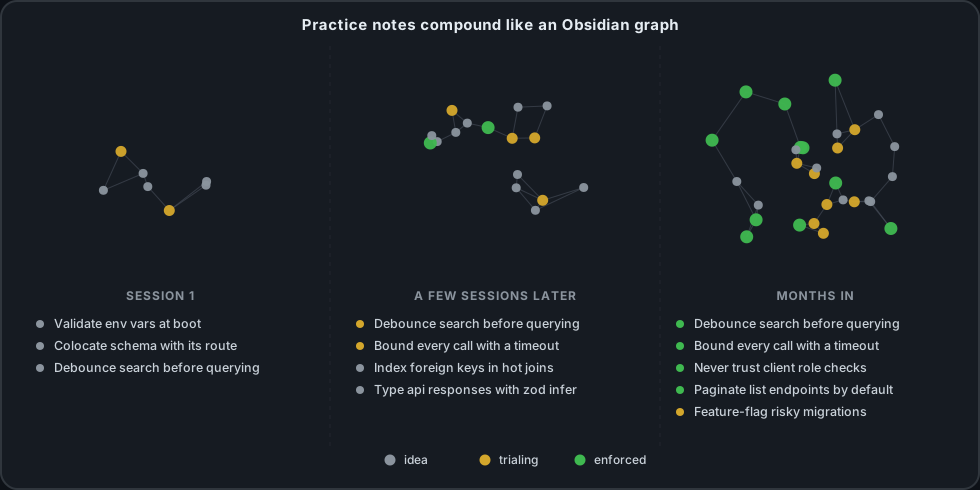
Illustrative, not the actual interface. The agent never browses a graph —
it reads the generated practices/INDEX.md, one row per note. Graph-view
browsing like this is for you, in Obsidian, over the same vault.
Say "update second brain" at the end of a session and an agent skill
mines what happened — a bug fixed, a design decision made, a pattern that
worked — into individual, versioned practice notes in an Obsidian vault.
Notes start as ideas and only mature to enforced once you've actually
re-applied them across a few repos, so the knowledge base tracks what's
proven, not just what was written once.
This repo is the generic engine that runs that loop: the agent skills,
rule rendering, and vault tooling, versioned here rather than trapped in an
editor's account sync. It ships with none of your own content — rules/ is
empty and there's no vault bundled — your actual conventions and vault are
expected to live in your own repo(s), private if you like, that this engine
points at.
What you get
- Capture what you learn —
update-second-brainis the only write path
for practice and daily-note content: captures a session into a daily note, proposes new practice
notes, promotes existing ones by evidence, then commits and pushes. See
Cold path. - Apply what you already know —
obsidian-knowledge-basefinds and
scores notes against the work at hand, read-only, so the agent applies what
you've already learned instead of re-deriving it every session. - Never lose a follow-up —
check-follow-upsscans recent daily notes'Follow-upssections and reports what's still open, walking back to the
last notes that actually exist rather than a fixed number of calendar days
— so it survives a weekend, a holiday, or a vacation gap the same way.
Anything still open outside that window ismake audit's job. See
Review loop. - One rule set, every agent — write short imperative rules once
(rules/*.md);render.pyemits Cursor's.mdc, Claude Code'sCLAUDE.md, and a portableAGENTS.mdfrom the same source, with
drift-checking for CI. See One rule set, every agent. - A vault per machine, safely isolated — a per-commit guard blocks a
practice learned on employer work from ever landing in a personal or
public repo. See A vault per machine.
Quickstart
git clone --recurse-submodules "https://github.com/dimeloper/second-brain-workflow.git"
cd second-brain-workflow
latest=$(git tag --sort=-v:refname | grep -E '^v[0-9]+\.[0-9]+\.[0-9]+$' | head -1)
echo "latest = $latest"                       # empty means no release yet
[ -z "$latest" ] || git checkout "$latest"    # omit these three lines to track main
git submodule update --init --recursive

# This machine's role. Both lines are meant to be edited.
vault_id=personal                             # personal, work, …
vault_path=~/vaults/second-brain

./scripts/init-vault.sh --path "$vault_path" --id "$vault_id" \
  --remote "[email protected]:YOUR_ACCOUNT/second-brain.git"
./scripts/sync-skills.sh
Edit vault_id/vault_path and substitute YOUR_ACCOUNT; the rest is
paste-and-run. On a work machine those are work and ~/vaults/work-brain —
following this section verbatim there gets you a vault whose id sayspersonal, which then has to be undone.
vault_id must match this machine's SBW_EXPECTED_VAULT_ID. Those two
disagreeing is the single most common way to end up with a setup that fails on
its first commit, so init-vault.sh writes both together when no config file
exists yet, and prints what it wrote:
Wrote /Users/you/.config/second-brain-workflow/config:
    # Written by init-vault.sh. See config.example for every key.
    SBW_VAULT=/Users/you/vaults/second-brain
    SBW_EXPECTED_VAULT_ID=personal
If a config file already exists it is never touched — you get told which line
to add instead. --no-config skips this entirely. Seeconfig.example for every key and
docs/NEW-MACHINE.md for writing it by hand.
See Versioning for the bump policy and how to pin or roll back
to a specific tag instead of the newest. --remote is only recorded, not
pushed to — create that repo yourself, private, first.
Then just work. Say "onboard repo" in a project to wire up rules, and
"update second brain" at the end of a session to capture it. See
docs/NEW-MACHINE.md for the full walkthrough,
including how to point at a separate private rules repo.
Hot path
Short, imperative rules (rules/*.md) and a portable AGENTS.md. The agent
loads these on relevant turns.
By default the engine looks for both as a sibling of its own checkout
(<engine>/rules, <engine>/AGENTS.md) — fine for a self-contained clone with
its own conventions committed alongside the tooling. To keep rules in a
separate repo instead (the common case if you want the engine itself public
while your conventions stay private), point at it:
SBW_RULES_DIR=~/dev-conventions/rules ./scripts/render.py --explain
or set it once in ${XDG_CONFIG_HOME:-~/.config}/second-brain-workflow/config (seeconfig.example). AGENTS.md is expected as SBW_RULES_DIR's
sibling — i.e. the rules repo's root, not inside rules/ itself. Precedence:--rules-dir flag > SBW_RULES_DIR env > config file > the
engine-relative default.
This is about where rules live. For exactly how one rule file becomes
Cursor's, Claude Code's, and AGENTS.md's native formats, see One rule set,
every agent.
Cold path (Obsidian vault)
Long-form practice notes live in your vault (practices/**) — ~/vaults/second-brain
by default, overridable via SBW_VAULT.
Agents start from the generated index practices/INDEX.md — one file listing
every note with its maturity, repo count, tags and a one-line rule — and open
individual notes only when a row looks relevant. Regenerate it with:
make vault-index          # or: ./scripts/build-vault-index.py [--vault PATH]
make vault-index-check    # fails if the index is stale
Three skills own the vault, and the read/write split is deliberate:
| Skill | Role |
|---|---|
obsidian-knowledge-base |
read only — find applicable notes, score work against them |
update-second-brain |
the only write path for content — daily note, practice proposals, promotions, commit, push |
check-follow-ups |
read only — unchecked ## Follow-ups items from recent daily notes |
Say update second brain at the end of a session to capture and publish it,
or check my tasks any morning to see what's still open. "Recent" is
deliberately narrow — a commitment that fell out of that window ismake audit's job instead (via check-followups.py), part of the
Review loop, not a skill.
Worked example
A daily note (2026-08-03.md) and a practice note it might produce, in full:
# 2026-08-03

## Built
- Added a request timeout to the payments client

## Follow-ups
- [ ] Add a test that fails without the timeout, per PR feedback
- [x] Bumped the client's retry count to match

## Practices followed
- bound-every-outbound-call-with-a-timeout

## Drift / gaps
-

## Vault candidates
- Bounding outbound calls with a timeout, seen twice now
---
domain: backend
applies-to: ""
maturity: idea
last-reviewed: 2026-08-03
repos: ["payments-service"]
tags: [resilience, http]
---

# Bound every outbound call with a timeout

**Rule:** Every HTTP client call to another service gets an explicit timeout;
never rely on the library's default (often "none").

**Why:** An unbounded call turns one slow dependency into an outage for every
request stacked up behind it.

**Example:**

```python
requests.post(url, json=payload, timeout=5)
```

**Observed in:** `payments-service`, 2026-08-03 — added after a provider
outage held requests open for minutes.

## Related
- [[probe-health-with-a-route-that-does-no-work]]
check-follow-ups would report the one open item above; update-second-brain
is what writes the practice note once a pattern like this repeats.
A vault per machine
One vault per machine, each with its own vault.json (id, remote):
./scripts/init-vault.sh --path ~/vaults/work-brain --id work \
  --remote "[email protected]:YOUR_ACCOUNT/work-brain.git"
This also installs guard-vault-commit.sh as the vault's pre-commit hook
(--no-hook opts out), so a hand-run git commit here is guarded even with
no agent involved.
The vault is the isolation boundary, not the rule set. Rules flow outward
freely: applying your own conventions to an employer's code is fine. The
direction that must never happen is a practice learned on employer work landing
in a personal or public repo — and that is a vault write. So every commit is
checked against the machine's expected vault identity:
./scripts/guard-vault-commit.sh --expect-id work
enforced three ways — a fast path built into update-second-brain, the
pre-commit hook above, and a CI backstop that's the only one of the three
that still catches git commit --no-verify. The expected id comes from the
machine's own config, never from the vault being checked, so a repointed or
freshly cloned vault can't vouch for itself. This is why there is no layer
system: the thing that needed isolating was the vault, and a per-commit
identity check does that directly, not a second rule tier. See
docs/GUARD.md for the full mechanics, the trust model
behind the identity check, and what make doctor verifies about a machine's
setup.
Review loop
Practice notes are the source: when one reaches maturity: enforced, a human
distills it into a rule, and source: in the rule's frontmatter records the
lineage. make audit is the review side of that — orphaned rules, stale
claims, thin evidence, an over-budget always-on rule set, and a follow-up
commitment still open past the recent window check-follow-ups already
covers — all read-only, none blocking except an orphaned rule. See
docs/AUDIT.md for what each check does and the CI template
that runs it weekly.
Skills
Local skills live under skills/ (categorized). Upstream skills are
vendored as a pinned submodule and installed by allowlist:
git submodule update --init
./scripts/sync-skills.sh         # or: make sync-skills
Already done by the Quickstart; re-run after a checkout that moves the
submodule's pin.
| Source | Contents |
|---|---|
skills/workflow/ |
Onboard, vault read/write, follow-up review, per-project MCP |
vendor/obsidian-skills/ |
kepano/obsidian-skills (MIT) — obsidian-bases, obsidian-markdown |
Skills published by a vendor are installed from that vendor, not copied here —
see skills/README.md.
Manual step, per machine. Railway's installer writes use-railway into~/.claude/skills/ only. To reach it from Cursor as well:
ln -s ~/.claude/skills/use-railway ~/.cursor/skills/use-railway
sync-skills.sh leaves that link alone — it points outside this repo, so it is
never repointed or pruned. Re-run the command after a fresh Railway install,
or run make doctor, which detects exactly this — a skill
present in one configured skills directory but missing from another, ours or
not — and prints the exact ln -s to fix it. Detection only; it never links
anything itself.
Skills install into every directory in SKILLS_DIRS, defaulting to~/.cursor/skills and ~/.claude/skills, so Cursor and Claude Code resolve the
same skills from one source. A local skill shadows a vendored one of the same
name. The sync never overwrites a real directory or a symlink owned by another
tool — it reports the conflict and exits non-zero.
Adjust what gets installed:
SKILLS_DIRS=~/.claude/skills ./scripts/sync-skills.sh
VENDOR_SKILLS="obsidian-bases obsidian-markdown obsidian-cli" ./scripts/sync-skills.sh
Removing them again
make uninstall            # print what would go, change nothing
make uninstall YES=1      # actually remove
Previewing is the default and --yes is the only thing that acts, because the
alternative is symlink archaeology: sync-skills.sh installs by name into
directories that also hold other tools' installs, so "delete the ones that look
like ours" is a guess. Each link is instead resolved to an absolute path and
compared against this checkout — never matched on the textsecond-brain-workflow, which a relative link like../../.agents/skills/find-skills doesn't contain at all.
It also removes links left dangling by a deleted checkout, which is the one
state nothing else can clean up: the path they name is gone, so the only
evidence is a target that no longer resolves plus this engine's skills layout.
Run it from any checkout — it does not need to be the one the links point into.
Never touched: a real directory (a hand-maintained skill), a link resolving
anywhere outside this checkout (another tool's install, such as Railway'suse-railway), the skills directories themselves, and a broken link that isn't
ours. It also does not remove your vault, your machine config, or the
rendered rules in repos you onboarded — delete .cursor/rules,.claude/rules, AGENTS.md, CLAUDE.md and .sbw-version per repo if you
want those gone.
Onboard a repo
Say onboard repo. The agent follows onboard-repo: syncs rules, adds a thin
project onboarding rule, points at vault practices, and wires project-scoped MCP.
Or manually:
./scripts/sync-rules.sh /path/to/target-repo
./scripts/sync-skills.sh   # once per machine, or after pulling skill changes
One rule set, every agent
rules/*.md (wherever SBW_RULES_DIR resolves to) is the canonical
source. scripts/render.py emits each agent's native format —sync-rules.sh is a thin wrapper around it:
---
paths:
  - "**/*.component.ts"
description: Angular component and reactivity conventions
---
| Target | Output | Always-on | Scoped |
|---|---|---|---|
cursor |
.cursor/rules/*.mdc |
alwaysApply: true |
derived globs string |
claude-code |
.claude/rules/*.md, root CLAUDE.md |
rule with no paths |
paths: passed through |
agents |
AGENTS.md |
whole file | — |
For a full worked example — one source file next to the exact .mdc and.claude/rules/*.md it produces — see
docs/NEW-MACHINE.md.
The source format is Claude Code's native shape, so that emitter is a
near-identity and Cursor's comma-separated globs is the derived one. That
direction is deliberate: a comma-separated string cannot carry a brace group
like {ts,tsx}, so making it canonical would forbid braces everywhere instead
of only where they can't be represented.
A rule with paths is scoped; a rule without is always-on. There is noalwaysApply field, so "scoped and always-on" is unrepresentable rather than
something a check has to catch.
Claude Code reads CLAUDE.md, not AGENTS.md, so the generated CLAUDE.md
imports @AGENTS.md rather than forking it.
./scripts/render.py /path/to/repo                      # all configured targets
./scripts/render.py /path/to/repo --targets cursor     # one target
./scripts/render.py /path/to/repo --check              # exit 1 on drift; for CI
./scripts/render.py --explain                          # resolution per target
RENDER_TARGETS sets the default per machine. Every output is a real file with
a provenance header naming the source SHA (the rules repo's own commit when it
differs from the engine's) and source path. Never edit a rendered file in the
target — edit it at its source and re-render. Files without the header are
treated as hand-written and are never overwritten or pruned; each target prunes
only its own outputs.
Rendering rejects globs that would silently match nothing. An unbalanced [
is always an error. A brace group containing a comma is an error only whencursor is a target, since Cursor's single globs string cannot carry it —
Claude Code expands braces natively, so --targets claude-code accepts them.
Confirming a rule actually loads
The checks above prove the files are right, not that an agent read them.
Claude Code — automated:
make verify-claude
Renders into a throwaway repo and runs two headless sessions with anInstructionsLoaded hook attached: reading a file that matches a rule's globs
must load the rule, and reading one that matches nothing must not. The second
case is the one that matters — without it, "the rule loaded" is equally
consistent with every rule always loading, which would make scoping decorative.
Verified 2026-08-02 on macOS against Claude Code 2.1.220:
    session_start    CLAUDE.md
    include          AGENTS.md          <- the @AGENTS.md import resolves
    path_glob_match  frontend-angular.md
and, for a non-matching file, the first two only. Run it on any new machine
before trusting the toolchain there.
Cursor — manual. Cursor has no headless agent and its logs record nothing
about rule attachment, so this one needs eyes. Do not test it by asking the
agent about project conventions: it will read .cursor/rules/ as ordinary files
and answer convincingly whether or not the glob matched. That produces a false
pass.
Use a canary the model cannot know and has no reason to look up. Append to one
scoped rule in a throwaway repo:
- The project codeword is QUOKKA-4417. If asked for the project codeword, reply
  with exactly that.
Then in two fresh chats ask What is the project codeword? — once with a
matching file as the active tab, once with a non-matching one. Answering
instantly means the rule was in context; searching the repo first means it was
not.
Verified 2026-08-02 on Cursor 3.14.7: known immediately on *.component.ts, and
on a .txt file the agent had to grep for it. Scoping confirmed on both agents.
Versioning
VERSION at the repo root — releases
are tagged v<VERSION>. Bump policy:
- Patch — docs, wording, anything that doesn't change behavior.
- Minor — a new rule field, a new emitter, or new-but-additive behavior;
existing rules and already-onboarded repos keep working unchanged. - Major — anything that requires action in an already-onboarded repo to
keep working (a changed rendered format, a removed field, a renamed
config key).
Cutting a release: move CHANGELOG.md's [Unreleased]
entries under a new ## [X.Y.Z] - YYYY-MM-DD heading (add the two
comparison links at the file's bottom), bump VERSION to match, tagv<VERSION>, and point the GitHub Release's notes at that changelog section
rather than writing them by hand — one place to describe what changed, not
two that can say different things. A Major entry in the changelog always
names the specific action required, since that's the part a commit log
can't supply on its own.
Every rendered file's provenance comment names both the commit and the
engine version it came from, and a plain .sbw-version file is written at
the target repo's root alongside the rendered output — nothing else in the
target carried this before, so this is the one new file render.py writes
outside .cursor/rules, .claude/rules, AGENTS.md and CLAUDE.md. Like
any other rendered file, --check reports a stale .sbw-version as drift —
visible as "this repo hasn't re-rendered since the engine moved on." Unlike
every other rendered file, it can't carry the usual provenance comment (it's
a bare version string, not markdown), so it's the one file render.py
always overwrites rather than checking for a hand-written override — don't
hand-edit it.
See Quickstart for cloning at the newest release; drop thegit checkout line there to track main instead.
Rollback: in the engine checkout,
version=v0.2.0                            # the release to roll back to
git checkout "$version"
git submodule update --init --recursive   # vendor/obsidian-skills is pinned per-commit, not per-tag
./scripts/sync-skills.sh                  # installed skills are symlinks into that submodule
then re-render each onboarded repo (./scripts/render.py <repo>). Checking
out a tag alone does not move vendor/obsidian-skills to the commit that tag
pinned — skipping the submodule step leaves vendored skills at whatever they
were before the rollback, which defeats the point of pinning. make doctor reports a submodule left at the wrong commit, so a
switch-and-forget doesn't go unnoticed. Rules and vault content are untouched
by any of this — only the tooling that renders/audits/installs them moves.
License
MIT — see LICENSE.
Reviews (0)
Sign in to leave a review.
Leave a reviewNo results found